# Retrieval
The **Retrieval API** allows you to perform [**semantic search**](#semantic-search) over your data, which is a technique that surfaces semantically similar results — even when they match few or no keywords. Retrieval is useful on its own, but is especially powerful when combined with our models to synthesize responses.
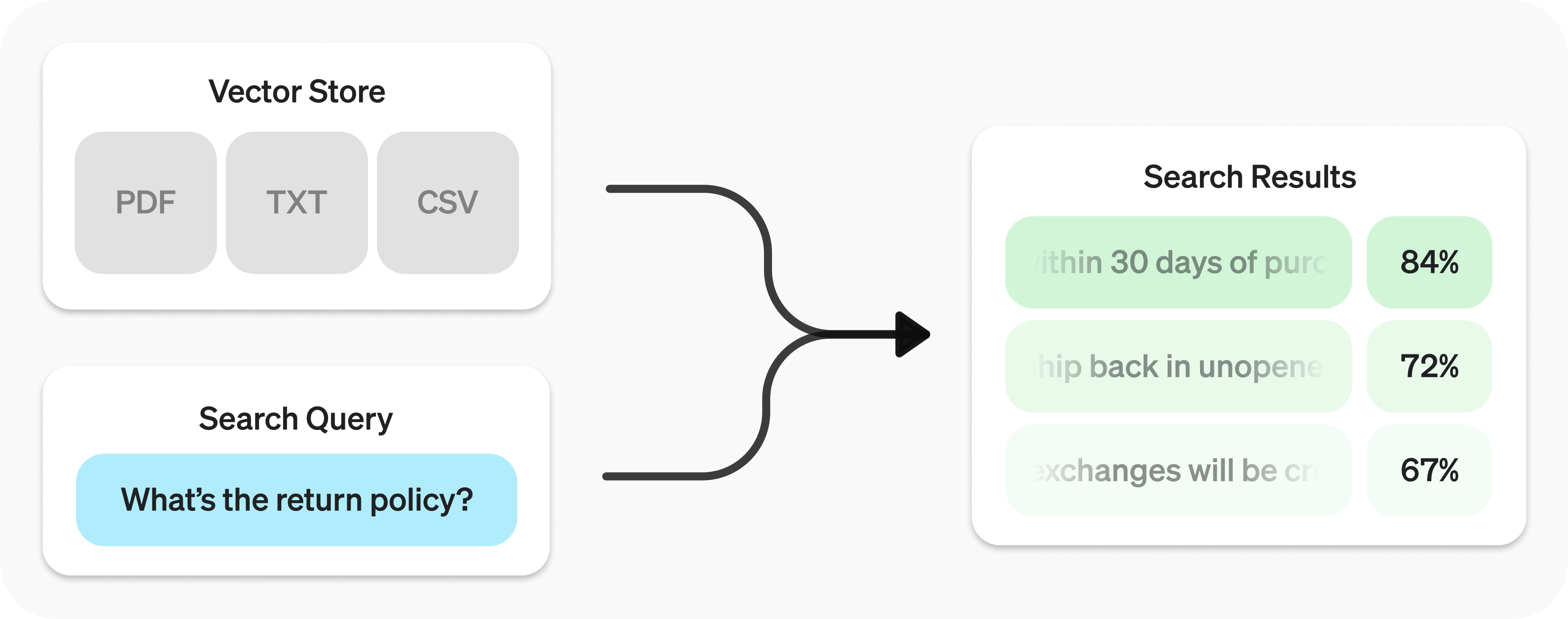
The Retrieval API is powered by [**vector stores**](#vector-stores), which serve as indices for your data. This guide will cover how to perform semantic search, and go into the details of vector stores.
## Quickstart
**Create vector store** and upload files.
**Send search query** to get relevant results.
To learn how to use the results with our models, check out the [synthesizing
responses](#synthesizing-responses) section.
## Semantic search
**Semantic search** is a technique that leverages [vector embeddings](https://developers.openai.com/api/docs/guides/embeddings) to surface semantically relevant results. Importantly, this includes results with few or no shared keywords, which classical search techniques might miss.
For example, let's look at potential results for `"When did we go to the moon?"`:
| Text | Keyword Similarity | Semantic Similarity |
| ------------------------------------------------- | ------------------ | ------------------- |
| The first lunar landing occurred in July of 1969. | 0% | 65% |
| The first man on the moon was Neil Armstrong. | 27% | 43% |
| When I ate the moon cake, it was delicious. | 40% | 28% |
_([Jaccard](https://en.wikipedia.org/wiki/Jaccard_index) used for keyword, [cosine](https://en.wikipedia.org/wiki/Cosine_similarity) with `text-embedding-3-small` used for semantic.)_
Notice how the most relevant result contains none of the words in the search query. This flexibility makes semantic search a very powerful technique for querying knowledge bases of any size.
Semantic search is powered by [vector stores](#vector-stores), which we cover in detail later in the guide. This section will focus on the mechanics of semantic search.
### Performing semantic search
You can query a vector store using the `search` function and specifying a `query` in natural language. This will return a list of results, each with the relevant chunks, similarity scores, and file of origin.
A response will contain 10 results maximum by default, but you can set up to 50 using the `max_num_results` param.
### Query rewriting
Certain query styles yield better results, so we've provided a setting to automatically rewrite your queries for optimal performance. Enable this feature by setting `rewrite_query=true` when performing a `search`.
The rewritten query will be available in the result's `search_query` field.
| **Original** | **Rewritten** |
| --------------------------------------------------------------------- | ------------------------------------------ |
| I'd like to know the height of the main office building. | primary office building height |
| What are the safety regulations for transporting hazardous materials? | safety regulations for hazardous materials |
| How do I file a complaint about a service issue? | service complaint filing process |
### Attribute filtering
Attribute filtering helps narrow down results by applying criteria, such as restricting searches to a specific date range. You can define and combine criteria in `attribute_filter` to target files based on their attributes before performing semantic search.
Use **comparison filters** to compare a specific `key` in a file's `attributes` with a given `value`, and **compound filters** to combine multiple filters using `and` and `or`.
Below are some example filters.
### Ranking
If you find that your file search results are not sufficiently relevant, you can adjust the `ranking_options` to improve the quality of responses. This includes specifying a `ranker`, such as `auto` or `default-2024-08-21`, and setting a `score_threshold` between 0.0 and 1.0. A higher `score_threshold` will limit the results to more relevant chunks, though it may exclude some potentially useful ones. When `ranking_options.hybrid_search` is provided you can also tune `hybrid_search.embedding_weight` (`rrf_embedding_weight`) and `hybrid_search.text_weight` (`rrf_text_weight`) to control how reciprocal rank fusion balances semantic embedding matches vs. sparse keyword matches. Increase the former to emphasize semantic similarity, increase the latter to emphasize textual overlap, and ensure at least one of the weights is greater than zero.
## Vector stores
Vector stores are the containers that power semantic search for the Retrieval API and the [file search](https://developers.openai.com/api/docs/guides/tools-file-search) tool. When you add a file to a vector store it will be automatically chunked, embedded, and indexed.
Vector stores contain `vector_store_file` objects, which are backed by a `file` object.
| Object type
| Description |
| -------------------------------------------------------------------------- | ------------------------------------------------------------------------------------------------------------------------------------------------------------------------------------- |
| `file` | Represents content uploaded through the [Files API](https://developers.openai.com/api/docs/api-reference/files). Often used with vector stores, but also for fine-tuning and other use cases. |
| `vector_store` | Container for searchable files. |
| `vector_store.file` | Wrapper type specifically representing a `file` that has been chunked and embedded, and has been associated with a `vector_store`.
Contains `attributes` map used for filtering. |
### Pricing
You will be charged based on the total storage used across all your vector stores, determined by the size of parsed chunks and their corresponding embeddings.
| Storage | Cost |
| ------------------------------ | ------------ |
| Up to 1 GB (across all stores) | Free |
| Beyond 1 GB | $0.10/GB/day |
See [expiration policies](#expiration-policies) for options to minimize costs.
### Vector store operations
### Vector store file operations
Some operations, like `create` for `vector_store.file`, are asynchronous and may take time to complete — use our helper functions, like `create_and_poll` to block until it is. Otherwise, you may check the status. Removing files from a vector store is eventually consistent, and search results may still include content from a removed file for a short period.
Adding files is rate limited per vector store ID. Requests to [`/vector_stores/{vector_store_id}/files`](https://developers.openai.com/api/docs/api-reference/vector-stores/createFile) and [`/vector_stores/{vector_store_id}/file_batches`](https://developers.openai.com/api/docs/api-reference/vector-stores/createBatch) share a per-vector-store limit of 300 requests per minute.
### Batch operations
When creating a batch you can either provide `file_ids` with optional `attributes` and/or `chunking_strategy`, or use the `files` array to pass objects that include a `file_id` plus optional `attributes` and `chunking_strategy` for each file. The two options are mutually exclusive so that you can cleanly control whether every file shares the same settings or you need per-file overrides.
For higher-throughput ingestion into a single vector store, we recommend batch creation whenever possible. Batches can include up to 500 files in one request, which usually reduces contention and improves end-to-end latency versus sending many single-file create requests.
### Attributes
Each `vector_store.file` can have associated `attributes`, a dictionary of values that can be referenced when performing [semantic search](#semantic-search) with [attribute filtering](#attribute-filtering). The dictionary can have at most 16 keys, with a limit of 256 characters each.
### Expiration policies
You can set an expiration policy on `vector_store` objects with `expires_after`. Once a vector store expires, all associated `vector_store.file` objects will be deleted and you'll no longer be charged for them.
### Limits
The maximum file size is 512 MB. Each file should contain no more than 5,000,000 tokens per file (computed automatically when you attach a file).
### Chunking
By default, `max_chunk_size_tokens` is set to `800` and `chunk_overlap_tokens` is set to `400`, meaning every file is indexed by being split up into 800-token chunks, with 400-token overlap between consecutive chunks.
You can adjust this by setting [`chunking_strategy`](https://developers.openai.com/api/docs/api-reference/vector-stores-files/createFile#vector-stores-files-createfile-chunking_strategy) when adding files to the vector store. There are certain limitations to `chunking_strategy`:
- `max_chunk_size_tokens` must be between 100 and 4096 inclusive.
- `chunk_overlap_tokens` must be non-negative and should not exceed `max_chunk_size_tokens / 2`.
Supported file types
_For `text/` MIME types, the encoding must be one of `utf-8`, `utf-16`, or `ascii`._
{/* Keep this table in sync with RETRIEVAL_SUPPORTED_EXTENSIONS in the agentapi service */}
| File format | MIME type |
| ----------- | --------------------------------------------------------------------------- |
| `.c` | `text/x-c` |
| `.cpp` | `text/x-c++` |
| `.cs` | `text/x-csharp` |
| `.css` | `text/css` |
| `.doc` | `application/msword` |
| `.docx` | `application/vnd.openxmlformats-officedocument.wordprocessingml.document` |
| `.go` | `text/x-golang` |
| `.html` | `text/html` |
| `.java` | `text/x-java` |
| `.js` | `text/javascript` |
| `.json` | `application/json` |
| `.md` | `text/markdown` |
| `.pdf` | `application/pdf` |
| `.php` | `text/x-php` |
| `.pptx` | `application/vnd.openxmlformats-officedocument.presentationml.presentation` |
| `.py` | `text/x-python` |
| `.py` | `text/x-script.python` |
| `.rb` | `text/x-ruby` |
| `.sh` | `application/x-sh` |
| `.tex` | `text/x-tex` |
| `.ts` | `application/typescript` |
| `.txt` | `text/plain` |
## Synthesizing responses
After performing a query you may want to synthesize a response based on the results. You can leverage our models to do so, by supplying the results and original query, to get back a grounded response.
This uses a sample `format_results` function, which could be implemented like
so: