
概览
多智能体功能让模型能够创建并协调多个并行工作的子智能体,综合它们的工作成果,给出最终响应。对于需要处理复杂任务且能从并行委派中受益的应用,这一功能尤其有效,例如探索代码库、编写文档和实现功能。
所有 GPT-5.6 模型均支持多智能体功能,目前处于测试阶段。在您的应用中启用多智能体功能之前,请查看模型页面。
何时使用多智能体
任务通常可以拆分成多个独立部分。单个智能体需要依次完成这些工作,而多个智能体可以并行处理。多智能体功能让根智能体能够将工作委派给多个子智能体,由它们并发完成。这可以带来以下好处:
- 并行执行。 独立的研究、分析或实现任务可以同时进行,从而有望加快执行速度。
- 更专注的上下文。 每个子智能体接收范围明确的任务,并维护自己的上下文,从而减少无关工作之间的上下文干扰,提升表现。
- 由模型协调。 根智能体可以创建子智能体、向它们发送补充信息、等待结果并综合生成最终回答,您的应用无需自行实现编排。
当任务可以拆分为具体且相互独立的工作时,多智能体编排最为有用,例如:
- 探索大型代码库中的不同部分
- 比较多个提案、文档或假设
- 并行研究多个信息来源
- 实现独立组件或编写独立测试套件
- 并行调查可能导致故障的不同原因
- 同时探索解决问题的不同方法
请注意,增加子智能体可能会增加 Token 用量。对于依赖单一有序推理链、需要频繁写入共享可变状态,或耗时主要集中在某个缓慢外部操作上的任务,使用子智能体带来的收益可能较小。
| 适合使用多智能体的情况 | 更适合使用单个智能体的情况 |
|---|---|
| 工作可以拆分为独立且范围明确的任务 | 每一步都直接依赖上一步 |
| 独立的上下文有助于保持专注 | 任务规模较小,一次短时间运行即可完成 |
| 并行探索可以缩短实际耗时 | 多个智能体会争用同一个可变资源 |
| 比较独立得出的发现有助于提高覆盖度 | 您需要固定且具有确定性的执行图 |
快速入门
Python 和 JavaScript 示例使用测试版 Responses SDK。对于 HTTP
请求,请使用 client.beta.responses,并通过
betas 参数传入 responses_multi_agent=v1。对于原始 HTTP 请求和 WebSocket 连接,请在请求头或连接标头中传入
OpenAI-Beta: responses_multi_agent=v1。
多智能体功能处于测试阶段期间,输出项的模式可能会发生变化。
通过 multi_agent.enabled 在您的 Responses API 请求中启用多智能体功能。当 multi_agent.enabled 为 true 时,根智能体便可以创建树状层级的子智能体。子智能体共享请求中的模型和可用工具,各智能体通过创建、消息传递和等待等协作原语进行协调(请参阅多智能体的工作原理)。根智能体负责综合子智能体的响应,并提供最终响应。
from openai import OpenAI
client = OpenAI()
def review_pull_request(diff: str) -> str:
response = client.beta.responses.create(
model="gpt-5.6-sol",
input=(
"Review the pull-request diff below with three agents: one for "
"correctness, one for security, and one for missing tests. "
"Reconcile duplicate or conflicting findings, then return a "
"prioritized review with file and line references.\n\n"
f"<diff>\n{diff}\n</diff>"
),
multi_agent={
"enabled": True,
"max_concurrent_subagents": 3,
},
betas=["responses_multi_agent=v1"],
)
return "".join(
part.text
for item in response.output
if (
item.type == "message"
and item.agent is not None
and item.agent.agent_name == "/root"
and item.phase == "final_answer"
)
for part in item.content
if part.type == "output_text"
)max_concurrent_subagents 设置整个智能体树中可以同时处于活跃状态的子智能体数量上限。该数量包括所有后代,即子级、孙级及更深层的子智能体,但不包括根智能体。
API 未对此设置规定固定上限。默认值为 3,建议大多数工作负载使用此值。多智能体运行的树深度以及单次运行期间创建的子智能体总数也没有固定限制。
添加开发者消息,可以调整根模型应在何时创建子智能体。这条开发者消息会补充到为根智能体和子智能体注入的指令中。
开发者消息示例包括:
- “除非用户明确要求使用子智能体、委派任务或让多个智能体并行工作,否则不要创建子智能体。”
- “主动多智能体委派已启用。当并行工作能够显著提高速度或质量时,请使用子智能体。”
多智能体的工作原理
Responses API 为根智能体模型和子智能体模型提供托管的编排操作,以及这些操作的使用指令。根智能体名为 /root。创建的子智能体使用层级路径,例如:
/root
├── /root/researcher
├── /root/reviewer
└── /root/reviewer/tester
多智能体功能对子智能体总数或树深度没有固定限制。对于大多数任务,请将 max_concurrent_subagents 保持为默认值 3。此设置限制整个树中处于活跃状态的子智能体轮次数量,包括子级和更深层的后代。
启用多智能体模式后,Responses API 会提供六种托管的协作操作。您可能会看到这些操作以 multi_agent_call 项的形式出现。您的应用不应执行这些操作,也不应为它们提交输出。
| 操作 | 用途 |
|---|---|
spawn_agent | 创建子智能体并分配初始任务。 |
send_message | 将消息加入现有智能体的消息队列,但不启动新轮次。 |
followup_task | 为现有的非根智能体分配更多工作,并启动或恢复其轮次。 |
wait_agent | 等待调用方智能体的邮箱中出现更新。 |
interrupt_agent | 中断另一个智能体的当前活跃轮次,但不删除其上下文。 |
list_agents | 返回当前智能体树、各智能体的状态以及每个智能体的 last_task_message。 |
开发者自定义工具调用的处理方式与未启用多智能体功能时相同。树中的任何智能体都可能发出 function_call。您的应用必须执行该调用,并提交匹配的 function_call_output。
请注意,树中的所有智能体都可以访问 API 请求的模型调用中配置的工具。
在 Responses API 中使用多智能体
HTTP 与 WebSocket 性能对比
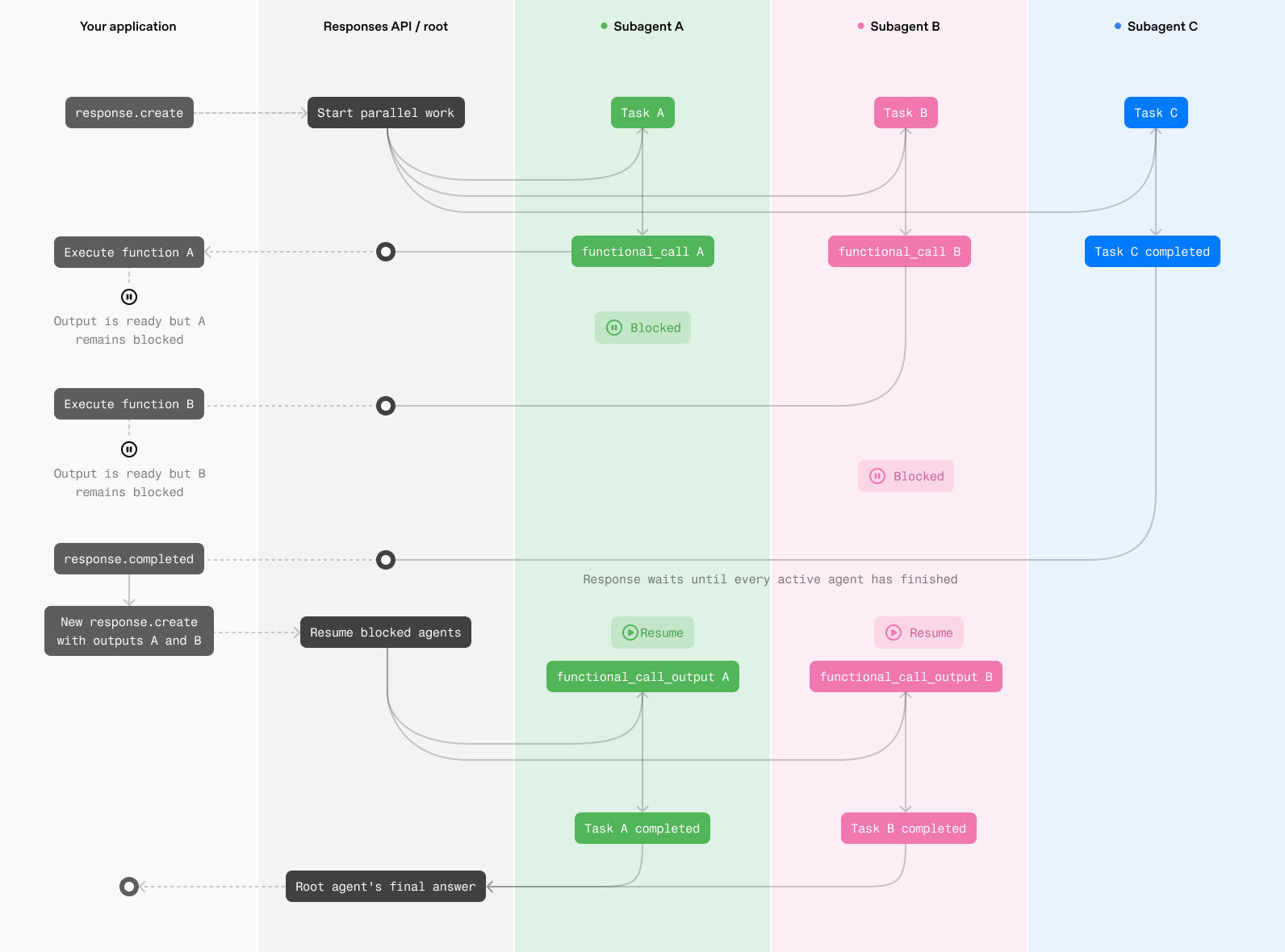
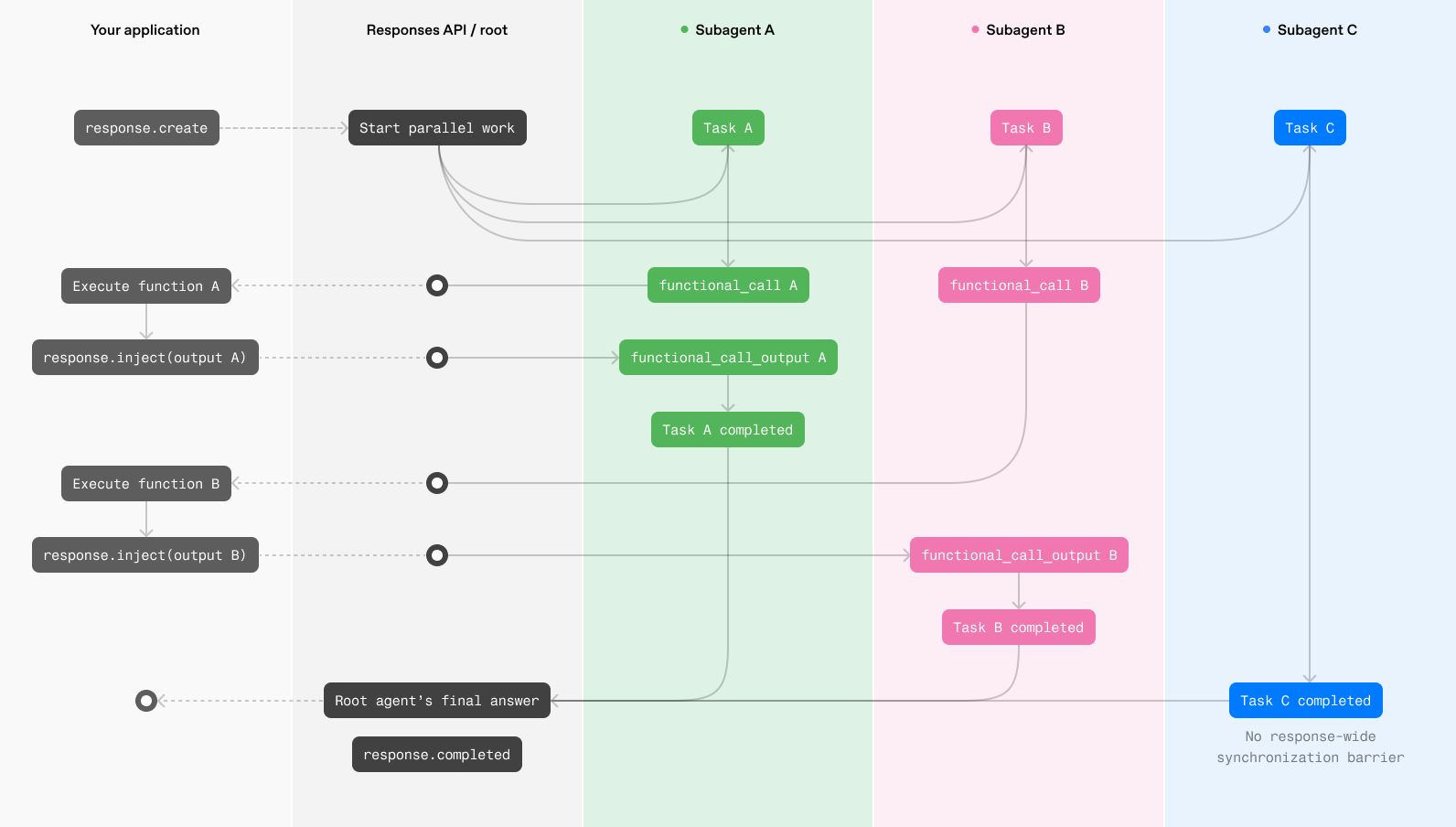
HTTP 和 WebSocket 支持相同的多智能体能力,但对于频繁使用工具或长时间运行的工作流,建议使用 WebSocket。其持久连接让您的应用能够在函数输出就绪后立即返回结果,减少继续执行所需的开销,缩短智能体的等待时间。
使用 HTTP 时,只有当所有活跃智能体都已完成工作,或已暂停以等待客户端执行函数调用时,响应才会完成。随后,您的应用执行所有待处理的函数调用,并通过新的 Responses API 请求提交这些调用的输出,让暂停的智能体恢复运行。
使用 WebSocket 时,您的应用可以在每个函数输出就绪后立即将其注入响应,无需等待当前响应完成。等待中的智能体可以立即恢复运行,其他智能体则继续工作。当各智能体在不同时间完成工作或请求工具时,这可以减少协调延迟,避免额外的请求往返。
对于需要调用多个托管工具的工作流(例如并行网页搜索),或函数调用较少的单请求工作流,HTTP 可能已经足够。对于大多数多智能体工作流,WebSocket 更有可能提供更低的延迟和更好的端到端性能。
HTTP 函数调用执行
WebSocket 函数调用执行
HTTP
这些示例需要使用提供测试版 Responses API 的测试版 SDK。对于 HTTP 流式传输,请调用 client.beta.responses.create,并通过 betas 参数传入 responses_multi_agent=v1;这会启用测试版类型和自动补全。在 Python 中添加类型注解时,请从 openai.types.beta 导入测试版响应项类型。
客户端代码示例:
from __future__ import annotations
import json
import sys
from openai import OpenAI
from openai.types.beta import BetaResponseOutputItem
client = OpenAI()
ROOT = "/root"
PROPOSALS = {
"alpha": {"estimated_weeks": 6, "risk": "medium"},
"beta": {"estimated_weeks": 8, "risk": "low"},
}
tools = [
{
"type": "function",
"name": "get_proposal",
"description": "Return details for a proposal that the agents should compare.",
"parameters": {
"type": "object",
"properties": {
"proposal": {
"type": "string",
"enum": ["alpha", "beta"],
}
},
"required": ["proposal"],
"additionalProperties": False,
},
"strict": True,
}
]
history = [
{
"role": "user",
"content": "Compare proposal alpha and proposal beta.",
}
]
def agent_name(item: BetaResponseOutputItem) -> str:
return item.agent.agent_name if item.agent else ROOT
def render_to_user(delta: str) -> None:
print(delta, end="", flush=True)
def log_subagent_text(agent: str, delta: str) -> None:
print(f"[{agent}] {delta}", end="", file=sys.stderr, flush=True)
def process_tool_call(name: str, arguments: str) -> str:
if name != "get_proposal":
raise ValueError(f"Unknown tool: {name}")
parsed_arguments = json.loads(arguments)
return json.dumps(PROPOSALS[parsed_arguments["proposal"]])
while True:
output_items = []
pending_calls = []
item_agents: dict[int, str] = {}
stream = client.beta.responses.create(
model="gpt-5.6-sol",
input=history,
tools=tools,
store=False,
multi_agent={
"enabled": True,
"max_concurrent_subagents": 3,
},
stream=True,
betas=["responses_multi_agent=v1"],
)
for event in stream:
if event.type == "response.output_item.added":
item_agents[event.output_index] = agent_name(event.item)
elif event.type == "response.output_text.delta":
agent = item_agents.get(event.output_index, ROOT)
if agent == ROOT:
render_to_user(event.delta)
else:
log_subagent_text(agent, event.delta)
elif event.type == "response.output_item.done":
output_items.append(event.item)
if event.item.type == "function_call":
# Handle function calls from both the root agent and subagents.
pending_calls.append(event.item)
elif event.type == "response.completed":
print(f"\nUsage: {event.response.usage}", file=sys.stderr)
break
elif event.type in {
"error",
"response.failed",
"response.incomplete",
}:
raise RuntimeError(event)
history.extend(output_items)
for call in pending_calls:
history.append(
{
"type": "function_call_output",
"call_id": call.call_id,
"output": process_tool_call(call.name, call.arguments),
}
)
if not pending_calls:
break如果一个或多个智能体调用了开发者定义的函数,请执行所有待处理的调用,并创建包含其输出的续接请求。
WebSocket
在 WebSocket 模式下,当智能体调用开发者定义的函数时,请在您的应用程序中执行该函数,并通过 response.inject 事件将结果发送到正在进行的响应中。随后,等待中的智能体即可继续运行,无需等待整个多智能体响应完成。
{
"type": "response.inject",
"response_id": "resp_123",
"input": [
{
"type": "function_call_output",
"call_id": "call_123",
"output": "{\"temperature\":72}"
}
]
}对于有效的 response.inject 请求,服务器会返回以下两种事件之一:
response.inject.created:输入已通过验证,并获准注入response.inject.failed:输入未注入;请检查error.code
{
"type": "response.inject.created",
"sequence_number": 42,
"response_id": "resp_123"
}{
"type": "response.inject.failed",
"sequence_number": 43,
"response_id": "resp_123",
"input": [
{
"type": "function_call_output",
"call_id": "call_123",
"output": "{\"temperature\":72}"
}
],
"error": {
"code": "response_already_completed",
"message": "Response 'resp_123' has already completed."
}
}如果请求不符合 response.inject 模式,服务器会发送状态码为 400 的通用错误,并关闭 WebSocket 连接。请修正请求并建立新的 WebSocket 连接,然后再发送事件。
Python 测试版 SDK 通过 client.beta.responses.connect 提供 WebSocket 模式,TypeScript 测试版 SDK 则通过 ResponsesWS 提供此模式。请在连接标头中传入 OpenAI-Beta: responses_multi_agent=v1;与 HTTP 流式传输不同,WebSocket 连接器尚不接受 betas 参数。
请保存 response.created 事件中的响应 ID,并在针对该响应发送的每个 response.inject 事件中包含此 ID。发送注入项后,请继续从 WebSocket 读取数据,直到响应完成,且每次注入均已产生 response.inject.created 或 response.inject.failed 事件。
from __future__ import annotations
import json
from openai import OpenAI
client = OpenAI()
PROPOSALS = {
"alpha": {"estimated_weeks": 6, "risk": "medium"},
"beta": {"estimated_weeks": 8, "risk": "low"},
}
tools = [
{
"type": "function",
"name": "get_proposal",
"description": "Return details for a proposal that the agents should compare.",
"parameters": {
"type": "object",
"properties": {
"proposal": {
"type": "string",
"enum": ["alpha", "beta"],
}
},
"required": ["proposal"],
"additionalProperties": False,
},
"strict": True,
}
]
def process_tool_call(name: str, arguments: str) -> str:
if name != "get_proposal":
raise ValueError(f"Unknown tool: {name}")
parsed_arguments = json.loads(arguments)
return json.dumps(PROPOSALS[parsed_arguments["proposal"]])
def run_multi_agent(connection):
previous_response_id: str | None = None
pending_input: list[dict[str, object]] = [{"role": "user", "content": input()}]
while pending_input:
request = {
"type": "response.create",
"model": "gpt-5.6-sol",
"store": True,
"multi_agent": {"enabled": True},
"tools": tools,
"input": pending_input,
}
if previous_response_id is not None:
request["previous_response_id"] = previous_response_id
connection.send(request)
next_input: list[dict[str, object]] = []
completed_response = None
response_id: str | None = None
pending_injections = 0
for event in connection:
event_type = event.type
if event_type == "response.created":
response_id = event.response.id
elif event_type == "response.output_item.done":
item = event.item
if item.type == "function_call":
if response_id is None:
raise RuntimeError(
"Received a function call before response.created"
)
output = {
"type": "function_call_output",
"call_id": item.call_id,
"output": process_tool_call(item.name, item.arguments),
}
pending_injections += 1
connection.send(
{
"type": "response.inject",
"response_id": response_id,
"input": [output],
}
)
elif event_type == "response.inject.created":
pending_injections -= 1
elif event_type == "response.inject.failed":
pending_injections -= 1
if event.error.code != "response_already_completed":
raise RuntimeError(event.error)
next_input.extend(item.model_dump(mode="json") for item in event.input)
elif event_type == "response.completed":
completed_response = event.response
elif event_type in {
"error",
"response.failed",
"response.incomplete",
}:
raise RuntimeError(event)
if completed_response is not None and pending_injections == 0:
break
if completed_response is None:
raise RuntimeError("Connection ended before response.completed")
if not next_input:
return completed_response
previous_response_id = completed_response.id
pending_input = next_input
with client.beta.responses.connect(
extra_headers={"OpenAI-Beta": "responses_multi_agent=v1"},
) as connection:
run_multi_agent(connection)发送 response.inject 事件后,请继续从 WebSocket 读取数据,并处理确认消息:
response.inject.created:函数输出已添加到正在进行的响应中。请继续读取该响应的事件。response.inject.failed,错误码为response_already_completed:函数输出尚未添加,响应就已完成。请取出失败事件返回的input,通过新的response.create请求发送,以接续已完成的响应。response.inject.failed,错误码为response_not_found:服务器找不到response_id标识的响应。请确认您使用的是从response.created收到的 ID。
一次多智能体运行可能跨越多个 Responses API 请求。使用 HTTP 时,当智能体调用开发者定义的函数,您的应用程序会执行该函数,并通过新的 response.create 调用提交其输出。使用 WebSocket 时,您的应用程序则会将函数输出注入正在进行的响应中。
新增的多智能体输出项
多智能体响应可以包含以下三种新增的输出项类型:
multi_agent_call:记录托管的多智能体操作,例如spawn_agent。multi_agent_call_output:包含托管操作的执行结果。agent_message:承载一个智能体发送给另一个智能体的加密消息。
call_id 字段将每个 multi_agent_call 与相应的 multi_agent_call_output 关联起来。
每个项还包含一个 agent 属性。对于 agent_message,agent.agent_name 标识接收消息的智能体。请使用 author 和 recipient 追踪消息的发送方向。
当您的应用程序收到 multi_agent_call 时,请勿将其作为函数调用执行,也不要返回结果。Responses API 会执行托管操作并返回相应的 multi_agent_call_output。如果您的应用程序需要使用这两个项进行回放或追踪,请将它们都保留下来。
[
{
"type": "multi_agent_call",
"id": "mac_123",
"call_id": "call_spawn_a",
"action": "spawn_agent",
"arguments": "{\"task_name\":\"agent_a\",\"fork_turns\":\"all\",\"message\":\"enc_...\"}",
"agent": { "agent_name": "/root" }
},
{
"type": "multi_agent_call_output",
"id": "maco_123",
"call_id": "call_spawn_a",
"action": "spawn_agent",
"output": [
{
"type": "output_text",
"text": "{\"task_name\":\"/root/agent_a\"}",
"annotations": [],
"logprobs": []
}
],
"agent": { "agent_name": "/root" }
},
{
"type": "agent_message",
"id": "amsg_123",
"author": "/root/agent_a",
"recipient": "/root",
"content": [
{
"type": "encrypted_content",
"encrypted_content": "enc_..."
}
],
"agent": { "agent_name": "/root" }
}
]归属于特定智能体的 SSE 事件包含顶层 agent 属性。对于 agent_message 事件,agent.agent_name 标识接收消息的智能体。response.created 和 response.completed 等响应生命周期事件描述的是整个响应,而非单个智能体,因此不包含 agent 属性。
{
"type": "response.output_item.done",
"agent": { "agent_name": "/root" },
"item": {
"type": "agent_message",
"id": "amsg_123",
"author": "/root/agent_a",
"recipient": "/root",
"content": [
{
"type": "encrypted_content",
"encrypted_content": "enc_..."
}
],
"agent": { "agent_name": "/root" }
}
}限制
- 压缩:
- 启用多智能体后,不支持
/responses/compact端点。 - 当
multi_agent.enabled设置为true时,即使请求未配置context_management,也会隐式启用服务器端自动压缩。压缩会分别应用于根智能体和每个子智能体,保持各自的上下文独立。用户仍可在请求中显式设置context_management.compact_threshold,以覆盖compact_threshold。
- 启用多智能体后,不支持
- 启用多智能体后,不支持
reasoning.summary。 - 启用多智能体后,不支持
max_tool_calls。 max_concurrent_subagents的默认值为3,这也是推荐设置。
提示编写指南
启用多智能体后,我们的系统会自动将这些指令作为一条新的开发者消息追加给根智能体和子智能体。您无法编辑或移除这些指令,但应将自己的开发者指令编写为对这些自动注入指令的补充。
根智能体
You are `/root`, the primary agent in a team of agents collaborating to fulfill the user's goals.

At the start of your turn, you are the active agent.
You can spawn sub-agents to handle subtasks, and those sub-agents can spawn their own sub-agents.
All agents in the team, including the agents that you can assign tasks to, are equally intelligent and capable, and have access to the same set of tools.

You can use `spawn_agent` to create a new agent, `followup_task` to give an existing agent a new task and trigger a turn, and `send_message` to pass a message to a running agent without triggering a turn.
Child agents can also spawn their own sub-agents.
You can decide how much context you want to propagate to your sub-agents with the `fork_turns` parameter.

You will receive messages in the form:
```
Message Type: MESSAGE | FINAL_ANSWER
Task name: <recipient>
Sender: <author>
Payload:
<payload text>
```
They may be addressed as to=/root

There are {max_concurrent_subagents + 1} available concurrency slots, meaning that up to {max_concurrent_subagents + 1} agents can be active at once, including you.
子智能体
You are an agent in a team of agents collaborating to complete a task.

You can spawn sub-agents to handle subtasks, and those sub-agents can spawn their own sub-agents. All agents in the team, including the agents that you can assign tasks to, are equally intelligent and capable, and have access to the same set of tools.

You can use `spawn_agent` to create a new agent, `followup_task` to give an existing agent a new task and trigger a turn, and `send_message` to pass a message to a running agent.
Child agents can also spawn their own sub-agents.

When you provide a response in the final channel, that content is immediately delivered back to your parent agent.

You will receive messages in the form:
```
Message Type: NEW_TASK | MESSAGE | FINAL_ANSWER
Task name: <recipient>
Sender: <author>
Payload:
<payload text>
```
You may also see them addressed as to=/root/..., which indicates your identity is /root/...

There are {max_concurrent_subagents + 1} available concurrency slots, meaning that up to {max_concurrent_subagents + 1} agents can be active at once, including you.