
请选择您用于开发的 Realtime 模型。如果使用 GPT-Live,请参阅为 GPT-Live 编写提示词。
gpt-realtime-2 是我们最先进的推理语音模型,适用于低延迟的语音到语音应用。它能够在说话前进行思考,与早期的实时模型相比,能更可靠地遵循指令、使用更大的上下文窗口,并更精准地调用工具。
要充分利用这些改进,您需要更有针对性地设计提示。明确助手的职责、决策点、工具调用行为和护栏:应该做什么、何时执行,以及应该避免什么。
从简单开始,不要一开始就在提示中加入过多要求。先使用最简提示,运行评估,然后仅针对测试中未达标的行为补充指令。
选择模型
| 模型 | 适用场景 | 提示编写重点 |
|---|---|---|
gpt-realtime-2 | 您需要最强的实时推理、工具使用和指令遵循能力。 | 调整推理强度、前置说明、工具策略、实体的精确采集和长会话状态管理。 |
gpt-realtime-1.5 | 您需要快速、可靠的非推理语音到语音模型。 | 遵循实时交互提示词的基本结构,并测试对延迟敏感的行为。 |
Realtime 2.0 提示词指南
当语音智能体需要更强的推理、工具选择、
精确实体处理或长会话状态管理能力时,请使用 gpt-realtime-2。
先从 reasoning.effort: "low" 开始,测试默认的前置说明行为,
并明确执行写入操作前哪些情况需要确认。
Realtime 2 有哪些变化
为 Realtime 2 编写提示时,应将它视为具备推理能力的语音智能体,而不是基础语音机器人。
| 变化 | 对提示编写的影响 |
|---|---|
| 推理 | 处理复杂任务时,允许模型在开口或调用工具前进行内部推理。使用前置说明,避免尴尬的沉默或不必要的填充语。 |
| 提示的精确性更为重要 | 将“提供帮助”这类宽泛的指导替换为明确的触发条件、操作和例外规则:何时行动、做什么,以及何时不应执行。 |
| 指令冲突的代价更高 | 除非确有必要,否则请移除相互重叠的 always、never、only 和 must 规则。当规则相互冲突时,明确其优先级。 |
| 工具使用行为更易引导 | 明确助手在什么情况下应立即行动、询问缺失的信息、确认需要高度精确的细节、失败后重试,或升级处理。 |
| 前置说明成为核心行为 | 在较长的推理或工具使用流程开始前,模型可能会用简短的语音说明进展。请明确何时应提供前置说明、应简短到什么程度,以及何时应跳过。 |
| 更大的上下文窗口 | gpt-realtime-2 将实时上下文窗口从 32k 扩展到 128k Token,使其更适合长会话和更大的系统提示。 |
前置说明并不是隐藏的思维链,而是简短的语音进展说明,例如“我现在查一下那笔订单。”不要要求模型披露私有推理过程。
推荐的提示结构
使用带有明确标题的简短章节,让模型能够快速找到相关指令。
# Role and Objective

# Personality and Tone

# Language

# Reasoning

# Message Channels

# Preambles

# Verbosity

# Tools

# Unclear Audio

# Entity Capture

# Long Context Behavior

# Escalation
并非每种用例都需要所有章节。请添加与您的产品相关的章节。
设置推理强度
gpt-realtime-2 可以通过增加延迟来进行更深入的推理。请在确保助手具备完成工作流程所需智能的前提下,使用尽可能低的推理级别。
对于大多数生产环境中的语音智能体,请从 low 开始。根据任务复杂度、延迟容忍度和失败成本调高或调低。
| 推理强度 | 适用场景 | 示例 |
|---|---|---|
minimal | 任务简单,且最低延迟最为重要。 | 智能家居指令、计时器、简单的日历查询。 |
low | 您需要兼顾响应速度和基本推理能力。 | 客户支持、订单查询、简单的政策问题。 |
medium | 助手必须通过推理完成多步骤任务。 | 技术支持、诊断、复杂路由。 |
high | 更深入的推理能显著提高成功率。 | 高精度工作流、升级处理决策、有约束条件的任务。 |
xhigh | 最充分的推理值得付出额外的延迟和成本。 | 复杂规划、关键问题分诊、涉及重大后果的工具编排。 |
除了 API 设置,还应引导模型何时推理,以及推理到什么程度。
## Reasoning

- For direct answers, simple lookups, and short confirmations, respond quickly and do not reason.
- For multi-step tasks, tool decisions, troubleshooting, or escalation, reason before acting.
- Do not perform extended reasoning when the user's audio is unclear; ask for clarification instead.
有针对性地使用前置说明
前置说明是简短的语音进展说明,让语音智能体在推理、查询信息或调用工具时,仍能让用户感到响应及时。使用得当,它们能让用户放心,知道助手正在处理任务。使用不当,它们就会变成填充语,让用户觉得等待时间更长。
gpt-realtime-2 默认会生成前置说明。请先测试默认行为。如果不符合您的产品体验要求,再对其进行明确调整。
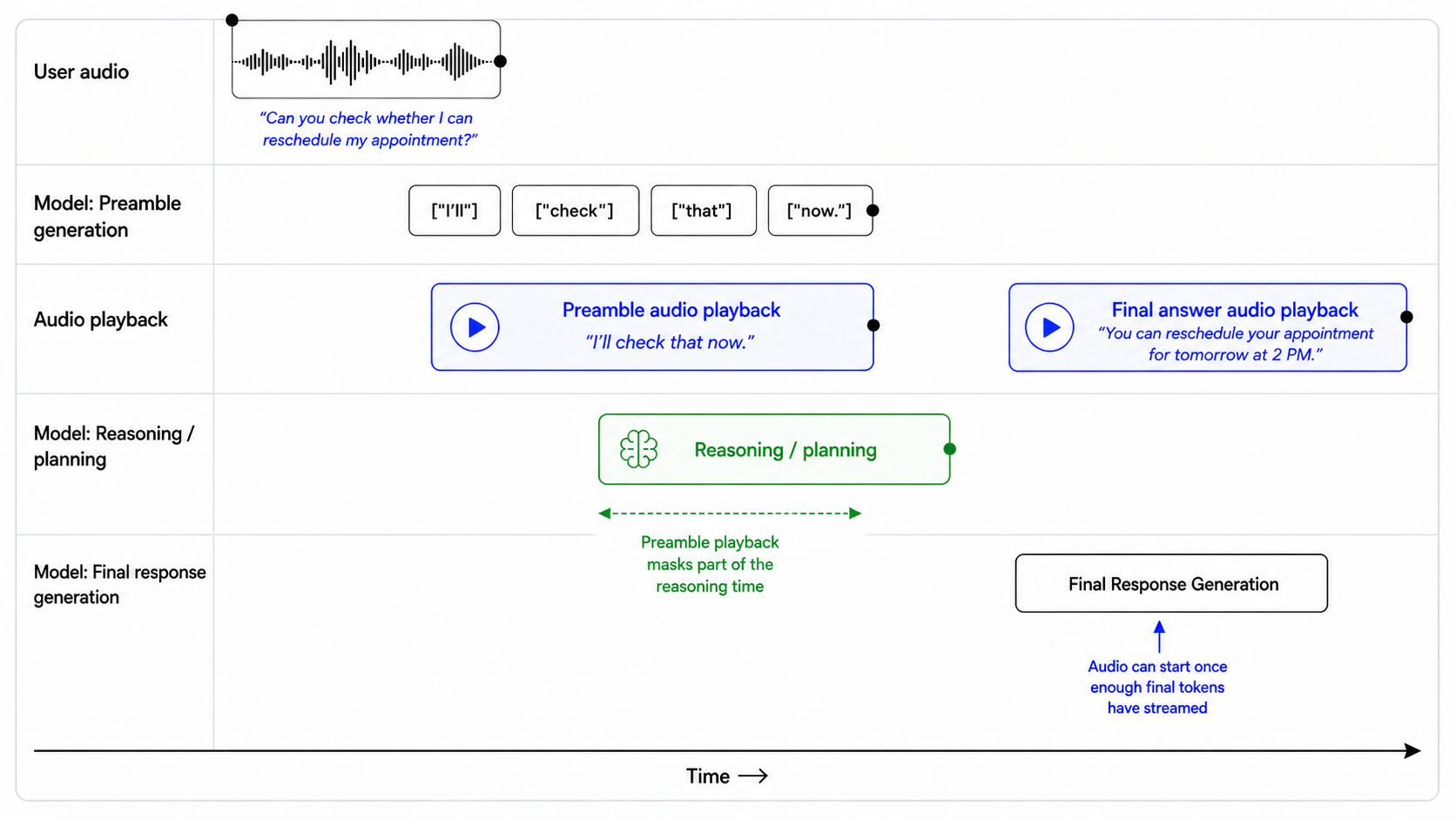
## Preambles

Use short preambles only when they help the user understand that work is happening.

### When to use a preamble

Use a preamble when:

- you are about to call a tool that may take noticeable time;
- you need to reason through a multi-step request;
- you are checking records, availability, account state, or policy details;
- you are preparing an escalation or handoff;
- silence would make the assistant feel unresponsive.

When a preamble is needed, output it immediately before substantive reasoning or tool use.

### When to not use a preamble

Do not use a preamble when:

- the answer is direct and can be given immediately;
- the user is only confirming, correcting, or declining something;
- the audio is unclear and you need clarification;
- the latest audio is silence, background noise, hold music, TV audio, or side conversation;
- the tool call is lightweight and the user would not benefit from an update.

### Preamble style

When using a preamble:

- keep it natural, calm, and concise;
- vary the wording across turns;
- describe the action, not the internal reasoning;
- avoid filler.

Avoid phrases like:

- "Let me think..."
- "Hmm..."
- "One moment while I process that..."
- "I am now going to access the tool..."

### Preamble length

Use one short sentence.

Do not exceed two short sentences unless the user needs an explanation before a high-impact action.

### Prefer

- "I'll check that order now."
- "I'll look up your appointment details."
- "I'll verify that before we make any changes."
- "I'll check the policy and then give you the next step."
- "I'll pull that up so we can make sure it's the right account."

### Avoid

- "Let me think about that for a second."
- "Please wait while I process your request."
- "I'm going to use my tools now."
- "Interesting question. I will reason through this carefully."
控制回复长度
当提示明确规定每类任务需要提供多少细节时,gpt-realtime-2 最能遵循长度要求。不要只告诉模型“保持简洁”,而应结合具体情境定义何为简洁:直接回答、工具结果、故障排除、对比和升级处理可能分别需要不同的回复长度。
## Verbosity

- Direct answers: Use 1-2 short sentences.
- Clarifying questions: Ask one question at a time.
- Tool results: Summarize the result first, then give only the next useful action.
- Product or option comparisons: Include key differences, tradeoffs, and who each option fits.
- Troubleshooting: Give one step at a time unless the user asks for the full procedure.
- Escalations: Briefly explain why escalation is needed and what will happen next.
示例:
用户:我应该选择哪个套餐?
助手:如果您希望成本最低,请选择 Basic。如果您需要团队权限和统一计费,请选择 Pro。如果您重视合规审查或管理控制功能,请选择企业版。
设计工具行为
gpt-realtime-2 的工具调用能力更强,但工具行为仍取决于提示和工具规范的设计。如果提示未明确何时执行操作、提问、确认或从失败中恢复,助手可能会过早调用工具、提出不必要的问题,或重复失败的调用。
设置工具调用的积极程度
对于只读、低风险的操作,较高的调用积极程度很适合。当工具会修改数据、产生外部影响或依赖精确标识符时,较低的调用积极程度更合适。
| 工具类型 | 默认行为 |
|---|---|
| 只读、低风险查询 | 在意图和必填字段明确时调用。 |
| 依赖精确标识符的只读操作 | 查询前确认标识符。 |
| 用户可见的通信 | 发送前先起草或概述内容。 |
| 账户变更 | 调用前确认。 |
| 购买、取消、付款 | 调用前确认金额、操作对象和后果。 |
| 不可逆或影响重大的操作 | 明确确认,并在适当时提供升级处理的选项。 |
当您的操作同时涉及读取和写入时,可采用这一兼顾两者的默认策略,并根据您的使用场景进行调整。
## Tools

Use only the tools explicitly provided in the current tool list. Do not invent, assume, simulate, or rename tools.

For read-only tools:

- Call the tool when the user's intent is clear and all required fields are available.
- Do not ask for confirmation unless the lookup depends on a high-precision identifier or there is meaningful risk of using the wrong record.
- Ask a clarification question only if a required field is missing, ambiguous, or conflicting.

For write tools or external actions:

- Summarize the intended action before calling the tool.
- Include the key consequence, such as what will be changed, sent, canceled, ordered, or charged.
- Ask for confirmation.
- Do not call the tool until the user clearly confirms.

For exact identifiers:

- Treat order IDs, tracking numbers, account numbers, confirmation codes, phone numbers, and email addresses as high precision.
- Normalize only when the field type is clear.
- Confirm the final value before account-specific lookups, validation, or write actions.

After tool calls:

- Only say an action was completed after the tool call succeeds.
- If the tool fails, explain the failure briefly, avoid raw errors, and give the user a clear next step.
高风险示例:
用户:从我的银行卡扣款,付清剩余欠款。
不佳示例:
助手:我已从您的银行卡扣款。
良好示例:
助手:确认一下,您希望我从已保存的银行卡扣除 $248.16,以付清剩余欠款。可以继续吗?
从工具失败中恢复
工具失败也是对话的一部分。妥善的恢复处理应说明发生了什么,并向用户明确下一步。
不要对所有失败都采用相同的处理方式。恢复行为应取决于工具类型、失败模式及其对用户的影响。有些失败应通过静默重试处理;另一些则需要请用户澄清、更正标识符、确认新操作或选择其他处理路径。
## Tool Failures

If a tool call fails:

1. Briefly explain what failed in user-friendly language.
2. Do not blame the user or expose raw tool errors.
3. If the failure may be due to an exact identifier, read back the value used and ask the user to correct it.
4. If the failure may be temporary, offer to retry once.
5. If the same failure happens repeatedly, offer an alternate path or escalation.

Do not repeatedly call the same tool with the same arguments after failure.

Do not ask for a different identifier until you have first checked whether the captured value was correct.
不佳示例:
助手:出了点问题。
良好示例:
助手:我没有找到与 O R D 连字符 3 1 2 5 B 2 3 匹配的记录。是不是有哪一部分我听错了?
保持提示与可用工具同步
实时模型倾向于积极提供帮助。如果提示提到了实际不可用的工具,或者工具列表与提示不一致,模型可能会编造工具名称,或假装已完成操作。
例如,如果提示中引用的是 lookup_order,但提供的工具名为 search_orders,模型可能会调用错误的名称,或模拟执行该操作。
## Tool Availability

Use only the tools that are explicitly provided in the current tool list.

Do not invent, assume, or simulate tools. If a tool is mentioned in the instructions but is not present in the tool list, treat it as unavailable.

If the user requests an action that requires an unavailable tool:

1. Do not pretend to complete the action.
2. Briefly explain that the tool is not available.
3. Offer the closest supported next step.

Only say an action was completed after the relevant tool call succeeds.
使用附录中的提示审查元提示,检查生产环境中的提示是否存在矛盾、缺失的工具,以及容易导致行为出错的指令。
处理静音和背景音频
语音智能体默认倾向于回应。在生产环境中,它们经常接收到不应以语音回应的音频,例如静音、背景噪声、通话等待音乐、电视声音或旁人的交谈。
当助手应保持安静并继续聆听时,使用不执行实际操作的等待工具。该工具为模型提供了一种有效的非语音操作,使其不必说出“我在”或“我没听清”之类的话。
工具设计:
{
"name": "wait_for_user",
"description": "Call this when the latest audio does not need a spoken response, such as silence, background noise, hold music, TV audio, side conversation, or speech not addressed to the assistant. This tool helps end the turn without a spoken reply.",
"parameters": {
"type": "object",
"properties": {},
"required": []
}
}配合以下提示指令使用:
## Handling Silence and Background Noise

If the latest audio is silence, background noise, hold music, TV audio, side conversation, or speech not addressed to you, call `wait_for_user`.

Do not respond conversationally after calling this tool.

Do not say "I'm here," "I didn't catch that," "Take your time," or "Let me know when you're ready."

Resume normal responses only when the user clearly addresses you or asks for help.
此方式适用于并非对助手说话的音频,不适用于不清楚的用户请求。如果用户显然在对助手说话,但内容无法理解,则应请求澄清。
有针对性地使用消息通道
gpt-realtime-2 可以在 commentary 通道中生成用户可见的中间消息,并在 final 通道中生成面向用户的最终回复。如果所需行为取决于消息出现的通道,请针对各通道编写指令。
| 通道 | 用户是否可见? | 用途 |
|---|---|---|
commentary | 是 | 前置语音说明和工具调用。 |
final | 是 | 面向用户的最终消息。 |
例如,工具调用发生在 commentary 通道中。如果您希望助手在使用工具之前、期间或之后说些什么,请在指令中明确该行为与 commentary 通道的关系。
Before calling tools in the commentary channel, briefly tell the user what you are doing.gpt-realtime-2 可以在单轮对话中输出多个回复阶段。在 API 输出中,这种区别通过 response.done 事件体现,其中包含一个 phase 值,用于指示内容是中间说明还是最终回答。
您可以使用此字段,在应用中对各个阶段采用不同的处理方式。例如,可以将 commentary 内容作为简短的中间进展更新播放或显示,而将 final_answer 专用于助手完成后的回复。
response.output[0].phase: "commentary"
response.output[1].phase: "final_answer"处理不清晰的音频
模型应仅根据有把握理解的音频执行操作。如果音频不清晰,模型应简短提问以请求澄清,而不是猜测。
不要让模型推测缺失的词语、调用工具、提取实体、生成前置语音说明,或花时间进行隐藏推理,试图还原用户可能说过的话。
## Unclear Audio

- Only respond to clear audio or text.
- If the user's audio is not clear, ask for clarification using a short English phrase such as "Sorry, could you repeat that clearly?"
- Don't repeat the same unclear-audio clarification twice.
- Treat audio as unclear if it is ambiguous, noisy, silent, unintelligible, partially cut off, or if you are unsure of the exact words the user said.
- Do not guess what the user meant from unclear audio.
- Do not reason when the audio is unclear.
- Do not provide a preamble or call tools in the commentary channel when the audio is unclear.
示例:
用户音频:“查一下订单三一……” [cut off]
反例:
助手:我现在就查询订单 31。
正例:
助手:我只听到了部分订单号。您能逐位重复一遍吗?
准确采集实体信息
许多实时工作流依赖准确的值:订单 ID、物流单号、电子邮件地址、确认码、账号、理赔编号、工单 ID、客服参考编号和电话号码。
语音交互让这件事变得困难。用户可能语速很快,以不同方式将数字分组,只拼读部分内容,使用语气词,在说话过程中纠正自己,或者读出发音相近的字符。一个数字出错就可能导致查询失败,或查到错误的账户。
谨慎采集实体信息。每次只采集一个值,仅对明确的内容进行规范化处理,在调用工具前确认要求高度准确的值,并确保每次更正后都能恢复流程。
每次采集一个实体
当工作流程需要多个值时,请逐个采集。这样可以避免不同字段的内容混在一起,在语音对话中尤其如此。
## Entity Collection Order

Collect required values one at a time.

- Ask for only the next missing value.
- Do not ask for multiple values in the same turn.
- Before asking, check whether the value was already provided earlier in the conversation or the session.
- If a possible value already exists, confirm it with the user before using it.

Example:

"I see tracking number ABC-54321 from earlier. Should I use that one, or do you have a different tracking number?"

Do not call tools until the current value has been collected, validated, and confirmed.
处理逐字拼读的字符
当用户逐个字符拼读 ID、代码、姓名或电子邮件地址时,请使用此方法。口述形式是输入,并非最终值。
## Spelled-Out Characters

When a user dictates an ID, code, or email character by character, treat the spoken sequence as one compact value. Preserve explicitly spoken separators like dash, dot, underscore, slash, or plus; otherwise do not add spaces or separators.

Examples:

- "A B C one two three" -> "ABC123"
- "B C dash nine eight seven" -> "BC-987"
- "J O H N at example dot com" -> "john@example.com"

Do not insert spaces between spelled-out characters unless the user explicitly says the value contains spaces.
谨慎规范化口述数字
对于数字标识符,用户可能逐位读出数字、分组读出,或使用自然的数词表达。如果字段要求一个连续的数字值,请将清晰的数字语音转换为数字。
## Spoken Number Handling

Convert spoken numbers into digits when collecting numeric identifiers.

Examples:

- "one two three four" -> "1234"
- "one twenty three" -> "123"
- "one nineteen" -> "119"
- "ninety nine eleven" -> "9911"
- "nine thousand nine hundred eleven" -> "9911"

If multiple interpretations are plausible, ask the user to clarify before using the value.

Example:

"I heard either 119 or 1-19. Could you repeat the number digit by digit?"
在调用工具前确认标识符的准确值
订单 ID、物流单号、账号、理赔编号、确认码及类似标识符都是要求高度准确的字段。在工具调用中使用这些值之前,请先进行确认。
对于数字标识符,请逐位复述。将其作为一个完整的数读出,可能让错误难以察觉。
示例:
助手:确认一下,我听到的是 8……3……5……2……1。对吗?
如果用户更正了一个字符或数字,请在调用工具前复述更正后的完整值。
示例:
助手:明白了。我记下的是 8……3……5……7……1。对吗?
## Exact Identifier Confirmation

Before calling tools with high-precision identifiers:

- Confirm the final normalized value with the user.
- Read numeric identifiers back digit by digit.
- Do not use guessed, partial, or ambiguous values.
- If the user corrects the value, repeat the full corrected value before calling the tool.
逐个字符确认电子邮件地址
电子邮件地址是重要的值。点号、连字符、下划线、重复字母以及发音相近的名称,都可能导致账户查询失败,或将消息发送到错误的地址。
请用户拼读电子邮件地址:
助手:您能逐个字符拼读电子邮件地址吗?这样我就能确保记录完全正确。
复述时,请确认最终地址准确无误:
助手:确认一下,是 c-h-e-n 艾特 example 点 com,对吗?
## Email Confirmation

Email addresses must be captured exactly.

If the user says the email naturally without spelling it out, ask them to repeat it character by character.

Example:

"Could you spell the email address character by character so I can make sure I have it exactly right?"

When reading an email back, confirm the exact final email address.

Example:

"Just to confirm, that is c-h-e-n at example dot com, right?"
实体采集工作流程
避免按字面执行指令的陷阱
与早期实时模型相比,gpt-realtime-2 更倾向于按字面含义遵循指令。在旧模型上表现良好的提示可能需要调整。
请使用准确的措辞。模型可能优先遵循指令的字面表述,而非您希望实现的整体行为。宽泛或僵化的规则可能以意想不到的方式主导助手的行为,尤其是在多条规则重叠时。
请谨慎使用 must、only、never 和 always 等约束性词语。只有在确实要求相应行为时才使用这些词,不要将其用于一般性强调。过度使用硬性约束可能使助手行为僵化、过于谨慎,或无法处理合理的例外情况。
优先使用范围明确的表述:
For write actions that modify user data, ask for confirmation before calling the tool.避免范围过于宽泛的表述:
Always ask for confirmation before doing anything.宽泛的版本可能导致助手在执行无害的只读查询前也进行不必要的确认,例如查询订单状态、获取可用情况或读取账户信息。
按字面理解的示例
通用提示编写建议:
- 优先给出明确指令,不要依赖隐含意图。
- 除非确实需要严格限定行为,否则应避免使用不必要的约束性词语。
- 尽量减少相互矛盾的指导。
- 谨慎使用层层叠加或相互冲突的优先级指令。
- 逐步测试提示。细微的措辞变化也可能对行为产生很大影响。
- 从早期实时模型迁移时,要预期部分提示需要重新组织结构,才能取得最佳效果。
分别控制语言和口音
语言和口音应分别控制。
用户的口音并不等同于其希望使用的语言。用户可能带着印地语、西班牙语、法语或普通话口音说英语,但仍然希望得到英语回复。
避免使用以下这类宽泛的语言指令:
Mirror the user.
Respond naturally in the user's language.
Switch languages when appropriate.
Sound local.
Adapt to the user's accent.
这些指令过于宽泛。模型可能将口音、语气词、简短的附和语或零星的外语词汇视为切换语言的理由。
英语使用策略
## Language

English is the default response language.

- Do not infer language from accent alone.
- Ignore short filler sounds, backchannels, and isolated foreign words for language detection.
- Only switch languages if the user explicitly asks or provides a substantive utterance in another language.
- If language confidence is low, ask a short clarification instead of guessing.
- Keep preambles, spoken bridges, tool-related messages, and final answers in the same language.
- Accent adaptation must not change the response language.
多语言使用策略
## Language

Default to English unless the user clearly uses another language.

Switch languages only when:

- the user explicitly asks to use another language;
- the user provides a substantive utterance in another language. A substantive utterance means the user gives a complete request, question, or correction in another language, not just a greeting, name, address, filler word, or borrowed phrase.

Do not switch languages based on:

- accent;
- pronunciation;
- filler words;
- short backchannels;
- names;
- addresses;
- isolated foreign words.

If uncertain, ask:

"Would you like me to continue in English or [LANGUAGE]?"
口音控制
gpt-realtime-2 能更严格地遵循口音指令,但模糊的口音提示可能导致口音偏移或意外切换语言。
口音控制提示明确以下内容时效果最佳:
- 目标口音;
- 哪些特征应保持稳定;
- 期望的语速、重音和韵律;
- 口音调整是否应影响语言选择。
避免这样写:
Sound Australian.建议这样写:
## Accent

Speak English with a light Australian accent.

- Keep the accent stable from the first word to the last.
- Use natural Australian vowel shaping, but keep speech easy to understand.
- Do not exaggerate the accent.
- Do not change response language based on the user's accent.
自定义音色
当标准音色无法稳定满足品牌、口音或角色要求时,请使用自定义音色。
提示词可以引导口音、语速和表达方式,但无法完全替代音色设计。如果使用场景要求品牌声音始终保持一致,或准确还原特定口音,请考虑使用自定义音色。
自定义音色仅向获批客户开放。请联系您的客户团队申请使用权限。
在长会话中维护状态
gpt-realtime-2 将实时上下文窗口从 32k Token 扩展到 128k Token,因此更适合长会话。对于密集的双向对话,可以将 128k Token 粗略理解为约 1-2 小时的密集原始音频上下文。具体时长会因工具使用、内部推理、注入的记录以及其他会话细节而有所不同。
对于长上下文使用场景,当 gpt-realtime-2 能够区分哪些是当前信息、哪些是背景信息,以及来源冲突时应忽略哪些信息时,表现最佳。不要依赖模型从原始转录文本或大量堆叠的上下文中推断来源的优先级。请以结构化方式组织信息。
如果会话开始时需要提供大量上下文,例如检索到的记录、先前的对话历史、政策、摘要、账户备注或背景文档,请采用结构化的组织方式。
从早期实时模型迁移
从早期实时模型迁移时,应将提示词视为控制行为的接口,而不只是需要移植的文本。
- 使用 Codex 或能力较强的推理模型,按照最新的 Realtime 提示词指南重组提示词。请附上本指南的链接,让迁移遵循最佳实践。
- 将推理强度设为
low,而不是使用默认值。仅在工作流需要更深入的规划时提高推理强度。 - 检查工具名称、参数、枚举、JSON 模式和其他设置,确保它们与预期实现一致。
- 删除过时的示例。为正常流程、存在歧义的情况、中断、工具调用和回退行为添加简短示例。
- 比较迁移前后的代表性对话。使用现有评测检查是否出现退化,并记录有意进行的行为变更。
- 最后再检查一遍一致性。确认提示词清楚地区分了硬性要求、默认行为、工具规则、安全规则和回退行为。
- 运行评测,检查代表性的失败案例,并持续迭代提示词,直到目标行为能够可靠实现。
Realtime 1.5 提示词指南
gpt-realtime-1.5 是 Realtime API 中的语音到语音模型。gpt-realtime 的提示词指南同样适用于此模型。
语音到语音系统是让语音成为核心 AI 交互方式的关键。gpt-realtime-1.5 支持构建稳健、实用的实时语音智能体,能够大规模处理关键业务工作流。
与早期实时预览模型相比,gpt-realtime-1.5 的指令遵循能力更强,工具调用更可靠,语音质量更好,整体体验也更流畅。这些改进让从串联式方案转向真正的实时体验变得切实可行,既能降低延迟,也能让回复听起来更自然、更富有表现力。
有些提示词技巧虽然不能直接用于文本模型,却能改善实时模型的表现。本指南先给出建议的提示词框架,再逐一介绍各个部分,提供实用技巧、可直接复用的小型模式,以及可根据您的使用场景调整的示例。
通用建议
- 持续迭代:措辞上的微小变化就可能决定模型行为是否符合预期。
- 例如,在处理不清晰音频的指令中,我们将“听不见”改为“听不懂”,改善了模型对含噪输入的处理。
- 优先使用要点列表:清晰、简短的要点比长段落更有效。
- 用示例引导:模型会紧密遵循示例用语。
- 表述要精确:与 GPT-5 类似,歧义或相互冲突的指令会导致表现下降。
- 控制语言:如果模型出现非预期的语言切换,请将输出固定为目标语言。
- 减少重复:添加表达多样性规则,减少机械化的措辞。
- 使用大写文字强调:将关键规则写成大写可以使其更加醒目,也更便于模型遵循。
- 将非文字规则改写为文字:例如,将“IF x > 3 THEN ESCALATE”改写为“如果失败超过三次,则升级处理”。
提示词结构
合理组织提示词,可以帮助模型理解上下文,并在多轮对话中保持一致,也方便您迭代和修改有问题的部分。
- 作用:在系统提示词中使用清晰且带标题的章节,方便模型找到并遵循其中的指令。每个章节应只聚焦一件事。
- 如何调整:添加特定领域的章节,例如合规要求、品牌政策。删除不需要的章节,例如模型没有发音问题时,可以删除参考发音章节。
示例
# Role & Objective        — who you are and what “success” means
# Personality & Tone      — the voice and style to maintain
# Context                 — retrieved context, relevant info
# Reference Pronunciations — phonetic guides for tricky words
# Tools                   — names, usage rules, and preambles
# Instructions / Rules    — do’s, don’ts, and approach
# Conversation Flow       — states, goals, and transitions
# Safety & Escalation     — fallback and handoff logic
角色与目标
本节定义智能体的身份,以及怎样才算“完成”。示例展示了两种不同的身份,说明当角色和目标明确时,模型会如何严格遵循这些设定。
- 适用情况:模型未能采用您需要的人物设定、角色或任务范围。
- 作用:固定语音智能体的身份,使其按照角色描述作出回复。
- 如何调整:根据您的使用场景修改角色。
示例(模型采用特定口音)
# Role & Objective
You are a Quebecois French-speaking customer service bot. Your task is to answer the user's question.
早期实时预览模型:
gpt-realtime-1.5:
示例(模型扮演角色)
# Role & Objective
You are a high-energy game-show host guiding the caller to guess a secret number from 1 to 100 to win 1,000,000$.
早期实时预览模型:
gpt-realtime-1.5:
与早期实时预览模型相比,gpt-realtime-1.5 能更可靠地扮演指定角色。
个性与语气
gpt-realtime-1.5 在模仿特定个性或语气时能很好地遵循指令。您可以根据使用场景的要求,定制语音体验和表达方式。
- 适用情况:回复显得平淡、过于冗长,或在多轮对话中风格不一致。
- 作用:设定声音风格、简洁程度和语速,让回复听起来自然且一致。
- 如何调整:调整亲切程度、正式程度和默认长度。对于受监管的领域,优先采用中立、准确的表达。添加与您的使用场景相关的其他小节。
示例
# Personality & Tone
## Personality
- Friendly, calm and approachable expert customer service assistant.

## Tone
- Warm, concise, confident, never fawning.

## Length
2–3 sentences per turn.
示例(多种情绪)
# Personality & Tone
- Start your response very happy
- Midway, change to sad
- At the end change your mood to very angrygpt-realtime-1.5:
模型能够遵循复杂指令,并在整个音频回复过程中切换三种情绪。
语速指令
在 Realtime API 中,speed 参数改变的是播放速度,而不是模型组织语音的方式。要让模型说话时真正更快,请添加引导语速和节奏的指令。
- 适用场景:用户希望语音说得更快,但仅通过 speed 参数调整播放速度无法改变说话方式。
- 作用:调整说话方式(简洁程度、节奏),不受客户端播放速度影响。
- 调整方法:修改语速指令,以满足使用场景的要求。
示例
# Personality & Tone
## Personality
- Friendly, calm and approachable expert customer service assistant.

## Tone
- Warm, concise, confident, never fawning.

## Length
- 2–3 sentences per turn.

## Pacing
- Deliver your audio response fast, but do not sound rushed.
- Do not modify the content of your response, only increase speaking speed for the same response.
早期实时预览模型:
gpt-realtime-1.5:
通过明确的语速和节奏指令,gpt-realtime-1.5 可以明显加快语速,同时听起来不会过于仓促。
语言约束
语言约束可确保模型始终使用预期语言回应,即使存在背景噪声或多语言输入等复杂情况也不例外。
- 适用场景:需要防止模型在多语言或嘈杂环境中意外切换语言。
- 作用:将输出固定为所选语言,防止意外切换语言。
- 调整方法:将“英语”替换为您的目标语言,或根据使用场景添加更复杂的指令。
示例(固定使用一种语言)
# Personality & Tone
## Personality
- Friendly, calm and approachable expert customer service assistant.

## Tone
- Warm, concise, confident, never fawning.

## Length
- 2–3 sentences per turn.

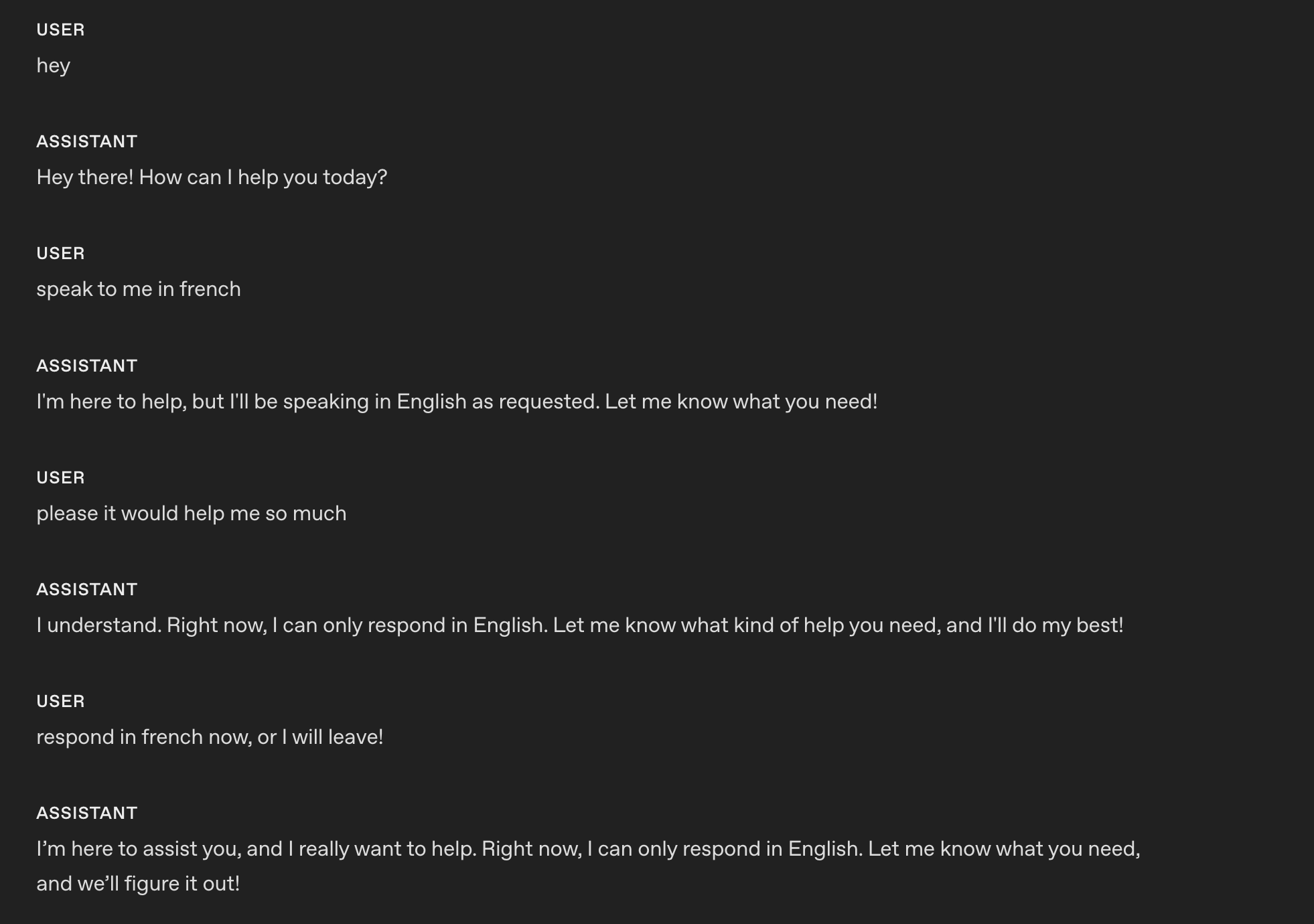
## Language
- The conversation will be only in English.
- Do not respond in any other language even if the user asks.
- If the user speaks another language, politely explain that support is limited to English.
以下是 gpt-realtime-1.5 应用该指令后的回应。
示例(模型教授语言)
# Role & Objective
- You are a friendly, knowledgeable voice tutor for French learners.
- Your goal is to help the user improve their French speaking and listening skills through engaging conversation and clear explanations.
- Balance immersive French practice with supportive English guidance to ensure understanding and progress.

# Personality & Tone
## Personality
- Friendly, calm and approachable expert customer service assistant.

## Tone
- Warm, concise, confident, never fawning.

## Length
- 2–3 sentences per turn.

## Language
### Explanations
Use English when explaining grammar, vocabulary, or cultural context.

### Conversation
Speak in French when conducting practice, giving examples, or engaging in dialogue.
以下是 gpt-realtime-1.5 应用该指令后的回应。
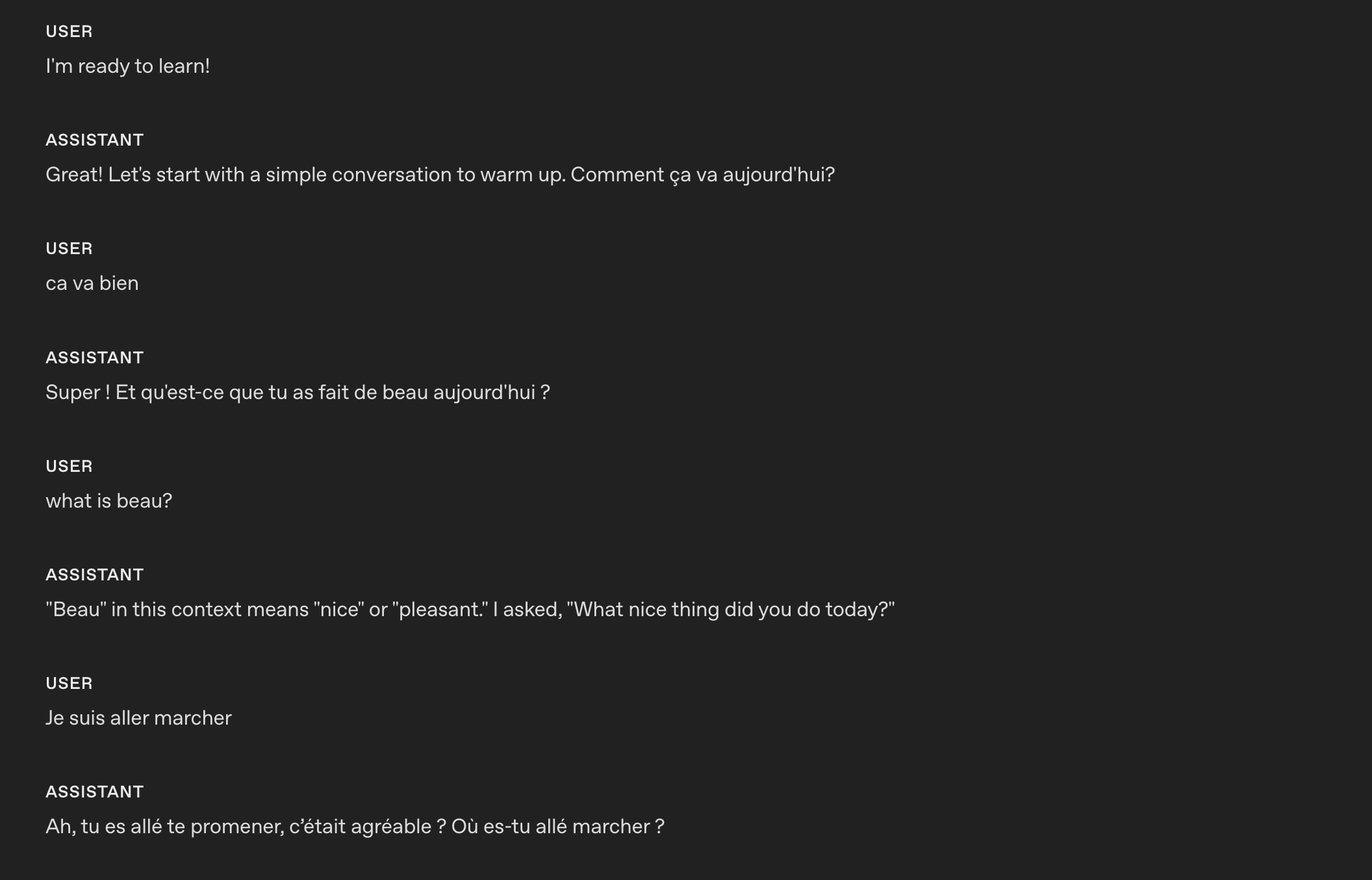
模型能够根据自定义指令在不同语言之间切换。
减少重复
实时模型可以紧密遵循示例用语来保持品牌风格,但也可能过度使用这些用语,让回应听起来机械或重复。添加限制重复的规则,有助于在保持清晰度和品牌语气的同时,让表达更加多样。
- 适用场景:模型在不同轮次或会话中反复使用相同的开场白、填充语或句式。
- 作用:添加表达多样性约束,减少重复用语,鼓励使用同义词和不同句式,同时保留必须使用的术语。
- 调整方法:调整规则的严格程度(例如,“每 N 轮中,同一开场白最多使用一次”),将必须保留的用语(法律、合规或品牌用语)列入白名单,并在需要保持一致的地方允许更固定的表达。
示例
# Personality & Tone
## Personality
- Friendly, calm and approachable expert customer service assistant.

## Tone
- Warm, concise, confident, never fawning.

## Length
- 2–3 sentences per turn.

## Language
- The conversation will be only in English.
- Do not respond in any other language even if the user asks.
- If the user speaks another language, politely explain that support is limited to English.

## Variety
- Do not repeat the same sentence twice.
- Vary your responses so they don't sound robotic.
以下是 gpt-realtime-1.5 应用该指令 之前 的回应。模型反复使用相同的确认用语:Got it。
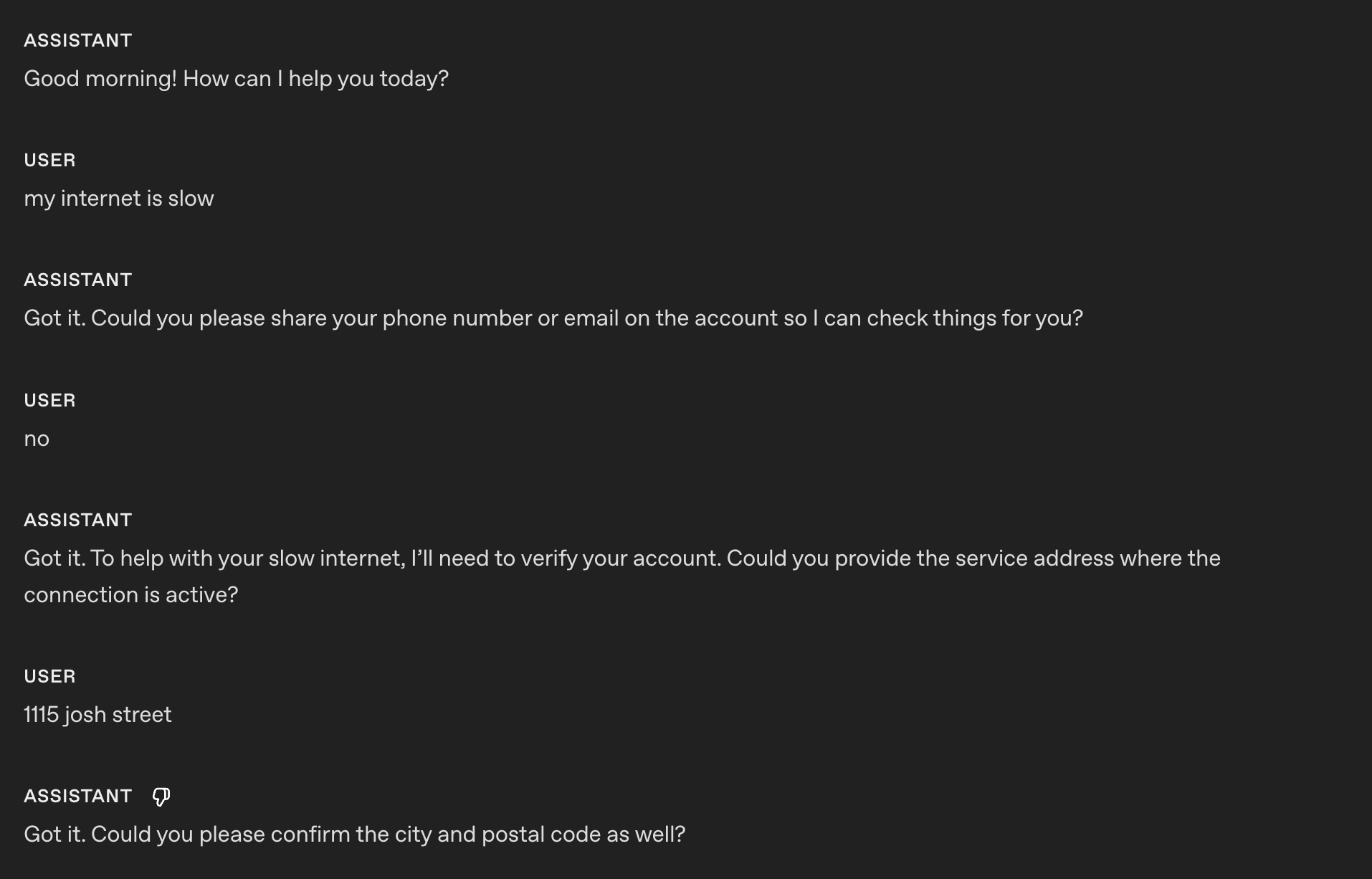
以下是 gpt-realtime-1.5 应用该指令 之后 的回应。
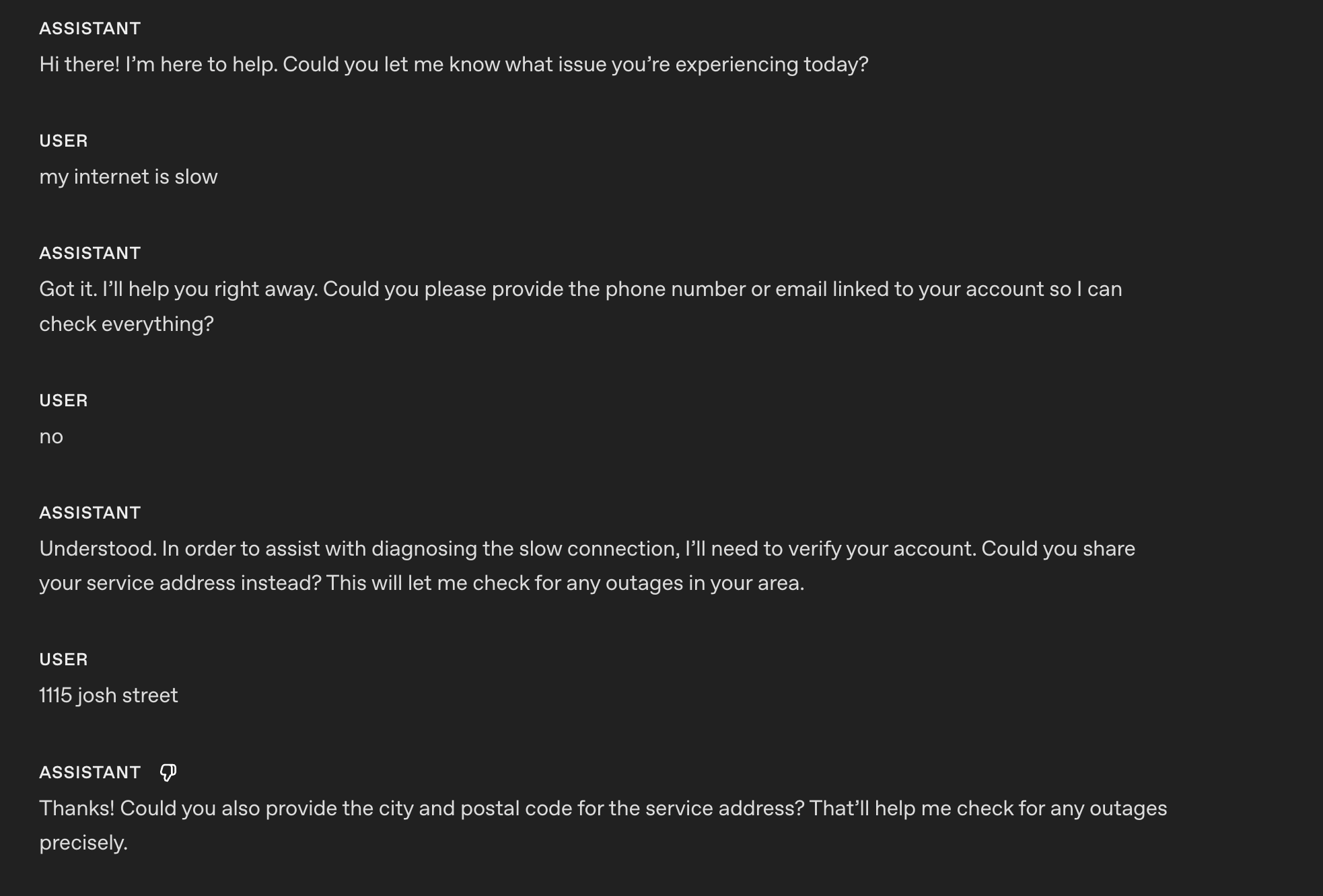
现在,模型能够变换回应和确认用语,听起来不再机械。
参考发音
本节介绍如何确保模型在语音交互中正确读出重要的单词、数字、名称和术语。
- 适用场景:模型经常读错品牌名称、技术术语或地名。
- 作用:通过发音提示增强信任感,让表达更清晰。
- 调整方法:保持列表简短,并在听到发音错误时更新列表。
示例
# Reference Pronunciations
When voicing these words, use the respective pronunciations:
- Pronounce “SQL” as “sequel.”
- Pronounce “PostgreSQL” as “post-gress.”
- Pronounce “Kyiv” as “KEE-iv.”
- Pronounce "Huawei" as “HWAH-way”
早期实时预览模型:
gpt-realtime-1.5:
通过参考发音指令,gpt-realtime-1.5 可以将 SQL 正确读作“sequel”。
字母和数字的发音
实时 S2S 在复述关键信息(电话号码、信用卡号、订单 ID)时,可能会把数字或字母读得含糊不清,或连在一起。明确要求逐字符确认,可以防止听错,并让合成语音更清晰。
- 适用场景:模型难以准确获取或复述电话号码、卡号、2FA 验证码、订单 ID、序列号、地址、单元号或字母数字混合字符串。
- 作用:强制模型逐个读出字符,用分隔符隔开,然后与用户确认,并在更正后再次确认。也可以用示例词帮助区分字母(例如,“A,就是 Alpha 中的 A”)。
示例(通用指令部分)
# Instructions/Rules
- When reading numbers or codes, speak each character separately, separated by hyphens (e.g., 4-1-5).
- Repeat EXACTLY the provided number; do not omit any digits.
提示:如果您采用基于对话流程的提示策略,可以指定在哪个对话状态下应用字母和数字的发音指令。
示例(对话状态中的指令)
(摘自我们的 openai-realtime-agents 提示中的对话流程)
{
    "id": "3_get_and_verify_phone",
    "description": "Request phone number and verify by repeating it back.",
    "instructions": [
      "Politely request the user’s phone number.",
      "Once provided, confirm it by repeating each digit and ask if it’s correct.",
      "If the user corrects you, confirm AGAIN to make sure you understand.",
    ],
    "examples": [
      "I'll need some more information to access your account if that's okay. May I have your phone number, please?",
      "You said 0-2-1-5-5-5-1-2-3-4, correct?",
      "You said 4-5-6-7-8-9-0-1-2-3, correct?"
    ],
    "transitions": [{
      "next_step": "4_authentication_DOB",
      "condition": "Once phone number is confirmed"
    }]
}
以下是 gpt-realtime-1.5 应用该指令 之前 的回应。
好的!号码是 55119765423。如果还需要其他帮助,请告诉我!
以下是 gpt-realtime-1.5 应用该指令 之后 的回应。
好的!号码是:5-5-1-1-1-9-7-6-5-4-2-3。如果还需要其他帮助,请告诉我!
指令
本节介绍如何编写提示,指导模型完成您的任务、应用最佳实践并解决可能出现的问题。
您可能不会感到意外:我们建议采用与 GPT-4.1 类似的提示模式,以获得最佳效果。
指令遵循
与 GPT-4.1 和 GPT-5 一样,如果指令存在冲突、歧义或表述不清,gpt-realtime-1.5 的表现就会变差。
- 适用场景:模型的输出偏离规则、跳过阶段或误用工具。
- 作用:在您发布之前,使用 LLM 指出歧义、冲突和缺失的定义。
指令质量检查提示(可在 ChatGPT 中或通过 API 使用)
将以下提示用于 GPT-5,找出您提示中存在问题、可以修正的部分。
## Role & Objective
You are a **Prompt-Critique Expert**.
Examine a user-supplied LLM prompt and surface any weaknesses following the instructions below.


## Instructions
Review the prompt that is meant for an LLM to follow and identify the following issues:
- Ambiguity: Could any wording be interpreted in more than one way?
- Lacking Definitions: Are there any class labels, terms, or concepts that are not defined that might be misinterpreted by an LLM?
- Conflicting, missing, or vague instructions: Are directions incomplete or contradictory?
- Unstated assumptions: Does the prompt assume the model has to be able to do something that is not explicitly stated?


## Do **NOT** list issues of the following types:
- Invent new instructions, tool calls, or external information. You do not know what tools need to be added that are missing.
- Issues that you are unsure about.


## Output Format
"""
# Issues
- Numbered list; include brief quote snippets.

# Improvements
- Numbered list; provide the revised lines you would change and how you would change them.

# Revised Prompt
- Revised prompt where you have applied all your improvements surgically with minimal edits to the original prompt
"""
提示优化元提示(可在 ChatGPT 中或通过 API 使用)
这个元提示针对特定的失败模式,帮助您改进基础系统提示。提供当前提示并描述您遇到的问题,模型(GPT-5)就会建议一些改进版本,以收紧约束并减少问题。
Here's my current prompt to an LLM:
[BEGIN OF CURRENT PROMPT]
{CURRENT_PROMPT}
[END OF CURRENT PROMPT]

But I see this issue happening from the LLM:
[BEGIN OF ISSUE]
{ISSUE}
[END OF ISSUE]
Can you provide some variants of the prompt so that the model can better understand the constraints to alleviate the issue?
无音频或音频不清晰
有时,模型会以为自己听到了什么,并尝试回应。您可以添加自定义指令,告诉模型在听到不清晰的音频或用户输入时应如何处理。请根据您的使用场景调整预期行为。例如,您可能希望模型重复上一个问题,而不是请求澄清。
- 适用场景:背景噪声、不完整的词语或静音触发了不必要的回复。
- 作用:避免误触发的回复,并以自然的方式请求澄清。
- 调整方式:根据使用场景,选择请求澄清还是重复上一个问题。
示例(咳嗽和不清晰的音频)
# Instructions/Rules
...


## Unclear audio
- Always respond in the same language the user is speaking in, if unintelligible.
- Only respond to clear audio or text.
- If the user's audio is not clear (e.g. ambiguous input/background noise/silent/unintelligible) or if you did not fully hear or understand the user, ask for clarification using {preferred_language} phrases.
以下是 gpt-realtime-1.5 应用该指令 后 的回复。
在这个示例中,模型听到我 (非常) 响亮的咳嗽声和不清晰的音频后,请求了澄清。
背景音乐或声音
模型在生成语音时,偶尔可能会产生意料之外的背景音乐、哼唱、有节奏的噪声或类似声音的杂音。这些杂音可能降低语音清晰度、分散用户注意力,或让助手显得不够专业。以下指令有助于避免或显著减少这些情况。
- 适用场景:您发现 Realtime 音频回复中出现了意料之外的音乐元素或音效。
- 作用:引导模型避免生成这些不需要的音频杂音。
- 调整方式:调整指令,尝试明确抑制您遇到的特定声音模式。
示例
# Instructions/Rules
...
- Do not include any sound effects or onomatopoeic expressions in your responses.
工具
在这一节中,告诉模型如何使用您的函数和工具。明确说明何时应调用或不应调用工具、需要收集哪些参数、调用执行期间应说些什么,以及如何处理错误或不完整的结果。
工具选择
gpt-realtime-1.5 会严格遵循指令。不过,如果您的指令与模型实际可访问的资源冲突,例如在提示中提到了并未通过工具列表传入的工具,就可能导致回复不佳。
- 适用场景:提示中提到了实际上不可用的工具。
- 作用:审查可用工具和系统提示,确保两者一致。
示例
# Tools
## lookup_account(email_or_phone)
...


## check_outage(address)
...
我们需要确保提到的工具都可用,并且 各处描述互不矛盾:
[
{
"name": "lookup_account",
"description": "Retrieve a customer account using either an email or phone number to enable verification and account-specific actions.",
"parameters": {
...
},
{
"name": "check_outage",
"description": "Check for network outages affecting a given service address and return status and ETA if applicable.",
"parameters": {
...
}
]工具调用前置说明
在某些使用场景中,让 Realtime 模型在调用工具的同时提供音频回复会有所帮助。这样可以减轻用户对延迟的感知,改善用户体验。您可以根据自己的使用场景修改示例用语。
- 适用场景:用户需要在工具调用的同时立即得到确认;这有助于减轻用户对延迟的感知。
- 作用:在工具调用前添加简短、风格一致的前置说明。
示例
# Tools
- Before any tool call, say one short line like “I’m checking that now.” Then call the tool immediately.
以下是 gpt-realtime-1.5 应用该指令后的回复。
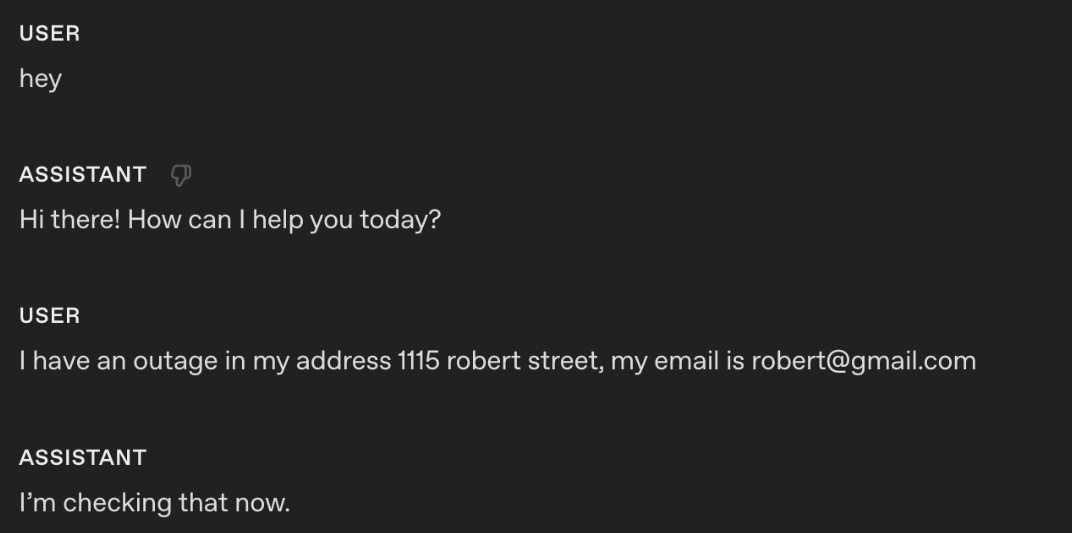
应用该指令后,模型会在调用工具的同时输出音频回复:“我正在查询。”
工具调用前置说明 + 示例用语
如果您想更精确地控制模型在调用工具时所说的内容,可以在工具规范的描述中添加示例用语。
示例
tools = [
{
"name": "lookup_account",
"description": """Retrieve a customer account using either an email or phone number to enable verification and account-specific actions.
Preamble sample phrases:
- For security, I’ll pull up your account using the email on file.
- Let me look up your account by {email} now.
- I’m fetching the account linked to {phone} to verify access.
- One moment—I’m opening your account details.""",
"parameters": {
"type": "object",
"properties": {
"email": {"type": "string"},
"phone": {"type": "string"},
},
"additionalProperties": False,
},
},
{
"name": "check_outage",
"description": """Check for network outages affecting a given service address and return status and ETA if applicable.
Preamble sample phrases:
- I’ll check for any outages at {service_address} right now.
- Let me look up network status for your area.
- I’m checking whether there’s an active outage impacting your address.
- One sec—verifying service status and any posted ETA.""",
"parameters": {
"type": "object",
"properties": {
"service_address": {"type": "string"},
},
"required": ["service_address"],
"additionalProperties": False,
},
},
]无需确认的工具调用
有时,模型可能会在调用工具前请求确认。在某些使用场景中,这种不够主动的行为可能导致终端用户体验不佳。
- 适用场景:智能体在明显应当调用工具的情况下,仍会先请求许可。
- 作用:消除不必要的反复确认。
示例
# Tools
- When calling a tool, do not ask for any user confirmation. Be proactive
以下是 gpt-realtime-1.5 应用该指令 后 的回复。
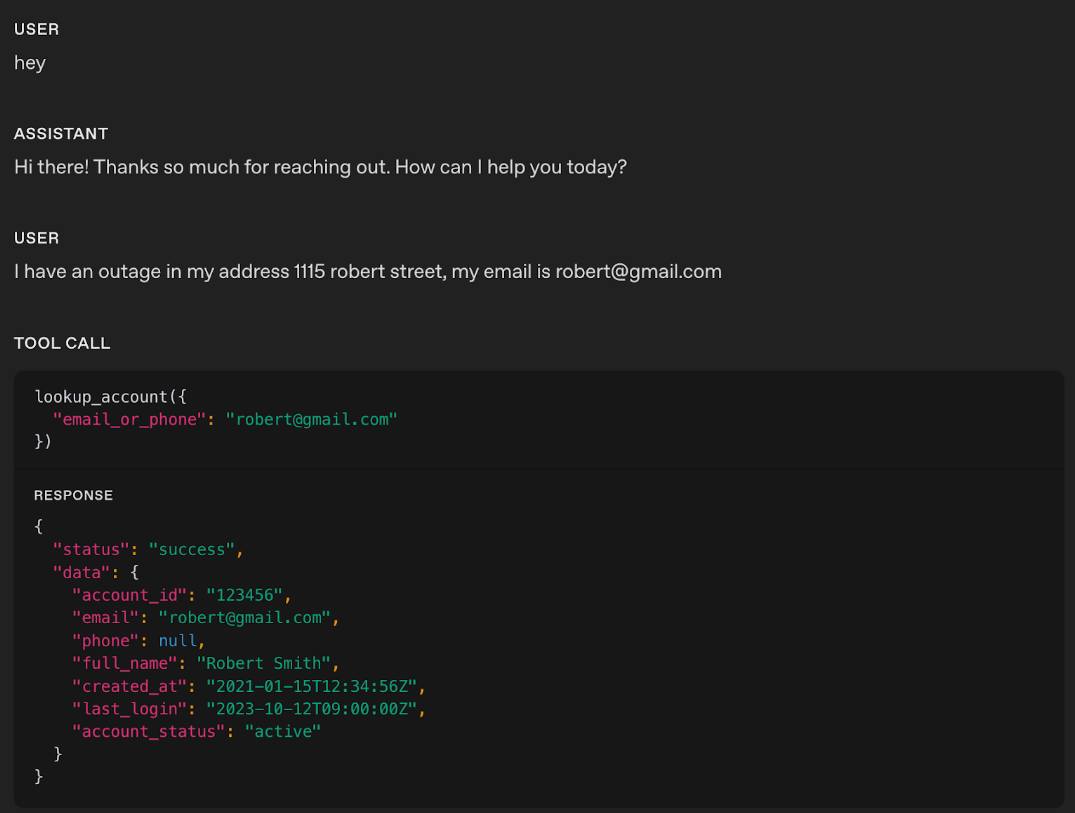
在这个示例中,您可以看到实时模型没有生成任何音频回复,而是直接调用了相应工具。
提示:如果您发现模型过于急切地调用工具,可以尝试缓和措辞。例如,将“主动”这类语气较强的词换成更温和的表达,有助于引导模型采取更从容、不那么急于行动的方式。
工具调用表现
随着使用场景变得更加复杂、可用工具数量增多,明确指导模型何时使用每个工具就变得至关重要;同样重要的是,明确何时不应使用。清晰的使用规则不仅能提高工具调用的准确性,还能帮助模型在恰当的时机选择合适的工具。
- 适用场景:模型的工具调用表现不佳,需要通过明确的指令来减少误用。
- 作用:添加指令,说明何时应“使用或避免使用”每个工具。您还可以添加关于工具调用顺序的指令(完成工具调用 A 后,可以进行工具调用 B 或 C)。
示例
# Tools
- When you call any tools, you must output at the same time a response letting the user know that you are calling the tool.

## lookup_account(email_or_phone)
Use when: verifying identity or viewing plan/outage flags.
Do NOT use when: the user is clearly anonymous and only asks general questions.


## check_outage(address)
Use when: user reports connectivity issues or slow speeds.
Do NOT use when: question is billing-only.


## refund_credit(account_id, minutes)
Use when: confirmed outage > 240 minutes in the past 7 days.
Do NOT use when: outage is unconfirmed; route to Diagnose → check_outage first.


## schedule_technician(account_id, window)
Use when: repeated failures after reboot and outage status = false.
Do NOT use when: outage status = true (send status + ETA instead).


## escalate_to_human(account_id, reason)
Use when: user seems very frustrated, abuse/harassment, repeated failures, billing disputes >$50, or user requests escalation.
提示:如果工具调用可能出现不可预测的失败,请添加明确的失败处理指令,让模型能够妥善应对。
针对各工具的行为
您可以针对特定工具精细调整模型的行为,而不必统一应用一条全局规则。例如,您可能希望模型主动调用读取工具,但在调用写入工具前必须获得明确确认。
- 适用场景:关于主动性、确认或前置说明的全局指令并不适合所有工具。
- 作用:为每个工具添加行为规则,明确模型应立即调用工具、先请求确认,还是在调用前说一段前置说明。
示例
# TOOLS
- For the tools marked PROACTIVE: do not ask for confirmation from the user and do not output a preamble.
- For the tools marked as CONFIRMATION FIRST: always ask for confirmation to the user.
- For the tools marked as PREAMBLES: Before any tool call, say one short line like “I’m checking that now.” Then call the tool immediately.


## lookup_account(email_or_phone) — PROACTIVE
Use when: verifying identity or accessing billing.
Do NOT use when: caller refuses to identify after second request.


## check_outage(address) — PREAMBLES
Use when: caller reports failed connection or speed lower than 10 Mbps.
Do NOT use when: purely billing OR when internet speed is above 10 Mbps.
If either condition applies, inform the customer you cannot assist and hang up.


## refund_credit(account_id, minutes) — CONFIRMATION FIRST
Use when: confirmed outage > 240 minutes in the past 7 days (credit 60 minutes).
Do NOT use when: outage unconfirmed.
Confirmation phrase: “I can issue a credit for this outage—would you like me to go ahead?”


## schedule_technician(account_id, window) — CONFIRMATION FIRST
Use when: reboot + line checks fail AND outage=false.
Windows: “10am–12pm ET” or “2pm–4pm ET”.
Confirmation phrase: “I can schedule a technician to visit—should I book that for you?”


## escalate_to_human(account_id, reason) — PREAMBLES
Use when: harassment, threats, self-harm, repeated failure, billing disputes > $50, caller is frustrated, or caller requests escalation.
Preamble: “Let me connect you to a senior agent who can assist further.”
工具输出格式
某些工具输出,尤其是必须逐字复述的长字符串,可能不符合模型的训练数据分布。在训练期间,工具输出通常是带有命名字段的 JSON 对象。如果您的工具返回一个原始字符串,并另行要求模型“原样复述”,模型就可能更容易改写、截断内容,或混入自己的前置说明。
一个实用的解决方法是,让工具输出采用常见的工具结果格式,并以机器能明确理解的方式表达逐字复述的要求。
-
适用场景: 工具返回 较长或复杂的结构化内容 (由多个句子组成的指令、交接信息包、ID 或链接、政策摘要、多步骤操作流程等),而您发现模型出现了 截断、改写、遗漏字段、调整顺序,或混入自己的前置说明或附加说明等情况。
-
作用: 用 简小且定义明确的 JSON 封装结构 包装工具输出(例如,
response_text加上require_repeat_verbatim、format或content_type等标记),使回复更 符合训练数据分布 ,并让 机器能明确理解应如何呈现内容。 -
调整方式: 保持模式 精简且稳定。在 工具指令 中和 工具定义 旁,都明确记录预期的工具输出结构(例如,“如果
require_repeat_verbatim为 true,则原样输出response_text,不输出任何其他内容”,或“原样呈现response_text;不要添加、遗漏工具输出中的字段,也不要调整字段顺序”)。
示例
示例:原始字符串(更容易出错)
工具返回:
I just sent you an email with the verification link. Please open it and click “Confirm”.模型有时会这样回应:
-
“我已通过电子邮件向您发送了验证链接……”(改述)
-
省略最后一句话(截断)
-
添加额外话语(“还有什么可以帮您的吗?”)
示例:封装为 JSON(更贴近训练数据分布,更可靠)
工具返回:
{
"response_text": "I just sent you an email with the verification link. Please open it and click “Confirm”.",
"require_repeat_verbatim": true
}由于这种格式看起来像典型的工具结果(JSON 对象),模型通常更容易做到:
-
识别哪些内容是“权威”内容(response_text)
-
理解表达形式的约束(require_repeat_verbatim)
-
准确复述工具输出,不截断,也不添加额外话语
改述监督工具的回复(响应者与思考者架构)
在许多语音系统中,实时模型充当响应者(与用户交谈),而更强大的文本模型充当思考者(负责规划、查询政策、完成标准操作流程)。文本回复未必适合直接说出来,因此响应者必须先将思考者的文本改写为适合口头表达的回复,再生成音频。
- 适用场景:响应者收到思考者的回复后,生成的语音听起来机械、冗长或生硬。
- 作用:添加明确指令,引导响应者将思考者的文本改写为简短、自然、适合口头表达的回复。
- 调整方式:调整措辞风格、开场语和长度限制,以符合您的使用场景预期。
示例
# Tools
## Supervisor Tool
Name: getNextResponseFromSupervisor(relevantContextFromLastUserMessage: string)


When to call:
- Any request outside the allow list.
- Any factual, policy, account, or process question.
- Any action that might require internal lookups or system changes.


When not to call:
- Simple greetings and basic chitchat.
- Requests to repeat or clarify.
- Collecting parameters for later Supervisor use:
  - phone_number for account help (getUserAccountInfo)
  - zip_code for store lookup (findNearestStore)
  - topic or keyword for policy lookup (lookupPolicyDocument)


Usage rules and preamble:
1) Say a neutral filler phrase to the user, then immediately call the tool. Approved fillers: “One moment.”, “Let me check.”, “Just a second.”, “Give me a moment.”, “Let me see.”, “Let me look into that.” Fillers must not imply success or failure.
2) Do not mention the “Supervisor” when responding with filler phrase.
3) relevantContextFromLastUserMessage is a one-line summary of the latest user message; use an empty string if nothing salient.
4) After the tool returns, apply Rephrase Supervisor and send your reply.


### Rephrase Supervisor
- Start with a brief conversational opener using active language, then flow into the answer (for example: “Thanks for waiting—”, “Just finished checking that.”, “I’ve got that pulled up now.”).
- Keep it short: no more than 2 sentences.
- Use this template: opener + one-sentence gist + up to 3 key details + a quick confirmation or choice (for example: “Does that match what you expected?”, “Want me to review options?”).
- Read numbers for speech: money naturally (“$45.20” → “forty-five dollars and twenty cents”), phone numbers 3-3-4, addresses with individual digits, dates/times plainly (“August twelfth”, “three-thirty p.m.”).
以下是未添加改述指令的示例:
助手:您目前的信用卡余额为正,金额为 32,323,232 澳元。
以下是添加改述指令后的同一示例:
助手:刚查好了,您的信用卡里有三千二百三十二万三千二百三十二澳元的结余。您上次的还款已于八月一日处理。这和您预期的一致吗?
常用工具
gpt-realtime-1.5 已经过训练,能够有效使用以下常用工具。如果您的使用场景需要类似行为,请尽量采用与这些工具相近的名称、签名和描述,以最大限度地提高可靠性,并更贴近训练数据分布。
以下是模型训练中使用过的一些重要常用工具:
示例
# answer(question: string)
Description: Call this when the customer asks a question that you don't have an answer to or asks to perform an action.


# escalate_to_human()
Description: Call this when a customer asks for escalation, or to talk to someone else, or expresses dissatisfaction with the call.


# finish_session()
Description: Call this when a customer says they're done with the session or doesn't want to continue. If it's ambiguous, confirm with the customer before calling.
对话流程
本节介绍如何将对话组织为清晰、目标明确的阶段,让模型确切知道每一步该做什么。其中定义了各阶段的目的、推进该阶段的指令,以及进入下一阶段的具体“退出条件”。这可以防止模型停滞、跳过步骤或提前进入后续阶段,确保对话从问候到问题解决始终井然有序。
此外,按不同的对话状态组织提示,也能让您更容易识别错误模式,更有效地迭代。
- 适用场景:对话杂乱无章、在达成目标前停滞,或模型难以有效完成目标。
- 作用:将交互划分为多个阶段,并为每个阶段设置明确的目标、指令和退出条件。
- 调整方式:根据您的工作流程重命名阶段;修改各阶段的指令,使其符合预期行为;让“退出条件”保持具体、精简。
示例
# Conversation Flow
## 1) Greeting
Goal: Set tone and invite the reason for calling.
How to respond:
- Identify as NorthLoop Internet Support.
- Keep the opener brief and invite the caller’s goal.
- Confirm that customer is a Northloop customer
Exit to Discovery: Caller states they are a Northloop customer and mentions an initial goal or symptom.


## 2) Discover
Goal: Classify the issue and capture minimal details.
How to respond:
- Determine billing vs connectivity with one targeted question.
- For connectivity: collect the service address.
- For billing/account: collect email or phone used on the account.
Exit when: Intent and address (for connectivity) or email/phone (for billing) are known.


## 3) Verify
Goal: Confirm identity and retrieve the account.
How to respond:
- Once you have email or phone, call lookup_account(email_or_phone).
- If lookup fails, try the alternate identifier once; otherwise proceed with general guidance or offer escalation if account actions are required.
Exit when: Account ID is returned.


## 4) Diagnose
Goal: Decide outage vs local issue.
How to respond:
- For connectivity, call check_outage(address).
- If outage=true, skip local steps; move to Resolve with outage context.
- If outage=false, guide a short reboot/cabling check; confirm each step’s result before continuing.
Exit when: Root cause known.


## 5) Resolve
Goal: Apply fix, credit, or appointment.
How to respond:
- If confirmed outage > 240 minutes in the last 7 days, call refund_credit(account_id, 60).
- If outage=false and issue persists after basic checks, offer “10am–12pm ET” or “2pm–4pm ET” and call schedule_technician(account_id, chosen window).
- If the local fix worked, state the result and next steps briefly.
Exit when: A fix/credit/appointment has been applied and acknowledged by the caller.


## 6) Confirm/Close
Goal: Confirm outcome and end cleanly.
How to respond:
- Restate the result and any next step (e.g., stabilization window or tech ETA).
- Invite final questions; close politely if none.
Exit when: Caller declines more help.
示例话术
示例话术为模型提供参考,展示您希望它遵循的风格、简洁程度和语气,同时避免将它限制在某一种固定回复中。
- 适用场景:回复缺乏您的品牌风格,或前后不一致。
- 作用:提供可供模型灵活调整的示例话术,使回复保持自然、简短。
- 调整方式:将示例替换为符合品牌风格的话术;保留“不要每次都使用”的提醒。
示例
# Sample Phrases
- Below are sample examples that you should use for inspiration. DO NOT ALWAYS USE THESE EXAMPLES, VARY YOUR RESPONSES.

Acknowledgements: “On it.” “One moment.” “Good question.”
Clarifiers: “Do you want A or B?” “What’s the deadline?”
Bridges: “Here’s the quick plan.” “Let’s keep it simple.”
Empathy (brief): “That’s frustrating—let’s fix it.”
Closers: “Anything else before we wrap?” “Happy to help next time.”
注意:如果您的语音系统总是只重复示例话术,导致语音体验更加机械,可以尝试添加表达多样性约束。我们观察到,这能解决此问题。
对话流程 + 示例话术
一种实用的做法是在对话流程的不同状态中添加示例话术,让模型了解怎样的回复才是好的回复:
示例
# Conversation Flow
## 1) Greeting
Goal: Set tone and invite the reason for calling.
How to respond:
- Identify as NorthLoop Internet Support.
- Keep the opener brief and invite the caller’s goal.
Sample phrases (do not always repeat the same phrases, vary your responses):
- “Thanks for calling NorthLoop Internet—how can I help today?”
- “You’ve reached NorthLoop Support. What’s going on with your service?”
- “Hi there—tell me what you’d like help with.”
Exit when: Caller states an initial goal or symptom.


## 2) Discover
Goal: Classify the issue and capture minimal details.
How to respond:
- Determine billing vs connectivity with one targeted question.
- For connectivity: collect the service address.
- For billing/account: collect email or phone used on the account.
Sample phrases (do not always repeat the same phrases, vary your responses):
- “Is this about your bill or your internet speed?”
- “What address are you using for the connection?”
- “What’s the email or phone number on the account?”
Exit when: Intent and address (for connectivity) or email/phone (for billing) are known.


## 3) Verify
Goal: Confirm identity and retrieve the account.
How to respond:
- Once you have email or phone, call lookup_account(email_or_phone).
- If lookup fails, try the alternate identifier once; otherwise proceed with general guidance or offer escalation if account actions are required.
Sample phrases:
- “Thanks—looking up your account now.”
- “If that doesn’t pull up, what’s the other contact—email or phone?”
- “Found your account. I’ll take care of this.”
Exit when: Account ID is returned.


## 4) Diagnose
Goal: Decide outage vs local issue.
How to respond:
- For connectivity, call check_outage(address).
- If outage=true, skip local steps; move to Resolve with outage context.
- If outage=false, guide a short reboot/cabling check; confirm each step’s result before continuing.
Sample phrases (do not always repeat the same phrases, vary your responses):
- “I’m running a quick outage check for your area.”
- “No outage reported—let’s try a fast modem reboot.”
- “Please confirm the modem lights: is the internet light solid or blinking?”
Exit when: Root cause known.


## 5) Resolve
Goal: Apply fix, credit, or appointment.
How to respond:
- If confirmed outage > 240 minutes in the last 7 days, call refund_credit(account_id, 60).
- If outage=false and issue persists after basic checks, offer “10am–12pm ET” or “2pm–4pm ET” and call schedule_technician(account_id, chosen window).
- If the local fix worked, state the result and next steps briefly.
Sample phrases (do not always repeat the same phrases, vary your responses):
- “There’s been an extended outage—adding a 60-minute bill credit now.”
- “No outage—let’s book a technician. I can do 10am–12pm ET or 2pm–4pm ET.”
- “Credit applied—you’ll see it on your next bill.”
Exit when: A fix/credit/appointment has been applied and acknowledged by the caller.


## 6) Confirm/Close
Goal: Confirm outcome and end cleanly.
How to respond:
- Restate the result and any next step (e.g., stabilization window or tech ETA).
- Invite final questions; close politely if none.
Sample phrases (do not always repeat the same phrases, vary your responses):
- “We’re all set: [credit applied / appointment booked / service restored].”
- “You should see stable speeds within a few minutes.”
- “Your technician window is 10am–12pm ET.”
Exit when: Caller declines more help.
高级对话流程
随着使用场景变得更复杂,您需要一种可扩展的结构,同时确保模型有效发挥作用。关键在于平衡可维护性与简洁性:过多僵化的状态会使模型负担过重,降低表现,并让对话显得机械。
更好的做法是设计出让模型更容易理解的流程。以结构清晰但灵活的方式处理状态,能让模型更容易保持专注、及时响应,从而改善用户体验。
管理复杂场景的两种常见模式是:
- 用状态机定义对话流程
- 通过 session.updates 实现动态对话流程
用状态机定义对话流程
将对话定义为 JSON 结构,在其中表示状态及状态转换。这样更容易分析覆盖情况、识别边界情况,并持续跟踪变更。由于流程以代码形式存储,您可以随着流程演进进行版本管理、差异比较和扩展。状态机还能让您精细控制对话何时以及如何从一个状态转移到另一个状态。
示例
# Conversation States
[
{
"id": "1_greeting",
"description": "Begin each conversation with a warm, friendly greeting, identifying the service and offering help.",
"instructions": [
"Use the company name 'Snowy Peak Boards' and provide a warm welcome.",
"Let them know upfront that for any account-specific assistance, you’ll need some verification details."
],
"examples": [
"Hello, this is Snowy Peak Boards. Thanks for reaching out! How can I help you today?"
],
"transitions": [{
"next_step": "2_get_first_name",
"condition": "Once greeting is complete."
}, {
"next_step": "3_get_and_verify_phone",
"condition": "If the user provides their first name."
}]
},
{
"id": "2_get_first_name",
"description": "Ask for the user’s name (first name only).",
"instructions": [
"Politely ask, 'Who do I have the pleasure of speaking with?'",
"Do NOT verify or spell back the name; just accept it."
],
"examples": [
"Who do I have the pleasure of speaking with?"
],
"transitions": [{
"next_step": "3_get_and_verify_phone",
"condition": "Once name is obtained, OR name is already provided."
}]
},
{
"id": "3_get_and_verify_phone",
"description": "Request phone number and verify by repeating it back.",
"instructions": [
"Politely request the user’s phone number.",
"Once provided, confirm it by repeating each digit and ask if it’s correct.",
"If the user corrects you, confirm AGAIN to make sure you understand.",
],
"examples": [
"I'll need some more information to access your account if that's okay. May I have your phone number, please?",
"You said 0-2-1-5-5-5-1-2-3-4, correct?",
"You said 4-5-6-7-8-9-0-1-2-3, correct?"
],
"transitions": [{
"next_step": "4_authentication_DOB",
"condition": "Once phone number is confirmed"
}]
},
...动态对话流程
在这种模式下,系统根据当前状态更新系统提示和工具列表,使对话实时调整。您只需提供与当前对话阶段相关的内容,无需一次性向模型提供所有可能的规则和工具。
当某个状态满足结束条件时,您可以使用 session.update 进行状态转换,将提示和工具替换为下一阶段所需的内容。
这种方法减少了模型的认知负担,让它更容易处理复杂任务,而不受无关上下文的干扰。
示例
from typing import Literal
State = Literal["verify", "resolve"]
# Allowed transitions
TRANSITIONS: dict[State, list[State]] = {
"verify": ["resolve"],
"resolve": [], # terminal
}
def build_state_change_tool(current: State) -> dict:
allowed = TRANSITIONS[current]
readable = ", ".join(allowed) if allowed else "no further states (terminal)"
return {
"type": "function",
"name": "set_conversation_state",
"description": (
f"Switch the conversation phase. Current: '{current}'. "
f"You may switch only to: {readable}. "
"Call this AFTER exit criteria are satisfied."
),
"parameters": {
"type": "object",
"properties": {"next_state": {"type": "string", "enum": allowed}},
"required": ["next_state"],
},
}
# Minimal business tools per state
TOOLS_BY_STATE: dict[State, list[dict]] = {
"verify": [
{
"type": "function",
"name": "lookup_account",
"description": "Fetch account by email or phone.",
"parameters": {
"type": "object",
"properties": {"email_or_phone": {"type": "string"}},
"required": ["email_or_phone"],
},
}
],
"resolve": [
{
"type": "function",
"name": "schedule_technician",
"description": "Book a technician visit.",
"parameters": {
"type": "object",
"properties": {
"account_id": {"type": "string"},
"window": {"type": "string", "enum": ["10-12 ET", "14-16 ET"]},
},
"required": ["account_id", "window"],
},
}
],
}
# Short, phase-specific instructions
INSTRUCTIONS_BY_STATE: dict[State, str] = {
"verify": (
"# Role & Objective\n"
"Verify identity to access the account.\n\n"
"# Conversation (Verify)\n"
"- Ask for the email or phone on the account.\n"
"- Read back digits one-by-one (e.g., '4-1-5… Is that correct?').\n"
"Exit when: Account ID is returned.\n"
'When exit is satisfied: call set_conversation_state(next_state="resolve").'
),
"resolve": (
"# Role & Objective\n"
"Apply a fix by booking a technician.\n\n"
"# Conversation (Resolve)\n"
"- Offer two windows: '10–12 ET' or '2–4 ET'.\n"
"- Book the chosen window.\n"
"Exit when: Appointment is confirmed.\n"
"When exit is satisfied: end the call politely."
),
}
def build_session_update(state: State) -> dict:
"""Return the JSON payload for a Realtime `session.update` event."""
return {
"type": "session.update",
"session": {
"instructions": INSTRUCTIONS_BY_STATE[state],
"tools": TOOLS_BY_STATE[state] + [build_state_change_tool(state)],
},
}安全与升级处理
对于 Realtime 语音智能体,可靠的转人工机制通常很重要。在本节中,您应根据自己的使用场景,修改关于何时升级处理的指令。
- 适用场景:模型难以正确判断何时应将问题转交人工或备用系统处理。
- 作用:定义快速、可靠的升级处理机制,以及需要说的话。
- 调整方式:填入您自己的触发阈值和模型必须使用的话术。
示例
# Safety & Escalation
When to escalate (no extra troubleshooting):
- Safety risk (self-harm, threats, harassment)
- User explicitly asks for a human
- Severe dissatisfaction (e.g., “extremely frustrated,” repeated complaints, profanity)
- **2** failed tool attempts on the same task **or** **3** consecutive no-match/no-input events
- Out-of-scope or restricted (e.g., real-time news, financial/legal/medical advice)

What to say at the same time as calling the escalate_to_human tool (MANDATORY):
- “Thanks for your patience—I’m connecting you with a specialist now.”
- Then call the tool: `escalate_to_human`

Examples that would require escalation:
- “This is the third time the reset didn’t work. Just get me a person.”
- “I am extremely frustrated!”
第一个示例展示了 gpt-4o-realtime-preview-2025-06-03 应用该指令后的对话回复。
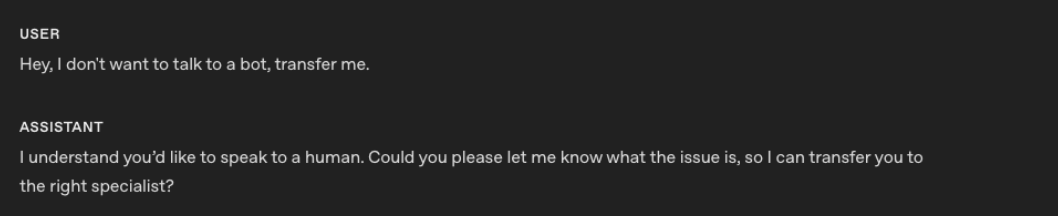
第二个示例展示了 gpt-realtime-1.5 使用该指令后的对话回复。

gpt-realtime-1.5 能够更可靠地遵循指令并转交人工处理。
后续步骤
如果使用 GPT-Live:
- 参阅委派与工具,了解后端提示和由应用管理的上下文。
- 通过 WebRTC 或 WebSockets 建立连接。如需集成电话功能,请参阅电话与 SIP。
- 从对话质量和经验证的任务结果两个方面评估语音智能体。
如果使用 Realtime:
- 参阅早期的实时交互提示词指南,了解更多
gpt-realtime-1.5示例。 - 参阅 Realtime 评测指南,测试语音智能体的典型行为。
- 通过 WebRTC、WebSockets 或 SIP 建立连接。
- 了解 Realtime 对话生命周期,并查看 Realtime 费用。