
text-embedding-3-small and text-embedding-3-large, our newest and most performant embedding models, are now available. They feature lower costs, higher multilingual performance, and new parameters to control the overall size.什么是嵌入向量?
OpenAI 的文本嵌入向量用于衡量文本字符串之间的关联程度。嵌入向量通常用于:
- 搜索 (根据结果与查询字符串的相关性对结果进行排序)
- 聚类 (根据相似度对文本字符串进行分组)
- 推荐 (推荐文本字符串相关的条目)
- 异常检测 (识别关联程度低的离群值)
- 多样性衡量 (分析相似度分布)
- 分类 (根据与文本字符串最相似的标签对其进行分类)
嵌入向量是由浮点数组成的向量(列表)。两个向量之间的距离用于衡量它们的关联程度。距离越小,关联程度越高;距离越大,关联程度越低。
请访问我们的定价页面,了解嵌入向量的定价。请求按输入中的 Token 数量计费。
如何获取嵌入向量
要获取嵌入向量,请将文本字符串与嵌入模型名称(例如 text-embedding-3-small)一起发送到嵌入向量 API 端点:
1
2
3
4
5
6
7
8
9
10import OpenAI from "openai";
const openai = new OpenAI();

const embedding = await openai.embeddings.create({
  model: "text-embedding-3-small",
  input: "Your text string goes here",
  encoding_format: "float",
});

console.log(embedding);
1
2
3
4
5
6
7
8
9from openai import OpenAI
client = OpenAI()
response = client.embeddings.create(
input="Your text string goes here", model="text-embedding-3-small"
)
print(response.data[0].embedding)1
2
3
4
5
6
7
8
9
10
11
12
13
14
15
16
17
18
19
20
21
22
23
24package main
import (
"context"
"fmt"
"github.com/openai/openai-go/v3"
)
func main() {
client := openai.NewClient()
embedding, err := client.Embeddings.New(context.Background(), openai.EmbeddingNewParams{
Model: openai.EmbeddingModelTextEmbedding3Small,
Input: openai.EmbeddingNewParamsInputUnion{
OfString: openai.String("Your text string goes here."),
},
})
if err != nil {
panic(err)
}
fmt.Println(len(embedding.Data[0].Embedding))
}1
2
3
4
5
6
7
8
9
10
11
12
13
14import com.openai.client.OpenAIClient;
import com.openai.client.okhttp.OpenAIOkHttpClient;
import com.openai.models.embeddings.EmbeddingCreateParams;
var embedding =
client
.embeddings()
.create(
EmbeddingCreateParams.builder()
.model("text-embedding-3-small")
.input("The food was delicious and the waiter...")
.build());
System.out.println(embedding.data().get(0).embedding());1
2
3
4
5
6
7
8
9
10
11using OpenAI.Embeddings;
string key = Environment.GetEnvironmentVariable("OPENAI_API_KEY")!;
string model = "text-embedding-3-small";
EmbeddingClient client = new(model, key);
OpenAIEmbedding embedding = await client.GenerateEmbeddingAsync(
"The food was delicious and the waiter was friendly."
);
Console.WriteLine($"Dimensions: {embedding.ToFloats().Length}");1
2
3
4
5
6
7
8
9
10require "openai"
client = OpenAI::Client.new
response = client.embeddings.create(
model: "text-embedding-3-small",
input: "The food was delicious and the waiter..."
)
puts(response.data.fetch(0).embedding)1
2
3
4
5
6
7curl https://api.openai.com/v1/embeddings \
-H "Content-Type: application/json" \
-H "Authorization: Bearer $OPENAI_API_KEY" \
-d '{
"input": "Your text string goes here",
"model": "text-embedding-3-small"
}'响应包含嵌入向量(浮点数列表)以及一些额外的元数据。您可以提取嵌入向量,将其保存到向量数据库中,并用于多种不同的使用场景。
123456789101112131415161718{
  "object": "list",
  "data": [
    {
      "object": "embedding",
      "index": 0,
      "embedding": [
        -0.006929283495992422, -0.005336422007530928, -4.547132266452536e-5,
        -0.024047505110502243
      ]
    }
  ],
  "model": "text-embedding-3-small",
  "usage": {
    "prompt_tokens": 5,
    "total_tokens": 5
  }
}
默认情况下,text-embedding-3-small 的嵌入向量长度为 1536,text-embedding-3-large 的嵌入向量长度为 3072。要在保留嵌入向量表征概念的能力的同时减少其维度,请传入 dimensions 参数。有关嵌入向量维度的更多信息,请参阅嵌入向量使用场景部分。
嵌入模型
OpenAI 提供两款功能强大的第三代嵌入模型(模型 ID 中以 -3 标识)。请阅读嵌入模型 v3 的发布博客文章,了解更多详情。
使用费用按输入 Token 计收。下表以每美元可处理的文本页数说明定价(假设每页约有 800 个 Token):
| 模型 | 每美元可处理的页数(约) | 在 MTEB 评测中的表现 | 最大输入 |
|---|---|---|---|
| text-embedding-3-small | 62,500 | 62.3% | 8192 |
| text-embedding-3-large | 9,615 | 64.6% | 8192 |
| text-embedding-ada-002 | 12,500 | 61.0% | 8192 |
使用场景
下面我们使用 Amazon 美食评论数据集展示一些典型的使用场景。
获取嵌入向量
该数据集包含截至 2012 年 10 月 Amazon 用户发表的共 568,454 条食品评论。我们选取其中最新的 1000 条评论作为子集进行演示。这些评论以英语撰写,通常带有正面或负面倾向。每条评论都包含 ProductId、UserId、Score、评论标题(Summary)和评论正文(Text)。例如:
| 产品 ID | 用户 ID | 评分 | 摘要 | 正文 |
|---|---|---|---|---|
| B001E4KFG0 | A3SGXH7AUHU8GW | 5 | 品质不错的狗粮 | 我买过几款 Vitality 的罐头…… |
| B00813GRG4 | A1D87F6ZCVE5NK | 1 | 与宣传不符 | 收到的产品标签上写着特大咸味花生…… |
下面,我们将评论摘要和评论正文合并为一段文本。模型对这段合并后的文本进行编码,并输出一个嵌入向量。
1
2
3
4
5
6
7
8
9
10
11
12
13
14
15
16
17
18
19
20
21import { mkdir, writeFile } from "node:fs/promises";
import OpenAI from "openai";

const client = new OpenAI();
const reviews = ["A rich cup of coffee.", "A bright herbal tea."];

const response = await client.embeddings.create({
  model: "text-embedding-3-small",
  input: reviews.map((review) => review.replaceAll("\n", " ")),
});

const csvField = (value) => `"${value.replaceAll('"', '""')}"`;
const rows = response.data.map(({ embedding }, index) =>
  [csvField(reviews[index]), csvField(JSON.stringify(embedding))].join(",")
);

await mkdir("output", { recursive: true });
await writeFile(
  "output/embedded_1k_reviews.csv",
  ["combined,ada_embedding", ...rows].join("\n") + "\n"
);
1
2
3
4
5
6
7
8
9
10
11
12
13
14from openai import OpenAI
client = OpenAI()
def get_embedding(text, model="text-embedding-3-small"):
text = text.replace("\n", " ")
return client.embeddings.create(input=[text], model=model).data[0].embedding
df["ada_embedding"] = df.combined.apply(
lambda x: get_embedding(x, model="text-embedding-3-small")
)
df.to_csv("output/embedded_1k_reviews.csv", index=False)1
2
3
4
5
6
7
8
9
10
11
12
13
14
15
16
17
18
19
20
21
22
23
24
25
26
27
28
29
30
31
32
33import com.openai.client.OpenAIClient;
import com.openai.client.okhttp.OpenAIOkHttpClient;
import com.openai.models.embeddings.EmbeddingCreateParams;
import java.io.IOException;
import java.nio.file.Files;
import java.nio.file.Path;
import java.util.List;
static String csvField(String value) {
return "\"" + value.replace("\"", "\"\"") + "\"";
}
List<String> reviews = List.of("A rich cup of coffee.", "A bright herbal tea.");
Path output = Path.of("output", "embedded_1k_reviews.csv");
Files.createDirectories(output.getParent());
try (var writer = Files.newBufferedWriter(output)) {
writer.write("combined,ada_embedding\n");
for (String review : reviews) {
var embedding =
client
.embeddings()
.create(
EmbeddingCreateParams.builder()
.model("text-embedding-3-small")
.inputOfArrayOfStrings(List.of(review.replace("\n", " ")))
.build())
.data()
.get(0)
.embedding();
writer.write(csvField(review) + "," + csvField(embedding.toString()) + "\n");
}
}
System.out.println(output);1
2
3
4
5
6
7
8
9
10
11
12
13
14
15
16
17
18
19
20require "csv"
require "fileutils"
require "json"
require "openai"
client = OpenAI::Client.new
reviews = ["A rich cup of coffee.", "A bright herbal tea."]
response = client.embeddings.create(
model: "text-embedding-3-small",
input: reviews.map { |review| review.tr("\n", " ") }
)
FileUtils.mkdir_p("output")
CSV.open("output/embedded_1k_reviews.csv", "w") do |csv|
csv << ["combined", "ada_embedding"]
response.data.each do |embedding|
csv << [reviews.fetch(embedding.index), JSON.generate(embedding.embedding)]
end
end要从已保存的文件中加载数据,您可以运行以下代码:
1
2
3
4import pandas as pd

df = pd.read_csv("output/embedded_1k_reviews.csv")
df["ada_embedding"] = df.ada_embedding.apply(eval).apply(np.array)使用较大的嵌入向量,例如将其存入向量存储以供检索,通常比使用较小的嵌入向量成本更高,也会消耗更多计算、内存和存储资源。
我们的两个新嵌入模型均采用了一种训练技术,让开发者可以在使用嵌入向量的性能和成本之间进行权衡。具体而言,开发者可以通过传入 dimensions API 参数来缩短嵌入向量(即移除序列末尾的部分数字),同时保留其表示概念的能力。例如,在 MTEB 基准测试中,text-embedding-3-large 嵌入向量缩短至 256 维后,表现仍优于未经缩短的 1536 维 text-embedding-ada-002 嵌入向量。关于调整维度如何影响性能,您可以阅读我们的嵌入模型 v3 发布博客文章了解更多。
一般建议在创建嵌入向量时使用 dimensions 参数。在某些情况下,您可能需要在生成嵌入向量后调整其维度。手动调整维度时,请务必按下方示例对嵌入向量进行归一化。
1
2
3
4
5
6
7
8
9
10
11
12
13
14
15
16
17import OpenAI from "openai";

const client = new OpenAI();

const response = await client.embeddings.create({
  model: "text-embedding-3-small",
  input: "Testing 123",
  encoding_format: "float",
});

const shortened = response.data[0].embedding.slice(0, 256);
const magnitude = Math.hypot(...shortened);
const normalized = shortened.map((value) =>
  magnitude === 0 ? 0 : value / magnitude
);

console.log(normalized);
1
2
3
4
5
6
7
8
9
10
11
12
13
14
15
16
17
18
19
20
21
22
23
24
25
26from openai import OpenAI
import numpy as np
client = OpenAI()
def normalize_l2(x):
x = np.array(x)
if x.ndim == 1:
norm = np.linalg.norm(x)
if norm == 0:
return x
return x / norm
else:
norm = np.linalg.norm(x, 2, axis=1, keepdims=True)
return np.where(norm == 0, x, x / norm)
response = client.embeddings.create(
model="text-embedding-3-small", input="Testing 123", encoding_format="float"
)
cut_dim = response.data[0].embedding[:256]
norm_dim = normalize_l2(cut_dim)
print(norm_dim)1
2
3
4
5
6
7
8
9
10
11
12
13
14
15
16
17
18
19
20
21
22import com.openai.client.OpenAIClient;
import com.openai.client.okhttp.OpenAIOkHttpClient;
import com.openai.models.embeddings.EmbeddingCreateParams;
import java.util.List;
private static List<Double> normalizeL2(List<Float> embedding) {
double norm = Math.sqrt(embedding.stream().mapToDouble(value -> value * value).sum());
return embedding.stream().map(value -> norm == 0 ? 0.0 : value / norm).toList();
}
var embedding =
client
.embeddings()
.create(
EmbeddingCreateParams.builder()
.model("text-embedding-3-small")
.input("Testing 123")
.encodingFormat(EmbeddingCreateParams.EncodingFormat.FLOAT)
.build());
List<Float> shortened = embedding.data().get(0).embedding().subList(0, 256);
System.out.println(normalizeL2(shortened));1
2
3
4
5
6
7
8
9
10
11
12
13
14
15
16
17
18
19
20using OpenAI.Embeddings;
string key = Environment.GetEnvironmentVariable("OPENAI_API_KEY")!;
string model = "text-embedding-3-small";
EmbeddingClient client = new(model, key);
OpenAIEmbedding embedding = await client.GenerateEmbeddingAsync("Testing 123");
float[] shortened = embedding.ToFloats().Span[..256].ToArray();
double magnitude = Math.Sqrt(shortened.Sum(value => value * value));
float[] normalized =
magnitude == 0
? shortened
: shortened.Select(value => (float)(value / magnitude)).ToArray();
Console.WriteLine($"Dimensions: {normalized.Length}");
Console.WriteLine($"First value: {normalized[0]:F6}");
Console.WriteLine(
$"L2 norm: {Math.Sqrt(normalized.Sum(value => value * value)):F3}"
);1
2
3
4
5
6
7
8
9
10
11
12
13
14
15require "openai"
client = OpenAI::Client.new
response = client.embeddings.create(
model: "text-embedding-3-small",
input: "Testing 123",
encoding_format: :float
)
shortened = response.data.fetch(0).embedding.first(256)
magnitude = Math.sqrt(shortened.sum { |value| value**2 })
normalized = shortened.map { |value| magnitude.zero? ? 0 : value / magnitude }
puts(normalized)动态调整维度让使用方式更加灵活。例如,当向量数据存储仅支持最多 1024 维的嵌入向量时,开发者现在仍可使用我们最好的嵌入模型 text-embedding-3-large,并将 dimensions API 参数设为 1024。这样会将嵌入向量从 3072 维缩短至 1024 维,以牺牲部分准确性换取更小的向量。
在许多常见场景中,您希望模型在回答用户查询时能用到某些关键事实和信息,但模型的训练数据并不包含这些内容。一种解决方法是将额外信息放入模型的上下文窗口,如下所示。这种方法在许多使用场景中都很有效,但会增加 Token 成本。在此笔记本中,我们将探讨如何在这种方法与基于嵌入向量的搜索之间进行权衡。
1
2
3
4
5
6
7
8
9
10
11
12
13
14
15
16
17
18
19
20
21
22
23
24
25import OpenAI from "openai";

const client = new OpenAI();
const article =
  "At the 2022 Winter Olympics, Great Britain won women's curling and Sweden won men's curling.";
const question = `Use the article below to answer the question. If the answer cannot be found, say "I don't know."

Article:
${article}

Question: Which athletes won the gold medal in curling at the 2022 Winter Olympics?`;

const response = await client.chat.completions.create({
  model: "gpt-4.1-mini",
  messages: [
    {
      role: "system",
      content: "You answer questions about the 2022 Winter Olympics.",
    },
    { role: "user", content: question },
  ],
  temperature: 0,
});

console.log(response.choices[0].message.content);
1
2
3
4
5
6
7
8
9
10
11
12
13
14
15
16
17
18
19
20
21
22query = f"""Use the below article on the 2022 Winter Olympics to answer the subsequent question. If the answer cannot be found, write "I don't know."
Article:
\"\"\"
{wikipedia_article_on_curling}
\"\"\"
Question: Which athletes won the gold medal in curling at the 2022 Winter Olympics?"""
response = client.chat.completions.create(
messages=[
{
"role": "system",
"content": "You answer questions about the 2022 Winter Olympics.",
},
{"role": "user", "content": query},
],
model=GPT_MODEL,
temperature=0,
)
print(response.choices[0].message.content)1
2
3
4
5
6
7
8
9
10
11
12
13
14
15
16
17
18
19
20
21
22
23
24import com.openai.client.OpenAIClient;
import com.openai.client.okhttp.OpenAIOkHttpClient;
import com.openai.models.chat.completions.ChatCompletionCreateParams;
String article =
"At the 2022 Winter Olympics, Great Britain won women's curling and Sweden won men's curling.";
String question =
"Use the below article on the 2022 Winter Olympics to answer the subsequent question. "
+ "If the answer cannot be found, write \"I don't know.\"\n\n"
+ "Article:\n"
+ article
+ "\n\nQuestion: Which athletes won the gold medal in curling at the 2022 Winter Olympics?";
ChatCompletionCreateParams params =
ChatCompletionCreateParams.builder()
.model("gpt-4.1-mini")
.addSystemMessage("You answer questions about the 2022 Winter Olympics.")
.addUserMessage(question)
.temperature(0)
.build();
client.chat().completions().create(params).choices().stream()
.flatMap(choice -> choice.message().content().stream())
.forEach(System.out::println);1
2
3
4
5
6
7
8
9
10
11
12
13
14
15
16
17
18
19
20
21
22
23
24
25
26
27
28
29require "openai"
client = OpenAI::Client.new
article = "At the 2022 Winter Olympics, Great Britain won women's curling and Sweden won men's curling."
question = <<~QUESTION
Use the article below to answer the question. If the answer cannot be found, say "I don't know."
Article:
#{article}
Question: Which athletes won the gold medal in curling at the 2022 Winter Olympics?
QUESTION
response = client.chat.completions.create(
model: "gpt-4.1-mini",
messages: [
{
role: :system,
content: "You answer questions about the 2022 Winter Olympics."
},
{
role: :user,
content: question
}
],
temperature: 0
)
puts(response.choices.fetch(0).message.content)为了检索最相关的文档,我们计算查询与各文档的嵌入向量之间的余弦相似度,并返回得分最高的文档。
1
2
3
4
5
6
7
8
9
10
11
12
13
14
15
16
17
18
19
20
21
22
23
24
25
26
27
28
29
30
31
32import OpenAI from "openai";

const client = new OpenAI();
const reviews = [
  "A rich cup of coffee.",
  "Smooth beans in tomato sauce.",
  "Dark chocolate with orange.",
];

const { data } = await client.embeddings.create({
  model: "text-embedding-3-small",
  input: [...reviews, "delicious beans"],
});

const query = data.at(-1).embedding;
const similarity = (embedding) => {
  const dotProduct = embedding.reduce(
    (total, value, index) => total + value * query[index],
    0
  );
  return dotProduct / (Math.hypot(...embedding) * Math.hypot(...query));
};

const results = reviews
  .map((review, index) => ({
    review,
    score: similarity(data[index].embedding),
  }))
  .sort((left, right) => right.score - left.score)
  .slice(0, 3);

console.log(results);
1
2
3
4
5
6
7
8
9
10def search_reviews(df, product_description, n=3, pprint=True):
embedding = get_embedding(product_description, model="text-embedding-3-small")
df["similarities"] = df.ada_embedding.apply(
lambda x: cosine_similarity(x, embedding)
)
res = df.sort_values("similarities", ascending=False).head(n)
return res
res = search_reviews(df, "delicious beans", n=3)1
2
3
4
5
6
7
8
9
10
11
12
13
14
15
16
17
18
19
20
21
22
23
24
25
26
27
28
29
30
31
32
33
34
35
36
37
38
39
40
41
42
43import com.openai.client.OpenAIClient;
import com.openai.client.okhttp.OpenAIOkHttpClient;
import com.openai.models.embeddings.EmbeddingCreateParams;
import java.util.Comparator;
import java.util.List;
import java.util.stream.IntStream;
List<String> reviews =
List.of(
"A rich cup of coffee.",
"Smooth beans in tomato sauce.",
"Dark chocolate with orange.");
var reviewEmbeddings =
client
.embeddings()
.create(
EmbeddingCreateParams.builder()
.model("text-embedding-3-small")
.inputOfArrayOfStrings(reviews)
.build())
.data();
List<Float> query =
client
.embeddings()
.create(
EmbeddingCreateParams.builder()
.model("text-embedding-3-small")
.inputOfArrayOfStrings(List.of("delicious beans"))
.build())
.data()
.get(0)
.embedding();
IntStream.range(0, reviews.size())
.boxed()
.sorted(
Comparator.comparingDouble(
(Integer index) ->
cosineSimilarity(query, reviewEmbeddings.get(index).embedding()))
.reversed())
.limit(3)
.map(reviews::get)
.forEach(System.out::println);1
2
3
4
5
6
7
8
9
10
11
12
13
14
15
16
17
18
19
20
21
22
23
24
25
26
27
28
29
30require "openai"
client = OpenAI::Client.new
reviews = [
"A rich cup of coffee.",
"Smooth beans in tomato sauce.",
"Dark chocolate with orange."
]
response = client.embeddings.create(
model: "text-embedding-3-small",
input: reviews + ["delicious beans"]
)
query = response.data.fetch(-1).embedding
similarity = lambda do |embedding|
dot_product = embedding.zip(query).sum { |value, query_value| value * query_value }
magnitude = Math.sqrt(embedding.sum { |value| value**2 })
query_magnitude = Math.sqrt(query.sum { |value| value**2 })
dot_product / (magnitude * query_magnitude)
end
results = reviews.map.with_index do |review, index|
{
review: review,
score: similarity.call(response.data.fetch(index).embedding)
}
end.sort_by { |result| -result.fetch(:score) }.first(3)
puts(results)代码搜索的原理与基于嵌入向量的文本搜索类似。我们提供了一种方法,用于从指定代码仓库的所有 Python 文件中提取 Python 函数,然后使用 text-embedding-3-small 模型为每个函数建立索引。
进行代码搜索时,我们使用同一个模型为自然语言查询生成嵌入向量,然后计算查询的嵌入向量与各函数的嵌入向量之间的余弦相似度。余弦相似度最高的结果最相关。
1
2
3
4
5
6
7
8
9
10
11
12
13
14
15
16
17
18
19
20
21
22
23
24
25
26
27
28
29
30import OpenAI from "openai";

const client = new OpenAI();
const functions = [
  "function add(a, b) { return a + b; }",
  "function complete(prompt) { return prompt; }",
];

const { data } = await client.embeddings.create({
  model: "text-embedding-3-small",
  input: [...functions, "Completions API tests"],
});

const query = data.at(-1).embedding;
const similarity = (embedding) => {
  const dotProduct = embedding.reduce(
    (total, value, index) => total + value * query[index],
    0
  );
  return dotProduct / (Math.hypot(...embedding) * Math.hypot(...query));
};

const results = functions
  .map((source, index) => ({
    source,
    score: similarity(data[index].embedding),
  }))
  .sort((left, right) => right.score - left.score);

console.log(results);
1
2
3
4
5
6
7
8
9
10
11
12
13
14
15
16df["code_embedding"] = df["code"].apply(
lambda x: get_embedding(x, model="text-embedding-3-small")
)
def search_functions(df, code_query, n=3, pprint=True, n_lines=7):
embedding = get_embedding(code_query, model="text-embedding-3-small")
df["similarities"] = df.code_embedding.apply(
lambda x: cosine_similarity(x, embedding)
)
res = df.sort_values("similarities", ascending=False).head(n)
return res
res = search_functions(df, "Completions API tests", n=3)1
2
3
4
5
6
7
8
9
10
11
12
13
14
15
16
17
18
19
20
21
22
23
24
25
26
27
28
29
30
31
32
33
34
35
36
37
38import com.openai.client.OpenAIClient;
import com.openai.client.okhttp.OpenAIOkHttpClient;
import com.openai.models.embeddings.EmbeddingCreateParams;
import java.util.Comparator;
import java.util.List;
import java.util.stream.IntStream;
List<String> functions =
List.of("def add(a, b): return a + b", "def complete(prompt): return prompt");
var functionEmbeddings =
client
.embeddings()
.create(
EmbeddingCreateParams.builder()
.model("text-embedding-3-small")
.inputOfArrayOfStrings(functions)
.build())
.data();
List<Float> query =
client
.embeddings()
.create(
EmbeddingCreateParams.builder()
.model("text-embedding-3-small")
.input("Completions API tests")
.build())
.data()
.get(0)
.embedding();
IntStream.range(0, functions.size())
.boxed()
.sorted(
Comparator.comparingDouble(
(Integer index) ->
cosineSimilarity(query, functionEmbeddings.get(index).embedding()))
.reversed())
.map(functions::get)
.forEach(System.out::println);1
2
3
4
5
6
7
8
9
10
11
12
13
14
15
16
17
18
19
20
21
22
23
24
25
26
27
28
29require "openai"
client = OpenAI::Client.new
functions = [
"function add(a, b) { return a + b; }",
"function complete(prompt) { return prompt; }"
]
response = client.embeddings.create(
model: "text-embedding-3-small",
input: functions + ["Completions API tests"]
)
query = response.data.fetch(-1).embedding
similarity = lambda do |embedding|
dot_product = embedding.zip(query).sum { |value, query_value| value * query_value }
magnitude = Math.sqrt(embedding.sum { |value| value**2 })
query_magnitude = Math.sqrt(query.sum { |value| value**2 })
dot_product / (magnitude * query_magnitude)
end
results = functions.map.with_index do |source, index|
{
source: source,
score: similarity.call(response.data.fetch(index).embedding)
}
end.sort_by { |result| -result.fetch(:score) }
puts(results)嵌入向量之间的距离越短,相似度越高,因此嵌入向量可用于推荐。
下面展示了一个基本的推荐器。它接收一个字符串列表和一个“源”字符串,计算它们的嵌入向量,然后按与源字符串的相似度从高到低返回排序结果。下方链接的笔记本提供了一个具体示例:将此函数的一个版本应用于 AG 新闻数据集(抽样缩减至 2,000 条新闻文章描述),以返回与任意指定源文章最相似的 5 篇文章。
1
2
3
4
5
6
7
8
9
10
11
12
13
14
15
16
17
18
19
20
21
22
23
24
25
26
27
28import OpenAI from "openai";

const client = new OpenAI();
const strings = [
  "A cheetah is a fast land animal.",
  "A peregrine falcon is a fast bird.",
  "A tortoise moves slowly.",
];

const { data } = await client.embeddings.create({
  model: "text-embedding-3-small",
  input: strings,
});

const query = data[0].embedding;
const recommendations = data
  .map(({ embedding }, index) => {
    const dotProduct = embedding.reduce(
      (total, value, dimension) => total + value * query[dimension],
      0
    );
    const similarity =
      dotProduct / (Math.hypot(...embedding) * Math.hypot(...query));
    return { index, text: strings[index], similarity };
  })
  .sort((left, right) => right.similarity - left.similarity);

console.log(recommendations);
1
2
3
4
5
6
7
8
9
10
11
12
13
14
15
16
17
18
19
20
21
22
23def recommendations_from_strings(
strings: list[str],
index_of_source_string: int,
model="text-embedding-3-small",
) -> list[int]:
"""Return nearest neighbors of a given string."""
# get embeddings for all strings
embeddings = [embedding_from_string(string, model=model) for string in strings]
# get the embedding of the source string
query_embedding = embeddings[index_of_source_string]
# get distances between the source embedding and other embeddings (function from embeddings_utils.py)
distances = distances_from_embeddings(
query_embedding, embeddings, distance_metric="cosine"
)
# get indices of nearest neighbors (function from embeddings_utils.py)
indices_of_nearest_neighbors = indices_of_nearest_neighbors_from_distances(
distances
)
return indices_of_nearest_neighbors1
2
3
4
5
6
7
8
9
10
11
12
13
14
15
16
17
18
19
20
21
22
23
24
25
26
27
28
29
30
31
32
33
34
35
36
37
38
39
40
41
42
43
44import com.openai.client.OpenAIClient;
import com.openai.client.okhttp.OpenAIOkHttpClient;
import com.openai.models.embeddings.EmbeddingCreateParams;
import java.util.Comparator;
import java.util.List;
import java.util.stream.IntStream;
List<String> strings =
List.of(
"A cheetah is a fast land animal.",
"A peregrine falcon is a fast bird.",
"A tortoise moves slowly.");
var embeddings =
client
.embeddings()
.create(
EmbeddingCreateParams.builder()
.model("text-embedding-3-small")
.inputOfArrayOfStrings(strings)
.build())
.data();
List<Float> query = embeddings.get(0).embedding();
var nearestNeighbors =
IntStream.range(0, embeddings.size())
.boxed()
.sorted(
Comparator.comparingDouble(
(Integer index) -> {
List<Float> candidate = embeddings.get(index).embedding();
double dotProduct = 0;
double queryMagnitude = 0;
double candidateMagnitude = 0;
for (int dimension = 0; dimension < query.size(); dimension++) {
dotProduct += query.get(dimension) * candidate.get(dimension);
queryMagnitude += query.get(dimension) * query.get(dimension);
candidateMagnitude += candidate.get(dimension) * candidate.get(dimension);
}
return 1 - dotProduct / Math.sqrt(queryMagnitude * candidateMagnitude);
}))
.toList();
System.out.println(nearestNeighbors);1
2
3
4
5
6
7
8
9
10
11
12
13
14
15
16
17
18
19
20
21
22
23
24
25
26
27
28
29
30
31require "openai"
client = OpenAI::Client.new
strings = [
"A cheetah is a fast land animal.",
"A peregrine falcon is a fast bird.",
"A tortoise moves slowly."
]
response = client.embeddings.create(
model: "text-embedding-3-small",
input: strings
)
query = response.data.fetch(0).embedding
similarity = lambda do |embedding|
dot_product = embedding.zip(query).sum { |value, query_value| value * query_value }
magnitude = Math.sqrt(embedding.sum { |value| value**2 })
query_magnitude = Math.sqrt(query.sum { |value| value**2 })
dot_product / (magnitude * query_magnitude)
end
recommendations = response.data.map.with_index do |embedding, index|
{
index: index,
text: strings.fetch(index),
similarity: similarity.call(embedding.embedding)
}
end.sort_by { |recommendation| -recommendation.fetch(:similarity) }
puts(recommendations)嵌入向量的大小随底层模型的复杂度而变化。为了将这些高维数据可视化,我们使用 t-SNE 算法将数据转换为二维。
我们根据评论者给出的星级,为每条评论标注颜色:
- 1 星:红色
- 2 星:深橙色
- 3 星:金色
- 4 星:青绿色
- 5 星:深绿色
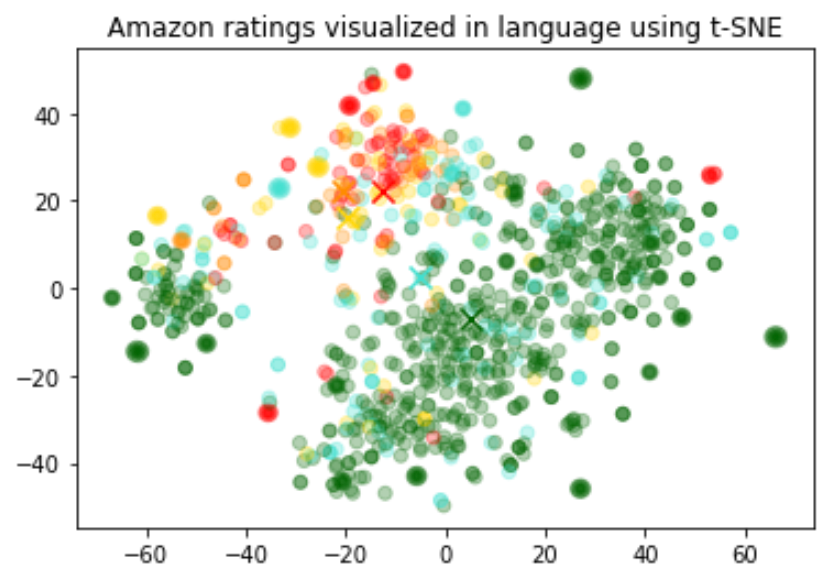
从可视化结果来看,数据大致形成了 3 个簇,其中一个主要由负面评论组成。
1
2
3
4
5
6
7
8
9
10
11
12
13
14
15
16
17
18
19
20
21
22
23import numpy as np
import pandas as pd
from sklearn.manifold import TSNE
import matplotlib.pyplot as plt
import matplotlib

df = pd.read_csv("output/embedded_1k_reviews.csv")
matrix = np.array(df.ada_embedding.apply(eval).to_list())

# Create a t-SNE model and transform the data
tsne = TSNE(
    n_components=2, perplexity=15, random_state=42, init="random", learning_rate=200
)
vis_dims = tsne.fit_transform(matrix)

colors = ["red", "darkorange", "gold", "turquoise", "darkgreen"]
x = [x for x, y in vis_dims]
y = [y for x, y in vis_dims]
color_indices = df.Score.values - 1

colormap = matplotlib.colors.ListedColormap(colors)
plt.scatter(x, y, c=color_indices, cmap=colormap, alpha=0.3)
plt.title("Amazon ratings visualized in language using t-SNE")在机器学习模型中,嵌入向量可用作通用的自由文本特征编码器。如果相关输入中有一部分是自由文本,那么引入嵌入向量就能提升任何机器学习模型的性能。嵌入向量也可用作机器学习模型中的类别特征编码器。当类别变量的名称具有实际含义且数量众多时,例如职位名称,这种方法最有价值。对于这项任务,相似度嵌入向量通常比搜索嵌入向量表现更好。
我们观察到,嵌入向量的表示通常非常丰富,信息密度也很高。例如,使用 SVD 或 PCA 降低输入维度时,即使仅降低 10%,通常也会导致特定下游任务的性能下降。
这段代码将数据划分为训练集和测试集,供接下来的回归和分类这两个使用场景使用。
1
2
3
4
5from sklearn.model_selection import train_test_split

X_train, X_test, y_train, y_test = train_test_split(
    list(df.ada_embedding.values), df.Score, test_size=0.2, random_state=42
)
使用嵌入向量特征进行回归
嵌入向量提供了一种简洁有效的数值预测方法。在此示例中,我们根据评论文本预测评论者给出的星级。由于嵌入向量包含丰富的语义信息,即使评论数量很少,也能得到不错的预测结果。
我们假设评分是 1 到 5 之间的连续变量,并允许算法预测任意浮点值。机器学习算法会尽量缩小预测值与真实评分之间的差距,最终实现了 0.39 的平均绝对误差,也就是说,预测结果的平均偏差不到半颗星。
1
2
3
4
5from sklearn.ensemble import RandomForestRegressor

rfr = RandomForestRegressor(n_estimators=100)
rfr.fit(X_train, y_train)
preds = rfr.predict(X_test)这次,我们不再让算法预测 1 到 5 之间的任意数值,而是尝试将评论归入从 1 星到 5 星的 5 个类别,以确定具体星级。
训练后,模型对 1 星和 5 星评论的预测明显优于情感表达更微妙的评论(2 至 4 星),这可能是因为前者的情感表达更极端。
1
2
3
4
5
6from sklearn.ensemble import RandomForestClassifier
from sklearn.metrics import classification_report, accuracy_score

clf = RandomForestClassifier(n_estimators=100)
clf.fit(X_train, y_train)
preds = clf.predict(X_test)无需任何带标签的训练数据,我们就能使用嵌入向量进行零样本分类。对于每个类别,我们为其名称或简短描述生成嵌入向量。要以零样本方式对新文本进行分类,我们会将其嵌入向量与所有类别的嵌入向量进行比较,并将相似度最高的类别作为预测结果。
1
2
3
4
5
6
7
8
9
10
11
12
13
14
15
16
17
18
19
20
21import OpenAI from "openai";

const client = new OpenAI();
const labels = ["negative", "positive"];

const { data } = await client.embeddings.create({
  model: "text-embedding-3-small",
  input: [...labels, "The coffee arrived quickly and tastes great."],
});

const review = data.at(-1).embedding;
const similarity = (embedding) => {
  const dotProduct = embedding.reduce(
    (total, value, index) => total + value * review[index],
    0
  );
  return dotProduct / (Math.hypot(...embedding) * Math.hypot(...review));
};

const [negative, positive] = data.map(({ embedding }) => similarity(embedding));
console.log(positive > negative ? "positive" : "negative");
1
2
3
4
5
6
7
8
9
10
11
12
13
14
15
16
17
18df = df[df.Score != 3]
df["sentiment"] = df.Score.replace(
{1: "negative", 2: "negative", 4: "positive", 5: "positive"}
)
labels = ["negative", "positive"]
label_embeddings = [get_embedding(label, model=model) for label in labels]
def label_score(review_embedding, label_embeddings):
return cosine_similarity(review_embedding, label_embeddings[1]) - cosine_similarity(
review_embedding, label_embeddings[0]
)
prediction = (
"positive" if label_score(get_embedding("Sample Review", model=model), label_embeddings) > 0 else "negative"
)1
2
3
4
5
6
7
8
9
10
11
12
13
14
15
16
17
18
19import com.openai.client.OpenAIClient;
import com.openai.client.okhttp.OpenAIOkHttpClient;
import com.openai.models.embeddings.EmbeddingCreateParams;
import java.util.List;
var embeddings =
client
.embeddings()
.create(
EmbeddingCreateParams.builder()
.model("text-embedding-3-small")
.inputOfArrayOfStrings(List.of("negative", "positive", "Sample Review"))
.build())
.data();
List<Float> review = embeddings.get(2).embedding();
double negative = cosineSimilarity(review, embeddings.get(0).embedding());
double positive = cosineSimilarity(review, embeddings.get(1).embedding());
System.out.println(positive > negative ? "positive" : "negative");1
2
3
4
5
6
7
8
9
10
11
12
13
14
15
16
17
18
19
20
21
22require "openai"
client = OpenAI::Client.new
labels = ["negative", "positive"]
response = client.embeddings.create(
model: "text-embedding-3-small",
input: labels + ["The coffee arrived quickly and tastes great."]
)
review = response.data.fetch(-1).embedding
similarity = lambda do |embedding|
dot_product = embedding.zip(review).sum { |value, review_value| value * review_value }
magnitude = Math.sqrt(embedding.sum { |value| value**2 })
review_magnitude = Math.sqrt(review.sum { |value| value**2 })
dot_product / (magnitude * review_magnitude)
end
negative, positive = response.data.first(2).map do |embedding|
similarity.call(embedding.embedding)
end
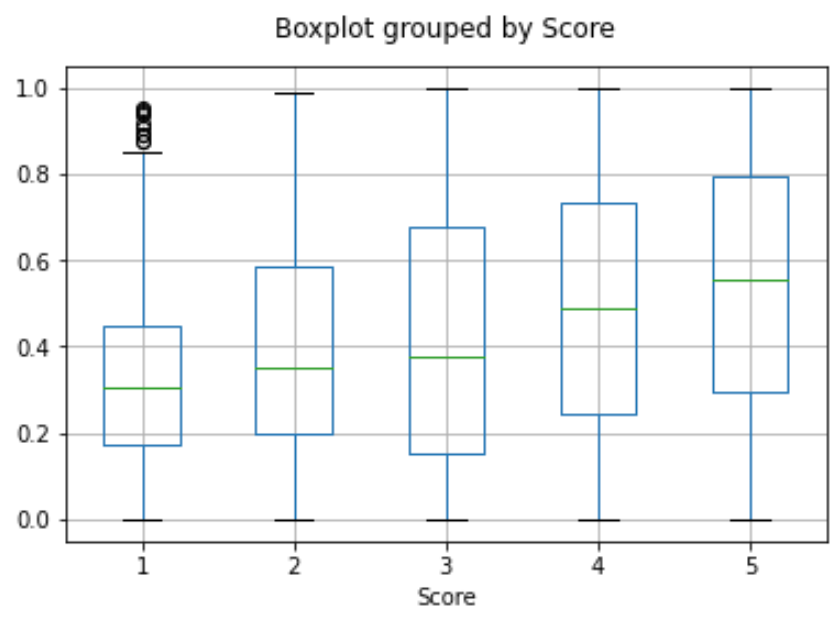
puts((positive > negative) ? "positive" : "negative")对用户所有评论的嵌入向量取平均值,即可得到该用户的嵌入向量。同样,对某个产品所有评论的嵌入向量取平均值,即可得到该产品的嵌入向量。为了展示这种方法的实用性,我们使用了一个包含 5 万条评论的子集,以涵盖每位用户和每个产品的更多评论。
我们在独立测试集上评估这些嵌入向量的实用性,并绘图展示用户与产品嵌入向量的相似度随评分的变化。有趣的是,采用这种方法,即使用户尚未收到产品,我们也能预测他们是否会喜欢该产品,且效果优于随机猜测。
user_embeddings = df.groupby("UserId").ada_embedding.apply(np.mean)
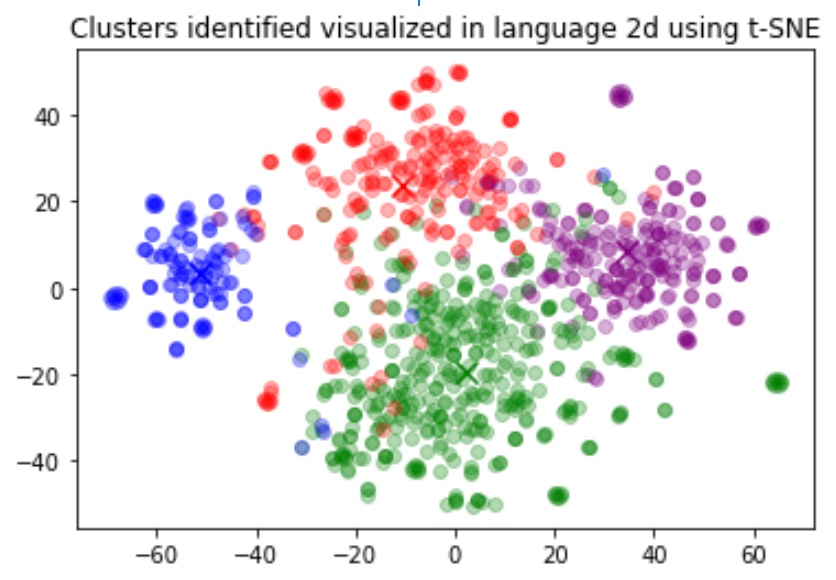
prod_embeddings = df.groupby("ProductId").ada_embedding.apply(np.mean)聚类是理解大量文本数据的一种方法。嵌入向量为每段文本提供了具有语义意义的向量表示,因此很适合这项任务。通过聚类,我们可以用无监督的方式发现数据集中隐藏的分组。
在此示例中,我们发现了四个不同的簇:一个主要涉及狗粮,一个主要包含负面评论,另外两个主要包含正面评论。
1
2
3
4
5
6
7
8
9import numpy as np
from sklearn.cluster import KMeans

matrix = np.vstack(df.ada_embedding.values)
n_clusters = 4

kmeans = KMeans(n_clusters=n_clusters, init="k-means++", random_state=42)
kmeans.fit(matrix)
df["Cluster"] = kmeans.labels_
常见问题
如何在生成嵌入向量之前确定字符串的 Token 数量?
在 Python 中,您可以使用 OpenAI 的分词器 tiktoken 将字符串拆分为 Token。
示例代码:
1
2
3
4
5
6
7
8
9
10
11import tiktoken


def num_tokens_from_string(string: str, encoding_name: str) -> int:
    """Returns the number of tokens in a text string."""
    encoding = tiktoken.get_encoding(encoding_name)
    num_tokens = len(encoding.encode(string))
    return num_tokens


num_tokens_from_string("tiktoken is great!", "cl100k_base")
对于 text-embedding-3-small 等第三代嵌入模型,请使用 cl100k_base 编码。
更多详情和示例代码,请参阅 OpenAI Cookbook 指南如何使用 tiktoken 统计 Token 数量。
如何快速检索 K 个最近邻嵌入向量?
要在大量向量中快速搜索,我们建议使用向量数据库。您可以在 GitHub 上的 Cookbook 中找到结合使用向量数据库和 OpenAI API 的示例。
应该使用哪种距离函数?
我们推荐使用余弦相似度。通常,选择哪种距离函数对结果的影响不大。
OpenAI 嵌入向量已归一化为长度 1,这意味着:
- 只需计算点积即可得到余弦相似度,计算速度会略快一些
- 使用余弦相似度和欧氏距离会得到完全相同的排序
可以在网上分享我的嵌入向量吗?
可以,客户拥有其向我们模型提供的输入及模型生成的输出,嵌入向量也不例外。您有责任确保输入到我们 API 的内容不违反任何适用法律或我们的使用条款。
V3 嵌入模型了解近期事件吗?
不了解。text-embedding-3-large 和 text-embedding-3-small 模型不具备 2021 年 9 月之后发生的事件的相关知识。与文本生成模型相比,这一限制对嵌入模型的影响通常较小,但在某些边缘情况下可能会降低性能。