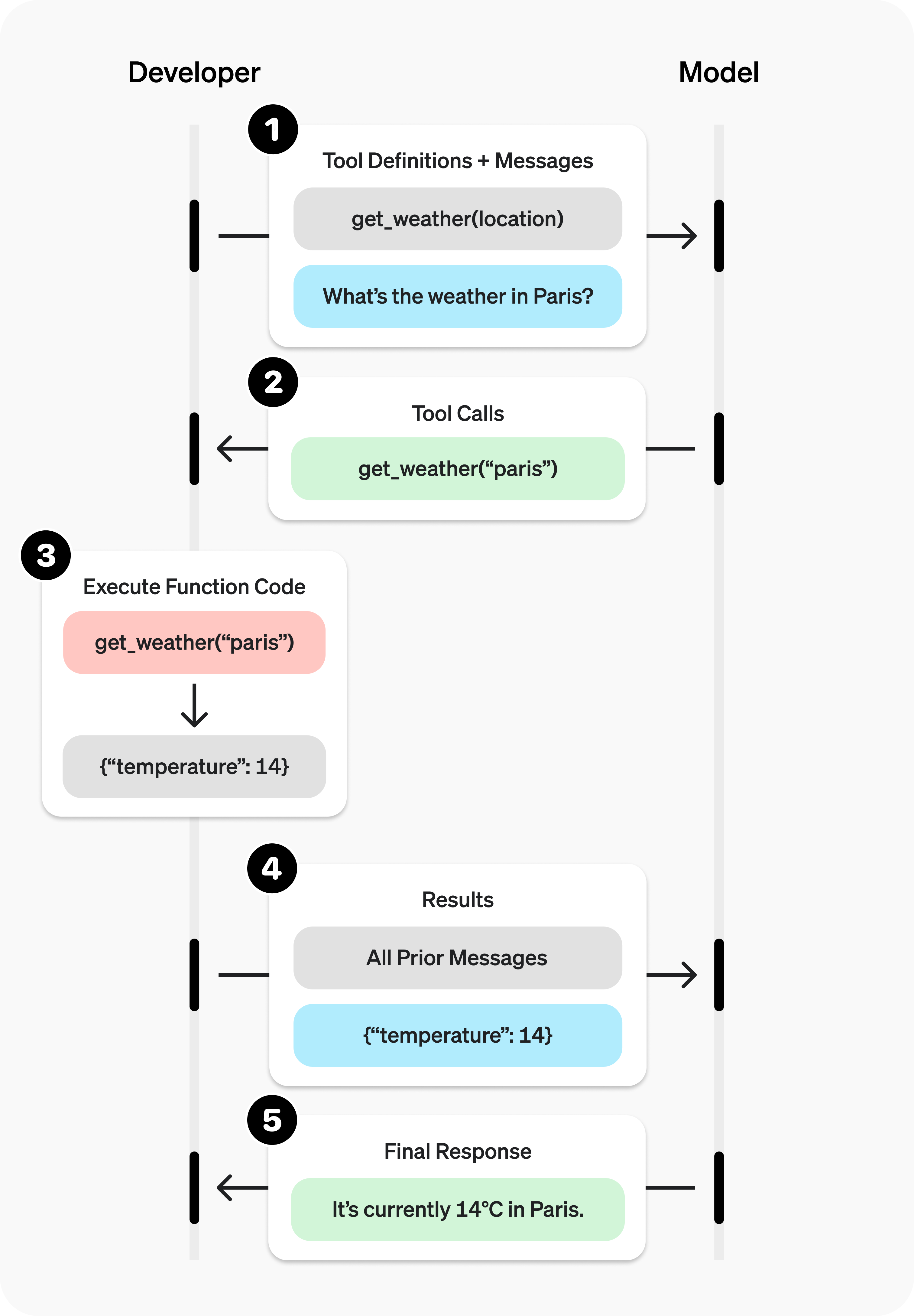
函数调用 (也称为 工具调用 )为 OpenAI 模型提供了一种强大而灵活的方式,使其能够与外部系统交互,并访问训练数据之外的数据。本指南介绍如何将模型连接到您的应用程序提供的数据和操作。我们将演示如何使用函数工具(通过 JSON 模式定义),以及使用自由格式文本作为输入和输出的自定义工具。
对于 Agents API 会话,请使用函数 来注册函数并处理会话操作请求。本指南中的示例展示了与 Responses API 和 Chat Completions 的集成。
如果您的应用程序包含大量函数或庞大的模式,可以将函数调用与工具搜索 结合使用,推迟加载不常用的工具,仅在模型需要时才加载。只有 gpt-5.4 及更新的模型支持 tool_search。
GPT-6 Astra 需要使用 Responses API 进行工具调用。为确保兼容性,Chat Completions
示例使用 GPT-5.6。如需更新现有的
集成,请参阅迁移
指南 。
首先,我们来了解几个与工具调用有关的关键术语。统一对这些术语的理解后,我们将通过一些实际示例演示如何进行工具调用。
工具:我们提供给模型的功能 从概念上说, 函数 或 工具 是指我们告知模型可以使用的某项功能。模型在生成提示的响应时,可能会判断需要工具提供的数据或功能,才能遵循提示中的指令。
您可以让模型使用工具来完成以下操作:
获取某个地点今天的天气
根据指定的用户 ID 访问账户详情
为货物丢失的订单办理退款
或者在响应提示时,获取您希望模型了解的任何其他信息,或执行您希望它完成的任何其他操作。
通过 API 请求向模型发送提示时,我们可以附上一份工具列表,供模型考虑使用。例如,如果希望模型能够回答世界上某个地点的当前天气,我们可以为其提供一个以 location 为参数的 get_weather 工具。
工具调用:模型发出的工具使用请求 函数调用 或 工具调用 是模型可能返回的一种特殊响应:模型分析提示后,判断需要调用我们提供的某个工具,才能遵循提示中的指令。
如果模型在 API 请求中收到“巴黎的天气怎么样?”这样的提示,它可能会返回对 get_weather 工具的调用,并将 location 参数设为 Paris。
工具调用输出:我们为模型生成的输出 函数调用输出 或 工具调用输出 是指工具根据模型工具调用中的输入生成的响应。工具调用输出可以是结构化的 JSON,也可以是纯文本,并且应包含对模型某次具体工具调用的引用(在后面的示例中通过 call_id 引用)。
继续以天气查询为例,完整流程如下:
模型可以使用以 location 为参数的 get_weather 工具 。
对于“巴黎的天气怎么样?”这样的提示,模型会返回一个 工具调用 ,其中包含值为 Paris 的 location 参数
工具调用输出 可能返回 JSON 对象(例如 {"temperature": "25", "unit": "C"},表示当前温度为 25 度)、图像内容 或文件内容 。 然后,我们将工具定义、原始提示、模型的工具调用和工具调用输出一起发回模型,最终获得如下文本响应:
The weather in Paris today is 25C. 函数与工具的区别
函数是一种通过 JSON 模式定义的特定工具。函数定义使模型能够将数据传递给您的应用程序,然后由应用程序中的代码访问数据或执行模型建议的操作。
除了函数工具,还有使用自由格式文本作为输入和输出的自定义工具(本指南中也会介绍)。
OpenAI 平台还提供内置工具 。这些工具让模型能够搜索网页 、执行代码 、使用 MCP 服务器 的功能等。
工具调用是您的应用程序与模型通过 OpenAI API 进行的多步骤对话。其流程大致分为五个步骤:
向模型发送请求,并提供可供其调用的工具
接收模型返回的工具调用
使用工具调用中的输入,在应用程序端执行代码
将工具输出包含在第二次请求中,发送给模型
接收模型的最终响应(或更多工具调用)
使用 Responses 时,您的应用程序可以根据任务需要持续执行这一流程,完成任意次数的工具调用。如果您希望使用一个框架来封装这一循环中重复的编排工作,请参阅 Responses API 与 Agents SDK 的对比 。
我们来看一个 get_horoscope 函数的端到端工具调用流程,该函数用于获取某个星座的每日运势。
1
2
3
4
5
6
7
8
9
10
11
12
13
14
15
16
17
18
19
20
21
22
23
24
25
26
27
28
29
30
31
32
33
34
35
36
37
38
39
40
41
42
43
44
45
46
47
48
49
50
51
52
53
54
55
56
57
58
59
60
61
62
63
64
65
66
67
68
69
70 import OpenAI from "openai";
const openai = new OpenAI();
// 1. Define a list of callable tools for the model
const tools = [
{
type: "function",
function: {
name: "get_horoscope",
description: "Get today's horoscope for an astrological sign.",
parameters: {
type: "object",
properties: {
sign: {
type: "string",
description: "An astrological sign like Taurus or Aquarius",
},
},
required: ["sign"],
additionalProperties: false,
},
strict: true,
},
},
];
function getHoroscope(sign) {
return `${sign}: Next Tuesday you will befriend a baby otter.`;
}
const messages = [
{ role: "user", content: "What is my horoscope? I am an Aquarius." },
];
// 2. Prompt the model with tools defined
let response = await openai.chat.completions.create({
model: "gpt-5.6",
messages,
tools,
});
messages.push(response.choices[0].message);
for (const toolCall of response.choices[0].message.tool_calls ?? []) {
if (toolCall.type !== "function") continue;
if (toolCall.function.name === "get_horoscope") {
// 3. Execute the function logic for get_horoscope
const args = JSON.parse(toolCall.function.arguments);
const horoscope = getHoroscope(args.sign);
// 4. Provide function call results to the model
messages.push({
role: "tool",
tool_call_id: toolCall.id,
content: JSON.stringify({ horoscope }),
});
}
}
response = await openai.chat.completions.create({
model: "gpt-5.6",
messages,
tools,
});
// 5. The model should be able to give a response!
console.log(response.choices[0].message.content); 1
2
3
4
5
6
7
8
9
10
11
12
13
14
15
16
17
18
19
20
21
22
23
24
25
26
27
28
29
30
31
32
33
34
35
36
37
38
39
40
41
42
43
44
45
46
47
48
49
50
51
52
53
54
55
56
57
58
59
60
61
62
63
64
65
66
67 from openai import OpenAI
import json
client = OpenAI()
# 1. Define a list of callable tools for the model
tools = [
{
"type" : "function" ,
"function" : {
"name" : "get_horoscope" ,
"description" : "Get today's horoscope for an astrological sign." ,
"parameters" : {
"type" : "object" ,
"properties" : {
"sign" : {
"type" : "string" ,
"description" : "An astrological sign like Taurus or Aquarius" ,
},
},
"required" : [ "sign" ],
"additionalProperties" : False ,
},
"strict" : True ,
},
},
]
def get_horoscope (sign):
return f " { sign } : Next Tuesday you will befriend a baby otter."
messages = [{ "role" : "user" , "content" : "What is my horoscope? I am an Aquarius." }]
# 2. Prompt the model with tools defined
response = client.chat.completions.create(
model = "gpt-5.6" ,
messages = messages,
tools = tools,
)
messages.append(response.choices[ 0 ].message)
for tool_call in response.choices[ 0 ].message.tool_calls or []:
if tool_call.function.name == "get_horoscope" :
# 3. Execute the function logic for get_horoscope
args = json.loads(tool_call.function.arguments)
horoscope = get_horoscope(args[ "sign" ])
# 4. Provide function call results to the model
messages.append(
{
"role" : "tool" ,
"tool_call_id" : tool_call.id,
"content" : json.dumps({ "horoscope" : horoscope}),
}
)
response = client.chat.completions.create(
model = "gpt-5.6" ,
messages = messages,
tools = tools,
)
# 5. The model should be able to give a response!
print (response.choices[ 0 ].message.content) 1
2
3
4
5
6
7
8
9
10
11
12
13
14
15
16
17
18
19
20
21
22
23
24
25
26
27
28
29
30
31
32
33
34
35
36
37
38
39
40
41
42
43
44
45
46
47
48
49
50
51
52
53
54
55
56
57
58
59
60
61
62
63
64
65
66
67
68
69 package main
import (
"context"
"encoding/json"
"fmt"
"github.com/openai/openai-go/v3"
"github.com/openai/openai-go/v3/shared"
)
func main() {
client := openai.NewClient()
tool := horoscopeChatTool()
messages := []openai.ChatCompletionMessageParamUnion{
openai.UserMessage("What is my horoscope? I am an Aquarius."),
}
completion, err := client.Chat.Completions.New(context.Background(), openai.ChatCompletionNewParams{
Model: "gpt-5.6", Messages: messages, Tools: []openai.ChatCompletionToolUnionParam{tool},
ReasoningEffort: shared.ReasoningEffortNone,
})
if err != nil {
panic(err)
}
messages = append(messages, completion.Choices[0].Message.ToParam())
for _, call := range completion.Choices[0].Message.ToolCalls {
if call.Type != "function" || call.Function.Name != "get_horoscope" {
continue
}
var arguments struct {
Sign string `json:"sign"`
}
if err := json.Unmarshal([]byte(call.Function.Arguments), &arguments); err != nil {
panic(err)
}
horoscope := getHoroscope(arguments.Sign)
messages = append(messages, openai.ToolMessage(horoscope, call.ID))
}
completion, err = client.Chat.Completions.New(context.Background(), openai.ChatCompletionNewParams{
Model: "gpt-5.6", Messages: messages, Tools: []openai.ChatCompletionToolUnionParam{tool},
ReasoningEffort: shared.ReasoningEffortNone,
})
if err != nil {
panic(err)
}
fmt.Println(completion.Choices[0].Message.Content)
}
func horoscopeChatTool() openai.ChatCompletionToolUnionParam {
parameters := map[string]any{
"type": "object",
"properties": map[string]any{
"sign": map[string]any{"type": "string", "description": "An astrological sign like Taurus or Aquarius"},
},
"required": []string{"sign"},
"additionalProperties": false,
}
return openai.ChatCompletionToolUnionParam{OfFunction: &openai.ChatCompletionFunctionToolParam{
Function: shared.FunctionDefinitionParam{
Name: "get_horoscope", Description: openai.String("Get today's horoscope for an astrological sign."), Parameters: parameters, Strict: openai.Bool(true),
},
}}
}
func getHoroscope(sign string) string {
return fmt.Sprintf("%s: Next Tuesday you will befriend a baby otter.", sign)
} 1
2
3
4
5
6
7
8
9
10
11
12
13
14
15
16
17
18
19
20
21
22
23
24
25
26
27
28
29
30
31
32
33
34
35
36
37
38
39
40
41
42
43
44
45
46
47
48
49
50
51
52
53
54
55
56
57
58
59 import com.openai.client.OpenAIClient;
import com.openai.client.okhttp.OpenAIOkHttpClient;
import com.openai.core.JsonValue;
import com.openai.models.FunctionDefinition;
import com.openai.models.FunctionParameters;
import com.openai.models.chat.completions.ChatCompletionCreateParams;
import com.openai.models.chat.completions.ChatCompletionToolMessageParam;
import java.util.List;
import java.util.Map;
FunctionDefinition horoscope =
FunctionDefinition.builder()
.name("get_horoscope")
.description("Get today's horoscope for an astrological sign.")
.parameters(
FunctionParameters.builder()
.putAdditionalProperty("type", JsonValue.from("object"))
.putAdditionalProperty(
"properties",
JsonValue.from(
Map.of(
"sign",
Map.of(
"type", "string",
"description",
"An astrological sign like Taurus or Aquarius"))))
.putAdditionalProperty("required", JsonValue.from(List.of("sign")))
.putAdditionalProperty("additionalProperties", JsonValue.from(false))
.build())
.strict(true)
.build();
ChatCompletionCreateParams params =
ChatCompletionCreateParams.builder()
.model("gpt-5.6")
.addUserMessage("What is my horoscope? I am an Aquarius.")
.addFunctionTool(horoscope)
.build();
var assistant = client.chat().completions().create(params).choices().get(0).message();
var calls = assistant.toolCalls().orElseThrow(() -> new IllegalStateException("No tool calls"));
var followUp = params.toBuilder().addMessage(assistant);
record HoroscopeArguments(String sign) {}
for (var toolCall : calls) {
var function = toolCall.asFunction();
if (function.function().name().equals("get_horoscope")) {
String sign = function.function().arguments(HoroscopeArguments.class).sign();
followUp.addMessage(
ChatCompletionToolMessageParam.builder()
.toolCallId(function.id())
.content(sign + ": Embrace an unexpected opportunity today.")
.build());
}
}
client.chat().completions().create(followUp.build()).choices().stream()
.flatMap(choice -> choice.message().content().stream())
.forEach(System.out::println); 1
2
3
4
5
6
7
8
9
10
11
12
13
14
15
16
17
18
19
20
21
22
23
24
25
26
27
28
29
30
31
32
33
34
35
36
37
38
39
40
41
42
43
44
45
46
47
48
49
50
51
52
53
54
55
56
57
58
59
60 require "json"
require "openai"
client = OpenAI::Client.new
messages = [
{
role: :user,
content: "What is my horoscope? I am an Aquarius."
}
]
tools = [
{
type: :function,
function: {
name: "get_horoscope",
description: "Get today's horoscope for an astrological sign.",
parameters: {
type: :object,
properties: { sign: { type: :string } },
required: ["sign"],
additionalProperties: false
},
strict: true
}
}
]
first_completion = client.chat.completions.create(
model: "gpt-5.6",
messages: messages,
tools: tools
)
assistant_message = first_completion.choices.fetch(0).message
tool_calls = assistant_message.tool_calls || []
raise "The model did not call get_horoscope" if tool_calls.empty?
messages << {
role: :assistant,
content: assistant_message.content,
tool_calls: tool_calls.map(&:to_h)
}
tool_calls.each do |tool_call|
next unless tool_call.is_a?(OpenAI::Models::Chat::ChatCompletionMessageFunctionToolCall)
next unless tool_call.function.name == "get_horoscope"
arguments = JSON.parse(tool_call.function.arguments, symbolize_names: true)
sign = arguments.fetch(:sign)
messages << {
role: :tool,
tool_call_id: tool_call.id,
content: "#{sign}: Embrace an unexpected opportunity today."
}
end
final_completion = client.chat.completions.create(
model: "gpt-5.6",
messages: messages,
tools: tools
)
puts(final_completion.choices.fetch(0).message.content)
1
2
3
4
5
6
7
8
9
10
11
12
13
14
15
16
17
18
19
20
21
22
23
24
25
26
27
28
29
30
31
32
33
34
35
36
37
38
39
40
41
42
43
44
45
46
47
48
49
50
51
52
53
54
55
56
57
58
59
60
61
62
63
64
65
66
67
68
69
70
71
72
73
74
75
76
77 import OpenAI from "openai";
import { toResponseInputItems } from "openai/lib/responses/ResponseInputItems";
const openai = new OpenAI();
// 1. Define a list of callable tools for the model
const tools = [
{
type: "function",
name: "get_horoscope",
description: "Get today's horoscope for an astrological sign.",
parameters: {
type: "object",
properties: {
sign: {
type: "string",
description: "An astrological sign like Taurus or Aquarius",
},
},
required: ["sign"],
additionalProperties: false,
},
strict: true,
},
];
function getHoroscope(sign) {
return `${sign}: Next Tuesday you will befriend a baby otter.`;
}
// Create a running input list we will add to over time
let input = [
{ role: "user", content: "What is my horoscope? I am an Aquarius." },
];
// 2. Prompt the model with tools defined
let response = await openai.responses.create({
model: "gpt-6-astra",
tools,
input,
});
// Preserve model output for the next turn
input.push(...toResponseInputItems(response.output));
for (const item of response.output) {
if (item.type !== "function_call") continue;
if (item.name === "get_horoscope") {
// 3. Execute the function logic for get_horoscope
const { sign } = JSON.parse(item.arguments);
const horoscope = getHoroscope(sign);
// 4. Provide function call results to the model
input.push({
type: "function_call_output",
call_id: item.call_id,
output: horoscope,
});
}
}
console.log("Final input:");
console.log(JSON.stringify(input, null, 2));
response = await openai.responses.create({
model: "gpt-6-astra",
instructions: "Respond only with a horoscope generated by a tool.",
tools,
input,
});
// 5. The model should be able to give a response!
console.log("Final output:");
console.log(response.output_text); 1
2
3
4
5
6
7
8
9
10
11
12
13
14
15
16
17
18
19
20
21
22
23
24
25
26
27
28
29
30
31
32
33
34
35
36
37
38
39
40
41
42
43
44
45
46
47
48
49
50
51
52
53
54
55
56
57
58
59
60
61
62
63
64
65
66
67
68
69
70
71
72 from openai import OpenAI
import json
client = OpenAI()
# 1. Define a list of callable tools for the model
tools = [
{
"type" : "function" ,
"name" : "get_horoscope" ,
"description" : "Get today's horoscope for an astrological sign." ,
"parameters" : {
"type" : "object" ,
"properties" : {
"sign" : {
"type" : "string" ,
"description" : "An astrological sign like Taurus or Aquarius" ,
},
},
"required" : [ "sign" ],
},
},
]
def get_horoscope (sign):
return f " { sign } : Next Tuesday you will befriend a baby otter."
# Create a running input list we will add to over time
input_list = [{ "role" : "user" , "content" : "What is my horoscope? I am an Aquarius." }]
# 2. Prompt the model with tools defined
response = client.responses.create(
model = "gpt-6-astra" ,
tools = tools,
input = input_list,
)
# Save function call outputs for subsequent requests
input_list += response.output
for item in response.output:
if item.type == "function_call" :
if item.name == "get_horoscope" :
# 3. Execute the function logic for get_horoscope
sign = json.loads(item.arguments)[ "sign" ]
horoscope = get_horoscope(sign)
# 4. Provide function call results to the model
input_list.append(
{
"type" : "function_call_output" ,
"call_id" : item.call_id,
"output" : horoscope,
}
)
print ( "Final input:" )
print (input_list)
response = client.responses.create(
model = "gpt-6-astra" ,
instructions = "Respond only with a horoscope generated by a tool." ,
tools = tools,
input = input_list,
)
# 5. The model should be able to give a response!
print ( "Final output:" )
print (response.model_dump_json( indent = 2 ))
print ( " \n " + response.output_text) 1
2
3
4
5
6
7
8
9
10
11
12
13
14
15
16
17
18
19
20
21
22
23
24
25
26
27
28
29
30
31
32
33
34
35
36
37
38
39
40
41
42
43
44
45
46
47
48
49
50
51
52
53
54
55
56
57
58
59
60
61
62
63
64
65
66
67
68
69
70
71
72
73
74
75 package main
import (
"context"
"encoding/json"
"fmt"
"github.com/openai/openai-go/v3"
"github.com/openai/openai-go/v3/responses"
)
func main() {
client := openai.NewClient()
tool := horoscopeResponseTool()
response, err := client.Responses.New(context.Background(), responses.ResponseNewParams{
Model: "gpt-6-astra",
Input: responses.ResponseNewParamsInputUnion{OfString: openai.String("What is my horoscope? I am an Aquarius.")},
Tools: []responses.ToolUnionParam{tool},
})
if err != nil {
panic(err)
}
var functionOutput responses.ResponseInputItemUnionParam
for _, output := range response.Output {
if output.Type != "function_call" {
continue
}
call := output.AsFunctionCall()
if call.Name != "get_horoscope" {
continue
}
var arguments struct {
Sign string `json:"sign"`
}
if err := json.Unmarshal([]byte(call.Arguments), &arguments); err != nil {
panic(err)
}
functionOutput = responses.ResponseInputItemParamOfFunctionCallOutput(getHoroscope(arguments.Sign))
functionOutput.OfFunctionCallOutput.CallID = openai.String(call.CallID)
}
if functionOutput.OfFunctionCallOutput == nil {
panic("the model did not call get_horoscope")
}
response, err = client.Responses.New(context.Background(), responses.ResponseNewParams{
Model: "gpt-6-astra",
PreviousResponseID: openai.String(response.ID),
Instructions: openai.String("Respond only with a horoscope generated by a tool."),
Input: responses.ResponseNewParamsInputUnion{OfInputItemList: responses.ResponseInputParam{functionOutput}},
Tools: []responses.ToolUnionParam{tool},
})
if err != nil {
panic(err)
}
fmt.Println(response.OutputText())
}
func horoscopeResponseTool() responses.ToolUnionParam {
parameters := map[string]any{
"type": "object",
"properties": map[string]any{
"sign": map[string]any{"type": "string", "description": "An astrological sign like Taurus or Aquarius"},
},
"required": []string{"sign"},
"additionalProperties": false,
}
tool := responses.ToolParamOfFunction("get_horoscope", parameters, true)
tool.OfFunction.Description = openai.String("Get today's horoscope for an astrological sign.")
return tool
}
func getHoroscope(sign string) string {
return fmt.Sprintf("%s: Next Tuesday you will befriend a baby otter.", sign)
} 1
2
3
4
5
6
7
8
9
10
11
12
13
14
15
16
17
18
19
20
21
22
23
24
25
26
27
28
29
30
31
32
33
34
35
36
37
38
39
40
41
42
43
44
45
46
47
48
49
50
51
52
53
54
55
56
57
58
59
60
61
62
63
64
65
66
67
68
69
70
71 import com.openai.client.OpenAIClient;
import com.openai.client.okhttp.OpenAIOkHttpClient;
import com.openai.core.JsonValue;
import com.openai.models.responses.FunctionTool;
import com.openai.models.responses.ResponseCreateParams;
import com.openai.models.responses.ResponseInputItem;
import java.util.List;
import java.util.Map;
FunctionTool horoscope =
FunctionTool.builder()
.name("get_horoscope")
.description("Get today's horoscope for an astrological sign.")
.parameters(
FunctionTool.Parameters.builder()
.putAdditionalProperty("type", JsonValue.from("object"))
.putAdditionalProperty(
"properties",
JsonValue.from(
Map.of(
"sign",
Map.of(
"type", "string",
"description",
"An astrological sign like Taurus or Aquarius"))))
.putAdditionalProperty("required", JsonValue.from(List.of("sign")))
.putAdditionalProperty("additionalProperties", JsonValue.from(false))
.build())
.strict(true)
.build();
var firstResponse =
client
.responses()
.create(
ResponseCreateParams.builder()
.model("gpt-6-astra")
.input("What is my horoscope? I am an Aquarius.")
.addTool(horoscope)
.build());
var functionCall =
firstResponse.output().stream()
.flatMap(item -> item.functionCall().stream())
.filter(call -> call.name().equals("get_horoscope"))
.findFirst()
.orElseThrow(() -> new IllegalStateException("The model did not call get_horoscope"));
record HoroscopeArguments(String sign) {}
String sign = functionCall.arguments(HoroscopeArguments.class).sign();
ResponseCreateParams followUp =
ResponseCreateParams.builder()
.model("gpt-6-astra")
.instructions("Respond only with a horoscope generated by a tool.")
.previousResponseId(firstResponse.id())
.inputOfResponse(
List.of(
ResponseInputItem.ofFunctionCallOutput(
ResponseInputItem.FunctionCallOutput.builder()
.callId(functionCall.callId())
.output(sign + ": Embrace an unexpected opportunity today.")
.build())))
.addTool(horoscope)
.build();
client.responses().create(followUp).output().stream()
.flatMap(item -> item.message().stream())
.flatMap(message -> message.content().stream())
.flatMap(content -> content.outputText().stream())
.forEach(text -> System.out.println(text.text())); 1
2
3
4
5
6
7
8
9
10
11
12
13
14
15
16
17
18
19
20
21
22
23
24
25
26
27
28
29
30
31
32
33
34
35
36
37
38
39
40
41
42
43
44
45
46
47
48 require "json"
require "openai"
client = OpenAI::Client.new
tools = [
{
type: :function,
name: "get_horoscope",
description: "Get today's horoscope for an astrological sign.",
parameters: {
type: :object,
properties: { sign: { type: :string } },
required: ["sign"],
additionalProperties: false
},
strict: true
}
]
first_response = client.responses.create(
model: "gpt-6-astra",
input: "What is my horoscope? I am an Aquarius.",
tools: tools
)
function_call = first_response.output.find do |item|
item.is_a?(OpenAI::Models::Responses::ResponseFunctionToolCall) &&
item.name == "get_horoscope"
end
unless function_call.is_a?(OpenAI::Models::Responses::ResponseFunctionToolCall)
raise "The model did not call get_horoscope"
end
arguments = JSON.parse(function_call.arguments, symbolize_names: true)
sign = arguments.fetch(:sign)
response = client.responses.create(
model: "gpt-6-astra",
previous_response_id: first_response.id,
input: [
{
type: :function_call_output,
call_id: function_call.call_id,
output: "#{sign}: Embrace an unexpected opportunity today."
}
],
tools: tools
)
puts(response.output_text)
请注意,对于 GPT-5 或 o4-mini 等推理模型,如果模型响应中包含工具调用,
其中返回的所有推理项也必须与工具调用输出
一起传回模型。
函数通常在每次 API 请求的 tools 参数中声明。通过工具搜索 ,您的应用程序也可以在交互的后续阶段加载延迟加载的函数。无论采用哪种方式,每个可调用函数都使用相同的模式结构。函数定义包含以下属性:
字段 说明 type此值应始终为 function name函数名称(例如 get_weather) description关于何时以及如何使用该函数的详细说明 parameters用于定义函数输入参数的 JSON 模式 strict是否对函数调用强制启用严格模式
以下是 get_weather 函数的定义示例
1 2 3 4 5 6 7 8 9 10 11 12 13 14 15 16 17 18 19 20 21 22 { "type" : "function" , "name" : "get_weather" , "description" : "Retrieves current weather for the given location." , "parameters" : { "type" : "object" , "properties" : { "location" : { "type" : "string" , "description" : "City and country e.g. Bogotá, Colombia" }, "units" : { "type" : "string" , "enum" : [ "celsius" , "fahrenheit" ], "description" : "Units the temperature will be returned in." } }, "required" : [ "location" , "units" ], "additionalProperties" : false }, "strict" : true } 由于 parameters 由 JSON 模式 定义,您可以使用其丰富的功能,例如属性类型、枚举、描述、嵌套对象和递归对象。
使用命名空间按领域对相关工具进行分组,例如 crm、billing 或 shipping。命名空间有助于组织相似的工具。当模型必须在服务于不同系统或用途的工具之间做出选择时,命名空间尤其有用,例如一个搜索工具用于您的 CRM,另一个用于您的支持工单系统。
1 2 3 4 5 6 7 8 9 10 11 12 13 14 15 16 17 18 19 20 21 22 23 24 25 26 27 28 29 30 31 32 33 34 { "type" : "namespace" , "name" : "crm" , "description" : "CRM tools for customer lookup and order management." , "tools" : [ { "type" : "function" , "name" : "get_customer_profile" , "description" : "Fetch a customer profile by customer ID." , "parameters" : { "type" : "object" , "properties" : { "customer_id" : { "type" : "string" } }, "required" : [ "customer_id" ], "additionalProperties" : false } }, { "type" : "function" , "name" : "list_open_orders" , "description" : "List open orders for a customer ID." , "defer_loading" : true , "parameters" : { "type" : "object" , "properties" : { "customer_id" : { "type" : "string" } }, "required" : [ "customer_id" ], "additionalProperties" : false } } ] } 如果您需要让模型访问庞大的工具生态系统,可以使用 tool_search 延迟加载其中部分或全部工具。tool_search 工具让模型能够搜索相关工具,将其添加到模型上下文中,然后使用它们。只有 gpt-5.4 及更新的模型支持此功能。请阅读工具搜索指南 以了解更多信息。
(可选)使用 pydantic 和 zod 进行函数调用 虽然我们建议您直接定义函数模式,但我们的 SDK 也提供了辅助方法,可以将 pydantic 和 zod 对象转换为模式。目前并非所有 pydantic 和 zod 功能都受支持。
1
2
3
4
5
6
7
8
9
10
11
12
13
14
15
16
17
18
19
20
21
22
23
24
25
26 import OpenAI from "openai";
import { z } from "zod";
import { zodFunction } from "openai/helpers/zod";
const openai = new OpenAI();
const GetWeatherParameters = z.object({
location: z.string().describe("City and country e.g. Bogotá, Colombia"),
});
const tools = [
zodFunction({ name: "getWeather", parameters: GetWeatherParameters }),
];
const messages = [
{ role: "user", content: "What's the weather like in Paris today?" },
];
const response = await openai.chat.completions.create({
model: "gpt-5.6",
messages,
tools,
store: true,
});
console.log(response.choices[0].message.tool_calls); 1
2
3
4
5
6
7
8
9
10
11
12
13
14
15
16
17
18
19 from openai import OpenAI, pydantic_function_tool
from pydantic import BaseModel, Field
client = OpenAI()
class GetWeather ( BaseModel ):
location: str = Field( ... , description = "City and country e.g. Bogotá, Colombia" )
tools = [pydantic_function_tool(GetWeather)]
completion = client.chat.completions.create(
model = "gpt-5.6" ,
messages = [{ "role" : "user" , "content" : "What's the weather like in Paris today?" }],
tools = tools,
)
print (completion.choices[ 0 ].message.tool_calls)
编写清晰、详细的函数名称、参数描述和使用说明。
明确说明函数及各个参数的用途 (以及参数格式),并说明输出的含义。在系统提示中说明何时应该使用各个函数,以及何时不应该使用。 总之,要 准确 告诉模型该做什么。提供示例和边界情况 ,尤其要针对反复出现的错误。(注意: 添加示例可能会降低推理模型 的表现。)对于延迟加载的工具,请将详细的使用说明放在函数描述中,并保持命名空间描述简洁。 命名空间帮助模型选择要加载的工具;函数描述帮助模型正确使用已加载的工具。
遵循软件工程最佳实践。
让函数的行为符合预期,使用方式直观易懂 。(最小惊讶原则 )使用枚举 和对象结构来防止无效状态。例如,toggle_light(on: bool, off: bool) 这样的定义可能导致无效调用。通过实习生测试。 如果只提供您给模型的信息,实习生或其他人能否正确使用这个函数?(如果不能,他们会向您提出什么问题?请将答案补充到提示中。)
减轻模型的负担,尽可能用代码处理。
不要让模型填写您已经知道的参数值。 例如,如果您已经从之前的菜单中获得了 order_id,就不要再包含 order_id 参数。应将 submit_refund() 定义为无参数函数,并在您的代码中传递 order_id。合并始终按顺序调用的函数。 例如,如果您总是在调用 query_location() 后调用 mark_location(),只需将标记逻辑移入查询函数中。
减少初始可用函数的数量,以提高准确性。
在不同函数数量下评估实际效果 。
尽量将每轮开始时同时可用的函数数量控制在 20 个以下 ,不过这只是建议,并非硬性要求。使用工具搜索 来延迟加载工具集中体积较大或不常用的部分,而不是一开始就提供所有工具。
利用 OpenAI 资源。
在底层实现中,函数会以模型训练时学过的语法注入系统消息。这意味着可调用函数的定义会占用模型的上下文额度,并按输入 Token 计费。如果您遇到 Token 限制,我们建议减少预先加载的函数数量,尽可能缩短描述,或使用工具搜索 ,让延迟加载的工具仅在需要时加载。
如果您的工具规范中定义了大量函数,也可以使用微调 来减少 Token 用量。
当模型调用函数时,您必须执行该函数并返回结果。模型响应可能包含零次、一次或多次调用,因此最佳实践是按可能存在多次调用的情况来处理。
响应中包含一个 tool_calls 数组,其中每个条目都有一个 id(稍后用于提交函数结果),以及一个包含 name 和 JSON 编码的 arguments 的 function。
1
2
3
4
5
6
7
8
9
10
11
12
13
14
15
16
17
18
19
20
21
22
23
24
25
26 [
{
"id" : "call_12345xyz" ,
"type" : "function" ,
"function" : {
"name" : "get_weather" ,
"arguments" : "{ \" location \" : \" Paris, France \" }"
}
},
{
"id" : "call_67890abc" ,
"type" : "function" ,
"function" : {
"name" : "get_weather" ,
"arguments" : "{ \" location \" : \" Bogotá, Colombia \" }"
}
},
{
"id" : "call_99999def" ,
"type" : "function" ,
"function" : {
"name" : "send_email" ,
"arguments" : "{ \" to \" : \" bob@email.com \" , \" body \" : \" Hi bob \" }"
}
}
] 1
2
3
4
5
6
7
8
9
10
11
12
13
14
15 messages.push(completion.choices[0].message);
for (const toolCall of completion.choices[0].message.tool_calls ?? []) {
if (toolCall.type !== "function") continue;
const name = toolCall.function.name;
const args = JSON.parse(toolCall.function.arguments);
const result = await callFunction(name, args);
messages.push({
role: "tool",
tool_call_id: toolCall.id,
content: result.toString(),
});
} 1
2
3
4
5
6
7
8
9
10
11
12
13
14 messages.append(completion.choices[ 0 ].message)
for tool_call in completion.choices[ 0 ].message.tool_calls or []:
name = tool_call.function.name
args = json.loads(tool_call.function.arguments)
result = call_function(name, args)
messages.append(
{
"role" : "tool" ,
"tool_call_id" : tool_call.id,
"content" : json.dumps(result),
}
) 1
2
3
4
5
6
7
8
9
10
11
12
13
14
15
16 messages = append(messages, completion.Choices[0].Message.ToParam())
for _, toolCall := range completion.Choices[0].Message.ToolCalls {
if toolCall.Type != "function" {
continue
}
var arguments functionArguments
if err := json.Unmarshal([]byte(toolCall.Function.Arguments), &arguments); err != nil {
panic(err)
}
result, err := callFunction(toolCall.Function.Name, arguments)
if err != nil {
panic(err)
}
messages = append(messages, openai.ToolMessage(result, toolCall.ID))
} 1
2
3
4
5
6
7
8
9
10
11
12
13
14
15
16
17
18
19
20
21
22
23
24
25
26
27
28
29
30
31
32
33
34
35
36 import com.openai.client.OpenAIClient;
import com.openai.client.okhttp.OpenAIOkHttpClient;
import com.openai.core.JsonValue;
import com.openai.models.FunctionDefinition;
import com.openai.models.FunctionParameters;
import com.openai.models.chat.completions.ChatCompletionCreateParams;
import com.openai.models.chat.completions.ChatCompletionToolMessageParam;
import java.util.List;
import java.util.Map;
var assistant = client.chat().completions().create(params).choices().get(0).message();
var history = params.toBuilder().addMessage(assistant);
for (var item : assistant.toolCalls().orElseThrow()) {
var call = item.asFunction();
String output;
if (call.function().name().equals("get_weather")) {
record Coordinates(double latitude, double longitude) {}
Coordinates coordinates = call.function().arguments(Coordinates.class);
output =
JsonValue.from(
Map.of(
"latitude", coordinates.latitude(),
"longitude", coordinates.longitude(),
"temperature_c", 18))
.toString();
} else if (call.function().name().equals("send_email")) {
record Email(String to, String body) {}
Email message = call.function().arguments(Email.class);
output = JsonValue.from(Map.of("to", message.to(), "status", "sent")).toString();
} else {
throw new IllegalArgumentException("Unknown function: " + call.function().name());
}
history.addMessage(
ChatCompletionToolMessageParam.builder().toolCallId(call.id()).content(output).build());
System.out.println(call.id() + " " + output);
} 1
2
3
4
5
6
7
8
9
10
11
12
13
14
15
16
17
18 message = completion.choices.fetch(0).message
messages << message
Array(message.tool_calls).each do |tool_call|
next unless tool_call.is_a?(
OpenAI::Models::Chat::ChatCompletionMessageFunctionToolCall
)
name = tool_call.function.name
arguments = JSON.parse(tool_call.function.arguments)
result = call_function(name, arguments)
messages << {
role: :tool,
tool_call_id: tool_call.id,
content: JSON.generate(result)
}
end
响应的 output 数组中包含 type 值为 function_call 的条目。每个此类条目都有 call_id(稍后用于提交函数结果)、name 和 JSON 编码的 arguments。
1
2
3
4
5
6
7
8
9
10
11
12
13
14
15
16
17
18
19
20
21
22
23 [
{
"id" : "fc_12345xyz" ,
"call_id" : "call_12345xyz" ,
"type" : "function_call" ,
"name" : "get_weather" ,
"arguments" : "{ \" location \" : \" Paris, France \" }"
},
{
"id" : "fc_67890abc" ,
"call_id" : "call_67890abc" ,
"type" : "function_call" ,
"name" : "get_weather" ,
"arguments" : "{ \" location \" : \" Bogotá, Colombia \" }"
},
{
"id" : "fc_99999def" ,
"call_id" : "call_99999def" ,
"type" : "function_call" ,
"name" : "send_email" ,
"arguments" : "{ \" to \" : \" bob@email.com \" , \" body \" : \" Hi bob \" }"
}
] 如果您使用工具搜索 ,还可能在 function_call 之前看到 tool_search_call 和 tool_search_output 条目。函数加载后,按此处展示的方式处理函数调用即可。
1
2
3
4
5
6
7
8
9
10
11
12
13
14
15
16
17
18
19 import { toResponseInputItems } from "openai/lib/responses/ResponseInputItems";
input.push(...toResponseInputItems(response.output));
for (const toolCall of response.output) {
if (toolCall.type !== "function_call") {
continue;
}
const name = toolCall.name;
const args = JSON.parse(toolCall.arguments);
const result = await callFunction(name, args);
input.push({
type: "function_call_output",
call_id: toolCall.call_id,
output: result.toString(),
});
} 1
2
3
4
5
6
7
8
9
10
11
12
13
14
15
16
17 input_messages += response.output
for tool_call in response.output:
if tool_call.type != "function_call" :
continue
name = tool_call.name
args = json.loads(tool_call.arguments)
result = call_function(name, args)
input_messages.append(
{
"type" : "function_call_output" ,
"call_id" : tool_call.call_id,
"output" : json.dumps(result),
}
) 1
2
3
4
5
6
7
8
9
10
11
12
13
14
15
16
17
18
19 input = append(input, responseOutputAsInput(response.Output)...)
for _, output := range response.Output {
if output.Type != "function_call" {
continue
}
toolCall := output.AsFunctionCall()
var arguments functionArguments
if err := json.Unmarshal([]byte(toolCall.Arguments), &arguments); err != nil {
panic(err)
}
result, err := callFunction(toolCall.Name, arguments)
if err != nil {
panic(err)
}
toolOutput := responses.ResponseInputItemParamOfFunctionCallOutput(result)
toolOutput.OfFunctionCallOutput.CallID = openai.String(toolCall.CallID)
input = append(input, toolOutput)
} 1
2
3
4
5
6
7
8
9
10
11
12
13
14
15
16
17
18
19
20
21
22
23
24
25
26
27
28
29
30
31
32
33
34
35
36
37
38
39
40
41
42
43
44
45
46
47 import com.openai.client.OpenAIClient;
import com.openai.client.okhttp.OpenAIOkHttpClient;
import com.openai.core.JsonValue;
import com.openai.models.responses.EasyInputMessage;
import com.openai.models.responses.FunctionTool;
import com.openai.models.responses.ResponseCreateParams;
import com.openai.models.responses.ResponseInputItem;
import java.util.ArrayList;
import java.util.List;
import java.util.Map;
response.output().stream()
.map(item -> JsonValue.from(item).convert(ResponseInputItem.class))
.forEach(input::add);
response.output().stream()
.flatMap(item -> item.functionCall().stream())
.forEach(
call -> {
String result;
if (call.name().equals("get_weather")) {
record Coordinates(double latitude, double longitude) {}
Coordinates coordinates = call.arguments(Coordinates.class);
result =
JsonValue.from(
Map.of(
"latitude", coordinates.latitude(),
"longitude", coordinates.longitude(),
"temperature_c", 18))
.toString();
} else if (call.name().equals("send_email")) {
record Email(String to, String body) {}
Email message = call.arguments(Email.class);
result = JsonValue.from(Map.of("to", message.to(), "status", "sent")).toString();
} else {
throw new IllegalArgumentException("Unknown function: " + call.name());
}
var output =
ResponseInputItem.ofFunctionCallOutput(
ResponseInputItem.FunctionCallOutput.builder()
.callId(call.callId())
.output(result)
.build());
input.add(output);
System.out.println(call.callId() + " " + result);
}); 1
2
3
4
5
6
7
8
9
10
11
12
13
14 input.concat(response.output)
response.output.each do |tool_call|
next unless tool_call.is_a?(OpenAI::Models::Responses::ResponseFunctionToolCall)
arguments = JSON.parse(tool_call.arguments)
result = call_function(tool_call.name, arguments)
input << {
type: :function_call_output,
call_id: tool_call.call_id,
output: JSON.generate(result)
}
end
在上面的示例中,我们假设有一个 call_function 来分派各个调用。以下是一种可能的实现:
1
2
3
4
5
6
7
8
9 const callFunction = async (name, args) => {
if (name === "get_weather") {
return getWeather(args.latitude, args.longitude);
}
if (name === "send_email") {
return sendEmail(args.to, args.body);
}
throw new Error(`Unknown function: ${name}`);
}; 1
2
3
4
5
6 def call_function (name, args):
if name == "get_weather" :
return get_weather( ** args)
if name == "send_email" :
return send_email( ** args)
raise ValueError ( f "Unknown function: { name } " ) 1
2
3
4
5
6
7
8
9
10 func callFunction(name string, arguments functionArguments) (string, error) {
switch name {
case "get_weather":
return getWeather(arguments.Location), nil
case "send_email":
return sendEmail(arguments.To, arguments.Body), nil
default:
return "", fmt.Errorf("unknown function: %s", name)
}
} 1
2
3
4
5
6
7
8
9
10
11
12
13
14
15
16 def call_function(name, arguments)
case name
when "get_weather"
FunctionCallingExample.get_weather(
arguments.fetch("latitude"),
arguments.fetch("longitude")
)
when "send_email"
FunctionCallingExample.send_email(
arguments.fetch("to"),
arguments.fetch("body")
)
else
raise ArgumentError, "Unknown function: #{name}"
end
end 您在 function_call_output 消息中传入的结果通常应为字符串,格式由您决定(JSON、错误代码、纯文本等)。模型会根据需要解读该字符串。
对于返回图像或文件的函数,您可以传入图像或文件对象数组 来代替字符串。
如果您的函数没有返回值(例如 send_email),请返回表示成功或失败的字符串,例如 "success"。
将结果追加到 messages 后,您可以将其发回模型,以获得最终响应。
1
2
3
4
5
6 const completion = await openai.chat.completions.create({
model: "gpt-5.6",
messages,
tools,
store: true,
}); 1
2
3
4
5
6
7 completion = client.chat.completions.create(
model = "gpt-5.6" ,
messages = messages,
tools = chat_tools,
)
print (completion.choices[ 0 ].message.content) 1
2
3
4
5
6
7
8
9 completion, err = client.Chat.Completions.New(context.Background(), openai.ChatCompletionNewParams{
Model: "gpt-5.6",
Messages: messages,
Tools: tools,
ReasoningEffort: shared.ReasoningEffortNone,
})
if err != nil {
panic(err)
} 1
2
3
4
5
6
7
8
9
10
11
12
13
14
15
16
17
18
19
20
21
22
23
24
25
26
27
28
29
30
31
32
33
34
35
36
37
38
39
40
41
42
43
44
45
46
47
48
49
50
51
52
53
54 import com.openai.client.OpenAIClient;
import com.openai.client.okhttp.OpenAIOkHttpClient;
import com.openai.core.JsonValue;
import com.openai.models.FunctionDefinition;
import com.openai.models.FunctionParameters;
import com.openai.models.chat.completions.ChatCompletionAssistantMessageParam;
import com.openai.models.chat.completions.ChatCompletionCreateParams;
import com.openai.models.chat.completions.ChatCompletionMessageFunctionToolCall;
import com.openai.models.chat.completions.ChatCompletionToolMessageParam;
import java.util.List;
import java.util.Map;
FunctionDefinition weather =
FunctionDefinition.builder()
.name("get_weather")
.description("Get the weather for a city.")
.parameters(
FunctionParameters.builder()
.putAdditionalProperty("type", JsonValue.from("object"))
.putAdditionalProperty(
"properties", JsonValue.from(Map.of("city", Map.of("type", "string"))))
.putAdditionalProperty("required", JsonValue.from(List.of("city")))
.putAdditionalProperty("additionalProperties", JsonValue.from(false))
.build())
.strict(true)
.build();
ChatCompletionCreateParams params =
ChatCompletionCreateParams.builder()
.model("gpt-5.6")
.addUserMessage("What is the weather in Paris?")
.addMessage(
ChatCompletionAssistantMessageParam.builder()
.addToolCall(
ChatCompletionMessageFunctionToolCall.builder()
.id("call_weather")
.function(
ChatCompletionMessageFunctionToolCall.Function.builder()
.name("get_weather")
.arguments("{\"city\":\"Paris\"}")
.build())
.build())
.build())
.addMessage(
ChatCompletionToolMessageParam.builder()
.toolCallId("call_weather")
.content("{\"city\":\"Paris\",\"temperature_c\":18}")
.build())
.addFunctionTool(weather)
.build();
client.chat().completions().create(params).choices().stream()
.flatMap(choice -> choice.message().content().stream())
.forEach(System.out::println); 1
2
3
4
5
6
7
8
9
10
11
12
13
14
15
16
17
18
19
20
21
22
23
24
25
26
27
28
29
30
31
32
33
34
35
36
37
38
39
40
41
42
43
44
45
46
47
48 require "openai"
client = OpenAI::Client.new
completion = client.chat.completions.create(
model: "gpt-5.6",
messages: [
{
role: :user,
content: "What is the weather in Paris?"
},
{
role: :assistant,
tool_calls: [
{
id: "call_weather",
type: :function,
function: {
name: "get_weather",
arguments: '{"city":"Paris"}'
}
}
]
},
{
role: :tool,
tool_call_id: "call_weather",
content: '{"city":"Paris","temperature_c":18}'
}
],
tools: [
{
type: :function,
function: {
name: "get_weather",
description: "Get the weather for a city",
parameters: {
type: :object,
properties: { city: { type: :string } },
required: ["city"],
additionalProperties: false
},
strict: true
}
}
]
)
puts(completion.choices.fetch(0).message.content)
将结果追加到 input 后,您可以将其发回模型,以获得最终响应。
1
2
3
4
5 const response = await openai.responses.create({
model: "gpt-6-astra",
input,
tools,
}); 1
2
3
4
5
6
7 response = client.responses.create(
model = "gpt-6-astra" ,
input = input_messages,
tools = responses_tools,
)
print (response.output_text) 1
2
3
4
5
6
7
8 response, err = client.Responses.New(context.Background(), responses.ResponseNewParams{
Model: "gpt-6-astra",
Input: responses.ResponseNewParamsInputUnion{OfInputItemList: input},
Tools: tools,
})
if err != nil {
panic(err)
} 1
2
3
4
5
6
7
8
9
10
11
12
13
14
15
16
17
18
19
20
21
22
23
24
25
26
27
28
29
30
31
32
33
34
35
36
37
38
39
40
41
42
43
44
45
46
47
48
49
50
51
52
53
54
55 import com.openai.client.OpenAIClient;
import com.openai.client.okhttp.OpenAIOkHttpClient;
import com.openai.core.JsonValue;
import com.openai.models.responses.EasyInputMessage;
import com.openai.models.responses.FunctionTool;
import com.openai.models.responses.ResponseCreateParams;
import com.openai.models.responses.ResponseFunctionToolCall;
import com.openai.models.responses.ResponseInputItem;
import java.util.List;
import java.util.Map;
FunctionTool weather =
FunctionTool.builder()
.name("get_weather")
.description("Get the weather for a city.")
.parameters(
FunctionTool.Parameters.builder()
.putAdditionalProperty("type", JsonValue.from("object"))
.putAdditionalProperty(
"properties", JsonValue.from(Map.of("city", Map.of("type", "string"))))
.putAdditionalProperty("required", JsonValue.from(List.of("city")))
.putAdditionalProperty("additionalProperties", JsonValue.from(false))
.build())
.strict(true)
.build();
ResponseCreateParams params =
ResponseCreateParams.builder()
.model("gpt-6-astra")
.inputOfResponse(
List.of(
ResponseInputItem.ofEasyInputMessage(
EasyInputMessage.builder()
.role(EasyInputMessage.Role.USER)
.content("What is the weather like in Paris?")
.build()),
ResponseInputItem.ofFunctionCall(
ResponseFunctionToolCall.builder()
.callId("call_weather")
.name("get_weather")
.arguments("{\"city\":\"Paris\"}")
.build()),
ResponseInputItem.ofFunctionCallOutput(
ResponseInputItem.FunctionCallOutput.builder()
.callId("call_weather")
.output("{\"city\":\"Paris\",\"temperature_c\":18}")
.build())))
.addTool(weather)
.build();
client.responses().create(params).output().stream()
.flatMap(item -> item.message().stream())
.flatMap(message -> message.content().stream())
.flatMap(content -> content.outputText().stream())
.forEach(text -> System.out.println(text.text())); 1
2
3
4
5
6
7
8
9
10
11
12
13
14
15
16
17
18
19
20
21
22
23
24
25
26
27
28
29
30
31
32
33
34
35
36
37
38
39
40
41 require "openai"
client = OpenAI::Client.new
input = [
{
role: :user,
content: "What is the weather like in Paris?"
},
{
type: :function_call,
call_id: "call_weather",
name: "get_weather",
arguments: '{"city":"Paris"}'
},
{
type: :function_call_output,
call_id: "call_weather",
output: '{"city":"Paris","temperature_c":18}'
}
]
tools = [
{
type: :function,
name: "get_weather",
description: "Get the weather for a city",
parameters: {
type: :object,
properties: { city: { type: :string } },
required: ["city"],
additionalProperties: false
},
strict: true
}
]
response = client.responses.create(
model: "gpt-6-astra",
input: input,
tools: tools
)
puts(response.output_text)
"It's about 15°C in Paris, 18°C in Bogotá, and I've sent that email to Bob." 默认情况下,模型会自行决定何时使用工具以及使用多少个工具。您可以通过 tool_choice 参数强制指定行为。
自动: (默认 )调用零个、一个或多个函数。tool_choice: "auto"必须调用: 调用一个或多个函数。
tool_choice: "required"强制指定函数: 仅调用一次指定函数。
tool_choice: {"type": "function", "name": "get_weather"}允许的工具: 将模型能够发起的工具调用限制在
其可用工具的一个子集中。
何时使用 allowed_tools
如果您希望在多次模型请求中仅允许使用部分工具,
又不想修改传入的工具列表,可以配置 allowed_tools 列表,从而最大限度地利用提示缓存 节省成本。
1 2 3 4 5 6 7 8 9 "tool_choice" : { "type" : "allowed_tools" , "mode" : "auto" , "tools" : [ { "type" : "function" , "name" : "get_weather" }, { "type" : "function" , "name" : "search_docs" } ] } } 您也可以将 tool_choice 设为 "none",使其行为与不传入任何函数时相同。
使用工具搜索时,tool_choice 仍然适用于当前轮次中可调用的工具。当您加载了部分工具,并希望将模型的调用范围限制在这些工具内时,这一设置尤其有用。
从 GPT-5 开始,在支持此功能的模型上,
即使同时提供了内置工具 ,也可以并行调用函数。
内置工具不能包含在并行函数调用批次中。
模型可能会选择在单个轮次中调用多个函数。您可以将 parallel_tool_calls 设为 false 来避免这种情况,确保只调用零个或一个工具。
注意: 目前,如果您使用微调模型,且模型在一个轮次中调用多个函数,这些调用的严格模式 将被禁用。
关于 gpt-4.1-nano-2025-04-14 的注意事项: 启用并行工具调用时,gpt-4.1-nano 的这一快照版本有时会对同一个工具发起多次调用。建议在使用此快照版本时禁用并行工具调用。
将 strict 设为 true 可确保函数调用可靠地遵循函数模式,而不是仅尽力遵循。我们建议始终启用严格模式。
严格模式在底层通过我们的结构化输出 功能实现,因此有以下要求:
对于 parameters 中的每个对象,都必须将 additionalProperties 设为 false。
properties 中的所有字段都必须标记为 required。
您可以将 null 添加为 type 的一个选项,以表示可选字段(参见下方示例)。
如果您传入 strict: true,但模式不满足上述要求,
请求将被拒绝,并返回所缺少约束的详细信息。
如果省略 strict,默认行为取决于所使用的 API:Responses 请求会
尽可能尝试将您的模式规范化为严格模式;
如果无法使其兼容严格模式,
则会回退到非严格、尽力而为的函数调用。发生回退时,响应中的工具会显示
strict: false。Chat Completions 请求默认仍采用非严格模式。如需
在 Responses 中关闭严格模式,并保留非严格、尽力而为的函数调用,
请显式设置 strict: false。
已启用严格模式
1
2
3
4
5
6
7
8
9
10
11
12
13
14
15
16
17
18
19
20
21
22
23
24 {
"type" : "function" ,
"function" : {
"name" : "get_weather" ,
"description" : "Retrieves current weather for the given location." ,
"strict" : true ,
"parameters" : {
"type" : "object" ,
"properties" : {
"location" : {
"type" : "string" ,
"description" : "City and country e.g. Bogotá, Colombia"
},
"units" : {
"type" : [ "string" , "null" ],
"enum" : [ "celsius" , "fahrenheit" ],
"description" : "Units the temperature will be returned in."
}
},
"required" : [ "location" , "units" ],
"additionalProperties" : false
}
}
} 已禁用严格模式
1
2
3
4
5
6
7
8
9
10
11
12
13
14
15
16
17
18
19
20
21
22 {
"type" : "function" ,
"function" : {
"name" : "get_weather" ,
"description" : "Retrieves current weather for the given location." ,
"parameters" : {
"type" : "object" ,
"properties" : {
"location" : {
"type" : "string" ,
"description" : "City and country e.g. Bogotá, Colombia"
},
"units" : {
"type" : "string" ,
"enum" : [ "celsius" , "fahrenheit" ],
"description" : "Units the temperature will be returned in."
}
},
"required" : [ "location" ],
}
}
}
已启用严格模式
1
2
3
4
5
6
7
8
9
10
11
12
13
14
15
16
17
18
19
20
21
22 {
"type" : "function" ,
"name" : "get_weather" ,
"description" : "Retrieves current weather for the given location." ,
"strict" : true ,
"parameters" : {
"type" : "object" ,
"properties" : {
"location" : {
"type" : "string" ,
"description" : "City and country e.g. Bogotá, Colombia"
},
"units" : {
"type" : [ "string" , "null" ],
"enum" : [ "celsius" , "fahrenheit" ],
"description" : "Units the temperature will be returned in."
}
},
"required" : [ "location" , "units" ],
"additionalProperties" : false
}
} 已禁用严格模式
1
2
3
4
5
6
7
8
9
10
11
12
13
14
15
16
17
18
19
20 {
"type" : "function" ,
"name" : "get_weather" ,
"description" : "Retrieves current weather for the given location." ,
"parameters" : {
"type" : "object" ,
"properties" : {
"location" : {
"type" : "string" ,
"description" : "City and country e.g. Bogotá, Colombia"
},
"units" : {
"type" : "string" ,
"enum" : [ "celsius" , "fahrenheit" ],
"description" : "Units the temperature will be returned in."
}
},
"required" : [ "location" ],
}
}
虽然我们建议您启用严格模式,但它存在一些限制:
不支持 JSON 模式的部分功能。(参见支持的模式 。)
对于微调模型,还存在以下限制:
模式在首次请求时需要经过额外处理,随后会被缓存。如果您在每次请求中使用不同的模式,可能会导致更高的延迟。
为了提高性能,模式会被缓存,因此不适用零数据保留 。
您可以使用流式传输来展示进度:在模型填充函数参数时,显示正在调用哪个函数,甚至实时显示参数。
函数调用的流式传输与常规响应的流式传输非常相似:将 stream 设为 true,即可获取包含 delta 对象的数据块。
1
2
3
4
5
6
7
8
9
10
11
12
13
14
15
16
17
18
19
20
21
22
23
24
25
26
27
28
29
30
31
32
33
34
35
36
37
38
39
40 import { OpenAI } from "openai";
const openai = new OpenAI();
const tools = [
{
type: "function",
function: {
name: "get_weather",
description: "Get current temperature for a given location.",
parameters: {
type: "object",
properties: {
location: {
type: "string",
description: "City and country e.g. Bogotá, Colombia",
},
},
required: ["location"],
additionalProperties: false,
},
strict: true,
},
},
];
const stream = await openai.chat.completions.create({
model: "gpt-5.6",
messages: [
{ role: "user", content: "What's the weather like in Paris today?" },
],
tools,
stream: true,
store: true,
});
for await (const chunk of stream) {
const delta = chunk.choices[0].delta;
console.log(delta.tool_calls);
} 1
2
3
4
5
6
7
8
9
10
11
12
13
14
15
16
17
18
19
20
21
22
23
24
25
26
27
28
29
30
31
32
33
34
35
36 from openai import OpenAI
client = OpenAI()
tools = [
{
"type" : "function" ,
"function" : {
"name" : "get_weather" ,
"description" : "Get current temperature for a given location." ,
"parameters" : {
"type" : "object" ,
"properties" : {
"location" : {
"type" : "string" ,
"description" : "City and country e.g. Bogotá, Colombia" ,
}
},
"required" : [ "location" ],
"additionalProperties" : False ,
},
"strict" : True ,
},
}
]
stream = client.chat.completions.create(
model = "gpt-5.6" ,
messages = [{ "role" : "user" , "content" : "What's the weather like in Paris today?" }],
tools = tools,
stream = True ,
)
for chunk in stream:
delta = chunk.choices[ 0 ].delta
print (delta.tool_calls) 1
2
3
4
5
6
7
8
9
10
11
12
13
14
15
16
17
18
19
20
21
22
23
24
25
26
27
28
29
30
31
32
33
34
35
36
37
38
39
40 package main
import (
"context"
"fmt"
"github.com/openai/openai-go/v3"
"github.com/openai/openai-go/v3/shared"
)
func main() {
client := openai.NewClient()
parameters := map[string]any{
"type": "object",
"properties": map[string]any{
"location": map[string]any{"type": "string", "description": "City and country e.g. Bogotá, Colombia"},
},
"required": []string{"location"},
"additionalProperties": false,
}
tool := openai.ChatCompletionToolUnionParam{OfFunction: &openai.ChatCompletionFunctionToolParam{
Function: shared.FunctionDefinitionParam{Name: "get_weather", Parameters: parameters, Strict: openai.Bool(true)},
}}
stream := client.Chat.Completions.NewStreaming(context.Background(), openai.ChatCompletionNewParams{
Model: "gpt-5.6",
Messages: []openai.ChatCompletionMessageParamUnion{
openai.UserMessage("What's the weather like in Paris today?"),
},
Tools: []openai.ChatCompletionToolUnionParam{tool},
ReasoningEffort: shared.ReasoningEffortNone,
})
for stream.Next() {
if len(stream.Current().Choices) > 0 {
fmt.Println(stream.Current().Choices[0].Delta.ToolCalls)
}
}
if err := stream.Err(); err != nil {
panic(err)
}
} 1
2
3
4
5
6
7
8
9
10
11
12
13
14
15
16
17
18
19
20
21
22
23
24
25
26
27
28
29
30
31
32
33
34
35
36
37
38
39
40 import com.openai.client.OpenAIClient;
import com.openai.client.okhttp.OpenAIOkHttpClient;
import com.openai.core.JsonValue;
import com.openai.core.http.StreamResponse;
import com.openai.models.FunctionDefinition;
import com.openai.models.FunctionParameters;
import com.openai.models.chat.completions.ChatCompletionChunk;
import com.openai.models.chat.completions.ChatCompletionCreateParams;
import java.util.List;
import java.util.Map;
FunctionDefinition weather =
FunctionDefinition.builder()
.name("get_weather")
.description("Get the weather for a city.")
.parameters(
FunctionParameters.builder()
.putAdditionalProperty("type", JsonValue.from("object"))
.putAdditionalProperty(
"properties", JsonValue.from(Map.of("city", Map.of("type", "string"))))
.putAdditionalProperty("required", JsonValue.from(List.of("city")))
.putAdditionalProperty("additionalProperties", JsonValue.from(false))
.build())
.strict(true)
.build();
ChatCompletionCreateParams params =
ChatCompletionCreateParams.builder()
.model("gpt-5.6")
.addUserMessage("What is the weather in Paris?")
.addFunctionTool(weather)
.build();
try (StreamResponse<ChatCompletionChunk> stream =
client.chat().completions().createStreaming(params)) {
stream.stream()
.flatMap(chunk -> chunk.choices().stream())
.flatMap(choice -> choice.delta().toolCalls().stream())
.flatMap(List::stream)
.forEach(System.out::println);
} 1
2
3
4
5
6
7
8
9
10
11
12
13
14
15
16
17
18
19
20
21
22
23
24
25
26
27
28
29
30
31
32
33
34 require "openai"
client = OpenAI::Client.new
stream = client.chat.completions.stream(
model: "gpt-5.6",
messages: [
{
role: :user,
content: "What is the weather in Paris?"
}
],
tools: [
{
type: :function,
function: {
name: "get_weather",
description: "Get the weather for a city",
parameters: {
type: :object,
properties: { city: { type: :string } },
required: ["city"],
additionalProperties: false
},
strict: true
}
}
]
)
stream.each do |event|
next unless event.is_a?(OpenAI::Helpers::Streaming::ChatChunkEvent)
puts(event.chunk.choices.first&.delta&.tool_calls)
end 1
2
3
4
5
6
7
8
9 [{ "index" : 0 , "id" : "call_DdmO9pD3xa9XTPNJ32zg2hcA" , "function" : { "arguments" : "" , "name" : "get_weather" }, "type" : "function" }]
[{ "index" : 0 , "id" : null , "function" : { "arguments" : "{ \" " , "name" : null }, "type" : null }]
[{ "index" : 0 , "id" : null , "function" : { "arguments" : "location" , "name" : null }, "type" : null }]
[{ "index" : 0 , "id" : null , "function" : { "arguments" : " \" : \" " , "name" : null }, "type" : null }]
[{ "index" : 0 , "id" : null , "function" : { "arguments" : "Paris" , "name" : null }, "type" : null }]
[{ "index" : 0 , "id" : null , "function" : { "arguments" : "," , "name" : null }, "type" : null }]
[{ "index" : 0 , "id" : null , "function" : { "arguments" : " France" , "name" : null }, "type" : null }]
[{ "index" : 0 , "id" : null , "function" : { "arguments" : " \" }" , "name" : null }, "type" : null }]
null 不过,此时您不是将数据块合并为单个 content 字符串,而是将其合并为一个编码后的 arguments JSON 对象。
当模型调用一个或多个函数时,每个 delta 的 tool_calls 字段都会被填充。每个 tool_call 都包含以下字段:
字段 说明 index标识 delta 所属的函数调用 id工具调用 ID。 function函数调用增量(name 和 arguments) typetool_call 的类型(对于函数调用,始终为 function)
这些字段中有许多仅在每个工具调用的第一个 delta 中设置,例如 id、function.name 和 type。
下面的代码片段演示了如何将多个 delta 汇总为最终的 tool_calls 对象。
1
2
3
4
5
6
7
8
9
10
11
12
13
14
15
16
17
18 const finalToolCalls = {};
for await (const chunk of stream) {
const toolCalls = chunk.choices[0].delta.tool_calls || [];
for (const toolCall of toolCalls) {
const { index } = toolCall;
const accumulated = (finalToolCalls[index] ??= {
id: toolCall.id,
type: toolCall.type,
function: { name: toolCall.function?.name, arguments: "" },
});
accumulated.id ??= toolCall.id;
accumulated.type ??= toolCall.type;
accumulated.function.name ??= toolCall.function?.name;
accumulated.function.arguments += toolCall.function?.arguments ?? "";
}
} 1
2
3
4
5
6
7
8
9
10 final_tool_calls = {}
for chunk in stream:
for tool_call in chunk.choices[ 0 ].delta.tool_calls or []:
index = tool_call.index
if index not in final_tool_calls:
final_tool_calls[index] = tool_call
final_tool_calls[index].function.arguments += tool_call.function.arguments 1
2
3
4
5
6
7
8
9
10
11
12
13
14
15
16
17
18
19
20
21
22
23
24
25
26
27
28
29
30
31
32
33
34
35
36
37
38
39
40
41
42
43
44
45
46
47
48
49
50
51
52
53 package main
import (
"context"
"fmt"
"github.com/openai/openai-go/v3"
"github.com/openai/openai-go/v3/shared"
)
func main() {
client := openai.NewClient()
parameters := map[string]any{
"type": "object",
"properties": map[string]any{
"location": map[string]any{"type": "string"},
},
"required": []string{"location"},
"additionalProperties": false,
}
tool := openai.ChatCompletionToolUnionParam{OfFunction: &openai.ChatCompletionFunctionToolParam{
Function: shared.FunctionDefinitionParam{Name: "get_weather", Parameters: parameters, Strict: openai.Bool(true)},
}}
stream := client.Chat.Completions.NewStreaming(context.Background(), openai.ChatCompletionNewParams{
Model: "gpt-5.6",
Messages: []openai.ChatCompletionMessageParamUnion{
openai.UserMessage("What's the weather like in Paris today?"),
},
Tools: []openai.ChatCompletionToolUnionParam{tool},
ReasoningEffort: shared.ReasoningEffortNone,
})
finalToolCalls := map[int64]openai.ChatCompletionChunkChoiceDeltaToolCall{}
for stream.Next() {
chunk := stream.Current()
if len(chunk.Choices) == 0 {
continue
}
for _, toolCall := range chunk.Choices[0].Delta.ToolCalls {
finalToolCall, ok := finalToolCalls[toolCall.Index]
if !ok {
finalToolCalls[toolCall.Index] = toolCall
continue
}
finalToolCall.Function.Arguments += toolCall.Function.Arguments
finalToolCalls[toolCall.Index] = finalToolCall
}
}
if err := stream.Err(); err != nil {
panic(err)
}
fmt.Println(finalToolCalls)
} 1
2
3
4
5
6
7
8
9
10
11
12
13
14
15
16
17
18
19
20
21
22
23
24
25
26
27
28
29
30
31
32
33
34
35
36
37
38
39
40
41
42
43
44
45
46
47
48
49
50
51
52
53
54
55
56
57
58
59 import com.openai.client.OpenAIClient;
import com.openai.client.okhttp.OpenAIOkHttpClient;
import com.openai.core.JsonValue;
import com.openai.core.http.StreamResponse;
import com.openai.models.FunctionDefinition;
import com.openai.models.FunctionParameters;
import com.openai.models.chat.completions.ChatCompletionChunk;
import com.openai.models.chat.completions.ChatCompletionCreateParams;
import java.util.LinkedHashMap;
import java.util.List;
import java.util.Map;
FunctionDefinition weather =
FunctionDefinition.builder()
.name("get_weather")
.description("Get the weather for a city.")
.parameters(
FunctionParameters.builder()
.putAdditionalProperty("type", JsonValue.from("object"))
.putAdditionalProperty(
"properties", JsonValue.from(Map.of("location", Map.of("type", "string"))))
.putAdditionalProperty("required", JsonValue.from(List.of("location")))
.putAdditionalProperty("additionalProperties", JsonValue.from(false))
.build())
.strict(true)
.build();
ChatCompletionCreateParams params =
ChatCompletionCreateParams.builder()
.model("gpt-5.6")
.addUserMessage("What is the weather in Paris?")
.addFunctionTool(weather)
.build();
record ToolCall(String id, String type, String name, StringBuilder arguments) {}
Map<Long, ToolCall> toolCalls = new LinkedHashMap<>();
try (StreamResponse<ChatCompletionChunk> stream =
client.chat().completions().createStreaming(params)) {
stream.stream()
.flatMap(chunk -> chunk.choices().stream())
.flatMap(choice -> choice.delta().toolCalls().stream())
.flatMap(List::stream)
.forEach(
delta -> {
ToolCall toolCall =
toolCalls.computeIfAbsent(
delta.index(),
ignored ->
new ToolCall(
delta.id().orElseThrow(),
delta.type().orElseThrow().asString(),
delta.function().flatMap(function -> function.name()).orElseThrow(),
new StringBuilder()));
delta
.function()
.flatMap(function -> function.arguments())
.ifPresent(toolCall.arguments()::append);
});
}
toolCalls.values().forEach(System.out::println); 1
2
3
4
5
6
7
8
9
10
11
12
13
14
15
16
17
18
19
20
21
22
23
24
25
26
27
28
29
30
31
32
33
34
35
36
37
38
39
40
41
42
43
44
45
46
47
48 require "openai"
client = OpenAI::Client.new
stream = client.chat.completions.stream(
model: "gpt-5.6",
messages: [
{
role: :user,
content: "What is the weather in Paris?"
}
],
tools: [
{
type: :function,
function: {
name: "get_weather",
parameters: {
type: :object,
properties: { location: { type: :string } },
required: ["location"],
additionalProperties: false
},
strict: true
}
}
]
)
tool_calls = {}
stream.each do |event|
next unless event.is_a?(OpenAI::Helpers::Streaming::ChatChunkEvent)
(event.chunk.choices.first&.delta&.tool_calls || []).each do |delta|
tool_call = tool_calls[delta.index] ||= {
id: nil,
type: nil,
function: {
name: nil,
arguments: +""
}
}
tool_call[:id] ||= delta.id
tool_call[:type] ||= delta.type
tool_call[:function][:name] ||= delta.function&.name
tool_call[:function][:arguments] << delta.function&.arguments.to_s
end
end
puts(tool_calls.sort.to_h.values) 1
2
3
4
5
6
7
8 {
"index" : 0 ,
"id" : "call_RzfkBpJgzeR0S242qfvjadNe" ,
"function" : {
"name" : "get_weather" ,
"arguments" : "{ \" location \" : \" Paris, France \" }"
}
}
流式传输可以用来展示进度:在模型填充参数时显示正在调用的函数,甚至实时显示参数。
函数调用的流式传输与常规响应的流式传输非常相似:将 stream 设置为 true,即可接收不同的 event 对象。
1
2
3
4
5
6
7
8
9
10
11
12
13
14
15
16
17
18
19
20
21
22
23
24
25
26
27
28
29
30
31
32
33 import { OpenAI } from "openai";
const openai = new OpenAI();
const tools = [
{
type: "function",
name: "get_weather",
description: "Get current temperature for provided coordinates in celsius.",
parameters: {
type: "object",
properties: {
latitude: { type: "number" },
longitude: { type: "number" },
},
required: ["latitude", "longitude"],
additionalProperties: false,
},
strict: true,
},
];
const stream = await openai.responses.create({
model: "gpt-6-astra",
input: [{ role: "user", content: "What's the weather like in Paris today?" }],
tools,
stream: true,
store: true,
});
for await (const event of stream) {
console.log(event);
} 1
2
3
4
5
6
7
8
9
10
11
12
13
14
15
16
17
18
19
20
21
22
23
24
25
26
27
28
29
30
31
32 from openai import OpenAI
client = OpenAI()
tools = [
{
"type" : "function" ,
"name" : "get_weather" ,
"description" : "Get current temperature for a given location." ,
"parameters" : {
"type" : "object" ,
"properties" : {
"location" : {
"type" : "string" ,
"description" : "City and country e.g. Bogotá, Colombia" ,
}
},
"required" : [ "location" ],
"additionalProperties" : False ,
},
}
]
stream = client.responses.create(
model = "gpt-6-astra" ,
input = [{ "role" : "user" , "content" : "What's the weather like in Paris today?" }],
tools = tools,
stream = True ,
)
for event in stream:
print (event) 1
2
3
4
5
6
7
8
9
10
11
12
13
14
15
16
17
18
19
20
21
22
23
24
25
26
27
28
29
30
31
32
33 package main
import (
"context"
"fmt"
"github.com/openai/openai-go/v3"
"github.com/openai/openai-go/v3/responses"
)
func main() {
client := openai.NewClient()
parameters := map[string]any{
"type": "object",
"properties": map[string]any{
"location": map[string]any{"type": "string", "description": "City and country e.g. Bogotá, Colombia"},
},
"required": []string{"location"},
"additionalProperties": false,
}
tool := responses.ToolParamOfFunction("get_weather", parameters, true)
stream := client.Responses.NewStreaming(context.Background(), responses.ResponseNewParams{
Model: "gpt-6-astra",
Input: responses.ResponseNewParamsInputUnion{OfString: openai.String("What's the weather like in Paris today?")},
Tools: []responses.ToolUnionParam{tool},
})
for stream.Next() {
fmt.Println(stream.Current().Type)
}
if err := stream.Err(); err != nil {
panic(err)
}
} 1
2
3
4
5
6
7
8
9
10
11
12
13
14
15
16
17
18
19
20
21
22
23
24
25
26
27
28
29
30
31
32
33
34
35
36
37
38
39
40
41
42
43
44
45
46 import com.openai.client.OpenAIClient;
import com.openai.client.okhttp.OpenAIOkHttpClient;
import com.openai.core.JsonValue;
import com.openai.core.http.StreamResponse;
import com.openai.models.responses.FunctionTool;
import com.openai.models.responses.ResponseCreateParams;
import com.openai.models.responses.ResponseStreamEvent;
import java.util.List;
import java.util.Map;
FunctionTool weather =
FunctionTool.builder()
.name("get_weather")
.description("Get the weather for a city.")
.parameters(
FunctionTool.Parameters.builder()
.putAdditionalProperty("type", JsonValue.from("object"))
.putAdditionalProperty(
"properties", JsonValue.from(Map.of("city", Map.of("type", "string"))))
.putAdditionalProperty("required", JsonValue.from(List.of("city")))
.putAdditionalProperty("additionalProperties", JsonValue.from(false))
.build())
.strict(true)
.build();
ResponseCreateParams params =
ResponseCreateParams.builder()
.model("gpt-6-astra")
.input("What is the weather in Paris?")
.addTool(weather)
.build();
try (StreamResponse<ResponseStreamEvent> stream = client.responses().createStreaming(params)) {
stream.stream()
.forEach(
event -> {
System.out.println(event);
event
.outputItemAdded()
.ifPresent(added -> System.out.println("response.output_item.added: " + added));
event
.functionCallArgumentsDelta()
.ifPresent(
delta ->
System.out.println("response.function_call_arguments.delta: " + delta));
});
} 1
2
3
4
5
6
7
8
9
10
11
12
13
14
15
16
17
18
19
20
21
22
23 require "openai"
client = OpenAI::Client.new
stream = client.responses.stream(
model: "gpt-6-astra",
input: "What is the weather in Paris?",
tools: [
{
type: :function,
name: "get_weather",
description: "Get the weather for a city",
parameters: {
type: :object,
properties: { city: { type: :string } },
required: ["city"],
additionalProperties: false
},
strict: true
}
]
)
stream.each { |event| puts(event.type) } 1
2
3
4
5
6
7
8
9
10 { "type" : "response.output_item.added" , "response_id" : "resp_1234xyz" , "output_index" : 0 , "item" :{ "type" : "function_call" , "id" : "fc_1234xyz" , "call_id" : "call_1234xyz" , "name" : "get_weather" , "arguments" : "" }}
{ "type" : "response.function_call_arguments.delta" , "response_id" : "resp_1234xyz" , "item_id" : "fc_1234xyz" , "output_index" : 0 , "delta" : "{ \" " }
{ "type" : "response.function_call_arguments.delta" , "response_id" : "resp_1234xyz" , "item_id" : "fc_1234xyz" , "output_index" : 0 , "delta" : "location" }
{ "type" : "response.function_call_arguments.delta" , "response_id" : "resp_1234xyz" , "item_id" : "fc_1234xyz" , "output_index" : 0 , "delta" : " \" : \" " }
{ "type" : "response.function_call_arguments.delta" , "response_id" : "resp_1234xyz" , "item_id" : "fc_1234xyz" , "output_index" : 0 , "delta" : "Paris" }
{ "type" : "response.function_call_arguments.delta" , "response_id" : "resp_1234xyz" , "item_id" : "fc_1234xyz" , "output_index" : 0 , "delta" : "," }
{ "type" : "response.function_call_arguments.delta" , "response_id" : "resp_1234xyz" , "item_id" : "fc_1234xyz" , "output_index" : 0 , "delta" : " France" }
{ "type" : "response.function_call_arguments.delta" , "response_id" : "resp_1234xyz" , "item_id" : "fc_1234xyz" , "output_index" : 0 , "delta" : " \" }" }
{ "type" : "response.function_call_arguments.done" , "response_id" : "resp_1234xyz" , "item_id" : "fc_1234xyz" , "output_index" : 0 , "arguments" : "{ \" location \" : \" Paris, France \" }" }
{ "type" : "response.output_item.done" , "response_id" : "resp_1234xyz" , "output_index" : 0 , "item" :{ "type" : "function_call" , "id" : "fc_1234xyz" , "call_id" : "call_1234xyz" , "name" : "get_weather" , "arguments" : "{ \" location \" : \" Paris, France \" }" }} 不过,这里并不是将各个数据块汇总为单个 content 字符串,而是将它们汇总为经过编码的 arguments JSON 对象。
当模型调用一个或多个函数时,每次函数调用都会发出一个类型为 response.output_item.added 的事件,其中包含以下字段:
字段 说明 response_id函数调用所属响应的 ID output_index输出项在响应中的索引,用于标识响应中的各个函数调用。 item正在进行的函数调用项,包含 name、arguments 和 id 字段
随后,您会收到一系列类型为 response.function_call_arguments.delta 的事件,其中包含 arguments 字段的 delta。这些事件包含以下字段:
字段 说明 response_id函数调用所属响应的 ID item_id增量所属函数调用项的 ID output_index输出项在响应中的索引,用于标识响应中的各个函数调用。 deltaarguments 字段的增量。
下面的代码片段演示了如何将多个 delta 汇总为最终的 tool_call 对象。
1
2
3
4
5
6
7
8
9
10
11
12
13
14
15
16 const finalToolCalls = {};
for await (const event of stream) {
if (
event.type === "response.output_item.added" &&
event.item.type === "function_call"
) {
finalToolCalls[event.output_index] = event.item;
} else if (event.type === "response.function_call_arguments.delta") {
const index = event.output_index;
if (finalToolCalls[index]) {
finalToolCalls[index].arguments += event.delta;
}
}
} 1
2
3
4
5
6
7
8
9
10 final_tool_calls = {}
for event in stream:
if event.type == "response.output_item.added" :
final_tool_calls[event.output_index] = event.item
elif event.type == "response.function_call_arguments.delta" :
index = event.output_index
if final_tool_calls[index]:
final_tool_calls[index].arguments += event.delta 1
2
3
4
5
6
7
8
9
10
11
12
13
14
15
16
17
18
19
20
21
22
23
24
25
26
27
28
29
30
31
32
33
34
35
36
37
38
39
40
41
42
43
44
45
46
47
48
49 package main
import (
"context"
"fmt"
"github.com/openai/openai-go/v3"
"github.com/openai/openai-go/v3/responses"
)
func main() {
client := openai.NewClient()
parameters := map[string]any{
"type": "object",
"properties": map[string]any{
"location": map[string]any{"type": "string"},
},
"required": []string{"location"},
"additionalProperties": false,
}
tool := responses.ToolParamOfFunction("get_weather", parameters, true)
stream := client.Responses.NewStreaming(context.Background(), responses.ResponseNewParams{
Model: "gpt-6-astra",
Input: responses.ResponseNewParamsInputUnion{
OfString: openai.String("What's the weather like in Paris today?"),
},
Tools: []responses.ToolUnionParam{tool},
})
finalToolCalls := map[int64]responses.ResponseFunctionToolCall{}
for stream.Next() {
event := stream.Current()
if event.Type == "response.output_item.added" && event.Item.Type == "function_call" {
finalToolCalls[event.OutputIndex] = event.Item.AsFunctionCall()
}
if event.Type == "response.function_call_arguments.delta" {
finalToolCall, ok := finalToolCalls[event.OutputIndex]
if !ok {
continue
}
finalToolCall.Arguments += event.Delta
finalToolCalls[event.OutputIndex] = finalToolCall
}
}
if err := stream.Err(); err != nil {
panic(err)
}
fmt.Println(finalToolCalls)
} 1
2
3
4
5
6
7
8
9
10
11
12
13
14
15
16
17
18
19
20
21
22
23
24
25
26
27
28
29
30
31
32
33
34
35
36
37
38
39
40
41
42
43
44
45
46
47
48
49
50
51
52
53
54
55
56
57
58
59 import com.openai.client.OpenAIClient;
import com.openai.client.okhttp.OpenAIOkHttpClient;
import com.openai.core.JsonValue;
import com.openai.core.http.StreamResponse;
import com.openai.models.responses.FunctionTool;
import com.openai.models.responses.ResponseCreateParams;
import com.openai.models.responses.ResponseFunctionToolCall;
import com.openai.models.responses.ResponseStreamEvent;
import java.util.LinkedHashMap;
import java.util.List;
import java.util.Map;
FunctionTool weather =
FunctionTool.builder()
.name("get_weather")
.description("Get the weather for a city.")
.parameters(
FunctionTool.Parameters.builder()
.putAdditionalProperty("type", JsonValue.from("object"))
.putAdditionalProperty(
"properties", JsonValue.from(Map.of("location", Map.of("type", "string"))))
.putAdditionalProperty("required", JsonValue.from(List.of("location")))
.putAdditionalProperty("additionalProperties", JsonValue.from(false))
.build())
.strict(true)
.build();
ResponseCreateParams params =
ResponseCreateParams.builder()
.model("gpt-6-astra")
.input("What is the weather in Paris?")
.addTool(weather)
.build();
Map<Long, ResponseFunctionToolCall> toolCalls = new LinkedHashMap<>();
try (StreamResponse<ResponseStreamEvent> stream = client.responses().createStreaming(params)) {
stream.stream()
.forEach(
event -> {
event
.outputItemAdded()
.ifPresent(
added ->
added
.item()
.functionCall()
.ifPresent(call -> toolCalls.put(added.outputIndex(), call)));
event
.functionCallArgumentsDelta()
.ifPresent(
delta ->
toolCalls.computeIfPresent(
delta.outputIndex(),
(ignored, call) ->
call.toBuilder()
.arguments(call.arguments() + delta.delta())
.build()));
});
}
toolCalls.values().forEach(System.out::println); 1
2
3
4
5
6
7
8
9
10
11
12
13
14
15
16
17
18
19
20
21
22
23
24
25
26
27
28
29
30
31
32
33
34
35
36
37
38
39
40
41
42 require "openai"
client = OpenAI::Client.new
stream = client.responses.stream(
model: "gpt-6-astra",
input: "What is the weather in Paris?",
tools: [
{
type: :function,
name: "get_weather",
parameters: {
type: :object,
properties: { location: { type: :string } },
required: ["location"],
additionalProperties: false
},
strict: true
}
]
)
final_tool_calls = {}
stream.each do |event|
case event
when OpenAI::Models::Responses::ResponseOutputItemAddedEvent
item = event.item
next unless item.is_a?(OpenAI::Models::Responses::ResponseFunctionToolCall)
final_tool_calls[event.output_index] = {
id: item.id,
call_id: item.call_id,
name: item.name,
type: item.type,
arguments: item.arguments.dup
}
when OpenAI::Models::Responses::ResponseFunctionCallArgumentsDeltaEvent
tool_call = final_tool_calls[event.output_index]
tool_call[:arguments] << event.delta if tool_call
end
end
puts(final_tool_calls.sort.to_h.values) 1
2
3
4
5
6
7 {
"type" : "function_call" ,
"id" : "fc_1234xyz" ,
"call_id" : "call_2345abc" ,
"name" : "get_weather" ,
"arguments" : "{ \" location \" : \" Paris, France \" }"
} 当模型完成函数调用时,会发出一个类型为 response.function_call_arguments.done 的事件。此事件包含完整的函数调用,具体包括以下字段:
字段 说明 response_id函数调用所属响应的 ID output_index输出项在响应中的索引,用于标识响应中的各个函数调用。 item函数调用项,包含 name、arguments 和 id 字段。
自定义工具的工作方式与由 JSON 模式驱动的函数工具基本相同。不过,您无需明确指示模型工具需要什么输入,模型可以将任意字符串传给工具作为输入。这样可以避免不必要地将响应封装为 JSON,也可以对响应应用自定义语法(下文将详细介绍)。
下面的代码示例演示了如何创建一个自定义工具,该工具预期接收的响应是包含 Python 代码的文本字符串。
1
2
3
4
5
6
7
8
9
10
11
12
13
14
15
16 import OpenAI from "openai";
const client = new OpenAI();
const response = await client.responses.create({
model: "gpt-6-astra",
input: "Use the code_exec tool to print hello world to the console.",
tools: [
{
type: "custom",
name: "code_exec",
description: "Executes arbitrary Python code.",
},
],
});
console.log(response.output); 1
2
3
4
5
6
7
8
9
10
11
12
13
14
15
16 from openai import OpenAI
client = OpenAI()
response = client.responses.create(
model = "gpt-6-astra" ,
input = "Use the code_exec tool to print hello world to the console." ,
tools = [
{
"type" : "custom" ,
"name" : "code_exec" ,
"description" : "Executes arbitrary Python code." ,
}
],
)
print (response.output) 1
2
3
4
5
6
7
8
9
10
11
12
13
14
15
16
17
18
19
20
21
22
23
24
25 package main
import (
"context"
"fmt"
"github.com/openai/openai-go/v3"
"github.com/openai/openai-go/v3/responses"
)
func main() {
client := openai.NewClient()
tool := responses.ToolParamOfCustom("code_exec")
tool.OfCustom.Description = openai.String("Executes arbitrary Python code.")
response, err := client.Responses.New(context.Background(), responses.ResponseNewParams{
Model: "gpt-6-astra",
Input: responses.ResponseNewParamsInputUnion{OfString: openai.String("Use the code_exec tool to print hello world to the console.")},
Tools: []responses.ToolUnionParam{tool},
})
if err != nil {
panic(err)
}
fmt.Println(response.Output)
} 1
2
3
4
5
6
7
8
9
10
11
12
13
14
15
16
17 import com.openai.client.OpenAIClient;
import com.openai.client.okhttp.OpenAIOkHttpClient;
import com.openai.models.responses.CustomTool;
import com.openai.models.responses.ResponseCreateParams;
ResponseCreateParams params =
ResponseCreateParams.builder()
.model("gpt-6-astra")
.input("Use code_exec to print hello world.")
.addTool(
CustomTool.builder()
.name("code_exec")
.description("Executes arbitrary Python code.")
.build())
.build();
client.responses().create(params).output().forEach(System.out::println); 1
2
3
4
5
6
7
8
9
10
11
12
13
14
15
16 require "openai"
client = OpenAI::Client.new
response = client.responses.create(
model: "gpt-6-astra",
input: "Use code_exec to print hello world.",
tools: [
{
type: :custom,
name: "code_exec",
description: "Executes arbitrary Python code."
}
]
)
puts(response.output) 与前面一样,output 数组会包含模型生成的工具调用。不过,这次工具调用的输入以纯文本形式提供。
1 2 3 4 5 6 7 8 9 10 11 12 13 14 15 16 [ { "id" : "rs_6890e972fa7c819ca8bc561526b989170694874912ae0ea6" , "type" : "reasoning" , "content" : [], "summary" : [] }, { "id" : "ctc_6890e975e86c819c9338825b3e1994810694874912ae0ea6" , "type" : "custom_tool_call" , "status" : "completed" , "call_id" : "call_aGiFQkRWSWAIsMQ19fKqxUgb" , "input" : "print( \" hello world \" )" , "name" : "code_exec" } ] 上下文无关语法 上下文无关语法 (CFG)是一组规则,用于定义如何生成符合指定格式的有效文本。对于自定义工具,您可以提供 CFG,约束模型传给该工具的文本输入。
配置自定义工具时,您可以通过 grammar 参数提供自定义 CFG。目前,定义文法时支持两种 CFG 语法形式:lark 和 regex。
1
2
3
4
5
6
7
8
9
10
11
12
13
14
15
16
17
18
19
20
21
22
23
24
25
26
27
28
29
30
31
32
33
34 import OpenAI from "openai";
const client = new OpenAI();
const grammar = `
start: expr
expr: term (SP ADD SP term)* -> add
| term
term: factor (SP MUL SP factor)* -> mul
| factor
factor: INT
SP: " "
ADD: "+"
MUL: "*"
%import common.INT
`;
const response = await client.responses.create({
model: "gpt-6-astra",
input: "Use the math_exp tool to add four plus four.",
tools: [
{
type: "custom",
name: "math_exp",
description: "Creates valid mathematical expressions",
format: {
type: "grammar",
syntax: "lark",
definition: grammar,
},
},
],
});
console.log(response.output); 1
2
3
4
5
6
7
8
9
10
11
12
13
14
15
16
17
18
19
20
21
22
23
24
25
26
27
28
29
30
31
32
33
34 from openai import OpenAI
client = OpenAI()
grammar = """
start: expr
expr: term (SP ADD SP term)* -> add
| term
term: factor (SP MUL SP factor)* -> mul
| factor
factor: INT
SP: " "
ADD: "+"
MUL: "*"
%i mport common.INT
"""
response = client.responses.create(
model = "gpt-6-astra" ,
input = "Use the math_exp tool to add four plus four." ,
tools = [
{
"type" : "custom" ,
"name" : "math_exp" ,
"description" : "Creates valid mathematical expressions" ,
"format" : {
"type" : "grammar" ,
"syntax" : "lark" ,
"definition" : grammar,
},
}
],
)
print (response.output) 1
2
3
4
5
6
7
8
9
10
11
12
13
14
15
16
17
18
19
20
21
22
23
24
25
26
27
28
29
30
31
32
33
34
35
36
37 package main
import (
"context"
"fmt"
"github.com/openai/openai-go/v3"
"github.com/openai/openai-go/v3/responses"
"github.com/openai/openai-go/v3/shared"
)
func main() {
client := openai.NewClient()
grammar := `start: expr
expr: term (SP ADD SP term)* -> add
| term
term: factor (SP MUL SP factor)* -> mul
| factor
factor: INT
SP: " "
ADD: "+"
MUL: "*"
%import common.INT`
tool := responses.ToolParamOfCustom("math_exp")
tool.OfCustom.Description = openai.String("Creates valid mathematical expressions")
tool.OfCustom.Format = shared.CustomToolInputFormatParamOfGrammar(grammar, "lark")
response, err := client.Responses.New(context.Background(), responses.ResponseNewParams{
Model: "gpt-6-astra",
Input: responses.ResponseNewParamsInputUnion{OfString: openai.String("Use the math_exp tool to add four plus four.")},
Tools: []responses.ToolUnionParam{tool},
})
if err != nil {
panic(err)
}
fmt.Println(response.Output)
} 1
2
3
4
5
6
7
8
9
10
11
12
13
14
15
16
17
18
19
20
21
22
23
24
25
26
27
28
29
30
31
32
33 import com.openai.client.OpenAIClient;
import com.openai.client.okhttp.OpenAIOkHttpClient;
import com.openai.models.CustomToolInputFormat;
import com.openai.models.responses.CustomTool;
import com.openai.models.responses.ResponseCreateParams;
String grammar =
"""
start: expr
expr: term (SP ADD SP term)*
term: INT
SP: " "
ADD: "+"
%import common.INT
""";
ResponseCreateParams params =
ResponseCreateParams.builder()
.model("gpt-6-astra")
.input("Use math_exp to add four plus four.")
.addTool(
CustomTool.builder()
.name("math_exp")
.description("Creates valid mathematical expressions.")
.format(
CustomToolInputFormat.Grammar.builder()
.syntax(CustomToolInputFormat.Grammar.Syntax.LARK)
.definition(grammar)
.build())
.build())
.build();
client.responses().create(params).output().forEach(System.out::println); 1
2
3
4
5
6
7
8
9
10
11
12
13
14
15
16
17
18
19
20
21
22
23
24
25
26
27
28
29 require "openai"
client = OpenAI::Client.new
grammar = <<~LARK
start: expr
expr: term (SP ADD SP term)*
term: INT
SP: " "
ADD: "+"
%import common.INT
LARK
response = client.responses.create(
model: "gpt-6-astra",
input: "Use math_exp to add four plus four.",
tools: [
{
type: :custom,
name: "math_exp",
description: "Creates valid mathematical expressions.",
format: {
type: :grammar,
syntax: :lark,
definition: grammar
}
}
]
)
puts(response.output) 这样,工具的输出就应符合您定义的 Lark CFG:
1 2 3 4 5 6 7 8 9 10 11 12 13 14 15 16 [ { "id" : "rs_6890ed2b6374819dbbff5353e6664ef103f4db9848be4829" , "type" : "reasoning" , "content" : [], "summary" : [] }, { "id" : "ctc_6890ed2f32e8819daa62bef772b8c15503f4db9848be4829" , "type" : "custom_tool_call" , "status" : "completed" , "call_id" : "call_pmlLjmvG33KJdyVdC4MVdk5N" , "input" : "4 + 4" , "name" : "math_exp" } ] 语法使用 Lark 的一种变体来定义,并使用 LLGuidance 约束模型采样。以下 Lark 功能不受支持:
词法分析器正则表达式中的环视断言
词法分析器正则表达式中的惰性修饰符(*?、+?、??)
终结符优先级
模板
导入(内置的 %import common 除外)
%declare 指令
我们建议使用 Lark IDE 来试验自定义文法。
请仅在文法中包含工具所需的规则和模式。如果文法过于复杂,OpenAI API 可能会返回错误,因此您应在通过 API 使用文法之前,确认所需的文法与 API 兼容。
要完善 Lark 文法并不容易。较简单的文法运行起来最可靠,而复杂文法往往需要反复调整文法定义本身、提示和工具描述,以确保模型不会产生分布外输出。
正确写法(单个、有界的终结符):
start: SENTENCE
SENTENCE: /[A-Za-z, ]*(the hero|a dragon|an old man|the princess)[A-Za-z, ]*(fought|saved|found|lost)[A-Za-z, ]*(a treasure|the kingdom|a secret|his way)[A-Za-z, ]*\./
请勿这样做(拆分到多个规则或终结符中)。这种写法试图让规则将自由文本划分给不同的终结符。词法分析器会贪婪地匹配这些自由文本片段,导致您无法控制划分结果:
start: sentence
sentence: /[A-Za-z, ]+/ subject /[A-Za-z, ]+/ verb /[A-Za-z, ]+/ object /[A-Za-z, ]+/
小写命名的规则不会影响从输入中切分终结符的方式,只有终结符定义才会影响。当您需要匹配“锚点之间的自由文本”时,请将其写成一个完整的大型正则表达式终结符,让词法分析器按您预期的结构一次性完成匹配。
Lark 使用终结符定义词法分析器的 Token(按惯例使用 UPPERCASE),使用规则定义语法分析器的产生式(按惯例使用 lowercase)。要确保文法不超出支持的子集并避免意外行为,最实用的方法是明确编写文法,避免不必要的复杂性,并清晰划分终结符与规则的职责。
终结符使用的正则表达式语法是 Rust regex crate 的语法 ,而不是 Python 的 re 模块 语法。
词法分析器先于语法分析器运行
在应用任何 CFG 规则逻辑之前,词法分析器就会匹配终结符(采用贪婪匹配,以最长匹配为准)。如果您试图通过将终结符拆分到多个规则中来控制其匹配方式,这些规则并不能引导词法分析器,只有终结符的正则表达式才能做到。
从自由格式文本片段中提取文本时,优先使用单个终结符
如果您需要识别任意文本中嵌入的模式(例如,锚点之间可以包含“任意内容”的自然语言文本),请将其表示为单个终结符。不要尝试将自由文本终结符与语法分析规则交错使用;采用贪婪匹配的词法分析器不会遵循您预期的边界,模型也极有可能产生分布外输出。
使用规则组合独立的 Token
当您需要将边界明确的终结符(数字、关键字、标点符号)组合成更大的结构时,规则是理想的选择。但规则并不适合用来约束两个终结符“之间的内容”。
让终结符职责单一、范围有限且自成一体
优先使用明确的字符类和有界量词(使用 {0,10},不要到处使用无界的 *)。如果您需要匹配“直到句点为止的任意文本”,请优先使用类似 /[^.\n]{0,10}*\./ 的表达式,而不是 /.+\./,以避免匹配长度失控。
使用规则组合 Token,而不是控制正则表达式的内部行为
合理使用规则的示例:
start: expr
NUMBER: /[0-9]+/
PLUS: "+"
MINUS: "-"
expr: term (("+"|"-") term)*
term: NUMBER
显式处理空白字符
不要依赖无界的 %ignore 指令。使用无界的忽略指令可能会导致文法过于复杂,也可能导致模型偏离原有分布。建议在所有允许出现空白字符的位置显式加入相应的终结符。
如果 API 因文法过于复杂而拒绝它,请简化规则和终结符,并移除无界的 %ignore 指令。
如果自定义工具调用中出现意外的 Token,请确认终结符的匹配范围没有重叠,并检查词法分析器的贪婪匹配行为。
当模型偏离原有分布时(表现为模型生成过长或重复的输出,语法有效但语义错误):
收紧文法约束。
迭代调整提示(添加少样本示例)和工具描述(解释文法,并指示模型进行推理、遵循文法)。
尝试更高的推理强度(例如,从“中”提升到“高”)。
1
2
3
4
5
6
7
8
9
10
11
12
13
14
15
16
17
18
19
20
21
22
23
24
25 import OpenAI from "openai";
const client = new OpenAI();
const grammar =
"^(?P<month>January|February|March|April|May|June|July|August|September|October|November|December)\\s+(?P<day>\\d{1,2})(?:st|nd|rd|th)?\\s+(?P<year>\\d{4})\\s+at\\s+(?P<hour>0?[1-9]|1[0-2])(?P<ampm>AM|PM)$";
const response = await client.responses.create({
model: "gpt-6-astra",
input:
"Use the timestamp tool to save a timestamp for August 7th 2025 at 10AM.",
tools: [
{
type: "custom",
name: "timestamp",
description: "Saves a timestamp in date + time in 24-hr format.",
format: {
type: "grammar",
syntax: "regex",
definition: grammar,
},
},
],
});
console.log(response.output); 1
2
3
4
5
6
7
8
9
10
11
12
13
14
15
16
17
18
19
20
21
22
23 from openai import OpenAI
client = OpenAI()
grammar = r " ^( ?P<month> January | February | March | April | May | June | July | August | September | October | November | December )\s + ( ?P<day> \d {1,2} )(?: st | nd | rd | th ) ? \s + ( ?P<year> \d {4} )\s + at \s + ( ?P<hour> 0 ? [1-9] | 1 [0-2])( ?P<ampm> AM | PM )$ "
response = client.responses.create(
model = "gpt-6-astra" ,
input = "Use the timestamp tool to save a timestamp for August 7th 2025 at 10AM." ,
tools = [
{
"type" : "custom" ,
"name" : "timestamp" ,
"description" : "Saves a timestamp in date + time in 24-hr format." ,
"format" : {
"type" : "grammar" ,
"syntax" : "regex" ,
"definition" : grammar,
},
}
],
)
print (response.output) 1
2
3
4
5
6
7
8
9
10
11
12
13
14
15
16
17
18
19
20
21
22
23
24
25
26
27
28 package main
import (
"context"
"fmt"
"github.com/openai/openai-go/v3"
"github.com/openai/openai-go/v3/responses"
"github.com/openai/openai-go/v3/shared"
)
func main() {
client := openai.NewClient()
grammar := `^(?P<month>January|February|March|April|May|June|July|August|September|October|November|December)\s+(?P<day>\d{1,2})(?:st|nd|rd|th)?\s+(?P<year>\d{4})\s+at\s+(?P<hour>0?[1-9]|1[0-2])(?P<ampm>AM|PM)$`
tool := responses.ToolParamOfCustom("timestamp")
tool.OfCustom.Description = openai.String("Saves a timestamp in date and time format.")
tool.OfCustom.Format = shared.CustomToolInputFormatParamOfGrammar(grammar, "regex")
response, err := client.Responses.New(context.Background(), responses.ResponseNewParams{
Model: "gpt-6-astra",
Input: responses.ResponseNewParamsInputUnion{OfString: openai.String("Use the timestamp tool to save a timestamp for August 7th 2025 at 10AM.")},
Tools: []responses.ToolUnionParam{tool},
})
if err != nil {
panic(err)
}
fmt.Println(response.Output)
} 1
2
3
4
5
6
7
8
9
10
11
12
13
14
15
16
17
18
19
20
21
22
23
24
25
26
27 import com.openai.client.OpenAIClient;
import com.openai.client.okhttp.OpenAIOkHttpClient;
import com.openai.models.CustomToolInputFormat;
import com.openai.models.responses.CustomTool;
import com.openai.models.responses.ResponseCreateParams;
String grammar =
"^(January|February|March|April|May|June|July|August|September|October|November|December) "
+ "\\d{1,2}(st|nd|rd|th)? \\d{4} at (0?[1-9]|1[0-2])(AM|PM)$";
ResponseCreateParams params =
ResponseCreateParams.builder()
.model("gpt-6-astra")
.input("Use timestamp to save August 7th 2025 at 10AM.")
.addTool(
CustomTool.builder()
.name("timestamp")
.description("Saves a timestamp in date and time format.")
.format(
CustomToolInputFormat.Grammar.builder()
.syntax(CustomToolInputFormat.Grammar.Syntax.REGEX)
.definition(grammar)
.build())
.build())
.build();
client.responses().create(params).output().forEach(System.out::println); 1
2
3
4
5
6
7
8
9
10
11
12
13
14
15
16
17
18
19
20
21
22 require "openai"
client = OpenAI::Client.new
grammar = "^(January|February|March|April|May|June|July|August|September|October|November|December) \\d{1,2}(st|nd|rd|th)? \\d{4} at (0?[1-9]|1[0-2])(AM|PM)$"
response = client.responses.create(
model: "gpt-6-astra",
input: "Use timestamp to save August 7th 2025 at 10AM.",
tools: [
{
type: :custom,
name: "timestamp",
description: "Saves a timestamp in date and time format.",
format: {
type: :grammar,
syntax: :regex,
definition: grammar
}
}
]
)
puts(response.output) 工具的输出应符合您定义的正则表达式 CFG:
1 2 3 4 5 6 7 8 9 10 11 12 13 14 15 16 [ { "id" : "rs_6894f7a3dd4c81a1823a723a00bfa8710d7962f622d1c260" , "type" : "reasoning" , "content" : [], "summary" : [] }, { "id" : "ctc_6894f7ad7fb881a1bffa1f377393b1a40d7962f622d1c260" , "type" : "custom_tool_call" , "status" : "completed" , "call_id" : "call_8m4XCnYvEmFlzHgDHbaOCFlK" , "input" : "August 7th 2025 at 10AM" , "name" : "timestamp" } ] 与 Lark 语法一样,这里的正则表达式使用 Rust regex crate 的语法 ,而不是 Python 的 re 模块 语法。
不支持以下正则表达式功能:
模式必须写在同一行
如果您需要匹配输入中的换行符,请使用转义序列 \n。不要使用允许模式跨越多行的详细模式或扩展模式。
以纯模式字符串的形式提供正则表达式
不要将模式包裹在 // 中。