推理模型會先在內部使用推理 Token,再產生回應。這有助於模型擬定計畫、有效使用工具、評估其他做法、在遇到歧義時調整方向,以及完成難度較高的多步驟任務。推理模型尤其適合解決複雜問題、撰寫程式碼、進行科學推理,以及執行多步驟的智慧體工作流程。對於我們的輕量級程式開發智慧體 Codex CLI,推理模型也是最佳選擇。
對於大多數推理工作負載,建議先使用 gpt-6-astra。若要降低成本,可以考慮 gpt-5.6-terra。若希望成本和延遲都降到最低,可以選擇 gpt-5.6-luna。如果你使用 GPT-5.6 或 GPT-6 模型,請參閱推理模式一節,瞭解 pro 選項。
推理模型搭配 Responses API 的效果更好。雖然推理模型仍支援 Chat Completions API,但使用 Responses 能讓模型更充分發揮推理能力,效能也更好。
呼叫 Responses API,並指定推理模型和推理強度:
1
2
3
4
5
6
7
8
9
10
11
12
13
14
15
16
17
18
19
20
21import OpenAI from "openai";

const openai = new OpenAI();

const prompt = `
Write a bash script that takes a matrix represented as a string with
format '[1,2],[3,4],[5,6]' and prints the transpose in the same format.
`;

const response = await openai.responses.create({
  model: "gpt-6-astra",
  reasoning: { effort: "low" },
  input: [
    {
      role: "user",
      content: prompt,
    },
  ],
});

console.log(response.output_text);
1
2
3
4
5
6
7
8
9
10
11
12
13
14
15
16from openai import OpenAI

client = OpenAI()

prompt = """
Write a bash script that takes a matrix represented as a string with
format '[1,2],[3,4],[5,6]' and prints the transpose in the same format.
"""

response = client.responses.create(
    model="gpt-6-astra",
    reasoning={"effort": "low"},
    input=[{"role": "user", "content": prompt}],
)

print(response.output_text)
1
2
3
4
5
6
7
8
9
10
11
12
13
14
15
16
17
18
19
20
21
22
23
24
25
26
27
28
29
30package main

import (
	"context"
	"fmt"

	"github.com/openai/openai-go/v3"
	"github.com/openai/openai-go/v3/responses"
)

func main() {
	client := openai.NewClient()
	prompt := `Write a bash script that takes a matrix represented as a string with
format '[1,2],[3,4],[5,6]' and prints the transpose in the same format.`

	response, err := client.Responses.New(context.Background(), responses.ResponseNewParams{
		Model: "gpt-6-astra",
		Reasoning: responses.ReasoningParam{
			Effort: responses.ReasoningEffortLow,
		},
		Input: responses.ResponseNewParamsInputUnion{
			OfString: openai.String(prompt),
		},
	})
	if err != nil {
		panic(err)
	}

	fmt.Println(response.OutputText())
}
1
2
3
4
5
6
7
8
9
10
11
12
13
14
15
16
17
18
19
20
21
22
23
24
25import com.openai.client.OpenAIClient;
import com.openai.client.okhttp.OpenAIOkHttpClient;
import com.openai.models.Reasoning;
import com.openai.models.ReasoningEffort;
import com.openai.models.responses.ResponseCreateParams;

String prompt =
    """
    Write a bash script that takes a matrix represented as a string with format
    '[1,2],[3,4],[5,6]' and prints the transpose in the same format.
    """
        .strip();

ResponseCreateParams params =
    ResponseCreateParams.builder()
        .model("gpt-6-astra")
        .input(prompt)
        .reasoning(Reasoning.builder().effort(ReasoningEffort.LOW).build())
        .build();

client.responses().create(params).output().stream()
    .flatMap(item -> item.message().stream())
    .flatMap(message -> message.content().stream())
    .flatMap(content -> content.outputText().stream())
    .forEach(text -> System.out.println(text.text()));
1
2
3
4
5
6
7
8
9
10
11
12
13
14
15
16
17
18
19
20
21
22
23
24using OpenAI.Responses;
#pragma warning disable OPENAI001

string key = Environment.GetEnvironmentVariable("OPENAI_API_KEY")!;
ResponsesClient client = new(key);

string prompt =
    """
    Write a bash script that takes a matrix represented as a string with format
    '[1,2],[3,4],[5,6]' and prints the transpose in the same format.
    """;
CreateResponseOptions options = new()
{
    Model = "gpt-6-astra",
    ReasoningOptions = new ResponseReasoningOptions
    {
        ReasoningEffortLevel = ResponseReasoningEffortLevel.Low,
    },
};
options.InputItems.Add(ResponseItem.CreateUserMessageItem(prompt));

ResponseResult response = await client.CreateResponseAsync(options);

Console.WriteLine(response.GetOutputText());
1
2
3
4
5
6
7
8
9
10
11
12
13
14
15require "openai"

client = OpenAI::Client.new
prompt = <<~PROMPT
  Write a bash script that takes a matrix represented as a string with format
  '[1,2],[3,4],[5,6]' and prints the transpose in the same format.
PROMPT

response = client.responses.create(
  model: "gpt-6-astra",
  reasoning: { effort: :low },
  input: prompt
)

puts(response.output_text)
1
2
3
4
5
6
7
8
9
10
11
12
13curl https://api.openai.com/v1/responses \
  -H "Content-Type: application/json" \
  -H "Authorization: Bearer $OPENAI_API_KEY" \
  -d '{
    "model": "gpt-6-astra",
    "reasoning": {"effort": "low"},
    "input": [
      {
        "role": "user",
        "content": "Write a bash script that takes a matrix represented as a string with format \"[1,2],[3,4],[5,6]\" and prints the transpose in the same format."
      }
    ]
  }'
reasoning.effort 參數用來指示模型在執行任務時應投入多少心力思考。
支援的值因模型而異,可能包括 none、minimal、low、medium、high、xhigh 和 max。推理強度較低時,模型回應較快,使用的 Token 也較少。強度較高時,模型會思考得更周全,以提供品質更高的回應。在各種推理強度下,模型也會依任務難度調整推理方式:簡單任務使用較少的 Token,複雜任務則投入更多心力思考。
GPT-6 Astra 不支援 none 推理強度。將 reasoning.effort(Responses)或 reasoning_effort(Chat Completions)設為 none 會傳回 HTTP 400。GPT-6.1 Sol 不支援 none 或 minimal,預設值為 medium。
若要使用函式呼叫,請使用 Responses API。Chat Completions 不支援在 GPT-6 Astra 或 GPT-6.1 Sol 上使用函式呼叫。
預設值也因模型而異。gpt-5.5 的預設推理強度為 medium。若要兼顧 gpt-5.5 的品質、可靠性和效能,這是最適合的起始設定。
| 推理強度 |
適用情境 |
none |
對延遲要求嚴格,且無法從推理或連續多次呼叫工具中受益的任務。對於使用 gpt-5.5 且對延遲敏感的應用,建議先試用 low,再視需要改用 none。
常見用途包括語音應用、快速資訊檢索和分類。 |
low |
適合需要有效推理且可接受延遲略增的任務。如果任務需要使用工具、規劃、搜尋或分多個步驟做決策,同時又要兼顧速度和成本,這個設定很合適。
常見用途包括資料分析、草擬文件、著重實作的程式開發,以及客服或聊天助理工作流程。 |
medium |
適合重視品質與可靠性,且涉及規劃、複雜推理和判斷的任務。這是大多數工作負載的預設設定,在延遲、效能與成本的帕累托曲線上取得良好平衡。
常見用途包括智慧體式程式碼編寫、研究、處理試算表與投影片,以及委派長期任務。 |
high |
適合高難度推理、複雜的除錯工作、深入規劃,以及品質和模型智慧比延遲更重要的高價值任務。建議用於複雜的工作流程和智慧體任務。
常見用途包括智慧體式程式碼編寫、長期研究和知識工作。可視任務的複雜程度,分別評估 medium 和 high 的效果。 |
xhigh |
適合深度研究、非同步工作流程,以及需要長時間執行的智慧體任務。只有在評估結果顯示效益明確、值得付出額外延遲與成本時,才使用此設定。
常見用途包括安全性與程式碼審查、提升企業生產力、更深入的研究任務,以及難度較高的程式開發流程。 |
max |
以最高推理強度處理最複雜的任務。如果你目前使用 xhigh,可以評估改用 max 是否有更好的表現。 |
如果應用對延遲敏感,可要求模型先產生簡短的開場說明,再繼續深入推理,以縮短第一個可見 Token 出現前的等待時間。
部分模型只支援上述選項中的某些值。選擇設定前,請先查看對應的模型頁面。
GPT-5.6 和 GPT-6 模型在 Responses API 中支援 standard 和 pro 兩種推理模式。預設模式為 standard。如果任務難度高,需要模型投入更多運算,且能接受較高的延遲和 Token 用量,請將 reasoning.mode 設為 pro。
推理模式與推理強度彼此獨立。模式決定模型以標準模式或 Pro 模式執行,而 reasoning.effort 控制模型在該模式下的推理強度。若省略 reasoning.effort,GPT-5.6 在兩種模式下都預設為 medium。GPT-6.1 Sol、GPT-6 Sol 和 GPT-6 Luna 的預設推理強度也都是 medium。
1
2
3
4
5
6
7
8
9
10
11curl https://api.openai.com/v1/responses \
  -H "Content-Type: application/json" \
  -H "Authorization: Bearer $OPENAI_API_KEY" \
  -d '{
    "model": "gpt-6.1-sol",
    "reasoning": {
      "mode": "pro",
      "effort": "medium"
    },
    "input": "Review this database migration plan and identify potential failure modes."
  }'
Pro 模式會合計模型為產生最終答案所做的各項運算,並依所選模型的標準 Token 費率對這些運算使用的 Token 計費。與標準模式相比,Pro 模式會投入更多運算,因此 Token 用量和成本也會增加。現有 Pro 模型 ID 的運作方式和定價維持不變。
除了輸入和輸出 Token,推理模型還會使用推理 Token。模型使用這些推理 Token 來「思考」:拆解提示詞,並考慮多種產生回應的方式。gpt-5.5 和 gpt-5.4 等推理模型支援交錯思考,也就是說,模型可以在開始思考前和各段思考之間產生可見的輸出 Token,也可以在工具呼叫之間思考。
在多步驟對話中,早於 GPT-5.6 推出的模型預設會沿用每個步驟的輸入和輸出 Token,但下次取樣時不會將先前回合的推理納入上下文。GPT-5.6 模型則預設會納入先前回合中可用的推理內容。在支援的模型上,可以使用 reasoning.context 選擇其中一種行為。
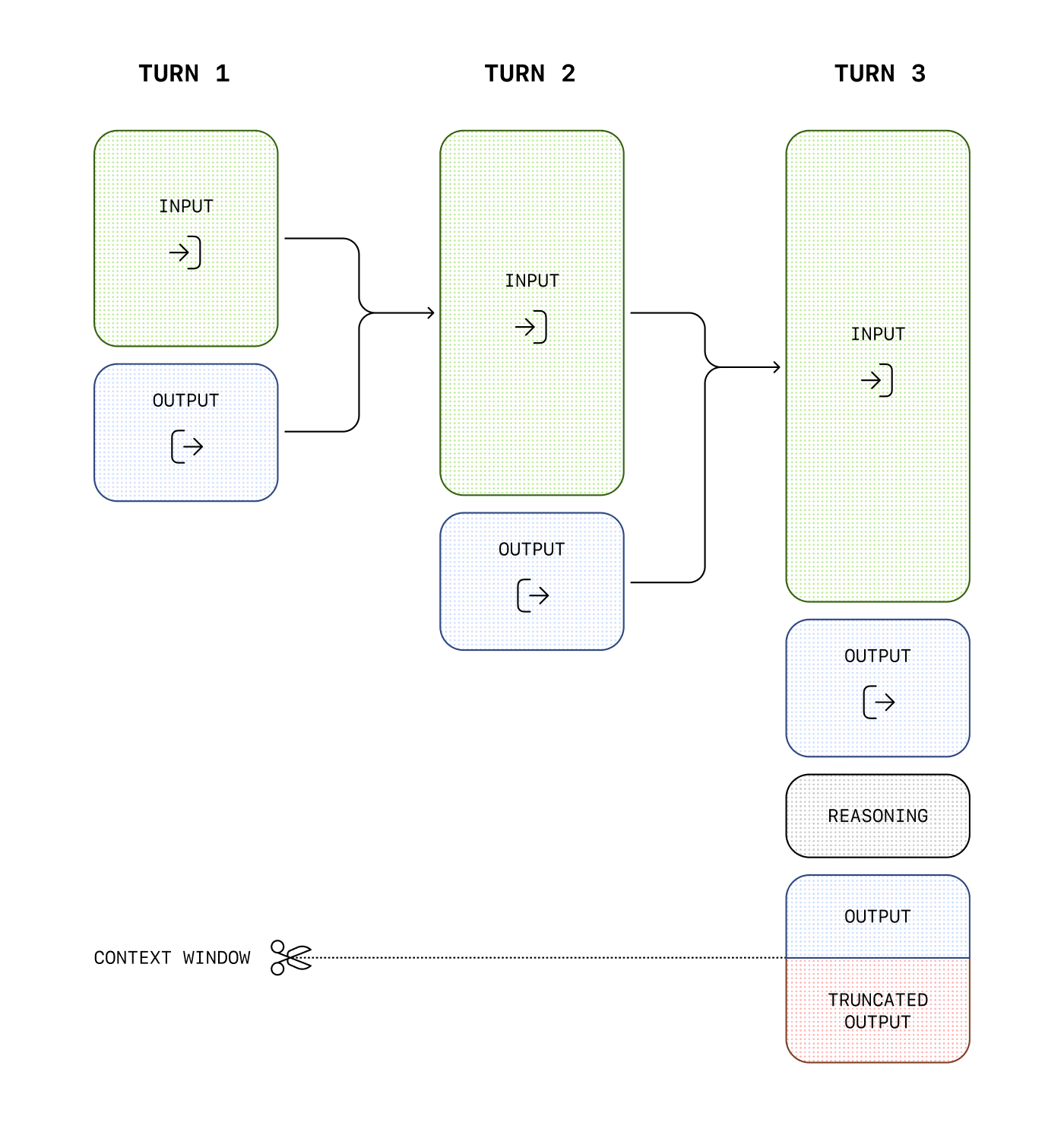
雖然無法透過 API 查看推理 Token 的內容,但這些 Token 仍會占用模型的上下文視窗空間,並按輸出 Token 計費。
若要管理推理模型的成本,可以限制模型產生的 Token 總數,包括推理 Token、可見的輸出 Token,以及不可見的格式 Token。請使用 max_output_tokens 參數設定上限。如需瞭解產生的 Token 如何計入用量和輸出上限,請參閱輸出 Token 計數。
建立回應時,請務必在上下文視窗中為推理 Token 預留足夠空間。視問題的複雜程度而定,模型可能產生數百至數萬個推理 Token。回應物件中的用量物件會在 output_tokens_details 下列出實際使用的推理 Token 數量:
12345678910111213{
  "usage": {
    "input_tokens": 75,
    "input_tokens_details": {
      "cached_tokens": 0
    },
    "output_tokens": 1186,
    "output_tokens_details": {
      "reasoning_tokens": 1024
    },
    "total_tokens": 1261
  }
}
上下文視窗的長度因模型快照而異,可在模型參考頁面查閱。
如果產生的 Token 數量達到上下文視窗上限或你設定的 max_output_tokens 值,你收到的回應中,status 會是 incomplete,而 incomplete_details 中的 reason 會是 max_output_tokens。這種情況可能發生在模型產生任何可見的輸出 Token 之前,因此即使沒有收到可見的回應,也可能產生輸入和推理 Token 的費用。
為避免這種情況,請確認上下文視窗有足夠空間,或調高 max_output_tokens。剛開始試用這些模型時,OpenAI 建議為推理和輸出預留至少 25,000 個 Token。熟悉提示詞通常需要多少推理 Token 後,就可以據此調整預留空間。
1
2
3
4
5
6
7
8
9
10
11
12
13
14
15
16
17
18
19
20
21
22
23
24
25
26
27
28
29
30
31
32import OpenAI from "openai";

const openai = new OpenAI();

const prompt = `
Write a bash script that takes a matrix represented as a string with
format '[1,2],[3,4],[5,6]' and prints the transpose in the same format.
`;

const response = await openai.responses.create({
  model: "gpt-6-astra",
  reasoning: { effort: "medium" },
  input: [
    {
      role: "user",
      content: prompt,
    },
  ],
  max_output_tokens: 300,
});

if (
  response.status === "incomplete" &&
  response.incomplete_details?.reason === "max_output_tokens"
) {
  console.log("Ran out of tokens");
  if (response.output_text?.length > 0) {
    console.log("Partial output:", response.output_text);
  } else {
    console.log("Ran out of tokens during reasoning");
  }
}
1
2
3
4
5
6
7
8
9
10
11
12
13
14
15
16
17
18
19
20
21
22
23
24
25from openai import OpenAI

client = OpenAI()

prompt = """
Write a bash script that takes a matrix represented as a string with
format '[1,2],[3,4],[5,6]' and prints the transpose in the same format.
"""

response = client.responses.create(
    model="gpt-6-astra",
    reasoning={"effort": "medium"},
    input=[{"role": "user", "content": prompt}],
    max_output_tokens=300,
)

if (
    response.status == "incomplete"
    and response.incomplete_details.reason == "max_output_tokens"
):
    print("Ran out of tokens")
    if response.output_text:
        print("Partial output:", response.output_text)
    else:
        print("Ran out of tokens during reasoning")
1
2
3
4
5
6
7
8
9
10
11
12
13
14
15
16
17
18
19
20
21
22
23
24
25
26
27
28
29
30
31
32
33
34
35
36package main

import (
	"context"
	"fmt"

	"github.com/openai/openai-go/v3"
	"github.com/openai/openai-go/v3/responses"
)

func main() {
	client := openai.NewClient()
	prompt := `Write a bash script that takes a matrix represented as a string with
format '[1,2],[3,4],[5,6]' and prints the transpose in the same format.`

	response, err := client.Responses.New(context.Background(), responses.ResponseNewParams{
		Model:           "gpt-6-astra",
		MaxOutputTokens: openai.Int(300),
		Reasoning: responses.ReasoningParam{
			Effort: responses.ReasoningEffortMedium,
		},
		Input: responses.ResponseNewParamsInputUnion{
			OfString: openai.String(prompt),
		},
	})
	if err != nil {
		panic(err)
	}

	if response.Status == responses.ResponseStatusIncomplete {
		fmt.Println("Ran out of tokens")
		if text := response.OutputText(); text != "" {
			fmt.Println("Partial output:", text)
		}
	}
}
1
2
3
4
5
6
7
8
9
10
11
12
13
14
15
16
17
18
19
20
21
22
23
24
25
26
27
28
29
30
31
32import com.openai.client.OpenAIClient;
import com.openai.client.okhttp.OpenAIOkHttpClient;
import com.openai.models.Reasoning;
import com.openai.models.ReasoningEffort;
import com.openai.models.responses.Response;
import com.openai.models.responses.ResponseCreateParams;
import com.openai.models.responses.ResponseStatus;

ResponseCreateParams params =
    ResponseCreateParams.builder()
        .model("gpt-6-astra")
        .input(
            "Write a bash script that takes a matrix represented as a string with format "
                + "'[1,2],[3,4],[5,6]' and prints the transpose in the same format.")
        .maxOutputTokens(300)
        .reasoning(Reasoning.builder().effort(ReasoningEffort.MEDIUM).build())
        .build();

var response = client.responses().create(params);
if (response.status().filter(ResponseStatus.INCOMPLETE::equals).isPresent()
    && response
        .incompleteDetails()
        .flatMap(Response.IncompleteDetails::reason)
        .filter(Response.IncompleteDetails.Reason.MAX_OUTPUT_TOKENS::equals)
        .isPresent()) {
  System.out.println("Ran out of tokens");
  response.output().stream()
      .flatMap(item -> item.message().stream())
      .flatMap(message -> message.content().stream())
      .flatMap(content -> content.outputText().stream())
      .forEach(text -> System.out.println("Partial output: " + text.text()));
}
1
2
3
4
5
6
7
8
9
10
11
12
13
14
15
16
17
18
19
20
21
22
23
24
25
26
27
28
29
30
31
32
33
34
35
36
37
38
39
40
41
42
43
44
45
46
47
48using OpenAI.Responses;
#pragma warning disable OPENAI001

string key = Environment.GetEnvironmentVariable("OPENAI_API_KEY")!;
ResponsesClient client = new(key);

CreateResponseOptions options = new()
{
    Model = "gpt-6-astra",
    MaxOutputTokenCount = 300,
    ReasoningOptions = new ResponseReasoningOptions
    {
        ReasoningEffortLevel = ResponseReasoningEffortLevel.Medium,
    },
};
options.InputItems.Add(
    ResponseItem.CreateUserMessageItem("Write a bash script that transposes a matrix.")
);

ResponseResult response = await client.CreateResponseAsync(options);
if (
    response.Status == ResponseStatus.Incomplete
    && response.IncompleteStatusDetails?.Reason == ResponseIncompleteStatusReason.MaxOutputTokens
)
{
    Console.WriteLine("The response ended before all output tokens were generated.");
    string partialOutput = response.GetOutputText();
    Console.WriteLine(
        string.IsNullOrWhiteSpace(partialOutput)
            ? "Ran out of tokens during reasoning."
            : $"Partial output: {partialOutput}"
    );
}
else if (
    response.Status == ResponseStatus.Incomplete
    && response.IncompleteStatusDetails?.Reason == ResponseIncompleteStatusReason.ContentFilter
)
{
    Console.WriteLine("The response was interrupted by the content filter.");
}
else if (response.Status == ResponseStatus.Completed)
{
    Console.WriteLine(response.GetOutputText());
}
else
{
    throw new InvalidOperationException($"The response ended with status: {response.Status}");
}
1
2
3
4
5
6
7
8
9
10
11
12
13
14
15
16
17
18
19require "openai"

client = OpenAI::Client.new
prompt = <<~PROMPT
  Write a bash script that takes a matrix represented as a string with format
  '[1,2],[3,4],[5,6]' and prints the transpose in the same format.
PROMPT

response = client.responses.create(
  model: "gpt-6-astra",
  max_output_tokens: 300,
  reasoning: { effort: :medium },
  input: prompt
)

if response.status == OpenAI::Responses::ResponseStatus::INCOMPLETE
  puts("Ran out of tokens")
  puts("Partial output: #{response.output_text}") unless response.output_text.empty?
end
對話狀態和推理狀態的用途不同。在呼叫之間傳遞訊息,可讓模型取得可見的對話記錄。對於支援此功能的模型,保留推理狀態還能讓模型在下一次呼叫的上下文中納入先前回合的相容推理項目。
保留推理狀態能讓模型延續推理過程,但不會公開模型的原始推理內容。推理項目的內容無法直接查看,API 也不會傳回其中的推理文字。設定 reasoning.context 即可控制模型能使用哪些可用的推理項目:
GPT-5.6 模型系列支援 all_turns,並預設使用此值。較早的模型預設使用 current_turn。GPT-6.1 Sol 也支援 all_turns。省略 reasoning.context 或將其設為 auto,即可使用所選模型的預設值。
| 值 |
行為 |
auto |
使用所選模型的預設值。省略 reasoning.context 的效果與設為 auto 相同。 |
current_turn |
模型可使用目前回合的推理,但下次取樣時不會將先前回合的推理納入上下文。 |
all_turns |
下次取樣時,將先前回合中可用且相容的推理項目納入上下文。GPT-5.6 模型和 GPT-6.1 Sol 支援此值。 |
回應中的 reasoning.context 欄位會顯示實際生效的模式,值為 current_turn 或 all_turns。請查看每次回應中的這個欄位,確認模型使用的模式。此設定只會使用已有的推理項目,不會建立新的項目。
只有在請求能存取先前的回應項目時,all_turns 才會生效。你可以使用 previous_response_id、將回應連結至對話,或手動重新傳入完整的回應記錄。在第一次請求中,由於沒有先前的推理內容,current_turn 和 all_turns 的行為相同。
保留下來的推理內容只能在同一模型系列內重複使用。例如,gpt-5.6-sol、gpt-5.6-terra 和 gpt-5.6-luna 可以沿用彼此的推理內容,但 GPT-5.6 和 GPT-5.5 系列之間無法沿用。
切換模型系列時,即使 reasoning.context 設為 all_turns,API 也會從模型的上下文中排除不相容的推理內容。
若要以最少的程式碼整合有狀態的呼叫,請使用 previous_response_id:
1
2
3
4
5
6
7
8
9
10
11
12
13
14
15
16
17
18import OpenAI from "openai";

const client = new OpenAI();

const first = await client.responses.create({
  model: "gpt-6.1-sol",
  input: "Inspect this repository and identify the likely bug.",
  reasoning: { context: "current_turn" },
});

const second = await client.responses.create({
  model: "gpt-6.1-sol",
  previous_response_id: first.id,
  input: "Now patch the bug and explain the change.",
  reasoning: { context: "all_turns" },
});

console.log(second.output_text);
1
2
3
4
5
6
7
8
9
10
11
12
13
14
15
16
17
18
19from openai import OpenAI

client = OpenAI()
model = "gpt-6.1-sol"

first = client.responses.create(
    model=model,
    input="Inspect this repository and identify the likely bug.",
    reasoning={"context": "current_turn"},
)

second = client.responses.create(
    model=model,
    previous_response_id=first.id,
    input="Now patch the bug and explain the change.",
    reasoning={"context": "all_turns"},
)

print(second.output_text)
1
2
3
4
5
6
7
8
9
10
11
12
13
14
15
16
17
18
19
20
21
22
23
24
25
26
27
28
29
30
31
32
33
34
35
36
37
38
39
40
41
42
43package main

import (
	"context"
	"fmt"

	"github.com/openai/openai-go/v3"
	"github.com/openai/openai-go/v3/responses"
)

func main() {
	client := openai.NewClient()
	model := "gpt-6.1-sol"

	first, err := client.Responses.New(context.Background(), responses.ResponseNewParams{
		Model: model,
		Input: responses.ResponseNewParamsInputUnion{
			OfString: openai.String("Inspect this repository and identify the likely bug."),
		},
		Reasoning: responses.ReasoningParam{
			Context: responses.ReasoningContextCurrentTurn,
		},
	})
	if err != nil {
		panic(err)
	}

	second, err := client.Responses.New(context.Background(), responses.ResponseNewParams{
		Model:              model,
		PreviousResponseID: openai.String(first.ID),
		Input: responses.ResponseNewParamsInputUnion{
			OfString: openai.String("Now patch the bug and explain the change."),
		},
		Reasoning: responses.ReasoningParam{
			Context: responses.ReasoningContextAllTurns,
		},
	})
	if err != nil {
		panic(err)
	}

	fmt.Println(second.OutputText())
}
1
2
3
4
5
6
7
8
9
10
11
12
13
14
15
16
17
18
19
20
21
22
23
24
25
26
27
28
29
30
31
32
33
34
35
36
37import com.openai.client.OpenAIClient;
import com.openai.client.okhttp.OpenAIOkHttpClient;
import com.openai.core.JsonValue;
import com.openai.models.Reasoning;
import com.openai.models.responses.ResponseCreateParams;

var first =
    client
        .responses()
        .create(
            ResponseCreateParams.builder()
                .model("gpt-6.1-sol")
                .input("Inspect this repository and identify the likely bug.")
                .reasoning(
                    Reasoning.builder()
                        .putAdditionalProperty("context", JsonValue.from("current_turn"))
                        .build())
                .build());

var second =
    client
        .responses()
        .create(
            ResponseCreateParams.builder()
                .model("gpt-6.1-sol")
                .input("Now patch the bug and explain the change.")
                .previousResponseId(first.id())
                .reasoning(
                    Reasoning.builder()
                        .putAdditionalProperty("context", JsonValue.from("all_turns"))
                        .build())
                .build());
second.output().stream()
    .flatMap(item -> item.message().stream())
    .flatMap(message -> message.content().stream())
    .flatMap(content -> content.outputText().stream())
    .forEach(text -> System.out.println(text.text()));
1
2
3
4
5
6
7
8
9
10
11
12
13
14
15
16
17
18require "openai"

client = OpenAI::Client.new

first = client.responses.create(
  model: "gpt-6.1-sol",
  input: "Inspect this repository and identify the likely bug.",
  reasoning: { context: :current_turn }
)

second = client.responses.create(
  model: "gpt-6.1-sol",
  previous_response_id: first.id,
  input: "Now patch the bug and explain the change.",
  reasoning: { context: :all_turns }
)

puts(second.output_text)
重新傳入模型已不再需要的舊回應項目時,請使用 current_turn。這些推理項目可以保留在 API 請求內容中,以維持記錄的連續性,但服務不會在下次取樣時將它們納入上下文。這有助於縮減長時間執行的工作流程實際使用的上下文。
以無狀態模式建立回應時,回應的 output 陣列中的推理項目預設會包含 encrypted_content 屬性。當 store 為 false,或你的組織使用零資料保留(ZDR)時,就會採用無狀態模式。為了維持相容性,API 仍接受舊版的 reasoning.encrypted_content 值,但你無須在 include 中指定此值。
以下請求無須指定 include 就會傳回加密的推理內容:
1
2
3
4
5
6
7
8
9
10curl https://api.openai.com/v1/responses \
  -H "Content-Type: application/json" \
  -H "Authorization: Bearer $OPENAI_API_KEY" \
  -d '{
    "model": "gpt-6-astra",
    "store": false,
    "reasoning": {"effort": "medium"},
    "input": "What is the weather like today?",
    "tools": [ ... function config here ... ]
  }'
output 陣列中的推理項目會包含 encrypted_content 屬性,其中的推理 Token 已加密,可傳入後續呼叫。
若要使用 all_turns 並設定 store: false,請保留每個輸出項目,將下一則使用者訊息加在末尾,再重新傳入完整記錄:
1
2
3
4
5
6
7
8
9
10
11
12
13
14
15
16
17
18
19
20
21
22
23
24
25
26
27
28
29
30
31
32
33
34import OpenAI from "openai";
import { toResponseInputItems } from "openai/lib/responses/ResponseInputItems";

const client = new OpenAI();

const history: OpenAI.Responses.ResponseInput = [
  {
    role: "user",
    content: "Inspect this repository and identify the likely bug.",
  },
];

const first = await client.responses.create({
  model: "gpt-6.1-sol",
  store: false,
  input: history,
  reasoning: { context: "current_turn" },
});

// Keep replayable output, including encrypted reasoning and assistant phase.
history.push(...toResponseInputItems(first.output));
history.push({
  role: "user",
  content: "Now patch the bug and explain the change.",
});

const second = await client.responses.create({
  model: "gpt-6.1-sol",
  store: false,
  input: history,
  reasoning: { context: "all_turns" },
});

console.log(second.output_text);
1
2
3
4
5
6
7
8
9
10
11
12
13
14
15
16
17
18
19
20
21
22
23
24
25
26
27
28
29
30
31
32
33
34
35
36from openai import OpenAI

client = OpenAI()
model = "gpt-6.1-sol"

history = [
    {
        "role": "user",
        "content": "Inspect this repository and identify the likely bug.",
    }
]

first = client.responses.create(
    model=model,
    store=False,
    input=history,
    reasoning={"context": "current_turn"},
)

# Keep every output item, including encrypted reasoning and assistant phase.
history.extend(item.to_dict() for item in first.output)
history.append(
    {
        "role": "user",
        "content": "Now patch the bug and explain the change.",
    }
)

second = client.responses.create(
    model=model,
    store=False,
    input=history,
    reasoning={"context": "all_turns"},
)

print(second.output_text)
1
2
3
4
5
6
7
8
9
10
11
12
13
14
15
16
17
18
19
20
21
22
23
24
25
26
27
28
29
30
31
32
33
34
35
36
37
38
39
40
41
42
43
44
45
46
47
48
49
50
51
52
53
54package main

import (
	"context"
	"encoding/json"
	"fmt"

	"github.com/openai/openai-go/v3"
	"github.com/openai/openai-go/v3/responses"
	"github.com/openai/openai-go/v3/shared"
)

func main() {
	client := openai.NewClient()
	history := []responses.ResponseInputItemUnionParam{
		responses.ResponseInputItemParamOfMessage("Inspect this repository and identify the likely bug.", responses.EasyInputMessageRoleUser),
	}
	first, err := client.Responses.New(context.Background(), responses.ResponseNewParams{
		Model:     "gpt-6.1-sol",
		Store:     openai.Bool(false),
		Input:     responses.ResponseNewParamsInputUnion{OfInputItemList: history},
		Reasoning: shared.ReasoningParam{Context: shared.ReasoningContextCurrentTurn},
	})
	if err != nil {
		panic(err)
	}
	history = append(history, outputAsInput(first.Output)...)
	history = append(history, responses.ResponseInputItemParamOfMessage(
		"Now patch the bug and explain the change.",
		responses.EasyInputMessageRoleUser,
	))
	second, err := client.Responses.New(context.Background(), responses.ResponseNewParams{
		Model:     "gpt-6.1-sol",
		Store:     openai.Bool(false),
		Input:     responses.ResponseNewParamsInputUnion{OfInputItemList: history},
		Reasoning: shared.ReasoningParam{Context: shared.ReasoningContextAllTurns},
	})
	if err != nil {
		panic(err)
	}
	fmt.Println(second.OutputText())
}

func outputAsInput(output []responses.ResponseOutputItemUnion) []responses.ResponseInputItemUnionParam {
	input := make([]responses.ResponseInputItemUnionParam, 0, len(output))
	for _, item := range output {
		var converted responses.ResponseInputItemUnion
		if err := json.Unmarshal([]byte(item.RawJSON()), &converted); err != nil {
			panic(err)
		}
		input = append(input, converted.ToParam())
	}
	return input
}
1
2
3
4
5
6
7
8
9
10
11
12
13
14
15
16
17
18
19
20
21
22
23
24
25
26
27
28
29
30
31
32
33
34
35
36
37
38
39
40
41
42
43
44
45
46
47
48
49
50
51
52
53
54
55
56
57
58import com.openai.client.OpenAIClient;
import com.openai.client.okhttp.OpenAIOkHttpClient;
import com.openai.core.JsonValue;
import com.openai.models.Reasoning;
import com.openai.models.responses.EasyInputMessage;
import com.openai.models.responses.ResponseCreateParams;
import com.openai.models.responses.ResponseInputItem;
import java.util.ArrayList;

var history = new ArrayList<ResponseInputItem>();
history.add(
    ResponseInputItem.ofEasyInputMessage(
        EasyInputMessage.builder()
            .role(EasyInputMessage.Role.USER)
            .content("Inspect this repository and identify the likely bug.")
            .build()));

var first =
    client
        .responses()
        .create(
            ResponseCreateParams.builder()
                .model("gpt-6.1-sol")
                .inputOfResponse(history)
                .store(false)
                .reasoning(
                    Reasoning.builder()
                        .putAdditionalProperty("context", JsonValue.from("current_turn"))
                        .build())
                .build());
first.output().stream()
    .map(item -> JsonValue.from(item).convert(ResponseInputItem.class))
    .forEach(history::add);
history.add(
    ResponseInputItem.ofEasyInputMessage(
        EasyInputMessage.builder()
            .role(EasyInputMessage.Role.USER)
            .content("Now patch the bug and explain the change.")
            .build()));

client
    .responses()
    .create(
        ResponseCreateParams.builder()
            .model("gpt-6.1-sol")
            .inputOfResponse(history)
            .store(false)
            .reasoning(
                Reasoning.builder()
                    .putAdditionalProperty("context", JsonValue.from("all_turns"))
                    .build())
            .build())
    .output()
    .stream()
    .flatMap(item -> item.message().stream())
    .flatMap(message -> message.content().stream())
    .flatMap(content -> content.outputText().stream())
    .forEach(text -> System.out.println(text.text()));
1
2
3
4
5
6
7
8
9
10
11
12
13
14
15
16
17
18
19
20
21
22
23
24
25
26
27
28
29
30require "openai"

client = OpenAI::Client.new
history = [
  {
    role: :user,
    content: "Inspect this repository and identify the likely bug."
  }
]

first = client.responses.create(
  model: "gpt-6.1-sol",
  store: false,
  input: history,
  reasoning: { context: :current_turn }
)
history.concat(first.output)
history << {
  role: :user,
  content: "Now patch the bug and explain the change."
}

second = client.responses.create(
  model: "gpt-6.1-sol",
  store: false,
  input: history,
  reasoning: { context: :all_turns }
)

puts(second.output_text)
使用推理模型進行函式呼叫時,如果使用的是 Responses API,請將模型隨函式呼叫傳回的推理項目,連同工具輸出一起傳回給模型。這樣模型就能在呼叫工具後繼續推理。
你可以使用 previous_response_id 在後續請求中沿用推理項目。如果你自行管理對話記錄,請將原始輸入及每次回應的所有輸出項目納入下一次請求的輸入。請保留這些項目的原始順序,並將新項目加在末尾。
使用較新的前沿模型時,如果你修改某個推理項目之前的對話記錄,API 可能會捨棄該項目的推理內容。如需瞭解如何變更指示和工具輸出,以及如何管理長對話,請參閱保持前綴不變。
使用 configuration_update 可針對困難的工作提高推理強度,或針對例行的後續問題降低強度。請在兩次回應之間加入更新,並維持請求層級的 reasoning.effort 設定。這樣就能保留原始提示詞前綴,供提示詞快取使用。
如果使用的 GPT-6 或後續模型支援此功能,你可以在標準模式下使用單一智慧體時,更新推理強度和回應格式。
請在 input 陣列中,將下列項目加在下一則使用者訊息之前。這個做法適用於 HTTP Responses 請求和 WebSocket response.create 請求:
123456{
  "type": "configuration_update",
  "reasoning": {
    "effort": "high"
  }
}
例如,如果對話開始時請求層級的推理強度為 low,這項更新會讓下一次及後續回應使用 high,直到另一項更新覆寫此設定。
1
2
3
4
5
6
7
8
9
10
11
12
13
14
15
16
17
18
19
20
21
22
23
24import OpenAI from "openai";

const client = new OpenAI();
const model = "gpt-6-astra";

const first = await client.responses.create({
  model,
  reasoning: { effort: "low" },
  input: "Draft a database migration plan.",
});

const next = await client.responses.create({
  model,
  reasoning: { effort: "low" },
  previous_response_id: first.id,
  input: [
    { type: "configuration_update", reasoning: { effort: "high" } },
    {
      role: "user",
      content: "Analyze the failure modes and propose rollback steps.",
    },
  ],
});
console.log(next.output_text);
1
2
3
4
5
6
7
8
9
10
11
12
13
14
15
16
17
18
19
20
21
22
23
24
25
26
27
28
29
30from openai import OpenAI

client = OpenAI()
model = "gpt-6-astra"

response = client.responses.create(
    model=model,
    reasoning={"effort": "low"},
    input="Draft a database migration plan.",
    store=True,
)
print(response.output_text)

response = client.responses.create(
    model=model,
    previous_response_id=response.id,
    reasoning={"effort": "low"},
    input=[
        {
            "type": "configuration_update",
            "reasoning": {"effort": "high"},
        },
        {
            "role": "user",
            "content": "Analyze the failure modes and propose rollback steps.",
        },
    ],
    store=True,
)
print(response.output_text)
1
2
3
4
5
6
7
8
9
10
11
12
13
14
15
16
17
18
19
20
21
22
23
24
25
26
27
28
29
30
31
32
33
34
35
36
37
38
39
40
41package main

import (
	"context"
	"fmt"

	"github.com/openai/openai-go/v3"
	"github.com/openai/openai-go/v3/responses"
	"github.com/openai/openai-go/v3/shared"
)

func main() {
	client := openai.NewClient()
	ctx := context.Background()
	first, err := client.Responses.New(ctx, responses.ResponseNewParams{
		Store:     openai.Bool(true),
		Model:     "gpt-6-astra",
		Reasoning: shared.ReasoningParam{Effort: shared.ReasoningEffortLow},
		Input:     responses.ResponseNewParamsInputUnion{OfString: openai.String("Draft a database migration plan.")},
	})
	if err != nil {
		panic(err)
	}
	fmt.Println(first.OutputText())
	response, err := client.Responses.New(ctx, responses.ResponseNewParams{
		Model:              "gpt-6-astra",
		PreviousResponseID: openai.String(first.ID),
		// Keep the original request-level setting; the item updates the conversation.
		Reasoning: shared.ReasoningParam{Effort: shared.ReasoningEffortLow},
		Input: responses.ResponseNewParamsInputUnion{OfInputItemList: responses.ResponseInputParam{
			{OfConfigurationUpdate: &responses.ResponseConfigurationUpdateItemParam{
				Reasoning: responses.ResponseConfigurationUpdateItemParamReasoning{Effort: shared.ReasoningEffortHigh},
			}},
			responses.ResponseInputItemParamOfMessage("Analyze the failure modes and propose rollback steps.", responses.EasyInputMessageRoleUser),
		}},
	})
	if err != nil {
		panic(err)
	}
	fmt.Println(response.OutputText())
}
1
2
3
4
5
6
7
8
9
10
11
12
13
14
15
16
17
18
19
20
21
22
23
24
25
26
27
28
29
30
31
32
33
34
35
36
37
38
39
40
41
42
43
44
45
46
47
48
49import com.openai.models.Reasoning;
import com.openai.models.ReasoningEffort;
import com.openai.models.responses.EasyInputMessage;
import com.openai.models.responses.Response;
import com.openai.models.responses.ResponseConfigurationUpdateItemParam;
import com.openai.models.responses.ResponseCreateParams;
import com.openai.models.responses.ResponseInputItem;
import java.util.List;

Response first =
    client
        .responses()
        .create(
            ResponseCreateParams.builder()
                .model("gpt-6-astra")
                .store(true)
                .reasoning(Reasoning.builder().effort(ReasoningEffort.LOW).build())
                .input("Draft a database migration plan.")
                .build());
Response response =
    client
        .responses()
        .create(
            ResponseCreateParams.builder()
                .model("gpt-6-astra")
                .previousResponseId(first.id())
                // Keep the original request-level setting; the item updates the conversation.
                .reasoning(Reasoning.builder().effort(ReasoningEffort.LOW).build())
                .inputOfResponse(
                    List.of(
                        ResponseInputItem.ofConfigurationUpdate(
                            ResponseConfigurationUpdateItemParam.builder()
                                .reasoning(
                                    ResponseConfigurationUpdateItemParam.Reasoning.builder()
                                        .effort(ReasoningEffort.HIGH)
                                        .build())
                                .build()),
                        ResponseInputItem.ofEasyInputMessage(
                            EasyInputMessage.builder()
                                .role(EasyInputMessage.Role.USER)
                                .content(
                                    "Analyze the failure modes and propose rollback steps.")
                                .build())))
                .build());
response.output().stream()
    .flatMap(item -> item.message().stream())
    .flatMap(message -> message.content().stream())
    .flatMap(content -> content.outputText().stream())
    .forEach(text -> System.out.println(text.text()));
1
2
3
4
5
6
7
8
9
10
11
12
13
14
15
16
17
18
19
20
21
22
23
24
25
26
27
28require "openai"

client = OpenAI::Client.new
first = client.responses.create(
  model: "gpt-6-astra",
  store: true,
  reasoning: OpenAI::Models::Reasoning.new(effort: :low),
  input: "Draft a database migration plan."
)
puts(first.output_text)
response = client.responses.create(
  model: "gpt-6-astra",
  previous_response_id: first.id,
  # Keep the original request-level setting; the item updates the conversation.
  reasoning: OpenAI::Models::Reasoning.new(effort: :low),
  input: [
    OpenAI::Models::Responses::ResponseConfigurationUpdateItemParam.new(
      reasoning: OpenAI::Models::Responses::ResponseConfigurationUpdateItemParam::Reasoning.new(
        effort: :high
      )
    ),
    OpenAI::Models::Responses::EasyInputMessage.new(
      role: :user,
      content: "Analyze the failure modes and propose rollback steps."
    )
  ]
)
puts(response.output_text)
使用 previous_response_id 保留更新,或在手動管理對話記錄時,依照更新原本的位置重新傳入。回應中的 reasoning.effort 仍會顯示請求層級的設定,不會顯示透過更新選取的推理強度。
你可以同時設定 reasoning.effort 和 text.format,將兩者放在同一個 configuration_update 項目中。如果只更新其中一項,另一項會沿用原有設定。
請勿將設定更新與自動壓縮或自動截斷搭配使用。獨立的 /responses/compact 端點也會拒絕包含這類更新的記錄。
你仍可以將 compaction_trigger 項目加入 /responses 請求,明確要求壓縮記錄。壓縮完成後,請在下一則使用者訊息之前加入新的 configuration_update,重新指定你變更過的每一項設定。如果你也變更過回應格式,請一併指定。
提示詞快取的一般要求仍然適用。若要在模型產生回應期間傳送使用者指示,請參閱在回合中途引導模型。
雖然我們不會公開模型產生的原始推理 Token,但你可以使用 summary 參數查看模型的推理摘要。如需確認哪些推理模型支援摘要,請參閱模型文件。
不同模型支援的推理摘要設定也不同。例如,我們的電腦操作模型支援 concise 摘要,而 o4-mini 支援 detailed 摘要。若要取得模型所能提供的最詳細摘要,請將這個參數設為 auto。對目前大多數推理模型而言,auto 等同於 detailed,但未來可能會提供更細緻的設定。
推理摘要會放在 summary 陣列中,這個陣列屬於 reasoning 輸出項目。只有在你明確要求包含推理摘要時,回應才會包含這項輸出。
以下範例示範如何傳送 API 請求,要求回應包含推理摘要。
1
2
3
4
5
6
7
8
9
10
11
12
13import OpenAI from "openai";
const openai = new OpenAI();

const response = await openai.responses.create({
  model: "gpt-6-astra",
  input: "What is the capital of France?",
  reasoning: {
    effort: "low",
    summary: "auto",
  },
});

console.log(response.output);
1
2
3
4
5
6
7
8
9
10
11from openai import OpenAI

client = OpenAI()

response = client.responses.create(
    model="gpt-6-astra",
    input="What is the capital of France?",
    reasoning={"effort": "low", "summary": "auto"},
)

print(response.output)
1
2
3
4
5
6
7
8
9
10
11
12
13
14
15
16
17
18
19
20
21
22
23
24
25
26
27
28
29package main

import (
	"context"
	"fmt"

	"github.com/openai/openai-go/v3"
	"github.com/openai/openai-go/v3/responses"
)

func main() {
	client := openai.NewClient()

	response, err := client.Responses.New(context.Background(), responses.ResponseNewParams{
		Model: "gpt-6-astra",
		Input: responses.ResponseNewParamsInputUnion{
			OfString: openai.String("What is the capital of France?"),
		},
		Reasoning: responses.ReasoningParam{
			Effort:  responses.ReasoningEffortLow,
			Summary: responses.ReasoningSummaryAuto,
		},
	})
	if err != nil {
		panic(err)
	}

	fmt.Println(response.Output)
}
1
2
3
4
5
6
7
8
9
10
11
12
13
14
15
16
17
18
19
20
21import com.openai.client.OpenAIClient;
import com.openai.client.okhttp.OpenAIOkHttpClient;
import com.openai.models.Reasoning;
import com.openai.models.ReasoningEffort;
import com.openai.models.responses.ResponseCreateParams;

ResponseCreateParams params =
    ResponseCreateParams.builder()
        .model("gpt-6-astra")
        .input("What is the capital of France?")
        .reasoning(
            Reasoning.builder()
                .effort(ReasoningEffort.LOW)
                .summary(Reasoning.Summary.AUTO)
                .build())
        .build();

client.responses().create(params).output().stream()
    .flatMap(item -> item.reasoning().stream())
    .flatMap(reasoning -> reasoning.summary().stream())
    .forEach(summary -> System.out.println(summary.text()));
1
2
3
4
5
6
7
8
9
10
11
12
13
14
15
16
17
18
19
20
21
22
23using OpenAI.Responses;
#pragma warning disable OPENAI001

string key = Environment.GetEnvironmentVariable("OPENAI_API_KEY")!;
ResponsesClient client = new(key);

CreateResponseOptions options = new()
{
    Model = "gpt-6-astra",
    ReasoningOptions = new ResponseReasoningOptions
    {
        ReasoningEffortLevel = ResponseReasoningEffortLevel.Low,
        ReasoningSummaryVerbosity = ResponseReasoningSummaryVerbosity.Auto,
    },
};
options.InputItems.Add(ResponseItem.CreateUserMessageItem("What is the capital of France?"));

ResponseResult response = await client.CreateResponseAsync(options);
foreach (ReasoningResponseItem reasoning in response.OutputItems.OfType<ReasoningResponseItem>())
{
    Console.WriteLine(reasoning.GetSummaryText());
}
Console.WriteLine(response.GetOutputText());
1
2
3
4
5
6
7
8
9
10
11
12
13
14require "openai"

client = OpenAI::Client.new

response = client.responses.create(
  model: "gpt-6-astra",
  input: "What is the capital of France?",
  reasoning: {
    effort: :low,
    summary: :auto
  }
)

puts(response.output)
1
2
3
4
5
6
7
8
9
10
11curl https://api.openai.com/v1/responses \
  -H "Content-Type: application/json" \
  -H "Authorization: Bearer $OPENAI_API_KEY" \
  -d '{
    "model": "gpt-6-astra",
    "input": "What is the capital of France?",
    "reasoning": {
        "effort": "low",
        "summary": "auto"
    }
  }'
這個 API 請求會傳回一個輸出陣列,其中包含助理訊息,以及模型產生該回應時的推理摘要。
1234567891011121314151617181920212223242526[
  {
    "id": "rs_6876cf02e0bc8192b74af0fb64b715ff06fa2fcced15a5ac",
    "type": "reasoning",
    "summary": [
      {
        "type": "summary_text",
        "text": "**Answering a simple question**\n\nI\u2019m looking at a straightforward question: the capital of France is Paris. It\u2019s a well-known fact, and I want to keep it brief and to the point. Paris is known for its history, art, and culture, so it might be nice to add just a hint of that charm. But mostly, I\u2019ll aim to focus on delivering a clear and direct answer, ensuring the user gets what they\u2019re looking for without any extra fluff."
      }
    ]
  },
  {
    "id": "msg_6876cf054f58819284ecc1058131305506fa2fcced15a5ac",
    "type": "message",
    "status": "completed",
    "content": [
      {
        "type": "output_text",
        "annotations": [],
        "logprobs": [],
        "text": "The capital of France is Paris."
      }
    ],
    "role": "assistant"
  }
]
為確保部署安全,在使用最新推理模型的摘要功能之前,你可能需要先完成組織驗證。請前往平台設定頁面開始驗證。
在 Responses API 中使用 GPT-5.5 或 GPT-5.4 執行耗時較長或頻繁使用工具的流程時,請使用助理訊息的 phase 欄位,避免模型過早停止或出現其他非預期行為。
API 並未強制要求設定 phase,但 OpenAI 建議使用此欄位。對於助理在過程中提供的進度說明,例如呼叫工具前的簡短說明,請使用 phase: "commentary"。對於完整的最終答案,請使用 phase: "final_answer"。請勿在使用者訊息中加入 phase。
使用 previous_response_id 通常最簡單,因為這樣會保留先前的助理狀態。如果你手動重新傳入助理訊息記錄,請保留每則訊息原本的 phase 值。
在這類流程中,如果訊息缺少 phase 或重新傳入時遺漏了這個欄位,開場說明可能會被當成最終答案。如需瞭解特定模型的提示詞撰寫方式,請參閱為 GPT-5.5 撰寫提示詞。
1
2
3
4
5
6
7
8
9
10
11
12
13
14
15
16
17
18
19
20
21
22
23
24
25import OpenAI from "openai";
const client = new OpenAI();

const response = await client.responses.create({
  model: "gpt-6-astra",
  input: [
    {
      role: "assistant",
      phase: "commentary",
      content:
        "I’ll inspect the logs and then summarize root cause and remediation.",
    },
    {
      role: "assistant",
      phase: "final_answer",
      content: "Root cause: cache invalidation race.",
    },
    {
      role: "user",
      content: "Great—now give me a rollout-safe fix plan.",
    },
  ],
});

console.log(response.output_text);
1
2
3
4
5
6
7
8
9
10
11
12
13
14
15
16
17
18
19
20
21
22
23
24
25from openai import OpenAI

client = OpenAI()

response = client.responses.create(
    model="gpt-6-astra",
    input=[
        {
            "role": "assistant",
            "phase": "commentary",
            "content": "I’ll inspect the logs and then summarize root cause and remediation.",
        },
        {
            "role": "assistant",
            "phase": "final_answer",
            "content": "Root cause: cache invalidation race.",
        },
        {
            "role": "user",
            "content": "Great—now give me a rollout-safe fix plan.",
        },
    ],
)

print(response.output_text)
1
2
3
4
5
6
7
8
9
10
11
12
13
14
15
16
17
18
19
20
21
22
23
24
25
26
27
28
29
30
31
32
33
34
35package main

import (
	"context"
	"fmt"

	"github.com/openai/openai-go/v3"
	"github.com/openai/openai-go/v3/responses"
)

func main() {
	client := openai.NewClient()
	commentary := responses.ResponseInputItemParamOfMessage(
		"I’ll inspect the logs and then summarize root cause and remediation.",
		responses.EasyInputMessageRoleAssistant,
	)
	commentary.OfMessage.Phase = responses.EasyInputMessagePhaseCommentary
	finalAnswer := responses.ResponseInputItemParamOfMessage(
		"Root cause: cache invalidation race.",
		responses.EasyInputMessageRoleAssistant,
	)
	finalAnswer.OfMessage.Phase = responses.EasyInputMessagePhaseFinalAnswer
	response, err := client.Responses.New(context.Background(), responses.ResponseNewParams{
		Model: "gpt-6-astra",
		Input: responses.ResponseNewParamsInputUnion{OfInputItemList: responses.ResponseInputParam{
			commentary,
			finalAnswer,
			responses.ResponseInputItemParamOfMessage("Great—now give me a rollout-safe fix plan.", responses.EasyInputMessageRoleUser),
		}},
	})
	if err != nil {
		panic(err)
	}
	fmt.Println(response.OutputText())
}
1
2
3
4
5
6
7
8
9
10
11
12
13
14
15
16
17
18
19
20
21
22
23
24
25
26
27
28
29
30
31
32
33
34
35
36
37import com.openai.client.OpenAIClient;
import com.openai.client.okhttp.OpenAIOkHttpClient;
import com.openai.models.responses.EasyInputMessage;
import com.openai.models.responses.ResponseCreateParams;
import com.openai.models.responses.ResponseInputItem;
import java.util.List;

ResponseCreateParams params =
    ResponseCreateParams.builder()
        .model("gpt-6-astra")
        .inputOfResponse(
            List.of(
                ResponseInputItem.ofEasyInputMessage(
                    EasyInputMessage.builder()
                        .role(EasyInputMessage.Role.ASSISTANT)
                        .phase(EasyInputMessage.Phase.COMMENTARY)
                        .content(
                            "I'll inspect the logs and then summarize root cause and remediation.")
                        .build()),
                ResponseInputItem.ofEasyInputMessage(
                    EasyInputMessage.builder()
                        .role(EasyInputMessage.Role.ASSISTANT)
                        .phase(EasyInputMessage.Phase.FINAL_ANSWER)
                        .content("Root cause: cache invalidation race.")
                        .build()),
                ResponseInputItem.ofEasyInputMessage(
                    EasyInputMessage.builder()
                        .role(EasyInputMessage.Role.USER)
                        .content("Great—now give me a rollout-safe fix plan.")
                        .build())))
        .build();

client.responses().create(params).output().stream()
    .flatMap(item -> item.message().stream())
    .flatMap(message -> message.content().stream())
    .flatMap(content -> content.outputText().stream())
    .forEach(text -> System.out.println(text.text()));
1
2
3
4
5
6
7
8
9
10
11
12
13
14
15
16
17
18
19
20
21
22
23
24
25require "openai"

client = OpenAI::Client.new

response = client.responses.create(
  model: "gpt-6-astra",
  input: [
    {
      role: :assistant,
      phase: :commentary,
      content: "I'll inspect the logs and then summarize root cause and remediation."
    },
    {
      role: :assistant,
      phase: :final_answer,
      content: "Root cause: cache invalidation race."
    },
    {
      role: :user,
      content: "Great—now give me a rollout-safe fix plan."
    }
  ]
)

puts(response.output_text)
為推理模型撰寫提示詞時,請留意以下差異。對於具備推理能力的 GPT-5 模型,通常只要給予清楚的目標、嚴謹的限制條件和明確的輸出規格,就能得到最佳效果,無須規定每個中間步驟。
- 告訴模型要完成的任務、必須遵守的限制條件,以及所需的輸出格式。
- 將
reasoning.effort 視為可調整的參數。若回應品質不佳,請避免將調整推理強度當成改善品質的主要方法。
- 對於智慧體工作流程或需要大量研究的流程,請定義完成條件,以及模型應如何驗證工作成果。
如需進一步瞭解使用推理模型的最佳做法,請參閱這份指南。
程式開發(重構)
推理模型可以實作複雜的演算法並產生程式碼。以下提示詞要求模型依照指定條件重構一個 React 元件。
1
2
3
4
5
6
7
8
9
10
11
12
13
14
15
16
17
18
19
20
21
22
23
24
25
26
27
28
29
30
31
32
33
34
35
36
37
38
39
40
41
42
43
44import OpenAI from "openai";

const openai = new OpenAI();

const prompt = `
Instructions:
- Given the React component below, change it so that nonfiction books have red
  text.
- Return only the code in your reply
- Do not include any additional formatting, such as markdown code blocks
- For formatting, use four space tabs, and do not allow any lines of code to
  exceed 80 columns

const books = [
  { title: 'Dune', category: 'fiction', id: 1 },
  { title: 'Frankenstein', category: 'fiction', id: 2 },
  { title: 'Moneyball', category: 'nonfiction', id: 3 },
];

export default function BookList() {
  const listItems = books.map(book =>
    <li>
      {book.title}
    </li>
  );

  return (
    <ul>{listItems}</ul>
  );
}
`.trim();

const completion = await openai.chat.completions.create({
  model: "gpt-6-astra",
  messages: [
    {
      role: "user",
      content: prompt,
    },
  ],
  store: true,
});

console.log(completion.choices[0].message.content);
1
2
3
4
5
6
7
8
9
10
11
12
13
14
15
16
17
18
19
20
21
22
23
24
25
26
27
28
29
30
31
32
33
34
35
36
37
38
39
40
41
42
43
44
45from openai import OpenAI

client = OpenAI()

prompt = """
Instructions:
- Given the React component below, change it so that nonfiction books have red
  text.
- Return only the code in your reply
- Do not include any additional formatting, such as markdown code blocks
- For formatting, use four space tabs, and do not allow any lines of code to
  exceed 80 columns

const books = [
  { title: 'Dune', category: 'fiction', id: 1 },
  { title: 'Frankenstein', category: 'fiction', id: 2 },
  { title: 'Moneyball', category: 'nonfiction', id: 3 },
];

export default function BookList() {
  const listItems = books.map(book =>
    <li>
      {book.title}
    </li>
  );

  return (
    <ul>{listItems}</ul>
  );
}
"""

response = client.chat.completions.create(
    model="gpt-6-astra",
    messages=[
        {
            "role": "user",
            "content": [
                {"type": "text", "text": prompt},
            ],
        }
    ],
)

print(response.choices[0].message.content)
1
2
3
4
5
6
7
8
9
10
11
12
13
14
15
16
17
18
19
20
21
22
23
24
25
26
27
28
29
30
31
32
33
34package main

import (
	"context"
	"fmt"

	"github.com/openai/openai-go/v3"
)

func main() {
	client := openai.NewClient()
	prompt := `Instructions:
- Given the React component below, change it so that nonfiction books have red text.
- Return only the code in your reply.
- Do not include any additional formatting, such as markdown code blocks.

const books = [
  { title: 'Dune', category: 'fiction', id: 1 },
  { title: 'Frankenstein', category: 'fiction', id: 2 },
  { title: 'Moneyball', category: 'nonfiction', id: 3 },
];`

	completion, err := client.Chat.Completions.New(context.Background(), openai.ChatCompletionNewParams{
		Model: "gpt-6-astra",
		Messages: []openai.ChatCompletionMessageParamUnion{
			openai.UserMessage(prompt),
		},
	})
	if err != nil {
		panic(err)
	}

	fmt.Println(completion.Choices[0].Message.Content)
}
1
2
3
4
5
6
7
8
9
10
11
12
13
14
15
16
17
18
19
20
21
22
23
24
25import com.openai.client.OpenAIClient;
import com.openai.client.okhttp.OpenAIOkHttpClient;
import com.openai.models.chat.completions.ChatCompletionCreateParams;

String prompt =
    """
    Instructions:
    - Given the React component below, change it so that nonfiction books have red text.
    - Return only the code in your reply.
    - Do not include any additional formatting, such as markdown code blocks.

    const books = [
    { title: 'Dune', category: 'fiction', id: 1 },
    { title: 'Frankenstein', category: 'fiction', id: 2 },
    { title: 'Moneyball', category: 'nonfiction', id: 3 },
    ];
    """
        .strip();

ChatCompletionCreateParams params =
    ChatCompletionCreateParams.builder().model("gpt-6-astra").addUserMessage(prompt).build();

client.chat().completions().create(params).choices().stream()
    .flatMap(choice -> choice.message().content().stream())
    .forEach(System.out::println);
1
2
3
4
5
6
7
8
9
10
11
12
13
14
15
16
17
18
19
20
21
22
23
24
25
26
27
28
29
30
31
32
33
34
35using OpenAI.Chat;

string key = Environment.GetEnvironmentVariable("OPENAI_API_KEY")!;
string model = "gpt-6-astra";
ChatClient client = new(model, key);

string prompt =
    """
    Instructions:
    - Given the React component below, make nonfiction book titles red.
    - Return only the updated component code in your reply.
    - Do not include any additional formatting, such as markdown code blocks.
    - For formatting, use four space tabs, and do not allow any lines of code to
      exceed 80 columns.

    const books = [
      { title: 'Dune', category: 'fiction', id: 1 },
      { title: 'Frankenstein', category: 'fiction', id: 2 },
      { title: 'Moneyball', category: 'nonfiction', id: 3 },
    ];

    export default function BookList() {
      const listItems = books.map(book =>
        <li>
          {book.title}
        </li>
      );

      return (
        <ul>{listItems}</ul>
      );
    }
    """;
ChatCompletion completion = await client.CompleteChatAsync(new UserChatMessage(prompt));
Console.WriteLine(completion.Content[0].Text);
1
2
3
4
5
6
7
8
9
10
11
12
13
14
15
16
17
18
19
20
21
22
23
24
25
26
27require "openai"

client = OpenAI::Client.new
prompt = <<~PROMPT
  Instructions:
  - Given the React component below, change it so that nonfiction books have red text.
  - Return only the code in your reply.
  - Do not include any additional formatting, such as markdown code blocks.

  const books = [
    { title: 'Dune', category: 'fiction', id: 1 },
    { title: 'Frankenstein', category: 'fiction', id: 2 },
    { title: 'Moneyball', category: 'nonfiction', id: 3 },
  ];
PROMPT

completion = client.chat.completions.create(
  model: "gpt-6-astra",
  messages: [
    {
      role: :user,
      content: prompt
    }
  ]
)

puts(completion.choices.fetch(0).message.content)
1
2
3
4
5
6
7
8
9
10
11
12
13
14
15
16
17
18
19
20
21
22
23
24
25
26
27
28
29
30
31
32
33
34
35
36
37
38
39
40
41
42
43import OpenAI from "openai";

const openai = new OpenAI();

const prompt = `
Instructions:
- Given the React component below, change it so that nonfiction books have red
  text.
- Return only the code in your reply
- Do not include any additional formatting, such as markdown code blocks
- For formatting, use four space tabs, and do not allow any lines of code to
  exceed 80 columns

const books = [
  { title: 'Dune', category: 'fiction', id: 1 },
  { title: 'Frankenstein', category: 'fiction', id: 2 },
  { title: 'Moneyball', category: 'nonfiction', id: 3 },
];

export default function BookList() {
  const listItems = books.map(book =>
    <li>
      {book.title}
    </li>
  );

  return (
    <ul>{listItems}</ul>
  );
}
`.trim();

const response = await openai.responses.create({
  model: "gpt-6-astra",
  input: [
    {
      role: "user",
      content: prompt,
    },
  ],
});

console.log(response.output_text);
1
2
3
4
5
6
7
8
9
10
11
12
13
14
15
16
17
18
19
20
21
22
23
24
25
26
27
28
29
30
31
32
33
34
35
36
37
38
39
40
41
42
43from openai import OpenAI

client = OpenAI()

prompt = """
Instructions:
- Given the React component below, change it so that nonfiction books have red
  text.
- Return only the code in your reply
- Do not include any additional formatting, such as markdown code blocks
- For formatting, use four space tabs, and do not allow any lines of code to
  exceed 80 columns

const books = [
  { title: 'Dune', category: 'fiction', id: 1 },
  { title: 'Frankenstein', category: 'fiction', id: 2 },
  { title: 'Moneyball', category: 'nonfiction', id: 3 },
];

export default function BookList() {
  const listItems = books.map(book =>
    <li>
      {book.title}
    </li>
  );

  return (
    <ul>{listItems}</ul>
  );
}
"""

response = client.responses.create(
    model="gpt-6-astra",
    input=[
        {
            "role": "user",
            "content": prompt,
        }
    ],
)

print(response.output_text)
1
2
3
4
5
6
7
8
9
10
11
12
13
14
15
16
17
18
19
20
21
22
23
24
25
26
27
28
29
30
31
32
33
34
35package main

import (
	"context"
	"fmt"

	"github.com/openai/openai-go/v3"
	"github.com/openai/openai-go/v3/responses"
)

func main() {
	client := openai.NewClient()
	prompt := `Instructions:
- Given the React component below, change it so that nonfiction books have red text.
- Return only the code in your reply.
- Do not include any additional formatting, such as markdown code blocks.

const books = [
  { title: 'Dune', category: 'fiction', id: 1 },
  { title: 'Frankenstein', category: 'fiction', id: 2 },
  { title: 'Moneyball', category: 'nonfiction', id: 3 },
];`

	response, err := client.Responses.New(context.Background(), responses.ResponseNewParams{
		Model: "gpt-6-astra",
		Input: responses.ResponseNewParamsInputUnion{
			OfString: openai.String(prompt),
		},
	})
	if err != nil {
		panic(err)
	}

	fmt.Println(response.OutputText())
}
1
2
3
4
5
6
7
8
9
10
11
12
13
14
15
16
17
18
19
20
21
22
23
24
25
26
27import com.openai.client.OpenAIClient;
import com.openai.client.okhttp.OpenAIOkHttpClient;
import com.openai.models.responses.ResponseCreateParams;

String prompt =
    """
    Instructions:
    - Given the React component below, change it so that nonfiction books have red text.
    - Return only the code in your reply.
    - Do not include any additional formatting, such as markdown code blocks.

    const books = [
    { title: 'Dune', category: 'fiction', id: 1 },
    { title: 'Frankenstein', category: 'fiction', id: 2 },
    { title: 'Moneyball', category: 'nonfiction', id: 3 },
    ];
    """
        .strip();

ResponseCreateParams params =
    ResponseCreateParams.builder().model("gpt-6-astra").input(prompt).build();

client.responses().create(params).output().stream()
    .flatMap(item -> item.message().stream())
    .flatMap(message -> message.content().stream())
    .flatMap(content -> content.outputText().stream())
    .forEach(text -> System.out.println(text.text()));
1
2
3
4
5
6
7
8
9
10
11
12
13
14
15
16
17
18
19
20
21
22
23
24
25
26
27
28
29
30
31
32
33
34
35
36
37
38using OpenAI.Responses;
#pragma warning disable OPENAI001

string key = Environment.GetEnvironmentVariable("OPENAI_API_KEY")!;
ResponsesClient client = new(key);

string prompt =
    """
    Instructions:
    - Given the React component below, make nonfiction book titles red.
    - Return only the updated component code in your reply.
    - Do not include any additional formatting, such as markdown code blocks.
    - For formatting, use four space tabs, and do not allow any lines of code to
      exceed 80 columns.

    const books = [
      { title: 'Dune', category: 'fiction', id: 1 },
      { title: 'Frankenstein', category: 'fiction', id: 2 },
      { title: 'Moneyball', category: 'nonfiction', id: 3 },
    ];

    export default function BookList() {
      const listItems = books.map(book =>
        <li>
          {book.title}
        </li>
      );

      return (
        <ul>{listItems}</ul>
      );
    }
    """;
ResponseResult response = await client.CreateResponseAsync(
    "gpt-6-astra",
    [ResponseItem.CreateUserMessageItem(prompt)]
);
Console.WriteLine(response.GetOutputText());
1
2
3
4
5
6
7
8
9
10
11
12
13
14
15
16
17
18
19
20
21
22require "openai"

client = OpenAI::Client.new
prompt = <<~PROMPT
  Instructions:
  - Given the React component below, change it so that nonfiction books have red text.
  - Return only the code in your reply.
  - Do not include any additional formatting, such as markdown code blocks.

  const books = [
    { title: 'Dune', category: 'fiction', id: 1 },
    { title: 'Frankenstein', category: 'fiction', id: 2 },
    { title: 'Moneyball', category: 'nonfiction', id: 3 },
  ];
PROMPT

response = client.responses.create(
  model: "gpt-6-astra",
  input: prompt
)

puts(response.output_text)
程式開發(規劃)
推理模型也能擬定包含多個步驟的計畫。這個範例提示詞要求模型為完整的解決方案建立檔案與目錄結構,並撰寫 Python 程式碼來實作指定的使用案例。
1
2
3
4
5
6
7
8
9
10
11
12
13
14
15
16
17
18
19
20
21
22
23
24
25
26import OpenAI from "openai";

const openai = new OpenAI();

const prompt = `
I want to build a Python app that takes user questions and looks
them up in a database where they are mapped to answers. If there
is close match, it retrieves the matched answer. If there isn't,
it asks the user to provide an answer and stores the
question/answer pair in the database. Make a plan for the directory
structure you'll need, then return each file in full. Only supply
your reasoning at the beginning and end, not throughout the code.
`.trim();

const completion = await openai.chat.completions.create({
  model: "gpt-6-astra",
  messages: [
    {
      role: "user",
      content: prompt,
    },
  ],
  store: true,
});

console.log(completion.choices[0].message.content);
1
2
3
4
5
6
7
8
9
10
11
12
13
14
15
16
17
18
19
20
21
22
23
24
25
26
27from openai import OpenAI

client = OpenAI()

prompt = """
I want to build a Python app that takes user questions and looks
them up in a database where they are mapped to answers. If there
is close match, it retrieves the matched answer. If there isn't,
it asks the user to provide an answer and stores the
question/answer pair in the database. Make a plan for the directory
structure you'll need, then return each file in full. Only supply
your reasoning at the beginning and end, not throughout the code.
"""

response = client.chat.completions.create(
    model="gpt-6-astra",
    messages=[
        {
            "role": "user",
            "content": [
                {"type": "text", "text": prompt},
            ],
        }
    ],
)

print(response.choices[0].message.content)
1
2
3
4
5
6
7
8
9
10
11
12
13
14
15
16
17
18
19
20
21
22
23
24
25
26
27
28
29package main

import (
	"context"
	"fmt"

	"github.com/openai/openai-go/v3"
)

func main() {
	client := openai.NewClient()
	prompt := `I want to build a Python app that takes user questions and looks them up
in a database where they are mapped to answers. If there is a close match, it
retrieves the matched answer. If there is not, it asks the user to provide an
answer and stores the question/answer pair in the database. Make a plan for the
directory structure you will need, then return each file in full.`

	completion, err := client.Chat.Completions.New(context.Background(), openai.ChatCompletionNewParams{
		Model: "gpt-6-astra",
		Messages: []openai.ChatCompletionMessageParamUnion{
			openai.UserMessage(prompt),
		},
	})
	if err != nil {
		panic(err)
	}

	fmt.Println(completion.Choices[0].Message.Content)
}
1
2
3
4
5
6
7
8
9
10
11
12
13
14
15
16
17
18
19import com.openai.client.OpenAIClient;
import com.openai.client.okhttp.OpenAIOkHttpClient;
import com.openai.models.chat.completions.ChatCompletionCreateParams;

String prompt =
    """
    I want to build a Python app that looks up user questions in a database where
    they are mapped to answers. If there is a close match, it retrieves the answer.
    Otherwise, it asks the user for an answer and stores the question and answer.
    Plan the directory structure, then return each file in full.
    """
        .strip();

ChatCompletionCreateParams params =
    ChatCompletionCreateParams.builder().model("gpt-6-astra").addUserMessage(prompt).build();

client.chat().completions().create(params).choices().stream()
    .flatMap(choice -> choice.message().content().stream())
    .forEach(System.out::println);
1
2
3
4
5
6
7
8
9
10
11
12
13
14
15
16
17
18
19using OpenAI.Chat;

string key = Environment.GetEnvironmentVariable("OPENAI_API_KEY")!;
string model = "gpt-6-astra";
ChatClient client = new(model, key);

string prompt =
    """
    I want to build a Python app that looks up user questions in a database where
    they are mapped to answers. If there is a close match, it retrieves the answer.
    Otherwise, it asks the user for an answer and stores the question and answer.
    Plan the directory structure, then return each file in full.
    Only supply your reasoning at the beginning and end, not throughout the code.
    """;
ChatCompletion completion = await client.CompleteChatAsync(
    new UserChatMessage(prompt)
);

Console.WriteLine(completion.Content[0].Text);
1
2
3
4
5
6
7
8
9
10
11
12
13
14
15
16
17
18
19
20
21require "openai"

client = OpenAI::Client.new
prompt = <<~PROMPT
  I want to build a Python app that looks up user questions in a database where
  they are mapped to answers. If there is a close match, it retrieves the answer.
  Otherwise, it asks the user for an answer and stores the question and answer.
  Plan the directory structure, then return each file in full.
PROMPT

completion = client.chat.completions.create(
  model: "gpt-6-astra",
  messages: [
    {
      role: :user,
      content: prompt
    }
  ]
)

puts(completion.choices.fetch(0).message.content)
1
2
3
4
5
6
7
8
9
10
11
12
13
14
15
16
17
18
19
20
21
22
23
24
25import OpenAI from "openai";

const openai = new OpenAI();

const prompt = `
I want to build a Python app that takes user questions and looks
them up in a database where they are mapped to answers. If there
is close match, it retrieves the matched answer. If there isn't,
it asks the user to provide an answer and stores the
question/answer pair in the database. Make a plan for the directory
structure you'll need, then return each file in full. Only supply
your reasoning at the beginning and end, not throughout the code.
`.trim();

const response = await openai.responses.create({
  model: "gpt-6-astra",
  input: [
    {
      role: "user",
      content: prompt,
    },
  ],
});

console.log(response.output_text);
1
2
3
4
5
6
7
8
9
10
11
12
13
14
15
16
17
18
19
20
21
22
23
24
25from openai import OpenAI

client = OpenAI()

prompt = """
I want to build a Python app that takes user questions and looks
them up in a database where they are mapped to answers. If there
is close match, it retrieves the matched answer. If there isn't,
it asks the user to provide an answer and stores the
question/answer pair in the database. Make a plan for the directory
structure you'll need, then return each file in full. Only supply
your reasoning at the beginning and end, not throughout the code.
"""

response = client.responses.create(
    model="gpt-6-astra",
    input=[
        {
            "role": "user",
            "content": prompt,
        }
    ],
)

print(response.output_text)
1
2
3
4
5
6
7
8
9
10
11
12
13
14
15
16
17
18
19
20
21
22
23
24
25
26
27
28
29
30package main

import (
	"context"
	"fmt"

	"github.com/openai/openai-go/v3"
	"github.com/openai/openai-go/v3/responses"
)

func main() {
	client := openai.NewClient()
	prompt := `I want to build a Python app that takes user questions and looks them up
in a database where they are mapped to answers. If there is a close match, it
retrieves the matched answer. If there is not, it asks the user to provide an
answer and stores the question/answer pair in the database. Make a plan for the
directory structure you will need, then return each file in full.`

	response, err := client.Responses.New(context.Background(), responses.ResponseNewParams{
		Model: "gpt-6-astra",
		Input: responses.ResponseNewParamsInputUnion{
			OfString: openai.String(prompt),
		},
	})
	if err != nil {
		panic(err)
	}

	fmt.Println(response.OutputText())
}
1
2
3
4
5
6
7
8
9
10
11
12
13
14
15
16
17
18
19
20
21import com.openai.client.OpenAIClient;
import com.openai.client.okhttp.OpenAIOkHttpClient;
import com.openai.models.responses.ResponseCreateParams;

String prompt =
    """
    I want to build a Python app that looks up user questions in a database where
    they are mapped to answers. If there is a close match, it retrieves the answer.
    Otherwise, it asks the user for an answer and stores the question and answer.
    Plan the directory structure, then return each file in full.
    """
        .strip();

ResponseCreateParams params =
    ResponseCreateParams.builder().model("gpt-6-astra").input(prompt).build();

client.responses().create(params).output().stream()
    .flatMap(item -> item.message().stream())
    .flatMap(message -> message.content().stream())
    .flatMap(content -> content.outputText().stream())
    .forEach(text -> System.out.println(text.text()));
1
2
3
4
5
6
7
8
9
10
11
12
13
14
15
16
17using OpenAI.Responses;
#pragma warning disable OPENAI001

string key = Environment.GetEnvironmentVariable("OPENAI_API_KEY")!;
ResponsesClient client = new(key);

string prompt =
    """
    I want to build a Python app that looks up user questions in a database where
    they are mapped to answers. If there is a close match, it retrieves the answer.
    Otherwise, it asks the user for an answer and stores the question and answer.
    Plan the directory structure, then return each file in full.
    Only supply your reasoning at the beginning and end, not throughout the code.
    """;
ResponseResult response = await client.CreateResponseAsync("gpt-6-astra", prompt);

Console.WriteLine(response.GetOutputText());
1
2
3
4
5
6
7
8
9
10
11
12
13
14
15
16require "openai"

client = OpenAI::Client.new
prompt = <<~PROMPT
  I want to build a Python app that looks up user questions in a database where
  they are mapped to answers. If there is a close match, it retrieves the answer.
  Otherwise, it asks the user for an answer and stores the question and answer.
  Plan the directory structure, then return each file in full.
PROMPT

response = client.responses.create(
  model: "gpt-6-astra",
  input: prompt
)

puts(response.output_text)
STEM 研究
OpenAI 的 o 系列模型在 STEM 研究中表現出色。透過提示詞請這些模型協助完成基礎研究任務,預期能取得良好成果。
1
2
3
4
5
6
7
8
9
10
11
12
13
14
15
16
17
18
19
20
21
22import OpenAI from "openai";

const openai = new OpenAI();

const prompt = `
What are three compounds we should consider investigating to
advance research into new antibiotics? Why should we consider
them?
`;

const completion = await openai.chat.completions.create({
  model: "gpt-6-astra",
  messages: [
    {
      role: "user",
      content: prompt,
    },
  ],
  store: true,
});

console.log(completion.choices[0].message.content);
1
2
3
4
5
6
7
8
9
10
11
12
13
14
15from openai import OpenAI

client = OpenAI()

prompt = """
What are three compounds we should consider investigating to
advance research into new antibiotics? Why should we consider
them?
"""

response = client.chat.completions.create(
    model="gpt-6-astra", messages=[{"role": "user", "content": prompt}]
)

print(response.choices[0].message.content)
1
2
3
4
5
6
7
8
9
10
11
12
13
14
15
16
17
18
19
20
21
22
23
24
25
26package main

import (
	"context"
	"fmt"

	"github.com/openai/openai-go/v3"
)

func main() {
	client := openai.NewClient()
	prompt := `What are three compounds we should consider investigating to advance
research into new antibiotics? Why should we consider them?`

	completion, err := client.Chat.Completions.New(context.Background(), openai.ChatCompletionNewParams{
		Model: "gpt-6-astra",
		Messages: []openai.ChatCompletionMessageParamUnion{
			openai.UserMessage(prompt),
		},
	})
	if err != nil {
		panic(err)
	}

	fmt.Println(completion.Choices[0].Message.Content)
}
1
2
3
4
5
6
7
8
9
10
11
12
13
14
15
16
17import com.openai.client.OpenAIClient;
import com.openai.client.okhttp.OpenAIOkHttpClient;
import com.openai.models.chat.completions.ChatCompletionCreateParams;

String prompt =
    """
    What are three compounds we should consider investigating to advance research
    into new antibiotics? Why should we consider them?
    """
        .strip();

ChatCompletionCreateParams params =
    ChatCompletionCreateParams.builder().model("gpt-6-astra").addUserMessage(prompt).build();

client.chat().completions().create(params).choices().stream()
    .flatMap(choice -> choice.message().content().stream())
    .forEach(System.out::println);
1
2
3
4
5
6
7
8
9
10
11
12
13using OpenAI.Chat;

string key = Environment.GetEnvironmentVariable("OPENAI_API_KEY")!;
string model = "gpt-6-astra";
ChatClient client = new(model, key);

string prompt =
    """
    What are three compounds we should investigate to advance research into
    new antibiotics? Why should we consider them?
    """;
ChatCompletion completion = await client.CompleteChatAsync(new UserChatMessage(prompt));
Console.WriteLine(completion.Content[0].Text);
1
2
3
4
5
6
7
8
9
10
11
12
13
14
15
16
17
18
19require "openai"

client = OpenAI::Client.new
prompt = <<~PROMPT
  What are three compounds we should consider investigating to advance research
  into new antibiotics? Why should we consider them?
PROMPT

completion = client.chat.completions.create(
  model: "gpt-6-astra",
  messages: [
    {
      role: :user,
      content: prompt
    }
  ]
)

puts(completion.choices.fetch(0).message.content)
1
2
3
4
5
6
7
8
9
10
11
12
13
14
15
16
17
18
19
20
21import OpenAI from "openai";

const openai = new OpenAI();

const prompt = `
What are three compounds we should consider investigating to
advance research into new antibiotics? Why should we consider
them?
`;

const response = await openai.responses.create({
  model: "gpt-6-astra",
  input: [
    {
      role: "user",
      content: prompt,
    },
  ],
});

console.log(response.output_text);
1
2
3
4
5
6
7
8
9
10
11
12
13
14
15from openai import OpenAI

client = OpenAI()

prompt = """
What are three compounds we should consider investigating to
advance research into new antibiotics? Why should we consider
them?
"""

response = client.responses.create(
    model="gpt-6-astra", input=[{"role": "user", "content": prompt}]
)

print(response.output_text)
1
2
3
4
5
6
7
8
9
10
11
12
13
14
15
16
17
18
19
20
21
22
23
24
25
26
27package main

import (
	"context"
	"fmt"

	"github.com/openai/openai-go/v3"
	"github.com/openai/openai-go/v3/responses"
)

func main() {
	client := openai.NewClient()
	prompt := `What are three compounds we should consider investigating to advance
research into new antibiotics? Why should we consider them?`

	response, err := client.Responses.New(context.Background(), responses.ResponseNewParams{
		Model: "gpt-6-astra",
		Input: responses.ResponseNewParamsInputUnion{
			OfString: openai.String(prompt),
		},
	})
	if err != nil {
		panic(err)
	}

	fmt.Println(response.OutputText())
}
1
2
3
4
5
6
7
8
9
10
11
12
13
14
15
16
17
18
19import com.openai.client.OpenAIClient;
import com.openai.client.okhttp.OpenAIOkHttpClient;
import com.openai.models.responses.ResponseCreateParams;

String prompt =
    """
    What are three compounds we should consider investigating to advance research
    into new antibiotics? Why should we consider them?
    """
        .strip();

ResponseCreateParams params =
    ResponseCreateParams.builder().model("gpt-6-astra").input(prompt).build();

client.responses().create(params).output().stream()
    .flatMap(item -> item.message().stream())
    .flatMap(message -> message.content().stream())
    .flatMap(content -> content.outputText().stream())
    .forEach(text -> System.out.println(text.text()));
1
2
3
4
5
6
7
8
9
10
11
12
13
14
15
16using OpenAI.Responses;
#pragma warning disable OPENAI001

string key = Environment.GetEnvironmentVariable("OPENAI_API_KEY")!;
ResponsesClient client = new(key);

string prompt =
    """
    What are three compounds we should investigate to advance research into
    new antibiotics? Why should we consider them?
    """;
ResponseResult response = await client.CreateResponseAsync(
    "gpt-6-astra",
    [ResponseItem.CreateUserMessageItem(prompt)]
);
Console.WriteLine(response.GetOutputText());
1
2
3
4
5
6
7
8
9
10
11
12
13
14require "openai"

client = OpenAI::Client.new
prompt = <<~PROMPT
  What are three compounds we should consider investigating to advance research
  into new antibiotics? Why should we consider them?
PROMPT

response = client.responses.create(
  model: "gpt-6-astra",
  input: prompt
)

puts(response.output_text)
你可以在 OpenAI Cookbook 中找到推理模型的實際應用範例。
