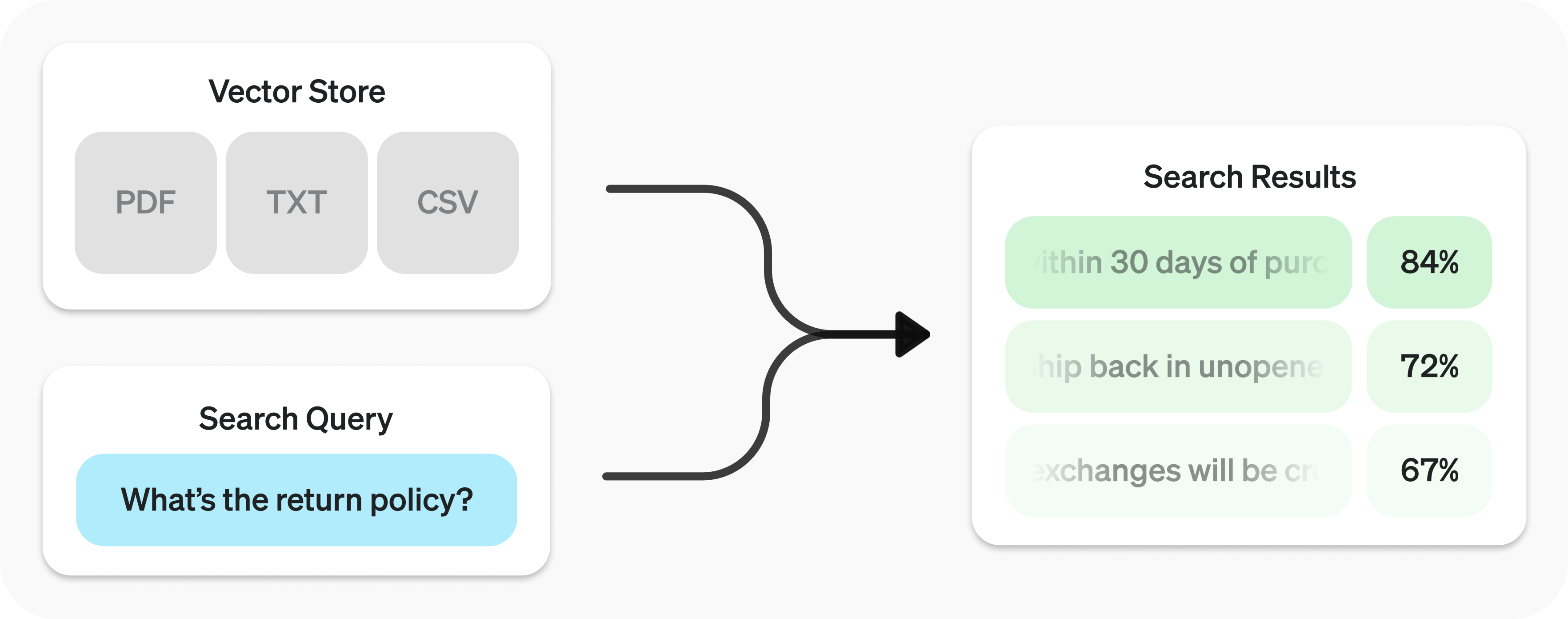
你可以使用 Retrieval API 對資料執行語意搜尋
Retrieval API 使用向量儲存庫
建立向量儲存庫 並上傳檔案。
1
2
3
4
5
6
7
8
9
10
11
12
13 import OpenAI from "openai";
const client = new OpenAI();
const vector_store = await client.vectorStores.create({
// Create vector store
name: "Support FAQ",
});
await client.vectorStores.files.uploadAndPoll(
vector_store.id,
// Upload file
fs.createReadStream("customer_policies.txt")
); 1
2
3
4
5
6
7
8
9
10
11
12 from openai import OpenAI
client = OpenAI()
vector_store = client.vector_stores.create( # Create vector store
name = "Support FAQ" ,
)
client.vector_stores.files.upload_and_poll( # Upload file
vector_store_id = vector_store.id,
file = open ( "customer_policies.txt" , "rb" )
) 1
2
3
4
5
6
7
8
9
10
11
12
13
14
15
16
17
18
19
20
21
22
23
24
25
26
27
28
29
30 package main
import (
"context"
"fmt"
"os"
"github.com/openai/openai-go/v3"
)
func main() {
client := openai.NewClient()
vectorStore, err := client.VectorStores.New(context.Background(), openai.VectorStoreNewParams{Name: openai.String("Support FAQ")})
if err != nil {
panic(err)
}
file, err := os.Open("customer_policies.txt")
if err != nil {
panic(err)
}
defer file.Close()
_, err = client.VectorStores.Files.UploadAndPoll(context.Background(), vectorStore.ID, openai.FileNewParams{
File: openai.File(file, "customer_policies.txt", "text/plain"),
Purpose: openai.FilePurposeAssistants,
}, 1000)
if err != nil {
panic(err)
}
fmt.Println(vectorStore.ID)
} 1
2
3
4
5
6
7
8
9
10
11
12
13
14
15
16
17
18
19
20
21
22
23
24
25
26
27
28
29
30
31
32
33
34
35
36
37 import com.openai.client.OpenAIClient;
import com.openai.client.okhttp.OpenAIOkHttpClient;
import com.openai.models.files.FileCreateParams;
import com.openai.models.files.FilePurpose;
import com.openai.models.vectorstores.VectorStoreCreateParams;
import com.openai.models.vectorstores.files.FileRetrieveParams;
import com.openai.models.vectorstores.files.VectorStoreFile;
import java.nio.file.Path;
var store =
client.vectorStores().create(VectorStoreCreateParams.builder().name("Support FAQ").build());
var uploaded =
client
.files()
.create(
FileCreateParams.builder()
.file(Path.of(System.getenv("OPENAI_EXAMPLE_FILE_PATH")))
.purpose(FilePurpose.ASSISTANTS)
.build());
var file =
client
.vectorStores()
.files()
.create(
store.id(),
com.openai.models.vectorstores.files.FileCreateParams.builder()
.fileId(uploaded.id())
.build());
while (file.status().equals(VectorStoreFile.Status.IN_PROGRESS)) {
Thread.sleep(1000);
file =
client
.vectorStores()
.files()
.retrieve(file.id(), FileRetrieveParams.builder().vectorStoreId(store.id()).build());
}
System.out.println(store.id()); 1
2
3
4
5
6
7
8
9
10
11
12
13 require "openai"
require "pathname"
client = OpenAI::Client.new
store = client.vector_stores.create(name: "Support FAQ")
file = client.vector_stores.files.upload_and_poll(
store.id,
file: Pathname("customer_policies.txt"),
timeout: 600
)
raise "File ingestion ended with status: #{file.status}" unless file.status == OpenAI::VectorStores::VectorStoreFile::Status::COMPLETED
puts(store.id) 送出搜尋查詢 以取得相關結果。
1
2
3
4
5 const userQuery = "What is the return policy?";
const results = await client.vectorStores.search(vector_store.id, {
query: userQuery,
}); 1
2
3
4
5
6 user_query = "What is the return policy?"
results = client.vector_stores.search(
vector_store_id = vector_store.id,
query = user_query,
) 1
2
3
4
5
6
7
8
9
10
11
12
13
14
15
16
17
18
19 package main
import (
"context"
"fmt"
"github.com/openai/openai-go/v3"
)
func main() {
client := openai.NewClient()
results, err := client.VectorStores.Search(context.Background(), "vs_123", openai.VectorStoreSearchParams{
Query: openai.VectorStoreSearchParamsQueryUnion{OfString: openai.String("What is the return policy?")},
})
if err != nil {
panic(err)
}
fmt.Println(results.Data)
} 1
2
3
4
5
6
7
8
9
10
11
12
13
14 import com.openai.client.OpenAIClient;
import com.openai.client.okhttp.OpenAIOkHttpClient;
import com.openai.models.vectorstores.VectorStoreSearchParams;
String vectorStoreId = "vs_123";
var results =
client
.vectorStores()
.search(
vectorStoreId,
VectorStoreSearchParams.builder().query("What is the return policy?").build());
System.out.println(results.data()); 1
2
3
4
5 require "openai"
client = OpenAI::Client.new
results = client.vector_stores.search("vs_123", query: "What is the return policy?")
puts(results.data&.first&.content) 語意搜尋 利用嵌入向量 找出語意相關的結果。即使結果與查詢只有少數關鍵字相同,或完全沒有相同的關鍵字,也能搜尋到這些傳統搜尋方法可能遺漏的內容。
以英文查詢 "When did we go to the moon?"(「我們是什麼時候登上月球的?」)為例,以下列出可能的搜尋結果。表中的相似度是根據英文原文計算的。
文字
關鍵字相似度
語意相似度
人類首次登月是在 1969 年 7 月。
0%
65%
第一位踏上月球的人是 Neil Armstrong。
27%
43%
我吃了月餅,覺得很好吃。
40%
28%
(關鍵字相似度採用交集與聯集的比值 計算。語意相似度則採用餘弦相似度 ,使用的嵌入模型為 text-embedding-3-small。)
在這個例子中,最相關的結果與查詢沒有任何相同的英文單字。語意搜尋具備這樣的彈性,能有效查詢各種規模的知識庫。
語意搜尋使用向量儲存庫 ,本指南稍後會詳細介紹。本節先說明語意搜尋的運作方式。
你可以使用 search 函式查詢向量儲存庫,並以自然語言指定 query。函式會傳回結果清單,每筆結果都包含相關的文字區塊、相似度分數和來源檔案。
1
2
3 const results = await client.vectorStores.search(vector_store.id, {
query: "How many woodchucks are allowed per passenger?",
}); 1
2
3
4 results = client.vector_stores.search(
vector_store_id = vector_store.id,
query = "How many woodchucks are allowed per passenger?" ,
) 1
2
3
4
5
6
7
8
9
10
11
12
13
14
15
16
17
18
19 package main
import (
"context"
"fmt"
"github.com/openai/openai-go/v3"
)
func main() {
client := openai.NewClient()
results, err := client.VectorStores.Search(context.Background(), "vs_123", openai.VectorStoreSearchParams{
Query: openai.VectorStoreSearchParamsQueryUnion{OfString: openai.String("How many woodchucks are allowed per passenger?")},
})
if err != nil {
panic(err)
}
fmt.Println(results.Data)
} 1
2
3
4
5
6
7
8
9
10
11
12
13
14
15
16 import com.openai.client.OpenAIClient;
import com.openai.client.okhttp.OpenAIOkHttpClient;
import com.openai.models.vectorstores.VectorStoreSearchParams;
String vectorStoreId = "vs_123";
var results =
client
.vectorStores()
.search(
vectorStoreId,
VectorStoreSearchParams.builder()
.query("How many woodchucks are allowed per passenger?")
.build());
System.out.println(results.data()); 1
2
3
4
5
6
7
8 require "openai"
client = OpenAI::Client.new
results = client.vector_stores.search(
"vs_123",
query: "How many woodchucks are allowed per passenger?"
)
puts(results.data&.first&.content) 1
2
3
4
5
6
7
8
9
10
11
12
13
14
15
16
17
18
19
20
21
22
23
24
25
26
27
28
29
30
31
32
33
34
35
36
37
38
39
40
41
42 {
"object" : "vector_store.search_results.page" ,
"search_query" : "How many woodchucks are allowed per passenger?" ,
"data" : [
{
"file_id" : "file-12345" ,
"filename" : "woodchuck_policy.txt" ,
"score" : 0.85 ,
"attributes" : {
"region" : "North America" ,
"author" : "Wildlife Department"
},
"content" : [
{
"type" : "text" ,
"text" : "According to the latest regulations, each passenger is allowed to carry up to two woodchucks."
},
{
"type" : "text" ,
"text" : "Ensure that the woodchucks are properly contained during transport."
}
]
},
{
"file_id" : "file-67890" ,
"filename" : "transport_guidelines.txt" ,
"score" : 0.75 ,
"attributes" : {
"region" : "North America" ,
"author" : "Transport Authority"
},
"content" : [
{
"type" : "text" ,
"text" : "Passengers must adhere to the guidelines set forth by the Transport Authority regarding the transport of woodchucks."
}
]
}
],
"has_more" : false ,
"next_page" : null
} 每次回應預設最多包含 10 筆結果。你可以透過 max_num_results 參數調整上限,最高可設為 50 筆。
某些查詢寫法能得到更好的結果,因此我們提供了自動改寫查詢的設定,以改善搜尋效果。將 rewrite_query=true 設為執行 search 時的參數,即可啟用這項功能。
你可以在結果的 search_query 欄位查看改寫後的查詢。
原始查詢 改寫後的查詢
我想知道總部辦公大樓有多高。
總部辦公大樓高度
運輸危險物品有哪些安全規定?
危險物品安全規定
遇到服務問題時,我該如何提出申訴?
服務申訴流程
你可以設定屬性條件來縮小搜尋範圍,例如只搜尋特定日期範圍內的檔案。在 filters 中定義並組合條件,即可先依屬性篩選檔案,再執行語意搜尋。
使用比較篩選器 時,先指定 key,再將檔案 attributes 中該鍵對應的值與給定的 value 比較。使用複合篩選器 時,則可透過 and 和 or 組合多個篩選器。
1
2
3
4
5 {
"type" : "eq" | "ne" | "gt" | "gte" | "lt" | "lte" | "in" | "nin" , // comparison operators
"key" : "attributes_key" , // attributes key
"value" : "target_value" // value to compare against
} 1
2
3
4 {
"type" : "and" | "or" , // logical operators
"filters" : [ ... ]
} 以下是幾個篩選器範例。
下列檔名範例會比對自訂的 filename 屬性。你必須為向量儲存庫中的每個檔案明確設定這項屬性,例如 {"filename": "example.txt"}。篩選器不會自動比對上傳時的檔名。
Region Date range Filenames Exclude filenames Complex 地區
1
2
3
4
5 {
"type" : "eq" ,
"key" : "region" ,
"value" : "us"
} 日期範圍
1
2
3
4
5
6
7
8
9
10
11
12
13
14
15 {
"type" : "and" ,
"filters" : [
{
"type" : "gte" ,
"key" : "date" ,
"value" : 1704067200 // unix timestamp for 2024-01-01
},
{
"type" : "lte" ,
"key" : "date" ,
"value" : 1710892800 // unix timestamp for 2024-03-20
}
]
} 檔名
1
2
3
4
5 {
"type" : "in" ,
"key" : "filename" ,
"value" : [ "example.txt" , "example2.txt" ]
} 排除檔名
1
2
3
4
5 {
"type" : "nin" ,
"key" : "filename" ,
"value" : [ "draft.txt" , "internal_notes.md" ]
} 複合條件
1
2
3
4
5
6
7
8
9
10
11
12
13
14
15
16
17
18
19
20
21
22
23
24
25
26
27
28
29
30
31
32
33
34
35 {
"type" : "or" ,
"filters" : [
{
"type" : "and" ,
"filters" : [
{
"type" : "or" ,
"filters" : [
{
"type" : "eq" ,
"key" : "project_code" ,
"value" : "X123"
},
{
"type" : "eq" ,
"key" : "project_code" ,
"value" : "X999"
}
]
},
{
"type" : "eq" ,
"key" : "confidentiality" ,
"value" : "top_secret"
}
]
},
{
"type" : "eq" ,
"key" : "language" ,
"value" : "en"
}
]
}
如果檔案搜尋結果的相關性不足,可以調整 ranking_options 來改善回應品質。你可以指定 ranker,例如 auto 或 default-2024-08-21,並將 score_threshold 設為 0.0 到 1.0 之間的值。提高 score_threshold 可讓結果只包含相關性較高的區塊,但也可能排除一些有用的內容。如果指定了 ranking_options.hybrid_search,還可以調整 hybrid_search.embedding_weight(rrf_embedding_weight)和 hybrid_search.text_weight(rrf_text_weight),控制倒數排名融合演算法如何權衡語意嵌入比對與稀疏關鍵字比對的結果。提高前者的權重會更重視語意相似度,提高後者的權重則會更重視文字重疊程度。至少要有一個權重大於零。
向量儲存庫是 Retrieval API 和檔案搜尋 工具用來執行語意搜尋的容器。將檔案加入向量儲存庫後,系統會自動把檔案切成區塊、產生嵌入向量並建立索引。
向量儲存庫包含 vector_store_file 物件,每個物件都對應一個底層的 file 物件。
物件類型
說明
file代表透過 Files API 上傳的內容。常與向量儲存庫搭配使用,也可用於微調及其他用途。
vector_store用來存放可搜尋檔案的容器。
vector_store.file此包裝類型代表一個 file,其內容已切成區塊並轉換為嵌入向量,且已與一個 vector_store 建立關聯。attributes 對應表。
費用按所有向量儲存庫使用的總儲存空間計算。儲存用量取決於解析後的區塊及其對應嵌入向量的大小。
儲存用量
費用
所有儲存庫合計的前 1 GB
免費
超過 1 GB 的部分
每 GB 每天 0.10 美元
Create Retrieve Update Delete List 建立
1
2
3
4 await client.vectorStores.create({
name: "Support FAQ",
file_ids: ["file_123"],
}); 1
2
3
4 client.vector_stores.create(
name = "Support FAQ" ,
file_ids = [ "file_123" ]
) 1
2
3
4
5
6
7
8
9
10
11
12
13
14
15
16
17
18
19
20 package main
import (
"context"
"fmt"
"github.com/openai/openai-go/v3"
)
func main() {
client := openai.NewClient()
vectorStore, err := client.VectorStores.New(context.Background(), openai.VectorStoreNewParams{
Name: openai.String("Support FAQ"),
FileIDs: []string{"file_123"},
})
if err != nil {
panic(err)
}
fmt.Println(vectorStore.ID)
} 1
2
3
4
5
6
7
8
9
10
11
12
13 import com.openai.client.OpenAIClient;
import com.openai.client.okhttp.OpenAIOkHttpClient;
import com.openai.models.vectorstores.VectorStoreCreateParams;
String fileId = "file_123";
var store =
client
.vectorStores()
.create(
VectorStoreCreateParams.builder().name("Support FAQ").addFileId(fileId).build());
System.out.println(store.id()); 1
2
3
4
5
6
7
8 require "openai"
client = OpenAI::Client.new
store = client.vector_stores.create(
name: "Support FAQ",
file_ids: ["file_123"]
)
puts(store.id) 取得
1 await client.vectorStores.retrieve("vs_123"); 1
2
3 client.vector_stores.retrieve(
vector_store_id = "vs_123"
) 1
2
3
4
5
6
7
8
9
10
11
12
13
14
15
16
17 package main
import (
"context"
"fmt"
"github.com/openai/openai-go/v3"
)
func main() {
client := openai.NewClient()
vectorStore, err := client.VectorStores.Get(context.Background(), "vs_123")
if err != nil {
panic(err)
}
fmt.Println(vectorStore.ID)
} 1
2
3
4
5
6 import com.openai.client.OpenAIClient;
import com.openai.client.okhttp.OpenAIOkHttpClient;
String vectorStoreId = "vs_123";
System.out.println(client.vectorStores().retrieve(vectorStoreId).id()); 1
2
3
4
5 require "openai"
client = OpenAI::Client.new
store = client.vector_stores.retrieve("vs_123")
puts(store.id) 更新
1
2
3 await client.vectorStores.update("vs_123", {
name: "Support FAQ Updated",
}); 1
2
3
4 client.vector_stores.update(
vector_store_id = "vs_123" ,
name = "Support FAQ Updated"
) 1
2
3
4
5
6
7
8
9
10
11
12
13
14
15
16
17
18
19 package main
import (
"context"
"fmt"
"github.com/openai/openai-go/v3"
)
func main() {
client := openai.NewClient()
vectorStore, err := client.VectorStores.Update(context.Background(), "vs_123", openai.VectorStoreUpdateParams{
Name: openai.String("Support FAQ Updated"),
})
if err != nil {
panic(err)
}
fmt.Println(vectorStore.Name)
} 1
2
3
4
5
6
7
8
9
10
11
12
13
14 import com.openai.client.OpenAIClient;
import com.openai.client.okhttp.OpenAIOkHttpClient;
import com.openai.models.vectorstores.VectorStoreUpdateParams;
String vectorStoreId = "vs_123";
var store =
client
.vectorStores()
.update(
vectorStoreId,
VectorStoreUpdateParams.builder().name("Updated knowledge base").build());
System.out.println(store.name()); 1
2
3
4
5 require "openai"
client = OpenAI::Client.new
store = client.vector_stores.update("vs_123", name: "Updated knowledge base")
puts(store.name) 刪除
1 await client.vectorStores.delete("vs_123"); 1
2
3 client.vector_stores.delete(
vector_store_id = "vs_123"
) 1
2
3
4
5
6
7
8
9
10
11
12
13
14
15
16
17 package main
import (
"context"
"fmt"
"github.com/openai/openai-go/v3"
)
func main() {
client := openai.NewClient()
deleted, err := client.VectorStores.Delete(context.Background(), "vs_123")
if err != nil {
panic(err)
}
fmt.Println(deleted.Deleted)
} 1
2
3
4
5
6 import com.openai.client.OpenAIClient;
import com.openai.client.okhttp.OpenAIOkHttpClient;
String vectorStoreId = "vs_123";
System.out.println(client.vectorStores().delete(vectorStoreId).deleted()); 1
2
3
4
5 require "openai"
client = OpenAI::Client.new
deleted = client.vector_stores.delete("vs_123")
puts(deleted.deleted) 列出
await client.vectorStores.list(); client.vector_stores.list() package main
import (
"context"
"fmt"
"github.com/openai/openai-go/v3"
)
func main() {
client := openai.NewClient()
vectorStores, err := client.VectorStores.List(context.Background(), openai.VectorStoreListParams{})
if err != nil {
panic(err)
}
fmt.Println(vectorStores.Data)
} import com.openai.client.OpenAIClient;
import com.openai.client.okhttp.OpenAIOkHttpClient;
System.out.println(client.vectorStores().list().data()); require "openai"
client = OpenAI::Client.new
stores = client.vector_stores.list(limit: 10)
puts((stores.data || []).length)
部分操作採非同步方式執行,例如用 create 建立 vector_store.file,可能需要一些時間才能完成。你可以使用 create_and_poll 等輔助函式,讓程式等到操作完成後再繼續,也可以自行查詢狀態。從向量儲存庫移除檔案的操作採用最終一致性,因此在移除後的一小段時間內,搜尋結果仍可能包含該檔案的內容。
新增檔案的請求速率限制按向量儲存庫 ID 分別計算。對 /vector_stores/{vector_store_id}/files/vector_stores/{vector_store_id}/file_batches
Create Upload Retrieve Update Delete List 建立
1
2
3 await client.vectorStores.files.createAndPoll("vs_123", {
file_id: "file_123",
}); 1
2
3
4 client.vector_stores.files.create_and_poll(
vector_store_id = "vs_123" ,
file_id = "file_123"
) 1
2
3
4
5
6
7
8
9
10
11
12
13
14
15
16
17
18
19 package main
import (
"context"
"fmt"
"github.com/openai/openai-go/v3"
)
func main() {
client := openai.NewClient()
file, err := client.VectorStores.Files.NewAndPoll(context.Background(), "vs_123", openai.VectorStoreFileNewParams{
FileID: "file_123",
}, 1000)
if err != nil {
panic(err)
}
fmt.Println(file.ID)
} 1
2
3
4
5
6
7
8
9
10
11
12
13
14
15 import com.openai.client.OpenAIClient;
import com.openai.client.okhttp.OpenAIOkHttpClient;
import com.openai.models.vectorstores.files.FileCreateParams;
String vectorStoreId = "vs_123";
String fileId = "file_123";
var file =
client
.vectorStores()
.files()
.create(vectorStoreId, FileCreateParams.builder().fileId(fileId).build());
System.out.println(file.id()); 1
2
3
4
5
6
7
8
9 require "openai"
client = OpenAI::Client.new
file = client.vector_stores.files.create_and_poll("vs_123", file_id: "file_123")
unless file.status == OpenAI::VectorStores::VectorStoreFile::Status::COMPLETED
raise "File indexing did not complete: #{file.last_error&.message || file.status}"
end
puts(file.id) 上傳
1
2
3
4 await client.vectorStores.files.uploadAndPoll(
"vs_123",
fs.createReadStream("customer_policies.txt")
); 1
2
3
4 client.vector_stores.files.upload_and_poll(
vector_store_id = "vs_123" ,
file = open ( "customer_policies.txt" , "rb" )
) 1
2
3
4
5
6
7
8
9
10
11
12
13
14
15
16
17
18
19
20
21
22
23
24
25
26 package main
import (
"context"
"fmt"
"os"
"github.com/openai/openai-go/v3"
)
func main() {
client := openai.NewClient()
file, err := os.Open("customer_policies.txt")
if err != nil {
panic(err)
}
defer file.Close()
result, err := client.VectorStores.Files.UploadAndPoll(context.Background(), "vs_123", openai.FileNewParams{
File: openai.File(file, "customer_policies.txt", "text/plain"),
Purpose: openai.FilePurposeAssistants,
}, 1000)
if err != nil {
panic(err)
}
fmt.Println(result.ID)
} 1
2
3
4
5
6
7
8
9
10
11
12
13
14
15
16
17
18
19
20
21
22
23
24
25
26
27
28
29
30
31
32
33
34
35
36 import com.openai.client.OpenAIClient;
import com.openai.client.okhttp.OpenAIOkHttpClient;
import com.openai.models.files.FileCreateParams;
import com.openai.models.files.FilePurpose;
import com.openai.models.vectorstores.files.FileRetrieveParams;
import com.openai.models.vectorstores.files.VectorStoreFile;
import java.nio.file.Path;
String vectorStoreId = "vs_123";
var uploaded =
client
.files()
.create(
FileCreateParams.builder()
.file(Path.of(System.getenv("OPENAI_EXAMPLE_FILE_PATH")))
.purpose(FilePurpose.ASSISTANTS)
.build());
var file =
client
.vectorStores()
.files()
.create(
vectorStoreId,
com.openai.models.vectorstores.files.FileCreateParams.builder()
.fileId(uploaded.id())
.build());
while (file.status().equals(VectorStoreFile.Status.IN_PROGRESS)) {
Thread.sleep(1000);
file =
client
.vectorStores()
.files()
.retrieve(
file.id(), FileRetrieveParams.builder().vectorStoreId(vectorStoreId).build());
}
System.out.println(file.id()); 1
2
3
4
5
6
7
8
9
10
11
12 require "openai"
require "pathname"
client = OpenAI::Client.new
vector_store_file = client.vector_stores.files.upload_and_poll(
"vs_123",
file: Pathname("customer_policies.txt"),
timeout: 600
)
raise "File ingestion ended with status: #{vector_store_file.status}" unless vector_store_file.status == OpenAI::VectorStores::VectorStoreFile::Status::COMPLETED
puts(vector_store_file.id) 取得
1
2
3 await client.vectorStores.files.retrieve("file_123", {
vector_store_id: "vs_123",
}); 1
2
3
4 client.vector_stores.files.retrieve(
vector_store_id = "vs_123" ,
file_id = "file_123"
) 1
2
3
4
5
6
7
8
9
10
11
12
13
14
15
16
17 package main
import (
"context"
"fmt"
"github.com/openai/openai-go/v3"
)
func main() {
client := openai.NewClient()
file, err := client.VectorStores.Files.Get(context.Background(), "vs_123", "file_123")
if err != nil {
panic(err)
}
fmt.Println(file.ID)
} 1
2
3
4
5
6
7
8
9
10
11
12
13
14
15
16
17 import com.openai.client.OpenAIClient;
import com.openai.client.okhttp.OpenAIOkHttpClient;
String fileId = "file_123";
String vectorStoreId = "vs_123";
System.out.println(
client
.vectorStores()
.files()
.retrieve(
fileId,
com.openai.models.vectorstores.files.FileRetrieveParams.builder()
.vectorStoreId(vectorStoreId)
.build())
.id()); 1
2
3
4
5 require "openai"
client = OpenAI::Client.new
file = client.vector_stores.files.retrieve("file_123", vector_store_id: "vs_123")
puts(file.id) 更新
1
2
3
4 await client.vectorStores.files.update("file_123", {
vector_store_id: "vs_123",
attributes: { key: "value" },
}); 1
2
3
4
5 client.vector_stores.files.update(
vector_store_id = "vs_123" ,
file_id = "file_123" ,
attributes = { "key" : "value" }
) 1
2
3
4
5
6
7
8
9
10
11
12
13
14
15
16
17
18
19
20
21 package main
import (
"context"
"fmt"
"github.com/openai/openai-go/v3"
)
func main() {
client := openai.NewClient()
file, err := client.VectorStores.Files.Update(context.Background(), "vs_123", "file_123", openai.VectorStoreFileUpdateParams{
Attributes: map[string]openai.VectorStoreFileUpdateParamsAttributeUnion{
"key": {OfString: openai.String("value")},
},
})
if err != nil {
panic(err)
}
fmt.Println(file.ID)
} 1
2
3
4
5
6
7
8
9
10
11
12
13
14
15
16
17
18
19
20
21
22
23
24 import com.openai.client.OpenAIClient;
import com.openai.client.okhttp.OpenAIOkHttpClient;
import com.openai.core.JsonValue;
import com.openai.models.vectorstores.files.FileUpdateParams;
String fileId = "file_123";
String vectorStoreId = "vs_123";
var file =
client
.vectorStores()
.files()
.update(
fileId,
FileUpdateParams.builder()
.vectorStoreId(vectorStoreId)
.attributes(
FileUpdateParams.Attributes.builder()
.putAdditionalProperty("category", JsonValue.from("policy"))
.build())
.build());
System.out.println(file.id()); 1
2
3
4
5 require "openai"
client = OpenAI::Client.new
file = client.vector_stores.files.update("file_123", vector_store_id: "vs_123", attributes: { category: "policy" })
puts(file.id) 刪除
1
2
3 await client.vectorStores.files.delete("file_123", {
vector_store_id: "vs_123",
}); 1
2
3
4 client.vector_stores.files.delete(
vector_store_id = "vs_123" ,
file_id = "file_123"
) 1
2
3
4
5
6
7
8
9
10
11
12
13
14
15
16
17 package main
import (
"context"
"fmt"
"github.com/openai/openai-go/v3"
)
func main() {
client := openai.NewClient()
deleted, err := client.VectorStores.Files.Delete(context.Background(), "vs_123", "file_123")
if err != nil {
panic(err)
}
fmt.Println(deleted.Deleted)
} 1
2
3
4
5
6
7
8
9
10
11
12
13
14
15
16
17 import com.openai.client.OpenAIClient;
import com.openai.client.okhttp.OpenAIOkHttpClient;
String fileId = "file_123";
String vectorStoreId = "vs_123";
System.out.println(
client
.vectorStores()
.files()
.delete(
fileId,
com.openai.models.vectorstores.files.FileDeleteParams.builder()
.vectorStoreId(vectorStoreId)
.build())
.deleted()); 1
2
3
4
5 require "openai"
client = OpenAI::Client.new
deleted = client.vector_stores.files.delete("file_123", vector_store_id: "vs_123")
puts(deleted.deleted) 列出
1 await client.vectorStores.files.list("vs_123"); 1
2
3 client.vector_stores.files.list(
vector_store_id = "vs_123"
) 1
2
3
4
5
6
7
8
9
10
11
12
13
14
15
16
17 package main
import (
"context"
"fmt"
"github.com/openai/openai-go/v3"
)
func main() {
client := openai.NewClient()
files, err := client.VectorStores.Files.List(context.Background(), "vs_123", openai.VectorStoreFileListParams{})
if err != nil {
panic(err)
}
fmt.Println(files.Data)
} 1
2
3
4
5
6 import com.openai.client.OpenAIClient;
import com.openai.client.okhttp.OpenAIOkHttpClient;
String vectorStoreId = "vs_123";
System.out.println(client.vectorStores().files().list(vectorStoreId).data()); 1
2
3
4
5 require "openai"
client = OpenAI::Client.new
files = client.vector_stores.files.list("vs_123")
puts((files.data || []).length)
建立
1
2
3
4
5
6
7
8
9
10
11
12
13
14
15
16
17
18 await client.vectorStores.fileBatches.createAndPoll("vs_123", {
files: [
{
file_id: "file_123",
attributes: { department: "finance" },
},
{
file_id: "file_456",
chunking_strategy: {
type: "static",
static: {
max_chunk_size_tokens: 1200,
chunk_overlap_tokens: 200,
},
},
},
],
}); 1
2
3
4
5
6
7
8
9
10
11
12
13
14
15
16
17
18
19 client.vector_stores.file_batches.create_and_poll(
vector_store_id = "vs_123" ,
files = [
{
"file_id" : "file_123" ,
"attributes" : { "department" : "finance" }
},
{
"file_id" : "file_456" ,
"chunking_strategy" : {
"type" : "static" ,
"static" : {
"max_chunk_size_tokens" : 1200 ,
"chunk_overlap_tokens" : 200
}
}
}
]
) 1
2
3
4
5
6
7
8
9
10
11
12
13
14
15
16
17
18
19
20
21
22
23
24
25
26
27
28
29
30
31
32 package main
import (
"context"
"fmt"
"github.com/openai/openai-go/v3"
)
func main() {
client := openai.NewClient()
batch, err := client.VectorStores.FileBatches.NewAndPoll(context.Background(), "vs_123", openai.VectorStoreFileBatchNewParams{
Files: []openai.VectorStoreFileBatchNewParamsFile{
{
FileID: "file_123",
Attributes: map[string]openai.VectorStoreFileBatchNewParamsFileAttributeUnion{
"department": {OfString: openai.String("finance")},
},
},
{
FileID: "file_456",
ChunkingStrategy: openai.FileChunkingStrategyParamUnion{OfStatic: &openai.StaticFileChunkingStrategyObjectParam{
Static: openai.StaticFileChunkingStrategyParam{MaxChunkSizeTokens: 1200, ChunkOverlapTokens: 200},
}},
},
},
}, 1000)
if err != nil {
panic(err)
}
fmt.Println(batch.ID)
} 1
2
3
4
5
6
7
8
9
10
11
12
13
14
15
16
17
18
19
20
21
22
23
24
25
26
27
28
29
30
31
32
33
34
35
36
37
38
39
40
41
42
43
44
45
46
47 import com.openai.client.OpenAIClient;
import com.openai.client.okhttp.OpenAIOkHttpClient;
import com.openai.core.JsonValue;
import com.openai.models.vectorstores.StaticFileChunkingStrategy;
import com.openai.models.vectorstores.filebatches.FileBatchCreateParams;
import com.openai.models.vectorstores.filebatches.FileBatchRetrieveParams;
import com.openai.models.vectorstores.filebatches.VectorStoreFileBatch;
String vectorStoreId = "vs_123";
String fileId = "file_123";
String fileId2 = "file_456";
var first =
FileBatchCreateParams.File.builder()
.fileId(fileId)
.attributes(
FileBatchCreateParams.File.Attributes.builder()
.putAdditionalProperty("department", JsonValue.from("finance"))
.build())
.build();
var second =
FileBatchCreateParams.File.builder()
.fileId(fileId2)
.staticChunkingStrategy(
StaticFileChunkingStrategy.builder()
.maxChunkSizeTokens(1200)
.chunkOverlapTokens(200)
.build())
.build();
var batch =
client
.vectorStores()
.fileBatches()
.create(
vectorStoreId,
FileBatchCreateParams.builder().addFile(first).addFile(second).build());
while (batch.status().equals(VectorStoreFileBatch.Status.IN_PROGRESS)) {
Thread.sleep(1000);
batch =
client
.vectorStores()
.fileBatches()
.retrieve(
batch.id(),
FileBatchRetrieveParams.builder().vectorStoreId(vectorStoreId).build());
}
System.out.println(batch.status()); 1
2
3
4
5
6
7
8
9
10
11
12
13
14
15
16
17
18
19
20
21
22
23
24
25
26
27
28
29
30
31
32
33
34
35
36
37 require "openai"
client = OpenAI::Client.new
batch = client.vector_stores.file_batches.create_and_poll(
"vs_123",
files: [
{
file_id: "file_123",
attributes: { department: "finance" }
},
{
file_id: "file_456",
chunking_strategy: {
type: :static,
static: {
max_chunk_size_tokens: 1_200,
chunk_overlap_tokens: 200
}
}
}
],
timeout: 600
)
raise "File ingestion ended with status: #{batch.status}" unless batch.status == OpenAI::VectorStores::VectorStoreFileBatch::Status::COMPLETED
raise "File ingestion failed for #{batch.file_counts.failed} file(s)" if batch.file_counts.failed.positive?
# Live validation of per-file batches returned default chunking despite overrides.
file = client.vector_stores.files.retrieve("file_456", vector_store_id: "vs_123")
strategy = file.chunking_strategy
unless strategy.is_a?(OpenAI::StaticFileChunkingStrategyObject) &&
strategy.static.max_chunk_size_tokens == 1_200 &&
strategy.static.chunk_overlap_tokens == 200
raise "Requested chunking was not applied to #{file.id}: #{strategy.to_json}"
end
puts(batch.status) 取得
1
2
3 await client.vectorStores.fileBatches.retrieve("vsfb_123", {
vector_store_id: "vs_123",
}); 1
2
3
4 client.vector_stores.file_batches.retrieve(
vector_store_id = "vs_123" ,
batch_id = "vsfb_123"
) 1
2
3
4
5
6
7
8
9
10
11
12
13
14
15
16
17 package main
import (
"context"
"fmt"
"github.com/openai/openai-go/v3"
)
func main() {
client := openai.NewClient()
batch, err := client.VectorStores.FileBatches.Get(context.Background(), "vs_123", "vsfb_123")
if err != nil {
panic(err)
}
fmt.Println(batch.ID)
} 1
2
3
4
5
6
7
8
9
10
11
12
13
14
15
16
17 import com.openai.client.OpenAIClient;
import com.openai.client.okhttp.OpenAIOkHttpClient;
String fileBatchId = "vsfb_123";
String vectorStoreId = "vs_123";
System.out.println(
client
.vectorStores()
.fileBatches()
.retrieve(
fileBatchId,
com.openai.models.vectorstores.filebatches.FileBatchRetrieveParams.builder()
.vectorStoreId(vectorStoreId)
.build())
.status()); 1
2
3
4
5
6
7
8 require "openai"
client = OpenAI::Client.new
batch = client.vector_stores.file_batches.retrieve(
"vsfb_123",
vector_store_id: "vs_123"
)
puts(batch.status) 取消
1
2
3 await client.vectorStores.fileBatches.cancel("vsfb_123", {
vector_store_id: "vs_123",
}); 1
2
3
4 client.vector_stores.file_batches.cancel(
vector_store_id = "vs_123" ,
batch_id = "vsfb_123"
) 1
2
3
4
5
6
7
8
9
10
11
12
13
14
15
16
17 package main
import (
"context"
"fmt"
"github.com/openai/openai-go/v3"
)
func main() {
client := openai.NewClient()
batch, err := client.VectorStores.FileBatches.Cancel(context.Background(), "vs_123", "vsfb_123")
if err != nil {
panic(err)
}
fmt.Println(batch.Status)
} 1
2
3
4
5
6
7
8
9
10
11
12
13
14
15
16
17 import com.openai.client.OpenAIClient;
import com.openai.client.okhttp.OpenAIOkHttpClient;
String fileBatchId = "vsfb_123";
String vectorStoreId = "vs_123";
System.out.println(
client
.vectorStores()
.fileBatches()
.cancel(
fileBatchId,
com.openai.models.vectorstores.filebatches.FileBatchCancelParams.builder()
.vectorStoreId(vectorStoreId)
.build())
.status()); 1
2
3
4
5
6
7
8 require "openai"
client = OpenAI::Client.new
batch = client.vector_stores.file_batches.cancel(
"vsfb_123",
vector_store_id: "vs_123"
)
puts(batch.status) 列出
1
2
3 await client.vectorStores.fileBatches.listFiles("vsfb_123", {
vector_store_id: "vs_123",
}); 1
2
3
4 client.vector_stores.file_batches.list_files(
"vsfb_123" ,
vector_store_id = "vs_123"
) 1
2
3
4
5
6
7
8
9
10
11
12
13
14
15
16
17 package main
import (
"context"
"fmt"
"github.com/openai/openai-go/v3"
)
func main() {
client := openai.NewClient()
files, err := client.VectorStores.FileBatches.ListFiles(context.Background(), "vs_123", "vsfb_123", openai.VectorStoreFileBatchListFilesParams{})
if err != nil {
panic(err)
}
fmt.Println(files.Data)
} 1
2
3
4
5
6
7
8
9
10
11
12
13
14
15
16
17 import com.openai.client.OpenAIClient;
import com.openai.client.okhttp.OpenAIOkHttpClient;
String fileBatchId = "vsfb_123";
String vectorStoreId = "vs_123";
System.out.println(
client
.vectorStores()
.fileBatches()
.listFiles(
fileBatchId,
com.openai.models.vectorstores.filebatches.FileBatchListFilesParams.builder()
.vectorStoreId(vectorStoreId)
.build())
.data()); 1
2
3
4
5
6
7
8 require "openai"
client = OpenAI::Client.new
files = client.vector_stores.file_batches.list_files(
"vsfb_123",
vector_store_id: "vs_123"
)
puts((files.data || []).length)
建立批次時,可以提供 file_ids,並視需要指定 attributes 和 chunking_strategy 中的一項或兩項。也可以使用 files 陣列,為每個檔案傳入一個物件,內含 file_id 以及選用的 attributes 和 chunking_strategy。這兩種方式只能擇一使用。若所有檔案共用設定,請使用前者。若要個別覆寫檔案設定,請使用後者。
若要提高單一向量儲存庫匯入檔案的吞吐量,建議盡可能使用批次建立。每次批次請求最多可包含 500 個檔案。相較於為每個檔案分別傳送建立請求,批次建立通常能減少資源競爭,縮短端對端延遲。
每個 vector_store.file 都可以設定 attributes。這個字典儲存屬性值,執行語意搜尋 時,可透過屬性篩選 引用這些值。字典最多可包含 16 個鍵。每個鍵最多可包含 64 個字元,每個字串值最多可包含 512 個字元。
1
2
3
4
5
6
7
8 await client.vectorStores.files.create("<vector_store_id>", {
file_id: "file_123",
attributes: {
region: "US",
category: "Marketing",
date: 1672531200, // Jan 1, 2023
},
}); 1
2
3
4
5
6
7
8
9 client.vector_stores.files.create(
vector_store_id = "<vector_store_id>" ,
file_id = "file_123" ,
attributes = {
"region" : "US" ,
"category" : "Marketing" ,
"date" : 1672531200 # Jan 1, 2023
}
) 1
2
3
4
5
6
7
8
9
10
11
12
13
14
15
16
17
18
19
20
21
22
23
24 package main
import (
"context"
"fmt"
"github.com/openai/openai-go/v3"
)
func main() {
client := openai.NewClient()
file, err := client.VectorStores.Files.New(context.Background(), "<vector_store_id>", openai.VectorStoreFileNewParams{
FileID: "file_123",
Attributes: map[string]openai.VectorStoreFileNewParamsAttributeUnion{
"region": {OfString: openai.String("US")},
"category": {OfString: openai.String("Marketing")},
"date": {OfFloat: openai.Float(1672531200)},
},
})
if err != nil {
panic(err)
}
fmt.Println(file.ID)
} 1
2
3
4
5
6
7
8
9
10
11
12
13
14
15
16
17
18
19
20
21
22
23
24 import com.openai.client.OpenAIClient;
import com.openai.client.okhttp.OpenAIOkHttpClient;
import com.openai.core.JsonValue;
import com.openai.models.vectorstores.files.FileCreateParams;
String vectorStoreId = "<vector_store_id>";
String fileId = "file_123";
var file =
client
.vectorStores()
.files()
.create(
vectorStoreId,
FileCreateParams.builder()
.fileId(fileId)
.attributes(
FileCreateParams.Attributes.builder()
.putAdditionalProperty("category", JsonValue.from("policy"))
.build())
.build());
System.out.println(file.id()); 1
2
3
4
5 require "openai"
client = OpenAI::Client.new
file = client.vector_stores.files.create("<vector_store_id>", file_id: "file_123", attributes: { category: "policy" })
puts(file.id) 你可以為 vector_store 物件設定 expires_after,指定到期政策。向量儲存庫到期後,系統會刪除所有相關的 vector_store.file 物件,並停止對這些物件收費。
1
2
3
4
5
6 await client.vectorStores.update("vs_123", {
expires_after: {
anchor: "last_active_at",
days: 7,
},
}); 1
2
3
4
5
6
7 client.vector_stores.update(
vector_store_id = "vs_123" ,
expires_after = {
"anchor" : "last_active_at" ,
"days" : 7
}
) 1
2
3
4
5
6
7
8
9
10
11
12
13
14
15
16
17
18
19 package main
import (
"context"
"fmt"
"github.com/openai/openai-go/v3"
)
func main() {
client := openai.NewClient()
vectorStore, err := client.VectorStores.Update(context.Background(), "vs_123", openai.VectorStoreUpdateParams{
ExpiresAfter: openai.VectorStoreUpdateParamsExpiresAfter{Days: 7},
})
if err != nil {
panic(err)
}
fmt.Println(vectorStore.ExpiresAfter)
} 1
2
3
4
5
6
7
8
9
10
11
12
13
14
15
16
17
18
19
20
21 import com.openai.client.OpenAIClient;
import com.openai.client.okhttp.OpenAIOkHttpClient;
import com.openai.core.JsonValue;
import com.openai.models.vectorstores.VectorStoreUpdateParams;
String vectorStoreId = "vs_123";
var store =
client
.vectorStores()
.update(
vectorStoreId,
VectorStoreUpdateParams.builder()
.expiresAfter(
VectorStoreUpdateParams.ExpiresAfter.builder()
.anchor(JsonValue.from("last_active_at"))
.days(7)
.build())
.build());
System.out.println(store.expiresAfter().orElseThrow()); 1
2
3
4
5
6
7
8
9
10
11 require "openai"
client = OpenAI::Client.new
store = client.vector_stores.update(
"vs_123",
expires_after: {
anchor: :last_active_at,
days: 7
}
)
puts(store.expires_after) 每個檔案的大小上限為 512 MB,內容不應超過 5,000,000 個 Token(加入檔案時會自動計算)。
預設情況下,max_chunk_size_tokens 設為 800,chunk_overlap_tokens 設為 400。系統會將每個檔案切成每塊 800 個 Token 的區塊來建立索引,相鄰區塊之間有 400 個 Token 重疊。
將檔案加入向量儲存庫時,可以設定 chunking_strategy
max_chunk_size_tokens 必須介於 100 到 4096 之間,含兩端值。chunk_overlap_tokens 不得小於零,且不應超過 max_chunk_size_tokens / 2。
支援的檔案類型 對於 text/ 開頭的 MIME 類型,編碼必須是 utf-8、utf-16 或 ascii。
檔案格式
MIME 類型
.ctext/x-c
.cpptext/x-c++
.cstext/x-csharp
.csstext/css
.docapplication/msword
.docxapplication/vnd.openxmlformats-officedocument.wordprocessingml.document
.gotext/x-golang
.htmltext/html
.javatext/x-java
.jstext/javascript
.jsonapplication/json
.mdtext/markdown
.pdfapplication/pdf
.phptext/x-php
.pptxapplication/vnd.openxmlformats-officedocument.presentationml.presentation
.pytext/x-python
.pytext/x-script.python
.rbtext/x-ruby
.shapplication/x-sh
.textext/x-tex
.tsapplication/typescript
.txttext/plain
執行查詢後,如果想根據搜尋結果整理出回覆,可以將結果和原始查詢一併提供給我們的模型,讓模型產生有資料依據的回覆。
1
2
3
4
5
6
7
8
9 import OpenAI from "openai";
const client = new OpenAI();
const userQuery = "What is the return policy?";
const results = await client.vectorStores.search(vector_store.id, {
query: userQuery,
}); 1
2
3
4
5
6
7
8
9
10 from openai import OpenAI
client = OpenAI()
user_query = "What is the return policy?"
results = client.vector_stores.search(
vector_store_id = vector_store.id,
query = user_query,
) 1
2
3
4
5
6
7
8
9
10
11
12
13
14
15
16
17
18
19 package main
import (
"context"
"fmt"
"github.com/openai/openai-go/v3"
)
func main() {
client := openai.NewClient()
results, err := client.VectorStores.Search(context.Background(), "vs_123", openai.VectorStoreSearchParams{
Query: openai.VectorStoreSearchParamsQueryUnion{OfString: openai.String("What is the return policy?")},
})
if err != nil {
panic(err)
}
fmt.Println(results.Data)
} 1
2
3
4
5
6
7
8
9
10
11
12
13
14 import com.openai.client.OpenAIClient;
import com.openai.client.okhttp.OpenAIOkHttpClient;
import com.openai.models.vectorstores.VectorStoreSearchParams;
String vectorStoreId = "vs_123";
var results =
client
.vectorStores()
.search(
vectorStoreId,
VectorStoreSearchParams.builder().query("What is the return policy?").build());
System.out.println(results.data()); 1
2
3
4
5
6
7
8 require "openai"
client = OpenAI::Client.new
results = client.vector_stores.search(
"vs_123",
query: "What is the return policy?"
)
puts(results.data) 1
2
3
4
5
6
7
8
9
10
11
12
13
14
15
16
17
18
19
20
21
22 const formattedResults = formatResults(results.data);
// Join the text content of all results
const textSources = results.data
.map((result) => result.content.map((c) => c.text).join("\n"))
.join("\n");
const completion = await client.chat.completions.create({
model: "gpt-6-astra",
messages: [
{
role: "developer",
content:
"Produce a concise answer to the query based on the provided sources.",
},
{
role: "user",
content: `Sources: ${formattedResults}\n\nQuery: '${userQuery}'`,
},
],
});
console.log(completion.choices[0].message.content); 1
2
3
4
5
6
7
8
9
10
11
12
13
14
15
16
17
18
19
20 # Use results and user_query from the preceding search step.
formatted_results = format_results(results.data)
" \n " .join( " \n " .join(c.text for c in result.content) for result in results.data)
completion = client.chat.completions.create(
model = "gpt-6-astra" ,
messages = [
{
"role" : "developer" ,
"content" : "Produce a concise answer to the query based on the provided sources." ,
},
{
"role" : "user" ,
"content" : f "Sources: { formatted_results }\n\n Query: ' { user_query } '" ,
},
],
)
print (completion.choices[ 0 ].message.content) 1
2
3
4
5
6
7
8
9
10
11
12
13
14
15
16
17
18
19
20
21
22
23
24
25
26
27
28
29
30
31
32
33
34
35
36
37
38
39
40
41
42
43
44
45
46 package main
import (
"context"
"fmt"
"strings"
"github.com/openai/openai-go/v3"
)
func main() {
client := openai.NewClient()
userQuery := "What is the return policy?"
results, err := client.VectorStores.Search(context.Background(), "vs_123", openai.VectorStoreSearchParams{
Query: openai.VectorStoreSearchParamsQueryUnion{OfString: openai.String(userQuery)},
})
if err != nil {
panic(err)
}
completion, err := client.Chat.Completions.New(context.Background(), openai.ChatCompletionNewParams{
Model: "gpt-6-astra",
Messages: []openai.ChatCompletionMessageParamUnion{
openai.DeveloperMessage("Produce a concise answer to the query based on the provided sources."),
openai.UserMessage(fmt.Sprintf("Sources: %s\n\nQuery: %q", formatResults(results.Data), userQuery)),
},
})
if err != nil {
panic(err)
}
fmt.Println(completion.Choices[0].Message.Content)
}
func formatResults(results []openai.VectorStoreSearchResponse) string {
var sources strings.Builder
sources.WriteString("<sources>")
for _, result := range results {
fmt.Fprintf(&sources, "<result file_id=%q file_name=%q>", result.FileID, result.Filename)
for _, content := range result.Content {
fmt.Fprintf(&sources, "<content>%s</content>", content.Text)
}
sources.WriteString("</result>")
}
sources.WriteString("</sources>")
return sources.String()
} 1
2
3
4
5
6
7
8
9
10
11
12
13
14
15
16
17
18
19
20
21
22
23
24
25
26
27
28
29
30
31
32
33
34
35
36
37
38
39
40
41
42
43
44 import com.openai.client.OpenAIClient;
import com.openai.client.okhttp.OpenAIOkHttpClient;
import com.openai.models.chat.completions.ChatCompletionCreateParams;
import com.openai.models.vectorstores.VectorStoreSearchParams;
import java.util.stream.Collectors;
String vectorStoreId = "vs_123";
String query = "What is the return policy?";
var results =
client
.vectorStores()
.search(vectorStoreId, VectorStoreSearchParams.builder().query(query).build());
String sources =
results.data().stream()
.map(
result ->
"<result file_id='"
+ result.fileId()
+ "' file_name='"
+ result.filename()
+ "'>"
+ result.content().stream()
.map(content -> "<content>" + content.text() + "</content>")
.collect(Collectors.joining())
+ "</result>")
.collect(Collectors.joining());
var completion =
client
.chat()
.completions()
.create(
ChatCompletionCreateParams.builder()
.model("gpt-6-astra")
.addDeveloperMessage(
"Answer the query concisely using only the provided sources.")
.addUserMessage(
"Sources: <sources>" + sources + "</sources>\n\nQuery: " + query)
.build());
completion.choices().stream()
.flatMap(choice -> choice.message().content().stream())
.forEach(System.out::println); 1
2
3
4
5
6
7
8
9
10
11
12
13
14
15
16
17
18
19
20
21
22
23
24 require "openai"
client = OpenAI::Client.new
query = "What is the return policy?"
results = client.vector_stores.search("vs_123", query: query)
sources = (results.data || []).map do |result|
content = result.content.map { |part| "<content>#{part.text}</content>" }.join
"<result file_id='#{result.file_id}' file_name='#{result.filename}'>#{content}</result>"
end.join
completion = client.chat.completions.create(
model: "gpt-6-astra",
messages: [
{
role: :developer,
content: "Answer the query concisely using only the provided sources."
},
{
role: :user,
content: "Sources: <sources>#{sources}</sources>\n\nQuery: #{query}"
}
]
)
puts(completion.choices.fetch(0).message.content) "Our return policy allows returns within 30 days of purchase." 這個範例使用 format_results 函式整理搜尋結果的格式。以下是其中一種實作方式:
1
2
3
4
5
6
7
8
9
10
11
12
13 function formatResults(results: {
data: import("openai/resources/vector-stores").VectorStoreSearchResponse[];
}) {
let formattedResults = "";
for (const result of results.data) {
let formattedResult = `<result file_id='${result.file_id}' file_name='${result.filename}'>`;
for (const part of result.content) {
formattedResult += `<content>${part.text}</content>`;
}
formattedResults += formattedResult + "</result>";
}
return `<sources>${formattedResults}</sources>`;
} 1
2
3
4
5
6
7
8
9
10 def format_results (results):
formatted_results = ""
for result in results.data:
formatted_result = (
f "<result file_id=' { result.file_id } ' file_name=' { result.filename } '>"
)
for part in result.content:
formatted_result += f "<content> { part.text } </content>"
formatted_results += formatted_result + "</result>"
return f "<sources> { formatted_results } </sources>" 1
2
3
4
5
6
7
8
9
10
11
12
13
14
15
16
17
18
19
20
21
22 package main
import (
"fmt"
"strings"
"github.com/openai/openai-go/v3"
)
func formatResults(results []openai.VectorStoreSearchResponse) string {
var sources strings.Builder
sources.WriteString("<sources>")
for _, result := range results {
fmt.Fprintf(&sources, "<result file_id=%q file_name=%q>", result.FileID, result.Filename)
for _, content := range result.Content {
fmt.Fprintf(&sources, "<content>%s</content>", content.Text)
}
sources.WriteString("</result>")
}
sources.WriteString("</sources>")
return sources.String()
} 1
2
3
4
5
6
7
8
9
10
11
12
13
14
15
16
17
18
19 import com.openai.models.vectorstores.VectorStoreSearchResponse;
import java.util.List;
static String formatResults(List<VectorStoreSearchResponse> results) {
var formatted = new StringBuilder("<sources>");
for (var result : results) {
formatted
.append("<result file_id='")
.append(result.fileId())
.append("' file_name='")
.append(result.filename())
.append("'>");
for (var part : result.content()) {
formatted.append("<content>").append(part.text()).append("</content>");
}
formatted.append("</result>");
}
return formatted.append("</sources>").toString();
} 1
2
3
4
5
6
7
8 def format_results(results)
sources = results.map do |result|
content = result.content.map { |part| "<content>#{part.text}</content>" }.join
"<result file_id=\"#{result.file_id}\" file_name=\"#{result.filename}\">#{content}</result>"
end
"<sources>#{sources.join}</sources>"
end