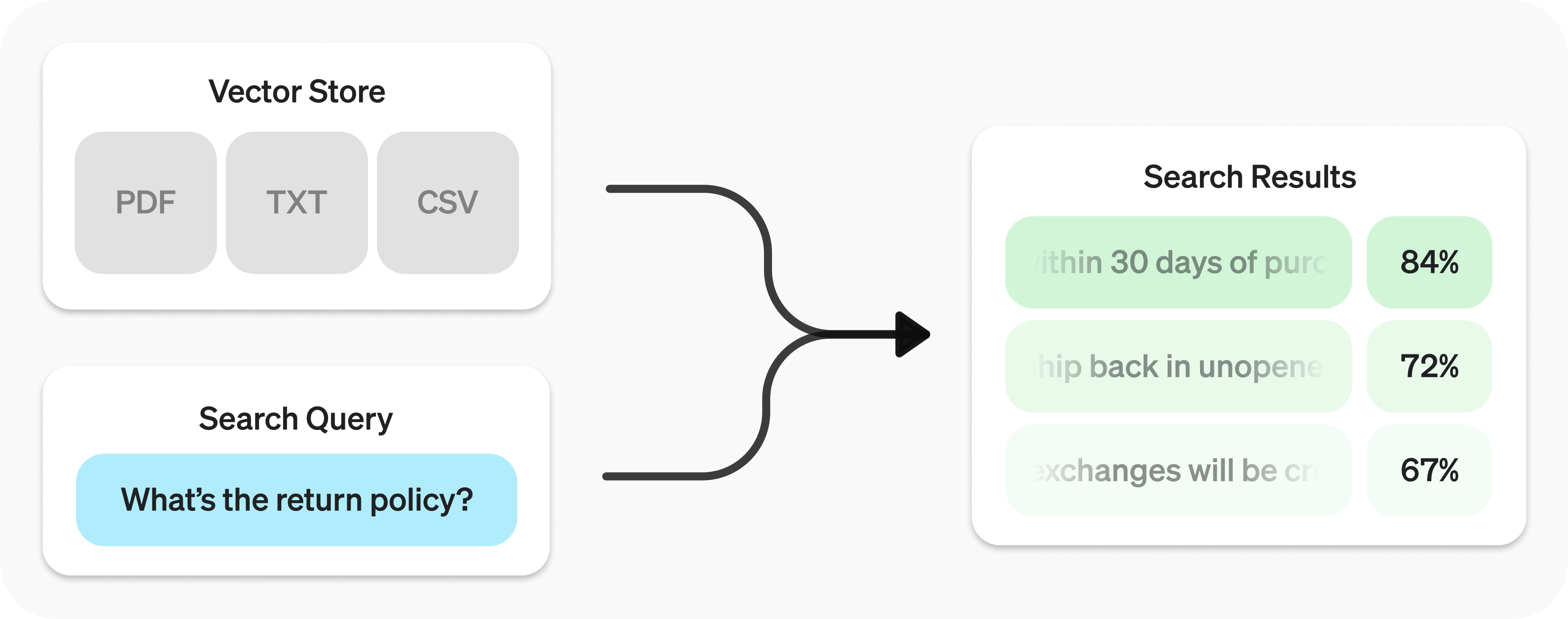
The Retrieval API allows you to perform semantic search
The Retrieval API is powered by vector stores
Create vector store and upload files.
1
2
3
4
5
6
7
8
9
10
11
12
13 import OpenAI from "openai";
const client = new OpenAI();
const vector_store = await client.vectorStores.create({
// Create vector store
name: "Support FAQ",
});
await client.vectorStores.files.uploadAndPoll(
vector_store.id,
// Upload file
fs.createReadStream("customer_policies.txt")
); 1
2
3
4
5
6
7
8
9
10
11
12 from openai import OpenAI
client = OpenAI()
vector_store = client.vector_stores.create( # Create vector store
name = "Support FAQ" ,
)
client.vector_stores.files.upload_and_poll( # Upload file
vector_store_id = vector_store.id,
file = open ( "customer_policies.txt" , "rb" )
) 1
2
3
4
5
6
7
8
9
10
11
12
13
14
15
16
17
18
19
20
21
22
23
24
25
26
27
28
29
30 package main
import (
"context"
"fmt"
"os"
"github.com/openai/openai-go/v3"
)
func main() {
client := openai.NewClient()
vectorStore, err := client.VectorStores.New(context.Background(), openai.VectorStoreNewParams{Name: openai.String("Support FAQ")})
if err != nil {
panic(err)
}
file, err := os.Open("customer_policies.txt")
if err != nil {
panic(err)
}
defer file.Close()
_, err = client.VectorStores.Files.UploadAndPoll(context.Background(), vectorStore.ID, openai.FileNewParams{
File: openai.File(file, "customer_policies.txt", "text/plain"),
Purpose: openai.FilePurposeAssistants,
}, 1000)
if err != nil {
panic(err)
}
fmt.Println(vectorStore.ID)
} 1
2
3
4
5
6
7
8
9
10
11
12
13
14
15
16
17
18
19
20
21
22
23
24
25
26
27
28
29
30
31
32
33
34
35
36
37 import com.openai.client.OpenAIClient;
import com.openai.client.okhttp.OpenAIOkHttpClient;
import com.openai.models.files.FileCreateParams;
import com.openai.models.files.FilePurpose;
import com.openai.models.vectorstores.VectorStoreCreateParams;
import com.openai.models.vectorstores.files.FileRetrieveParams;
import com.openai.models.vectorstores.files.VectorStoreFile;
import java.nio.file.Path;
var store =
client.vectorStores().create(VectorStoreCreateParams.builder().name("Support FAQ").build());
var uploaded =
client
.files()
.create(
FileCreateParams.builder()
.file(Path.of(System.getenv("OPENAI_EXAMPLE_FILE_PATH")))
.purpose(FilePurpose.ASSISTANTS)
.build());
var file =
client
.vectorStores()
.files()
.create(
store.id(),
com.openai.models.vectorstores.files.FileCreateParams.builder()
.fileId(uploaded.id())
.build());
while (file.status().equals(VectorStoreFile.Status.IN_PROGRESS)) {
Thread.sleep(1000);
file =
client
.vectorStores()
.files()
.retrieve(file.id(), FileRetrieveParams.builder().vectorStoreId(store.id()).build());
}
System.out.println(store.id()); 1
2
3
4
5
6
7
8
9
10
11
12
13 require "openai"
require "pathname"
client = OpenAI::Client.new
store = client.vector_stores.create(name: "Support FAQ")
file = client.vector_stores.files.upload_and_poll(
store.id,
file: Pathname("customer_policies.txt"),
timeout: 600
)
raise "File ingestion ended with status: #{file.status}" unless file.status == OpenAI::VectorStores::VectorStoreFile::Status::COMPLETED
puts(store.id) Send search query to get relevant results.
1
2
3
4
5 const userQuery = "What is the return policy?";
const results = await client.vectorStores.search(vector_store.id, {
query: userQuery,
}); 1
2
3
4
5
6 user_query = "What is the return policy?"
results = client.vector_stores.search(
vector_store_id = vector_store.id,
query = user_query,
) 1
2
3
4
5
6
7
8
9
10
11
12
13
14
15
16
17
18
19 package main
import (
"context"
"fmt"
"github.com/openai/openai-go/v3"
)
func main() {
client := openai.NewClient()
results, err := client.VectorStores.Search(context.Background(), "vs_123", openai.VectorStoreSearchParams{
Query: openai.VectorStoreSearchParamsQueryUnion{OfString: openai.String("What is the return policy?")},
})
if err != nil {
panic(err)
}
fmt.Println(results.Data)
} 1
2
3
4
5
6
7
8
9
10
11
12
13
14 import com.openai.client.OpenAIClient;
import com.openai.client.okhttp.OpenAIOkHttpClient;
import com.openai.models.vectorstores.VectorStoreSearchParams;
String vectorStoreId = "vs_123";
var results =
client
.vectorStores()
.search(
vectorStoreId,
VectorStoreSearchParams.builder().query("What is the return policy?").build());
System.out.println(results.data()); 1
2
3
4
5 require "openai"
client = OpenAI::Client.new
results = client.vector_stores.search("vs_123", query: "What is the return policy?")
puts(results.data&.first&.content) Semantic search is a technique that leverages vector embeddings to surface semantically relevant results. Importantly, this includes results with few or no shared keywords, which classical search techniques might miss.
For example, let’s look at potential results for "When did we go to the moon?":
Text
Keyword Similarity
Semantic Similarity
The first lunar landing occurred in July of 1969.
0%
65%
The first man on the moon was Neil Armstrong.
27%
43%
When I ate the moon cake, it was delicious.
40%
28%
(Keyword similarity uses intersection over union ; semantic similarity uses cosine similarity with text-embedding-3-small.)
Notice how the most relevant result contains none of the words in the search query. This flexibility makes semantic search a powerful technique for querying knowledge bases of any size.
Semantic search is powered by vector stores , which we cover in detail later in the guide. This section will focus on the mechanics of semantic search.
You can query a vector store using the search function and specifying a query in natural language. This will return a list of results, each with the relevant chunks, similarity scores, and file of origin.
1
2
3 const results = await client.vectorStores.search(vector_store.id, {
query: "How many woodchucks are allowed per passenger?",
}); 1
2
3
4 results = client.vector_stores.search(
vector_store_id = vector_store.id,
query = "How many woodchucks are allowed per passenger?" ,
) 1
2
3
4
5
6
7
8
9
10
11
12
13
14
15
16
17
18
19 package main
import (
"context"
"fmt"
"github.com/openai/openai-go/v3"
)
func main() {
client := openai.NewClient()
results, err := client.VectorStores.Search(context.Background(), "vs_123", openai.VectorStoreSearchParams{
Query: openai.VectorStoreSearchParamsQueryUnion{OfString: openai.String("How many woodchucks are allowed per passenger?")},
})
if err != nil {
panic(err)
}
fmt.Println(results.Data)
} 1
2
3
4
5
6
7
8
9
10
11
12
13
14
15
16 import com.openai.client.OpenAIClient;
import com.openai.client.okhttp.OpenAIOkHttpClient;
import com.openai.models.vectorstores.VectorStoreSearchParams;
String vectorStoreId = "vs_123";
var results =
client
.vectorStores()
.search(
vectorStoreId,
VectorStoreSearchParams.builder()
.query("How many woodchucks are allowed per passenger?")
.build());
System.out.println(results.data()); 1
2
3
4
5
6
7
8 require "openai"
client = OpenAI::Client.new
results = client.vector_stores.search(
"vs_123",
query: "How many woodchucks are allowed per passenger?"
)
puts(results.data&.first&.content) 1
2
3
4
5
6
7
8
9
10
11
12
13
14
15
16
17
18
19
20
21
22
23
24
25
26
27
28
29
30
31
32
33
34
35
36
37
38
39
40
41
42 {
"object" : "vector_store.search_results.page" ,
"search_query" : "How many woodchucks are allowed per passenger?" ,
"data" : [
{
"file_id" : "file-12345" ,
"filename" : "woodchuck_policy.txt" ,
"score" : 0.85 ,
"attributes" : {
"region" : "North America" ,
"author" : "Wildlife Department"
},
"content" : [
{
"type" : "text" ,
"text" : "According to the latest regulations, each passenger is allowed to carry up to two woodchucks."
},
{
"type" : "text" ,
"text" : "Ensure that the woodchucks are properly contained during transport."
}
]
},
{
"file_id" : "file-67890" ,
"filename" : "transport_guidelines.txt" ,
"score" : 0.75 ,
"attributes" : {
"region" : "North America" ,
"author" : "Transport Authority"
},
"content" : [
{
"type" : "text" ,
"text" : "Passengers must adhere to the guidelines set forth by the Transport Authority regarding the transport of woodchucks."
}
]
}
],
"has_more" : false ,
"next_page" : null
} A response will contain 10 results maximum by default, but you can set up to 50 using the max_num_results parameter.
Certain query styles yield better results, so we’ve provided a setting to automatically rewrite your queries for optimal performance. Enable this feature by setting rewrite_query=true when performing a search.
The rewritten query will be available in the result’s search_query field.
Original Rewritten
I’d like to know the height of the main office building.
primary office building height
What are the safety regulations for transporting hazardous materials?
safety regulations for hazardous materials
How do I file a complaint about a service issue?
service complaint filing process
Attribute filtering helps narrow down results by applying criteria, such as restricting searches to a specific date range. You can define and combine criteria in attribute_filter to target files based on their attributes before performing semantic search.
Use comparison filters to compare a specific key in a file’s attributes with a given value, and compound filters to combine multiple filters using and and or.
1
2
3
4
5 {
"type" : "eq" | "ne" | "gt" | "gte" | "lt" | "lte" | "in" | "nin" , // comparison operators
"key" : "attributes_key" , // attributes key
"value" : "target_value" // value to compare against
} 1
2
3
4 {
"type" : "and" | "or" , // logical operators
"filters" : [ ... ]
} Below are some example filters.
Region Date range Filenames Exclude filenames Complex Region
1
2
3
4
5 {
"type" : "eq" ,
"key" : "region" ,
"value" : "us"
} Date range
1
2
3
4
5
6
7
8
9
10
11
12
13
14
15 {
"type" : "and" ,
"filters" : [
{
"type" : "gte" ,
"key" : "date" ,
"value" : 1704067200 // unix timestamp for 2024-01-01
},
{
"type" : "lte" ,
"key" : "date" ,
"value" : 1710892800 // unix timestamp for 2024-03-20
}
]
} Filenames
1
2
3
4
5 {
"type" : "in" ,
"property" : "filename" ,
"value" : [ "example.txt" , "example2.txt" ]
} Exclude filenames
1
2
3
4
5 {
"type" : "nin" ,
"property" : "filename" ,
"value" : [ "draft.txt" , "internal_notes.md" ]
} Complex
1
2
3
4
5
6
7
8
9
10
11
12
13
14
15
16
17
18
19
20
21
22
23
24
25
26
27
28
29
30
31
32
33
34
35 {
"type" : "or" ,
"filters" : [
{
"type" : "and" ,
"filters" : [
{
"type" : "or" ,
"filters" : [
{
"type" : "eq" ,
"key" : "project_code" ,
"value" : "X123"
},
{
"type" : "eq" ,
"key" : "project_code" ,
"value" : "X999"
}
]
},
{
"type" : "eq" ,
"key" : "confidentiality" ,
"value" : "top_secret"
}
]
},
{
"type" : "eq" ,
"key" : "language" ,
"value" : "en"
}
]
}
If you find that your file search results are not sufficiently relevant, you can adjust the ranking_options to improve the quality of responses. This includes specifying a ranker, such as auto or default-2024-08-21, and setting a score_threshold between 0.0 and 1.0. A higher score_threshold will limit the results to more relevant chunks, though it may exclude some potentially useful ones. When ranking_options.hybrid_search is provided you can also tune hybrid_search.embedding_weight (rrf_embedding_weight) and hybrid_search.text_weight (rrf_text_weight) to control how reciprocal rank fusion balances semantic embedding matches vs. sparse keyword matches. Increase the former to emphasize semantic similarity, increase the latter to emphasize textual overlap, and ensure at least one of the weights is greater than zero.
Vector stores are the containers that power semantic search for the Retrieval API and the file search tool. When you add a file to a vector store it will be automatically chunked, embedded, and indexed.
Vector stores contain vector_store_file objects, which are backed by a file object.
Object type
Description
fileRepresents content uploaded through the Files API . Often used with vector stores, but also for fine-tuning and other use cases.
vector_storeContainer for searchable files.
vector_store.fileWrapper type specifically representing a file that has been chunked and embedded, and has been associated with a vector_store. attributes map used for filtering.
You will be charged based on the total storage used across all your vector stores, determined by the size of parsed chunks and their corresponding embeddings.
Storage
Cost
Up to 1 GB (across all stores)
Free
Beyond 1 GB
$0.10/GB/day
Create Retrieve Update Delete List Create
1
2
3
4 await client.vectorStores.create({
name: "Support FAQ",
file_ids: ["file_123"],
}); 1
2
3
4 client.vector_stores.create(
name = "Support FAQ" ,
file_ids = [ "file_123" ]
) 1
2
3
4
5
6
7
8
9
10
11
12
13
14
15
16
17
18
19
20 package main
import (
"context"
"fmt"
"github.com/openai/openai-go/v3"
)
func main() {
client := openai.NewClient()
vectorStore, err := client.VectorStores.New(context.Background(), openai.VectorStoreNewParams{
Name: openai.String("Support FAQ"),
FileIDs: []string{"file_123"},
})
if err != nil {
panic(err)
}
fmt.Println(vectorStore.ID)
} 1
2
3
4
5
6
7
8
9
10
11
12
13 import com.openai.client.OpenAIClient;
import com.openai.client.okhttp.OpenAIOkHttpClient;
import com.openai.models.vectorstores.VectorStoreCreateParams;
String fileId = "file_123";
var store =
client
.vectorStores()
.create(
VectorStoreCreateParams.builder().name("Support FAQ").addFileId(fileId).build());
System.out.println(store.id()); 1
2
3
4
5
6
7
8 require "openai"
client = OpenAI::Client.new
store = client.vector_stores.create(
name: "Support FAQ",
file_ids: ["file_123"]
)
puts(store.id) Retrieve
1 await client.vectorStores.retrieve("vs_123"); 1
2
3 client.vector_stores.retrieve(
vector_store_id = "vs_123"
) 1
2
3
4
5
6
7
8
9
10
11
12
13
14
15
16
17 package main
import (
"context"
"fmt"
"github.com/openai/openai-go/v3"
)
func main() {
client := openai.NewClient()
vectorStore, err := client.VectorStores.Get(context.Background(), "vs_123")
if err != nil {
panic(err)
}
fmt.Println(vectorStore.ID)
} 1
2
3
4
5
6 import com.openai.client.OpenAIClient;
import com.openai.client.okhttp.OpenAIOkHttpClient;
String vectorStoreId = "vs_123";
System.out.println(client.vectorStores().retrieve(vectorStoreId).id()); 1
2
3
4
5 require "openai"
client = OpenAI::Client.new
store = client.vector_stores.retrieve("vs_123")
puts(store.id) Update
1
2
3 await client.vectorStores.update("vs_123", {
name: "Support FAQ Updated",
}); 1
2
3
4 client.vector_stores.update(
vector_store_id = "vs_123" ,
name = "Support FAQ Updated"
) 1
2
3
4
5
6
7
8
9
10
11
12
13
14
15
16
17
18
19 package main
import (
"context"
"fmt"
"github.com/openai/openai-go/v3"
)
func main() {
client := openai.NewClient()
vectorStore, err := client.VectorStores.Update(context.Background(), "vs_123", openai.VectorStoreUpdateParams{
Name: openai.String("Support FAQ Updated"),
})
if err != nil {
panic(err)
}
fmt.Println(vectorStore.Name)
} 1
2
3
4
5
6
7
8
9
10
11
12
13
14 import com.openai.client.OpenAIClient;
import com.openai.client.okhttp.OpenAIOkHttpClient;
import com.openai.models.vectorstores.VectorStoreUpdateParams;
String vectorStoreId = "vs_123";
var store =
client
.vectorStores()
.update(
vectorStoreId,
VectorStoreUpdateParams.builder().name("Updated knowledge base").build());
System.out.println(store.name()); 1
2
3
4
5 require "openai"
client = OpenAI::Client.new
store = client.vector_stores.update("vs_123", name: "Updated knowledge base")
puts(store.name) Delete
1 await client.vectorStores.delete("vs_123"); 1
2
3 client.vector_stores.delete(
vector_store_id = "vs_123"
) 1
2
3
4
5
6
7
8
9
10
11
12
13
14
15
16
17 package main
import (
"context"
"fmt"
"github.com/openai/openai-go/v3"
)
func main() {
client := openai.NewClient()
deleted, err := client.VectorStores.Delete(context.Background(), "vs_123")
if err != nil {
panic(err)
}
fmt.Println(deleted.Deleted)
} 1
2
3
4
5
6 import com.openai.client.OpenAIClient;
import com.openai.client.okhttp.OpenAIOkHttpClient;
String vectorStoreId = "vs_123";
System.out.println(client.vectorStores().delete(vectorStoreId).deleted()); 1
2
3
4
5 require "openai"
client = OpenAI::Client.new
deleted = client.vector_stores.delete("vs_123")
puts(deleted.deleted) List
await client.vectorStores.list(); client.vector_stores.list() package main
import (
"context"
"fmt"
"github.com/openai/openai-go/v3"
)
func main() {
client := openai.NewClient()
vectorStores, err := client.VectorStores.List(context.Background(), openai.VectorStoreListParams{})
if err != nil {
panic(err)
}
fmt.Println(vectorStores.Data)
} import com.openai.client.OpenAIClient;
import com.openai.client.okhttp.OpenAIOkHttpClient;
System.out.println(client.vectorStores().list().data()); require "openai"
client = OpenAI::Client.new
stores = client.vector_stores.list(limit: 10)
puts((stores.data || []).length)
Some operations, like create for vector_store.file, are asynchronous and may take time to complete—use our helper functions, like create_and_poll to block until it is. Otherwise, you may check the status. Removing files from a vector store is eventually consistent, and search results may still include content from a removed file for a short period.
Adding files is rate limited per vector store ID. Requests to /vector_stores/{vector_store_id}/files/vector_stores/{vector_store_id}/file_batches
Create Upload Retrieve Update Delete List Create
1
2
3 await client.vectorStores.files.createAndPoll("vs_123", {
file_id: "file_123",
}); 1
2
3
4 client.vector_stores.files.create_and_poll(
vector_store_id = "vs_123" ,
file_id = "file_123"
) 1
2
3
4
5
6
7
8
9
10
11
12
13
14
15
16
17
18
19 package main
import (
"context"
"fmt"
"github.com/openai/openai-go/v3"
)
func main() {
client := openai.NewClient()
file, err := client.VectorStores.Files.NewAndPoll(context.Background(), "vs_123", openai.VectorStoreFileNewParams{
FileID: "file_123",
}, 1000)
if err != nil {
panic(err)
}
fmt.Println(file.ID)
} 1
2
3
4
5
6
7
8
9
10
11
12
13
14
15 import com.openai.client.OpenAIClient;
import com.openai.client.okhttp.OpenAIOkHttpClient;
import com.openai.models.vectorstores.files.FileCreateParams;
String vectorStoreId = "vs_123";
String fileId = "file_123";
var file =
client
.vectorStores()
.files()
.create(vectorStoreId, FileCreateParams.builder().fileId(fileId).build());
System.out.println(file.id()); 1
2
3
4
5 require "openai"
client = OpenAI::Client.new
file = client.vector_stores.files.create("vs_123", file_id: "file_123")
puts(file.id) Upload
1
2
3
4 await client.vectorStores.files.uploadAndPoll(
"vs_123",
fs.createReadStream("customer_policies.txt")
); 1
2
3
4 client.vector_stores.files.upload_and_poll(
vector_store_id = "vs_123" ,
file = open ( "customer_policies.txt" , "rb" )
) 1
2
3
4
5
6
7
8
9
10
11
12
13
14
15
16
17
18
19
20
21
22
23
24
25
26 package main
import (
"context"
"fmt"
"os"
"github.com/openai/openai-go/v3"
)
func main() {
client := openai.NewClient()
file, err := os.Open("customer_policies.txt")
if err != nil {
panic(err)
}
defer file.Close()
result, err := client.VectorStores.Files.UploadAndPoll(context.Background(), "vs_123", openai.FileNewParams{
File: openai.File(file, "customer_policies.txt", "text/plain"),
Purpose: openai.FilePurposeAssistants,
}, 1000)
if err != nil {
panic(err)
}
fmt.Println(result.ID)
} 1
2
3
4
5
6
7
8
9
10
11
12
13
14
15
16
17
18
19
20
21
22
23
24
25
26
27
28
29
30
31
32
33
34
35
36 import com.openai.client.OpenAIClient;
import com.openai.client.okhttp.OpenAIOkHttpClient;
import com.openai.models.files.FileCreateParams;
import com.openai.models.files.FilePurpose;
import com.openai.models.vectorstores.files.FileRetrieveParams;
import com.openai.models.vectorstores.files.VectorStoreFile;
import java.nio.file.Path;
String vectorStoreId = "vs_123";
var uploaded =
client
.files()
.create(
FileCreateParams.builder()
.file(Path.of(System.getenv("OPENAI_EXAMPLE_FILE_PATH")))
.purpose(FilePurpose.ASSISTANTS)
.build());
var file =
client
.vectorStores()
.files()
.create(
vectorStoreId,
com.openai.models.vectorstores.files.FileCreateParams.builder()
.fileId(uploaded.id())
.build());
while (file.status().equals(VectorStoreFile.Status.IN_PROGRESS)) {
Thread.sleep(1000);
file =
client
.vectorStores()
.files()
.retrieve(
file.id(), FileRetrieveParams.builder().vectorStoreId(vectorStoreId).build());
}
System.out.println(file.id()); 1
2
3
4
5
6
7
8
9
10
11
12 require "openai"
require "pathname"
client = OpenAI::Client.new
vector_store_file = client.vector_stores.files.upload_and_poll(
"vs_123",
file: Pathname("customer_policies.txt"),
timeout: 600
)
raise "File ingestion ended with status: #{vector_store_file.status}" unless vector_store_file.status == OpenAI::VectorStores::VectorStoreFile::Status::COMPLETED
puts(vector_store_file.id) Retrieve
1
2
3 await client.vectorStores.files.retrieve("file_123", {
vector_store_id: "vs_123",
}); 1
2
3
4 client.vector_stores.files.retrieve(
vector_store_id = "vs_123" ,
file_id = "file_123"
) 1
2
3
4
5
6
7
8
9
10
11
12
13
14
15
16
17 package main
import (
"context"
"fmt"
"github.com/openai/openai-go/v3"
)
func main() {
client := openai.NewClient()
file, err := client.VectorStores.Files.Get(context.Background(), "vs_123", "file_123")
if err != nil {
panic(err)
}
fmt.Println(file.ID)
} 1
2
3
4
5
6
7
8
9
10
11
12
13
14
15
16
17 import com.openai.client.OpenAIClient;
import com.openai.client.okhttp.OpenAIOkHttpClient;
String fileId = "file_123";
String vectorStoreId = "vs_123";
System.out.println(
client
.vectorStores()
.files()
.retrieve(
fileId,
com.openai.models.vectorstores.files.FileRetrieveParams.builder()
.vectorStoreId(vectorStoreId)
.build())
.id()); 1
2
3
4
5 require "openai"
client = OpenAI::Client.new
file = client.vector_stores.files.retrieve("file_123", vector_store_id: "vs_123")
puts(file.id) Update
1
2
3
4 await client.vectorStores.files.update("file_123", {
vector_store_id: "vs_123",
attributes: { key: "value" },
}); 1
2
3
4
5 client.vector_stores.files.update(
vector_store_id = "vs_123" ,
file_id = "file_123" ,
attributes = { "key" : "value" }
) 1
2
3
4
5
6
7
8
9
10
11
12
13
14
15
16
17
18
19
20
21 package main
import (
"context"
"fmt"
"github.com/openai/openai-go/v3"
)
func main() {
client := openai.NewClient()
file, err := client.VectorStores.Files.Update(context.Background(), "vs_123", "file_123", openai.VectorStoreFileUpdateParams{
Attributes: map[string]openai.VectorStoreFileUpdateParamsAttributeUnion{
"key": {OfString: openai.String("value")},
},
})
if err != nil {
panic(err)
}
fmt.Println(file.ID)
} 1
2
3
4
5
6
7
8
9
10
11
12
13
14
15
16
17
18
19
20
21
22
23
24 import com.openai.client.OpenAIClient;
import com.openai.client.okhttp.OpenAIOkHttpClient;
import com.openai.core.JsonValue;
import com.openai.models.vectorstores.files.FileUpdateParams;
String fileId = "file_123";
String vectorStoreId = "vs_123";
var file =
client
.vectorStores()
.files()
.update(
fileId,
FileUpdateParams.builder()
.vectorStoreId(vectorStoreId)
.attributes(
FileUpdateParams.Attributes.builder()
.putAdditionalProperty("category", JsonValue.from("policy"))
.build())
.build());
System.out.println(file.id()); 1
2
3
4
5 require "openai"
client = OpenAI::Client.new
file = client.vector_stores.files.update("file_123", vector_store_id: "vs_123", attributes: { category: "policy" })
puts(file.id) Delete
1
2
3 await client.vectorStores.files.delete("file_123", {
vector_store_id: "vs_123",
}); 1
2
3
4 client.vector_stores.files.delete(
vector_store_id = "vs_123" ,
file_id = "file_123"
) 1
2
3
4
5
6
7
8
9
10
11
12
13
14
15
16
17 package main
import (
"context"
"fmt"
"github.com/openai/openai-go/v3"
)
func main() {
client := openai.NewClient()
deleted, err := client.VectorStores.Files.Delete(context.Background(), "vs_123", "file_123")
if err != nil {
panic(err)
}
fmt.Println(deleted.Deleted)
} 1
2
3
4
5
6
7
8
9
10
11
12
13
14
15
16
17 import com.openai.client.OpenAIClient;
import com.openai.client.okhttp.OpenAIOkHttpClient;
String fileId = "file_123";
String vectorStoreId = "vs_123";
System.out.println(
client
.vectorStores()
.files()
.delete(
fileId,
com.openai.models.vectorstores.files.FileDeleteParams.builder()
.vectorStoreId(vectorStoreId)
.build())
.deleted()); 1
2
3
4
5 require "openai"
client = OpenAI::Client.new
deleted = client.vector_stores.files.delete("file_123", vector_store_id: "vs_123")
puts(deleted.deleted) List
1 await client.vectorStores.files.list("vs_123"); 1
2
3 client.vector_stores.files.list(
vector_store_id = "vs_123"
) 1
2
3
4
5
6
7
8
9
10
11
12
13
14
15
16
17 package main
import (
"context"
"fmt"
"github.com/openai/openai-go/v3"
)
func main() {
client := openai.NewClient()
files, err := client.VectorStores.Files.List(context.Background(), "vs_123", openai.VectorStoreFileListParams{})
if err != nil {
panic(err)
}
fmt.Println(files.Data)
} 1
2
3
4
5
6 import com.openai.client.OpenAIClient;
import com.openai.client.okhttp.OpenAIOkHttpClient;
String vectorStoreId = "vs_123";
System.out.println(client.vectorStores().files().list(vectorStoreId).data()); 1
2
3
4
5 require "openai"
client = OpenAI::Client.new
files = client.vector_stores.files.list("vs_123")
puts((files.data || []).length)
Create
1
2
3
4
5
6
7
8
9
10
11
12
13
14
15
16
17
18 await client.vectorStores.fileBatches.createAndPoll("vs_123", {
files: [
{
file_id: "file_123",
attributes: { department: "finance" },
},
{
file_id: "file_456",
chunking_strategy: {
type: "static",
static: {
max_chunk_size_tokens: 1200,
chunk_overlap_tokens: 200,
},
},
},
],
}); 1
2
3
4
5
6
7
8
9
10
11
12
13
14
15
16
17 client.vector_stores.file_batches.create_and_poll(
vector_store_id = "vs_123" ,
files = [
{
"file_id" : "file_123" ,
"attributes" : { "department" : "finance" }
},
{
"file_id" : "file_456" ,
"chunking_strategy" : {
"type" : "static" ,
"max_chunk_size_tokens" : 1200 ,
"chunk_overlap_tokens" : 200
}
}
]
) 1
2
3
4
5
6
7
8
9
10
11
12
13
14
15
16
17
18
19
20
21
22
23
24
25
26
27
28
29
30
31
32 package main
import (
"context"
"fmt"
"github.com/openai/openai-go/v3"
)
func main() {
client := openai.NewClient()
batch, err := client.VectorStores.FileBatches.NewAndPoll(context.Background(), "vs_123", openai.VectorStoreFileBatchNewParams{
Files: []openai.VectorStoreFileBatchNewParamsFile{
{
FileID: "file_123",
Attributes: map[string]openai.VectorStoreFileBatchNewParamsFileAttributeUnion{
"department": {OfString: openai.String("finance")},
},
},
{
FileID: "file_456",
ChunkingStrategy: openai.FileChunkingStrategyParamUnion{OfStatic: &openai.StaticFileChunkingStrategyObjectParam{
Static: openai.StaticFileChunkingStrategyParam{MaxChunkSizeTokens: 1200, ChunkOverlapTokens: 200},
}},
},
},
}, 1000)
if err != nil {
panic(err)
}
fmt.Println(batch.ID)
} 1
2
3
4
5
6
7
8
9
10
11
12
13
14
15
16
17
18
19
20
21
22
23
24
25
26
27
28
29
30
31
32
33
34
35
36
37
38
39
40
41
42
43
44
45
46
47 import com.openai.client.OpenAIClient;
import com.openai.client.okhttp.OpenAIOkHttpClient;
import com.openai.core.JsonValue;
import com.openai.models.vectorstores.StaticFileChunkingStrategy;
import com.openai.models.vectorstores.filebatches.FileBatchCreateParams;
import com.openai.models.vectorstores.filebatches.FileBatchRetrieveParams;
import com.openai.models.vectorstores.filebatches.VectorStoreFileBatch;
String vectorStoreId = "vs_123";
String fileId = "file_123";
String fileId2 = "file_456";
var first =
FileBatchCreateParams.File.builder()
.fileId(fileId)
.attributes(
FileBatchCreateParams.File.Attributes.builder()
.putAdditionalProperty("department", JsonValue.from("finance"))
.build())
.build();
var second =
FileBatchCreateParams.File.builder()
.fileId(fileId2)
.staticChunkingStrategy(
StaticFileChunkingStrategy.builder()
.maxChunkSizeTokens(1200)
.chunkOverlapTokens(200)
.build())
.build();
var batch =
client
.vectorStores()
.fileBatches()
.create(
vectorStoreId,
FileBatchCreateParams.builder().addFile(first).addFile(second).build());
while (batch.status().equals(VectorStoreFileBatch.Status.IN_PROGRESS)) {
Thread.sleep(1000);
batch =
client
.vectorStores()
.fileBatches()
.retrieve(
batch.id(),
FileBatchRetrieveParams.builder().vectorStoreId(vectorStoreId).build());
}
System.out.println(batch.status()); 1
2
3
4
5
6
7
8
9
10
11
12
13
14
15
16
17
18
19
20
21
22
23
24
25
26
27
28
29
30
31
32
33
34
35
36
37 require "openai"
client = OpenAI::Client.new
batch = client.vector_stores.file_batches.create_and_poll(
"vs_123",
files: [
{
file_id: "file_123",
attributes: { department: "finance" }
},
{
file_id: "file_456",
chunking_strategy: {
type: :static,
static: {
max_chunk_size_tokens: 1_200,
chunk_overlap_tokens: 200
}
}
}
],
timeout: 600
)
raise "File ingestion ended with status: #{batch.status}" unless batch.status == OpenAI::VectorStores::VectorStoreFileBatch::Status::COMPLETED
raise "File ingestion failed for #{batch.file_counts.failed} file(s)" if batch.file_counts.failed.positive?
# Live validation of per-file batches returned default chunking despite overrides.
file = client.vector_stores.files.retrieve("file_456", vector_store_id: "vs_123")
strategy = file.chunking_strategy
unless strategy.is_a?(OpenAI::StaticFileChunkingStrategyObject) &&
strategy.static.max_chunk_size_tokens == 1_200 &&
strategy.static.chunk_overlap_tokens == 200
raise "Requested chunking was not applied to #{file.id}: #{strategy.to_json}"
end
puts(batch.status) Retrieve
1
2
3 await client.vectorStores.fileBatches.retrieve("vsfb_123", {
vector_store_id: "vs_123",
}); 1
2
3
4 client.vector_stores.file_batches.retrieve(
vector_store_id = "vs_123" ,
batch_id = "vsfb_123"
) 1
2
3
4
5
6
7
8
9
10
11
12
13
14
15
16
17 package main
import (
"context"
"fmt"
"github.com/openai/openai-go/v3"
)
func main() {
client := openai.NewClient()
batch, err := client.VectorStores.FileBatches.Get(context.Background(), "vs_123", "vsfb_123")
if err != nil {
panic(err)
}
fmt.Println(batch.ID)
} 1
2
3
4
5
6
7
8
9
10
11
12
13
14
15
16
17 import com.openai.client.OpenAIClient;
import com.openai.client.okhttp.OpenAIOkHttpClient;
String fileBatchId = "vsfb_123";
String vectorStoreId = "vs_123";
System.out.println(
client
.vectorStores()
.fileBatches()
.retrieve(
fileBatchId,
com.openai.models.vectorstores.filebatches.FileBatchRetrieveParams.builder()
.vectorStoreId(vectorStoreId)
.build())
.status()); 1
2
3
4
5
6
7
8 require "openai"
client = OpenAI::Client.new
batch = client.vector_stores.file_batches.retrieve(
"vsfb_123",
vector_store_id: "vs_123"
)
puts(batch.status) Cancel
1
2
3 await client.vectorStores.fileBatches.cancel("vsfb_123", {
vector_store_id: "vs_123",
}); 1
2
3
4 client.vector_stores.file_batches.cancel(
vector_store_id = "vs_123" ,
batch_id = "vsfb_123"
) 1
2
3
4
5
6
7
8
9
10
11
12
13
14
15
16
17 package main
import (
"context"
"fmt"
"github.com/openai/openai-go/v3"
)
func main() {
client := openai.NewClient()
batch, err := client.VectorStores.FileBatches.Cancel(context.Background(), "vs_123", "vsfb_123")
if err != nil {
panic(err)
}
fmt.Println(batch.Status)
} 1
2
3
4
5
6
7
8
9
10
11
12
13
14
15
16
17 import com.openai.client.OpenAIClient;
import com.openai.client.okhttp.OpenAIOkHttpClient;
String fileBatchId = "vsfb_123";
String vectorStoreId = "vs_123";
System.out.println(
client
.vectorStores()
.fileBatches()
.cancel(
fileBatchId,
com.openai.models.vectorstores.filebatches.FileBatchCancelParams.builder()
.vectorStoreId(vectorStoreId)
.build())
.status()); 1
2
3
4
5
6
7
8 require "openai"
client = OpenAI::Client.new
batch = client.vector_stores.file_batches.cancel(
"vsfb_123",
vector_store_id: "vs_123"
)
puts(batch.status) List
1
2
3 await client.vectorStores.fileBatches.listFiles("vsfb_123", {
vector_store_id: "vs_123",
}); 1
2
3
4 client.vector_stores.file_batches.list_files(
"vsfb_123" ,
vector_store_id = "vs_123"
) 1
2
3
4
5
6
7
8
9
10
11
12
13
14
15
16
17 package main
import (
"context"
"fmt"
"github.com/openai/openai-go/v3"
)
func main() {
client := openai.NewClient()
files, err := client.VectorStores.FileBatches.ListFiles(context.Background(), "vs_123", "vsfb_123", openai.VectorStoreFileBatchListFilesParams{})
if err != nil {
panic(err)
}
fmt.Println(files.Data)
} 1
2
3
4
5
6
7
8
9
10
11
12
13
14
15
16
17 import com.openai.client.OpenAIClient;
import com.openai.client.okhttp.OpenAIOkHttpClient;
String fileBatchId = "vsfb_123";
String vectorStoreId = "vs_123";
System.out.println(
client
.vectorStores()
.fileBatches()
.listFiles(
fileBatchId,
com.openai.models.vectorstores.filebatches.FileBatchListFilesParams.builder()
.vectorStoreId(vectorStoreId)
.build())
.data()); 1
2
3
4
5
6
7
8 require "openai"
client = OpenAI::Client.new
files = client.vector_stores.file_batches.list_files(
"vsfb_123",
vector_store_id: "vs_123"
)
puts((files.data || []).length)
When creating a batch you can either provide file_ids with optional attributes and/or chunking_strategy, or use the files array to pass objects that include a file_id plus optional attributes and chunking_strategy for each file. The two options are mutually exclusive so that you can cleanly control whether every file shares the same settings or you need per-file overrides.
For higher-throughput ingestion into a single vector store, we recommend batch creation whenever possible. Batches can include up to 500 files in one request, which usually reduces contention and improves end-to-end latency versus sending many single-file create requests.
Each vector_store.file can have associated attributes, a dictionary of values that can be referenced when performing semantic search with attribute filtering . The dictionary can have at most 16 keys, with a limit of 256 characters each.
1
2
3
4
5
6
7
8 await client.vectorStores.files.create("<vector_store_id>", {
file_id: "file_123",
attributes: {
region: "US",
category: "Marketing",
date: 1672531200, // Jan 1, 2023
},
}); 1
2
3
4
5
6
7
8
9 client.vector_stores.files.create(
vector_store_id = "<vector_store_id>" ,
file_id = "file_123" ,
attributes = {
"region" : "US" ,
"category" : "Marketing" ,
"date" : 1672531200 # Jan 1, 2023
}
) 1
2
3
4
5
6
7
8
9
10
11
12
13
14
15
16
17
18
19
20
21
22
23
24 package main
import (
"context"
"fmt"
"github.com/openai/openai-go/v3"
)
func main() {
client := openai.NewClient()
file, err := client.VectorStores.Files.New(context.Background(), "<vector_store_id>", openai.VectorStoreFileNewParams{
FileID: "file_123",
Attributes: map[string]openai.VectorStoreFileNewParamsAttributeUnion{
"region": {OfString: openai.String("US")},
"category": {OfString: openai.String("Marketing")},
"date": {OfFloat: openai.Float(1672531200)},
},
})
if err != nil {
panic(err)
}
fmt.Println(file.ID)
} 1
2
3
4
5
6
7
8
9
10
11
12
13
14
15
16
17
18
19
20
21
22
23
24 import com.openai.client.OpenAIClient;
import com.openai.client.okhttp.OpenAIOkHttpClient;
import com.openai.core.JsonValue;
import com.openai.models.vectorstores.files.FileCreateParams;
String vectorStoreId = "<vector_store_id>";
String fileId = "file_123";
var file =
client
.vectorStores()
.files()
.create(
vectorStoreId,
FileCreateParams.builder()
.fileId(fileId)
.attributes(
FileCreateParams.Attributes.builder()
.putAdditionalProperty("category", JsonValue.from("policy"))
.build())
.build());
System.out.println(file.id()); 1
2
3
4
5 require "openai"
client = OpenAI::Client.new
file = client.vector_stores.files.create("<vector_store_id>", file_id: "file_123", attributes: { category: "policy" })
puts(file.id) You can set an expiration policy on vector_store objects with expires_after. Once a vector store expires, all associated vector_store.file objects will be deleted and you’ll no longer be charged for them.
1
2
3
4
5
6 await client.vectorStores.update("vs_123", {
expires_after: {
anchor: "last_active_at",
days: 7,
},
}); 1
2
3
4
5
6
7 client.vector_stores.update(
vector_store_id = "vs_123" ,
expires_after = {
"anchor" : "last_active_at" ,
"days" : 7
}
) 1
2
3
4
5
6
7
8
9
10
11
12
13
14
15
16
17
18
19 package main
import (
"context"
"fmt"
"github.com/openai/openai-go/v3"
)
func main() {
client := openai.NewClient()
vectorStore, err := client.VectorStores.Update(context.Background(), "vs_123", openai.VectorStoreUpdateParams{
ExpiresAfter: openai.VectorStoreUpdateParamsExpiresAfter{Days: 7},
})
if err != nil {
panic(err)
}
fmt.Println(vectorStore.ExpiresAfter)
} 1
2
3
4
5
6
7
8
9
10
11
12
13
14
15
16
17
18
19
20
21 import com.openai.client.OpenAIClient;
import com.openai.client.okhttp.OpenAIOkHttpClient;
import com.openai.core.JsonValue;
import com.openai.models.vectorstores.VectorStoreUpdateParams;
String vectorStoreId = "vs_123";
var store =
client
.vectorStores()
.update(
vectorStoreId,
VectorStoreUpdateParams.builder()
.expiresAfter(
VectorStoreUpdateParams.ExpiresAfter.builder()
.anchor(JsonValue.from("last_active_at"))
.days(7)
.build())
.build());
System.out.println(store.expiresAfter().orElseThrow()); 1
2
3
4
5
6
7
8
9
10
11 require "openai"
client = OpenAI::Client.new
store = client.vector_stores.update(
"vs_123",
expires_after: {
anchor: :last_active_at,
days: 7
}
)
puts(store.expires_after) The maximum file size is 512 MB. Each file should contain no more than 5,000,000 tokens per file (computed automatically when you attach a file).
By default, max_chunk_size_tokens is set to 800 and chunk_overlap_tokens is set to 400, meaning every file is indexed by being split up into 800-token chunks, with 400-token overlap between consecutive chunks.
You can adjust this by setting chunking_strategy
max_chunk_size_tokens must be between 100 and 4096 inclusive.chunk_overlap_tokens must be non-negative and should not exceed max_chunk_size_tokens / 2.
Supported file types For text/ MIME types, the encoding must be one of utf-8, utf-16, or ascii.
File format
MIME type
.ctext/x-c
.cpptext/x-c++
.cstext/x-csharp
.csstext/css
.docapplication/msword
.docxapplication/vnd.openxmlformats-officedocument.wordprocessingml.document
.gotext/x-golang
.htmltext/html
.javatext/x-java
.jstext/javascript
.jsonapplication/json
.mdtext/markdown
.pdfapplication/pdf
.phptext/x-php
.pptxapplication/vnd.openxmlformats-officedocument.presentationml.presentation
.pytext/x-python
.pytext/x-script.python
.rbtext/x-ruby
.shapplication/x-sh
.textext/x-tex
.tsapplication/typescript
.txttext/plain
After performing a query you may want to synthesize a response based on the results. You can leverage our models to do so, by supplying the results and original query, to get back a grounded response.
1
2
3
4
5
6
7
8
9 import OpenAI from "openai";
const client = new OpenAI();
const userQuery = "What is the return policy?";
const results = await client.vectorStores.search(vector_store.id, {
query: userQuery,
}); 1
2
3
4
5
6
7
8
9
10 from openai import OpenAI
client = OpenAI()
user_query = "What is the return policy?"
results = client.vector_stores.search(
vector_store_id = vector_store.id,
query = user_query,
) 1
2
3
4
5
6
7
8
9
10
11
12
13
14
15
16
17
18
19 package main
import (
"context"
"fmt"
"github.com/openai/openai-go/v3"
)
func main() {
client := openai.NewClient()
results, err := client.VectorStores.Search(context.Background(), "vs_123", openai.VectorStoreSearchParams{
Query: openai.VectorStoreSearchParamsQueryUnion{OfString: openai.String("What is the return policy?")},
})
if err != nil {
panic(err)
}
fmt.Println(results.Data)
} 1
2
3
4
5
6
7
8
9
10
11
12
13
14 import com.openai.client.OpenAIClient;
import com.openai.client.okhttp.OpenAIOkHttpClient;
import com.openai.models.vectorstores.VectorStoreSearchParams;
String vectorStoreId = "vs_123";
var results =
client
.vectorStores()
.search(
vectorStoreId,
VectorStoreSearchParams.builder().query("What is the return policy?").build());
System.out.println(results.data()); 1
2
3
4
5
6
7
8 require "openai"
client = OpenAI::Client.new
results = client.vector_stores.search(
"vs_123",
query: "What is the return policy?"
)
puts(results.data) 1
2
3
4
5
6
7
8
9
10
11
12
13
14
15
16
17
18
19
20
21
22 const formattedResults = formatResults(results.data);
// Join the text content of all results
const textSources = results.data
.map((result) => result.content.map((c) => c.text).join("\n"))
.join("\n");
const completion = await client.chat.completions.create({
model: "gpt-6-astra",
messages: [
{
role: "developer",
content:
"Produce a concise answer to the query based on the provided sources.",
},
{
role: "user",
content: `Sources: ${formattedResults}\n\nQuery: '${userQuery}'`,
},
],
});
console.log(completion.choices[0].message.content); 1
2
3
4
5
6
7
8
9
10
11
12
13
14
15
16
17
18
19
20 # Use results and user_query from the preceding search step.
formatted_results = format_results(results.data)
" \n " .join( " \n " .join(c.text for c in result.content) for result in results.data)
completion = client.chat.completions.create(
model = "gpt-6-astra" ,
messages = [
{
"role" : "developer" ,
"content" : "Produce a concise answer to the query based on the provided sources." ,
},
{
"role" : "user" ,
"content" : f "Sources: { formatted_results }\n\n Query: ' { user_query } '" ,
},
],
)
print (completion.choices[ 0 ].message.content) 1
2
3
4
5
6
7
8
9
10
11
12
13
14
15
16
17
18
19
20
21
22
23
24
25
26
27
28
29
30
31
32
33
34
35
36
37
38
39
40
41
42
43
44
45
46 package main
import (
"context"
"fmt"
"strings"
"github.com/openai/openai-go/v3"
)
func main() {
client := openai.NewClient()
userQuery := "What is the return policy?"
results, err := client.VectorStores.Search(context.Background(), "vs_123", openai.VectorStoreSearchParams{
Query: openai.VectorStoreSearchParamsQueryUnion{OfString: openai.String(userQuery)},
})
if err != nil {
panic(err)
}
completion, err := client.Chat.Completions.New(context.Background(), openai.ChatCompletionNewParams{
Model: "gpt-6-astra",
Messages: []openai.ChatCompletionMessageParamUnion{
openai.DeveloperMessage("Produce a concise answer to the query based on the provided sources."),
openai.UserMessage(fmt.Sprintf("Sources: %s\n\nQuery: %q", formatResults(results.Data), userQuery)),
},
})
if err != nil {
panic(err)
}
fmt.Println(completion.Choices[0].Message.Content)
}
func formatResults(results []openai.VectorStoreSearchResponse) string {
var sources strings.Builder
sources.WriteString("<sources>")
for _, result := range results {
fmt.Fprintf(&sources, "<result file_id=%q file_name=%q>", result.FileID, result.Filename)
for _, content := range result.Content {
fmt.Fprintf(&sources, "<content>%s</content>", content.Text)
}
sources.WriteString("</result>")
}
sources.WriteString("</sources>")
return sources.String()
} 1
2
3
4
5
6
7
8
9
10
11
12
13
14
15
16
17
18
19
20
21
22
23
24
25
26
27
28
29
30
31
32
33
34
35
36
37
38
39
40
41
42
43
44 import com.openai.client.OpenAIClient;
import com.openai.client.okhttp.OpenAIOkHttpClient;
import com.openai.models.chat.completions.ChatCompletionCreateParams;
import com.openai.models.vectorstores.VectorStoreSearchParams;
import java.util.stream.Collectors;
String vectorStoreId = "vs_123";
String query = "What is the return policy?";
var results =
client
.vectorStores()
.search(vectorStoreId, VectorStoreSearchParams.builder().query(query).build());
String sources =
results.data().stream()
.map(
result ->
"<result file_id='"
+ result.fileId()
+ "' file_name='"
+ result.filename()
+ "'>"
+ result.content().stream()
.map(content -> "<content>" + content.text() + "</content>")
.collect(Collectors.joining())
+ "</result>")
.collect(Collectors.joining());
var completion =
client
.chat()
.completions()
.create(
ChatCompletionCreateParams.builder()
.model("gpt-6-astra")
.addDeveloperMessage(
"Answer the query concisely using only the provided sources.")
.addUserMessage(
"Sources: <sources>" + sources + "</sources>\n\nQuery: " + query)
.build());
completion.choices().stream()
.flatMap(choice -> choice.message().content().stream())
.forEach(System.out::println); 1
2
3
4
5
6
7
8
9
10
11
12
13
14
15
16
17
18
19
20
21
22
23
24 require "openai"
client = OpenAI::Client.new
query = "What is the return policy?"
results = client.vector_stores.search("vs_123", query: query)
sources = (results.data || []).map do |result|
content = result.content.map { |part| "<content>#{part.text}</content>" }.join
"<result file_id='#{result.file_id}' file_name='#{result.filename}'>#{content}</result>"
end.join
completion = client.chat.completions.create(
model: "gpt-6-astra",
messages: [
{
role: :developer,
content: "Answer the query concisely using only the provided sources."
},
{
role: :user,
content: "Sources: <sources>#{sources}</sources>\n\nQuery: #{query}"
}
]
)
puts(completion.choices.fetch(0).message.content) "Our return policy allows returns within 30 days of purchase." This uses a sample format_results function, which could be implemented like
so:
1
2
3
4
5
6
7
8
9
10
11 function formatResults(results) {
let formattedResults = "";
for (const result of results.data) {
let formattedResult = `<result file_id='${result.file_id}' file_name='${result.filename}'>`;
for (const part of result.content) {
formattedResult += `<content>${part.text}</content>`;
}
formattedResults += formattedResult + "</result>";
}
return `<sources>${formattedResults}</sources>`;
} 1
2
3
4
5
6
7
8
9
10 def format_results (results):
formatted_results = ""
for result in results.data:
formatted_result = (
f "<result file_id=' { result.file_id } ' file_name=' { result.file_name } '>"
)
for part in result.content:
formatted_result += f "<content> { part.text } </content>"
formatted_results += formatted_result + "</result>"
return f "<sources> { formatted_results } </sources>" 1
2
3
4
5
6
7
8
9
10
11
12
13
14
15
16
17
18
19
20
21
22
23
24
25
26
27
28
29
30
31 package main
import (
"fmt"
"strings"
"github.com/openai/openai-go/v3"
)
func main() {
results := []openai.VectorStoreSearchResponse{{
FileID: "file-12345",
Filename: "woodchuck_policy.txt",
Content: []openai.VectorStoreSearchResponseContent{{Text: "Each passenger may carry up to two woodchucks."}},
}}
fmt.Println(formatResults(results))
}
func formatResults(results []openai.VectorStoreSearchResponse) string {
var sources strings.Builder
sources.WriteString("<sources>")
for _, result := range results {
fmt.Fprintf(&sources, "<result file_id=%q file_name=%q>", result.FileID, result.Filename)
for _, content := range result.Content {
fmt.Fprintf(&sources, "<content>%s</content>", content.Text)
}
sources.WriteString("</result>")
}
sources.WriteString("</sources>")
return sources.String()
} 1
2
3
4
5
6
7
8
9
10
11
12
13
14 results = [
{
file_id: "file-12345",
filename: "woodchuck_policy.txt",
content: [{ text: "Each passenger may carry up to two woodchucks." }]
}
]
sources = results.map do |result|
content = result.fetch(:content).map { |part| "<content>#{part.fetch(:text)}</content>" }.join
"<result file_id=\"#{result.fetch(:file_id)}\" file_name=\"#{result.fetch(:filename)}\">#{content}</result>"
end
puts("<sources>#{sources.join}</sources>")