Choose your API to understand how usage is measured and find ways to manage costs for your voice application.
GPT-Live usage and costs
GPT-Live separates the voice conversation from the backend that reasons and runs tools. Estimate these two costs separately: the voice session depends on duration, while backend costs depend on the models and tools you use.
Voice session costs
GPT-Live voice sessions are billed per second at the current model rate. Session duration is not rounded up to the next whole minute.
Active session time includes time when the user speaks, the assistant speaks, both are silent, or the backend is working.
For estimates, count the active session from start through closure. Use the duration reported by the API instead of timing only the audio you play. Muting microphone input does not close the session. When the conversation is finished, close the session and collect its final usage.
See API pricing for backend model and tool prices.
WebRTC initialization charges
A POST /v1/live/sessions request to create a WebRTC session bills 15 seconds of voice duration while the session initializes. That amount is credited against duration charges once the session starts running. Don’t add another 15 seconds to the running session’s duration when estimating its cost.
For example, the 90-second session below already includes the 15 seconds billed at initialization. It is not billed as 105 seconds. Account for session-creation charges when evaluating reconnects or applications that create sessions before the user is ready to speak.
Backend costs
Backend calls are billed separately from the voice session, just as they are in applications without voice. Include model input and output tokens, cached input where supported, and any applicable image or tool charges. If your application calls other services, include their costs in your estimate too.
You can optimize this work separately from the voice frontend. Use the general cost optimization guide to reduce requests and token usage. Use prompt caching for eligible backend models by keeping reusable instructions, tool definitions, and other stable content at the beginning of the prompt.
Backend choices can also change the length of the conversation. Compare the combined cost when an optimization makes the user wait longer or changes how reliably the assistant completes the task.
Estimate conversation costs
For a conversation with one voice session:
Total cost = (billable voice seconds ÷ 60 × voice rate per minute) + backend costs
For example, at an illustrative voice rate of $0.05 per minute, a 90-second voice session costs $0.075. If the backend model and tool costs total $0.02, the conversation costs $0.095:
| Component | Calculation | Cost |
|---|---|---|
| Voice session | 90 seconds ÷ 60 × $0.05 | $0.075 |
| Backend work | Total model and tool costs | $0.02 |
| Conversation total | $0.075 + $0.02 | $0.095 |
The rates and backend cost above are examples; use the current voice rate, your measured backend usage, and the applicable model and tool rates. If the task spans multiple voice sessions, add their durations and include backend work performed between sessions.
Optimization strategies
Focus on helping the user complete the task with less unnecessary conversation and waiting. Keep the confirmations and checks the task requires.
Provide relevant context before the session
Gather information your application already has permission to use before starting the voice session. For example, an assistant helping with an order can start with the order number and current status, so the user does not need to repeat them or wait for another lookup.
Keep this context current and focused on the task. Give the voice model the information it needs for the conversation; keep detailed records and workflows in the backend. See session configuration and delegation and tools.
Reduce time spent waiting for tools
Shorter waits can improve the user experience and reduce voice-session costs.
For example, suppose your backend uses gpt-5.6-luna with
Fast mode and runs independent tool calls in
parallel. If these optimizations help the user finish and close the voice
session one minute sooner, you save $0.05 in voice charges. The total cost
falls if the additional backend cost is less than that saving.
You can also start a speculative lookup from transcript fragments before a delegation event arrives. Include unused speculative work in your backend cost measurements.
See Reduce backend latency for model, connection, streaming, and tool optimizations. Validate useful spoken response time and task success with voice agent evaluations.
Close the session during long tasks
The voice frontend and your application-managed backend can run independently. With client delegation, your backend worker can keep running while the voice session is open or closed. Save the task state and conversation context before closing the voice session.
For the inactivity timeout, restart trigger, and context restoration workflow, see Close idle sessions and resume.
For an ambient agent, close the voice session while the backend handles a long-running task, such as coding in goal mode. Offer a button labeled Resume conversation to start a new voice session when the user returns, or use a backend completion event to start a new session and notify the user that the result is ready.
Restore the conversation by starting a new session with saved context and the
verified task result in input. For example, send this startup event over a
new WebSocket connection:
{
"type": "session.start",
"session": {
"model": "gpt-live-1",
"instructions": "Help the user review completed work and delegate follow-up tasks.",
"input": [
{
"type": "message",
"role": "developer",
"content": [
{
"type": "input_text",
"text": "Saved task: add CSV export. Result: code is ready for review."
}
]
}
],
"delegation": { "type": "client" }
}
}Wait for session.started before streaming audio. See
seed a session with prior conversation
for the supported history format.
If the earlier session was stored with store: true, you can also fork that session. Keep the verified backend task state in your application whichever approach you use.
Closing saves $0.05 per minute of idle voice time; compare that saving with reconnection costs and the interruption to the user’s experience.
Choose the right backend model
Start with models that meet the task’s accuracy and reliability requirements. Then compare total conversation cost, including voice duration, model usage, tool calls, and retries. The model selection guide describes how to balance these tradeoffs.
A larger backend model can cost less overall if it completes the task faster and the voice-session savings exceed its additional token costs. A cheaper model can cost more overall if it takes longer, repeats tool calls, or fails the task.
Compare cost per successful task alongside completion rate and time to completion. Include failed attempts and retries in the total so a cheaper configuration does not look better because it completes less work. Use the voice agent evaluation Cookbook when planning your comparison.
Monitor actual usage
Record voice duration and backend usage separately for each session. GPT-Live reports cumulative voice duration in seconds:
{
"type": "session.usage.updated",
"event_id": "event_usage_1",
"usage": { "seconds": 12 },
"context_window": { "usage_ratio": 0.42 }
}Each update replaces the previous duration snapshot. Do not sum the snapshots.
After sending session.close, keep receiving events until session.closed and
record its final usage.seconds once. Follow the
graceful-close procedure
so your application can collect final usage before disconnecting.
For Responses delegation, read the backend response’s usage from nested
response.completed events delivered through response.event. Count each
backend response once, using its response ID, and retain the input, output, and
cached-token details needed to apply that model’s rates. For backend work your
application runs independently, collect usage from those requests too.
Compare estimated and actual totals across representative conversations. Keep evaluation-only model calls separate from application usage, and review cost together with task success.
Realtime API costs
This document describes how Realtime API billing works and offers strategies for optimizing costs. Voice-agent sessions accrue input and output tokens across text, audio, and image modalities. Streaming translation and streaming transcription sessions are billed by audio duration. Prices vary per model, with prices listed on the model pages (for example, gpt-realtime-2, gpt-realtime-translate, gpt-realtime-whisper, and gpt-realtime).
Conversational Realtime API sessions are a series of turns, where the user adds input that triggers a Response to produce the model output. The server maintains a Conversation, which is a list of Items that form the input for the next turn. When a Response is returned, the output is automatically added to the Conversation.
Translation and transcription sessions use a different streaming architecture. The client streams audio continuously and receives translated audio, transcript deltas, or transcript events as the source audio arrives. These sessions don’t use the normal Response lifecycle, so estimate and monitor them with their duration-based rates instead of per-Response token usage.
Per-Response costs
Realtime API costs are accrued when a Response is created, and is charged based on the numbers of input and output tokens (except for input transcription costs, see below). There is no cost currently for network bandwidth or connections. A Response can be created manually or automatically if voice activity detection (VAD) is turned on. VAD will effectively filter out empty input audio, so empty audio doesn’t count as input tokens unless the client manually adds it as conversation input.
The entire conversation is sent to the model for each Response. The output from a turn will be added as Items to the server Conversation and become the input to subsequent turns, thus turns later in the session will be more expensive.
Text token costs can be estimated using our tokenization tools. Audio tokens in user messages are 1 token per 100 ms of audio, while audio tokens in assistant messages are 1 token per 50ms of audio. Note that token counts include special tokens aside from the content of a message which will surface as small variations in these counts, for example a user message with 10 text tokens of content may count as 12 tokens.
Example
Here’s a simple example to illustrate token costs over a multi-turn Realtime API session.
For the first turn in the conversation we’ve added 100 tokens of instructions, a user message of 20 audio tokens (for example added by VAD based on the user speaking), for a total of 120 input tokens. Creating a Response generates an assistant output message (20 audio, 10 text tokens).
Then we create a second turn with another user audio message. What will the tokens for turn 2 look like? The Conversation at this point includes the initial instructions, first user message, the output assistant message from the first turn, plus the second user message (25 audio tokens). This turn will have 110 text and 64 audio tokens for input, plus the output tokens of another assistant output message.
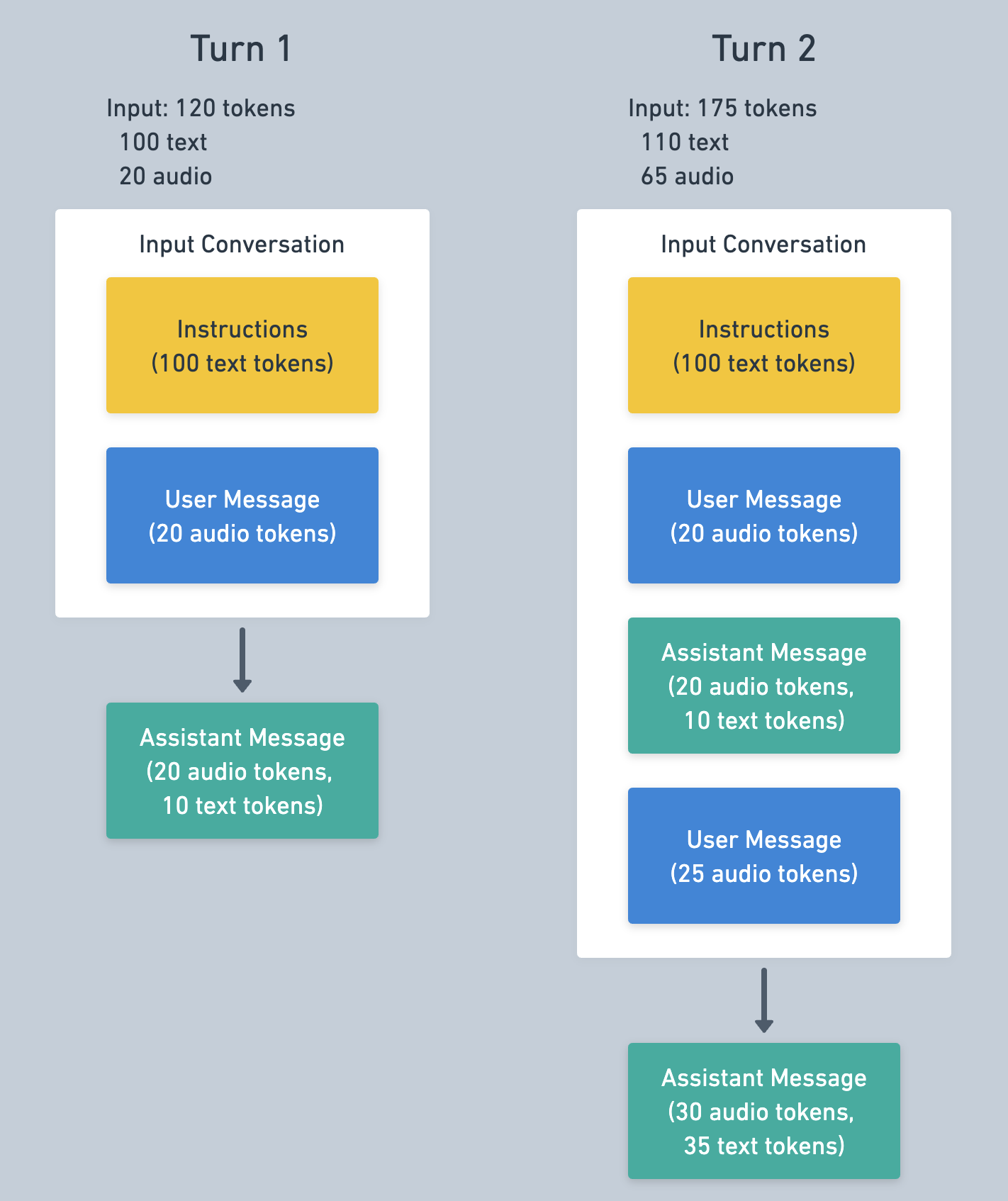
The messages from the first turn are likely to be cached for turn 2, which reduces the input cost. See below for more information on caching.
The tokens used for a Response can be read from the response.done event, which looks like the following.
{
"type": "response.done",
"response": {
...
"usage": {
"total_tokens": 253,
"input_tokens": 132,
"output_tokens": 121,
"input_token_details": {
"text_tokens": 119,
"audio_tokens": 13,
"image_tokens": 0,
"cached_tokens": 64,
"cached_tokens_details": {
"text_tokens": 64,
"audio_tokens": 0,
"image_tokens": 0
}
},
"output_token_details": {
"text_tokens": 30,
"audio_tokens": 91
}
}
}
}Input transcription costs
Aside from conversational Responses, the Realtime API bills for input transcriptions, if enabled. Input transcription uses a different model than the speech2speech model, such as whisper-1 or gpt-4o-transcribe, and thus are billed from a different rate card. Transcription is performed when audio is written to the input audio buffer and then committed, either manually or by VAD.
Input transcription token counts can be read from the conversation.item.input_audio_transcription.completed event, as in the following example.
{
"type": "conversation.item.input_audio_transcription.completed",
...
"transcript": "Hi, can you hear me?",
"usage": {
"type": "tokens",
"total_tokens": 26,
"input_tokens": 17,
"input_token_details": {
"text_tokens": 0,
"audio_tokens": 17
},
"output_tokens": 9
}
}Caching
Realtime API supports prompt caching, which is applied automatically and can dramatically reduce the costs of input tokens during multi-turn sessions. Caching applies when the input tokens of a Response match tokens from a previous Response, though this is best-effort and not guaranteed.
The best strategy for maximizing cache rate is keep a session’s history static. Removing or changing content in the conversation will “bust” the cache up to the point of the change — the input no longer matches as much as before. Note that instructions and tool definitions are at the beginning of a conversation, thus changing these mid-session will reduce the cache rate for subsequent turns.
Truncation
When the number of tokens in a conversation exceeds the model’s input token limit the conversation be truncated, meaning messages (starting from the oldest) will be dropped from the Response input. A 32k context model with 4,096 max output tokens can only include 28,224 tokens in the context before truncation occurs.
Clients can set a smaller token window than the model’s maximum, which is a good way to control token usage and cost. This is controlled with the token_limits.post_instructions configuration (if you configure truncation with a retention_ratio type as shown below). As the name indicates, this controls the maximum number of input tokens for a Response, except for the instruction tokens. Setting post_instructions to 1,000 means that items over the 1,000 input token limit won’t be sent to the model for a Response.
Truncation busts the cache near the beginning of the conversation, and if truncation occurs on every turn then cache rate will be very low. To mitigate this issue clients can configure truncation to drop more messages than necessary, which will extend the headroom before another truncation is needed. This can be controlled with the session.truncation.retention_ratio setting. The server defaults to a value of 1.0 , meaning truncation will remove only the items necessary. A value of 0.8 means a truncation would retain 80% of the maximum, dropping an additional 20%.
If you’re attempting to reduce Realtime API cost per session (for a given model), we recommend reducing limiting the number of tokens and setting a retention_ratio less than 1, as in the following example. Remember that there may be a tradeoff here in terms of lower cost but lower model memory for a given turn.
{
"event": "session.update",
"session": {
"truncation": {
"type": "retention_ratio",
"retention_ratio": 0.8,
"token_limits": {
"post_instructions": 8000
}
}
}
}Truncation can also be completely disabled, as shown below. When disabled an error will be returned if the Conversation is too long to create a Response. This may be useful if you intend to manage the Conversation size manually.
{
"event": "session.update",
"session": {
"truncation": "disabled"
}
}Other optimization strategies
Using a mini model
The Realtime speech2speech models come in a “normal” size and a mini size, which is significantly cheaper. The tradeoff here tends to be intelligence related to instruction following and function calling, which won’t be as effective in the mini model. We recommend first testing applications with the larger model, refining your application and prompt, then attempting to optimize using the mini model.
Editing the Conversation
While truncation will occur automatically on the server, another cost management strategy is to manually edit the Conversation. A principle of the API is to allow full client control of the server-side Conversation, allowing the client to add and remove items at will.
{
"type": "conversation.item.delete",
"item_id": "item_CCXLecNJVIVR2HUy3ABLj"
}Clearing out old messages is a good way to reduce input token sizes and cost. This might remove important content, but a common strategy is to replace these old messages with a summary. Items can be deleted from the Conversation with a conversation.item.delete message as above, and can be added with a conversation.item.create message.
Estimating costs
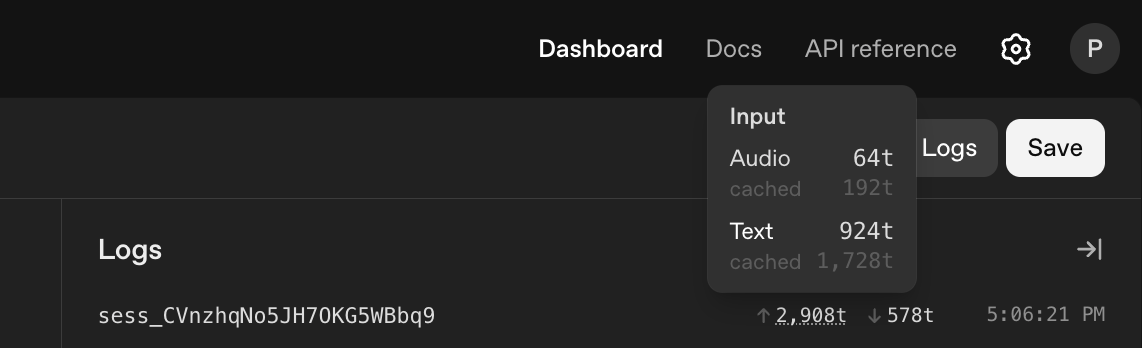
Given the complexity in Realtime API token usage it can be difficult to estimate your costs ahead of time. A good approach is to use the Realtime Playground with your intended prompts and functions, and measure the token usage over a sample session. The token usage for a session can be found under the Logs tab in the Realtime Playground next to the session id.