
Codex Security helps you turn a backlog of accepted findings into tested code changes. You can fix findings in the findings workspace UI or invoke the remediation workflow from a prompt, the command line, or CI/CD. In each case, Codex validates the issue, proposes a focused patch, adds regression coverage, and verifies that legitimate behavior still works.
Start by fixing one accepted finding so you can evaluate the patch and verification quality. Once the workflow meets your standards, scale it across more accepted findings by processing each finding in a separate task or CI/CD job. Keeping each fix scoped makes the code changes and evidence easier to review.
Fix a finding in the UI
Open an accepted finding in the findings workspace to generate, review, apply, and verify its patch.
-
Generate a focused patch
Open the finding, select the Patch tab, and select Generate patch. Codex validates or reproduces the issue when feasible and writes a patch artifact without modifying the selected checkout.
-
Review the proposed diff
Read every changed source and regression-test file. Use Open diff in editor when you want the full patch in the editor. Reject broad refactors, unrelated cleanup, or changes that weaken another security control.
-
Apply the patch locally
Select Apply patch locally only after the diff is acceptable. Codex applies the exact generated patch to the working tree and records that state. Review the working-tree diff before continuing.
-
Verify the fix
Select Verify fix. Codex reruns the original reproducer or strongest available exploit check, focused regression coverage, legitimate-behavior checks, nearby bypass checks, and relevant repository tests.
-
Close the finding deliberately
Verification doesn’t automatically close a finding. Review the commands, results, and remaining proof gap, then close the finding with an accurate reason or keep it open for more work.
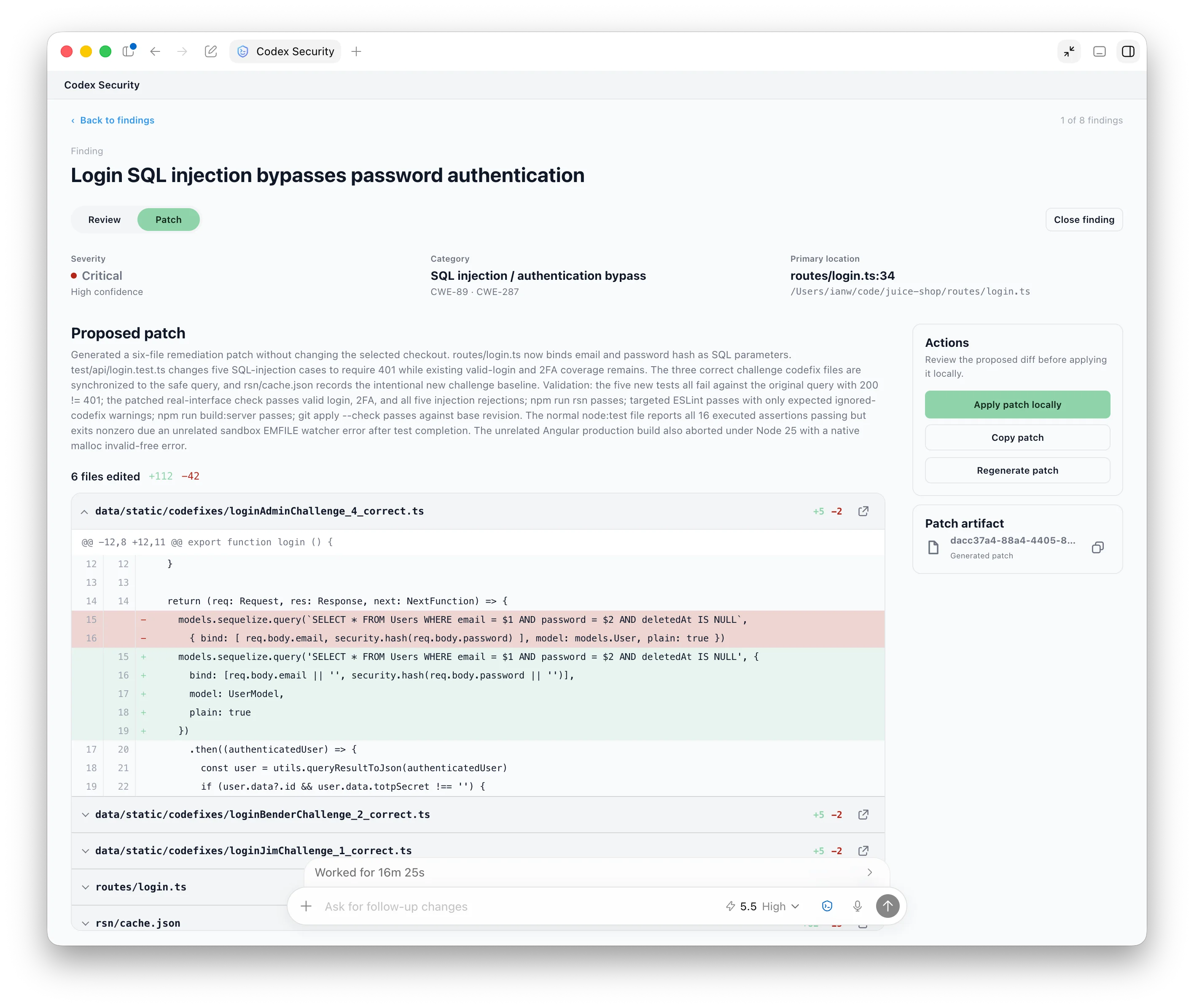
Review the proposed source and test changes before applying the patch locally.
Fix a finding from the CLI
Use the Codex CLI when you already have a finding from a scan, ticket, advisory, disclosure, security assessment, or internal review:
Use $codex-security:fix-finding to fix finding <finding-id> from <report-path>. Validate the issue, make the smallest safe change, add focused regression coverage, and verify that the issue no longer reproduces.Include the known source, sink, attacker input, impact, expected invariant, reproducer, affected files, and validation command. Codex can inspect the repository for missing technical details, but it should ask before guessing a product policy or intended security invariant.
For an automated run, pass the prompt to codex exec after checking out the code
and making the finding report available:
codex exec 'Use $codex-security:fix-finding to fix finding <finding-id> from <report-path>. Validate the issue, make the smallest safe change, add focused regression coverage, and verify that the issue no longer reproduces.'Scan and fix findings in CI/CD
In CI/CD, use one Codex run to scan the diff and generate fixes for every finding it discovers. The job doesn’t need finding IDs or report paths as inputs. Codex carries the findings from the scan into remediation within the same run.
The all-in-one run should:
- Resolve the base and head revisions for the change.
- Run
$codex-security:security-diff-scanagainst that diff. - Invoke
$codex-security:fix-findingfor every finding returned by the scan. - Generate focused patches and regression coverage, then verify each fix.
- Return the scan results, patches, tests, verification commands, and any finding it couldn’t fix.
For example:
codex exec 'Use $codex-security:security-diff-scan to review changes from <base-revision> to HEAD. For every finding returned by the scan, use $codex-security:fix-finding to generate and verify a minimal fix. Continue until every finding has either a verified fix or an explicit explanation of why it could not be fixed. Return the scan results, patches, tests, verification commands, and remaining failures.'After verification, merge the patch through your normal code-review and release process. To hand findings to another team before remediation, see Export or track findings.