
A sandbox gives an agent an isolated, Unix-like execution environment with a filesystem, shell, installed packages, mounted data, exposed ports, snapshots, and controlled access to external systems.
Agent workflows get brittle when the model needs that kind of workspace but only receives prompt context. Large document sets, generated artifacts, commands, previews, and resumable work all need an environment the agent can inspect and change.
Sandbox agents are available in the TypeScript and Python Agents SDKs.
This guide covers sandboxes in the Agents SDK, where your application runs the harness. For an OpenAI-managed harness, use Agents API: Connect a sandbox.
Use sandboxes when the agent needs to manipulate files, run commands, mount a data room, produce artifacts, expose a service, or continue stateful work later.
The key split is the boundary between the harness and compute. The harness is the control plane around the model: it owns the agent loop, model calls, tool routing, handoffs, approvals, tracing, recovery, and run state. Compute is the sandbox execution plane where model-directed work reads and writes files, runs commands, installs dependencies, uses mounted storage, exposes ports, and snapshots state.
Keeping those boundaries separate lets your application keep sensitive control plane work in trusted infrastructure while the sandbox stays focused on provider-specific execution. The sandbox can run code against files with narrow credentials and mounts; the harness can keep auth, billing, audit logs, human review, and recovery state outside any one container.
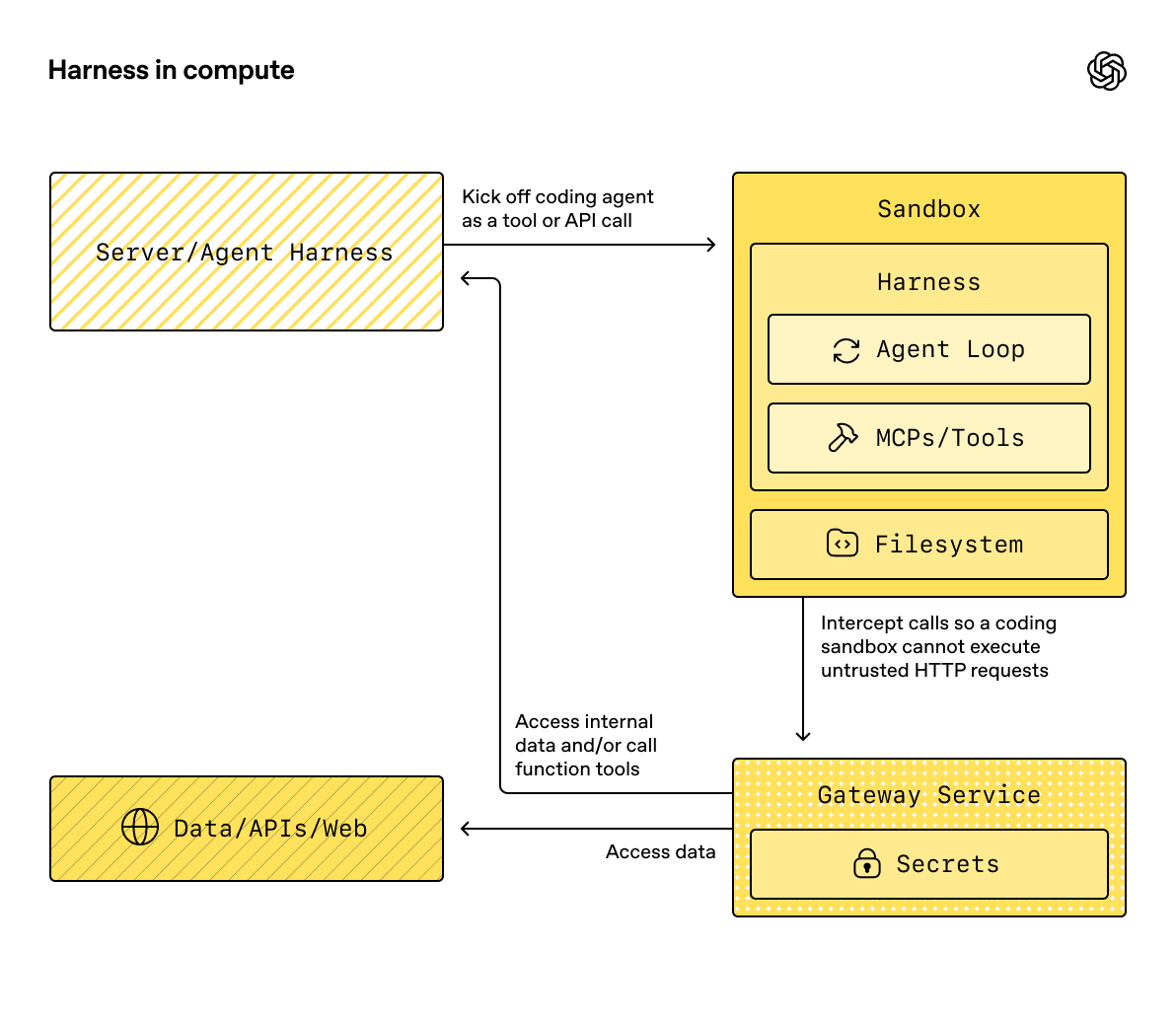
Running the harness inside the sandbox can be convenient for prototypes, but it puts orchestration and model-directed execution in the same compute boundary.
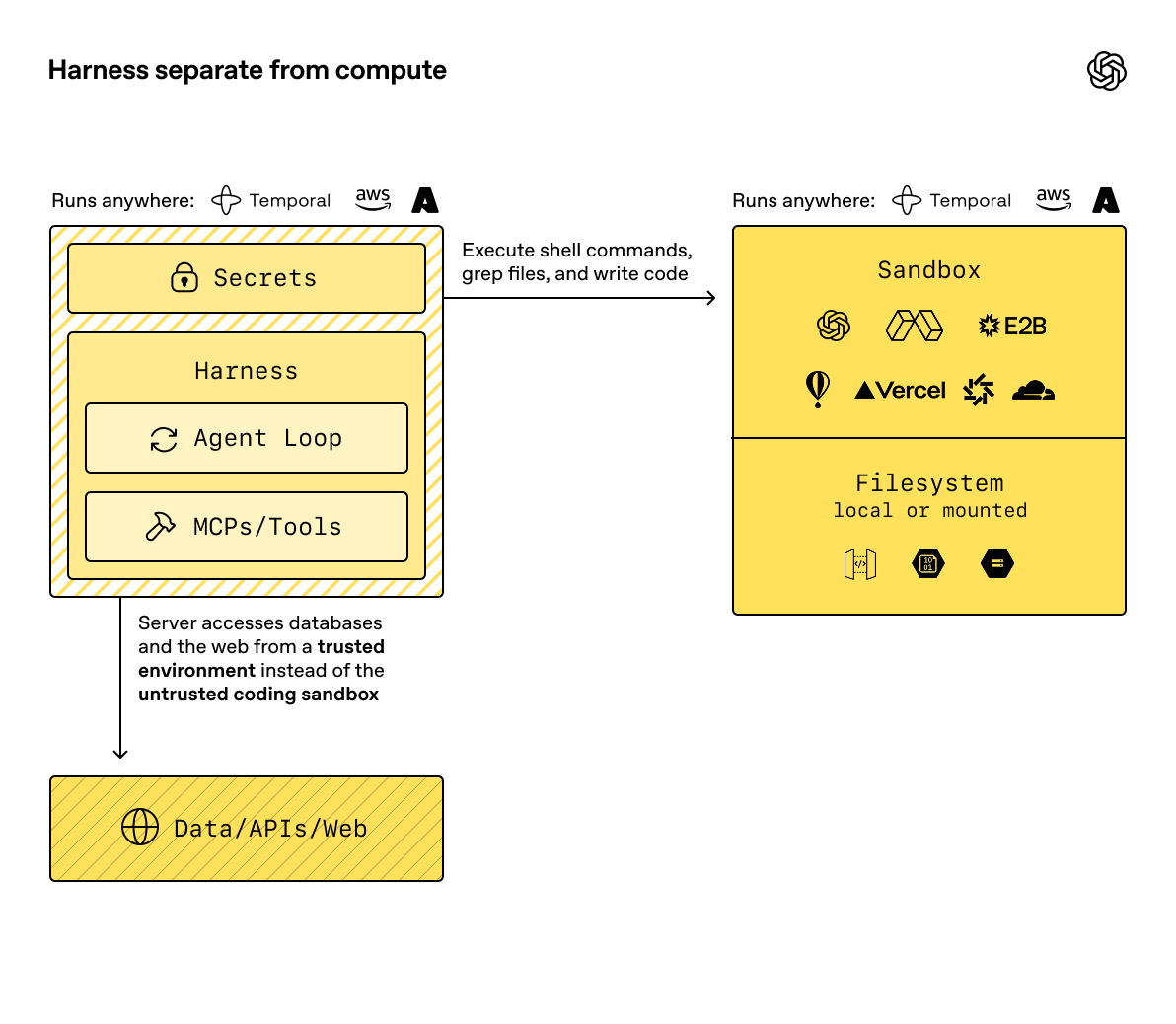
The harness can run in your infrastructure while the sandbox handles provider-specific, stateful execution.
When to use a sandbox
Use a sandbox when the agent’s answer depends on work done in a sandbox workspace, not just reasoning over prompt context.
Common pain points include:
- The task needs a directory of documents, not a single prompt.
- The agent should write files that your application can inspect later.
- The agent needs commands, packages, or scripts to complete the work.
- The workflow produces artifacts such as Markdown, CSV, JSONL, screenshots, or generated websites.
- A service, notebook, or report preview needs to run on an exposed port.
- Work pauses for human review and then resumes in the same workspace.
If your workflow only needs a short model response and no persistent workspace, call the Responses API directly or use the basic Agents SDK runtime without a sandbox.
If shell access is only one occasional tool, start with the hosted shell tool in Using tools. Use sandbox agents when workspace isolation, sandbox provider choice, or resumable filesystem state is part of the product design.
What sandboxes add
SandboxAgent is still an Agent. It keeps the usual agent surface, including
instructions, prompt, tools, handoffs, MCP servers, model settings,
structured output, guardrails, and hooks. What changes is the execution boundary:
the runner prepares the agent against a live sandbox session that owns files,
commands, ports, and provider-specific isolation.
| Piece | What it owns | Design question |
|---|---|---|
SandboxAgent |
The agent definition plus sandbox defaults | What should this agent do, and which sandbox defaults travel with it? |
Manifest |
The fresh-session workspace contract | What files, directories, repos, mounts, environment, users, or groups start out in the workspace? |
| Capabilities | Sandbox-native behavior attached to the agent | Which sandbox tools, instructions, or runtime behavior does this agent need? |
| Sandbox client | The provider integration | Where should the live workspace run: Unix-local, Docker, or a hosted provider? |
| Sandbox session | The live execution environment | Where do commands run, files change, ports open, and provider state live? |
| Sandbox run config | Per-run sandbox session source, client options, and fresh inputs | Should this run inject, resume, or create the sandbox session? |
| Saved state | RunState, serialized session state, and snapshots |
How should later runs reconnect to work or seed a new workspace? |
Sandbox-specific defaults belong on SandboxAgent. Per-run sandbox-session
choices belong in the run’s sandbox configuration.
Sandbox agents also don’t change what a turn means. A turn is still a model step, not a single shell command or sandbox action. Some work may stay inside the sandbox execution layer. The agent runtime consumes another turn only when it needs another model response after sandbox work has happened.
Create the workspace
Manifest describes the desired starting contents and layout for a fresh
sandbox workspace. Use it for the files, repos, input artifacts, helper files,
mounts, output directories, and environment setup the agent should see.
Treat the manifest as a fresh-session contract, not the full source of truth for every live sandbox. The effective workspace for a run can instead come from a reused live sandbox session, serialized sandbox session state, or a snapshot chosen at run time.
Manifest entry paths are workspace-relative. They can’t be absolute paths or
escape the workspace with .., which keeps the workspace contract portable
across local, Docker, and hosted clients.
| Manifest input | Use it for |
|---|---|
File, Dir |
Small synthetic inputs, helper files, or output directories. |
| Local file or directory | Host files or directories to materialize into the sandbox. |
| Git repo | A repository to fetch into the workspace. |
S3Mount, GCSMount, R2Mount, AzureBlobMount, BoxMount, S3FilesMount |
External storage to make available inside the sandbox. |
environment |
Environment variables the sandbox needs when it starts. |
users and groups |
Sandbox-local OS accounts and groups for providers that support account provisioning. |
Good manifest design means:
- Put repos, input artifacts, and output directories in the manifest.
- Put longer task specs and repo-local instructions in workspace files such as
repo/task.mdorAGENTS.md. - Use relative workspace paths in instructions, for example
repo/task.mdoroutput/report.md. - Keep mounted storage scoped to the inputs the agent should read or write.
- Treat mount entries as ephemeral workspace entries: snapshot and persistence flows skip mounted remote storage instead of copying it into saved workspace contents.
Mount files and storage
Useful data often already lives somewhere else. Instead of pasting large documents into context, mount them into the sandbox and let the agent work with files.
Examples:
- Mount a due-diligence data room and ask the agent to produce a cited summary.
- Mount a support export and ask the agent to cluster issues into a report.
- Mount generated artifacts so another system can review them.
Provider integrations expose their own mount helpers, credential handling, and persistence behavior. Keep the application contract the same: mount only the inputs the agent should use, tell the agent where to read and write, and check generated artifacts before using them.
Handle secrets and credentials
Treat sandbox credentials as runtime configuration, not prompt content. The agent may need access to credentials for package managers, storage mounts, or provider APIs, but those credentials shouldn’t appear in user prompts, agent instructions, task files, committed manifests, or generated artifacts.
Use these rules:
- Prefer provider-native secret systems for hosted sandbox providers.
- Keep cloud storage credentials scoped to the mount or provider option that needs them.
- Use
Manifest.environmentfor values the sandbox process needs at startup, and mark sensitive or generated entries as ephemeral when you want to rebuild them instead of persisting them. - Avoid saving secrets, generated mount config, local tokens, or files that shouldn’t survive the run.
- Review artifacts before moving them out of the sandbox, especially when the agent can read private documents or mounted storage.
The SDK supports manifest environment values and provider-specific mount credentials. General secret-store integration is provider-specific, so keep this page focused on the contract: your runtime or sandbox provider should inject credentials instead of teaching them to the model as instructions.
Give the agent capabilities
Capabilities attach sandbox-native behavior to a SandboxAgent. They can shape
the workspace before a run starts, append sandbox-specific instructions, expose
tools that bind to the live sandbox session, and adjust model behavior or input
handling for that agent.
| Capability | Add it when | Notes |
|---|---|---|
Shell |
The agent needs shell access. | Adds command execution and, when supported by the sandbox client, interactive input. |
Filesystem |
The agent needs to edit files or inspect local images. | Adds apply_patch and view_image; patch paths are workspace-root-relative. |
Skills |
You want skill discovery and materialization in the sandbox. | Prefer this over manually mounting .agents or .agents/skills. |
Memory |
Follow-on runs should read or generate memory artifacts. | Requires Shell; live memory updates also require Filesystem. |
Compaction |
Long-running flows need context trimming. | Adjusts model behavior and input handling after compaction items. |
By default, a SandboxAgent includes filesystem, shell, and compaction
capabilities. If you pass a capabilities list, it replaces the default list,
so include any default capabilities the agent still needs.
Prefer built-in capabilities when they fit. Write a custom capability only when you need a sandbox-specific tool or instruction surface that the built-ins don’t cover.
Load skills
Some tasks need repeatable instructions, scripts, references, or assets before
the agent starts. Use the Skills capability so the agent can discover that
working context during the run.
import {
Capabilities,
SandboxAgent,
gitRepo,
skills,
} from "@openai/agents/sandbox";
const agent = new SandboxAgent({
name: "Tax prep assistant",
instructions: "Use the mounted skill before preparing the return.",
capabilities: [
...Capabilities.default(),
skills({
from: gitRepo({
repo: "owner/tax-prep-skills",
ref: "main",
}),
}),
],
});Choose the skill source based on how you want it materialized:
- Use a lazy local directory source for larger local skill directories when you want the model to discover the index first and load only what it needs.
- Use a local directory source for a small local bundle to stage up front.
- Use a Git repo source when the skills bundle has its own release cadence or many sandboxes use it.
Expose previews and ports
Sometimes the artifact isn’t a file; it’s a running process. Use an exposed port when the agent creates a local app, notebook, report server, browser preview, or other service that you need to inspect outside the sandbox.
Port setup is provider-specific, but the product contract is the same: the agent starts the service inside the sandbox, the sandbox client exposes the port, and your application shares or inspects the resulting preview URL.
Run a sandbox agent
The shortest useful sandbox loop is:
- Build a
Manifestthat describes the workspace. - Create a
SandboxAgentwith the capabilities the model needs. - Choose a sandbox client for the environment where work should run.
- Run the agent with the per-run sandbox configuration.
- Inspect, copy, resume, or snapshot the artifacts that matter to your application.
Start with Unix-local for local development on macOS or Linux. It gives you the smallest local loop because the runner can create a temporary workspace from the agent’s default manifest and clean it up after the run.
import { run } from "@openai/agents";
import { Manifest, SandboxAgent, file, shell } from "@openai/agents/sandbox";
import { UnixLocalSandboxClient } from "@openai/agents/sandbox/local";
const manifest = new Manifest({
entries: {
"account_brief.md": file({
content:
"# Northwind Health\n\n" +
"- Segment: Mid-market healthcare analytics provider.\n" +
"- Renewal date: 2026-04-15.\n",
}),
"implementation_risks.md": file({
content:
"# Delivery risks\n\n" +
"- Security questionnaire is not complete.\n" +
"- Procurement requires final legal language by April 1.\n",
}),
},
});
const agent = new SandboxAgent({
name: "Renewal Packet Analyst",
model: "gpt-6-astra",
instructions:
"Review the workspace before answering. Keep the response concise, " +
"business-focused, and cite the file names that support each conclusion.",
defaultManifest: manifest,
capabilities: [shell()],
});
const result = await run(
agent,
"Summarize the renewal blockers and recommend the next two actions.",
{
sandbox: {
client: new UnixLocalSandboxClient(),
},
}
);
console.log(result.finalOutput);For complete local examples, see the TypeScript sandbox agent quickstart and Python unix_local_runner.py.
Switch providers
The provider is part of the run configuration, not the agent definition. Keep
the SandboxAgent, manifest, and capabilities stable, then swap the sandbox
client and provider options for the environment you want.
This example uses Docker for local container isolation. Hosted providers follow the same pattern with their own client classes and options.
import { run } from "@openai/agents";
import { SandboxAgent } from "@openai/agents/sandbox";
import { DockerSandboxClient } from "@openai/agents/sandbox/local";
const agent = new SandboxAgent({
name: "Workspace reviewer",
model: "gpt-6-astra",
instructions: "Inspect the sandbox workspace before answering.",
});
const result = await run(agent, "Inspect the workspace.", {
sandbox: {
client: new DockerSandboxClient({
image: "node:22-bookworm-slim",
}),
},
});
console.log(result.finalOutput);For runnable examples, see the TypeScript sandbox clients guide and basic example, plus Python basic.py for provider selection, docker_runner.py for Docker, and main.py for a data-room flow in the SDK repository.
Advanced patterns
Once the basic loop works, sandboxes become useful for workflows where the agent needs a sandbox workspace instead of more prompt context. These examples are workflow patterns, not separate APIs: the same harness can route, pause, resume, and trace the workflow while each sandbox keeps execution close to the files, tools, and ports it needs.
| Example | Description |
|---|---|
| Data room Q&A | Answer questions over a mounted data room. |
| Data room table extraction | Extract a table from a mounted data room. |
| Repository code review | Clone a repo, inspect it, and produce code review artifacts. |
| Vision website clone | Clone a website using the Vision API and screenshot feedback. |
| Sandbox resume | Resume work in a pre-existing sandbox. |
Resume or seed future work
Useful agent work often outlives one request. A user reviews an artifact, a step needs approval, or the next step depends on a later event.
Keep three state concepts separate:
| State surface | Restores | Use when |
|---|---|---|
RunState |
Harness-side state such as model items, tool state, approvals, and active agent position. | The runner should carry the workflow forward across pauses. |
| Session state | A serialized sandbox session that a client can reconnect to. | Your app or job system stores provider session state directly. |
snapshot |
Saved workspace contents used to seed a fresh sandbox session. | A new run should start from saved files and artifacts, not an empty workspace. |
In practice, the runner resolves the sandbox session in this order:
- If you pass a live sandbox session, the runner reuses that session directly.
- Otherwise, if the run is resuming from
RunState, the runner resumes from the stored sandbox session state. - Otherwise, if you pass explicit serialized sandbox state, the runner resumes from that state.
- Otherwise, the runner creates a fresh sandbox session. For that fresh session, it uses the per-run manifest when provided, or the agent’s default manifest if not.
The sandbox resume example serializes the stopped session state, resumes it through the same client, and then passes the resumed session back into the next run:
import { run } from "@openai/agents";
import { Manifest, SandboxAgent } from "@openai/agents/sandbox";
import { UnixLocalSandboxClient } from "@openai/agents/sandbox/local";
const manifest = new Manifest();
const client = new UnixLocalSandboxClient({
snapshot: { type: "local", baseDir: "/tmp/my-sandbox-snapshots" },
});
const agent = new SandboxAgent({
name: "Workspace builder",
model: "gpt-6-astra",
instructions: "Inspect the sandbox workspace before answering.",
});
const session = await client.create({ manifest });
let conversation = [];
let frozenSessionState;
try {
const firstResult = await run(agent, "Build the first version of the app.", {
maxTurns: 20,
sandbox: { session },
});
conversation = firstResult.history;
frozenSessionState = await client.serializeSessionState?.(session.state);
} finally {
await session.close?.();
}
if (!frozenSessionState || !client.deserializeSessionState || !client.resume) {
throw new Error("Sandbox client does not support session resume.");
}
const resumedSession = await client.resume(
await client.deserializeSessionState(frozenSessionState)
);
try {
conversation.push({
role: "user",
content: "Continue from the existing workspace and add tests.",
});
await run(agent, conversation, {
maxTurns: 20,
sandbox: { session: resumedSession },
});
} finally {
await resumedSession.close?.();
}Fresh-session inputs such as manifest and snapshot only apply when the
runner creates a new sandbox session. If you inject a live session, capability
processing can add compatible non-mount entries, but it can’t change root,
environment, users, or groups; remove existing entries; replace entry types; or
add or change mount entries on the already-running sandbox.
This split lets the harness resume the agent loop while the sandbox provider
restores or recreates the workspace. Current sample code for these paths lives
in the TypeScript resume session state example and
Python main.py and
sandbox_agent_with_remote_snapshot.py.
Persist memory across runs
Sandbox memory lets future sandbox-agent runs learn from prior runs. It’s
separate from SDK-managed conversational Session memory: sessions preserve
message history, while sandbox memory distills useful lessons from prior
workspace runs into files the agent can read later.
Use memory when the agent should carry forward user preferences, corrections, project-specific lessons, or task summaries without replaying every previous turn. Resume and snapshots preserve workspace state; memory preserves reusable guidance about work that happened in the workspace.
import {
Manifest,
SandboxAgent,
filesystem,
memory,
shell,
} from "@openai/agents/sandbox";
const manifest = new Manifest();
const agent = new SandboxAgent({
name: "Memory-enabled reviewer",
instructions:
"Inspect the workspace and retain useful lessons for follow-up runs.",
defaultManifest: manifest,
capabilities: [memory(), filesystem(), shell()],
});Memory enables both reads and generation by default. Memory reads require shell access so the agent can search and open memory files. By default, live memory updates also require filesystem access, so the agent can repair stale memory or update memory when the user asks.
Memory reads use progressive disclosure. The SDK injects memory_summary.md at
the start of a run, the agent searches MEMORY.md when prior work looks
relevant, and it opens rollout summaries only when it needs more detail.
| Memory mode | Use it when |
|---|---|
| Default read/write | The agent should read existing memory and generate new memory. |
| Read-only memory | The agent should read memory but not generate new memory after the run. |
| Generate-only memory | The run should generate memory without using existing memory. |
| Read config | You need to disable live updates. |
| Generate config | You need to tune generation, such as the extra prompt. |
| Layout config | Agents need isolated memory layouts in the same sandbox workspace. |
By default, memory artifacts live in the sandbox workspace:
workspace/
  sessions/
    <rollout-id>.jsonl
  memories/
    memory_summary.md
    MEMORY.md
    raw_memories.md
    phase_two_selection.json
    raw_memories/
      <rollout-id>.md
    rollout_summaries/
      <rollout-id>_<slug>.md
    skills/
The runtime appends run segments during the sandbox session. When the session
closes, memory generation first extracts conversation summaries and raw
memories, then consolidates those raw memories into MEMORY.md and
memory_summary.md. To reuse memory in a later run, preserve the configured
memory directories by keeping the same live sandbox session, resuming from
session state, starting from a snapshot, or mounting persistent storage such as
S3.
For multi-turn sandbox chats, use a stable SDK session together with the same live sandbox session. Memory groups runs by the explicit conversation ID, then the SDK session ID, then the run group ID, and finally a generated per-run ID. The sandbox session ID identifies the live workspace; it’s not the memory conversation ID.
For runnable examples, see the TypeScript memory guide,
plus Python memory.py for a local snapshot flow,
memory_s3.py for S3-backed memory storage, and
memory_multi_agent_multiturn.py for separate
memory layouts across agents.
Compose sandbox agents
Sandbox agents compose with the rest of the SDK.
Use a handoff when a non-sandbox intake agent should delegate only the workspace-heavy part of a workflow to a sandbox agent. The top-level run continues, but the sandbox agent becomes the active agent for the next turn.
Use agents as tools when an outer orchestrator should call one or more sandbox agents as nested tools. Each sandbox tool-agent can have its own sandbox run configuration, sandbox client, manifest, and provider options.
For examples, see handoffs.py and
sandbox_agents_as_tools.py.
Sandbox providers
Start with Unix-local for fast local iteration or Docker when you want local container isolation. Move to a hosted provider when the task needs managed execution, provider-specific isolation, scaling, previews, storage mounts, snapshots, or credentials that should live outside your application server.
Use provider docs for provider-specific setup, credentials, isolation, storage, previews, and persistence behavior.
| Provider | SDK client | Documentation and examples |
|---|---|---|
| Blaxel | BlaxelSandboxClient |
Sandbox overview |
| Cloudflare | CloudflareSandboxClient |
Sandbox documentation OpenAI Agents tutorial Sandbox Bridge examples |
| Daytona | DaytonaSandboxClient |
Sandbox documentation OpenAI Agents SDK guide |
| Docker | DockerSandboxClient |
Docker documentation TypeScript Docker SDK example Python Docker SDK example |
| E2B | E2BSandboxClient |
Sandbox documentation OpenAI Agents SDK guide Launch blog |
| Modal | ModalSandboxClient |
Sandbox guide Integration blog Example repo Modal extension reference |
| Runloop | RunloopSandboxClient |
Devbox overview Tunnels |
| Unix-local | UnixLocalSandboxClient |
TypeScript local SDK example Python local SDK example |
| Vercel | VercelSandboxClient |
Sandbox documentation OpenAI Agents SDK guide FastAPI template Sample app |