

One year ago, we introduced the Responses API — a foundation for developers and enterprises to build useful and reliable agents. Equipping models with a set of hosted tools allowed AI to evolve from chat assistants to systems that can take action on your behalf. Today, the Responses API supports a number of tools to power agentic workflows and a new set of features and primitives specifically designed for building with more capable models.
Thousands of developers are building with the Responses API today to accelerate productivity across industries like customer support, legal, life sciences, travel, and more. Having shared many success stories from those industries, today we’re celebrating five lesser-told stories of the developers who have built on the Responses API for the past year.
Detecting and fixing failures in AI agents
By Alexis Gauba and Ben Hylak from Raindrop AI
Tools: Custom built tools
Models: GPT-5.2 (testing GPT-5.4)
Raindrop is the monitoring platform behind the world’s most ambitious AI companies to catch when their agents go off the rails in production. As agents have gotten more complex, these failures have become more critical.
Without the Responses API, building this kind of monitoring system would have been much harder and a lot less reliable.
The system runs background analysis using the Responses API (via the Vercel AI SDK) to share tools across different model providers and keep their system portable across environments. These workflows surface unusual behavior. When something goes wrong, the system alerts developers and assists with diagnosing the underlying issue.
The platform focuses on three core systems:
- Agent behavior monitoring
- Failure detection and alerting
- Developer investigation and debugging tools
Together, these systems allow teams to discover, track, and fix issues in AI agents before they impact production systems.
Monitoring architecture
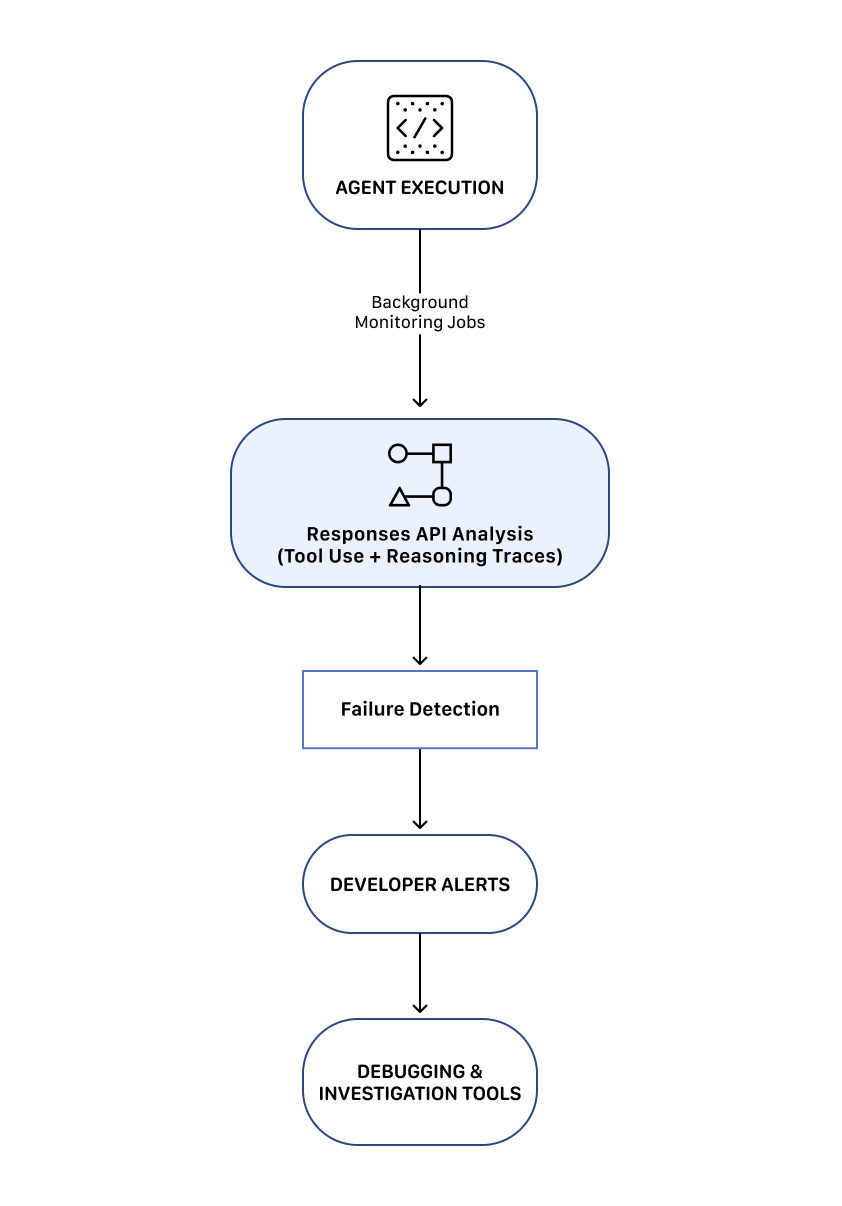
This architecture lets teams continuously monitor agent behavior and quickly respond when issues occur.
1. Agent behavior monitoring
The system evaluates agent behavior continuously to determine whether the agent is operating as expected.
Developers can set conditions for undesirable outcomes, and the platform can raise an alert when those conditions are met.
2. Failure detection and alerting
Once anomalies are detected, Raindrop notifies developers and surfaces the relevant context needed to investigate the issue.
The platform provides tools for:
- Tracking behavior changes across agent versions
- Identifying which prompt or system changes triggered failures
- Examining reasoning traces and tool calls
This lets developers quickly identify the root cause of failures and deploy fixes.
3. Investigation and debugging tools
Raindrop also provides tools that help developers diagnose issues in agent workflows. These capabilities let teams make the connection between failure detection and system improvement.
Raindrop AI uses the Responses API to power all of the long-running background analysis workflows. Without it, implementing these monitoring systems would be significantly more difficult.
Deep reasoning workflows for complex data
By Eric Provencher from Repo Prompt
Tools used: Codex with App Server + MCP, web search
Model used: GPT-5.3-Codex
Rather than letting the reasoning model waste its context window navigating context during planning or reviews, we leverage a separate agent to curate context ahead of time, to let our reasoning model dedicate as much of its reasoning as possible to solving our task.
Eric Provencher built a system that helps developers and researchers perform deep analysis on large collections of documents, codebases, and datasets.
Repo Prompt focuses on context engineering—automatically gathering, organizing, and structuring relevant information so a reasoning model can analyze it effectively.
While many agent systems focus on gathering data, Eric’s architecture separates context gathering from deep reasoning. The system uses agent workflows to assemble the relevant context and then hands that curated information to a reasoning model that focuses exclusively on analysis.
The platform uses the OpenAI Responses API to orchestrate long-running agent workflows and reasoning jobs for workflows, including:
- Large codebase analysis and architecture planning
- Deep code review workflows
- Research analysis on large document collections
- Medical and scientific document analysis
The system is built around three core components: context-building agent workflows, deep reasoning models (“Oracle” workflow), and iterative research and analysis loops.
1. Context builder agent workflow
The first stage of the system is a context builder agent. This workflow analyzes large repositories of data to determine what information is relevant to a given query.
Using tools and model reasoning with the Responses API, the agent identifies relevant files, relationships between documents, and key sections of information.
The output of this stage is a structured context package, which becomes the input for the reasoning stage.
2. “Oracle” deep reasoning workflow
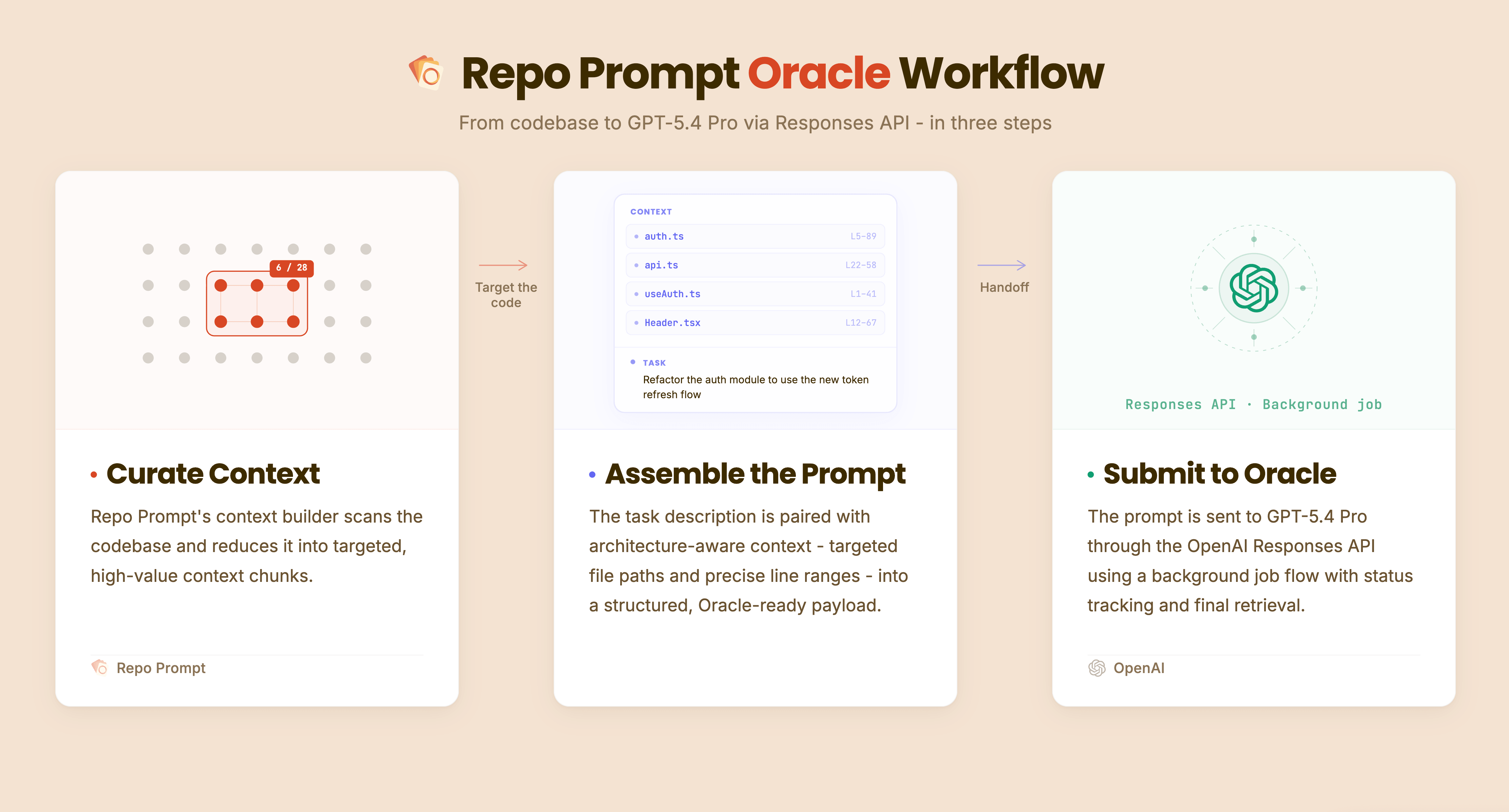
Unlike the context-building agents, the “Oracle” model (the deep reasoning model) does not perform tool calls or additional information retrieval. Instead, it focuses entirely on analyzing the curated context provided to it.
By separating research and reasoning, the model can dedicate its full reasoning capacity to understanding the problem. In many workflows, the reasoning stage can run for extended periods, analyzing complex relationships within the provided context.
3. Iterative research and analysis loops
The system also supports iterative reasoning loops. After the reasoning model produces an output, another agent can review the results and determine whether additional investigation is required.
If needed, the system launches another cycle of context gathering and reasoning. This loop enables long-running investigations where the system progressively refines its analysis.
Iterative workflow

The system relies on several capabilities of the Responses API:
- Background Jobs: Run long-running reasoning tasks that can execute for minutes or hours
- Agent Orchestration: Coordinate agent loops for context gathering, reasoning, and validation
- Observability: Monitor and manage long-running reasoning workflows as they execute
The platform uses Codex models to gather and structure relevant context, then hands that curated context to higher-capability reasoning models for deeper analysis. These capabilities enable the platform’s hybrid architecture combining agent workflows with deep reasoning models.
A conversational interface for vinyl record collectors
By Ash Ryan Arnwine from Collxn
Tools: Web search and 16 custom tools
Model: GPT-5.4, GPT-5 nano
The Responses API felt like it was taking work off my plate compared to alternatives like building a full retrieval-augmented generation system.
Ash Ryan Arnwine built “Collxn” (think: collection), a tiny service with a big mission: help vinyl collectors rediscover what’s already on their shelves and interact with their records.
Collectors often track massive libraries on Discogs, sometimes thousands of records deep. Collxn plugs into that collection and sends a daily email called the “Daily Drop,” spotlighting a different record along with details about the artist, helping collectors revisit music they already own.
And because flipping through records is more fun when you can ask questions, Collxn uses the OpenAI Responses API to power a chat interface that lets users literally talk to their records.
Conversational interface with tool calling
The app uses the Responses API to provide a chat interface called “Ask This Drop” where users can ask questions about records in their Daily Drop.
The model is configured with access to Discogs API tools to retrieve information directly from Discogs when answering a question.
For example, users can ask things like:
- What’s the current market price of this record?
- What other albums did this artist release?
- How rare is this pressing?
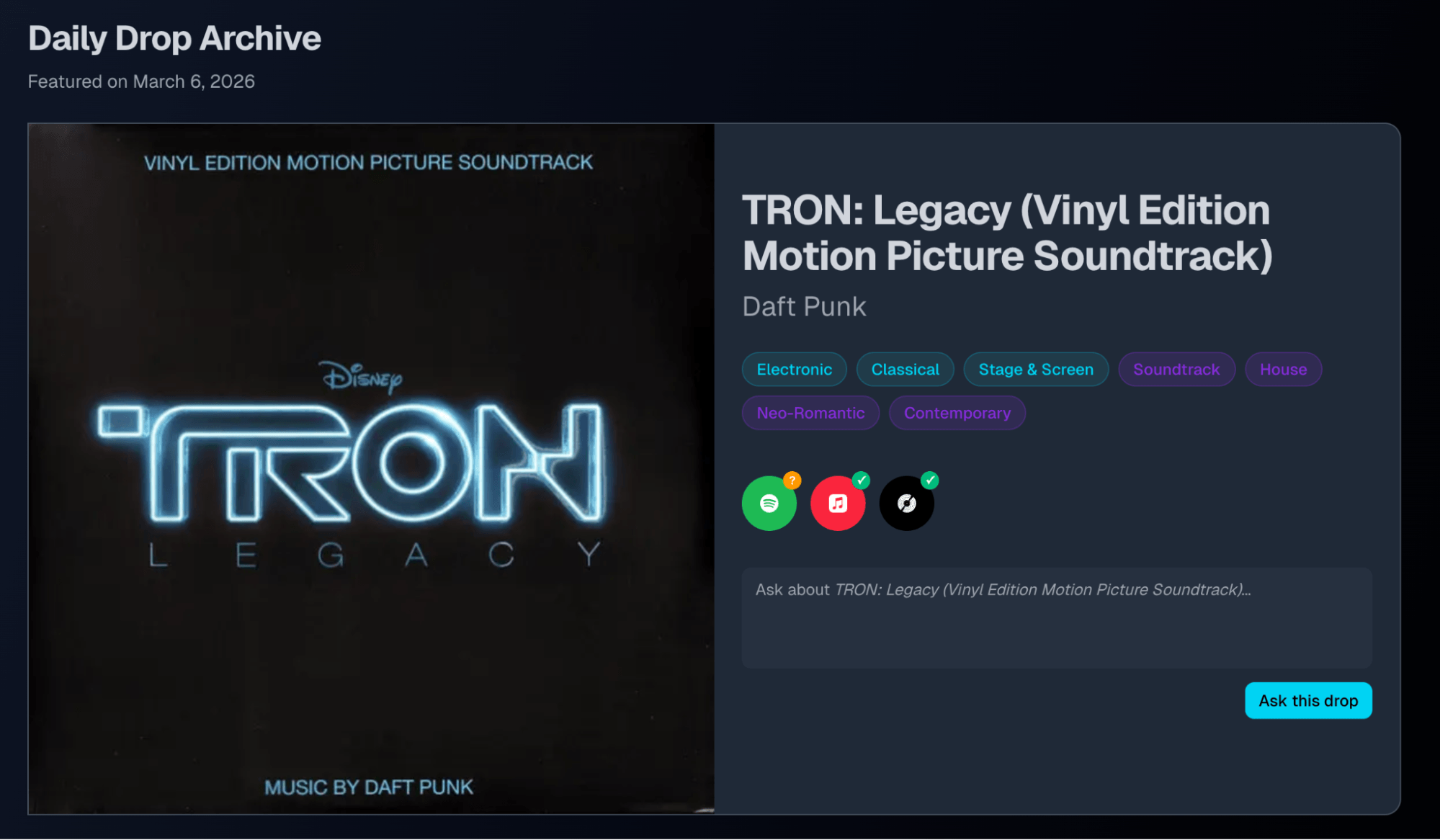
Ask This Drop gives Collxn users a chat interface with their vinyl records.
Collectors can simply ask questions and receive answers generated from real-time Discogs data paired with context from their own record collection.
This approach turns a static record collection into a conversational experience connected to the broader music ecosystem.
Daily Drop and artist news
Collxn also uses the OpenAI Agents SDK to generate a “recent news” section for the artist featured in the Daily Drop email.

The OpenAI Agents SDK powers the Collxn Daily Drop’s artist news section.
This feature deploys a web search-powered agent to find recent articles or updates about the artist and adds that context to the daily email. Among beta users, the news feature quickly became one of the most popular parts of the product, since it connects the record collecting experience to the outside world in a dynamic way.
Ultimately Ash migrated Collxn to the Responses API to launch “Ask This Drop”. By doing so, the application could support multi-step reasoning in conversational workflows as well as built-in and custom tool calling. Collxn’s Responses API implementation is using the built-in web search tool for in-chat artist news search in addition to 16 custom tools for working with the Discogs API, querying the user’s Collxn account, and more.
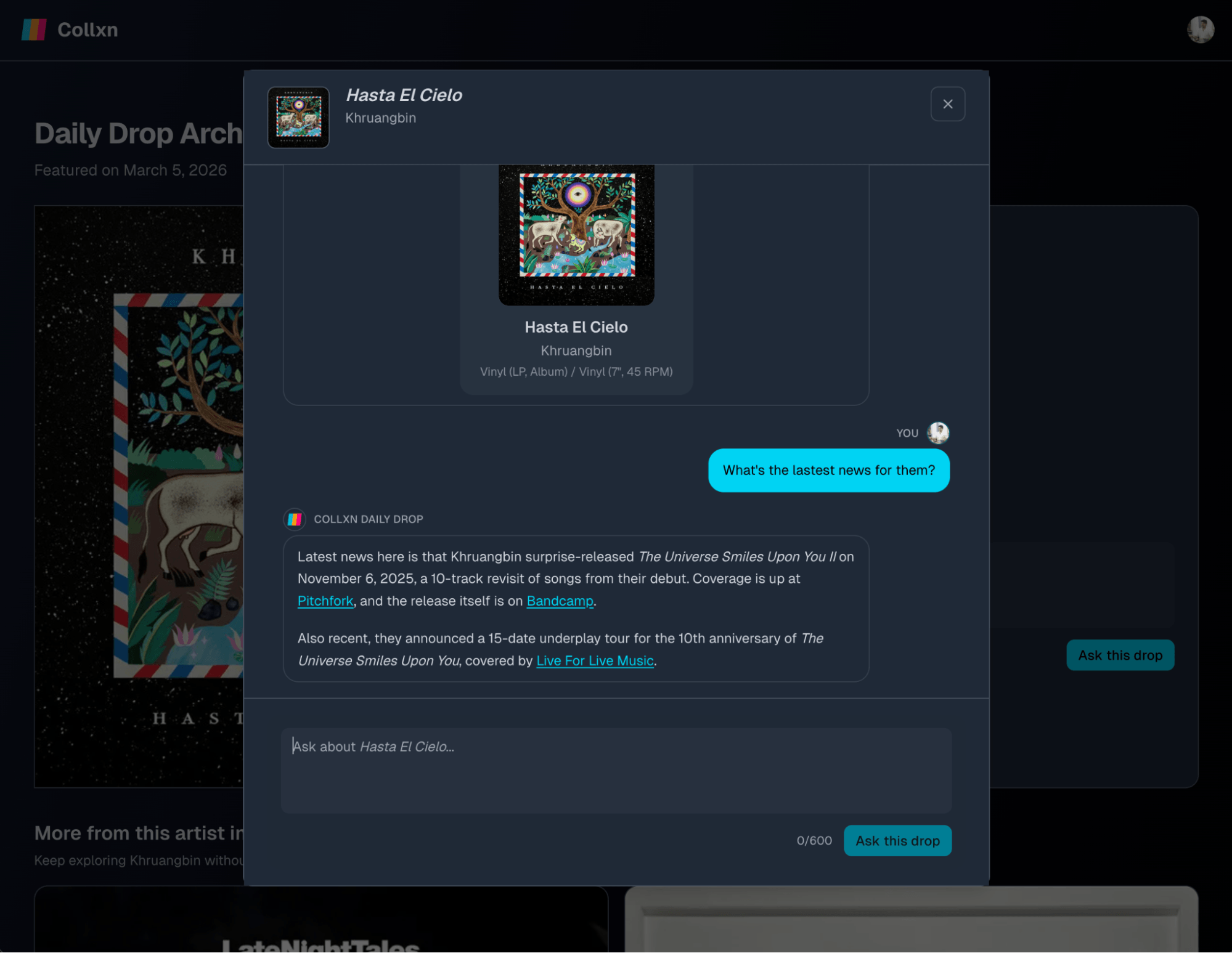
The Responses API web search tool powers live artist news lookup in Collxn’s “Ask This Drop”.
Stateful conversations in the Responses API are also making multi-turn chat interactions simpler and faster to handle. Overall, Ash noted that using the Responses API simplified the architecture compared to building a full retrieval-augmented generation (RAG) system.
Turning screen recordings into interactive product demos
By Nick Sorrentino and Pawel Wszola from the Arcade team
Tools: Computer use
Models: GPT-5.2, computer-use-preview
Integrating API-driven content generation cut the number of steps required to publish a demo by 50%, which significantly increased publish rates and adoption.
Arcade takes something most teams already do—record their screen—and turns it into a polished, interactive product demo. Instead of walking someone through a product live or writing step-by-step documentation, teams record a workflow once and Arcade handles the rest.
Under the hood, the platform analyzes the recording and automatically generates a guided walkthrough that explains what’s happening at each step.
Demo generation workflow
During a recording session:
- A user records their screen while performing a workflow.
- On desktop or in the browser, Arcade captures structured interactions such as clicks, typing, and scrolling directly.
- On mobile, where iOS sandboxing prevents apps from capturing system-wide interactions, users instead record a plain screen video of the app.
- The recording is sent to the OpenAI Responses API with the computer-use tool, which analyzes the visual frames and infers the interactions that occurred.
- The system converts those inferred actions into structured steps.
- Arcade generates the narrative text and interactive hotspots that guide viewers through the demo.
These steps automatically become the interactive walkthrough that users see.
The structured actions are then passed to the Chat Completions API, which generates the titles and hotspot descriptions that appear throughout the demo. Users can tweak the generated copy using built-in AI editing tools, for example, shortening or rewriting the text.
Cutting demo creation in half
Automating demo narration significantly reduced the effort required to publish a product walkthrough.
After integrating the API-driven workflow:
- The median number of actions required before publishing dropped by 50%
- The P80 action count fell from ~230 to ~120
- Publish rates and product adoption increased
By removing friction from the demo creation process, Arcade made it much faster for teams to turn raw recordings into polished interactive demos.
Measuring and improving brand visibility in AI outputs
By Tunde Adeyinka and Ramon Silva from Hexagon
Tools used: Web search
Model used: GPT-5.2 Chat
Tunde Adeyinka and Ramon Silva founded Hexagon to answer a new question for retailers: how do AI assistants talk about your products?
As AI assistants increasingly shape product discovery, Hexagon helps companies monitor how their brands appear in AI-generated answers and improve those results over time.
The platform uses the OpenAI Responses API to power three core systems:
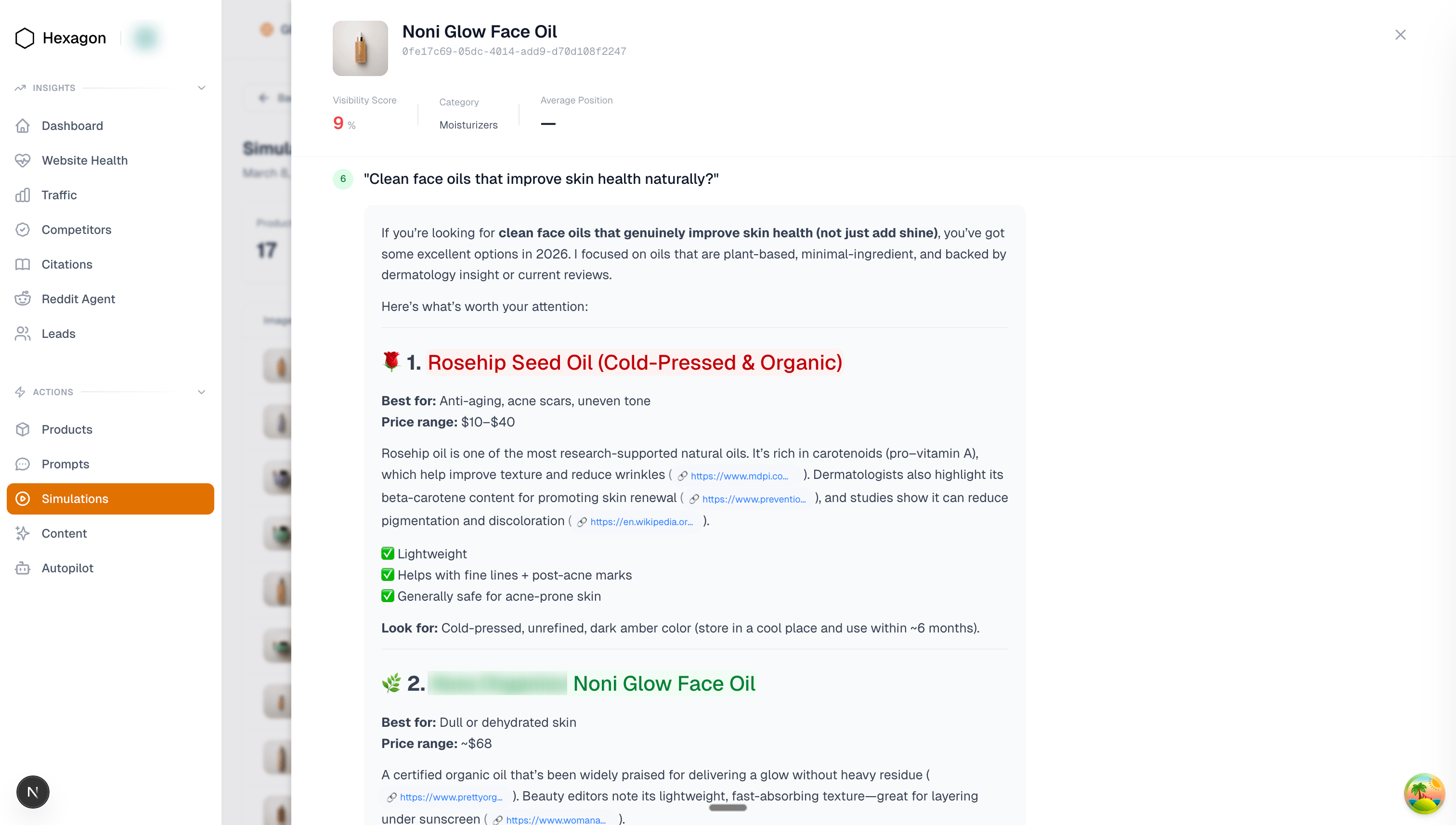
1. Response simulation architecture
Hexagon runs a daily simulation pipeline to measure how AI assistants answer product-related questions. Each day the system generates thousands of realistic consumer prompts, product recommendation prompts, and shopping queries, then sends them through the Responses API. The returned outputs are analyzed to track brand visibility across AI-generated answers.
Retail customers can then see how often their products appear and how those answers change over time.
2. Multi-agent content generation pipeline
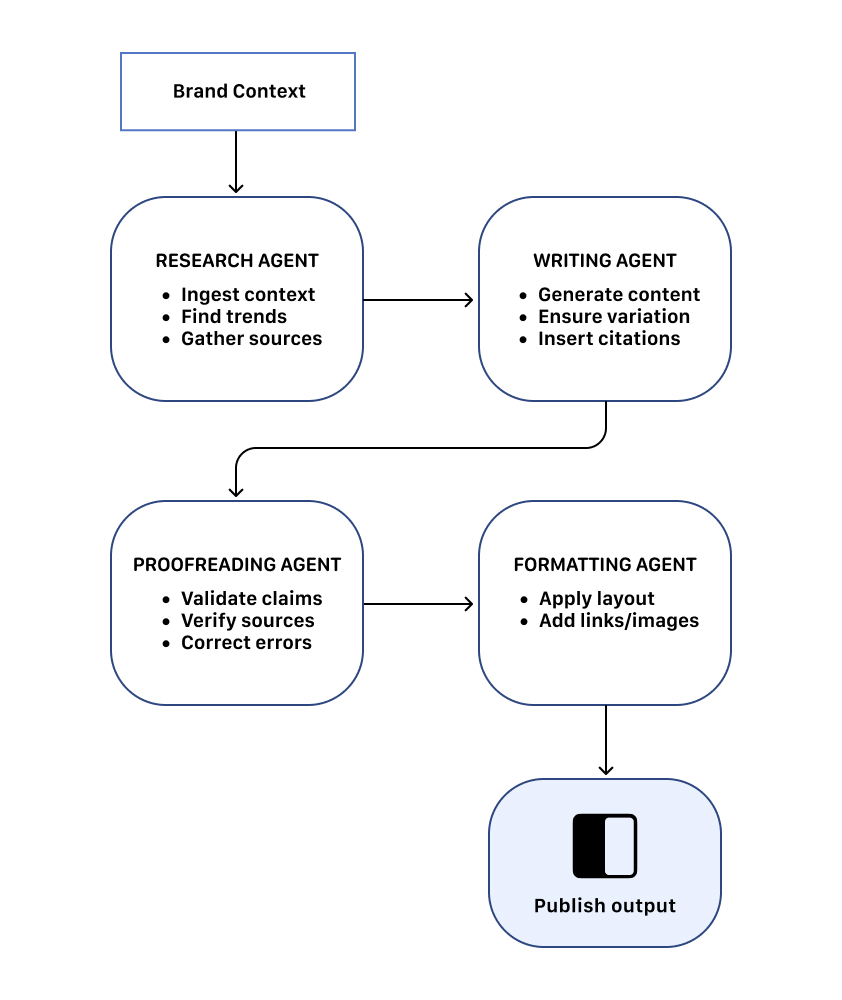
In addition to analytics, Hexagon uses the Responses API to generate optimized content that improves brand visibility in AI answers.
The system uses a four-agent architecture, with each agent performing a specialized step in the pipeline and passing outputs to the next stage until the final content is produced and published. The agents communicate through non-deterministic loops for iterative refinement before publishing.
3. Dashboard and customer tools
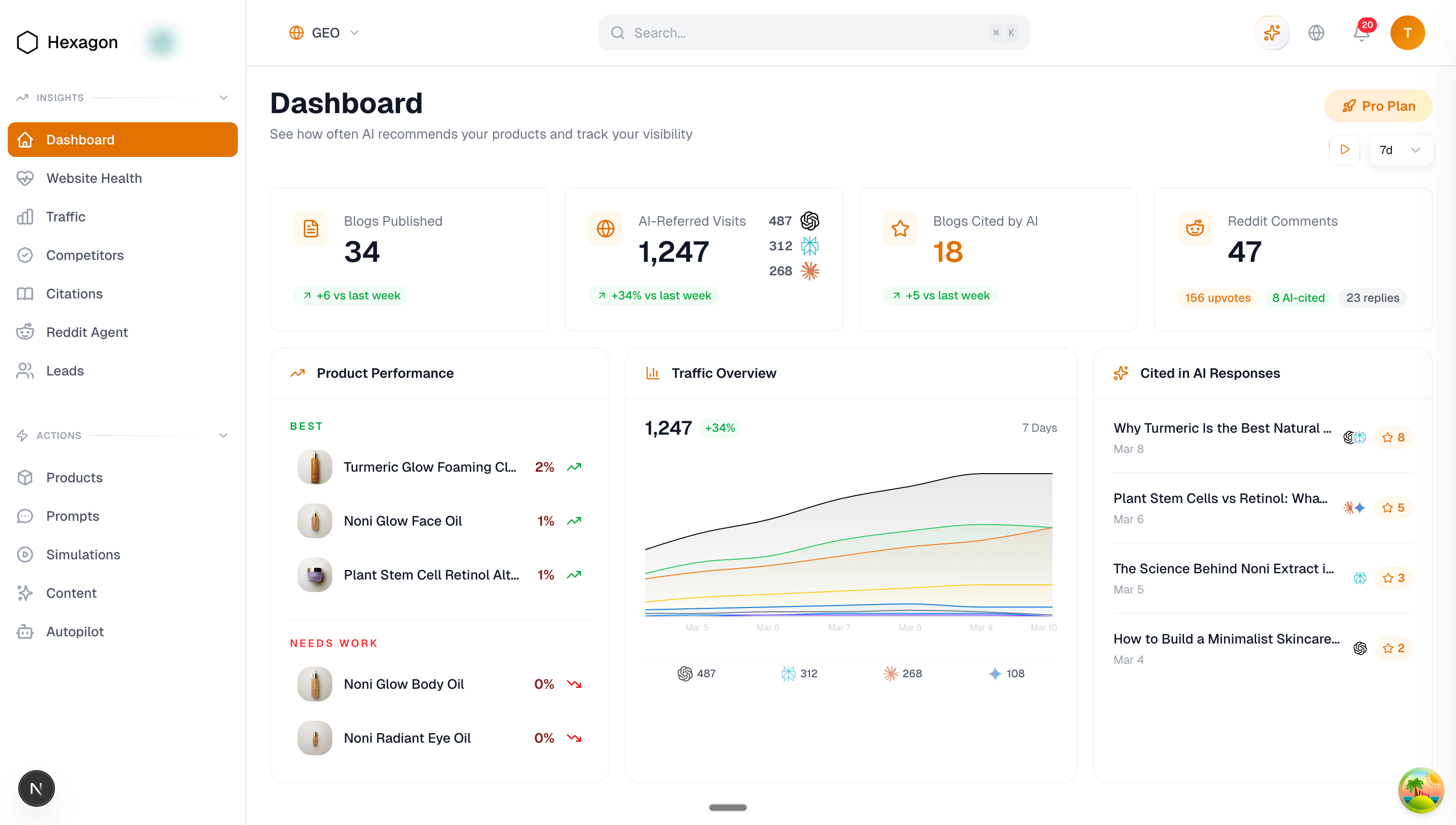
The platform also includes “Hexi”, a chatbot built with function calling via the Responses API. With Hexi, customers can explore analytics conversationally and generate summaries of their AI visibility data in a self-serve manner. Hexagon surfaces its analytics through a retailer dashboard that tracks how products appear in AI-generated answers.
Hexagon relies on several key capabilities of the Responses API to make simulations realistic and useful across their product:
- Web search: Replicates browsing-enabled responses similar to ChatGPT.
- User Location Parameter: Simulates queries from different regions to test geographic variation.
- Reasoning Effort: Controls response depth and complexity.
- Max Output Tokens: Limits response length for long-form outputs.
- Context Persistence: Maintains context across calls, enabling multi-agent workflows.
The Responses API provided better response quality and stronger context persistence across multiple calls, critical for the multi-step pipelines powering Hexagon’s platform.
Wrapping up
One year in, the Responses API has become a core building block for developers creating agentic software.
These five developer stories show examples of what that looks like in practice: multi-agent systems coordinating tools, detecting bugs, running workflows, and shipping products powered by AI.
The platform itself is evolving quickly—better orchestration and richer tool ecosystems with new additions like OpenAI hosted containers with networking and shell tools.
More tools.
More capabilities.
More developers building things the rest of us haven’t thought of yet.
Let’s see what developers build in year two.