
text-embedding-3-small and text-embedding-3-large, our newest and most performant embedding models, are now available. They feature lower costs, higher multilingual performance, and new parameters to control the overall size.什麼是嵌入向量?
OpenAI 的文字嵌入向量用於衡量文字字串之間的關聯程度。嵌入向量常用於:
- 搜尋 (根據結果與查詢字串的相關程度排序)
- 分群 (根據相似程度將文字字串分組)
- 推薦 (推薦文字字串彼此相關的項目)
- 異常偵測 (找出關聯程度低的離群值)
- 多樣性衡量 (分析相似度的分布)
- 分類 (根據最相似的標籤將文字字串分類)
嵌入向量是由浮點數組成的向量(串列)。兩個向量之間的距離可用來衡量其關聯程度。距離越小,表示關聯程度越高;距離越大,表示關聯程度越低。
請參閱我們的定價頁面,了解嵌入向量的定價。請求會根據輸入中的 Token 數量計費。
如何取得嵌入向量
若要取得嵌入向量,請將文字字串連同嵌入模型名稱(例如 text-embedding-3-small)傳送至嵌入向量 API 端點:
1
2
3
4
5
6
7
8
9
10import OpenAI from "openai";
const openai = new OpenAI();

const embedding = await openai.embeddings.create({
  model: "text-embedding-3-small",
  input: "Your text string goes here",
  encoding_format: "float",
});

console.log(embedding);
1
2
3
4
5
6
7
8
9from openai import OpenAI
client = OpenAI()
response = client.embeddings.create(
input="Your text string goes here", model="text-embedding-3-small"
)
print(response.data[0].embedding)1
2
3
4
5
6
7
8
9
10
11
12
13
14
15
16
17
18
19
20
21
22
23
24package main
import (
"context"
"fmt"
"github.com/openai/openai-go/v3"
)
func main() {
client := openai.NewClient()
embedding, err := client.Embeddings.New(context.Background(), openai.EmbeddingNewParams{
Model: openai.EmbeddingModelTextEmbedding3Small,
Input: openai.EmbeddingNewParamsInputUnion{
OfString: openai.String("Your text string goes here."),
},
})
if err != nil {
panic(err)
}
fmt.Println(len(embedding.Data[0].Embedding))
}1
2
3
4
5
6
7
8
9
10
11
12
13
14import com.openai.client.OpenAIClient;
import com.openai.client.okhttp.OpenAIOkHttpClient;
import com.openai.models.embeddings.EmbeddingCreateParams;
var embedding =
client
.embeddings()
.create(
EmbeddingCreateParams.builder()
.model("text-embedding-3-small")
.input("The food was delicious and the waiter...")
.build());
System.out.println(embedding.data().get(0).embedding());1
2
3
4
5
6
7
8
9
10
11using OpenAI.Embeddings;
string key = Environment.GetEnvironmentVariable("OPENAI_API_KEY")!;
string model = "text-embedding-3-small";
EmbeddingClient client = new(model, key);
OpenAIEmbedding embedding = await client.GenerateEmbeddingAsync(
"The food was delicious and the waiter was friendly."
);
Console.WriteLine($"Dimensions: {embedding.ToFloats().Length}");1
2
3
4
5
6
7
8
9
10require "openai"
client = OpenAI::Client.new
response = client.embeddings.create(
model: "text-embedding-3-small",
input: "The food was delicious and the waiter..."
)
puts(response.data.fetch(0).embedding)1
2
3
4
5
6
7curl https://api.openai.com/v1/embeddings \
-H "Content-Type: application/json" \
-H "Authorization: Bearer $OPENAI_API_KEY" \
-d '{
"input": "Your text string goes here",
"model": "text-embedding-3-small"
}'回應會包含嵌入向量(浮點數串列)及一些額外的中繼資料。你可以擷取嵌入向量,將其儲存至向量資料庫,並應用於各種使用案例。
123456789101112131415161718{
  "object": "list",
  "data": [
    {
      "object": "embedding",
      "index": 0,
      "embedding": [
        -0.006929283495992422, -0.005336422007530928, -4.547132266452536e-5,
        -0.024047505110502243
      ]
    }
  ],
  "model": "text-embedding-3-small",
  "usage": {
    "prompt_tokens": 5,
    "total_tokens": 5
  }
}
預設情況下,text-embedding-3-small 的嵌入向量長度為 1536,text-embedding-3-large 的嵌入向量長度則為 3072。若要降低嵌入向量的維度,同時保留其表達概念的特性,請傳入 dimensions 參數。如需嵌入向量維度的詳細資訊,請參閱嵌入向量使用案例章節。
嵌入模型
OpenAI 提供兩款功能強大的第三代嵌入模型(模型 ID 中以 -3 標示)。如需詳細資訊,請參閱嵌入模型 v3 的公告部落格文章。
使用費用按輸入 Token 數量計算。下表以每美元可處理的文字頁數說明定價(假設每頁約有 800 個 Token):
| 模型 | 每美元約可處理的頁數 | MTEB 評估表現 | 輸入上限 |
|---|---|---|---|
| text-embedding-3-small | 62,500 | 62.3% | 8192 |
| text-embedding-3-large | 9,615 | 64.6% | 8192 |
| text-embedding-ada-002 | 12,500 | 61.0% | 8192 |
使用案例
以下使用 Amazon 美食評論資料集,展示幾個具代表性的使用案例。
取得嵌入向量
此資料集共收錄 Amazon 使用者截至 2012 年 10 月留下的 568,454 則食品評論。我們取其中最新的 1000 則評論作為示範用的子集。這些評論以英文撰寫,內容通常偏向正面或負面。每則評論都包含 ProductId、UserId、Score、評論標題(Summary)及評論內文(Text)。例如:
| 產品 ID | 使用者 ID | 評分 | 摘要 | 文字 |
|---|---|---|---|---|
| B001E4KFG0 | A3SGXH7AUHU8GW | 5 | 品質優良的狗糧 | 我買過好幾款 Vitality 罐頭…… |
| B00813GRG4 | A1D87F6ZCVE5NK | 1 | 與廣告不符 | 收到的產品標示為超大鹽味花生…… |
以下將評論摘要與評論內文合併為一段文字。模型會將合併後的文字編碼,並輸出單一嵌入向量。
1
2
3
4
5
6
7
8
9
10
11
12
13
14
15
16
17
18
19
20
21import { mkdir, writeFile } from "node:fs/promises";
import OpenAI from "openai";

const client = new OpenAI();
const reviews = ["A rich cup of coffee.", "A bright herbal tea."];

const response = await client.embeddings.create({
  model: "text-embedding-3-small",
  input: reviews.map((review) => review.replaceAll("\n", " ")),
});

const csvField = (value) => `"${value.replaceAll('"', '""')}"`;
const rows = response.data.map(({ embedding }, index) =>
  [csvField(reviews[index]), csvField(JSON.stringify(embedding))].join(",")
);

await mkdir("output", { recursive: true });
await writeFile(
  "output/embedded_1k_reviews.csv",
  ["combined,ada_embedding", ...rows].join("\n") + "\n"
);
1
2
3
4
5
6
7
8
9
10
11
12
13
14from openai import OpenAI
client = OpenAI()
def get_embedding(text, model="text-embedding-3-small"):
text = text.replace("\n", " ")
return client.embeddings.create(input=[text], model=model).data[0].embedding
df["ada_embedding"] = df.combined.apply(
lambda x: get_embedding(x, model="text-embedding-3-small")
)
df.to_csv("output/embedded_1k_reviews.csv", index=False)1
2
3
4
5
6
7
8
9
10
11
12
13
14
15
16
17
18
19
20
21
22
23
24
25
26
27
28
29
30
31
32
33import com.openai.client.OpenAIClient;
import com.openai.client.okhttp.OpenAIOkHttpClient;
import com.openai.models.embeddings.EmbeddingCreateParams;
import java.io.IOException;
import java.nio.file.Files;
import java.nio.file.Path;
import java.util.List;
static String csvField(String value) {
return "\"" + value.replace("\"", "\"\"") + "\"";
}
List<String> reviews = List.of("A rich cup of coffee.", "A bright herbal tea.");
Path output = Path.of("output", "embedded_1k_reviews.csv");
Files.createDirectories(output.getParent());
try (var writer = Files.newBufferedWriter(output)) {
writer.write("combined,ada_embedding\n");
for (String review : reviews) {
var embedding =
client
.embeddings()
.create(
EmbeddingCreateParams.builder()
.model("text-embedding-3-small")
.inputOfArrayOfStrings(List.of(review.replace("\n", " ")))
.build())
.data()
.get(0)
.embedding();
writer.write(csvField(review) + "," + csvField(embedding.toString()) + "\n");
}
}
System.out.println(output);1
2
3
4
5
6
7
8
9
10
11
12
13
14
15
16
17
18
19
20require "csv"
require "fileutils"
require "json"
require "openai"
client = OpenAI::Client.new
reviews = ["A rich cup of coffee.", "A bright herbal tea."]
response = client.embeddings.create(
model: "text-embedding-3-small",
input: reviews.map { |review| review.tr("\n", " ") }
)
FileUtils.mkdir_p("output")
CSV.open("output/embedded_1k_reviews.csv", "w") do |csv|
csv << ["combined", "ada_embedding"]
response.data.each do |embedding|
csv << [reviews.fetch(embedding.index), JSON.generate(embedding.embedding)]
end
end若要從已儲存的檔案載入資料,可以執行以下程式碼:
1
2
3
4import pandas as pd

df = pd.read_csv("output/embedded_1k_reviews.csv")
df["ada_embedding"] = df.ada_embedding.apply(eval).apply(np.array)使用較大的嵌入向量,例如將其存入向量儲存區以供檢索,通常比使用較小的嵌入向量成本更高,也會耗用更多運算資源、記憶體和儲存空間。
我們的兩款新嵌入向量模型都採用一種技術進行訓練,讓開發人員可以在嵌入向量的表現與使用成本之間取得平衡。具體來說,開發人員可以傳入 dimensions API 參數來縮短嵌入向量(也就是移除序列末尾的部分數字),同時保留其表達概念的特性。例如,在 MTEB 基準測試中,text-embedding-3-large 嵌入向量即使縮短至 256 維,表現仍優於未縮短、維度為 1536 的 text-embedding-ada-002 嵌入向量。如要進一步瞭解調整維度如何影響表現,請參閱我們的嵌入向量 v3 發布部落格文章。
一般而言,建議在建立嵌入向量時使用 dimensions 參數。某些情況下,你可能需要在生成嵌入向量後調整其維度。手動調整維度時,務必依照下方範例將嵌入向量正規化。
1
2
3
4
5
6
7
8
9
10
11
12
13
14
15
16
17import OpenAI from "openai";

const client = new OpenAI();

const response = await client.embeddings.create({
  model: "text-embedding-3-small",
  input: "Testing 123",
  encoding_format: "float",
});

const shortened = response.data[0].embedding.slice(0, 256);
const magnitude = Math.hypot(...shortened);
const normalized = shortened.map((value) =>
  magnitude === 0 ? 0 : value / magnitude
);

console.log(normalized);
1
2
3
4
5
6
7
8
9
10
11
12
13
14
15
16
17
18
19
20
21
22
23
24
25
26from openai import OpenAI
import numpy as np
client = OpenAI()
def normalize_l2(x):
x = np.array(x)
if x.ndim == 1:
norm = np.linalg.norm(x)
if norm == 0:
return x
return x / norm
else:
norm = np.linalg.norm(x, 2, axis=1, keepdims=True)
return np.where(norm == 0, x, x / norm)
response = client.embeddings.create(
model="text-embedding-3-small", input="Testing 123", encoding_format="float"
)
cut_dim = response.data[0].embedding[:256]
norm_dim = normalize_l2(cut_dim)
print(norm_dim)1
2
3
4
5
6
7
8
9
10
11
12
13
14
15
16
17
18
19
20
21
22import com.openai.client.OpenAIClient;
import com.openai.client.okhttp.OpenAIOkHttpClient;
import com.openai.models.embeddings.EmbeddingCreateParams;
import java.util.List;
private static List<Double> normalizeL2(List<Float> embedding) {
double norm = Math.sqrt(embedding.stream().mapToDouble(value -> value * value).sum());
return embedding.stream().map(value -> norm == 0 ? 0.0 : value / norm).toList();
}
var embedding =
client
.embeddings()
.create(
EmbeddingCreateParams.builder()
.model("text-embedding-3-small")
.input("Testing 123")
.encodingFormat(EmbeddingCreateParams.EncodingFormat.FLOAT)
.build());
List<Float> shortened = embedding.data().get(0).embedding().subList(0, 256);
System.out.println(normalizeL2(shortened));1
2
3
4
5
6
7
8
9
10
11
12
13
14
15
16
17
18
19
20using OpenAI.Embeddings;
string key = Environment.GetEnvironmentVariable("OPENAI_API_KEY")!;
string model = "text-embedding-3-small";
EmbeddingClient client = new(model, key);
OpenAIEmbedding embedding = await client.GenerateEmbeddingAsync("Testing 123");
float[] shortened = embedding.ToFloats().Span[..256].ToArray();
double magnitude = Math.Sqrt(shortened.Sum(value => value * value));
float[] normalized =
magnitude == 0
? shortened
: shortened.Select(value => (float)(value / magnitude)).ToArray();
Console.WriteLine($"Dimensions: {normalized.Length}");
Console.WriteLine($"First value: {normalized[0]:F6}");
Console.WriteLine(
$"L2 norm: {Math.Sqrt(normalized.Sum(value => value * value)):F3}"
);1
2
3
4
5
6
7
8
9
10
11
12
13
14
15require "openai"
client = OpenAI::Client.new
response = client.embeddings.create(
model: "text-embedding-3-small",
input: "Testing 123",
encoding_format: :float
)
shortened = response.data.fetch(0).embedding.first(256)
magnitude = Math.sqrt(shortened.sum { |value| value**2 })
normalized = shortened.map { |value| magnitude.zero? ? 0 : value / magnitude }
puts(normalized)動態調整維度可讓使用方式更加靈活。例如,向量資料儲存區若僅支援最多 1024 維的嵌入向量,開發人員現在仍可使用我們最好的嵌入向量模型 text-embedding-3-large,並將 dimensions API 參數設為 1024。這會將嵌入向量從 3072 維縮短,以犧牲部分準確度換取較小的向量。
在許多常見情況下,模型的訓練資料並不包含你希望它在回覆使用者查詢時能夠參考的關鍵事實與資訊。如下所示,其中一種解決方式是將額外資訊放入模型的上下文視窗。這種方法在許多使用案例中都有效,但會增加 Token 成本。在這份筆記本中,我們探討這種方法與嵌入向量搜尋之間的取捨。
1
2
3
4
5
6
7
8
9
10
11
12
13
14
15
16
17
18
19
20
21
22
23
24
25import OpenAI from "openai";

const client = new OpenAI();
const article =
  "At the 2022 Winter Olympics, Great Britain won women's curling and Sweden won men's curling.";
const question = `Use the article below to answer the question. If the answer cannot be found, say "I don't know."

Article:
${article}

Question: Which athletes won the gold medal in curling at the 2022 Winter Olympics?`;

const response = await client.chat.completions.create({
  model: "gpt-4.1-mini",
  messages: [
    {
      role: "system",
      content: "You answer questions about the 2022 Winter Olympics.",
    },
    { role: "user", content: question },
  ],
  temperature: 0,
});

console.log(response.choices[0].message.content);
1
2
3
4
5
6
7
8
9
10
11
12
13
14
15
16
17
18
19
20
21
22query = f"""Use the below article on the 2022 Winter Olympics to answer the subsequent question. If the answer cannot be found, write "I don't know."
Article:
\"\"\"
{wikipedia_article_on_curling}
\"\"\"
Question: Which athletes won the gold medal in curling at the 2022 Winter Olympics?"""
response = client.chat.completions.create(
messages=[
{
"role": "system",
"content": "You answer questions about the 2022 Winter Olympics.",
},
{"role": "user", "content": query},
],
model=GPT_MODEL,
temperature=0,
)
print(response.choices[0].message.content)1
2
3
4
5
6
7
8
9
10
11
12
13
14
15
16
17
18
19
20
21
22
23
24import com.openai.client.OpenAIClient;
import com.openai.client.okhttp.OpenAIOkHttpClient;
import com.openai.models.chat.completions.ChatCompletionCreateParams;
String article =
"At the 2022 Winter Olympics, Great Britain won women's curling and Sweden won men's curling.";
String question =
"Use the below article on the 2022 Winter Olympics to answer the subsequent question. "
+ "If the answer cannot be found, write \"I don't know.\"\n\n"
+ "Article:\n"
+ article
+ "\n\nQuestion: Which athletes won the gold medal in curling at the 2022 Winter Olympics?";
ChatCompletionCreateParams params =
ChatCompletionCreateParams.builder()
.model("gpt-4.1-mini")
.addSystemMessage("You answer questions about the 2022 Winter Olympics.")
.addUserMessage(question)
.temperature(0)
.build();
client.chat().completions().create(params).choices().stream()
.flatMap(choice -> choice.message().content().stream())
.forEach(System.out::println);1
2
3
4
5
6
7
8
9
10
11
12
13
14
15
16
17
18
19
20
21
22
23
24
25
26
27
28
29require "openai"
client = OpenAI::Client.new
article = "At the 2022 Winter Olympics, Great Britain won women's curling and Sweden won men's curling."
question = <<~QUESTION
Use the article below to answer the question. If the answer cannot be found, say "I don't know."
Article:
#{article}
Question: Which athletes won the gold medal in curling at the 2022 Winter Olympics?
QUESTION
response = client.chat.completions.create(
model: "gpt-4.1-mini",
messages: [
{
role: :system,
content: "You answer questions about the 2022 Winter Olympics."
},
{
role: :user,
content: question
}
],
temperature: 0
)
puts(response.choices.fetch(0).message.content)為了檢索最相關的文件,我們計算查詢與各份文件的嵌入向量之間的餘弦相似度,並傳回分數最高的文件。
1
2
3
4
5
6
7
8
9
10
11
12
13
14
15
16
17
18
19
20
21
22
23
24
25
26
27
28
29
30
31
32import OpenAI from "openai";

const client = new OpenAI();
const reviews = [
  "A rich cup of coffee.",
  "Smooth beans in tomato sauce.",
  "Dark chocolate with orange.",
];

const { data } = await client.embeddings.create({
  model: "text-embedding-3-small",
  input: [...reviews, "delicious beans"],
});

const query = data.at(-1).embedding;
const similarity = (embedding) => {
  const dotProduct = embedding.reduce(
    (total, value, index) => total + value * query[index],
    0
  );
  return dotProduct / (Math.hypot(...embedding) * Math.hypot(...query));
};

const results = reviews
  .map((review, index) => ({
    review,
    score: similarity(data[index].embedding),
  }))
  .sort((left, right) => right.score - left.score)
  .slice(0, 3);

console.log(results);
1
2
3
4
5
6
7
8
9
10def search_reviews(df, product_description, n=3, pprint=True):
embedding = get_embedding(product_description, model="text-embedding-3-small")
df["similarities"] = df.ada_embedding.apply(
lambda x: cosine_similarity(x, embedding)
)
res = df.sort_values("similarities", ascending=False).head(n)
return res
res = search_reviews(df, "delicious beans", n=3)1
2
3
4
5
6
7
8
9
10
11
12
13
14
15
16
17
18
19
20
21
22
23
24
25
26
27
28
29
30
31
32
33
34
35
36
37
38
39
40
41
42
43import com.openai.client.OpenAIClient;
import com.openai.client.okhttp.OpenAIOkHttpClient;
import com.openai.models.embeddings.EmbeddingCreateParams;
import java.util.Comparator;
import java.util.List;
import java.util.stream.IntStream;
List<String> reviews =
List.of(
"A rich cup of coffee.",
"Smooth beans in tomato sauce.",
"Dark chocolate with orange.");
var reviewEmbeddings =
client
.embeddings()
.create(
EmbeddingCreateParams.builder()
.model("text-embedding-3-small")
.inputOfArrayOfStrings(reviews)
.build())
.data();
List<Float> query =
client
.embeddings()
.create(
EmbeddingCreateParams.builder()
.model("text-embedding-3-small")
.inputOfArrayOfStrings(List.of("delicious beans"))
.build())
.data()
.get(0)
.embedding();
IntStream.range(0, reviews.size())
.boxed()
.sorted(
Comparator.comparingDouble(
(Integer index) ->
cosineSimilarity(query, reviewEmbeddings.get(index).embedding()))
.reversed())
.limit(3)
.map(reviews::get)
.forEach(System.out::println);1
2
3
4
5
6
7
8
9
10
11
12
13
14
15
16
17
18
19
20
21
22
23
24
25
26
27
28
29
30require "openai"
client = OpenAI::Client.new
reviews = [
"A rich cup of coffee.",
"Smooth beans in tomato sauce.",
"Dark chocolate with orange."
]
response = client.embeddings.create(
model: "text-embedding-3-small",
input: reviews + ["delicious beans"]
)
query = response.data.fetch(-1).embedding
similarity = lambda do |embedding|
dot_product = embedding.zip(query).sum { |value, query_value| value * query_value }
magnitude = Math.sqrt(embedding.sum { |value| value**2 })
query_magnitude = Math.sqrt(query.sum { |value| value**2 })
dot_product / (magnitude * query_magnitude)
end
results = reviews.map.with_index do |review, index|
{
review: review,
score: similarity.call(response.data.fetch(index).embedding)
}
end.sort_by { |result| -result.fetch(:score) }.first(3)
puts(results)程式碼搜尋的運作方式與嵌入向量文字搜尋相似。我們提供一種方法,可從指定程式碼庫的所有 Python 檔案中擷取 Python 函式,再使用 text-embedding-3-small 模型為每個函式建立索引。
執行程式碼搜尋時,我們先使用相同模型將自然語言查詢轉換為嵌入向量,再計算查詢嵌入向量與各個函式嵌入向量之間的餘弦相似度。餘弦相似度最高的結果最為相關。
1
2
3
4
5
6
7
8
9
10
11
12
13
14
15
16
17
18
19
20
21
22
23
24
25
26
27
28
29
30import OpenAI from "openai";

const client = new OpenAI();
const functions = [
  "function add(a, b) { return a + b; }",
  "function complete(prompt) { return prompt; }",
];

const { data } = await client.embeddings.create({
  model: "text-embedding-3-small",
  input: [...functions, "Completions API tests"],
});

const query = data.at(-1).embedding;
const similarity = (embedding) => {
  const dotProduct = embedding.reduce(
    (total, value, index) => total + value * query[index],
    0
  );
  return dotProduct / (Math.hypot(...embedding) * Math.hypot(...query));
};

const results = functions
  .map((source, index) => ({
    source,
    score: similarity(data[index].embedding),
  }))
  .sort((left, right) => right.score - left.score);

console.log(results);
1
2
3
4
5
6
7
8
9
10
11
12
13
14
15
16df["code_embedding"] = df["code"].apply(
lambda x: get_embedding(x, model="text-embedding-3-small")
)
def search_functions(df, code_query, n=3, pprint=True, n_lines=7):
embedding = get_embedding(code_query, model="text-embedding-3-small")
df["similarities"] = df.code_embedding.apply(
lambda x: cosine_similarity(x, embedding)
)
res = df.sort_values("similarities", ascending=False).head(n)
return res
res = search_functions(df, "Completions API tests", n=3)1
2
3
4
5
6
7
8
9
10
11
12
13
14
15
16
17
18
19
20
21
22
23
24
25
26
27
28
29
30
31
32
33
34
35
36
37
38import com.openai.client.OpenAIClient;
import com.openai.client.okhttp.OpenAIOkHttpClient;
import com.openai.models.embeddings.EmbeddingCreateParams;
import java.util.Comparator;
import java.util.List;
import java.util.stream.IntStream;
List<String> functions =
List.of("def add(a, b): return a + b", "def complete(prompt): return prompt");
var functionEmbeddings =
client
.embeddings()
.create(
EmbeddingCreateParams.builder()
.model("text-embedding-3-small")
.inputOfArrayOfStrings(functions)
.build())
.data();
List<Float> query =
client
.embeddings()
.create(
EmbeddingCreateParams.builder()
.model("text-embedding-3-small")
.input("Completions API tests")
.build())
.data()
.get(0)
.embedding();
IntStream.range(0, functions.size())
.boxed()
.sorted(
Comparator.comparingDouble(
(Integer index) ->
cosineSimilarity(query, functionEmbeddings.get(index).embedding()))
.reversed())
.map(functions::get)
.forEach(System.out::println);1
2
3
4
5
6
7
8
9
10
11
12
13
14
15
16
17
18
19
20
21
22
23
24
25
26
27
28
29require "openai"
client = OpenAI::Client.new
functions = [
"function add(a, b) { return a + b; }",
"function complete(prompt) { return prompt; }"
]
response = client.embeddings.create(
model: "text-embedding-3-small",
input: functions + ["Completions API tests"]
)
query = response.data.fetch(-1).embedding
similarity = lambda do |embedding|
dot_product = embedding.zip(query).sum { |value, query_value| value * query_value }
magnitude = Math.sqrt(embedding.sum { |value| value**2 })
query_magnitude = Math.sqrt(query.sum { |value| value**2 })
dot_product / (magnitude * query_magnitude)
end
results = functions.map.with_index do |source, index|
{
source: source,
score: similarity.call(response.data.fetch(index).embedding)
}
end.sort_by { |result| -result.fetch(:score) }
puts(results)嵌入向量之間的距離越短,代表相似度越高,因此嵌入向量可用於提供推薦。
下方示範一個基本的推薦系統。它接收一份字串清單和一個「來源」字串,計算各自的嵌入向量,再依相似度由高至低傳回字串排名。下方連結的筆記本提供具體範例,將這個函式的一個版本套用至 AG 新聞資料集(取樣縮減至 2,000 篇新聞文章的簡介),以傳回與任意指定來源文章最相似的前 5 篇文章。
1
2
3
4
5
6
7
8
9
10
11
12
13
14
15
16
17
18
19
20
21
22
23
24
25
26
27
28import OpenAI from "openai";

const client = new OpenAI();
const strings = [
  "A cheetah is a fast land animal.",
  "A peregrine falcon is a fast bird.",
  "A tortoise moves slowly.",
];

const { data } = await client.embeddings.create({
  model: "text-embedding-3-small",
  input: strings,
});

const query = data[0].embedding;
const recommendations = data
  .map(({ embedding }, index) => {
    const dotProduct = embedding.reduce(
      (total, value, dimension) => total + value * query[dimension],
      0
    );
    const similarity =
      dotProduct / (Math.hypot(...embedding) * Math.hypot(...query));
    return { index, text: strings[index], similarity };
  })
  .sort((left, right) => right.similarity - left.similarity);

console.log(recommendations);
1
2
3
4
5
6
7
8
9
10
11
12
13
14
15
16
17
18
19
20
21
22
23def recommendations_from_strings(
strings: list[str],
index_of_source_string: int,
model="text-embedding-3-small",
) -> list[int]:
"""Return nearest neighbors of a given string."""
# get embeddings for all strings
embeddings = [embedding_from_string(string, model=model) for string in strings]
# get the embedding of the source string
query_embedding = embeddings[index_of_source_string]
# get distances between the source embedding and other embeddings (function from embeddings_utils.py)
distances = distances_from_embeddings(
query_embedding, embeddings, distance_metric="cosine"
)
# get indices of nearest neighbors (function from embeddings_utils.py)
indices_of_nearest_neighbors = indices_of_nearest_neighbors_from_distances(
distances
)
return indices_of_nearest_neighbors1
2
3
4
5
6
7
8
9
10
11
12
13
14
15
16
17
18
19
20
21
22
23
24
25
26
27
28
29
30
31
32
33
34
35
36
37
38
39
40
41
42
43
44import com.openai.client.OpenAIClient;
import com.openai.client.okhttp.OpenAIOkHttpClient;
import com.openai.models.embeddings.EmbeddingCreateParams;
import java.util.Comparator;
import java.util.List;
import java.util.stream.IntStream;
List<String> strings =
List.of(
"A cheetah is a fast land animal.",
"A peregrine falcon is a fast bird.",
"A tortoise moves slowly.");
var embeddings =
client
.embeddings()
.create(
EmbeddingCreateParams.builder()
.model("text-embedding-3-small")
.inputOfArrayOfStrings(strings)
.build())
.data();
List<Float> query = embeddings.get(0).embedding();
var nearestNeighbors =
IntStream.range(0, embeddings.size())
.boxed()
.sorted(
Comparator.comparingDouble(
(Integer index) -> {
List<Float> candidate = embeddings.get(index).embedding();
double dotProduct = 0;
double queryMagnitude = 0;
double candidateMagnitude = 0;
for (int dimension = 0; dimension < query.size(); dimension++) {
dotProduct += query.get(dimension) * candidate.get(dimension);
queryMagnitude += query.get(dimension) * query.get(dimension);
candidateMagnitude += candidate.get(dimension) * candidate.get(dimension);
}
return 1 - dotProduct / Math.sqrt(queryMagnitude * candidateMagnitude);
}))
.toList();
System.out.println(nearestNeighbors);1
2
3
4
5
6
7
8
9
10
11
12
13
14
15
16
17
18
19
20
21
22
23
24
25
26
27
28
29
30
31require "openai"
client = OpenAI::Client.new
strings = [
"A cheetah is a fast land animal.",
"A peregrine falcon is a fast bird.",
"A tortoise moves slowly."
]
response = client.embeddings.create(
model: "text-embedding-3-small",
input: strings
)
query = response.data.fetch(0).embedding
similarity = lambda do |embedding|
dot_product = embedding.zip(query).sum { |value, query_value| value * query_value }
magnitude = Math.sqrt(embedding.sum { |value| value**2 })
query_magnitude = Math.sqrt(query.sum { |value| value**2 })
dot_product / (magnitude * query_magnitude)
end
recommendations = response.data.map.with_index do |embedding, index|
{
index: index,
text: strings.fetch(index),
similarity: similarity.call(embedding.embedding)
}
end.sort_by { |recommendation| -recommendation.fetch(:similarity) }
puts(recommendations)嵌入向量的大小會隨底層模型的複雜度而變化。為了將這些高維度資料視覺化,我們使用 t-SNE 演算法將資料轉換為二維。
我們根據評論者給予的星級評分,為每則評論標示顏色:
- 1 星:紅色
- 2 星:深橘色
- 3 星:金色
- 4 星:綠松石色
- 5 星:深綠色
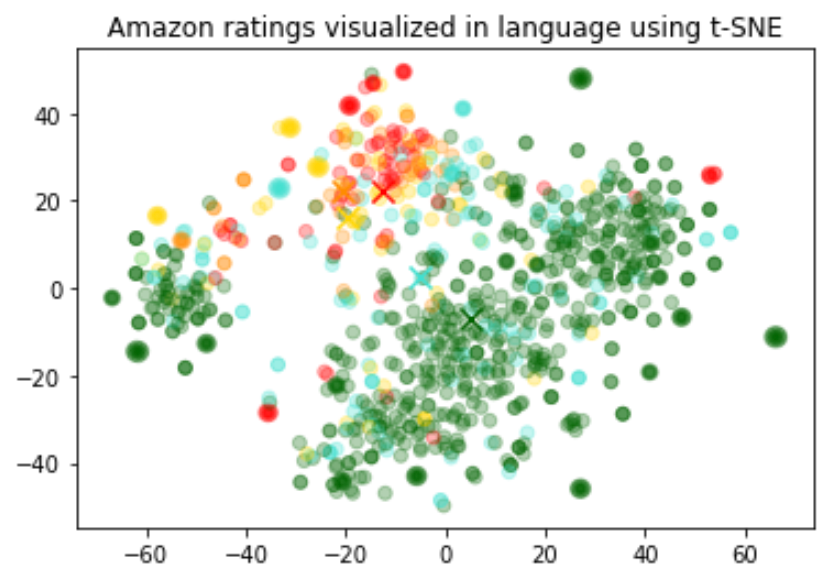
視覺化結果看起來大致形成了 3 個群集,其中一個以負面評論為主。
1
2
3
4
5
6
7
8
9
10
11
12
13
14
15
16
17
18
19
20
21
22
23import numpy as np
import pandas as pd
from sklearn.manifold import TSNE
import matplotlib.pyplot as plt
import matplotlib

df = pd.read_csv("output/embedded_1k_reviews.csv")
matrix = np.array(df.ada_embedding.apply(eval).to_list())

# Create a t-SNE model and transform the data
tsne = TSNE(
    n_components=2, perplexity=15, random_state=42, init="random", learning_rate=200
)
vis_dims = tsne.fit_transform(matrix)

colors = ["red", "darkorange", "gold", "turquoise", "darkgreen"]
x = [x for x, y in vis_dims]
y = [y for x, y in vis_dims]
color_indices = df.Score.values - 1

colormap = matplotlib.colors.ListedColormap(colors)
plt.scatter(x, y, c=color_indices, cmap=colormap, alpha=0.3)
plt.title("Amazon ratings visualized in language using t-SNE")嵌入向量可在機器學習模型中用作通用的自由文字特徵編碼器。只要部分相關輸入是自由文字,加入嵌入向量就能改善任何機器學習模型的表現。嵌入向量也可在機器學習模型中用作類別特徵編碼器。當類別變數的名稱具有意義且數量眾多時,例如職稱,這種做法最有價值。在這項任務中,相似度嵌入向量的表現通常優於搜尋嵌入向量。
我們觀察到,嵌入向量的表示方式通常非常豐富,且資訊密度很高。例如,使用 SVD 或 PCA 降低輸入資料的維度,即使只減少 10%,通常也會使特定下游任務的表現變差。
這段程式碼會將資料分成訓練集與測試集,供接下來的迴歸與分類兩個使用案例使用。
1
2
3
4
5from sklearn.model_selection import train_test_split

X_train, X_test, y_train, y_test = train_test_split(
    list(df.ada_embedding.values), df.Score, test_size=0.2, random_state=42
)
使用嵌入向量特徵進行迴歸
嵌入向量提供了一種簡潔的數值預測方法。在這個範例中,我們根據評論文字預測評論者給予的星級評分。由於嵌入向量含有豐富的語意資訊,即使評論數量很少,也能得到不錯的預測結果。
我們假設評分是介於 1 到 5 之間的連續變數,並允許演算法預測任意浮點數值。機器學習演算法會盡量縮小預測值與實際評分之間的差距,得到的平均絕對誤差為 0.39,表示預測結果平均偏差不到半顆星。
1
2
3
4
5from sklearn.ensemble import RandomForestRegressor

rfr = RandomForestRegressor(n_estimators=100)
rfr.fit(X_train, y_train)
preds = rfr.predict(X_test)這次,我們不再讓演算法預測介於 1 到 5 之間的任意數值,而是嘗試將評論歸入 1 到 5 星這 5 個類別,預測確切的星數。
訓練後,模型預測 1 星和 5 星評論的表現,遠優於情感較細膩的評論(2 到 4 星),這可能是因為前者的情感表達較為強烈。
1
2
3
4
5
6from sklearn.ensemble import RandomForestClassifier
from sklearn.metrics import classification_report, accuracy_score

clf = RandomForestClassifier(n_estimators=100)
clf.fit(X_train, y_train)
preds = clf.predict(X_test)即使沒有任何已標註的訓練資料,我們也能使用嵌入向量進行零樣本分類。我們先將各類別的名稱或簡短說明轉換為嵌入向量。要以零樣本方式對新文字進行分類時,我們會比較其嵌入向量與所有類別嵌入向量的相似度,並將相似度最高的類別作為預測結果。
1
2
3
4
5
6
7
8
9
10
11
12
13
14
15
16
17
18
19
20
21import OpenAI from "openai";

const client = new OpenAI();
const labels = ["negative", "positive"];

const { data } = await client.embeddings.create({
  model: "text-embedding-3-small",
  input: [...labels, "The coffee arrived quickly and tastes great."],
});

const review = data.at(-1).embedding;
const similarity = (embedding) => {
  const dotProduct = embedding.reduce(
    (total, value, index) => total + value * review[index],
    0
  );
  return dotProduct / (Math.hypot(...embedding) * Math.hypot(...review));
};

const [negative, positive] = data.map(({ embedding }) => similarity(embedding));
console.log(positive > negative ? "positive" : "negative");
1
2
3
4
5
6
7
8
9
10
11
12
13
14
15
16
17
18df = df[df.Score != 3]
df["sentiment"] = df.Score.replace(
{1: "negative", 2: "negative", 4: "positive", 5: "positive"}
)
labels = ["negative", "positive"]
label_embeddings = [get_embedding(label, model=model) for label in labels]
def label_score(review_embedding, label_embeddings):
return cosine_similarity(review_embedding, label_embeddings[1]) - cosine_similarity(
review_embedding, label_embeddings[0]
)
prediction = (
"positive" if label_score(get_embedding("Sample Review", model=model), label_embeddings) > 0 else "negative"
)1
2
3
4
5
6
7
8
9
10
11
12
13
14
15
16
17
18
19import com.openai.client.OpenAIClient;
import com.openai.client.okhttp.OpenAIOkHttpClient;
import com.openai.models.embeddings.EmbeddingCreateParams;
import java.util.List;
var embeddings =
client
.embeddings()
.create(
EmbeddingCreateParams.builder()
.model("text-embedding-3-small")
.inputOfArrayOfStrings(List.of("negative", "positive", "Sample Review"))
.build())
.data();
List<Float> review = embeddings.get(2).embedding();
double negative = cosineSimilarity(review, embeddings.get(0).embedding());
double positive = cosineSimilarity(review, embeddings.get(1).embedding());
System.out.println(positive > negative ? "positive" : "negative");1
2
3
4
5
6
7
8
9
10
11
12
13
14
15
16
17
18
19
20
21
22require "openai"
client = OpenAI::Client.new
labels = ["negative", "positive"]
response = client.embeddings.create(
model: "text-embedding-3-small",
input: labels + ["The coffee arrived quickly and tastes great."]
)
review = response.data.fetch(-1).embedding
similarity = lambda do |embedding|
dot_product = embedding.zip(review).sum { |value, review_value| value * review_value }
magnitude = Math.sqrt(embedding.sum { |value| value**2 })
review_magnitude = Math.sqrt(review.sum { |value| value**2 })
dot_product / (magnitude * review_magnitude)
end
negative, positive = response.data.first(2).map do |embedding|
similarity.call(embedding.embedding)
end
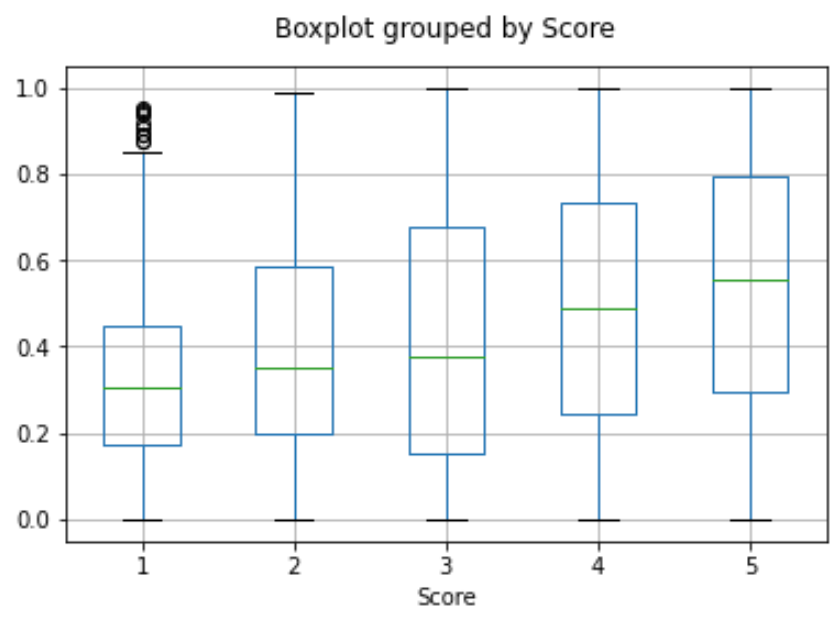
puts((positive > negative) ? "positive" : "negative")將使用者所有評論的嵌入向量取平均,即可取得該使用者的嵌入向量。同樣地,將某項產品所有評論的嵌入向量取平均,即可取得該產品的嵌入向量。為了展示這個方法的實用性,我們採用包含 50,000 則評論的子集,讓每位使用者與每項產品都能涵蓋更多評論。
我們使用獨立的測試集評估這些嵌入向量的實用性,並繪圖呈現不同評分下,使用者與產品嵌入向量之間的相似度。有趣的是,採用這個方法,即使使用者尚未收到產品,我們就能預測他們是否會喜歡該產品,而且準確度優於隨機猜測。
user_embeddings = df.groupby("UserId").ada_embedding.apply(np.mean)
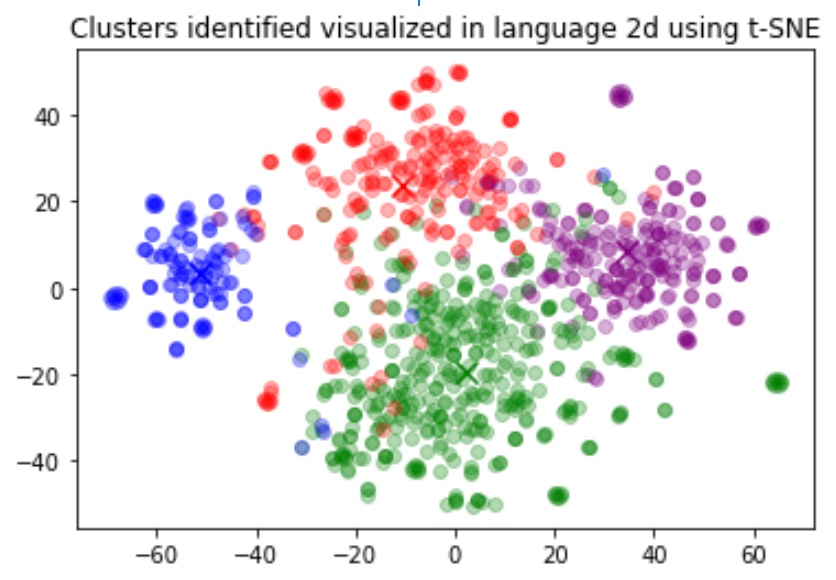
prod_embeddings = df.groupby("ProductId").ada_embedding.apply(np.mean)分群是理解大量文字資料的一種方法。嵌入向量能以具有語意意義的向量表示每段文字,因此很適合這項任務。透過分群,我們可以用非監督式方法找出資料集中隱藏的群組。
在這個範例中,我們找出了四個明顯不同的群組:一個以狗糧為主,一個以負面評論為主,另外兩個則以正面評論為主。
1
2
3
4
5
6
7
8
9import numpy as np
from sklearn.cluster import KMeans

matrix = np.vstack(df.ada_embedding.values)
n_clusters = 4

kmeans = KMeans(n_clusters=n_clusters, init="k-means++", random_state=42)
kmeans.fit(matrix)
df["Cluster"] = kmeans.labels_
常見問題
如何在產生嵌入向量前,得知字串包含多少個 Token?
在 Python 中,你可以使用 OpenAI 的 Token 化工具 tiktoken,將字串拆分成 Token。
範例程式碼:
1
2
3
4
5
6
7
8
9
10
11import tiktoken


def num_tokens_from_string(string: str, encoding_name: str) -> int:
    """Returns the number of tokens in a text string."""
    encoding = tiktoken.get_encoding(encoding_name)
    num_tokens = len(encoding.encode(string))
    return num_tokens


num_tokens_from_string("tiktoken is great!", "cl100k_base")
對於 text-embedding-3-small 等第三代嵌入模型,請使用 cl100k_base 編碼。
如需更多詳細資訊與範例程式碼,請參閱 OpenAI Cookbook 指南:如何使用 tiktoken 計算 Token 數量。
如何快速擷取距離最近的 K 個嵌入向量?
若要快速搜尋大量向量,我們建議使用向量資料庫。你可以在我們於 GitHub 上的 Cookbook 中,找到搭配使用向量資料庫與 OpenAI API 的範例。
我應該使用哪種距離函式?
我們建議使用餘弦相似度。通常,選擇哪種距離函式並不會造成太大差異。
OpenAI 嵌入向量均已正規化為長度 1,這表示:
- 只需計算點積即可求得餘弦相似度,計算速度也會稍快一些
- 餘弦相似度與歐幾里得距離會產生完全相同的排序結果
我可以在線上分享自己的嵌入向量嗎?
可以,客戶擁有提供給我們模型的輸入,以及模型產生的輸出,嵌入向量也不例外。你有責任確保輸入至我們 API 的內容不違反任何適用法律或我們的使用條款。
V3 嵌入模型知道最近發生的事件嗎?
不知道,text-embedding-3-large 和 text-embedding-3-small 模型不具備 2021 年 9 月之後所發生事件的知識。相較於文字生成模型,這項限制對嵌入模型的影響通常較小,但在某些邊界情況下仍可能降低效能。