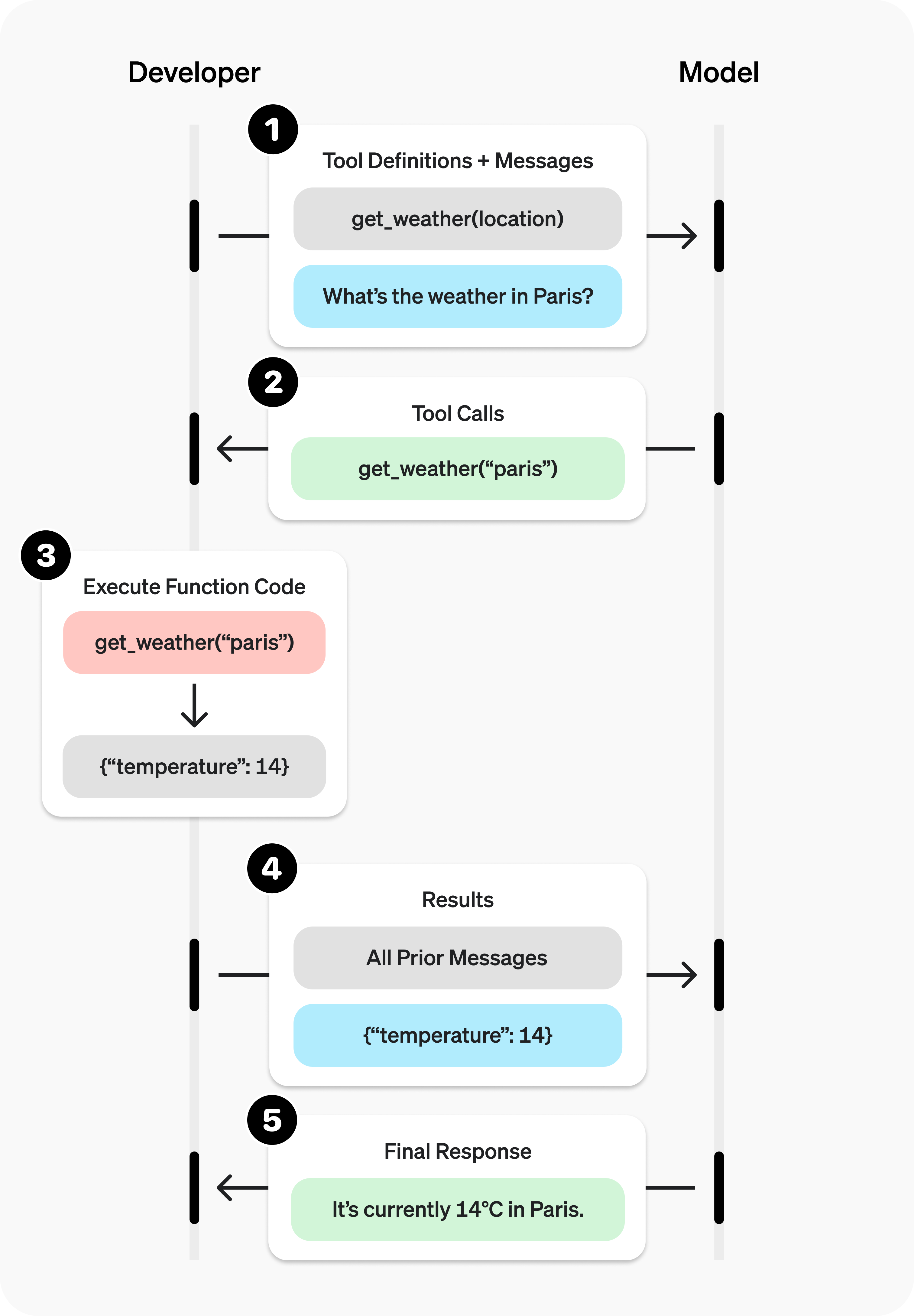
Function Calling ( ツール呼び出し とも呼ばれます)は、OpenAI モデルが外部システムと連携し、学習データに含まれないデータにアクセスするための強力で柔軟な方法です。このガイドでは、アプリケーションが提供するデータやアクションにモデルを接続する方法を説明します。JSON スキーマで定義する関数ツールと、自由形式のテキストを入出力するカスタムツールの使い方を紹介します。
Agents API のセッションでは、関数 を使って関数を登録し、セッションのアクションリクエストを処理します。このガイドの例では、Responses API と Chat Completions との連携方法を示します。
アプリケーションに多数の関数や大きなスキーマがある場合は、Function Calling とツール検索 を組み合わせることで、使用頻度の低いツールの読み込みを遅らせ、モデルが必要とするときにだけ読み込めます。tool_search に対応しているのは gpt-5.4 以降のモデルのみです。
GPT-6 Astra でツールを呼び出すには、Responses API が必要です。
Chat Completions の例では、互換性を確保するために GPT-5.6 を使用しています。既存の連携を更新するには、
移行
ガイド を参照してください。
まず、ツール呼び出しに関する主な用語を確認しましょう。用語を理解したうえで、実践的な例を使ってツール呼び出しの方法を説明します。
ツール:モデルに提供する機能 関数 や ツール とは、モデルに利用可能だと伝える機能を指す概念です。モデルはプロンプトへの応答を生成する際、プロンプトの指示に従うために、ツールが提供するデータや機能が必要だと判断することがあります。
たとえば、次のようなツールをモデルが利用できるようにします。
指定した場所の今日の天気を取得
指定したユーザー ID のアカウント詳細にアクセス
配送中に紛失した注文の返金処理
このほかにも、モデルがプロンプトに応答する際に必要な情報を得たり、アクションを実行したりするためのツールを提供できます。
プロンプトを含む API リクエストをモデルに送信する際、モデルが利用を検討できるツールの一覧を含められます。たとえば、世界のどこかの現在の天気に関する質問に答えられるようにするには、location を引数として受け取る get_weather ツールへのアクセスをモデルに提供します。
ツール呼び出し:ツールの使用を求めるモデルからのリクエスト 関数呼び出し や ツール呼び出し とは、モデルが返す特殊な形式の応答です。モデルがプロンプトを確認し、その指示に従うために、提供されたツールのいずれかを呼び出す必要があると判断した場合に返されます。
モデルが API リクエストで「パリの天気はどうですか?」というプロンプトを受け取ると、location 引数に Paris を指定した get_weather ツールの呼び出しを返すことがあります。
ツール呼び出しの出力:モデルに返すために生成する出力 関数呼び出しの出力 や ツール呼び出しの出力 とは、モデルのツール呼び出しに含まれる入力を使って、ツールが生成する応答です。ツール呼び出しの出力には、構造化された JSON またはプレーンテキストを使用できます。また、対応するモデルのツール呼び出しへの参照を含める必要があります(後の例では call_id で参照します)。
天気の例を最後まで見てみましょう。
モデルは、location を引数として受け取る get_weather ツール にアクセスできます。
「パリの天気はどうですか?」というプロンプトに対して、モデルは location 引数の値を Paris に設定した ツール呼び出し を返します。
ツール呼び出しの出力 として、JSON オブジェクト(たとえば、現在の気温が 25 度であることを示す {"temperature": "25", "unit": "C"})、画像の内容 、またはファイルの内容 が返されることがあります。 その後、ツールの定義、元のプロンプト、モデルのツール呼び出し、ツール呼び出しの出力をすべてモデルに送り返すと、最終的に次のようなテキストの応答を受け取れます。
The weather in Paris today is 25C. 関数とツールの違い
関数は、JSON スキーマで定義されるツールの一種です。関数の定義により、モデルからアプリケーションにデータを渡せます。アプリケーション側では、コードを使ってデータにアクセスしたり、モデルが提案したアクションを実行したりできます。
関数ツールのほかに、自由形式のテキストを入出力するカスタムツールもあります。カスタムツールについても、このガイドで説明します。
OpenAI プラットフォームの一部として提供される組み込みツール もあります。これらのツールを使うと、モデルはウェブ検索 、コードの実行 、MCP サーバー の機能へのアクセスなどを行えます。
ツール呼び出しは、OpenAI API を介してアプリケーションとモデルの間で行われる、複数のステップからなるやり取りです。大きく分けると、次の 5 つのステップで構成されます。
呼び出し可能なツールを含めてモデルにリクエストを送信
モデルからツール呼び出しを受信
ツール呼び出しの入力を使ってアプリケーション側でコードを実行
ツールの出力を含めてモデルに 2 回目のリクエストを送信
モデルから最終応答、または追加のツール呼び出しを受信
Responses を使うと、アプリケーションはタスクに必要な回数だけツールを呼び出し、この流れを継続できます。このループに伴う定型的なオーケストレーションをまとめて扱えるフレームワークが必要な場合は、Responses API と Agents SDK の比較 を参照してください。
星座ごとの今日の運勢を取得する get_horoscope 関数を使って、ツール呼び出しの一連の流れを見てみましょう。
1
2
3
4
5
6
7
8
9
10
11
12
13
14
15
16
17
18
19
20
21
22
23
24
25
26
27
28
29
30
31
32
33
34
35
36
37
38
39
40
41
42
43
44
45
46
47
48
49
50
51
52
53
54
55
56
57
58
59
60
61
62
63
64
65
66
67
68
69
70 import OpenAI from "openai";
const openai = new OpenAI();
// 1. Define a list of callable tools for the model
const tools = [
{
type: "function",
function: {
name: "get_horoscope",
description: "Get today's horoscope for an astrological sign.",
parameters: {
type: "object",
properties: {
sign: {
type: "string",
description: "An astrological sign like Taurus or Aquarius",
},
},
required: ["sign"],
additionalProperties: false,
},
strict: true,
},
},
];
function getHoroscope(sign) {
return `${sign}: Next Tuesday you will befriend a baby otter.`;
}
const messages = [
{ role: "user", content: "What is my horoscope? I am an Aquarius." },
];
// 2. Prompt the model with tools defined
let response = await openai.chat.completions.create({
model: "gpt-5.6",
messages,
tools,
});
messages.push(response.choices[0].message);
for (const toolCall of response.choices[0].message.tool_calls ?? []) {
if (toolCall.type !== "function") continue;
if (toolCall.function.name === "get_horoscope") {
// 3. Execute the function logic for get_horoscope
const args = JSON.parse(toolCall.function.arguments);
const horoscope = getHoroscope(args.sign);
// 4. Provide function call results to the model
messages.push({
role: "tool",
tool_call_id: toolCall.id,
content: JSON.stringify({ horoscope }),
});
}
}
response = await openai.chat.completions.create({
model: "gpt-5.6",
messages,
tools,
});
// 5. The model should be able to give a response!
console.log(response.choices[0].message.content); 1
2
3
4
5
6
7
8
9
10
11
12
13
14
15
16
17
18
19
20
21
22
23
24
25
26
27
28
29
30
31
32
33
34
35
36
37
38
39
40
41
42
43
44
45
46
47
48
49
50
51
52
53
54
55
56
57
58
59
60
61
62
63
64
65
66
67 from openai import OpenAI
import json
client = OpenAI()
# 1. Define a list of callable tools for the model
tools = [
{
"type" : "function" ,
"function" : {
"name" : "get_horoscope" ,
"description" : "Get today's horoscope for an astrological sign." ,
"parameters" : {
"type" : "object" ,
"properties" : {
"sign" : {
"type" : "string" ,
"description" : "An astrological sign like Taurus or Aquarius" ,
},
},
"required" : [ "sign" ],
"additionalProperties" : False ,
},
"strict" : True ,
},
},
]
def get_horoscope (sign):
return f " { sign } : Next Tuesday you will befriend a baby otter."
messages = [{ "role" : "user" , "content" : "What is my horoscope? I am an Aquarius." }]
# 2. Prompt the model with tools defined
response = client.chat.completions.create(
model = "gpt-5.6" ,
messages = messages,
tools = tools,
)
messages.append(response.choices[ 0 ].message)
for tool_call in response.choices[ 0 ].message.tool_calls or []:
if tool_call.function.name == "get_horoscope" :
# 3. Execute the function logic for get_horoscope
args = json.loads(tool_call.function.arguments)
horoscope = get_horoscope(args[ "sign" ])
# 4. Provide function call results to the model
messages.append(
{
"role" : "tool" ,
"tool_call_id" : tool_call.id,
"content" : json.dumps({ "horoscope" : horoscope}),
}
)
response = client.chat.completions.create(
model = "gpt-5.6" ,
messages = messages,
tools = tools,
)
# 5. The model should be able to give a response!
print (response.choices[ 0 ].message.content) 1
2
3
4
5
6
7
8
9
10
11
12
13
14
15
16
17
18
19
20
21
22
23
24
25
26
27
28
29
30
31
32
33
34
35
36
37
38
39
40
41
42
43
44
45
46
47
48
49
50
51
52
53
54
55
56
57
58
59
60
61
62
63
64
65
66
67
68
69 package main
import (
"context"
"encoding/json"
"fmt"
"github.com/openai/openai-go/v3"
"github.com/openai/openai-go/v3/shared"
)
func main() {
client := openai.NewClient()
tool := horoscopeChatTool()
messages := []openai.ChatCompletionMessageParamUnion{
openai.UserMessage("What is my horoscope? I am an Aquarius."),
}
completion, err := client.Chat.Completions.New(context.Background(), openai.ChatCompletionNewParams{
Model: "gpt-5.6", Messages: messages, Tools: []openai.ChatCompletionToolUnionParam{tool},
ReasoningEffort: shared.ReasoningEffortNone,
})
if err != nil {
panic(err)
}
messages = append(messages, completion.Choices[0].Message.ToParam())
for _, call := range completion.Choices[0].Message.ToolCalls {
if call.Type != "function" || call.Function.Name != "get_horoscope" {
continue
}
var arguments struct {
Sign string `json:"sign"`
}
if err := json.Unmarshal([]byte(call.Function.Arguments), &arguments); err != nil {
panic(err)
}
horoscope := getHoroscope(arguments.Sign)
messages = append(messages, openai.ToolMessage(horoscope, call.ID))
}
completion, err = client.Chat.Completions.New(context.Background(), openai.ChatCompletionNewParams{
Model: "gpt-5.6", Messages: messages, Tools: []openai.ChatCompletionToolUnionParam{tool},
ReasoningEffort: shared.ReasoningEffortNone,
})
if err != nil {
panic(err)
}
fmt.Println(completion.Choices[0].Message.Content)
}
func horoscopeChatTool() openai.ChatCompletionToolUnionParam {
parameters := map[string]any{
"type": "object",
"properties": map[string]any{
"sign": map[string]any{"type": "string", "description": "An astrological sign like Taurus or Aquarius"},
},
"required": []string{"sign"},
"additionalProperties": false,
}
return openai.ChatCompletionToolUnionParam{OfFunction: &openai.ChatCompletionFunctionToolParam{
Function: shared.FunctionDefinitionParam{
Name: "get_horoscope", Description: openai.String("Get today's horoscope for an astrological sign."), Parameters: parameters, Strict: openai.Bool(true),
},
}}
}
func getHoroscope(sign string) string {
return fmt.Sprintf("%s: Next Tuesday you will befriend a baby otter.", sign)
} 1
2
3
4
5
6
7
8
9
10
11
12
13
14
15
16
17
18
19
20
21
22
23
24
25
26
27
28
29
30
31
32
33
34
35
36
37
38
39
40
41
42
43
44
45
46
47
48
49
50
51
52
53
54
55
56
57
58
59 import com.openai.client.OpenAIClient;
import com.openai.client.okhttp.OpenAIOkHttpClient;
import com.openai.core.JsonValue;
import com.openai.models.FunctionDefinition;
import com.openai.models.FunctionParameters;
import com.openai.models.chat.completions.ChatCompletionCreateParams;
import com.openai.models.chat.completions.ChatCompletionToolMessageParam;
import java.util.List;
import java.util.Map;
FunctionDefinition horoscope =
FunctionDefinition.builder()
.name("get_horoscope")
.description("Get today's horoscope for an astrological sign.")
.parameters(
FunctionParameters.builder()
.putAdditionalProperty("type", JsonValue.from("object"))
.putAdditionalProperty(
"properties",
JsonValue.from(
Map.of(
"sign",
Map.of(
"type", "string",
"description",
"An astrological sign like Taurus or Aquarius"))))
.putAdditionalProperty("required", JsonValue.from(List.of("sign")))
.putAdditionalProperty("additionalProperties", JsonValue.from(false))
.build())
.strict(true)
.build();
ChatCompletionCreateParams params =
ChatCompletionCreateParams.builder()
.model("gpt-5.6")
.addUserMessage("What is my horoscope? I am an Aquarius.")
.addFunctionTool(horoscope)
.build();
var assistant = client.chat().completions().create(params).choices().get(0).message();
var calls = assistant.toolCalls().orElseThrow(() -> new IllegalStateException("No tool calls"));
var followUp = params.toBuilder().addMessage(assistant);
record HoroscopeArguments(String sign) {}
for (var toolCall : calls) {
var function = toolCall.asFunction();
if (function.function().name().equals("get_horoscope")) {
String sign = function.function().arguments(HoroscopeArguments.class).sign();
followUp.addMessage(
ChatCompletionToolMessageParam.builder()
.toolCallId(function.id())
.content(sign + ": Embrace an unexpected opportunity today.")
.build());
}
}
client.chat().completions().create(followUp.build()).choices().stream()
.flatMap(choice -> choice.message().content().stream())
.forEach(System.out::println); 1
2
3
4
5
6
7
8
9
10
11
12
13
14
15
16
17
18
19
20
21
22
23
24
25
26
27
28
29
30
31
32
33
34
35
36
37
38
39
40
41
42
43
44
45
46
47
48
49
50
51
52
53
54
55
56
57
58
59
60 require "json"
require "openai"
client = OpenAI::Client.new
messages = [
{
role: :user,
content: "What is my horoscope? I am an Aquarius."
}
]
tools = [
{
type: :function,
function: {
name: "get_horoscope",
description: "Get today's horoscope for an astrological sign.",
parameters: {
type: :object,
properties: { sign: { type: :string } },
required: ["sign"],
additionalProperties: false
},
strict: true
}
}
]
first_completion = client.chat.completions.create(
model: "gpt-5.6",
messages: messages,
tools: tools
)
assistant_message = first_completion.choices.fetch(0).message
tool_calls = assistant_message.tool_calls || []
raise "The model did not call get_horoscope" if tool_calls.empty?
messages << {
role: :assistant,
content: assistant_message.content,
tool_calls: tool_calls.map(&:to_h)
}
tool_calls.each do |tool_call|
next unless tool_call.is_a?(OpenAI::Models::Chat::ChatCompletionMessageFunctionToolCall)
next unless tool_call.function.name == "get_horoscope"
arguments = JSON.parse(tool_call.function.arguments, symbolize_names: true)
sign = arguments.fetch(:sign)
messages << {
role: :tool,
tool_call_id: tool_call.id,
content: "#{sign}: Embrace an unexpected opportunity today."
}
end
final_completion = client.chat.completions.create(
model: "gpt-5.6",
messages: messages,
tools: tools
)
puts(final_completion.choices.fetch(0).message.content)
1
2
3
4
5
6
7
8
9
10
11
12
13
14
15
16
17
18
19
20
21
22
23
24
25
26
27
28
29
30
31
32
33
34
35
36
37
38
39
40
41
42
43
44
45
46
47
48
49
50
51
52
53
54
55
56
57
58
59
60
61
62
63
64
65
66
67
68
69
70
71
72
73
74
75
76
77 import OpenAI from "openai";
import { toResponseInputItems } from "openai/lib/responses/ResponseInputItems";
const openai = new OpenAI();
// 1. Define a list of callable tools for the model
const tools = [
{
type: "function",
name: "get_horoscope",
description: "Get today's horoscope for an astrological sign.",
parameters: {
type: "object",
properties: {
sign: {
type: "string",
description: "An astrological sign like Taurus or Aquarius",
},
},
required: ["sign"],
additionalProperties: false,
},
strict: true,
},
];
function getHoroscope(sign) {
return `${sign}: Next Tuesday you will befriend a baby otter.`;
}
// Create a running input list we will add to over time
let input = [
{ role: "user", content: "What is my horoscope? I am an Aquarius." },
];
// 2. Prompt the model with tools defined
let response = await openai.responses.create({
model: "gpt-6-astra",
tools,
input,
});
// Preserve model output for the next turn
input.push(...toResponseInputItems(response.output));
for (const item of response.output) {
if (item.type !== "function_call") continue;
if (item.name === "get_horoscope") {
// 3. Execute the function logic for get_horoscope
const { sign } = JSON.parse(item.arguments);
const horoscope = getHoroscope(sign);
// 4. Provide function call results to the model
input.push({
type: "function_call_output",
call_id: item.call_id,
output: horoscope,
});
}
}
console.log("Final input:");
console.log(JSON.stringify(input, null, 2));
response = await openai.responses.create({
model: "gpt-6-astra",
instructions: "Respond only with a horoscope generated by a tool.",
tools,
input,
});
// 5. The model should be able to give a response!
console.log("Final output:");
console.log(response.output_text); 1
2
3
4
5
6
7
8
9
10
11
12
13
14
15
16
17
18
19
20
21
22
23
24
25
26
27
28
29
30
31
32
33
34
35
36
37
38
39
40
41
42
43
44
45
46
47
48
49
50
51
52
53
54
55
56
57
58
59
60
61
62
63
64
65
66
67
68
69
70
71
72 from openai import OpenAI
import json
client = OpenAI()
# 1. Define a list of callable tools for the model
tools = [
{
"type" : "function" ,
"name" : "get_horoscope" ,
"description" : "Get today's horoscope for an astrological sign." ,
"parameters" : {
"type" : "object" ,
"properties" : {
"sign" : {
"type" : "string" ,
"description" : "An astrological sign like Taurus or Aquarius" ,
},
},
"required" : [ "sign" ],
},
},
]
def get_horoscope (sign):
return f " { sign } : Next Tuesday you will befriend a baby otter."
# Create a running input list we will add to over time
input_list = [{ "role" : "user" , "content" : "What is my horoscope? I am an Aquarius." }]
# 2. Prompt the model with tools defined
response = client.responses.create(
model = "gpt-6-astra" ,
tools = tools,
input = input_list,
)
# Save function call outputs for subsequent requests
input_list += response.output
for item in response.output:
if item.type == "function_call" :
if item.name == "get_horoscope" :
# 3. Execute the function logic for get_horoscope
sign = json.loads(item.arguments)[ "sign" ]
horoscope = get_horoscope(sign)
# 4. Provide function call results to the model
input_list.append(
{
"type" : "function_call_output" ,
"call_id" : item.call_id,
"output" : horoscope,
}
)
print ( "Final input:" )
print (input_list)
response = client.responses.create(
model = "gpt-6-astra" ,
instructions = "Respond only with a horoscope generated by a tool." ,
tools = tools,
input = input_list,
)
# 5. The model should be able to give a response!
print ( "Final output:" )
print (response.model_dump_json( indent = 2 ))
print ( " \n " + response.output_text) 1
2
3
4
5
6
7
8
9
10
11
12
13
14
15
16
17
18
19
20
21
22
23
24
25
26
27
28
29
30
31
32
33
34
35
36
37
38
39
40
41
42
43
44
45
46
47
48
49
50
51
52
53
54
55
56
57
58
59
60
61
62
63
64
65
66
67
68
69
70
71
72
73
74
75 package main
import (
"context"
"encoding/json"
"fmt"
"github.com/openai/openai-go/v3"
"github.com/openai/openai-go/v3/responses"
)
func main() {
client := openai.NewClient()
tool := horoscopeResponseTool()
response, err := client.Responses.New(context.Background(), responses.ResponseNewParams{
Model: "gpt-6-astra",
Input: responses.ResponseNewParamsInputUnion{OfString: openai.String("What is my horoscope? I am an Aquarius.")},
Tools: []responses.ToolUnionParam{tool},
})
if err != nil {
panic(err)
}
var functionOutput responses.ResponseInputItemUnionParam
for _, output := range response.Output {
if output.Type != "function_call" {
continue
}
call := output.AsFunctionCall()
if call.Name != "get_horoscope" {
continue
}
var arguments struct {
Sign string `json:"sign"`
}
if err := json.Unmarshal([]byte(call.Arguments), &arguments); err != nil {
panic(err)
}
functionOutput = responses.ResponseInputItemParamOfFunctionCallOutput(getHoroscope(arguments.Sign))
functionOutput.OfFunctionCallOutput.CallID = openai.String(call.CallID)
}
if functionOutput.OfFunctionCallOutput == nil {
panic("the model did not call get_horoscope")
}
response, err = client.Responses.New(context.Background(), responses.ResponseNewParams{
Model: "gpt-6-astra",
PreviousResponseID: openai.String(response.ID),
Instructions: openai.String("Respond only with a horoscope generated by a tool."),
Input: responses.ResponseNewParamsInputUnion{OfInputItemList: responses.ResponseInputParam{functionOutput}},
Tools: []responses.ToolUnionParam{tool},
})
if err != nil {
panic(err)
}
fmt.Println(response.OutputText())
}
func horoscopeResponseTool() responses.ToolUnionParam {
parameters := map[string]any{
"type": "object",
"properties": map[string]any{
"sign": map[string]any{"type": "string", "description": "An astrological sign like Taurus or Aquarius"},
},
"required": []string{"sign"},
"additionalProperties": false,
}
tool := responses.ToolParamOfFunction("get_horoscope", parameters, true)
tool.OfFunction.Description = openai.String("Get today's horoscope for an astrological sign.")
return tool
}
func getHoroscope(sign string) string {
return fmt.Sprintf("%s: Next Tuesday you will befriend a baby otter.", sign)
} 1
2
3
4
5
6
7
8
9
10
11
12
13
14
15
16
17
18
19
20
21
22
23
24
25
26
27
28
29
30
31
32
33
34
35
36
37
38
39
40
41
42
43
44
45
46
47
48
49
50
51
52
53
54
55
56
57
58
59
60
61
62
63
64
65
66
67
68
69
70
71 import com.openai.client.OpenAIClient;
import com.openai.client.okhttp.OpenAIOkHttpClient;
import com.openai.core.JsonValue;
import com.openai.models.responses.FunctionTool;
import com.openai.models.responses.ResponseCreateParams;
import com.openai.models.responses.ResponseInputItem;
import java.util.List;
import java.util.Map;
FunctionTool horoscope =
FunctionTool.builder()
.name("get_horoscope")
.description("Get today's horoscope for an astrological sign.")
.parameters(
FunctionTool.Parameters.builder()
.putAdditionalProperty("type", JsonValue.from("object"))
.putAdditionalProperty(
"properties",
JsonValue.from(
Map.of(
"sign",
Map.of(
"type", "string",
"description",
"An astrological sign like Taurus or Aquarius"))))
.putAdditionalProperty("required", JsonValue.from(List.of("sign")))
.putAdditionalProperty("additionalProperties", JsonValue.from(false))
.build())
.strict(true)
.build();
var firstResponse =
client
.responses()
.create(
ResponseCreateParams.builder()
.model("gpt-6-astra")
.input("What is my horoscope? I am an Aquarius.")
.addTool(horoscope)
.build());
var functionCall =
firstResponse.output().stream()
.flatMap(item -> item.functionCall().stream())
.filter(call -> call.name().equals("get_horoscope"))
.findFirst()
.orElseThrow(() -> new IllegalStateException("The model did not call get_horoscope"));
record HoroscopeArguments(String sign) {}
String sign = functionCall.arguments(HoroscopeArguments.class).sign();
ResponseCreateParams followUp =
ResponseCreateParams.builder()
.model("gpt-6-astra")
.instructions("Respond only with a horoscope generated by a tool.")
.previousResponseId(firstResponse.id())
.inputOfResponse(
List.of(
ResponseInputItem.ofFunctionCallOutput(
ResponseInputItem.FunctionCallOutput.builder()
.callId(functionCall.callId())
.output(sign + ": Embrace an unexpected opportunity today.")
.build())))
.addTool(horoscope)
.build();
client.responses().create(followUp).output().stream()
.flatMap(item -> item.message().stream())
.flatMap(message -> message.content().stream())
.flatMap(content -> content.outputText().stream())
.forEach(text -> System.out.println(text.text())); 1
2
3
4
5
6
7
8
9
10
11
12
13
14
15
16
17
18
19
20
21
22
23
24
25
26
27
28
29
30
31
32
33
34
35
36
37
38
39
40
41
42
43
44
45
46
47
48 require "json"
require "openai"
client = OpenAI::Client.new
tools = [
{
type: :function,
name: "get_horoscope",
description: "Get today's horoscope for an astrological sign.",
parameters: {
type: :object,
properties: { sign: { type: :string } },
required: ["sign"],
additionalProperties: false
},
strict: true
}
]
first_response = client.responses.create(
model: "gpt-6-astra",
input: "What is my horoscope? I am an Aquarius.",
tools: tools
)
function_call = first_response.output.find do |item|
item.is_a?(OpenAI::Models::Responses::ResponseFunctionToolCall) &&
item.name == "get_horoscope"
end
unless function_call.is_a?(OpenAI::Models::Responses::ResponseFunctionToolCall)
raise "The model did not call get_horoscope"
end
arguments = JSON.parse(function_call.arguments, symbolize_names: true)
sign = arguments.fetch(:sign)
response = client.responses.create(
model: "gpt-6-astra",
previous_response_id: first_response.id,
input: [
{
type: :function_call_output,
call_id: function_call.call_id,
output: "#{sign}: Embrace an unexpected opportunity today."
}
],
tools: tools
)
puts(response.output_text)
GPT-5 や o4-mini などのリーズニングモデルでは、ツール呼び出しを含むモデルの応答で返された推論項目もすべて、ツール呼び出しの出力とともに送り返す必要があります。
関数は通常、各 API リクエストの tools パラメーターで宣言します。ツール検索 を使うと、アプリケーションはやり取りの途中で、読み込みを遅らせていた関数を読み込むこともできます。どちらの場合も、呼び出し可能な関数は同じスキーマ構造を使用します。関数の定義には次のプロパティがあります。
フィールド 説明 type常に function を指定します。 name関数名(例:get_weather) description関数を使用するタイミングと方法の詳細 parameters関数の入力引数を定義するJSON スキーマ strict関数呼び出しに厳格モードを適用するかどうか
以下は、get_weather 関数の定義例です。
1 2 3 4 5 6 7 8 9 10 11 12 13 14 15 16 17 18 19 20 21 22 { "type" : "function" , "name" : "get_weather" , "description" : "Retrieves current weather for the given location." , "parameters" : { "type" : "object" , "properties" : { "location" : { "type" : "string" , "description" : "City and country e.g. Bogotá, Colombia" }, "units" : { "type" : "string" , "enum" : [ "celsius" , "fahrenheit" ], "description" : "Units the temperature will be returned in." } }, "required" : [ "location" , "units" ], "additionalProperties" : false }, "strict" : true } parameters は JSON スキーマ で定義するため、プロパティの型、列挙型、説明、ネストしたオブジェクト、再帰的なオブジェクトなど、豊富な機能を活用できます。
名前空間を使って、関連するツールを crm、billing、shipping などのドメインごとにグループ化します。名前空間は類似するツールの整理に役立ちます。特に、CRM 用の検索ツールとサポートチケットシステム用の検索ツールのように、対象システムや目的の異なるツールをモデルが選び分ける必要がある場合に便利です。
1 2 3 4 5 6 7 8 9 10 11 12 13 14 15 16 17 18 19 20 21 22 23 24 25 26 27 28 29 30 31 32 33 34 { "type" : "namespace" , "name" : "crm" , "description" : "CRM tools for customer lookup and order management." , "tools" : [ { "type" : "function" , "name" : "get_customer_profile" , "description" : "Fetch a customer profile by customer ID." , "parameters" : { "type" : "object" , "properties" : { "customer_id" : { "type" : "string" } }, "required" : [ "customer_id" ], "additionalProperties" : false } }, { "type" : "function" , "name" : "list_open_orders" , "description" : "List open orders for a customer ID." , "defer_loading" : true , "parameters" : { "type" : "object" , "properties" : { "customer_id" : { "type" : "string" } }, "required" : [ "customer_id" ], "additionalProperties" : false } } ] } 多数のツールで構成されるエコシステムへのアクセスをモデルに提供する場合は、tool_search を使って、一部またはすべてのツールの読み込みを遅らせることができます。tool_search ツールを使うと、モデルは関連するツールを検索し、モデルのコンテキストに追加してから使用できます。対応しているのは gpt-5.4 以降のモデルのみです。詳しくは、ツール検索ガイド を参照してください。
(任意)pydantic と zod を使った Function Calling 関数のスキーマは直接定義することを推奨していますが、OpenAI の SDK には pydantic と zod のオブジェクトをスキーマに変換するヘルパーも用意されています。ただし、pydantic と zod のすべての機能に対応しているわけではありません。
1
2
3
4
5
6
7
8
9
10
11
12
13
14
15
16
17
18
19
20
21
22
23
24
25
26 import OpenAI from "openai";
import { z } from "zod";
import { zodFunction } from "openai/helpers/zod";
const openai = new OpenAI();
const GetWeatherParameters = z.object({
location: z.string().describe("City and country e.g. Bogotá, Colombia"),
});
const tools = [
zodFunction({ name: "getWeather", parameters: GetWeatherParameters }),
];
const messages = [
{ role: "user", content: "What's the weather like in Paris today?" },
];
const response = await openai.chat.completions.create({
model: "gpt-5.6",
messages,
tools,
store: true,
});
console.log(response.choices[0].message.tool_calls); 1
2
3
4
5
6
7
8
9
10
11
12
13
14
15
16
17
18
19 from openai import OpenAI, pydantic_function_tool
from pydantic import BaseModel, Field
client = OpenAI()
class GetWeather ( BaseModel ):
location: str = Field( ... , description = "City and country e.g. Bogotá, Colombia" )
tools = [pydantic_function_tool(GetWeather)]
completion = client.chat.completions.create(
model = "gpt-5.6" ,
messages = [{ "role" : "user" , "content" : "What's the weather like in Paris today?" }],
tools = tools,
)
print (completion.choices[ 0 ].message.tool_calls)
関数名、パラメーターの説明、指示は、明確かつ詳細に記述します。
関数と各パラメーターの目的を明示し 、パラメーターの形式や出力が何を表すかも説明します。各関数を使う場合と使わない場合を、システムプロンプトに記述します。 基本的には、何をすべきかをモデルに 具体的に 伝えます。特に繰り返し発生する失敗を改善するために、例やエッジケースを含めます 。(注: 例を追加すると、リーズニングモデル の性能が低下する場合があります。)
遅延読み込みするツールでは、詳細な指示を関数の説明に記載し、名前空間の説明は簡潔にします。 名前空間はモデルが読み込むツールを選ぶ際に役立ち、関数の説明は読み込んだツールを正しく使う際に役立ちます。
ソフトウェアエンジニアリングのベストプラクティスを適用します。
関数の動作を予測しやすく、直感的に使える設計にします 。(驚き最小の原則 )列挙型を使い 、オブジェクトの構造を工夫して、不正な状態を防ぎます。たとえば、toggle_light(on: bool, off: bool) では不正な呼び出しができてしまいます。インターンにも使えるかを確かめます。 モデルに与えた情報だけで、インターンなどの人間がその関数を正しく使えるでしょうか。(使えない場合、どのような質問をされますか。その答えをプロンプトに追加します。)
可能な処理はコードで実行し、モデルの負担を減らします。
すでにわかっている引数の値をモデルに指定させないようにします。 たとえば、前のメニューですでに order_id を取得している場合は、order_id パラメーターを含めないようにします。代わりに、パラメーターなしの submit_refund() を定義し、コード内で order_id を渡します。常に連続して呼び出す関数は、1 つにまとめます。 たとえば、query_location() の後に必ず mark_location() を呼び出す場合は、マークを付ける処理をクエリ関数に組み込むだけで済みます。
精度を高めるために、最初から利用できる関数の数を少なくします。
関数の数を変えて、性能を評価します 。
あくまで目安ですが、各ターンの開始時に利用できる関数は 20 個未満に抑えることを目指します 。
すべてのツールを最初から公開するのではなく、ツール検索を使用して 、ツール群のうち規模が大きい部分や使用頻度の低い部分を遅延読み込みします。
OpenAI のリソースを活用します。
内部では、モデルが学習した構文で関数がシステムメッセージに挿入されます。そのため、呼び出し可能な関数の定義はモデルのコンテキスト上限に算入され、入力トークンとして課金されます。トークン上限に達する場合は、最初に読み込む関数の数を制限する、可能な範囲で説明を短くする、またはツール検索 を使って必要なときだけツールを遅延読み込みすることをお勧めします。
ツールの仕様に多数の関数を定義している場合は、ファインチューニング を使ってトークン使用量を減らすことも可能です。
モデルが関数を呼び出したら、その関数を実行して結果を返す必要があります。モデルの応答に含まれる呼び出しの数は、0 件、1 件、または複数件となるため、複数の呼び出しがあることを想定しておくのがベストプラクティスです。
応答には tool_calls 配列が含まれます。各要素には、id(後で関数の結果を送信する際に使用)と、name および JSON エンコードされた arguments を格納する function があります。
1
2
3
4
5
6
7
8
9
10
11
12
13
14
15
16
17
18
19
20
21
22
23
24
25
26 [
{
"id" : "call_12345xyz" ,
"type" : "function" ,
"function" : {
"name" : "get_weather" ,
"arguments" : "{ \" location \" : \" Paris, France \" }"
}
},
{
"id" : "call_67890abc" ,
"type" : "function" ,
"function" : {
"name" : "get_weather" ,
"arguments" : "{ \" location \" : \" Bogotá, Colombia \" }"
}
},
{
"id" : "call_99999def" ,
"type" : "function" ,
"function" : {
"name" : "send_email" ,
"arguments" : "{ \" to \" : \" bob@email.com \" , \" body \" : \" Hi bob \" }"
}
}
] 1
2
3
4
5
6
7
8
9
10
11
12
13
14
15 messages.push(completion.choices[0].message);
for (const toolCall of completion.choices[0].message.tool_calls ?? []) {
if (toolCall.type !== "function") continue;
const name = toolCall.function.name;
const args = JSON.parse(toolCall.function.arguments);
const result = await callFunction(name, args);
messages.push({
role: "tool",
tool_call_id: toolCall.id,
content: result.toString(),
});
} 1
2
3
4
5
6
7
8
9
10
11
12
13
14 messages.append(completion.choices[ 0 ].message)
for tool_call in completion.choices[ 0 ].message.tool_calls or []:
name = tool_call.function.name
args = json.loads(tool_call.function.arguments)
result = call_function(name, args)
messages.append(
{
"role" : "tool" ,
"tool_call_id" : tool_call.id,
"content" : json.dumps(result),
}
) 1
2
3
4
5
6
7
8
9
10
11
12
13
14
15
16 messages = append(messages, completion.Choices[0].Message.ToParam())
for _, toolCall := range completion.Choices[0].Message.ToolCalls {
if toolCall.Type != "function" {
continue
}
var arguments functionArguments
if err := json.Unmarshal([]byte(toolCall.Function.Arguments), &arguments); err != nil {
panic(err)
}
result, err := callFunction(toolCall.Function.Name, arguments)
if err != nil {
panic(err)
}
messages = append(messages, openai.ToolMessage(result, toolCall.ID))
} 1
2
3
4
5
6
7
8
9
10
11
12
13
14
15
16
17
18
19
20
21
22
23
24
25
26
27
28
29
30
31
32
33
34
35
36 import com.openai.client.OpenAIClient;
import com.openai.client.okhttp.OpenAIOkHttpClient;
import com.openai.core.JsonValue;
import com.openai.models.FunctionDefinition;
import com.openai.models.FunctionParameters;
import com.openai.models.chat.completions.ChatCompletionCreateParams;
import com.openai.models.chat.completions.ChatCompletionToolMessageParam;
import java.util.List;
import java.util.Map;
var assistant = client.chat().completions().create(params).choices().get(0).message();
var history = params.toBuilder().addMessage(assistant);
for (var item : assistant.toolCalls().orElseThrow()) {
var call = item.asFunction();
String output;
if (call.function().name().equals("get_weather")) {
record Coordinates(double latitude, double longitude) {}
Coordinates coordinates = call.function().arguments(Coordinates.class);
output =
JsonValue.from(
Map.of(
"latitude", coordinates.latitude(),
"longitude", coordinates.longitude(),
"temperature_c", 18))
.toString();
} else if (call.function().name().equals("send_email")) {
record Email(String to, String body) {}
Email message = call.function().arguments(Email.class);
output = JsonValue.from(Map.of("to", message.to(), "status", "sent")).toString();
} else {
throw new IllegalArgumentException("Unknown function: " + call.function().name());
}
history.addMessage(
ChatCompletionToolMessageParam.builder().toolCallId(call.id()).content(output).build());
System.out.println(call.id() + " " + output);
} 1
2
3
4
5
6
7
8
9
10
11
12
13
14
15
16
17
18 message = completion.choices.fetch(0).message
messages << message
Array(message.tool_calls).each do |tool_call|
next unless tool_call.is_a?(
OpenAI::Models::Chat::ChatCompletionMessageFunctionToolCall
)
name = tool_call.function.name
arguments = JSON.parse(tool_call.function.arguments)
result = call_function(name, arguments)
messages << {
role: :tool,
tool_call_id: tool_call.id,
content: JSON.generate(result)
}
end
応答の output 配列には、type の値が function_call の要素が含まれます。各要素には、call_id(後で関数の結果を送信する際に使用)、name、JSON エンコードされた arguments があります。
1
2
3
4
5
6
7
8
9
10
11
12
13
14
15
16
17
18
19
20
21
22
23 [
{
"id" : "fc_12345xyz" ,
"call_id" : "call_12345xyz" ,
"type" : "function_call" ,
"name" : "get_weather" ,
"arguments" : "{ \" location \" : \" Paris, France \" }"
},
{
"id" : "fc_67890abc" ,
"call_id" : "call_67890abc" ,
"type" : "function_call" ,
"name" : "get_weather" ,
"arguments" : "{ \" location \" : \" Bogotá, Colombia \" }"
},
{
"id" : "fc_99999def" ,
"call_id" : "call_99999def" ,
"type" : "function_call" ,
"name" : "send_email" ,
"arguments" : "{ \" to \" : \" bob@email.com \" , \" body \" : \" Hi bob \" }"
}
] ツール検索 を使用している場合、function_call の前に tool_search_call と tool_search_output の項目が含まれることもあります。関数が読み込まれたら、ここで示す方法と同様に関数呼び出しを処理します。
1
2
3
4
5
6
7
8
9
10
11
12
13
14
15
16
17
18
19 import { toResponseInputItems } from "openai/lib/responses/ResponseInputItems";
input.push(...toResponseInputItems(response.output));
for (const toolCall of response.output) {
if (toolCall.type !== "function_call") {
continue;
}
const name = toolCall.name;
const args = JSON.parse(toolCall.arguments);
const result = await callFunction(name, args);
input.push({
type: "function_call_output",
call_id: toolCall.call_id,
output: result.toString(),
});
} 1
2
3
4
5
6
7
8
9
10
11
12
13
14
15
16
17 input_messages += response.output
for tool_call in response.output:
if tool_call.type != "function_call" :
continue
name = tool_call.name
args = json.loads(tool_call.arguments)
result = call_function(name, args)
input_messages.append(
{
"type" : "function_call_output" ,
"call_id" : tool_call.call_id,
"output" : json.dumps(result),
}
) 1
2
3
4
5
6
7
8
9
10
11
12
13
14
15
16
17
18
19 input = append(input, responseOutputAsInput(response.Output)...)
for _, output := range response.Output {
if output.Type != "function_call" {
continue
}
toolCall := output.AsFunctionCall()
var arguments functionArguments
if err := json.Unmarshal([]byte(toolCall.Arguments), &arguments); err != nil {
panic(err)
}
result, err := callFunction(toolCall.Name, arguments)
if err != nil {
panic(err)
}
toolOutput := responses.ResponseInputItemParamOfFunctionCallOutput(result)
toolOutput.OfFunctionCallOutput.CallID = openai.String(toolCall.CallID)
input = append(input, toolOutput)
} 1
2
3
4
5
6
7
8
9
10
11
12
13
14
15
16
17
18
19
20
21
22
23
24
25
26
27
28
29
30
31
32
33
34
35
36
37
38
39
40
41
42
43
44
45
46
47 import com.openai.client.OpenAIClient;
import com.openai.client.okhttp.OpenAIOkHttpClient;
import com.openai.core.JsonValue;
import com.openai.models.responses.EasyInputMessage;
import com.openai.models.responses.FunctionTool;
import com.openai.models.responses.ResponseCreateParams;
import com.openai.models.responses.ResponseInputItem;
import java.util.ArrayList;
import java.util.List;
import java.util.Map;
response.output().stream()
.map(item -> JsonValue.from(item).convert(ResponseInputItem.class))
.forEach(input::add);
response.output().stream()
.flatMap(item -> item.functionCall().stream())
.forEach(
call -> {
String result;
if (call.name().equals("get_weather")) {
record Coordinates(double latitude, double longitude) {}
Coordinates coordinates = call.arguments(Coordinates.class);
result =
JsonValue.from(
Map.of(
"latitude", coordinates.latitude(),
"longitude", coordinates.longitude(),
"temperature_c", 18))
.toString();
} else if (call.name().equals("send_email")) {
record Email(String to, String body) {}
Email message = call.arguments(Email.class);
result = JsonValue.from(Map.of("to", message.to(), "status", "sent")).toString();
} else {
throw new IllegalArgumentException("Unknown function: " + call.name());
}
var output =
ResponseInputItem.ofFunctionCallOutput(
ResponseInputItem.FunctionCallOutput.builder()
.callId(call.callId())
.output(result)
.build());
input.add(output);
System.out.println(call.callId() + " " + result);
}); 1
2
3
4
5
6
7
8
9
10
11
12
13
14 input.concat(response.output)
response.output.each do |tool_call|
next unless tool_call.is_a?(OpenAI::Models::Responses::ResponseFunctionToolCall)
arguments = JSON.parse(tool_call.arguments)
result = call_function(tool_call.name, arguments)
input << {
type: :function_call_output,
call_id: tool_call.call_id,
output: JSON.generate(result)
}
end
上の例では、各呼び出しを適切な関数に振り分けるために、仮の call_function を使用しています。実装例を次に示します。
1
2
3
4
5
6
7
8
9 const callFunction = async (name, args) => {
if (name === "get_weather") {
return getWeather(args.latitude, args.longitude);
}
if (name === "send_email") {
return sendEmail(args.to, args.body);
}
throw new Error(`Unknown function: ${name}`);
}; 1
2
3
4
5
6 def call_function (name, args):
if name == "get_weather" :
return get_weather( ** args)
if name == "send_email" :
return send_email( ** args)
raise ValueError ( f "Unknown function: { name } " ) 1
2
3
4
5
6
7
8
9
10 func callFunction(name string, arguments functionArguments) (string, error) {
switch name {
case "get_weather":
return getWeather(arguments.Location), nil
case "send_email":
return sendEmail(arguments.To, arguments.Body), nil
default:
return "", fmt.Errorf("unknown function: %s", name)
}
} 1
2
3
4
5
6
7
8
9
10
11
12
13
14
15
16 def call_function(name, arguments)
case name
when "get_weather"
FunctionCallingExample.get_weather(
arguments.fetch("latitude"),
arguments.fetch("longitude")
)
when "send_email"
FunctionCallingExample.send_email(
arguments.fetch("to"),
arguments.fetch("body")
)
else
raise ArgumentError, "Unknown function: #{name}"
end
end function_call_output メッセージで渡す結果は、通常は文字列にします。形式は JSON、エラーコード、プレーンテキストなど、自由に選べます。モデルはその文字列を必要に応じて解釈します。
画像やファイルを返す関数では、文字列の代わりに画像またはファイルのオブジェクトの配列 を渡せます。
関数に戻り値がない場合(例:send_email)は、"success" など、成功または失敗を示す文字列を返します。
messages に結果を追加してからモデルに送り返すと、最終応答を取得できます。
1
2
3
4
5
6 const completion = await openai.chat.completions.create({
model: "gpt-5.6",
messages,
tools,
store: true,
}); 1
2
3
4
5
6
7 completion = client.chat.completions.create(
model = "gpt-5.6" ,
messages = messages,
tools = chat_tools,
)
print (completion.choices[ 0 ].message.content) 1
2
3
4
5
6
7
8
9 completion, err = client.Chat.Completions.New(context.Background(), openai.ChatCompletionNewParams{
Model: "gpt-5.6",
Messages: messages,
Tools: tools,
ReasoningEffort: shared.ReasoningEffortNone,
})
if err != nil {
panic(err)
} 1
2
3
4
5
6
7
8
9
10
11
12
13
14
15
16
17
18
19
20
21
22
23
24
25
26
27
28
29
30
31
32
33
34
35
36
37
38
39
40
41
42
43
44
45
46
47
48
49
50
51
52
53
54 import com.openai.client.OpenAIClient;
import com.openai.client.okhttp.OpenAIOkHttpClient;
import com.openai.core.JsonValue;
import com.openai.models.FunctionDefinition;
import com.openai.models.FunctionParameters;
import com.openai.models.chat.completions.ChatCompletionAssistantMessageParam;
import com.openai.models.chat.completions.ChatCompletionCreateParams;
import com.openai.models.chat.completions.ChatCompletionMessageFunctionToolCall;
import com.openai.models.chat.completions.ChatCompletionToolMessageParam;
import java.util.List;
import java.util.Map;
FunctionDefinition weather =
FunctionDefinition.builder()
.name("get_weather")
.description("Get the weather for a city.")
.parameters(
FunctionParameters.builder()
.putAdditionalProperty("type", JsonValue.from("object"))
.putAdditionalProperty(
"properties", JsonValue.from(Map.of("city", Map.of("type", "string"))))
.putAdditionalProperty("required", JsonValue.from(List.of("city")))
.putAdditionalProperty("additionalProperties", JsonValue.from(false))
.build())
.strict(true)
.build();
ChatCompletionCreateParams params =
ChatCompletionCreateParams.builder()
.model("gpt-5.6")
.addUserMessage("What is the weather in Paris?")
.addMessage(
ChatCompletionAssistantMessageParam.builder()
.addToolCall(
ChatCompletionMessageFunctionToolCall.builder()
.id("call_weather")
.function(
ChatCompletionMessageFunctionToolCall.Function.builder()
.name("get_weather")
.arguments("{\"city\":\"Paris\"}")
.build())
.build())
.build())
.addMessage(
ChatCompletionToolMessageParam.builder()
.toolCallId("call_weather")
.content("{\"city\":\"Paris\",\"temperature_c\":18}")
.build())
.addFunctionTool(weather)
.build();
client.chat().completions().create(params).choices().stream()
.flatMap(choice -> choice.message().content().stream())
.forEach(System.out::println); 1
2
3
4
5
6
7
8
9
10
11
12
13
14
15
16
17
18
19
20
21
22
23
24
25
26
27
28
29
30
31
32
33
34
35
36
37
38
39
40
41
42
43
44
45
46
47
48 require "openai"
client = OpenAI::Client.new
completion = client.chat.completions.create(
model: "gpt-5.6",
messages: [
{
role: :user,
content: "What is the weather in Paris?"
},
{
role: :assistant,
tool_calls: [
{
id: "call_weather",
type: :function,
function: {
name: "get_weather",
arguments: '{"city":"Paris"}'
}
}
]
},
{
role: :tool,
tool_call_id: "call_weather",
content: '{"city":"Paris","temperature_c":18}'
}
],
tools: [
{
type: :function,
function: {
name: "get_weather",
description: "Get the weather for a city",
parameters: {
type: :object,
properties: { city: { type: :string } },
required: ["city"],
additionalProperties: false
},
strict: true
}
}
]
)
puts(completion.choices.fetch(0).message.content)
input に結果を追加してからモデルに送り返すと、最終応答を取得できます。
1
2
3
4
5 const response = await openai.responses.create({
model: "gpt-6-astra",
input,
tools,
}); 1
2
3
4
5
6
7 response = client.responses.create(
model = "gpt-6-astra" ,
input = input_messages,
tools = responses_tools,
)
print (response.output_text) 1
2
3
4
5
6
7
8 response, err = client.Responses.New(context.Background(), responses.ResponseNewParams{
Model: "gpt-6-astra",
Input: responses.ResponseNewParamsInputUnion{OfInputItemList: input},
Tools: tools,
})
if err != nil {
panic(err)
} 1
2
3
4
5
6
7
8
9
10
11
12
13
14
15
16
17
18
19
20
21
22
23
24
25
26
27
28
29
30
31
32
33
34
35
36
37
38
39
40
41
42
43
44
45
46
47
48
49
50
51
52
53
54
55 import com.openai.client.OpenAIClient;
import com.openai.client.okhttp.OpenAIOkHttpClient;
import com.openai.core.JsonValue;
import com.openai.models.responses.EasyInputMessage;
import com.openai.models.responses.FunctionTool;
import com.openai.models.responses.ResponseCreateParams;
import com.openai.models.responses.ResponseFunctionToolCall;
import com.openai.models.responses.ResponseInputItem;
import java.util.List;
import java.util.Map;
FunctionTool weather =
FunctionTool.builder()
.name("get_weather")
.description("Get the weather for a city.")
.parameters(
FunctionTool.Parameters.builder()
.putAdditionalProperty("type", JsonValue.from("object"))
.putAdditionalProperty(
"properties", JsonValue.from(Map.of("city", Map.of("type", "string"))))
.putAdditionalProperty("required", JsonValue.from(List.of("city")))
.putAdditionalProperty("additionalProperties", JsonValue.from(false))
.build())
.strict(true)
.build();
ResponseCreateParams params =
ResponseCreateParams.builder()
.model("gpt-6-astra")
.inputOfResponse(
List.of(
ResponseInputItem.ofEasyInputMessage(
EasyInputMessage.builder()
.role(EasyInputMessage.Role.USER)
.content("What is the weather like in Paris?")
.build()),
ResponseInputItem.ofFunctionCall(
ResponseFunctionToolCall.builder()
.callId("call_weather")
.name("get_weather")
.arguments("{\"city\":\"Paris\"}")
.build()),
ResponseInputItem.ofFunctionCallOutput(
ResponseInputItem.FunctionCallOutput.builder()
.callId("call_weather")
.output("{\"city\":\"Paris\",\"temperature_c\":18}")
.build())))
.addTool(weather)
.build();
client.responses().create(params).output().stream()
.flatMap(item -> item.message().stream())
.flatMap(message -> message.content().stream())
.flatMap(content -> content.outputText().stream())
.forEach(text -> System.out.println(text.text())); 1
2
3
4
5
6
7
8
9
10
11
12
13
14
15
16
17
18
19
20
21
22
23
24
25
26
27
28
29
30
31
32
33
34
35
36
37
38
39
40
41 require "openai"
client = OpenAI::Client.new
input = [
{
role: :user,
content: "What is the weather like in Paris?"
},
{
type: :function_call,
call_id: "call_weather",
name: "get_weather",
arguments: '{"city":"Paris"}'
},
{
type: :function_call_output,
call_id: "call_weather",
output: '{"city":"Paris","temperature_c":18}'
}
]
tools = [
{
type: :function,
name: "get_weather",
description: "Get the weather for a city",
parameters: {
type: :object,
properties: { city: { type: :string } },
required: ["city"],
additionalProperties: false
},
strict: true
}
]
response = client.responses.create(
model: "gpt-6-astra",
input: input,
tools: tools
)
puts(response.output_text)
"It's about 15°C in Paris, 18°C in Bogotá, and I've sent that email to Bob." デフォルトでは、ツールを使うタイミングと数をモデルが判断します。tool_choice パラメーターで特定の動作を強制できます。
自動: (デフォルト )関数を呼び出さないか、1 つ以上の関数を呼び出します。tool_choice: "auto"必須: 1 つ以上の関数を呼び出します。
tool_choice: "required"特定の関数を強制: 指定した関数を必ず 1 回だけ呼び出します。
tool_choice: {"type": "function", "name": "get_weather"}許可するツール: モデルが呼び出せるツールを、
利用可能なツールの一部に制限します。
allowed_tools の使用場面
モデルへのリクエストで使えるツールを一部に制限しつつ、
渡すツールのリストは変更せずにプロンプトキャッシュ によるコスト削減効果を最大限に得たい場合は、allowed_tools リストの設定が役立ちます。
1 2 3 4 5 6 7 8 9 "tool_choice" : { "type" : "allowed_tools" , "mode" : "auto" , "tools" : [ { "type" : "function" , "name" : "get_weather" }, { "type" : "function" , "name" : "search_docs" } ] } } tool_choice を "none" に設定すると、関数を渡さなかった場合と同じ動作にすることもできます。
ツール検索を使う場合も、tool_choice はそのターンで現在呼び出せるツールに適用されます。これは、ツールの一部を読み込んだ後、モデルが使えるツールをその範囲に制限したい場合に特に役立ちます。
GPT-5 以降の対応モデルでは、
組み込みツール が利用可能な場合でも、関数を並列に呼び出せます。
ただし、組み込みツールを関数の並列呼び出しのバッチに含めることはできません。
モデルは、1 ターンで複数の関数を呼び出すことがあります。parallel_tool_calls を false に設定すると、これを防ぎ、ツールの呼び出しを必ず 0 回または 1 回に制限できます。
注: 現在、ファインチューニング済みのモデルが 1 ターンで複数の関数を呼び出した場合、それらの呼び出しでは厳格モード が無効になります。
gpt-4.1-nano-2025-04-14 に関する注意:gpt-4.1-nano のスナップショットでは、ツールの並列呼び出しが有効な場合、同じツールに対する呼び出しが複数含まれることがあります。このスナップショットを使う際は、この機能を無効にすることをおすすめします。
strict を true に設定すると、関数呼び出しがベストエフォートではなく、関数スキーマに確実に準拠するようになります。厳格モードは常に有効にすることをお勧めします。
厳格モードは内部で構造化出力 機能を使うため、次の要件を満たす必要があります。
parameters 内の各オブジェクトで、additionalProperties を false に設定する必要があります。properties 内のすべてのフィールドを required に指定する必要があります。
type の選択肢に null を追加すると、省略可能なフィールドを表現できます(以下の例を参照)。
strict: true を指定して送信したスキーマが上記の要件を満たしていない場合、
リクエストは拒否され、不足している制約の詳細が返されます。
strict を省略した場合のデフォルトの動作は API によって異なります。Responses へのリクエストでは、
可能であればスキーマを厳格モードに適合する形に正規化します。
スキーマを厳格モードに適合させられない場合は、
厳格モードを使わないベストエフォートの Function Calling にフォールバックします。
フォールバックが発生すると、レスポンス内のツールに strict: false が表示されます。Chat Completions へのリクエストでは、引き続きデフォルトで厳格モードが無効です。
Responses で厳格モードを使わず、ベストエフォートの Function Calling を維持するには、
strict: false を明示的に設定してください。
厳格モード有効
1
2
3
4
5
6
7
8
9
10
11
12
13
14
15
16
17
18
19
20
21
22
23
24 {
"type" : "function" ,
"function" : {
"name" : "get_weather" ,
"description" : "Retrieves current weather for the given location." ,
"strict" : true ,
"parameters" : {
"type" : "object" ,
"properties" : {
"location" : {
"type" : "string" ,
"description" : "City and country e.g. Bogotá, Colombia"
},
"units" : {
"type" : [ "string" , "null" ],
"enum" : [ "celsius" , "fahrenheit" ],
"description" : "Units the temperature will be returned in."
}
},
"required" : [ "location" , "units" ],
"additionalProperties" : false
}
}
} 厳格モード無効
1
2
3
4
5
6
7
8
9
10
11
12
13
14
15
16
17
18
19
20
21
22 {
"type" : "function" ,
"function" : {
"name" : "get_weather" ,
"description" : "Retrieves current weather for the given location." ,
"parameters" : {
"type" : "object" ,
"properties" : {
"location" : {
"type" : "string" ,
"description" : "City and country e.g. Bogotá, Colombia"
},
"units" : {
"type" : "string" ,
"enum" : [ "celsius" , "fahrenheit" ],
"description" : "Units the temperature will be returned in."
}
},
"required" : [ "location" ],
}
}
}
厳格モード有効
1
2
3
4
5
6
7
8
9
10
11
12
13
14
15
16
17
18
19
20
21
22 {
"type" : "function" ,
"name" : "get_weather" ,
"description" : "Retrieves current weather for the given location." ,
"strict" : true ,
"parameters" : {
"type" : "object" ,
"properties" : {
"location" : {
"type" : "string" ,
"description" : "City and country e.g. Bogotá, Colombia"
},
"units" : {
"type" : [ "string" , "null" ],
"enum" : [ "celsius" , "fahrenheit" ],
"description" : "Units the temperature will be returned in."
}
},
"required" : [ "location" , "units" ],
"additionalProperties" : false
}
} 厳格モード無効
1
2
3
4
5
6
7
8
9
10
11
12
13
14
15
16
17
18
19
20 {
"type" : "function" ,
"name" : "get_weather" ,
"description" : "Retrieves current weather for the given location." ,
"parameters" : {
"type" : "object" ,
"properties" : {
"location" : {
"type" : "string" ,
"description" : "City and country e.g. Bogotá, Colombia"
},
"units" : {
"type" : "string" ,
"enum" : [ "celsius" , "fahrenheit" ],
"description" : "Units the temperature will be returned in."
}
},
"required" : [ "location" ],
}
}
厳格モードを有効にすることをお勧めしますが、いくつかの制限があります。
JSON スキーマの一部の機能はサポートされていません(サポートされているスキーマ を参照)。
ファインチューニング済みのモデルには、さらに次の制限があります。
スキーマは最初のリクエスト時に追加の処理を受け、その後キャッシュされます。リクエストごとにスキーマが異なると、レイテンシーが増加する場合があります。
スキーマはパフォーマンス向上のためにキャッシュされ、ゼロデータ保持 の対象にはなりません。
ストリーミングを使うと、モデルが引数を生成している間に、呼び出す関数を表示して進行状況を伝えられます。さらに、引数をリアルタイムで表示することもできます。
関数呼び出しのストリーミングは、通常のレスポンスのストリーミングとほぼ同じです。stream を true に設定すると、delta オブジェクトを含むチャンクを受け取れます。
1
2
3
4
5
6
7
8
9
10
11
12
13
14
15
16
17
18
19
20
21
22
23
24
25
26
27
28
29
30
31
32
33
34
35
36
37
38
39
40 import { OpenAI } from "openai";
const openai = new OpenAI();
const tools = [
{
type: "function",
function: {
name: "get_weather",
description: "Get current temperature for a given location.",
parameters: {
type: "object",
properties: {
location: {
type: "string",
description: "City and country e.g. Bogotá, Colombia",
},
},
required: ["location"],
additionalProperties: false,
},
strict: true,
},
},
];
const stream = await openai.chat.completions.create({
model: "gpt-5.6",
messages: [
{ role: "user", content: "What's the weather like in Paris today?" },
],
tools,
stream: true,
store: true,
});
for await (const chunk of stream) {
const delta = chunk.choices[0].delta;
console.log(delta.tool_calls);
} 1
2
3
4
5
6
7
8
9
10
11
12
13
14
15
16
17
18
19
20
21
22
23
24
25
26
27
28
29
30
31
32
33
34
35
36 from openai import OpenAI
client = OpenAI()
tools = [
{
"type" : "function" ,
"function" : {
"name" : "get_weather" ,
"description" : "Get current temperature for a given location." ,
"parameters" : {
"type" : "object" ,
"properties" : {
"location" : {
"type" : "string" ,
"description" : "City and country e.g. Bogotá, Colombia" ,
}
},
"required" : [ "location" ],
"additionalProperties" : False ,
},
"strict" : True ,
},
}
]
stream = client.chat.completions.create(
model = "gpt-5.6" ,
messages = [{ "role" : "user" , "content" : "What's the weather like in Paris today?" }],
tools = tools,
stream = True ,
)
for chunk in stream:
delta = chunk.choices[ 0 ].delta
print (delta.tool_calls) 1
2
3
4
5
6
7
8
9
10
11
12
13
14
15
16
17
18
19
20
21
22
23
24
25
26
27
28
29
30
31
32
33
34
35
36
37
38
39
40 package main
import (
"context"
"fmt"
"github.com/openai/openai-go/v3"
"github.com/openai/openai-go/v3/shared"
)
func main() {
client := openai.NewClient()
parameters := map[string]any{
"type": "object",
"properties": map[string]any{
"location": map[string]any{"type": "string", "description": "City and country e.g. Bogotá, Colombia"},
},
"required": []string{"location"},
"additionalProperties": false,
}
tool := openai.ChatCompletionToolUnionParam{OfFunction: &openai.ChatCompletionFunctionToolParam{
Function: shared.FunctionDefinitionParam{Name: "get_weather", Parameters: parameters, Strict: openai.Bool(true)},
}}
stream := client.Chat.Completions.NewStreaming(context.Background(), openai.ChatCompletionNewParams{
Model: "gpt-5.6",
Messages: []openai.ChatCompletionMessageParamUnion{
openai.UserMessage("What's the weather like in Paris today?"),
},
Tools: []openai.ChatCompletionToolUnionParam{tool},
ReasoningEffort: shared.ReasoningEffortNone,
})
for stream.Next() {
if len(stream.Current().Choices) > 0 {
fmt.Println(stream.Current().Choices[0].Delta.ToolCalls)
}
}
if err := stream.Err(); err != nil {
panic(err)
}
} 1
2
3
4
5
6
7
8
9
10
11
12
13
14
15
16
17
18
19
20
21
22
23
24
25
26
27
28
29
30
31
32
33
34
35
36
37
38
39
40 import com.openai.client.OpenAIClient;
import com.openai.client.okhttp.OpenAIOkHttpClient;
import com.openai.core.JsonValue;
import com.openai.core.http.StreamResponse;
import com.openai.models.FunctionDefinition;
import com.openai.models.FunctionParameters;
import com.openai.models.chat.completions.ChatCompletionChunk;
import com.openai.models.chat.completions.ChatCompletionCreateParams;
import java.util.List;
import java.util.Map;
FunctionDefinition weather =
FunctionDefinition.builder()
.name("get_weather")
.description("Get the weather for a city.")
.parameters(
FunctionParameters.builder()
.putAdditionalProperty("type", JsonValue.from("object"))
.putAdditionalProperty(
"properties", JsonValue.from(Map.of("city", Map.of("type", "string"))))
.putAdditionalProperty("required", JsonValue.from(List.of("city")))
.putAdditionalProperty("additionalProperties", JsonValue.from(false))
.build())
.strict(true)
.build();
ChatCompletionCreateParams params =
ChatCompletionCreateParams.builder()
.model("gpt-5.6")
.addUserMessage("What is the weather in Paris?")
.addFunctionTool(weather)
.build();
try (StreamResponse<ChatCompletionChunk> stream =
client.chat().completions().createStreaming(params)) {
stream.stream()
.flatMap(chunk -> chunk.choices().stream())
.flatMap(choice -> choice.delta().toolCalls().stream())
.flatMap(List::stream)
.forEach(System.out::println);
} 1
2
3
4
5
6
7
8
9
10
11
12
13
14
15
16
17
18
19
20
21
22
23
24
25
26
27
28
29
30
31
32
33
34 require "openai"
client = OpenAI::Client.new
stream = client.chat.completions.stream(
model: "gpt-5.6",
messages: [
{
role: :user,
content: "What is the weather in Paris?"
}
],
tools: [
{
type: :function,
function: {
name: "get_weather",
description: "Get the weather for a city",
parameters: {
type: :object,
properties: { city: { type: :string } },
required: ["city"],
additionalProperties: false
},
strict: true
}
}
]
)
stream.each do |event|
next unless event.is_a?(OpenAI::Helpers::Streaming::ChatChunkEvent)
puts(event.chunk.choices.first&.delta&.tool_calls)
end 1
2
3
4
5
6
7
8
9 [{ "index" : 0 , "id" : "call_DdmO9pD3xa9XTPNJ32zg2hcA" , "function" : { "arguments" : "" , "name" : "get_weather" }, "type" : "function" }]
[{ "index" : 0 , "id" : null , "function" : { "arguments" : "{ \" " , "name" : null }, "type" : null }]
[{ "index" : 0 , "id" : null , "function" : { "arguments" : "location" , "name" : null }, "type" : null }]
[{ "index" : 0 , "id" : null , "function" : { "arguments" : " \" : \" " , "name" : null }, "type" : null }]
[{ "index" : 0 , "id" : null , "function" : { "arguments" : "Paris" , "name" : null }, "type" : null }]
[{ "index" : 0 , "id" : null , "function" : { "arguments" : "," , "name" : null }, "type" : null }]
[{ "index" : 0 , "id" : null , "function" : { "arguments" : " France" , "name" : null }, "type" : null }]
[{ "index" : 0 , "id" : null , "function" : { "arguments" : " \" }" , "name" : null }, "type" : null }]
null ただし、チャンクを 1 つの content 文字列にまとめるのではなく、エンコードされた arguments の JSON オブジェクトにまとめます。
モデルが 1 つ以上の関数を呼び出すと、各 delta の tool_calls フィールドに値が入ります。各 tool_call には次のフィールドが含まれます。
フィールド 説明 indexdelta がどの関数呼び出しに対応するかを識別しますidツール呼び出しの ID。 function関数呼び出しの差分(name と arguments) typetool_call の種類(関数呼び出しの場合は常に function)
id、function.name、type など、これらのフィールドの多くは、各ツール呼び出しの最初の delta にのみ設定されます。
以下のコードスニペットは、複数の delta を集約して最終的な tool_calls オブジェクトにまとめる方法を示しています。
1
2
3
4
5
6
7
8
9
10
11
12
13
14
15
16
17
18 const finalToolCalls = {};
for await (const chunk of stream) {
const toolCalls = chunk.choices[0].delta.tool_calls || [];
for (const toolCall of toolCalls) {
const { index } = toolCall;
const accumulated = (finalToolCalls[index] ??= {
id: toolCall.id,
type: toolCall.type,
function: { name: toolCall.function?.name, arguments: "" },
});
accumulated.id ??= toolCall.id;
accumulated.type ??= toolCall.type;
accumulated.function.name ??= toolCall.function?.name;
accumulated.function.arguments += toolCall.function?.arguments ?? "";
}
} 1
2
3
4
5
6
7
8
9
10 final_tool_calls = {}
for chunk in stream:
for tool_call in chunk.choices[ 0 ].delta.tool_calls or []:
index = tool_call.index
if index not in final_tool_calls:
final_tool_calls[index] = tool_call
final_tool_calls[index].function.arguments += tool_call.function.arguments 1
2
3
4
5
6
7
8
9
10
11
12
13
14
15
16
17
18
19
20
21
22
23
24
25
26
27
28
29
30
31
32
33
34
35
36
37
38
39
40
41
42
43
44
45
46
47
48
49
50
51
52
53 package main
import (
"context"
"fmt"
"github.com/openai/openai-go/v3"
"github.com/openai/openai-go/v3/shared"
)
func main() {
client := openai.NewClient()
parameters := map[string]any{
"type": "object",
"properties": map[string]any{
"location": map[string]any{"type": "string"},
},
"required": []string{"location"},
"additionalProperties": false,
}
tool := openai.ChatCompletionToolUnionParam{OfFunction: &openai.ChatCompletionFunctionToolParam{
Function: shared.FunctionDefinitionParam{Name: "get_weather", Parameters: parameters, Strict: openai.Bool(true)},
}}
stream := client.Chat.Completions.NewStreaming(context.Background(), openai.ChatCompletionNewParams{
Model: "gpt-5.6",
Messages: []openai.ChatCompletionMessageParamUnion{
openai.UserMessage("What's the weather like in Paris today?"),
},
Tools: []openai.ChatCompletionToolUnionParam{tool},
ReasoningEffort: shared.ReasoningEffortNone,
})
finalToolCalls := map[int64]openai.ChatCompletionChunkChoiceDeltaToolCall{}
for stream.Next() {
chunk := stream.Current()
if len(chunk.Choices) == 0 {
continue
}
for _, toolCall := range chunk.Choices[0].Delta.ToolCalls {
finalToolCall, ok := finalToolCalls[toolCall.Index]
if !ok {
finalToolCalls[toolCall.Index] = toolCall
continue
}
finalToolCall.Function.Arguments += toolCall.Function.Arguments
finalToolCalls[toolCall.Index] = finalToolCall
}
}
if err := stream.Err(); err != nil {
panic(err)
}
fmt.Println(finalToolCalls)
} 1
2
3
4
5
6
7
8
9
10
11
12
13
14
15
16
17
18
19
20
21
22
23
24
25
26
27
28
29
30
31
32
33
34
35
36
37
38
39
40
41
42
43
44
45
46
47
48
49
50
51
52
53
54
55
56
57
58
59 import com.openai.client.OpenAIClient;
import com.openai.client.okhttp.OpenAIOkHttpClient;
import com.openai.core.JsonValue;
import com.openai.core.http.StreamResponse;
import com.openai.models.FunctionDefinition;
import com.openai.models.FunctionParameters;
import com.openai.models.chat.completions.ChatCompletionChunk;
import com.openai.models.chat.completions.ChatCompletionCreateParams;
import java.util.LinkedHashMap;
import java.util.List;
import java.util.Map;
FunctionDefinition weather =
FunctionDefinition.builder()
.name("get_weather")
.description("Get the weather for a city.")
.parameters(
FunctionParameters.builder()
.putAdditionalProperty("type", JsonValue.from("object"))
.putAdditionalProperty(
"properties", JsonValue.from(Map.of("location", Map.of("type", "string"))))
.putAdditionalProperty("required", JsonValue.from(List.of("location")))
.putAdditionalProperty("additionalProperties", JsonValue.from(false))
.build())
.strict(true)
.build();
ChatCompletionCreateParams params =
ChatCompletionCreateParams.builder()
.model("gpt-5.6")
.addUserMessage("What is the weather in Paris?")
.addFunctionTool(weather)
.build();
record ToolCall(String id, String type, String name, StringBuilder arguments) {}
Map<Long, ToolCall> toolCalls = new LinkedHashMap<>();
try (StreamResponse<ChatCompletionChunk> stream =
client.chat().completions().createStreaming(params)) {
stream.stream()
.flatMap(chunk -> chunk.choices().stream())
.flatMap(choice -> choice.delta().toolCalls().stream())
.flatMap(List::stream)
.forEach(
delta -> {
ToolCall toolCall =
toolCalls.computeIfAbsent(
delta.index(),
ignored ->
new ToolCall(
delta.id().orElseThrow(),
delta.type().orElseThrow().asString(),
delta.function().flatMap(function -> function.name()).orElseThrow(),
new StringBuilder()));
delta
.function()
.flatMap(function -> function.arguments())
.ifPresent(toolCall.arguments()::append);
});
}
toolCalls.values().forEach(System.out::println); 1
2
3
4
5
6
7
8
9
10
11
12
13
14
15
16
17
18
19
20
21
22
23
24
25
26
27
28
29
30
31
32
33
34
35
36
37
38
39
40
41
42
43
44
45
46
47
48 require "openai"
client = OpenAI::Client.new
stream = client.chat.completions.stream(
model: "gpt-5.6",
messages: [
{
role: :user,
content: "What is the weather in Paris?"
}
],
tools: [
{
type: :function,
function: {
name: "get_weather",
parameters: {
type: :object,
properties: { location: { type: :string } },
required: ["location"],
additionalProperties: false
},
strict: true
}
}
]
)
tool_calls = {}
stream.each do |event|
next unless event.is_a?(OpenAI::Helpers::Streaming::ChatChunkEvent)
(event.chunk.choices.first&.delta&.tool_calls || []).each do |delta|
tool_call = tool_calls[delta.index] ||= {
id: nil,
type: nil,
function: {
name: nil,
arguments: +""
}
}
tool_call[:id] ||= delta.id
tool_call[:type] ||= delta.type
tool_call[:function][:name] ||= delta.function&.name
tool_call[:function][:arguments] << delta.function&.arguments.to_s
end
end
puts(tool_calls.sort.to_h.values) 1
2
3
4
5
6
7
8 {
"index" : 0 ,
"id" : "call_RzfkBpJgzeR0S242qfvjadNe" ,
"function" : {
"name" : "get_weather" ,
"arguments" : "{ \" location \" : \" Paris, France \" }"
}
}
ストリーミングを使用すると、モデルが引数を生成している間に、呼び出す関数を表示して進捗を伝えられます。引数自体をリアルタイムで表示することもできます。
関数呼び出しのストリーミングは、通常のレスポンスのストリーミングとよく似ています。stream を true に設定すると、さまざまな event オブジェクトを受け取れます。
1
2
3
4
5
6
7
8
9
10
11
12
13
14
15
16
17
18
19
20
21
22
23
24
25
26
27
28
29
30
31
32
33 import { OpenAI } from "openai";
const openai = new OpenAI();
const tools = [
{
type: "function",
name: "get_weather",
description: "Get current temperature for provided coordinates in celsius.",
parameters: {
type: "object",
properties: {
latitude: { type: "number" },
longitude: { type: "number" },
},
required: ["latitude", "longitude"],
additionalProperties: false,
},
strict: true,
},
];
const stream = await openai.responses.create({
model: "gpt-6-astra",
input: [{ role: "user", content: "What's the weather like in Paris today?" }],
tools,
stream: true,
store: true,
});
for await (const event of stream) {
console.log(event);
} 1
2
3
4
5
6
7
8
9
10
11
12
13
14
15
16
17
18
19
20
21
22
23
24
25
26
27
28
29
30
31
32 from openai import OpenAI
client = OpenAI()
tools = [
{
"type" : "function" ,
"name" : "get_weather" ,
"description" : "Get current temperature for a given location." ,
"parameters" : {
"type" : "object" ,
"properties" : {
"location" : {
"type" : "string" ,
"description" : "City and country e.g. Bogotá, Colombia" ,
}
},
"required" : [ "location" ],
"additionalProperties" : False ,
},
}
]
stream = client.responses.create(
model = "gpt-6-astra" ,
input = [{ "role" : "user" , "content" : "What's the weather like in Paris today?" }],
tools = tools,
stream = True ,
)
for event in stream:
print (event) 1
2
3
4
5
6
7
8
9
10
11
12
13
14
15
16
17
18
19
20
21
22
23
24
25
26
27
28
29
30
31
32
33 package main
import (
"context"
"fmt"
"github.com/openai/openai-go/v3"
"github.com/openai/openai-go/v3/responses"
)
func main() {
client := openai.NewClient()
parameters := map[string]any{
"type": "object",
"properties": map[string]any{
"location": map[string]any{"type": "string", "description": "City and country e.g. Bogotá, Colombia"},
},
"required": []string{"location"},
"additionalProperties": false,
}
tool := responses.ToolParamOfFunction("get_weather", parameters, true)
stream := client.Responses.NewStreaming(context.Background(), responses.ResponseNewParams{
Model: "gpt-6-astra",
Input: responses.ResponseNewParamsInputUnion{OfString: openai.String("What's the weather like in Paris today?")},
Tools: []responses.ToolUnionParam{tool},
})
for stream.Next() {
fmt.Println(stream.Current().Type)
}
if err := stream.Err(); err != nil {
panic(err)
}
} 1
2
3
4
5
6
7
8
9
10
11
12
13
14
15
16
17
18
19
20
21
22
23
24
25
26
27
28
29
30
31
32
33
34
35
36
37
38
39
40
41
42
43
44
45
46 import com.openai.client.OpenAIClient;
import com.openai.client.okhttp.OpenAIOkHttpClient;
import com.openai.core.JsonValue;
import com.openai.core.http.StreamResponse;
import com.openai.models.responses.FunctionTool;
import com.openai.models.responses.ResponseCreateParams;
import com.openai.models.responses.ResponseStreamEvent;
import java.util.List;
import java.util.Map;
FunctionTool weather =
FunctionTool.builder()
.name("get_weather")
.description("Get the weather for a city.")
.parameters(
FunctionTool.Parameters.builder()
.putAdditionalProperty("type", JsonValue.from("object"))
.putAdditionalProperty(
"properties", JsonValue.from(Map.of("city", Map.of("type", "string"))))
.putAdditionalProperty("required", JsonValue.from(List.of("city")))
.putAdditionalProperty("additionalProperties", JsonValue.from(false))
.build())
.strict(true)
.build();
ResponseCreateParams params =
ResponseCreateParams.builder()
.model("gpt-6-astra")
.input("What is the weather in Paris?")
.addTool(weather)
.build();
try (StreamResponse<ResponseStreamEvent> stream = client.responses().createStreaming(params)) {
stream.stream()
.forEach(
event -> {
System.out.println(event);
event
.outputItemAdded()
.ifPresent(added -> System.out.println("response.output_item.added: " + added));
event
.functionCallArgumentsDelta()
.ifPresent(
delta ->
System.out.println("response.function_call_arguments.delta: " + delta));
});
} 1
2
3
4
5
6
7
8
9
10
11
12
13
14
15
16
17
18
19
20
21
22
23 require "openai"
client = OpenAI::Client.new
stream = client.responses.stream(
model: "gpt-6-astra",
input: "What is the weather in Paris?",
tools: [
{
type: :function,
name: "get_weather",
description: "Get the weather for a city",
parameters: {
type: :object,
properties: { city: { type: :string } },
required: ["city"],
additionalProperties: false
},
strict: true
}
]
)
stream.each { |event| puts(event.type) } 1
2
3
4
5
6
7
8
9
10 { "type" : "response.output_item.added" , "response_id" : "resp_1234xyz" , "output_index" : 0 , "item" :{ "type" : "function_call" , "id" : "fc_1234xyz" , "call_id" : "call_1234xyz" , "name" : "get_weather" , "arguments" : "" }}
{ "type" : "response.function_call_arguments.delta" , "response_id" : "resp_1234xyz" , "item_id" : "fc_1234xyz" , "output_index" : 0 , "delta" : "{ \" " }
{ "type" : "response.function_call_arguments.delta" , "response_id" : "resp_1234xyz" , "item_id" : "fc_1234xyz" , "output_index" : 0 , "delta" : "location" }
{ "type" : "response.function_call_arguments.delta" , "response_id" : "resp_1234xyz" , "item_id" : "fc_1234xyz" , "output_index" : 0 , "delta" : " \" : \" " }
{ "type" : "response.function_call_arguments.delta" , "response_id" : "resp_1234xyz" , "item_id" : "fc_1234xyz" , "output_index" : 0 , "delta" : "Paris" }
{ "type" : "response.function_call_arguments.delta" , "response_id" : "resp_1234xyz" , "item_id" : "fc_1234xyz" , "output_index" : 0 , "delta" : "," }
{ "type" : "response.function_call_arguments.delta" , "response_id" : "resp_1234xyz" , "item_id" : "fc_1234xyz" , "output_index" : 0 , "delta" : " France" }
{ "type" : "response.function_call_arguments.delta" , "response_id" : "resp_1234xyz" , "item_id" : "fc_1234xyz" , "output_index" : 0 , "delta" : " \" }" }
{ "type" : "response.function_call_arguments.done" , "response_id" : "resp_1234xyz" , "item_id" : "fc_1234xyz" , "output_index" : 0 , "arguments" : "{ \" location \" : \" Paris, France \" }" }
{ "type" : "response.output_item.done" , "response_id" : "resp_1234xyz" , "output_index" : 0 , "item" :{ "type" : "function_call" , "id" : "fc_1234xyz" , "call_id" : "call_1234xyz" , "name" : "get_weather" , "arguments" : "{ \" location \" : \" Paris, France \" }" }} ただし、チャンクを集約する先は、単一の content 文字列ではなく、エンコードされた arguments JSON オブジェクトです。
モデルが 1 つ以上の関数を呼び出すと、関数呼び出しごとに response.output_item.added 型のイベントが発行されます。このイベントには、次のフィールドが含まれます。
フィールド 説明 response_id関数呼び出しが属するレスポンスの ID output_indexレスポンス内の出力項目のインデックスです。レスポンス内の個々の関数呼び出しを表します。 itemname、arguments、id フィールドを含む、進行中の関数呼び出し項目
続いて、arguments フィールドの delta を含む response.function_call_arguments.delta 型のイベントを順次受け取ります。これらのイベントには、次のフィールドが含まれます。
フィールド 説明 response_id関数呼び出しが属するレスポンスの ID item_id差分が属する関数呼び出し項目の ID output_indexレスポンス内の出力項目のインデックスです。レスポンス内の個々の関数呼び出しを表します。 deltaarguments フィールドの差分です。
以下のコードスニペットは、複数の delta を集約して最終的な tool_call オブジェクトにまとめる方法を示しています。
1
2
3
4
5
6
7
8
9
10
11
12
13
14
15
16 const finalToolCalls = {};
for await (const event of stream) {
if (
event.type === "response.output_item.added" &&
event.item.type === "function_call"
) {
finalToolCalls[event.output_index] = event.item;
} else if (event.type === "response.function_call_arguments.delta") {
const index = event.output_index;
if (finalToolCalls[index]) {
finalToolCalls[index].arguments += event.delta;
}
}
} 1
2
3
4
5
6
7
8
9
10 final_tool_calls = {}
for event in stream:
if event.type == "response.output_item.added" :
final_tool_calls[event.output_index] = event.item
elif event.type == "response.function_call_arguments.delta" :
index = event.output_index
if final_tool_calls[index]:
final_tool_calls[index].arguments += event.delta 1
2
3
4
5
6
7
8
9
10
11
12
13
14
15
16
17
18
19
20
21
22
23
24
25
26
27
28
29
30
31
32
33
34
35
36
37
38
39
40
41
42
43
44
45
46
47
48
49 package main
import (
"context"
"fmt"
"github.com/openai/openai-go/v3"
"github.com/openai/openai-go/v3/responses"
)
func main() {
client := openai.NewClient()
parameters := map[string]any{
"type": "object",
"properties": map[string]any{
"location": map[string]any{"type": "string"},
},
"required": []string{"location"},
"additionalProperties": false,
}
tool := responses.ToolParamOfFunction("get_weather", parameters, true)
stream := client.Responses.NewStreaming(context.Background(), responses.ResponseNewParams{
Model: "gpt-6-astra",
Input: responses.ResponseNewParamsInputUnion{
OfString: openai.String("What's the weather like in Paris today?"),
},
Tools: []responses.ToolUnionParam{tool},
})
finalToolCalls := map[int64]responses.ResponseFunctionToolCall{}
for stream.Next() {
event := stream.Current()
if event.Type == "response.output_item.added" && event.Item.Type == "function_call" {
finalToolCalls[event.OutputIndex] = event.Item.AsFunctionCall()
}
if event.Type == "response.function_call_arguments.delta" {
finalToolCall, ok := finalToolCalls[event.OutputIndex]
if !ok {
continue
}
finalToolCall.Arguments += event.Delta
finalToolCalls[event.OutputIndex] = finalToolCall
}
}
if err := stream.Err(); err != nil {
panic(err)
}
fmt.Println(finalToolCalls)
} 1
2
3
4
5
6
7
8
9
10
11
12
13
14
15
16
17
18
19
20
21
22
23
24
25
26
27
28
29
30
31
32
33
34
35
36
37
38
39
40
41
42
43
44
45
46
47
48
49
50
51
52
53
54
55
56
57
58
59 import com.openai.client.OpenAIClient;
import com.openai.client.okhttp.OpenAIOkHttpClient;
import com.openai.core.JsonValue;
import com.openai.core.http.StreamResponse;
import com.openai.models.responses.FunctionTool;
import com.openai.models.responses.ResponseCreateParams;
import com.openai.models.responses.ResponseFunctionToolCall;
import com.openai.models.responses.ResponseStreamEvent;
import java.util.LinkedHashMap;
import java.util.List;
import java.util.Map;
FunctionTool weather =
FunctionTool.builder()
.name("get_weather")
.description("Get the weather for a city.")
.parameters(
FunctionTool.Parameters.builder()
.putAdditionalProperty("type", JsonValue.from("object"))
.putAdditionalProperty(
"properties", JsonValue.from(Map.of("location", Map.of("type", "string"))))
.putAdditionalProperty("required", JsonValue.from(List.of("location")))
.putAdditionalProperty("additionalProperties", JsonValue.from(false))
.build())
.strict(true)
.build();
ResponseCreateParams params =
ResponseCreateParams.builder()
.model("gpt-6-astra")
.input("What is the weather in Paris?")
.addTool(weather)
.build();
Map<Long, ResponseFunctionToolCall> toolCalls = new LinkedHashMap<>();
try (StreamResponse<ResponseStreamEvent> stream = client.responses().createStreaming(params)) {
stream.stream()
.forEach(
event -> {
event
.outputItemAdded()
.ifPresent(
added ->
added
.item()
.functionCall()
.ifPresent(call -> toolCalls.put(added.outputIndex(), call)));
event
.functionCallArgumentsDelta()
.ifPresent(
delta ->
toolCalls.computeIfPresent(
delta.outputIndex(),
(ignored, call) ->
call.toBuilder()
.arguments(call.arguments() + delta.delta())
.build()));
});
}
toolCalls.values().forEach(System.out::println); 1
2
3
4
5
6
7
8
9
10
11
12
13
14
15
16
17
18
19
20
21
22
23
24
25
26
27
28
29
30
31
32
33
34
35
36
37
38
39
40
41
42 require "openai"
client = OpenAI::Client.new
stream = client.responses.stream(
model: "gpt-6-astra",
input: "What is the weather in Paris?",
tools: [
{
type: :function,
name: "get_weather",
parameters: {
type: :object,
properties: { location: { type: :string } },
required: ["location"],
additionalProperties: false
},
strict: true
}
]
)
final_tool_calls = {}
stream.each do |event|
case event
when OpenAI::Models::Responses::ResponseOutputItemAddedEvent
item = event.item
next unless item.is_a?(OpenAI::Models::Responses::ResponseFunctionToolCall)
final_tool_calls[event.output_index] = {
id: item.id,
call_id: item.call_id,
name: item.name,
type: item.type,
arguments: item.arguments.dup
}
when OpenAI::Models::Responses::ResponseFunctionCallArgumentsDeltaEvent
tool_call = final_tool_calls[event.output_index]
tool_call[:arguments] << event.delta if tool_call
end
end
puts(final_tool_calls.sort.to_h.values) 1
2
3
4
5
6
7 {
"type" : "function_call" ,
"id" : "fc_1234xyz" ,
"call_id" : "call_2345abc" ,
"name" : "get_weather" ,
"arguments" : "{ \" location \" : \" Paris, France \" }"
} モデルが関数の呼び出しを完了すると、response.function_call_arguments.done 型のイベントが発行されます。このイベントには、次のフィールドを含む関数呼び出し全体が格納されます。
フィールド 説明 response_id関数呼び出しが属するレスポンスの ID output_indexレスポンス内の出力項目のインデックスです。レスポンス内の個々の関数呼び出しを表します。 itemname、arguments、id フィールドを含む関数呼び出し項目です。
カスタムツールは、JSON スキーマに基づく関数ツールとほぼ同じように動作します。ただし、ツールが必要とする入力をモデルに明示的に指定する代わりに、モデルは任意の文字列を入力としてツールに渡せます。これは、レスポンスを不必要に JSON でラップするのを避けたり、レスポンスにカスタム文法を適用したりする場合に役立ちます。カスタム文法については後述します。
次のコードサンプルは、Python コードを含む文字列をレスポンスとして受け取るカスタムツールの作成方法を示しています。
1
2
3
4
5
6
7
8
9
10
11
12
13
14
15
16 import OpenAI from "openai";
const client = new OpenAI();
const response = await client.responses.create({
model: "gpt-6-astra",
input: "Use the code_exec tool to print hello world to the console.",
tools: [
{
type: "custom",
name: "code_exec",
description: "Executes arbitrary Python code.",
},
],
});
console.log(response.output); 1
2
3
4
5
6
7
8
9
10
11
12
13
14
15
16 from openai import OpenAI
client = OpenAI()
response = client.responses.create(
model = "gpt-6-astra" ,
input = "Use the code_exec tool to print hello world to the console." ,
tools = [
{
"type" : "custom" ,
"name" : "code_exec" ,
"description" : "Executes arbitrary Python code." ,
}
],
)
print (response.output) 1
2
3
4
5
6
7
8
9
10
11
12
13
14
15
16
17
18
19
20
21
22
23
24
25 package main
import (
"context"
"fmt"
"github.com/openai/openai-go/v3"
"github.com/openai/openai-go/v3/responses"
)
func main() {
client := openai.NewClient()
tool := responses.ToolParamOfCustom("code_exec")
tool.OfCustom.Description = openai.String("Executes arbitrary Python code.")
response, err := client.Responses.New(context.Background(), responses.ResponseNewParams{
Model: "gpt-6-astra",
Input: responses.ResponseNewParamsInputUnion{OfString: openai.String("Use the code_exec tool to print hello world to the console.")},
Tools: []responses.ToolUnionParam{tool},
})
if err != nil {
panic(err)
}
fmt.Println(response.Output)
} 1
2
3
4
5
6
7
8
9
10
11
12
13
14
15
16
17 import com.openai.client.OpenAIClient;
import com.openai.client.okhttp.OpenAIOkHttpClient;
import com.openai.models.responses.CustomTool;
import com.openai.models.responses.ResponseCreateParams;
ResponseCreateParams params =
ResponseCreateParams.builder()
.model("gpt-6-astra")
.input("Use code_exec to print hello world.")
.addTool(
CustomTool.builder()
.name("code_exec")
.description("Executes arbitrary Python code.")
.build())
.build();
client.responses().create(params).output().forEach(System.out::println); 1
2
3
4
5
6
7
8
9
10
11
12
13
14
15
16 require "openai"
client = OpenAI::Client.new
response = client.responses.create(
model: "gpt-6-astra",
input: "Use code_exec to print hello world.",
tools: [
{
type: :custom,
name: "code_exec",
description: "Executes arbitrary Python code."
}
]
)
puts(response.output) これまでと同様に、output 配列にはモデルが生成したツール呼び出しが含まれます。ただし今回は、ツール呼び出しの入力がプレーンテキストで渡されます。
1 2 3 4 5 6 7 8 9 10 11 12 13 14 15 16 [ { "id" : "rs_6890e972fa7c819ca8bc561526b989170694874912ae0ea6" , "type" : "reasoning" , "content" : [], "summary" : [] }, { "id" : "ctc_6890e975e86c819c9338825b3e1994810694874912ae0ea6" , "type" : "custom_tool_call" , "status" : "completed" , "call_id" : "call_aGiFQkRWSWAIsMQ19fKqxUgb" , "input" : "print( \" hello world \" )" , "name" : "code_exec" } ] 文脈自由文法 文脈自由文法 (CFG)は、特定の形式に従った有効なテキストを生成する方法を定義するルールの集合です。カスタムツールでは、CFG を指定して、モデルがそのツールに渡すテキスト入力を制約できます。
カスタムツールの設定時に、grammar パラメーターを使って独自の CFG を指定できます。現在、文法の定義には lark と regex の 2 種類の CFG 構文をサポートしています。
1
2
3
4
5
6
7
8
9
10
11
12
13
14
15
16
17
18
19
20
21
22
23
24
25
26
27
28
29
30
31
32
33
34 import OpenAI from "openai";
const client = new OpenAI();
const grammar = `
start: expr
expr: term (SP ADD SP term)* -> add
| term
term: factor (SP MUL SP factor)* -> mul
| factor
factor: INT
SP: " "
ADD: "+"
MUL: "*"
%import common.INT
`;
const response = await client.responses.create({
model: "gpt-6-astra",
input: "Use the math_exp tool to add four plus four.",
tools: [
{
type: "custom",
name: "math_exp",
description: "Creates valid mathematical expressions",
format: {
type: "grammar",
syntax: "lark",
definition: grammar,
},
},
],
});
console.log(response.output); 1
2
3
4
5
6
7
8
9
10
11
12
13
14
15
16
17
18
19
20
21
22
23
24
25
26
27
28
29
30
31
32
33
34 from openai import OpenAI
client = OpenAI()
grammar = """
start: expr
expr: term (SP ADD SP term)* -> add
| term
term: factor (SP MUL SP factor)* -> mul
| factor
factor: INT
SP: " "
ADD: "+"
MUL: "*"
%i mport common.INT
"""
response = client.responses.create(
model = "gpt-6-astra" ,
input = "Use the math_exp tool to add four plus four." ,
tools = [
{
"type" : "custom" ,
"name" : "math_exp" ,
"description" : "Creates valid mathematical expressions" ,
"format" : {
"type" : "grammar" ,
"syntax" : "lark" ,
"definition" : grammar,
},
}
],
)
print (response.output) 1
2
3
4
5
6
7
8
9
10
11
12
13
14
15
16
17
18
19
20
21
22
23
24
25
26
27
28
29
30
31
32
33
34
35
36
37 package main
import (
"context"
"fmt"
"github.com/openai/openai-go/v3"
"github.com/openai/openai-go/v3/responses"
"github.com/openai/openai-go/v3/shared"
)
func main() {
client := openai.NewClient()
grammar := `start: expr
expr: term (SP ADD SP term)* -> add
| term
term: factor (SP MUL SP factor)* -> mul
| factor
factor: INT
SP: " "
ADD: "+"
MUL: "*"
%import common.INT`
tool := responses.ToolParamOfCustom("math_exp")
tool.OfCustom.Description = openai.String("Creates valid mathematical expressions")
tool.OfCustom.Format = shared.CustomToolInputFormatParamOfGrammar(grammar, "lark")
response, err := client.Responses.New(context.Background(), responses.ResponseNewParams{
Model: "gpt-6-astra",
Input: responses.ResponseNewParamsInputUnion{OfString: openai.String("Use the math_exp tool to add four plus four.")},
Tools: []responses.ToolUnionParam{tool},
})
if err != nil {
panic(err)
}
fmt.Println(response.Output)
} 1
2
3
4
5
6
7
8
9
10
11
12
13
14
15
16
17
18
19
20
21
22
23
24
25
26
27
28
29
30
31
32
33 import com.openai.client.OpenAIClient;
import com.openai.client.okhttp.OpenAIOkHttpClient;
import com.openai.models.CustomToolInputFormat;
import com.openai.models.responses.CustomTool;
import com.openai.models.responses.ResponseCreateParams;
String grammar =
"""
start: expr
expr: term (SP ADD SP term)*
term: INT
SP: " "
ADD: "+"
%import common.INT
""";
ResponseCreateParams params =
ResponseCreateParams.builder()
.model("gpt-6-astra")
.input("Use math_exp to add four plus four.")
.addTool(
CustomTool.builder()
.name("math_exp")
.description("Creates valid mathematical expressions.")
.format(
CustomToolInputFormat.Grammar.builder()
.syntax(CustomToolInputFormat.Grammar.Syntax.LARK)
.definition(grammar)
.build())
.build())
.build();
client.responses().create(params).output().forEach(System.out::println); 1
2
3
4
5
6
7
8
9
10
11
12
13
14
15
16
17
18
19
20
21
22
23
24
25
26
27
28
29 require "openai"
client = OpenAI::Client.new
grammar = <<~LARK
start: expr
expr: term (SP ADD SP term)*
term: INT
SP: " "
ADD: "+"
%import common.INT
LARK
response = client.responses.create(
model: "gpt-6-astra",
input: "Use math_exp to add four plus four.",
tools: [
{
type: :custom,
name: "math_exp",
description: "Creates valid mathematical expressions.",
format: {
type: :grammar,
syntax: :lark,
definition: grammar
}
}
]
)
puts(response.output) これにより、ツールの出力は定義した Lark CFG に従うはずです。
1 2 3 4 5 6 7 8 9 10 11 12 13 14 15 16 [ { "id" : "rs_6890ed2b6374819dbbff5353e6664ef103f4db9848be4829" , "type" : "reasoning" , "content" : [], "summary" : [] }, { "id" : "ctc_6890ed2f32e8819daa62bef772b8c15503f4db9848be4829" , "type" : "custom_tool_call" , "status" : "completed" , "call_id" : "call_pmlLjmvG33KJdyVdC4MVdk5N" , "input" : "4 + 4" , "name" : "math_exp" } ] 文法は、Lark の派生構文を使用して指定します。モデルのサンプリングは LLGuidance を使用して制約されます。Lark の次の機能はサポートされていません。
字句解析器の正規表現における先読み・後読み
字句解析器の正規表現における非貪欲修飾子(*?、+?、??)
終端記号の優先度
テンプレート
インポート(組み込みの %import common を除く)
%declare
カスタム文法を試すには、Lark IDE の使用をおすすめします。
文法には、ツールに必要なルールとパターンだけを含めます。文法が複雑すぎると OpenAI API がエラーを返す場合があるため、使いたい文法が対応しているかどうかを API で使用する前に確認してください。
Lark 文法を適切に仕上げるのは難しい場合があります。単純な文法ほど安定して動作しますが、複雑な文法では、モデルが学習時の分布から逸脱しないように、文法の定義そのものやプロンプト、ツールの説明を繰り返し調整する必要があります。
正しい例(長さに上限のある単一の終端記号):
start: SENTENCE
SENTENCE: /[A-Za-z, ]*(the hero|a dragon|an old man|the princess)[A-Za-z, ]*(fought|saved|found|lost)[A-Za-z, ]*(a treasure|the kingdom|a secret|his way)[A-Za-z, ]*\./
次のように、複数のルールや終端記号に分割しないでください。この方法では、ルールを使って自由形式のテキストを終端記号ごとに分割しようとしています。レキサーは自由形式のテキスト部分に貪欲にマッチするため、意図どおりに制御できなくなります:
start: sentence
sentence: /[A-Za-z, ]+/ subject /[A-Za-z, ]+/ verb /[A-Za-z, ]+/ object /[A-Za-z, ]+/
小文字で定義したルールは、入力から終端記号を切り出す方法には影響しません。影響するのは終端記号の定義だけです。「アンカー間の自由形式のテキスト」が必要な場合は、全体を単一の正規表現の終端記号にまとめてください。これにより、レキサーは意図した構造に一度だけマッチします。
Lark では、レクサーのトークンに終端記号(慣例では UPPERCASE)、パーサーの生成規則にルール(慣例では lowercase)を使います。サポートされる構文の範囲内で予期しない動作を避けるには、文法を明示的に記述して不要な複雑さを避け、終端記号とルールの役割を明確に分けるのが最も実用的です。
終端記号で使われる正規表現の構文は、Python の re モジュール の構文ではなく、Rust の regex クレートの構文 です。
レキサーはパーサーより先に実行されます
CFG のルールのロジックが適用される前に、レキサーが終端記号にマッチします(貪欲マッチで、最長の一致が優先されます)。終端記号を複数のルールに分割してマッチの仕方を制御しようとしても、レキサーはそれらのルールには従いません。従うのは終端記号の正規表現だけです。
自由形式の範囲からテキストを切り出す場合は、単一の終端記号を使います
任意のテキストに埋め込まれたパターン(たとえば、アンカー間に「あらゆる内容」を含む自然言語)を認識する必要がある場合は、単一の終端記号として表現します。自由形式のテキストを表す終端記号とパーサーのルールを交互に組み合わせないでください。レクサーは貪欲にマッチするため、意図した境界を守らず、モデルが学習時の分布から逸脱する可能性が非常に高くなります。
個別のトークンを組み合わせるにはルールを使います
ルールは、明確に区切られた終端記号(数値、キーワード、句読点)を組み合わせて、より大きな構造を作る場合に適しています。2 つの終端記号の「間にある内容」を制約する用途には適していません。
終端記号は役割を絞り、範囲に上限を設け、自己完結させます
明示的な文字クラスと、上限のある量指定子を使います(あらゆる箇所で上限のない * を使うのではなく、{0,10} などを使います)。「ピリオドまでの任意のテキスト」が必要な場合は、マッチする範囲が際限なく広がらないよう、/.+\./ よりも /[^.\n]{0,10}*\./ のような表現を使います。
ルールは正規表現の内部動作の制御ではなく、トークンの組み合わせに使います
適切なルールの使用例:
start: expr
NUMBER: /[0-9]+/
PLUS: "+"
MINUS: "-"
expr: term (("+"|"-") term)*
term: NUMBER
空白文字を明示的に扱います
上限のない %ignore ディレクティブに頼らないでください。上限のない無視ディレクティブを使うと、文法が複雑になりすぎたり、モデルが分布外の出力を生成したりする可能性があります。空白文字を許容するすべての箇所に、明示的な終端記号を組み込む方法を推奨します。
文法が複雑すぎるために API が拒否する場合は、ルールと終端記号を簡略化し、上限のない %ignore を削除してください。
想定外のトークンでカスタムツールが呼び出される場合は、終端記号のマッチ範囲が重複していないか確認し、レキサーの貪欲マッチの動作を調べてください。
モデルが「分布外」の出力を生成する場合(構文的には有効でも意味的には誤った、過度に長い出力や繰り返しの多い出力として現れます):
文法の制約を厳しくしてください。
プロンプトとツールの説明を繰り返し改善してください。プロンプトにはフューショットの例を追加し、ツールの説明では文法を説明して、それに従って推論し出力するようモデルに指示します。
推論強度を上げて試してください(たとえば、medium から high に変更します)。
1
2
3
4
5
6
7
8
9
10
11
12
13
14
15
16
17
18
19
20
21
22
23
24
25 import OpenAI from "openai";
const client = new OpenAI();
const grammar =
"^(?P<month>January|February|March|April|May|June|July|August|September|October|November|December)\\s+(?P<day>\\d{1,2})(?:st|nd|rd|th)?\\s+(?P<year>\\d{4})\\s+at\\s+(?P<hour>0?[1-9]|1[0-2])(?P<ampm>AM|PM)$";
const response = await client.responses.create({
model: "gpt-6-astra",
input:
"Use the timestamp tool to save a timestamp for August 7th 2025 at 10AM.",
tools: [
{
type: "custom",
name: "timestamp",
description: "Saves a timestamp in date + time in 24-hr format.",
format: {
type: "grammar",
syntax: "regex",
definition: grammar,
},
},
],
});
console.log(response.output); 1
2
3
4
5
6
7
8
9
10
11
12
13
14
15
16
17
18
19
20
21
22
23 from openai import OpenAI
client = OpenAI()
grammar = r " ^( ?P<month> January | February | March | April | May | June | July | August | September | October | November | December )\s + ( ?P<day> \d {1,2} )(?: st | nd | rd | th ) ? \s + ( ?P<year> \d {4} )\s + at \s + ( ?P<hour> 0 ? [1-9] | 1 [0-2])( ?P<ampm> AM | PM )$ "
response = client.responses.create(
model = "gpt-6-astra" ,
input = "Use the timestamp tool to save a timestamp for August 7th 2025 at 10AM." ,
tools = [
{
"type" : "custom" ,
"name" : "timestamp" ,
"description" : "Saves a timestamp in date + time in 24-hr format." ,
"format" : {
"type" : "grammar" ,
"syntax" : "regex" ,
"definition" : grammar,
},
}
],
)
print (response.output) 1
2
3
4
5
6
7
8
9
10
11
12
13
14
15
16
17
18
19
20
21
22
23
24
25
26
27
28 package main
import (
"context"
"fmt"
"github.com/openai/openai-go/v3"
"github.com/openai/openai-go/v3/responses"
"github.com/openai/openai-go/v3/shared"
)
func main() {
client := openai.NewClient()
grammar := `^(?P<month>January|February|March|April|May|June|July|August|September|October|November|December)\s+(?P<day>\d{1,2})(?:st|nd|rd|th)?\s+(?P<year>\d{4})\s+at\s+(?P<hour>0?[1-9]|1[0-2])(?P<ampm>AM|PM)$`
tool := responses.ToolParamOfCustom("timestamp")
tool.OfCustom.Description = openai.String("Saves a timestamp in date and time format.")
tool.OfCustom.Format = shared.CustomToolInputFormatParamOfGrammar(grammar, "regex")
response, err := client.Responses.New(context.Background(), responses.ResponseNewParams{
Model: "gpt-6-astra",
Input: responses.ResponseNewParamsInputUnion{OfString: openai.String("Use the timestamp tool to save a timestamp for August 7th 2025 at 10AM.")},
Tools: []responses.ToolUnionParam{tool},
})
if err != nil {
panic(err)
}
fmt.Println(response.Output)
} 1
2
3
4
5
6
7
8
9
10
11
12
13
14
15
16
17
18
19
20
21
22
23
24
25
26
27 import com.openai.client.OpenAIClient;
import com.openai.client.okhttp.OpenAIOkHttpClient;
import com.openai.models.CustomToolInputFormat;
import com.openai.models.responses.CustomTool;
import com.openai.models.responses.ResponseCreateParams;
String grammar =
"^(January|February|March|April|May|June|July|August|September|October|November|December) "
+ "\\d{1,2}(st|nd|rd|th)? \\d{4} at (0?[1-9]|1[0-2])(AM|PM)$";
ResponseCreateParams params =
ResponseCreateParams.builder()
.model("gpt-6-astra")
.input("Use timestamp to save August 7th 2025 at 10AM.")
.addTool(
CustomTool.builder()
.name("timestamp")
.description("Saves a timestamp in date and time format.")
.format(
CustomToolInputFormat.Grammar.builder()
.syntax(CustomToolInputFormat.Grammar.Syntax.REGEX)
.definition(grammar)
.build())
.build())
.build();
client.responses().create(params).output().forEach(System.out::println); 1
2
3
4
5
6
7
8
9
10
11
12
13
14
15
16
17
18
19
20
21
22 require "openai"
client = OpenAI::Client.new
grammar = "^(January|February|March|April|May|June|July|August|September|October|November|December) \\d{1,2}(st|nd|rd|th)? \\d{4} at (0?[1-9]|1[0-2])(AM|PM)$"
response = client.responses.create(
model: "gpt-6-astra",
input: "Use timestamp to save August 7th 2025 at 10AM.",
tools: [
{
type: :custom,
name: "timestamp",
description: "Saves a timestamp in date and time format.",
format: {
type: :grammar,
syntax: :regex,
definition: grammar
}
}
]
)
puts(response.output) この場合、ツールの出力は、定義した正規表現 CFG に準拠するはずです:
1 2 3 4 5 6 7 8 9 10 11 12 13 14 15 16 [ { "id" : "rs_6894f7a3dd4c81a1823a723a00bfa8710d7962f622d1c260" , "type" : "reasoning" , "content" : [], "summary" : [] }, { "id" : "ctc_6894f7ad7fb881a1bffa1f377393b1a40d7962f622d1c260" , "type" : "custom_tool_call" , "status" : "completed" , "call_id" : "call_8m4XCnYvEmFlzHgDHbaOCFlK" , "input" : "August 7th 2025 at 10AM" , "name" : "timestamp" } ] Lark 構文の場合と同様、正規表現には Python の re モジュール の構文ではなく、Rust の regex クレートの構文 を使います。
正規表現の一部の機能はサポートされていません:
先読み・後読み
最短一致の修飾子(*?、+?、??)
パターンは 1 行で記述する必要があります
入力内の改行にマッチさせるには、エスケープシーケンス \n を使ってください。パターンを複数行にわたって記述できる verbose/extended モードは使わないでください。
正規表現はパターン文字列をそのまま指定します
パターンを // で囲まないでください。