WebRTC 또는 WebSocket으로 Realtime API에 연결하면 gpt-realtime-2.1 같은 Realtime 모델을 호출해 음성-음성 변환 대화를 진행할 수 있습니다. 작업을 시작하려면 클라이언트 이벤트를 전송하고, Realtime API가 수행한 작업에 대응하려면 서버 이벤트를 수신해야 합니다.
이 가이드에서는 오디오 및 텍스트 생성, 이미지 입력, 함수 호출과 같은 모델 기능을 사용하는 데 필요한 이벤트 플로우를 살펴보고 Realtime 세션의 상태를 이해하는 방법을 설명합니다.
모델의 응답이 필요 없어 대화를 주고받을 필요가 없다면 Realtime API를 전사 모드로 사용할 수 있습니다.
Realtime 세션에서는 모델과 연결된 클라이언트가 상태를 유지하면서 상호작용합니다. 세션의 주요 구성 요소는 다음과 같습니다.
- 세션 객체는 사용할 모델, 오디오 출력에 사용할 음성 등 상호작용에 필요한 설정을 관리합니다.
- 대화는 현재 세션의 사용자 입력 항목과 모델이 생성한 출력 항목을 나타냅니다.
- 응답은 모델이 생성하여 대화에 추가하는 오디오 또는 텍스트 항목입니다.
입력 오디오 버퍼와 WebSocket
WebRTC를 사용하면 모델과 오디오를 주고받는 데 필요한 미디어 처리의 상당 부분을 WebRTC API가 담당합니다.
WebSocket으로 오디오를 전송할 때는 입력 오디오 버퍼를 직접 다뤄야 합니다. 오디오를 Base64로 인코딩한 후 JSON 이벤트에 담아 서버로 전송하세요.
이 구성 요소들이 모여 하나의 Realtime 세션을 이룹니다. 클라이언트 이벤트를 전송해 세션 상태를 업데이트하고, 서버 이벤트를 수신해 세션 내 상태 변화에 대응합니다.
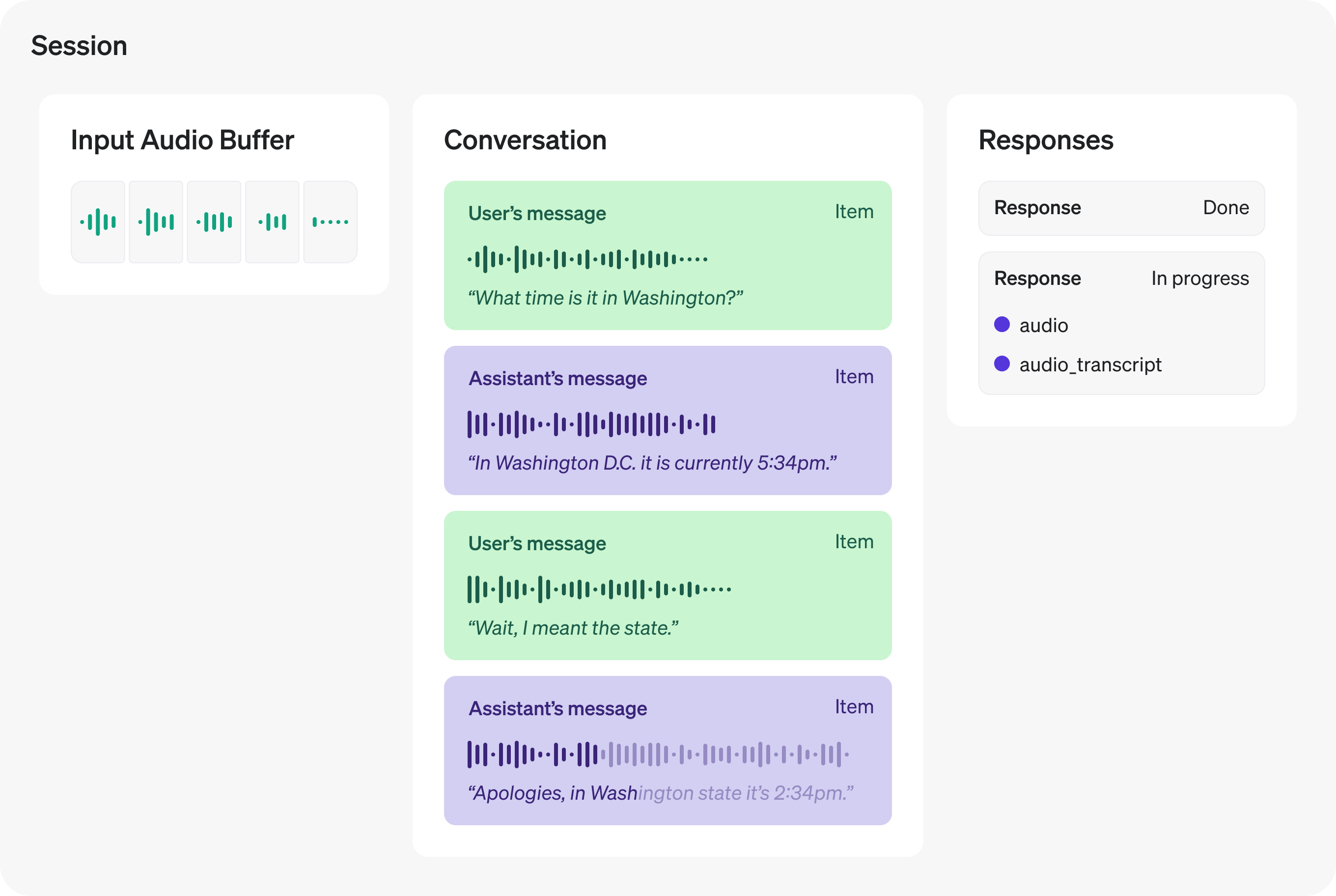
WebRTC 또는 WebSocket으로 세션을 시작하면 서버가 session.created 이벤트를 전송해 세션이 준비되었음을 알립니다. 클라이언트에서는 session.update 이벤트로 현재 세션 설정을 업데이트할 수 있습니다. 대부분의 세션 속성은 언제든지 변경할 수 있지만, 모델이 해당 세션에서 한 번이라도 오디오로 응답하면 오디오 출력에 사용하는 voice는 변경할 수 없습니다. Realtime 세션은 최대 60분 동안 유지됩니다.
다음 예제는 session.update 클라이언트 이벤트로 세션을 업데이트하는 방법을 보여 줍니다. 각 채널에서 클라이언트 이벤트를 전송하는 방법은 WebRTC 가이드 또는 WebSocket 가이드를 참고하세요.
1
2
3
4
5
6
7
8
9
10
11
12
13
14
15
16
17
18
19
20
21
22
23
24
25
26
27
28
29
30
31
32
33
34
35
36
37
38
39
40
41const event = {
  type: "session.update",
  session: {
    type: "realtime",
    model: "gpt-realtime-2.1",
    // Lock the output to audio (set to ["text"] if you want text without audio)
    output_modalities: ["audio"],
    audio: {
      input: {
        format: {
          type: "audio/pcm",
          rate: 24000,
        },
        turn_detection: {
          type: "semantic_vad",
        },
      },
      output: {
        format: {
          type: "audio/pcm",
          rate: 24000,
        },
        voice: "marin",
      },
    },
    // Use a server-stored prompt by ID. Optionally pin a version and pass variables.
    prompt: {
      id: "pmpt_123", // your stored prompt ID
      version: "89", // optional: pin a specific version
      variables: {
        city: "Paris", // example variable used by your prompt
      },
    },
    // You can still set direct session fields; these override prompt fields if they overlap:
    instructions:
      "Speak clearly and briefly. Confirm understanding before taking actions.",
  },
};

// WebRTC data channel and WebSocket both have .send()
dataChannel.send(JSON.stringify(event));
1
2
3
4
5
6
7
8
9
10
11
12
13
14
15
16
17
18
19
20
21
22
23
24
25
26
27
28
29
30
31
32
33
34
35event = {
    "type": "session.update",
    "session": {
        "type": "realtime",
        "model": "gpt-realtime-2.1",
        # Choose ["audio"] or ["text"]; do not combine them.
        "output_modalities": ["audio"],
        "audio": {
            "input": {
                "format": {
                    "type": "audio/pcm",
                    "rate": 24000,
                },
                "turn_detection": {"type": "semantic_vad"},
            },
            "output": {
                "format": {
                    "type": "audio/pcmu",
                },
                "voice": "marin",
            },
        },
        # Use a server-stored prompt by ID. Optionally pin a version and pass variables.
        "prompt": {
            "id": "pmpt_123",  # Your stored prompt ID.
            "version": "89",  # Optional: pin a specific version.
            "variables": {
                "city": "Paris",  # Example variable used by your prompt.
            },
        },
        # Direct session fields override prompt fields if they overlap.
        "instructions": "Speak clearly and briefly. Confirm understanding before taking actions.",
    },
}
ws.send(json.dumps(event))
1
2
3
4
5
6
7
8
9
10
11
12
13
14
15
16
17
18
19
20
21
22
23
24
25
26
27
28
29
30
31
32
33
34
35
36
37
38
39
40// Replace pmpt_123 and 89 with an existing saved prompt and version.
// The saved prompt must define the city variable.
if err := conn.Send(ctx, realtime.RealtimeClientEventParamOfSessionUpdate(realtime.RealtimeSessionCreateRequestParam{
	Model: "gpt-realtime-2.1",
	Prompt: responses.ResponsePromptParam{
		ID:      "pmpt_123",
		Version: openai.String("89"),
		Variables: map[string]responses.ResponsePromptVariableUnionParam{
			"city": {
				OfString: openai.String("Paris"),
			},
		},
	},
	OutputModalities: []string{"audio"},
	Instructions:     openai.String("Speak clearly and briefly. Confirm before taking action."),
	Audio: realtime.RealtimeAudioConfigParam{
		Input: realtime.RealtimeAudioConfigInputParam{
			Format: realtime.RealtimeAudioFormatsUnionParam{
				OfAudioPCM: &realtime.RealtimeAudioFormatsAudioPCMParam{
					Rate: 24000,
				},
			},
			TurnDetection: realtime.RealtimeAudioInputTurnDetectionUnionParam{
				OfSemanticVad: &realtime.RealtimeAudioInputTurnDetectionSemanticVadParam{},
			},
		},
		Output: realtime.RealtimeAudioConfigOutputParam{
			Format: realtime.RealtimeAudioFormatsUnionParam{
				OfAudioPCM: &realtime.RealtimeAudioFormatsAudioPCMParam{
					Rate: 24000,
				},
			},
			Voice: realtime.RealtimeAudioConfigOutputVoiceUnionParam{
				OfString: openai.String("marin"),
			},
		},
	},
})); err != nil {
	return err
}
1
2
3
4
5
6
7
8
9
10
11
12
13
14
15
16
17
18
19
20
21
22
23
24
25
26
27
28
29
30
31
32
33
34
35
36
37
38
39
40
41
42
43
44
45
46
47
48import com.openai.client.okhttp.OkHttpClient;
import com.openai.core.ClientOptions;
import com.openai.core.JsonValue;
import com.openai.helpers.RealtimeConnection;
import com.openai.helpers.RealtimeWebSocketOptions;
import com.openai.models.realtime.*;

// Replace pmpt_123 with your stored prompt ID.
var pcm =
    RealtimeAudioFormats.AudioPcm.builder()
        .type(RealtimeAudioFormats.AudioPcm.Type.AUDIO_PCM)
        .rate(RealtimeAudioFormats.AudioPcm.Rate._24000)
        .build();
connection.send(
    RealtimeClientEvent.ofSessionUpdate(
        SessionUpdateEvent.builder()
            .session(
                RealtimeSessionCreateRequest.builder()
                    .model("gpt-realtime-2.1")
                    .addOutputModality(RealtimeSessionCreateRequest.OutputModality.AUDIO)
                    .audio(
                        RealtimeAudioConfig.builder()
                            .input(
                                RealtimeAudioConfigInput.builder()
                                    .format(pcm)
                                    .turnDetection(
                                        RealtimeAudioInputTurnDetection.SemanticVad.builder()
                                            .build())
                                    .build())
                            .output(
                                RealtimeAudioConfigOutput.builder()
                                    .format(pcm)
                                    .voice("marin")
                                    .build())
                            .build())
                    .prompt(
                        com.openai.models.responses.ResponsePrompt.builder()
                            .id("pmpt_123")
                            .version("89")
                            .variables(
                                com.openai.models.responses.ResponsePrompt.Variables.builder()
                                    .putAdditionalProperty("city", JsonValue.from("Paris"))
                                    .build())
                            .build())
                    .instructions(
                        "Speak clearly and briefly. Confirm understanding before taking actions.")
                    .build())
            .build()));
1
2
3
4
5
6
7
8
9
10
11
12
13
14
15
16
17
18
19
20
21
22
23
24
25
26
27
28# Replace the illustrative IDs and URLs below with your own resource values.
connection.session.update(
  type: :realtime,
  model: "gpt-realtime-2.1",
  output_modalities: [:audio],
  audio: {
    input: {
      format: {
        type: :"audio/pcm",
        rate: 24_000
      },
      turn_detection: { type: :semantic_vad }
    },
    output: {
      format: {
        type: :"audio/pcm",
        rate: 24_000
      },
      voice: :marin
    }
  },
  prompt: {
    id: "pmpt_123",
    version: "89",
    variables: { city: "Paris" }
  },
  instructions: "Speak clearly and briefly. Confirm before taking action."
)
세션이 업데이트되면 서버가 session.updated 이벤트에 새로운 세션 상태를 담아 전송합니다.
Realtime 모델로 텍스트를 생성하려면 현재 대화에 텍스트 입력을 추가하고 모델에 응답 생성을 요청한 다음, 응답 생성 진행 상황을 알려 주는 서버 이벤트를 수신하세요. 텍스트를 생성하려면 세션 설정에서 text 모달리티를 사용해야 합니다. 기본 설정은 이 조건을 충족합니다.
conversation.item.create 클라이언트 이벤트로 새 텍스트 대화 항목을 만드세요. 이는 REST API의 Chat Completions에서 사용자 메시지(프롬프트)를 전송하는 것과 비슷합니다.
1
2
3
4
5
6
7
8
9
10
11
12
13
14
15
16const event = {
  type: "conversation.item.create",
  item: {
    type: "message",
    role: "user",
    content: [
      {
        type: "input_text",
        text: "What Prince album sold the most copies?",
      },
    ],
  },
};

// WebRTC data channel and WebSocket both have .send()
ws.send(JSON.stringify(event));
1
2
3
4
5
6
7
8
9
10
11
12
13
14event = {
    "type": "conversation.item.create",
    "item": {
        "type": "message",
        "role": "user",
        "content": [
            {
                "type": "input_text",
                "text": "What Prince album sold the most copies?",
            }
        ],
    },
}
ws.send(json.dumps(event))
1
2
3
4
5
6
7
8
9
10if err := conn.Send(ctx, realtime.RealtimeClientEventParamOfConversationItemCreate(realtime.RealtimeConversationItemUserMessageParam{
	Content: []realtime.RealtimeConversationItemUserMessageContentParam{
		{
			Text: openai.String("What Prince album sold the most copies?"),
			Type: "input_text",
		},
	},
})); err != nil {
	return err
}
1
2
3
4
5
6
7
8
9
10
11
12
13
14
15
16
17
18
19
20import com.openai.client.okhttp.OkHttpClient;
import com.openai.core.ClientOptions;
import com.openai.core.JsonMissing;
import com.openai.helpers.RealtimeConnection;
import com.openai.helpers.RealtimeWebSocketOptions;
import com.openai.models.realtime.*;

connection.send(
    RealtimeClientEvent.ofConversationItemCreate(
        ConversationItemCreateEvent.builder()
            .item(
                RealtimeConversationItemUserMessage.builder()
                    .object_(JsonMissing.of())
                    .addContent(
                        RealtimeConversationItemUserMessage.Content.builder()
                            .type(RealtimeConversationItemUserMessage.Content.Type.INPUT_TEXT)
                            .text("What Prince album sold the most copies?")
                            .build())
                    .build())
            .build()));
1
2
3
4
5
6
7using OpenAI.Realtime;

#pragma warning disable OPENAI002

RealtimeMessageItem item = RealtimeItem.CreateUserMessageItem("What Prince album sold the most copies?");
item.Id = Guid.NewGuid().ToString("N");
await session.SendCommandAsync(new RealtimeClientCommandConversationItemCreate(item), timeout.Token);
1
2
3
4
5
6
7
8
9
10
11
12
13
14
15
16
17
18connection.conversation.items.create(
  type: :message,
  role: :user,
  content: [
    {
      type: :input_text,
      text: "What is the weather like today?"
    }
  ]
)

receipt = connection.find do |event|
  raise event.error.message if event.is_a?(OpenAI::Realtime::RealtimeErrorEvent)
  next unless event.is_a?(OpenAI::Realtime::ConversationItemDone)

  event.item.is_a?(OpenAI::Realtime::RealtimeConversationItemUserMessage)
end
raise "Connection closed before the conversation item was acknowledged" unless receipt
대화에 사용자 메시지를 추가한 후 response.create 이벤트를 전송해 모델의 응답 생성을 시작하세요. 출력 모달리티는 하나만 선택합니다. audio는 오디오와 전사문을 함께 생성하고, text는 텍스트만 생성합니다. 텍스트만 생성하려면 다음 예제처럼 response.create 클라이언트 이벤트를 전송할 때 지정하세요.
1
2
3
4
5
6
7
8
9const event = {
  type: "response.create",
  response: {
    output_modalities: ["text"],
  },
};

// WebRTC data channel and WebSocket both have .send()
ws.send(JSON.stringify(event));
1
2event = {"type": "response.create", "response": {"output_modalities": ["text"]}}
ws.send(json.dumps(event))
1
2
3
4
5
6
7
8
9if err := conn.Send(ctx, realtime.RealtimeClientEventUnionParam{
	OfResponseCreate: &realtime.ResponseCreateEventParam{
		Response: realtime.RealtimeResponseCreateParams{
			OutputModalities: []string{"text"},
		},
	},
}); err != nil {
	return err
}
1
2
3
4
5
6
7
8
9
10
11
12
13
14import com.openai.client.okhttp.OkHttpClient;
import com.openai.core.ClientOptions;
import com.openai.helpers.RealtimeConnection;
import com.openai.helpers.RealtimeWebSocketOptions;
import com.openai.models.realtime.*;

connection.send(
    RealtimeClientEvent.ofResponseCreate(
        ResponseCreateEvent.builder()
            .response(
                RealtimeResponseCreateParams.builder()
                    .addOutputModality(RealtimeResponseCreateParams.OutputModality.TEXT)
                    .build())
            .build()));
1
2
3
4
5
6
7
8
9
10
11
12
13
14using OpenAI.Realtime;

#pragma warning disable OPENAI002

await session.SendCommandAsync(new RealtimeClientCommandResponseCreate
{
    ResponseOptions = new()
    {
        OutputModalities =
        {
            RealtimeOutputModality.Text
        }
    }
}, timeout.Token);
1
2
3
4
5
6
7
8
9
10
11
12
13
14connection.response.create(
  output_modalities: [:text],
  instructions: "Respond with a concise text message."
)

response_done = connection.find do |event|
  raise event.error.message if event.is_a?(OpenAI::Realtime::RealtimeErrorEvent)
  next unless event.is_a?(OpenAI::Realtime::ResponseDoneEvent)

  raise "Response failed: #{event.response.status}" unless event.response.status == :completed

  true
end
raise "Connection closed before the response completed" unless response_done
응답 생성이 모두 끝나면 서버가 response.done 이벤트를 전송합니다. 다음 예제와 같이 이 이벤트에는 모델이 생성한 텍스트 전체가 포함됩니다.
1
2
3
4
5
6
7
8
9
10
11
12
13function handleEvent(message) {
  const data = "data" in message ? message.data : message.toString();
  const serverEvent = JSON.parse(data);
  if (serverEvent.type === "response.done") {
    console.log(serverEvent.response.output[0]);
  }
}

// Listen for server messages (WebRTC)
// dataChannel.addEventListener("message", handleEvent);

// Listen for server messages (WebSocket)
ws.on("message", handleEvent);
1
2
3
4def on_message(ws, message):
    server_event = json.loads(message)
    if server_event["type"] == "response.done":
        print(server_event["response"]["output"][0])
1
2
3
4
5
6
7
8
9
10
11
12
13
14
15
16
17
18
19
20
21
22
23
24
25
26
27
28
29
30
31func receiveUntil(ctx context.Context, conn *realtime.RealtimeConnection, terminal string) (realtime.RealtimeServerEventUnion, error) {
	for {
		event, err := conn.Recv(ctx)
		if err != nil {
			return event, fmt.Errorf("waiting for %s: %w", terminal, err)
		}
		if event.Type == "error" {
			return event, fmt.Errorf("Realtime API error: %s", event.OfRealtimeErrorEvent.Error.Message)
		}
		if event.Type == "response.done" && event.OfResponseDoneEvent.Response.Status != "completed" {
			return event, fmt.Errorf("response ended with status %s", event.OfResponseDoneEvent.Response.Status)
		}
		if event.Type == "response.done" {
			response := event.OfResponseDoneEvent.Response
			fmt.Println("Response status:", response.Status)
			for _, output := range response.Output {
				item := output.OfRealtimeConversationItemAssistantMessage
				if item.Type == "message" {
					for _, content := range item.Content {
						if content.Type == "output_text" {
							fmt.Print(content.Text)
						}
					}
				}
			}
		}
		if event.Type == terminal {
			return event, nil
		}
	}
}
1
2
3
4
5
6
7
8
9
10
11
12
13
14
15
16
17
18
19
20
21
22
23import com.openai.client.okhttp.OkHttpClient;
import com.openai.core.ClientOptions;
import com.openai.helpers.RealtimeConnection;
import com.openai.helpers.RealtimeWebSocketOptions;
import com.openai.models.realtime.*;

static void handleEvent(RealtimeServerEvent event) {
  event
      .responseDone()
      .ifPresent(
          done -> {
            if (!done.response()
                .status()
                .filter(RealtimeResponse.Status.COMPLETED::equals)
                .isPresent())
              throw new IllegalStateException(
                  "Response ended with status "
                      + done.response().status()
                      + ": "
                      + done.response().statusDetails());
            System.out.println(done.response().output());
          });
}
1
2
3
4
5
6
7
8
9
10
11
12
13
14using OpenAI.Realtime;

#pragma warning disable OPENAI002

internal static void HandleEvent(RealtimeServerUpdate update)
{
    if (update is RealtimeServerUpdateResponseDone completion && completion.Response.Status != RealtimeResponseStatus.Completed)
        throw new InvalidOperationException($"Response ended with status {completion.Response.Status}: {System.ClientModel.Primitives.ModelReaderWriter.Write(completion.Response)}");
    if (update is RealtimeServerUpdateResponseDone done)
    {
        foreach (RealtimeItem item in done.Response.OutputItems)
            Console.WriteLine(System.ClientModel.Primitives.ModelReaderWriter.Write(item));
    }
}
1
2
3
4
5
6
7
8
9
10
11
12
13
14response_done = connection.find do |event|
  next unless event.is_a?(OpenAI::Realtime::ResponseDoneEvent)

  puts("Response status: #{event.response.status}")
  Array(event.response.output).each do |item|
    next unless item.is_a?(OpenAI::Realtime::RealtimeConversationItemAssistantMessage)

    item.content.each do |content|
      puts(content.text) if content.type == :output_text
    end
  end
  true
end
raise "Connection closed before the response completed" unless response_done
모델이 응답을 생성하는 동안 서버는 여러 수명 주기 이벤트를 전송합니다. response.output_text.delta와 같은 이벤트를 수신하면 응답이 생성되는 대로 사용자에게 실시간 피드백을 제공할 수 있습니다. 아래 표의 관련 서버 이벤트 열에는 서버가 전송하는 이벤트가 대략적인 발생 순서대로 나열되어 있습니다. 텍스트 생성에 사용하는 클라이언트 이벤트도 함께 확인할 수 있습니다.
Realtime API의 주요 기능 중 하나는 텍스트를 음성으로, 음성을 텍스트로 변환하는 중간 단계 없이 모델과 음성으로 직접 대화할 수 있다는 점입니다. 덕분에 음성 인터페이스의 지연 시간이 줄어들고, 모델은 입력 음성의 어조와 억양에 관한 정보를 더 많이 활용할 수 있습니다.
Realtime 세션에서는 여러 내장 음성 중 하나를 선택해 오디오를 출력할 수 있습니다. voice를 세션 생성 시점이나 response.create 이벤트에서 설정하면 모델의 목소리를 선택할 수 있습니다. 현재 제공되는 음성은 alloy, ash, ballad, coral, echo, sage, shimmer, verse, marin, cedar입니다. 모델이 세션에서 한 번이라도 오디오를 출력하면 해당 세션의 voice를 변경할 수 없습니다. 최상의 음질을 원한다면 marin 또는 cedar를 권장합니다.
WebRTC로 Realtime API에 연결하면 Realtime API가 클라이언트의 피어 연결 상대가 됩니다. 모델이 출력한 오디오는 원격 미디어 스트림으로 클라이언트에 전달됩니다. 클라이언트는 getUserMedia로 오디오 장치에서 모델에 입력할 오디오를 수집하고, 미디어 스트림을 트랙으로 피어 연결에 추가합니다.
WebRTC 연결 가이드의 다음 코드는 브라우저 API로 로컬 오디오와 원격 오디오를 모두 설정하는 기본 예제입니다.
1
2
3
4
5
6
7
8
9
10
11
12
13// Create a peer connection
const pc = new RTCPeerConnection();

// Set up to play remote audio from the model
const audioEl = document.createElement("audio");
audioEl.autoplay = true;
pc.ontrack = (e) => (audioEl.srcObject = e.streams[0]);

// Add local audio track for microphone input in the browser
const ms = await navigator.mediaDevices.getUserMedia({
  audio: true,
});
pc.addTrack(ms.getTracks()[0]);
위 코드만으로도 Realtime API와 상호작용할 수 있으며, 이를 바탕으로 다양한 인터페이스를 구현할 수 있습니다. 여러 종류의 사용자 인터페이스 예제는 WebRTC 샘플 리포지터리를 참고하세요. 샘플 데모를 직접 실행해 볼 수도 있습니다.
브라우저에서 미디어 캡처 및 스트림을 사용하면 마이크를 켜거나 끄고, 입력에 사용할 장치를 선택하는 등의 작업을 할 수 있습니다.
기본적으로 WebRTC 클라이언트는 오디오 입력을 보내기 전에 Realtime API에 별도의 클라이언트 이벤트를 전송할 필요가 없습니다. 피어 연결에 로컬 오디오 트랙을 추가하면 사용자가 바로 말하기 시작할 수 있습니다.
다만 피어 연결을 통해 클라이언트와 서버가 오디오를 주고받는 동안 WebRTC 클라이언트는 서버에서 여러 수명 주기 이벤트를 수신합니다. 예를 들면 다음과 같습니다.
미디어 스트림용 WebRTC API만으로도 필요한 제어를 모두 구현할 수 있습니다. 다만 오디오 입력과 출력을 더 낮은 수준에서 직접 다뤄야 할 때도 있습니다. 오디오 입력을 세밀하게 제어하는 방법과 필요한 이벤트 목록은 아래 WebSocket 섹션을 참고하세요.
WebSocket으로 오디오를 주고받을 때는 클라이언트에서 미디어를 전송하고 서버에서 보낸 미디어를 수신하기 위한 처리가 조금 더 필요합니다. 아래 표는 WebSocket 세션에서 오디오를 주고받는 데 필요한 이벤트 플로우를 보여 줍니다.
이벤트는 수명 주기 순서대로 나열했지만 delta 이벤트처럼 동시에 발생할 수 있는 이벤트도 있습니다.
서버로 오디오 입력을 스트리밍하려면 input_audio_buffer.append 클라이언트 이벤트를 사용하세요. 이 이벤트에서는 Base64로 인코딩한 오디오 바이트를 청크 단위로 나눠 소켓을 통해 Realtime API로 전송해야 합니다. 각 청크의 크기는 15 MB를 초과할 수 없습니다.
session.audio.input.format은 session.update 이벤트에서 설정하세요. PCM을 사용하려면 {"type": "audio/pcm", "rate": 24000}으로 설정하고 24 kHz 모노 오디오를 전송하세요.
1
2
3
4
5
6
7
8
9
10
11
12
13
14
15
16
17
18
19
20
21
22
23
24
25
26
27
28
29
30
31
32
33
34
35
36
37
38
39
40
41
42
43
44
45
46
47
48
49
50
51
52
53
54
55
56
57
58
59
60
61
62
63
64
65
66
67
68
69
70
71
72
73
74
75
76
77import fs from "fs";
import decodeAudio from "audio-decode";

// Converts Float32Array of audio data to PCM16 ArrayBuffer
function floatTo16BitPCM(float32Array) {
  const buffer = new ArrayBuffer(float32Array.length * 2);
  const view = new DataView(buffer);
  let offset = 0;
  for (let i = 0; i < float32Array.length; i++, offset += 2) {
    const sample = Math.max(-1, Math.min(1, float32Array[i]));
    view.setInt16(
      offset,
      Math.round(sample * (sample < 0 ? 0x8000 : 0x7fff)),
      true
    );
  }
  return buffer;
}

// Converts a Float32Array to base64-encoded PCM16 data
function base64EncodeAudio(float32Array) {
  const arrayBuffer = floatTo16BitPCM(float32Array);
  let binary = "";
  let bytes = new Uint8Array(arrayBuffer);
  const chunkSize = 0x8000; // 32KB chunk size
  for (let i = 0; i < bytes.length; i += chunkSize) {
    let chunk = bytes.subarray(i, i + chunkSize);
    binary += String.fromCharCode(...chunk);
  }
  return btoa(binary);
}

// Fills the audio buffer with the contents of three files,
// then asks the model to generate a response.
const files = [
  "fixtures/sample1.wav",
  "fixtures/sample2.wav",
  "fixtures/sample3.wav",
];

// Manual commit and response creation require automatic turn detection off.
ws.send(
  JSON.stringify({
    type: "session.update",
    session: {
      type: "realtime",
      audio: { input: { turn_detection: null } },
    },
  })
);

for (const filename of files) {
  const audioFile = fs.readFileSync(filename);
  const audioBuffer = await decodeAudio(audioFile);
  if (
    audioBuffer.sampleRate !== 24000 ||
    audioBuffer.channelData.length !== 1
  ) {
    throw new Error("Expected 24 kHz mono audio: " + filename);
  }
  const channelData = audioBuffer.channelData[0];
  const base64Chunk = base64EncodeAudio(channelData);
  ws.send(
    JSON.stringify({
      type: "input_audio_buffer.append",
      audio: base64Chunk,
    })
  );
}

ws.send(JSON.stringify({ type: "input_audio_buffer.commit" }));
ws.send(
  JSON.stringify({
    type: "response.create",
    response: { output_modalities: ["audio"] },
  })
);
1
2
3
4
5
6
7
8
9
10
11
12
13
14
15
16
17
18
19
20
21
22
23
24
25
26
27
28
29
30
31
32import base64
import json
import struct
import soundfile as sf
from websocket import create_connection

# ... create websocket-client named ws ...


def float_to_16bit_pcm(float32_array):
    clipped = [max(-1.0, min(1.0, x)) for x in float32_array]
    pcm16 = b"".join(struct.pack("<h", min(32767, int(x * 32768))) for x in clipped)
    return pcm16


def base64_encode_audio(float32_array):
    pcm_bytes = float_to_16bit_pcm(float32_array)
    encoded = base64.b64encode(pcm_bytes).decode("ascii")
    return encoded


files = ["./path/to/sample1.wav", "./path/to/sample2.wav", "./path/to/sample3.wav"]

for filename in files:
    data, samplerate = sf.read(filename, dtype="float32")
    if samplerate != 24000 or data.ndim != 1:
        raise ValueError(f"Expected 24 kHz mono audio: {filename}")
    base64_chunk = base64_encode_audio(data)

    # Send the client event
    event = {"type": "input_audio_buffer.append", "audio": base64_chunk}
    ws.send(json.dumps(event))
1
2
3
4
5
6
7// audio contains mono PCM16 samples at 24 kHz.
for start := 0; start < len(audio); start += 9600 {
	end := min(start+9600, len(audio))
	if err := conn.Send(ctx, realtime.RealtimeClientEventParamOfInputAudioBufferAppend(base64.StdEncoding.EncodeToString(audio[start:end]))); err != nil {
		return err
	}
}
1
2
3
4
5
6
7
8
9
10
11
12
13
14
15
16
17
18
19
20
21
22
23
24
25
26
27
28
29
30import com.openai.client.okhttp.OkHttpClient;
import com.openai.core.ClientOptions;
import com.openai.helpers.RealtimeConnection;
import com.openai.helpers.RealtimeWebSocketOptions;
import com.openai.models.realtime.*;
import java.util.Base64;

// Call for each PCM16, 24 kHz, mono chunk supplied by your audio source.
static void appendAudio(RealtimeConnection connection, byte[] pcmAudio) throws Exception {
  String base64Audio = Base64.getEncoder().encodeToString(pcmAudio);
  send(
      connection,
      RealtimeClientEvent.ofInputAudioBufferAppend(
          InputAudioBufferAppendEvent.builder().audio(base64Audio).build()));
}

// Retry only explicit admission rejections; these guarantee nothing was sent.
private static void send(RealtimeConnection connection, RealtimeClientEvent event)
    throws Exception {
  long deadline = System.nanoTime() + java.util.concurrent.TimeUnit.SECONDS.toNanos(5);
  while (true) {
    try {
      connection.send(event);
      return;
    } catch (com.openai.core.http.WebSocketWriteNotAttempted.Busy busy) {
      if (System.nanoTime() >= deadline) throw busy;
      Thread.sleep(10);
    }
  }
}
1
2
3
4
5
6
7
8
9using OpenAI.Realtime;

#pragma warning disable OPENAI002

// Call for each PCM16, 24 kHz, mono chunk supplied by your audio source.
internal static async Task AppendAudioAsync(RealtimeSessionClient session, BinaryData pcmAudio, CancellationToken cancellationToken)
{
    await session.SendCommandAsync(new RealtimeClientCommandInputAudioBufferAppend(pcmAudio), cancellationToken);
}
1
2
3
4
5File.open("speech.pcm", "rb") do |audio|
  while (chunk = audio.read(9_600))
    connection.input_audio_buffer.append_bytes(chunk)
  end
end
녹음한 오디오 전체를 하나의 대화 메시지로 만들 수도 있습니다. conversation.item.create 클라이언트 이벤트로 input_audio 콘텐츠가 담긴 메시지를 만드세요.
1
2
3
4
5
6
7
8
9
10
11
12
13
14
15
16
17
18const fullAudio = "<a base64-encoded string of audio bytes>";

const event = {
  type: "conversation.item.create",
  item: {
    type: "message",
    role: "user",
    content: [
      {
        type: "input_audio",
        audio: fullAudio,
      },
    ],
  },
};

// WebRTC data channel and WebSocket both have .send()
dataChannel.send(JSON.stringify(event));
1
2
3
4
5
6
7
8
9
10
11
12
13
14
15
16
17fullAudio = "<a base64-encoded string of audio bytes>"

event = {
    "type": "conversation.item.create",
    "item": {
        "type": "message",
        "role": "user",
        "content": [
            {
                "type": "input_audio",
                "audio": fullAudio,
            }
        ],
    },
}

ws.send(json.dumps(event))
1
2
3
4
5
6
7
8
9
10if err := conn.Send(ctx, realtime.RealtimeClientEventParamOfConversationItemCreate(realtime.RealtimeConversationItemUserMessageParam{
	Content: []realtime.RealtimeConversationItemUserMessageContentParam{
		{
			Audio: openai.String(base64.StdEncoding.EncodeToString(audio)),
			Type:  "input_audio",
		},
	},
})); err != nil {
	return err
}
1
2
3
4
5
6
7
8
9
10
11
12
13
14
15
16
17
18
19
20
21
22
23
24
25
26
27
28
29
30
31
32
33
34
35
36import com.openai.client.okhttp.OkHttpClient;
import com.openai.core.ClientOptions;
import com.openai.core.JsonMissing;
import com.openai.helpers.RealtimeConnection;
import com.openai.helpers.RealtimeWebSocketOptions;
import com.openai.models.realtime.*;
import java.util.Base64;

// Pass the complete PCM16, 24 kHz, mono recording from your application.
static void sendAudioItem(RealtimeConnection connection, byte[] pcmAudio) throws Exception {
  String fullAudio = Base64.getEncoder().encodeToString(pcmAudio);
  var event =
      RealtimeClientEvent.ofConversationItemCreate(
          ConversationItemCreateEvent.builder()
              .item(
                  RealtimeConversationItemUserMessage.builder()
                      .object_(JsonMissing.of())
                      .addContent(
                          RealtimeConversationItemUserMessage.Content.builder()
                              .type(RealtimeConversationItemUserMessage.Content.Type.INPUT_AUDIO)
                              .audio(fullAudio)
                              .build())
                      .build())
              .build());
  // Retry only explicit admission rejections; these guarantee nothing was sent.
  long deadline = System.nanoTime() + java.util.concurrent.TimeUnit.SECONDS.toNanos(5);
  while (true) {
    try {
      connection.send(event);
      return;
    } catch (com.openai.core.http.WebSocketWriteNotAttempted.Busy busy) {
      if (System.nanoTime() >= deadline) throw busy;
      Thread.sleep(10);
    }
  }
}
1
2
3
4
5
6
7
8
9
10
11
12
13using OpenAI.Realtime;

#pragma warning disable OPENAI002

// Pass the complete PCM16, 24 kHz, mono recording from your application.
internal static async Task<string> SendAudioItemAsync(RealtimeSessionClient session, BinaryData pcmAudio, CancellationToken cancellationToken)
{
    RealtimeMessageItem item = RealtimeItem.CreateUserMessageItem([new RealtimeInputAudioMessageContentPart(pcmAudio)]);
    string itemId = Guid.NewGuid().ToString("N");
    item.Id = itemId;
    await session.SendCommandAsync(new RealtimeClientCommandConversationItemCreate(item), cancellationToken);
    return itemId;
}
1
2
3
4
5
6
7
8
9
10
11
12
13
14
15
16
17
18
19
20audio = Base64.strict_encode64(File.binread("speech.pcm"))

connection.conversation.items.create(
  type: :message,
  role: :user,
  content: [
    {
      type: :input_audio,
      audio: audio
    }
  ]
)

receipt = connection.find do |event|
  raise event.error.message if event.is_a?(OpenAI::Realtime::RealtimeErrorEvent)

  event.is_a?(OpenAI::Realtime::ConversationItemDone) &&
    event.item.is_a?(OpenAI::Realtime::RealtimeConversationItemUserMessage)
end
raise "Connection closed before the audio item was acknowledged" unless receipt
웹 브라우저 같은 클라이언트에서 출력 오디오를 재생하려면 WebSocket보다 WebRTC를 권장합니다. 네트워크 상태가 불안정할 때 WebRTC가 클라이언트 장치에 미디어를 더 안정적으로 전송합니다.
WebSocket을 사용하는 서버 간 애플리케이션에서 오디오 출력을 처리하려면 response.output_audio.delta 이벤트를 수신해야 합니다. 이 이벤트에는 모델이 생성한 오디오 데이터가 Base64로 인코딩된 청크 형태로 들어 있습니다. 청크를 버퍼에 모아 파일에 쓰거나 Twilio 전화 통화 같은 다른 대상으로 바로 스트리밍할 수 있습니다.
response.output_audio.done 이벤트와 response.done 이벤트에는 오디오 데이터 없이 전사문만 포함됩니다. 실제 오디오 바이트를 받으려면 response.output_audio.delta 이벤트를 수신해야 합니다.
출력 청크의 형식은 세션 전체에 적용하거나 응답별로 설정할 수 있습니다.
1
2
3
4
5
6
7
8
9
10function handleEvent(message) {
  const serverEvent = JSON.parse(message.toString());
  if (serverEvent.type === "response.output_audio.delta") {
    const audio = Buffer.from(serverEvent.delta, "base64");
    console.log(`Received ${audio.length} audio bytes`);
  }
}

// Listen for server messages (WebSocket)
ws.on("message", handleEvent);
1
2
3
4
5def on_message(ws, message):
    server_event = json.loads(message)
    if server_event["type"] == "response.output_audio.delta":
        # Access Base64-encoded audio chunks:
        print(server_event["delta"])
1
2
3
4
5
6
7
8
9
10
11
12
13
14
15
16
17
18
19
20
21
22
23
24func receiveUntil(ctx context.Context, conn *realtime.RealtimeConnection, terminal string) (realtime.RealtimeServerEventUnion, error) {
	for {
		event, err := conn.Recv(ctx)
		if err != nil {
			return event, fmt.Errorf("waiting for %s: %w", terminal, err)
		}
		if event.Type == "response.output_audio.delta" {
			audio, err := base64.StdEncoding.DecodeString(event.OfResponseAudioDeltaEvent.Delta)
			if err != nil {
				return event, err
			}
			fmt.Printf("Received %d audio bytes\n", len(audio))
		}
		if event.Type == "error" {
			return event, fmt.Errorf("Realtime API error: %s", event.OfRealtimeErrorEvent.Error.Message)
		}
		if event.Type == "response.done" && event.OfResponseDoneEvent.Response.Status != "completed" {
			return event, fmt.Errorf("response ended with status %s", event.OfResponseDoneEvent.Response.Status)
		}
		if event.Type == terminal {
			return event, nil
		}
	}
}
1
2
3
4
5
6
7
8
9import com.openai.client.okhttp.OkHttpClient;
import com.openai.core.ClientOptions;
import com.openai.helpers.RealtimeConnection;
import com.openai.helpers.RealtimeWebSocketOptions;
import com.openai.models.realtime.*;

static void handleEvent(RealtimeServerEvent event) {
  event.responseOutputAudioDelta().ifPresent(delta -> System.out.println(delta.delta()));
}
1
2
3
4
5
6
7
8
9using OpenAI.Realtime;

#pragma warning disable OPENAI002

internal static void HandleEvent(RealtimeServerUpdate update)
{
    if (update is RealtimeServerUpdateResponseOutputAudioDelta delta)
        Console.WriteLine(Convert.ToBase64String(delta.Delta.ToArray()));
}
1
2
3
4
5
6
7
8
9
10
11
12
13
14response_done = connection.find do |event|
  case event
  when OpenAI::Realtime::ResponseAudioDeltaEvent
    audio_bytes = Base64.strict_decode64(event.delta)
    puts("Received #{audio_bytes.bytesize} audio bytes")
  when OpenAI::Realtime::RealtimeErrorEvent
    raise event.error.message
  when OpenAI::Realtime::ResponseDoneEvent
    raise "Response failed: #{event.response.status}" unless event.response.status == :completed

    true
  end
end
raise "Connection closed before the response completed" unless response_done
gpt-realtime-2와 gpt-realtime은 이미지 입력도 지원합니다. 사용자 메시지의 콘텐츠 일부로 이미지를 첨부하면 모델이 이미지 내용을 반영해 응답할 수 있습니다.
1
2
3
4
5
6
7
8
9
10
11
12
13
14
15
16
17
18const base64Image = "<a base64-encoded string of image bytes>";

const event = {
  type: "conversation.item.create",
  item: {
    type: "message",
    role: "user",
    content: [
      {
        type: "input_image",
        image_url: `data:image/{format};base64,${base64Image}`,
      },
    ],
  },
};

// WebRTC data channel and WebSocket both have .send()
dataChannel.send(JSON.stringify(event));
1
2
3
4
5
6
7
8
9
10
11
12
13
14
15
16
17
18
19
20
21
22
23
24if err := conn.Send(ctx, realtime.RealtimeClientEventParamOfConversationItemCreate(realtime.RealtimeConversationItemUserMessageParam{
	Content: []realtime.RealtimeConversationItemUserMessageContentParam{
		{
			ImageURL: openai.String("data:image/png;base64," + base64.StdEncoding.EncodeToString(image)),
			Type:     "input_image",
		},
		{
			Text: openai.String("Describe this image."),
			Type: "input_text",
		},
	},
})); err != nil {
	return err
}

if err := conn.Send(ctx, realtime.RealtimeClientEventUnionParam{
	OfResponseCreate: &realtime.ResponseCreateEventParam{
		Response: realtime.RealtimeResponseCreateParams{
			OutputModalities: []string{"text"},
		},
	},
}); err != nil {
	return err
}
1
2
3
4
5
6
7
8
9
10
11
12
13
14
15
16
17
18
19
20
21
22
23
24
25
26encoded_image = Base64.strict_encode64(File.binread("image.png"))

connection.conversation.items.create(
  type: :message,
  role: :user,
  content: [
    {
      type: :input_image,
      image_url: "data:image/png;base64,#{encoded_image}"
    },
    {
      type: :input_text,
      text: "Describe this image."
    }
  ]
)
connection.response.create(output_modalities: [:text])

completion = connection.find do |event|
  raise event.error.message if event.is_a?(OpenAI::Realtime::RealtimeErrorEvent)

  event.is_a?(OpenAI::Realtime::ResponseDoneEvent)
end
unless completion.is_a?(OpenAI::Realtime::ResponseDoneEvent) && completion.response.status == :completed
  raise "The Realtime response did not complete"
end
Realtime 세션에서는 기본적으로 음성 활동 감지(VAD)가 켜져 있습니다. API가 사용자가 말을 시작하고 멈추는 시점을 감지해 자동으로 응답합니다.
VAD 설정 방법은 음성 활동 감지 가이드를 참고하세요.
turn_detection을 null로 설정해 session.update 클라이언트 이벤트를 전송하면 VAD를 끌 수 있습니다. 눌러서 말하기처럼 오디오 입력을 세밀하게 제어하려는 인터페이스에 유용합니다.
VAD를 끄면 클라이언트가 다음 이벤트를 직접 전송해야 오디오 응답을 생성할 수 있습니다.
VAD를 켜 둔 채로 응답 생성 시점을 직접 정하려면 turn_detection.interrupt_response와 turn_detection.create_response를 false로 설정해 session.update 클라이언트 이벤트를 전송하세요. 이렇게 하면 VAD 기능은 그대로 작동하지만 새 응답이 자동으로 생성되지는 않습니다. 클라이언트에서 response.create 이벤트를 전송해 직접 응답 생성을 요청할 수 있습니다.
이 방식은 콘텐츠 검토, 입력 검증, RAG 패턴처럼 지연 시간이 조금 늘어나더라도 입력을 직접 제어하고 싶을 때 유용합니다.
기본적으로 세션 중에 생성된 모든 응답은 해당 세션의 대화 상태(‘기본 대화’)에 추가됩니다. 때로는 세션의 기본 대화 컨텍스트 밖에서 모델 응답을 생성하거나 여러 응답을 동시에 생성해야 할 수도 있습니다. 모델이 응답을 생성할 때 고려할 대화 항목을 더 세밀하게 지정해야 할 때도 있습니다. 예를 들어 최근 N개 턴만 고려하도록 할 수 있습니다.
response.conversation 필드를 문자열 none으로 설정하고 response.create 클라이언트 이벤트로 응답을 생성하면 기본 대화 상태에 추가되지 않는 ‘대역 외’ 응답을 만들 수 있습니다.
대역 외 응답을 생성할 때는 서버가 보내는 이벤트 중 어떤 이벤트가 해당 응답에 속하는지도 구분할 수 있어야 합니다. 모델 응답에 metadata를 지정하면 클라이언트가 보낸 이벤트로 어떤 응답이 생성되고 있는지 식별할 수 있습니다.
1
2
3
4
5
6
7
8
9
10
11
12
13
14
15
16
17
18
19
20
21
22
23const prompt = `
Analyze the conversation so far. If it is related to support, output
"support". If it is related to sales, output "sales".
`;

  const event = {
    type: "response.create",
    response: {
      // Setting to "none" indicates the response is out of band
      // and will not be added to the default conversation
      conversation: "none",

      // Set metadata to help identify responses sent back from the model
      metadata: { topic: "classification" },

      // Set any other available response fields
      output_modalities: ["text"],
      instructions: prompt,
    },
  };

  // WebRTC data channel and WebSocket both have .send()
  ws.send(JSON.stringify(event));
1
2
3
4
5
6
7
8
9
10
11
12
13
14
15
16
17
18
19
20prompt = """
Analyze the conversation so far. If it is related to support, output
"support". If it is related to sales, output "sales".
"""

event = {
    "type": "response.create",
    "response": {
        # Setting to "none" indicates the response is out of band,
        # and will not be added to the default conversation
        "conversation": "none",
        # Set metadata to help identify responses sent back from the model
        "metadata": {"topic": "classification"},
        # Set any other available response fields
        "output_modalities": ["text"],
        "instructions": prompt,
    },
}

ws.send(json.dumps(event))
1
2
3
4
5
6
7
8
9
10
11
12
13
14if err := conn.Send(ctx, realtime.RealtimeClientEventUnionParam{
	OfResponseCreate: &realtime.ResponseCreateEventParam{
		Response: realtime.RealtimeResponseCreateParams{
			Instructions: openai.String("\nAnalyze the conversation so far. If it is related to support, output\n\"support\". If it is related to sales, output \"sales\".\n"),
			Metadata: shared.Metadata{
				"topic": "classification",
			},
			Conversation:     "none",
			OutputModalities: []string{"text"},
		},
	},
}); err != nil {
	return err
}
1
2
3
4
5
6
7
8
9
10
11
12
13
14
15
16
17
18
19
20
21
22import com.openai.client.okhttp.OkHttpClient;
import com.openai.core.ClientOptions;
import com.openai.core.JsonValue;
import com.openai.helpers.RealtimeConnection;
import com.openai.helpers.RealtimeWebSocketOptions;
import com.openai.models.realtime.*;

connection.send(
    RealtimeClientEvent.ofResponseCreate(
        ResponseCreateEvent.builder()
            .response(
                RealtimeResponseCreateParams.builder()
                    .conversation("none")
                    .metadata(
                        RealtimeResponseCreateParams.Metadata.builder()
                            .putAdditionalProperty("topic", JsonValue.from("classification"))
                            .build())
                    .addOutputModality(RealtimeResponseCreateParams.OutputModality.TEXT)
                    .instructions(
                        "Analyze the conversation so far. If it is related to support, output \"support\". If it is related to sales, output \"sales\".")
                    .build())
            .build()));
1
2
3
4
5
6
7
8
9
10
11
12
13
14
15
16
17
18
19
20using OpenAI.Realtime;

#pragma warning disable OPENAI002

await session.SendCommandAsync(new RealtimeClientCommandResponseCreate
{
    ResponseOptions = new()
    {
        DefaultConversationConfiguration = RealtimeResponseDefaultConversationConfiguration.None,
        Metadata = new Dictionary<string, BinaryData>
        {
            ["topic"] = BinaryData.FromObjectAsJson("classification")
        },
        OutputModalities =
        {
            RealtimeOutputModality.Text
        },
        Instructions = "Analyze the conversation so far. If it is related to support, output \"support\". If it is related to sales, output \"sales\"."
    }
}, timeout.Token);
1
2
3
4
5
6
7
8
9
10
11
12
13
14
15
16connection.response.create(
  conversation: :none,
  metadata: { topic: "classification" },
  output_modalities: [:text],
  instructions: "Classify the conversation as support or sales."
)

response_done = connection.find do |event|
  raise event.error.message if event.is_a?(OpenAI::Realtime::RealtimeErrorEvent)
  next unless event.is_a?(OpenAI::Realtime::ResponseDoneEvent)

  raise "Response failed: #{event.response.status}" unless event.response.status == :completed

  true
end
raise "Connection closed before the response completed" unless response_done
이제 response.done 서버 이벤트를 수신하면 대역 외 응답의 결과를 식별할 수 있습니다.
1
2
3
4
5
6
7
8
9
10
11
12
13
14
15
16
17
18
19
20
21
22function handleEvent(message) {
  const data = "data" in message ? message.data : message.toString();
  const serverEvent = JSON.parse(data);
  if (
    serverEvent.type === "response.done" &&
    serverEvent.response.metadata?.topic === "classification"
  ) {
    const { response } = serverEvent;
    if (response.status !== "completed" || response.output.length === 0) {
      throw new Error(
        "Classification response ended with status " + response.status
      );
    }
    console.log(response.output[0]);
  }
}

// Listen for server messages (WebRTC)
// dataChannel.addEventListener("message", handleEvent);

// Listen for server messages (WebSocket)
ws.on("message", handleEvent);
1
2
3
4
5
6
7
8
9
10
11
12def on_message(ws, message):
    server_event = json.loads(message)
    if server_event["type"] != "response.done":
        return
    response = server_event["response"]
    if (response.get("metadata") or {}).get("topic") != "classification":
        return
    if response["status"] != "completed" or not response["output"]:
        raise RuntimeError(
            f"Classification response ended with status {response['status']}"
        )
    print(response["output"][0])
1
2
3
4
5
6
7
8
9
10
11
12
13
14
15
16
17
18
19
20
21
22
23
24
25
26
27
28
29
30
31
32
33
34func receiveUntil(ctx context.Context, conn *realtime.RealtimeConnection, terminal string) (realtime.RealtimeServerEventUnion, error) {
	for {
		event, err := conn.Recv(ctx)
		if err != nil {
			return event, fmt.Errorf("waiting for %s: %w", terminal, err)
		}
		if event.Type == "error" {
			return event, fmt.Errorf("Realtime API error: %s", event.OfRealtimeErrorEvent.Error.Message)
		}
		if event.Type == "response.done" && event.OfResponseDoneEvent.Response.Metadata["topic"] != "classification" {
			continue
		}
		if event.Type == "response.done" && event.OfResponseDoneEvent.Response.Status != "completed" {
			return event, fmt.Errorf("response ended with status %s", event.OfResponseDoneEvent.Response.Status)
		}
		if event.Type == "response.done" {
			response := event.OfResponseDoneEvent.Response
			fmt.Println("Response status:", response.Status)
			for _, output := range response.Output {
				item := output.OfRealtimeConversationItemAssistantMessage
				if item.Type == "message" {
					for _, content := range item.Content {
						if content.Type == "output_text" {
							fmt.Print(content.Text)
						}
					}
				}
			}
		}
		if event.Type == terminal {
			return event, nil
		}
	}
}
1
2
3
4
5
6
7
8
9
10
11
12
13
14
15
16
17
18
19
20
21
22import com.openai.client.okhttp.OkHttpClient;
import com.openai.core.ClientOptions;
import com.openai.core.JsonValue;
import com.openai.helpers.RealtimeConnection;
import com.openai.helpers.RealtimeWebSocketOptions;
import com.openai.models.realtime.*;

static boolean handleEvent(RealtimeServerEvent event) {
  if (event.responseDone().isEmpty()) return false;
  var response = event.responseDone().orElseThrow().response();
  if (!response
      .metadata()
      .map(m -> m._additionalProperties().get("topic"))
      .flatMap(JsonValue::asString)
      .filter("classification"::equals)
      .isPresent()) return false;
  if (!response.status().filter(RealtimeResponse.Status.COMPLETED::equals).isPresent())
    throw new IllegalStateException(
        "Response ended with status " + response.status() + ": " + response.statusDetails());
  System.out.println(response.output());
  return true;
}
1
2
3
4
5
6
7
8
9
10
11
12
13
14
15
16using OpenAI.Realtime;

#pragma warning disable OPENAI002

internal static bool HandleEvent(RealtimeServerUpdate update)
{
    if (update is not RealtimeServerUpdateResponseDone done ||
        !done.Response.Metadata.TryGetValue("topic", out BinaryData? topic) ||
        topic.ToObjectFromJson<string>() != "classification")
        return false;
    if (done.Response.Status != RealtimeResponseStatus.Completed)
        throw new InvalidOperationException($"Response ended with status {done.Response.Status}: {System.ClientModel.Primitives.ModelReaderWriter.Write(done.Response)}");
    foreach (RealtimeItem item in done.Response.OutputItems)
        Console.WriteLine(System.ClientModel.Primitives.ModelReaderWriter.Write(item));
    return true;
}
1
2
3
4
5
6
7
8
9
10
11
12
13
14
15response_done = connection.find do |event|
  next unless event.is_a?(OpenAI::Realtime::ResponseDoneEvent)
  next unless event.response.metadata&.fetch(:topic, nil) == "classification"

  puts("Classification response completed: #{event.response.status}")
  Array(event.response.output).each do |item|
    next unless item.is_a?(OpenAI::Realtime::RealtimeConversationItemAssistantMessage)

    item.content.each do |content|
      puts("Classification: #{content.text}") if content.type == :output_text
    end
  end
  true
end
raise "Connection closed before the response completed" unless response_done
현재 기본 대화 밖에서 모델이 응답 생성에 사용할 컨텍스트를 직접 구성할 수도 있습니다. input 배열을 response.create 클라이언트 이벤트에 지정하세요. 새 입력을 제공하거나 대화에 이미 있는 입력 항목을 ID로 참조할 수 있습니다.
1
2
3
4
5
6
7
8
9
10
11
12
13
14
15
16
17
18
19
20
21
22
23
24
25
26
27
28
29
30
31
32
33
34
35
36
37
38
39
40
41
42
43
44
45const existingItemId = "item_pizza";
ws.send(
  JSON.stringify({
    type: "conversation.item.create",
    item: {
      id: existingItemId,
      type: "message",
      role: "user",
      content: [
        { type: "input_text", text: "We are ordering pizza for dinner." },
      ],
    },
  })
);
const event = {
  type: "response.create",
  response: {
    conversation: "none",
    metadata: { topic: "pizza" },
    output_modalities: ["text"],

    // Create a custom input array for this request with whatever context
    // is appropriate
    input: [
      // potentially include existing conversation items:
      {
        type: "item_reference",
        id: existingItemId,
      },
      {
        type: "message",
        role: "user",
        content: [
          {
            type: "input_text",
            text: "Is it okay to put pineapple on pizza?",
          },
        ],
      },
    ],
  },
};

// WebRTC data channel and WebSocket both have .send()
ws.send(JSON.stringify(event));
1
2
3
4
5
6
7
8
9
10
11
12
13
14
15
16
17
18
19
20
21
22
23
24
25
26
27
28
29
30
31
32
33
34
35
36
37
38
39
40
41
42
43
44
45
46import json

existing_item_id = "item_pizza"
ws.send(
    json.dumps(
        {
            "type": "conversation.item.create",
            "item": {
                "id": existing_item_id,
                "type": "message",
                "role": "user",
                "content": [
                    {"type": "input_text", "text": "We are ordering pizza for dinner."}
                ],
            },
        }
    )
)

event = {
    "type": "response.create",
    "response": {
        "conversation": "none",
        "metadata": {"topic": "pizza"},
        "output_modalities": ["text"],
        # Create a custom input array for this request with whatever
        # context is appropriate
        "input": [
            # potentially include existing conversation items:
            {"type": "item_reference", "id": existing_item_id},
            # include new content as well
            {
                "type": "message",
                "role": "user",
                "content": [
                    {
                        "type": "input_text",
                        "text": "Is it okay to put pineapple on pizza?",
                    }
                ],
            },
        ],
    },
}

ws.send(json.dumps(event))
1
2
3
4
5
6
7
8
9
10
11
12
13
14
15
16
17
18
19
20
21
22
23
24
25
26
27
28
29
30
31
32
33
34existing_item_id = "item_order"
connection.conversation.items.create(
  id: existing_item_id,
  type: :message,
  role: :user,
  content: [
    {
      type: :input_text,
      text: "Order ORD-123 has not arrived."
    }
  ]
)

connection.response.create(
  conversation: :none,
  metadata: { topic: "classification" },
  output_modalities: [:text],
  input: [
    {
      type: :item_reference,
      id: existing_item_id
    },
    {
      type: :message,
      role: :user,
      content: [
        {
          type: :input_text,
          text: "Classify this issue: my order is late."
        }
      ]
    }
  ]
)
다른 모든 지침과 컨텍스트를 무시하고 생성한 응답을 기본 대화에 삽입할 수도 있습니다. 이때는 input을 빈 배열로 설정하세요.
1
2
3
4
5
6
7
8
9
10
11
12
13
14
15
16
17
18const prompt = `
Say exactly the following:
I'm a little teapot, short and stout!
This is my handle, this is my spout!
`;

  const event = {
    type: "response.create",
    response: {
      // An empty input array removes existing context
      input: [],
      output_modalities: ["text"],
      instructions: prompt,
    },
  };

  // WebRTC data channel and WebSocket both have .send()
  ws.send(JSON.stringify(event));
1
2
3
4
5
6
7
8
9
10
11
12
13
14
15
16
17prompt = """
Say exactly the following:
I'm a little teapot, short and stout!
This is my handle, this is my spout!
"""

event = {
    "type": "response.create",
    "response": {
        "output_modalities": ["text"],
        # An empty input array removes all prior context
        "input": [],
        "instructions": prompt,
    },
}

ws.send(json.dumps(event))
1
2
3
4
5
6
7
8
9
10
11if err := conn.Send(ctx, realtime.RealtimeClientEventUnionParam{
	OfResponseCreate: &realtime.ResponseCreateEventParam{
		Response: realtime.RealtimeResponseCreateParams{
			Instructions:     openai.String("\nSay exactly the following:\nI'm a little teapot, short and stout!\nThis is my handle, this is my spout!\n"),
			Input:            []realtime.ConversationItemUnionParam{},
			OutputModalities: []string{"text"},
		},
	},
}); err != nil {
	return err
}
1
2
3
4
5
6
7
8
9
10
11
12
13
14
15
16
17
18import com.openai.client.okhttp.OkHttpClient;
import com.openai.core.ClientOptions;
import com.openai.helpers.RealtimeConnection;
import com.openai.helpers.RealtimeWebSocketOptions;
import com.openai.models.realtime.*;
import java.util.List;

connection.send(
    RealtimeClientEvent.ofResponseCreate(
        ResponseCreateEvent.builder()
            .response(
                RealtimeResponseCreateParams.builder()
                    .addOutputModality(RealtimeResponseCreateParams.OutputModality.TEXT)
                    .input(List.of())
                    .instructions(
                        "Say exactly the following: I'm a little teapot, short and stout! This is my handle, this is my spout!")
                    .build())
            .build()));
1
2
3
4
5
6
7
8
9
10
11
12
13
14
15
16
17using OpenAI.Realtime;

#pragma warning disable OPENAI002

RealtimeResponseOptions options = new()

{
    OutputModalities = { RealtimeOutputModality.Text },
    Instructions = "Say exactly the following: I'm a little teapot, short and stout! This is my handle, this is my spout!"

};
options.InputItems.Clear();
// An explicitly empty list excludes conversation context.
await session.SendCommandAsync(new RealtimeClientCommandResponseCreate
{
    ResponseOptions = options
}, timeout.Token);
1
2
3
4
5
6
7
8
9
10
11
12
13
14
15connection.response.create(
  input: [],
  output_modalities: [:text],
  instructions: "Generate a concise greeting without conversation context."
)

response_done = connection.find do |event|
  raise event.error.message if event.is_a?(OpenAI::Realtime::RealtimeErrorEvent)
  next unless event.is_a?(OpenAI::Realtime::ResponseDoneEvent)

  raise "Response failed: #{event.response.status}" unless event.response.status == :completed

  true
end
raise "Connection closed before the response completed" unless response_done
Realtime 모델은 함수 호출도 지원합니다. 이 기능을 사용하면 직접 작성한 코드를 실행해 모델의 기능을 확장할 수 있습니다. 전반적인 작동 방식은 다음과 같습니다.
- 세션을 업데이트하거나 응답을 생성할 때 모델이 호출할 수 있는 함수 목록을 지정합니다.
- 모델이 입력을 처리하면서 함수를 호출해야 한다고 판단하면 함수 호출 인수를 나타내는 항목을 대화에 추가합니다.
- 클라이언트는 함수 호출 인수가 담긴 대화 항목을 감지하면 해당 인수로 사용자 지정 코드를 실행합니다.
- 코드 실행이 끝나면 클라이언트는 함수 호출 결과가 담긴 새 대화 항목을 만들고 모델에 응답을 요청합니다.
모델 사용자에게 오늘의 운세를 알려 주는 함수를 추가하는 예제로 실제 동작을 살펴보겠습니다. 클라이언트가 전송해야 하는 이벤트 객체의 구조와 이에 따라 서버가 전송하는 이벤트를 함께 살펴봅니다.
먼저 모델이 사용자 입력에 따라 호출할 수 있는 함수를 지정해야 합니다. 사용할 수 있는 함수는 세션 단위로 설정하거나 개별 응답에 지정할 수 있습니다.
다음은 session.update 클라이언트 이벤트의 페이로드 예제입니다. 운세를 생성할 별자리를 인수 하나로 받는 함수를 설정합니다.
session.update
12345678910111213141516171819202122232425262728293031323334353637{
  "type": "session.update",
  "session": {
    "tools": [
      {
        "type": "function",
        "name": "generate_horoscope",
        "description": "Give today's horoscope for an astrological sign.",
        "parameters": {
          "type": "object",
          "properties": {
            "sign": {
              "type": "string",
              "description": "The sign for the horoscope.",
              "enum": [
                "Aries",
                "Taurus",
                "Gemini",
                "Cancer",
                "Leo",
                "Virgo",
                "Libra",
                "Scorpio",
                "Sagittarius",
                "Capricorn",
                "Aquarius",
                "Pisces"
              ]
            }
          },
          "required": ["sign"]
        }
      }
    ],
    "tool_choice": "auto"
  }
}
함수와 매개변수의 description 필드는 모델이 함수를 호출할지, 각 매개변수에 어떤 데이터를 넣을지 판단하는 데 도움이 됩니다. 사용자가 운세를 알고 싶다는 입력을 보내면 모델은 sign 매개변수를 지정해 이 함수를 호출합니다.
모델은 입력에 따라 최적의 응답을 생성하기 위해 함수를 호출하기로 결정할 수 있습니다. 애플리케이션에서 conversation.item.create 이벤트로 다음 대화 항목을 추가한 후 응답을 생성한다고 가정해 보겠습니다.
12345678910111213{
  "type": "conversation.item.create",
  "item": {
    "type": "message",
    "role": "user",
    "content": [
      {
        "type": "input_text",
        "text": "What is my horoscope? I am an aquarius."
      }
    ]
  }
}
이어서 response.create 클라이언트 이벤트로 응답 생성을 요청합니다.
123{
  "type": "response.create"
}
이 경우 모델은 텍스트나 오디오 응답을 바로 반환하는 대신 개발자의 애플리케이션에 있는 함수에 전달할 인수를 담은 응답을 생성합니다. response.function_call_arguments.delta 서버 이벤트를 수신하면 함수 호출 인수가 생성되는 과정을 실시간으로 확인할 수 있습니다. response.done에도 함수 호출에 필요한 전체 데이터가 포함됩니다.
response.done
123456789101112131415161718192021{
  "type": "response.done",
  "event_id": "event_AeqLA8iR6FK20L4XZs2P6",
  "response": {
    "object": "realtime.response",
    "id": "resp_AeqL8XwMUOri9OhcQJIu9",
    "status": "completed",
    "status_details": null,
    "output": [
      {
        "object": "realtime.item",
        "id": "item_AeqL8gmRWDn9bIsUM2T35",
        "type": "function_call",
        "status": "completed",
        "name": "generate_horoscope",
        "call_id": "call_sHlR7iaFwQ2YQOqm",
        "arguments": "{\"sign\":\"Aquarius\"}"
      }
    ]
  }
}
서버가 보낸 JSON에서 다음 속성을 확인하면 모델이 사용자 지정 함수 호출을 요청했는지 알 수 있습니다.
| 속성 |
함수 호출에서의 용도 |
response.output[0].type |
값이 function_call이면 이 응답에 지정된 함수를 호출할 인수가 포함되어 있습니다. |
response.output[0].name |
설정된 함수 중 호출할 함수의 이름입니다. 이 예제에서는 generate_horoscope입니다. |
response.output[0].arguments |
함수에 전달할 인수가 담긴 JSON 문자열입니다. 이 예제에서는 "{\"sign\":\"Aquarius\"}"입니다. |
response.output[0].call_id |
시스템이 이 함수 호출에 부여한 ID입니다. 함수 호출 결과를 모델에 전달하려면 이 ID가 필요합니다. |
이 정보를 사용해 애플리케이션에서 운세를 생성하는 코드를 실행한 다음, 그 결과를 모델에 전달해 응답을 생성할 수 있습니다.
모델에서 함수 호출 인수가 담긴 응답을 받으면 애플리케이션은 해당 호출을 처리하는 코드를 실행할 수 있습니다. 외부 API 호출이나 데이터베이스 접근 등 원하는 작업을 수행할 수 있습니다.
사용자 지정 코드의 실행 결과를 모델에 전달할 준비가 되면 conversation.item.create 클라이언트 이벤트로 결과가 담긴 새 대화 항목을 만드세요.
12345678{
  "type": "conversation.item.create",
  "item": {
    "type": "function_call_output",
    "call_id": "call_sHlR7iaFwQ2YQOqm",
    "output": "{\"horoscope\": \"You will soon meet a new friend.\"}"
  }
}
- 대화 항목의 유형은
function_call_output입니다.
item.call_id는 앞서 response.done 이벤트에서 받은 ID와 같습니다.item.output은 함수 호출 결과가 담긴 JSON 문자열입니다.
함수 호출 결과가 담긴 대화 항목을 추가한 후 클라이언트에서 response.create 이벤트를 다시 전송합니다. 그러면 모델이 함수 호출로 얻은 데이터를 사용해 응답을 생성합니다.
123{
  "type": "response.create"
}
error 이벤트는 세션 중 서버에서 오류가 발생할 때마다 서버가 전송합니다. 일부 오류는 애플리케이션이 보낸 클라이언트 이벤트에서 비롯되며, 어떤 이벤트가 원인이었는지 추적할 수 있습니다.
HTTP에서는 응답이 클라이언트의 요청에 자동으로 연결됩니다. 반면 클라이언트 이벤트 중 어떤 이벤트가 서버 오류를 일으켰는지 확인하려면 클라이언트 이벤트에 event_id 속성을 지정해야 합니다. 다음 코드는 클라이언트가 지원되지 않는 유형의 이벤트를 보내려는 상황을 예로 들어 이 방법을 보여 줍니다.
1
2
3
4
5
6const event = {
  event_id: "my_awesome_event",
  type: "scooby.dooby.doo",
};

dataChannel.send(JSON.stringify(event));
클라이언트가 보낸 이벤트를 처리할 수 없으므로 서버는 다음과 같은 오류 이벤트를 전송합니다.
1234567891011{
  "type": "error",
  "event_id": "event_error_123",
  "error": {
    "type": "invalid_request_error",
    "code": "invalid_value",
    "message": "Invalid value: 'scooby.dooby.doo'.",
    "param": "type",
    "event_id": "my_awesome_event"
  }
}
많은 음성 애플리케이션에서는 모델이 말하는 도중에 사용자가 끼어들 수 있습니다. VAD가 켜져 있으면 Realtime API가 사용자의 발화를 감지해 진행 중인 응답을 취소하고 새 응답을 시작합니다. 이때 모델이 어느 지점에서 말이 끊겼는지 알아야 사용자가 “방금 뭐라고 했어?”라고 물을 때처럼 대화를 자연스럽게 이어 갈 수 있습니다. 모델의 마지막 응답에서 아직 재생되지 않은 부분을 대화에서 제거하는 작업을 응답 잘라내기라고 합니다.
WebRTC 및 SIP 연결에서는 서버가 출력 오디오 버퍼를 관리하므로 어느 시점에 오디오가 얼마나 재생되었는지 알 수 있습니다. 사용자가 끼어들면 서버가 아직 재생되지 않은 오디오를 자동으로 잘라냅니다.
WebSocket 연결에서는 클라이언트가 오디오 재생을 관리하므로 재생을 중단하고 잘라내기도 직접 처리해야 합니다. 절차는 다음과 같습니다.
input_audio_buffer.speech_started 이벤트를 받으면 즉시 모델의 오디오 재생을 중단하고 해당 항목의 재생 대기 중인 오디오를 모두 폐기합니다. 사용자가 실제로 들은 해당 항목의 오디오 길이를 밀리초 단위로 기록합니다.conversation.item.truncate 이벤트에 중단된 항목의 ID와 오디오 콘텐츠 인덱스를 넣고, audio_end_ms에 실제 재생 시간을 지정해 전송합니다. 이렇게 하면 재생되지 않은 부분이 대화에서 제거됩니다.- VAD가 진행 중인 응답을 중단하면 서버는 해당 응답을 취소하고
response.done 이벤트를 전송합니다. 이때 response.status는 cancelled입니다. 이 이벤트는 응답이 끝났는지 확인하는 용도입니다. 재생 중단이나 잘라내기 이벤트 전송을 이 이벤트가 올 때까지 미루지 마세요.
다음은 잘라내기 이벤트의 예입니다.
123456{
  "type": "conversation.item.truncate",
  "item_id": "item_1234",
  "content_index": 0,
  "audio_end_ms": 1500
}
이 예제에서는 재생 시작 후 1.5초를 기준으로 오디오를 잘라냅니다.
전사문도 같은 지점에서 잘라낼 수 있을까요? Realtime 모델에는 전사문을 오디오의 각 시점과 정확히 대응시킬 만큼 충분한 정보가 없습니다. 따라서 conversation.item.truncate는 지정된 지점에서 오디오를 자르고 재생되지 않은 부분의 전사 텍스트를 제거합니다. 이 방법으로 재생되지 않은 오디오는 제거할 수 있지만, 재생된 구간에 맞춰 잘라낸 전사문을 얻을 수는 없습니다.
Realtime API는 기본적으로 음성 활동 감지(VAD)를 사용하므로 오디오 입력에 따라 모델 응답이 생성됩니다. VAD를 끄고 애플리케이션에서 오디오 입력을 모델에 전송할 시점을 제어하면 눌러서 말하기도 구현할 수 있습니다. 예를 들어 사용자가 스페이스 바를 누르고 있는 동안 오디오를 녹음하고 키에서 손을 떼면 응답 생성을 요청합니다. 일부 앱에서는 이 방식이 특히 효과적입니다. 사용자가 대화 시점을 직접 정할 수 있고, VAD 감지 실패를 피할 수 있으며, VAD 타임아웃을 기다릴 필요가 없어 반응이 빠르게 느껴집니다.
눌러서 말하기의 구현 방식은 WebSocket과 WebRTC에서 조금 다릅니다. Realtime API의 WebSocket 연결에서는 모든 이벤트가 하나의 채널에서 전송 순서대로 전달됩니다. WebRTC 연결에서는 오디오와 제어 이벤트에 별도의 채널을 사용합니다.
WebSocket 연결에서 눌러서 말하기를 구현하려면 클라이언트가 오디오 재생을 중단하고, 사용자의 끼어들기를 처리하며, 새 응답 생성을 요청해야 합니다. 구체적인 절차는 다음과 같습니다.
"turn_detection": null을 지정한 session.update 이벤트를 전송해 VAD를 끕니다.- 사용자가 버튼을 누르면 클라이언트에서 오디오 녹음을 시작합니다.
- 모델이 응답을 생성 중이면
response.cancel 이벤트를 전송해 취소합니다.
- 모델의 출력 오디오가 재생 중이면 즉시 재생을 중단하고
conversation.item.truncate 이벤트를 전송해 아직 재생되지 않은 오디오를 대화에서 제거합니다.
- 사용자가 버튼에서 손을 떼면 녹음한 오디오를 담은
input_audio_buffer.append 메시지를 전송해 새 오디오를 입력 버퍼에 추가합니다.
input_audio_buffer.commit 이벤트를 전송해 입력 버퍼에 기록한 오디오를 커밋합니다. 입력 전사가 켜져 있으면 이때 전사가 시작됩니다.- 이어서
response.create 이벤트로 응답 생성을 요청합니다.
WebRTC에서 눌러서 말하기를 구현하는 절차도 비슷하지만 입력 오디오 버퍼를 명시적으로 비워야 합니다. 절차는 다음과 같습니다.
"turn_detection": null을 지정한 session.update 이벤트를 전송해 VAD를 끕니다.- 사용자가 버튼을 누르면
input_audio_buffer.clear 이벤트를 전송해 이전 오디오 입력을 모두 지웁니다.
- 모델이 응답을 생성 중이면
response.cancel 이벤트를 전송해 취소합니다.
- 모델의 출력 오디오가 재생 중이면
output_audio_buffer.clear 이벤트를 전송해 아직 재생되지 않은 오디오를 지웁니다. 이때 대화에서도 해당 부분이 잘립니다.
- 사용자가 버튼에서 손을 떼면
input_audio_buffer.commit 이벤트를 전송해 입력 버퍼에 기록한 오디오를 커밋합니다. 입력 전사가 켜져 있으면 이때 전사가 시작됩니다.
- 이어서
response.create 이벤트로 응답 생성을 요청합니다.
