
개요
멀티 에이전트를 사용하면 모델이 하위 에이전트를 생성해 병렬로 작업을 수행하도록 조율하고, 그 결과를 종합해 최종 응답을 제공합니다. 코드베이스 탐색, 문서 작성, 구현처럼 여러 에이전트에 나누어 맡기면 효율적인 복잡한 작업을 처리하는 애플리케이션에 특히 효과적입니다.
GPT-6.1 Sol과 모든 GPT-5.6 모델에서 멀티 에이전트를 베타 기능으로 사용할 수 있습니다. 애플리케이션에서 멀티 에이전트를 활성화하기 전에 모델 페이지를 확인하세요.
멀티 에이전트를 사용하기 좋은 경우
에이전트 하나가 순차적으로 처리하는 작업도 서로 독립적인 단위로 나누면 여러 에이전트가 병렬로 처리할 수 있는 경우가 많습니다. 멀티 에이전트를 사용하면 루트 에이전트가 여러 하위 에이전트에 작업을 위임하고, 각 하위 에이전트가 맡은 작업을 동시에 진행할 수 있습니다. 다음과 같은 이점이 있습니다.
- 병렬 실행. 서로 독립적인 조사, 분석, 구현 작업을 동시에 진행하면 실행 시간을 줄일 수 있습니다.
- 작업별 컨텍스트. 각 하위 에이전트는 범위가 명확한 작업을 맡아 자체 컨텍스트를 유지합니다. 따라서 서로 무관한 작업의 컨텍스트가 뒤섞이는 일이 줄어들고 성능이 향상됩니다.
- 모델 주도의 조율. 루트 에이전트가 하위 에이전트를 생성하고, 추가 정보를 보내고, 결과를 기다린 뒤 이를 종합해 최종 답변을 작성할 수 있습니다. 애플리케이션에서 이 과정을 따로 구현할 필요가 없습니다.
멀티 에이전트 오케스트레이션은 다음과 같이 작업을 구체적이고 독립적인 단위로 나눌 수 있을 때 가장 유용합니다.
- 대규모 코드베이스의 서로 다른 영역 탐색
- 여러 제안, 문서 또는 가설 비교
- 여러 출처를 병렬로 조사
- 독립적인 컴포넌트 구현 또는 독립적인 테스트 모음 작성
- 장애 원인으로 의심되는 여러 요인을 병렬로 조사
- 한 문제에 대한 서로 다른 접근 방식을 동시에 탐색
하위 에이전트를 추가하면 토큰 사용량이 늘어날 수 있습니다. 정해진 순서대로 하나의 추론 과정을 따라야 하거나, 변경 가능한 공유 상태에 자주 써야 하거나, 이미 느린 외부 작업 하나가 실행 시간의 대부분을 차지한다면 하위 에이전트를 추가해도 효과가 크지 않을 수 있습니다.
| 멀티 에이전트가 적합한 경우 | 에이전트 하나가 적합한 경우 |
|---|---|
| 작업을 범위가 명확하고 서로 독립적인 단위로 나눌 수 있음 | 각 단계가 바로 앞 단계에 의존함 |
| 컨텍스트를 분리하면 각 작업에 집중하기 쉬움 | 한 번의 짧은 실행으로 끝낼 수 있는 작은 작업임 |
| 병렬 탐색으로 실제 소요 시간을 줄일 수 있음 | 여러 에이전트가 변경 가능한 동일한 리소스를 두고 경합하게 됨 |
| 독립적으로 도출한 결과를 비교하면 더 폭넓게 검토할 수 있음 | 고정된 결정적 실행 그래프가 필요함 |
빠른 시작
Python 및 JavaScript 예제는 베타 Responses SDK를 사용합니다. HTTP 요청에는
client.beta.responses를 사용하고 responses_multi_agent=v1을
betas 인수로 전달하세요. HTTP 요청을 직접 보내거나 WebSocket에 연결할 때는
요청 또는 연결 헤더에 OpenAI-Beta: responses_multi_agent=v1을 전달하세요.
멀티 에이전트 베타 기간에는 항목 스키마가 변경될 수 있습니다.
Responses API 요청에서 multi_agent.enabled로 멀티 에이전트를 활성화하세요. multi_agent.enabled가 true이면 루트 에이전트가 하위 에이전트를 트리 구조로 생성할 수 있습니다. 하위 에이전트들은 요청에 지정된 모델과 사용 가능한 도구를 공유하며, 에이전트 생성, 메시지 전송, 대기 등의 기본 협업 동작으로 작업을 조율합니다(멀티 에이전트 작동 방식 참고). 하위 에이전트의 응답을 종합해 최종 응답을 제공하는 역할은 루트 에이전트가 맡습니다.
from openai import OpenAI
client = OpenAI()
def review_pull_request(diff: str) -> str:
response = client.beta.responses.create(
model="gpt-6.1-sol",
input=(
"Review the pull-request diff below with three agents: one for "
"correctness, one for security, and one for missing tests. "
"Reconcile duplicate or conflicting findings, then return a "
"prioritized review with file and line references.\n\n"
f"<diff>\n{diff}\n</diff>"
),
multi_agent={
"enabled": True,
"max_concurrent_subagents": 3,
},
betas=["responses_multi_agent=v1"],
)
return "".join(
part.text
for item in response.output
if (
item.type == "message"
and item.agent is not None
and item.agent.agent_name == "/root"
and item.phase == "final_answer"
)
for part in item.content
if part.type == "output_text"
)max_concurrent_subagents는 전체 에이전트 트리에서 동시에 활성 상태일 수 있는 하위 에이전트 수의 최댓값을 설정합니다. 자식 에이전트부터 그 아래 모든 단계의 하위 에이전트까지 포함하며 루트 에이전트는 제외합니다.
API는 이 설정에 고정된 상한을 두지 않습니다. 기본값은 3이며 대부분의 워크로드에 이 값을 권장합니다. 멀티 에이전트를 한 번 실행하는 동안 생성되는 하위 에이전트의 총수나 트리 깊이에도 고정된 제한이 없습니다.
루트 모델이 언제 하위 에이전트를 생성할지 조정하려면 개발자 메시지를 추가하세요. 이 메시지는 루트 에이전트와 하위 에이전트에 자동으로 삽입되는 지침을 보완합니다.
개발자 메시지 예시는 다음과 같습니다.
- “사용자가 하위 에이전트 사용, 작업 위임 또는 여러 에이전트의 병렬 작업을 명시적으로 요청한 경우에만 하위 에이전트를 생성하세요.”
- “멀티 에이전트가 스스로 작업을 위임하는 기능이 활성화되어 있습니다. 병렬 작업으로 속도나 품질을 실질적으로 개선할 수 있을 때 하위 에이전트를 사용하세요.”
멀티 에이전트 작동 방식
Responses API는 루트 및 하위 에이전트 모델에 서버에서 실행되는 오케스트레이션 동작과 그 사용 지침을 제공합니다. 루트 에이전트의 이름은 /root입니다. 생성된 하위 에이전트는 다음과 같은 계층형 경로를 사용합니다.
/root
├── /root/researcher
├── /root/reviewer
└── /root/reviewer/tester
멀티 에이전트에는 하위 에이전트의 총수나 트리 깊이에 고정된 제한이 없습니다. 대부분의 작업에는 max_concurrent_subagents의 기본값인 3을 사용하세요. 이 설정은 자식 에이전트와 그 아래 모든 하위 에이전트를 포함해 전체 트리에서 동시에 활성 상태일 수 있는 하위 에이전트 턴 수를 제한합니다.
멀티 에이전트 모드를 활성화하면 Responses API가 서버에서 실행하는 협업 동작 여섯 가지를 제공합니다. 응답에는 이러한 동작이 multi_agent_call 항목으로 표시될 수 있습니다. 애플리케이션에서 이 동작을 실행하거나 출력을 제출하지 마세요.
| 동작 | 용도 |
|---|---|
spawn_agent |
하위 에이전트를 생성하고 첫 작업을 할당합니다. |
send_message |
새 턴을 시작하지 않고 기존 에이전트에 보낼 메시지를 대기열에 넣습니다. |
followup_task |
루트 이외의 기존 에이전트에 추가 작업을 할당하고 해당 에이전트의 턴을 시작하거나 재개합니다. |
wait_agent |
이 동작을 호출한 에이전트의 수신함에 새 소식이 도착할 때까지 기다립니다. |
interrupt_agent |
다른 에이전트의 컨텍스트를 유지하면서 진행 중인 턴을 중단합니다. |
list_agents |
현재 에이전트 트리와 각 에이전트의 상태 및 last_task_message를 반환합니다. |
개발자가 정의한 도구 호출의 처리 방식은 멀티 에이전트 활성화 여부와 관계없이 동일합니다. 트리 내 어느 에이전트든 function_call을 생성할 수 있습니다. 애플리케이션은 해당 호출을 실행하고 그에 대응하는 function_call_output을 제출해야 합니다.
트리의 모든 에이전트가 API 요청의 모델 호출에 설정된 도구에 접근할 수 있다는 점에 유의하세요.
Responses API에서 멀티 에이전트 사용하기
HTTP와 WebSocket 성능 비교
HTTP와 WebSocket은 동일한 멀티 에이전트 기능을 지원하지만, 도구 호출이 많거나 오래 실행되는 워크플로우에는 WebSocket을 권장합니다. 연결이 유지되므로 애플리케이션이 함수 출력을 준비되는 대로 반환할 수 있습니다. 작업을 이어가는 데 드는 오버헤드와 에이전트의 대기 시간이 줄어듭니다.
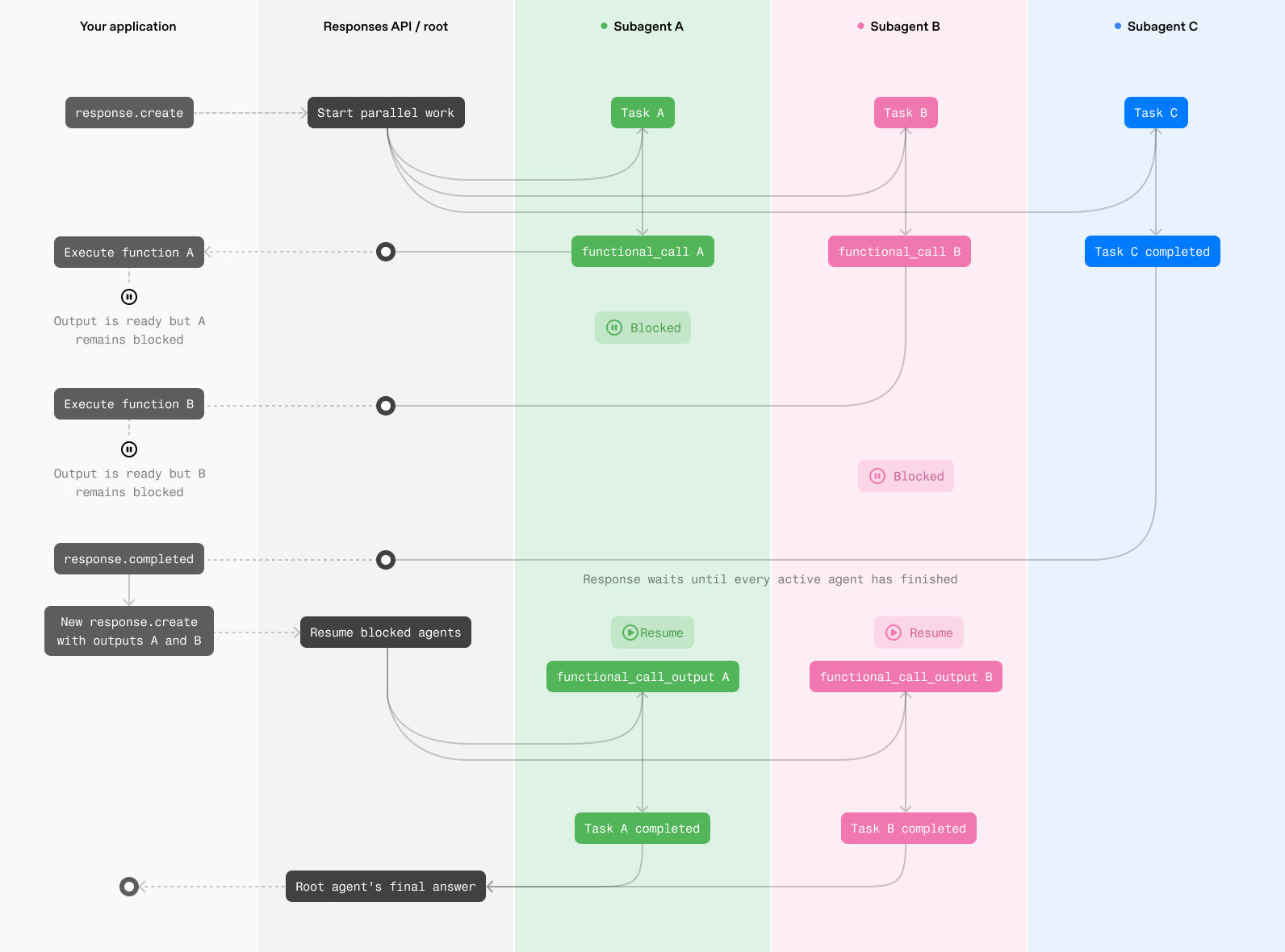
HTTP에서는 모든 활성 에이전트가 각각 작업을 마치거나 클라이언트의 함수 호출 실행을 기다리는 상태가 되면 응답이 완료됩니다. 그런 다음 애플리케이션이 대기 중인 함수 호출을 모두 실행하고 새 Responses API 요청으로 출력을 제출하면 대기 중이던 에이전트가 작업을 재개할 수 있습니다.
WebSocket에서는 진행 중인 응답이 완료될 때까지 기다릴 필요 없이 각 함수 출력이 준비되는 즉시 애플리케이션이 해당 응답에 출력을 삽입할 수 있습니다. 다른 에이전트가 작업을 계속하는 동안 대기 중이던 에이전트는 즉시 작업을 재개할 수 있습니다. 따라서 에이전트마다 작업을 마치거나 도구를 요청하는 시점이 달라도 조율에 따른 지연이 줄고 추가 요청을 주고받을 필요가 없습니다.
병렬 웹 검색처럼 서버에서 제공하는 도구를 여럿 호출하는 워크플로우나 함수 호출이 적고 요청 한 번으로 끝나는 워크플로우에는 HTTP로 충분할 수 있습니다. 대부분의 멀티 에이전트 워크플로우에서는 WebSocket을 사용하면 지연 시간이 줄고 전반적인 성능이 향상될 가능성이 큽니다.
HTTP에서 함수 호출 실행
WebSocket에서 함수 호출 실행
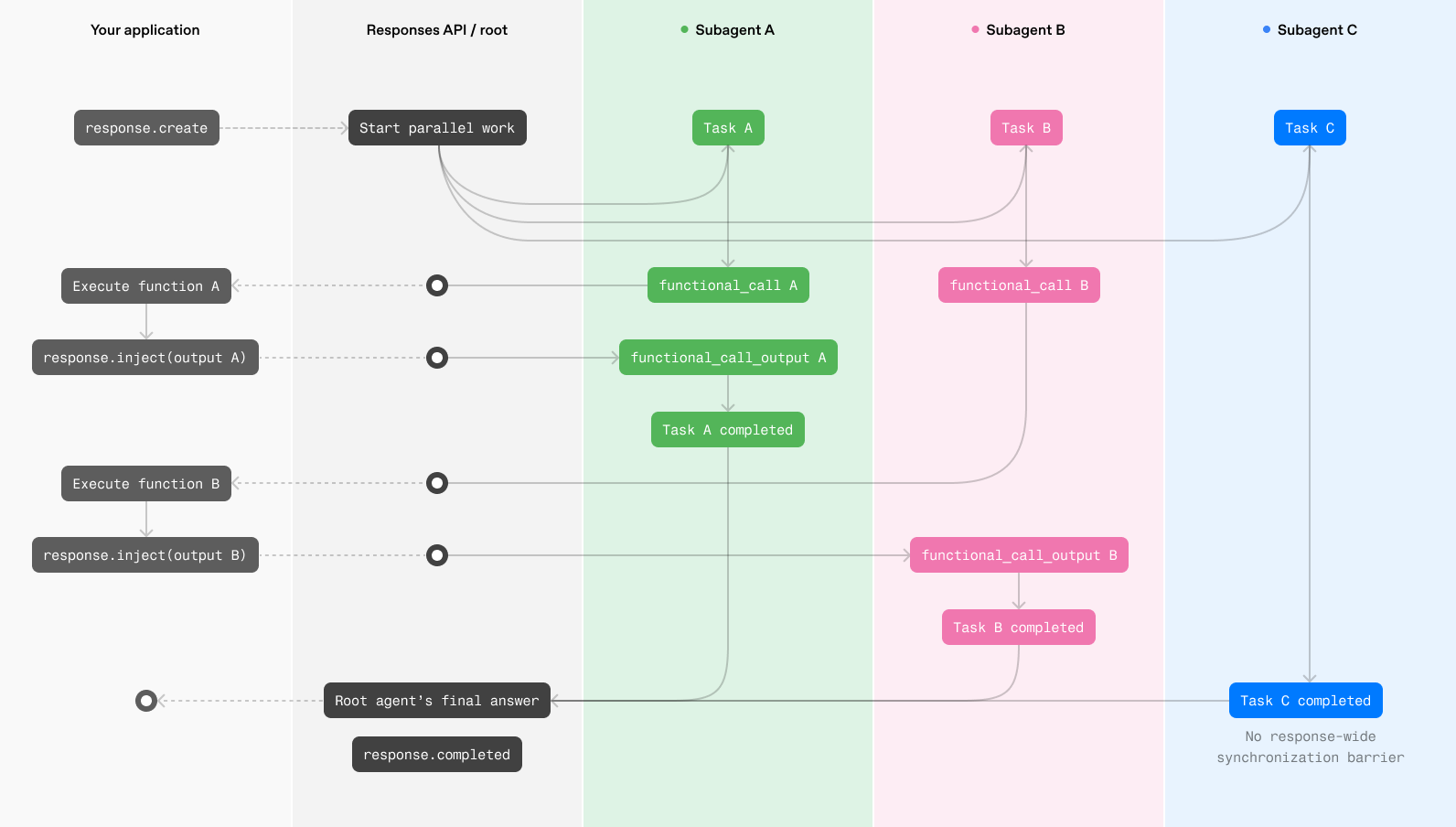
HTTP
다음 예제를 실행하려면 베타 Responses API를 제공하는 베타 SDK 빌드가 필요합니다. HTTP 스트리밍에서는 client.beta.responses.create를 호출하고 responses_multi_agent=v1을 betas 인수로 전달하세요. 이렇게 하면 베타 타입과 자동 완성을 사용할 수 있습니다. Python에서 타입 어노테이션을 추가할 때는 openai.types.beta에서 베타 응답 항목 타입을 가져오세요.
다음은 클라이언트 측 코드 예제입니다.
from __future__ import annotations
import json
import sys
from openai import OpenAI
from openai.types.beta import BetaResponseOutputItem
client = OpenAI()
ROOT = "/root"
PROPOSALS = {
"alpha": {"estimated_weeks": 6, "risk": "medium"},
"beta": {"estimated_weeks": 8, "risk": "low"},
}
tools = [
{
"type": "function",
"name": "get_proposal",
"description": "Return details for a proposal that the agents should compare.",
"parameters": {
"type": "object",
"properties": {
"proposal": {
"type": "string",
"enum": ["alpha", "beta"],
}
},
"required": ["proposal"],
"additionalProperties": False,
},
"strict": True,
}
]
history = [
{
"role": "user",
"content": (
"Use two subagents, one for proposal alpha and one for proposal beta. "
"Have each call get_proposal, then compare their findings."
),
}
]
def agent_name(item: BetaResponseOutputItem) -> str:
return item.agent.agent_name if item.agent else ROOT
def render_to_user(delta: str) -> None:
print(delta, end="", flush=True)
def log_subagent_text(agent: str, delta: str) -> None:
print(f"[{agent}] {delta}", end="", file=sys.stderr, flush=True)
def process_tool_call(name: str, arguments: str) -> str:
if name != "get_proposal":
raise ValueError(f"Unknown tool: {name}")
parsed_arguments = json.loads(arguments)
return json.dumps(PROPOSALS[parsed_arguments["proposal"]])
while True:
output_items = []
pending_calls = []
item_agents: dict[int, str] = {}
stream = client.beta.responses.create(
model="gpt-6.1-sol",
input=history,
tools=tools,
store=False,
multi_agent={
"enabled": True,
"max_concurrent_subagents": 3,
},
stream=True,
betas=["responses_multi_agent=v1"],
)
for event in stream:
if event.type == "response.output_item.added":
item_agents[event.output_index] = agent_name(event.item)
elif event.type == "response.output_text.delta":
agent = item_agents.get(event.output_index, ROOT)
if agent == ROOT:
render_to_user(event.delta)
else:
log_subagent_text(agent, event.delta)
elif event.type == "response.output_item.done":
output_items.append(event.item)
if event.item.type == "function_call":
# Handle function calls from both the root agent and subagents.
pending_calls.append(event.item)
elif event.type == "response.completed":
print(f"\nUsage: {event.response.usage}", file=sys.stderr)
break
elif event.type in {
"error",
"response.failed",
"response.incomplete",
}:
raise RuntimeError(event)
history.extend(output_items)
for call in pending_calls:
history.append(
{
"type": "function_call_output",
"call_id": call.call_id,
"output": process_tool_call(call.name, call.arguments),
}
)
if not pending_calls:
break하나 이상의 에이전트가 개발자 정의 함수를 호출하면 대기 중인 호출을 모두 실행하고, 그 출력을 담아 응답을 이어갈 요청을 생성하세요.
WebSocket
WebSocket 모드에서 에이전트가 개발자 정의 함수를 호출하면 애플리케이션에서 함수를 실행하고 response.inject 이벤트로 그 결과를 진행 중인 응답에 보내세요. 그러면 대기 중이던 에이전트가 전체 멀티 에이전트 응답이 완료될 때까지 기다리지 않고 작업을 재개할 수 있습니다.
{
"type": "response.inject",
"response_id": "resp_123",
"input": [
{
"type": "function_call_output",
"call_id": "call_123",
"output": "{\"temperature\":72}"
}
]
}유효한 response.inject 요청을 받으면 서버는 다음 두 이벤트 중 하나로 응답합니다.
response.inject.created: 서버가 입력을 검증하고 삽입 요청을 수락했습니다.response.inject.failed: 입력이 삽입되지 않았습니다.error.code를 확인하세요.
{
"type": "response.inject.created",
"sequence_number": 42,
"response_id": "resp_123"
}{
"type": "response.inject.failed",
"sequence_number": 43,
"response_id": "resp_123",
"input": [
{
"type": "function_call_output",
"call_id": "call_123",
"output": "{\"temperature\":72}"
}
],
"error": {
"code": "response_already_completed",
"message": "Response 'resp_123' has already completed."
}
}요청이 response.inject 스키마에 맞지 않으면 서버는 상태 코드가 400인 일반 오류를 보내고 WebSocket 연결을 닫습니다. 다른 이벤트를 보내기 전에 요청을 수정하고 새 WebSocket 연결을 여세요.
Python 베타 SDK에서는 client.beta.responses.connect로, TypeScript 베타 SDK에서는 ResponsesWS로 WebSocket 모드를 사용할 수 있습니다. 연결 헤더에 OpenAI-Beta: responses_multi_agent=v1을 전달하세요. HTTP 스트리밍과 달리 WebSocket 커넥터는 아직 betas 인수를 받지 않습니다.
response.created 이벤트에서 응답 ID를 저장하고 해당 응답에 보내는 모든 response.inject 이벤트에 이 ID를 포함하세요. 삽입할 항목을 보낸 뒤에는 응답이 완료되고 모든 삽입 요청에 대해 response.inject.created 또는 response.inject.failed 이벤트를 받을 때까지 WebSocket에서 이벤트를 계속 읽으세요.
from __future__ import annotations
import json
from openai import OpenAI
client = OpenAI()
PROPOSALS = {
"alpha": {"estimated_weeks": 6, "risk": "medium"},
"beta": {"estimated_weeks": 8, "risk": "low"},
}
tools = [
{
"type": "function",
"name": "get_proposal",
"description": "Return details for a proposal that the agents should compare.",
"parameters": {
"type": "object",
"properties": {
"proposal": {
"type": "string",
"enum": ["alpha", "beta"],
}
},
"required": ["proposal"],
"additionalProperties": False,
},
"strict": True,
}
]
def process_tool_call(name: str, arguments: str) -> str:
if name != "get_proposal":
raise ValueError(f"Unknown tool: {name}")
parsed_arguments = json.loads(arguments)
return json.dumps(PROPOSALS[parsed_arguments["proposal"]])
def run_multi_agent(connection):
previous_response_id: str | None = None
pending_input: list[dict[str, object]] = [{"role": "user", "content": input()}]
while pending_input:
request = {
"type": "response.create",
"model": "gpt-6.1-sol",
"store": True,
"multi_agent": {"enabled": True},
"tools": tools,
"input": pending_input,
}
if previous_response_id is not None:
request["previous_response_id"] = previous_response_id
connection.send(request)
next_input: list[dict[str, object]] = []
completed_response = None
response_id: str | None = None
pending_injections = 0
for event in connection:
event_type = event.type
if event_type == "response.created":
response_id = event.response.id
elif event_type == "response.output_item.done":
item = event.item
if item.type == "function_call":
if response_id is None:
raise RuntimeError(
"Received a function call before response.created"
)
output = {
"type": "function_call_output",
"call_id": item.call_id,
"output": process_tool_call(item.name, item.arguments),
}
pending_injections += 1
connection.send(
{
"type": "response.inject",
"response_id": response_id,
"input": [output],
}
)
elif event_type == "response.inject.created":
pending_injections -= 1
elif event_type == "response.inject.failed":
pending_injections -= 1
if event.error.code != "response_already_completed":
raise RuntimeError(event.error)
next_input.extend(item.model_dump(mode="json") for item in event.input)
elif event_type == "response.completed":
completed_response = event.response
elif event_type in {
"error",
"response.failed",
"response.incomplete",
}:
raise RuntimeError(event)
if completed_response is not None and pending_injections == 0:
break
if completed_response is None:
raise RuntimeError("Connection ended before response.completed")
if pending_injections:
raise RuntimeError("Connection ended with unacknowledged tool results")
if not next_input:
return completed_response
previous_response_id = completed_response.id
pending_input = next_input
with client.beta.responses.connect(
extra_headers={"OpenAI-Beta": "responses_multi_agent=v1"},
) as connection:
response = run_multi_agent(connection)
print(
"".join(
part.text
for item in response.output
if (
item.type == "message"
and item.agent is not None
and item.agent.agent_name == "/root"
and item.phase == "final_answer"
)
for part in item.content
if part.type == "output_text"
)
)response.inject 이벤트를 보낸 뒤에도 WebSocket에서 이벤트를 계속 읽으면서 서버의 확인 응답을 처리하세요.
response.inject.created: 진행 중인 응답에 함수 출력이 추가되었습니다. 해당 응답의 이벤트를 계속 읽으세요.response.inject.failed의 오류 코드가response_already_completed인 경우: 함수 출력을 추가하기 전에 응답이 완료되었습니다. 실패 이벤트에서 반환된input을 가져와 완료된 응답을 이어가는 새response.create요청에 담아 보내세요.response.inject.failed의 오류 코드가response_not_found인 경우: 서버가response_id에 해당하는 응답을 찾지 못했습니다.response.created에서 받은 ID를 사용하고 있는지 확인하세요.
멀티 에이전트 실행 한 번에 여러 Responses API 요청이 필요할 수 있습니다. HTTP에서는 에이전트가 개발자 정의 함수를 호출하면 애플리케이션이 함수를 실행한 뒤 새 response.create 호출로 출력을 제출합니다. WebSocket에서는 애플리케이션이 진행 중인 응답에 함수 출력을 직접 삽입합니다.
멀티 에이전트의 새 출력 항목
멀티 에이전트 응답에는 다음 세 가지 출력 항목 타입이 추가로 포함될 수 있습니다.
multi_agent_call:spawn_agent처럼 서버에서 실행되는 멀티 에이전트 동작을 기록합니다.multi_agent_call_output: 서버에서 실행한 동작의 결과를 담습니다.agent_message: 한 에이전트가 다른 에이전트에 보내는 암호화된 메시지를 전달합니다.
call_id 필드는 각 multi_agent_call을 해당 multi_agent_call_output과 연결합니다.
각 항목에는 agent 속성도 포함됩니다. agent_message에서 agent.agent_name은 메시지를 받는 에이전트를 식별합니다. author와 recipient를 사용해 어느 에이전트가 어느 에이전트에 메시지를 보냈는지 추적하세요.
애플리케이션이 multi_agent_call을 받으면 함수 호출로 실행하거나 결과를 보내지 마세요. Responses API가 서버에서 해당 동작을 실행하고 그에 대응하는 multi_agent_call_output을 반환합니다. 애플리케이션에서 재생이나 추적에 이 항목들이 필요하면 두 항목을 모두 보존하세요.
[
{
"type": "multi_agent_call",
"id": "mac_123",
"call_id": "call_spawn_a",
"action": "spawn_agent",
"arguments": "{\"task_name\":\"agent_a\",\"fork_turns\":\"all\",\"message\":\"enc_...\"}",
"agent": { "agent_name": "/root" }
},
{
"type": "multi_agent_call_output",
"id": "maco_123",
"call_id": "call_spawn_a",
"action": "spawn_agent",
"output": [
{
"type": "output_text",
"text": "{\"task_name\":\"/root/agent_a\"}",
"annotations": [],
"logprobs": []
}
],
"agent": { "agent_name": "/root" }
},
{
"type": "agent_message",
"id": "amsg_123",
"author": "/root/agent_a",
"recipient": "/root",
"content": [
{
"type": "encrypted_content",
"encrypted_content": "enc_..."
}
],
"agent": { "agent_name": "/root" }
}
]특정 에이전트에 귀속되는 SSE 이벤트에는 최상위 agent 속성이 포함됩니다. agent_message 이벤트에서 agent.agent_name은 메시지를 받는 에이전트를 식별합니다. response.created와 response.completed 같은 응답 수명 주기 이벤트는 응답 전체의 상태를 나타내므로 개별 에이전트를 나타내는 agent 속성이 없습니다.
{
"type": "response.output_item.done",
"agent": { "agent_name": "/root" },
"item": {
"type": "agent_message",
"id": "amsg_123",
"author": "/root/agent_a",
"recipient": "/root",
"content": [
{
"type": "encrypted_content",
"encrypted_content": "enc_..."
}
],
"agent": { "agent_name": "/root" }
}
}제한 사항
- 컨텍스트 압축
- 멀티 에이전트를 활성화하면
/responses/compact엔드포인트는 지원되지 않습니다. multi_agent.enabled를true로 설정하면 요청에서context_management를 별도로 설정하지 않아도 서버 측 자동 컨텍스트 압축이 활성화됩니다. 루트 에이전트와 각 하위 에이전트의 컨텍스트는 개별적으로 압축되므로 서로 분리된 상태로 유지됩니다.compact_threshold를 재정의하려면 요청에context_management.compact_threshold를 명시하세요.
- 멀티 에이전트를 활성화하면
reasoning.summary는 멀티 에이전트를 활성화한 경우 지원되지 않습니다.max_tool_calls는 멀티 에이전트를 활성화한 경우 지원되지 않습니다.max_concurrent_subagents의 기본값이자 권장값은3입니다.
프롬프트 작성 지침
멀티 에이전트를 활성화하면 시스템이 다음 지침을 새 개발자 메시지로 루트 에이전트와 하위 에이전트에 자동으로 추가합니다. 이 지침은 수정하거나 삭제할 수 없습니다. 자체 개발자 지침은 자동으로 추가되는 지침을 보완하도록 작성하세요.
루트 에이전트
You are `/root`, the primary agent in a team of agents collaborating to fulfill the user's goals.

At the start of your turn, you are the active agent.
You can spawn sub-agents to handle subtasks, and those sub-agents can spawn their own sub-agents.
All agents in the team, including the agents that you can assign tasks to, are equally intelligent and capable, and have access to the same set of tools.

You can use `spawn_agent` to create a new agent, `followup_task` to give an existing agent a new task and trigger a turn, and `send_message` to pass a message to a running agent without triggering a turn.
Child agents can also spawn their own sub-agents.
You can decide how much context you want to propagate to your sub-agents with the `fork_turns` parameter.

You will receive messages in the form:
```
Message Type: MESSAGE | FINAL_ANSWER
Task name: <recipient>
Sender: <author>
Payload:
<payload text>
```
They may be addressed as to=/root

There are {max_concurrent_subagents + 1} available concurrency slots, meaning that up to {max_concurrent_subagents + 1} agents can be active at once, including you.
하위 에이전트
You are an agent in a team of agents collaborating to complete a task.

You can spawn sub-agents to handle subtasks, and those sub-agents can spawn their own sub-agents. All agents in the team, including the agents that you can assign tasks to, are equally intelligent and capable, and have access to the same set of tools.

You can use `spawn_agent` to create a new agent, `followup_task` to give an existing agent a new task and trigger a turn, and `send_message` to pass a message to a running agent.
Child agents can also spawn their own sub-agents.

When you provide a response in the final channel, that content is immediately delivered back to your parent agent.

You will receive messages in the form:
```
Message Type: NEW_TASK | MESSAGE | FINAL_ANSWER
Task name: <recipient>
Sender: <author>
Payload:
<payload text>
```
You may also see them addressed as to=/root/..., which indicates your identity is /root/...

There are {max_concurrent_subagents + 1} available concurrency slots, meaning that up to {max_concurrent_subagents + 1} agents can be active at once, including you.