Den vollständigen Index der Dokumentation findest du in llms.txt. Die Markdown-Version einer Dokumentationsseite erhältst du, indem du
.md an die URL der Seite anhängst.
Erfahre, wie Reasoning-Modelle funktionieren und wie du sie gezielt einsetzt.
Responses
Reasoning-Modelle verwenden interne Reasoning-Token, bevor sie eine Antwort ausgeben. So kann das Modell planen, Tools gezielt einsetzen, Alternativen prüfen, bei Mehrdeutigkeit einen Lösungsweg finden und schwierigere Aufgaben in mehreren Schritten lösen. Reasoning-Modelle eignen sich besonders für komplexe Probleme, Programmieraufgaben, wissenschaftliches Reasoning und mehrstufige Workflows mit Agenten. Sie sind auch die besten Modelle für Codex CLI, unseren schlanken Programmieragenten.
Beginne für die meisten Reasoning-Aufgaben mit gpt-6-astra. Für geringere Kosten kommt gpt-5.6-terra infrage. Die niedrigsten Kosten und die geringste Latenz bietet gpt-5.6-luna. Wenn du ein Modell der Familie GPT-5.6 oder GPT-6 verwendest, findest du im Abschnitt Reasoning-Modus Informationen zur Option pro.
Reasoning-Modelle arbeiten mit der Responses API besser. Die Chat Completions API wird weiterhin unterstützt. Mit der Responses API löst das Modell Aufgaben jedoch besser und erreicht eine höhere Leistung.
Einstieg in das Reasoning
Rufe die Responses API auf und gib das Reasoning-Modell und den Reasoning-Aufwand an:
Ein Reasoning-Modell in der Responses API verwenden
Python
1
2
3
4
5
6
7
8
9
10
11
12
13
14
15
16
17
18
19
20
21import OpenAI from "openai";const openai = new OpenAI();const prompt = `Write a bash script that takes a matrix represented as a string withformat '[1,2],[3,4],[5,6]' and prints the transpose in the same format.`;const response = await openai.responses.create({ model: "gpt-6-astra", reasoning: { effort: "low" }, input: [ { role: "user", content: prompt, }, ],});console.log(response.output_text);
1
2
3
4
5
6
7
8
9
10
11
12
13
14
15
16from openai import OpenAIclient = OpenAI()prompt ="""Write a bash script that takes a matrix represented as a string withformat '[1,2],[3,4],[5,6]' and prints the transpose in the same format."""response = client.responses.create(model="gpt-6-astra",reasoning={"effort": "low"},input=[{"role": "user", "content": prompt}],)print(response.output_text)
1
2
3
4
5
6
7
8
9
10
11
12
13
14
15
16
17
18
19
20
21
22
23
24
25
26
27
28
29
30package mainimport ( "context" "fmt" "github.com/openai/openai-go/v3" "github.com/openai/openai-go/v3/responses")func main() { client := openai.NewClient() prompt := `Write a bash script that takes a matrix represented as a string withformat '[1,2],[3,4],[5,6]' and prints the transpose in the same format.` response, err := client.Responses.New(context.Background(), responses.ResponseNewParams{ Model: "gpt-6-astra", Reasoning: responses.ReasoningParam{ Effort: responses.ReasoningEffortLow, }, Input: responses.ResponseNewParamsInputUnion{ OfString: openai.String(prompt), }, }) if err != nil { panic(err) } fmt.Println(response.OutputText())}
1
2
3
4
5
6
7
8
9
10
11
12
13
14
15
16
17
18
19
20
21
22
23
24
25import com.openai.client.OpenAIClient;import com.openai.client.okhttp.OpenAIOkHttpClient;import com.openai.models.Reasoning;import com.openai.models.ReasoningEffort;import com.openai.models.responses.ResponseCreateParams;String prompt = """ Write a bash script that takes a matrix represented as a string with format '[1,2],[3,4],[5,6]' and prints the transpose in the same format. """ .strip();ResponseCreateParams params = ResponseCreateParams.builder() .model("gpt-6-astra") .input(prompt) .reasoning(Reasoning.builder().effort(ReasoningEffort.LOW).build()) .build();client.responses().create(params).output().stream() .flatMap(item -> item.message().stream()) .flatMap(message -> message.content().stream()) .flatMap(content -> content.outputText().stream()) .forEach(text -> System.out.println(text.text()));
1
2
3
4
5
6
7
8
9
10
11
12
13
14
15
16
17
18
19
20
21
22
23
24using OpenAI.Responses;#pragma warning disable OPENAI001string key = Environment.GetEnvironmentVariable("OPENAI_API_KEY")!;ResponsesClient client = new(key);string prompt = """ Write a bash script that takes a matrix represented as a string with format '[1,2],[3,4],[5,6]' and prints the transpose in the same format. """;CreateResponseOptions options = new(){ Model = "gpt-6-astra", ReasoningOptions = new ResponseReasoningOptions { ReasoningEffortLevel = ResponseReasoningEffortLevel.Low, },};options.InputItems.Add(ResponseItem.CreateUserMessageItem(prompt));ResponseResult response = await client.CreateResponseAsync(options);Console.WriteLine(response.GetOutputText());
1
2
3
4
5
6
7
8
9
10
11
12
13
14
15require "openai"client = OpenAI::Client.newprompt = <<~PROMPT Write a bash script that takes a matrix represented as a string with format '[1,2],[3,4],[5,6]' and prints the transpose in the same format.PROMPTresponse = client.responses.create( model: "gpt-6-astra", reasoning: { effort: :low }, input: prompt)puts(response.output_text)
1
2
3
4
5
6
7
8
9
10
11
12
13curl https://api.openai.com/v1/responses \
  -H "Content-Type: application/json" \
  -H "Authorization: Bearer $OPENAI_API_KEY" \
  -d '{
    "model": "gpt-6-astra",
    "reasoning": {"effort": "low"},
    "input": [
      {
        "role": "user",
        "content": "Write a bash script that takes a matrix represented as a string with format \"[1,2],[3,4],[5,6]\" and prints the transpose in the same format."
      }
    ]
  }'
Reasoning-Aufwand
Der Parameter reasoning.effort gibt dem Modell vor, wie gründlich es eine Aufgabe durchdenken soll.
Welche Werte unterstützt werden, hängt vom Modell ab. Mögliche Werte sind none, minimal, low, medium, high, xhigh und max. Bei geringerem Aufwand antwortet das Modell in der Regel schneller und verbraucht weniger Token. Bei höherem Aufwand durchdenkt es die Aufgabe gründlicher, um bessere Antworten zu liefern. Bei allen Aufwandsstufen passen die Modelle ihr Reasoning an die Aufgabe an. Für einfache Aufgaben verwenden sie weniger Token, komplexe Aufgaben durchdenken sie intensiver.
GPT-6 Astra unterstützt den Reasoning-Aufwand none nicht. Setzt du reasoning.effort (Responses) oder reasoning_effort (Chat Completions) auf none, gibt die API den HTTP-Statuscode 400 zurück. GPT-6.1 Sol unterstützt weder none noch minimal und verwendet standardmäßig medium.
Verwende für Funktionsaufrufe die Responses API. Chat Completions unterstützt mit GPT-6 Astra und GPT-6.1 Sol keine Funktionsaufrufe.
Auch die Standardwerte hängen vom Modell ab. gpt-5.5 verwendet standardmäßig den Reasoning-Aufwand medium. Das ist für gpt-5.5 der beste Ausgangspunkt, um Qualität, Zuverlässigkeit und Leistung in Einklang zu bringen.
Aufwand
Besonders geeignet für
none
Zeitkritische Aufgaben, die weder von Reasoning noch von verketteten Tool-Aufrufen profitieren. Für latenzempfindliche Anwendungen mit gpt-5.5 empfehlen wir, zunächst low auszuprobieren und bei Bedarf auf none zu wechseln.
Typische Anwendungen sind Sprachinteraktion, schneller Informationsabruf und Klassifikation.
low
Effizientes Reasoning bei leicht erhöhter Latenz. Ideal, wenn das Modell Tools verwenden, planen, suchen oder mehrstufige Entscheidungen treffen soll und es zugleich auf Geschwindigkeit und Kosten ankommt.
Typische Anwendungen sind Datenanalyse, das Erstellen von Entwürfen, die Umsetzung konkreter Programmieraufgaben sowie Workflows im Kundensupport oder mit Chat-Assistenten.
medium
Aufgaben, bei denen Qualität und Zuverlässigkeit zählen und die Planung, komplexes Reasoning und Urteilsvermögen erfordern. Diese Standardeinstellung für die meisten Aufgaben bietet auf der Pareto-Kurve ein ausgewogenes Verhältnis von Latenz, Leistung und Kosten.
Typische Anwendungen sind agentisches Programmieren, Recherche, die Arbeit mit Tabellen und Präsentationsfolien sowie das Delegieren längerfristiger Aufgaben.
high
Anspruchsvolles Reasoning, komplexe Fehlersuche, detaillierte Planung und besonders wichtige Aufgaben, bei denen Qualität und Modellintelligenz mehr zählen als Latenz. Empfohlen für komplexe Workflows und Aufgaben mit Agenten.
Typische Anwendungen sind agentisches Programmieren, langfristige Forschung und Wissensarbeit. Prüfe je nach Komplexität der Aufgabe sowohl medium als auch high.
xhigh
Deep Research, asynchrone Workflows und Aufgaben mit Agenten, die lange Laufzeiten erfordern. Verwende diese Stufe nur, wenn deine Evaluierungen einen klaren Vorteil zeigen, der die zusätzliche Latenz und die höheren Kosten rechtfertigt.
Typische Anwendungen sind Sicherheitsprüfungen und Codeprüfungen, produktiveres Arbeiten in Unternehmen, vertiefte Recherche und anspruchsvolle Programmierabläufe.
max
Maximaler Reasoning-Aufwand für deine komplexesten Aufgaben. Wenn du derzeit xhigh verwendest, prüfe, ob max bessere Ergebnisse liefert.
Wenn in einer latenzempfindlichen Anwendung das erste sichtbare Token früher erscheinen soll, bitte das Modell, vor dem vertieften Reasoning eine kurze Einleitung auszugeben.
Manche Modelle unterstützen nur einen Teil dieser Werte. Prüfe daher die jeweilige Modellseite, bevor du eine Einstellung wählst.
Reasoning-Modus
Modelle der Familien GPT-5.6 und GPT-6 unterstützen in der Responses API die Reasoning-Modi standard und pro. Standardmäßig gilt standard. Setze reasoning.mode auf pro, wenn eine schwierige Aufgabe mehr Rechenarbeit vom Modell erfordert und eine höhere Latenz sowie ein höherer Token-Verbrauch vertretbar sind.
Reasoning-Modus und Reasoning-Aufwand lassen sich unabhängig voneinander einstellen. Mit dem Modus wählst du zwischen Standard- und Pro-Ausführung. reasoning.effort steuert, wie gründlich das Modell die Aufgabe im jeweiligen Modus durchdenkt. Wenn du reasoning.effort weglässt, verwendet GPT-5.6 in beiden Modi standardmäßig medium. GPT-6.1 Sol, GPT-6 Sol und GPT-6 Luna verwenden ebenfalls standardmäßig den Reasoning-Aufwand medium.
Im Pro-Modus wird die gesamte Rechenarbeit des Modells für die endgültige Antwort zusammengezählt. Die dabei anfallenden Token werden zu den regulären Token-Preisen des gewählten Modells abgerechnet. Im Pro-Modus leistet das Modell mehr Rechenarbeit als im Standardmodus. Dadurch steigen Token-Verbrauch und Kosten. Für bestehende Pro-Modell-IDs gelten weiterhin das bisherige Verhalten und die bisherigen Preise.
So funktioniert Reasoning
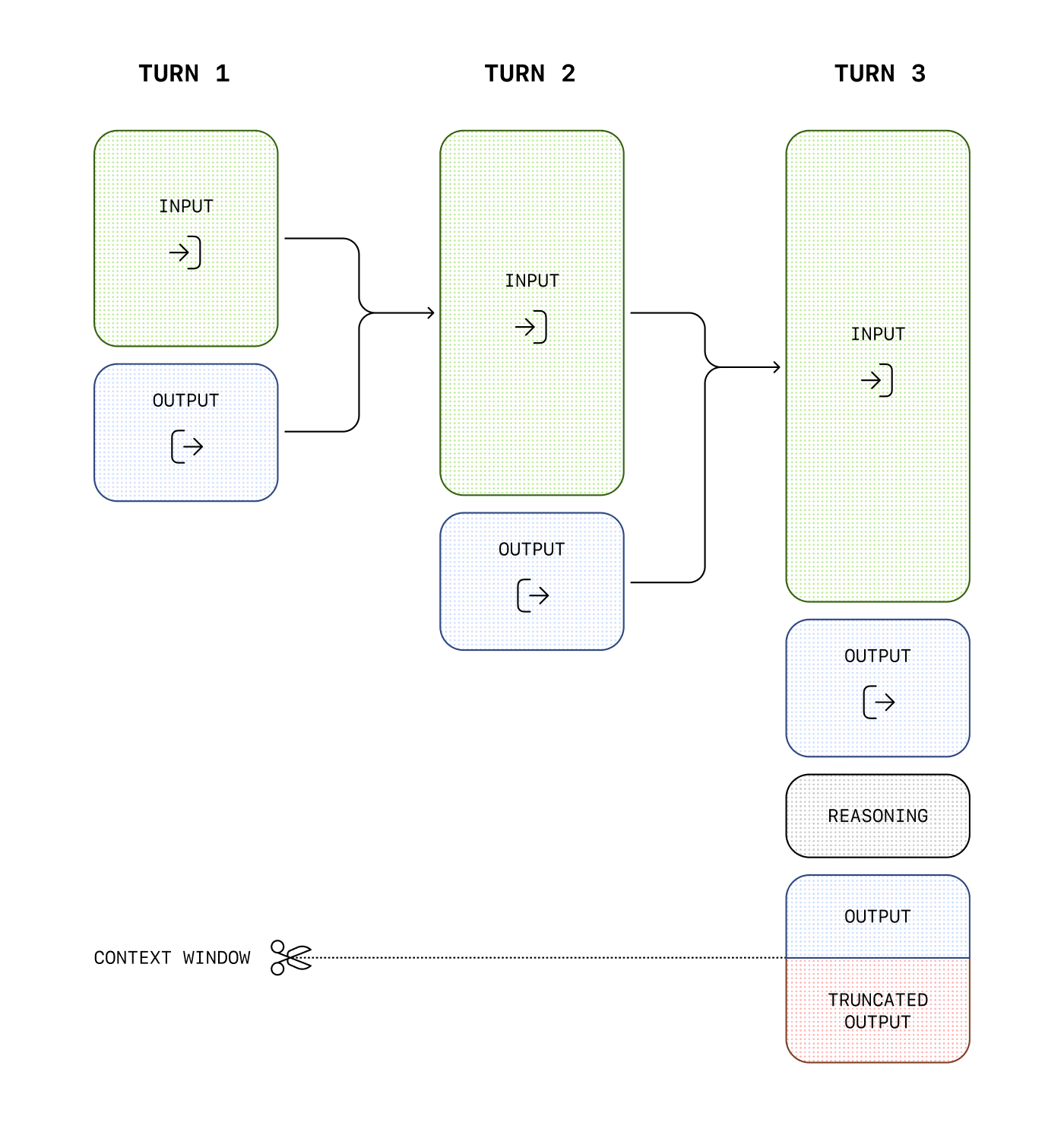
Reasoning-Modelle verwenden neben Eingabe- und Ausgabe-Token auch Reasoning-Token. Damit „denken“ die Modelle nach. Sie zerlegen den Prompt in Teilaufgaben und prüfen verschiedene Ansätze für eine Antwort. Unsere Reasoning-Modelle wie gpt-5.5 und gpt-5.4 können zwischen Reasoning und Ausgabe wechseln. Das Modell kann sowohl vor als auch zwischen Denkphasen sichtbare Ausgabe-Token erzeugen und zwischen Tool-Aufrufen weiterdenken.
Modelle, die vor GPT-5.6 erschienen sind, übernehmen in Gesprächen mit mehreren Schritten standardmäßig die Eingabe- und Ausgabe-Token jedes Schritts. Das Reasoning früherer Gesprächsrunden beziehen sie bei der nächsten Generierung nicht ein. Modelle der Familie GPT-5.6 beziehen verfügbares Reasoning aus früheren Runden standardmäßig ein. Bei unterstützten Modellen kannst du mit reasoning.context zwischen diesen beiden Verhaltensweisen wählen.
Reasoning-Token sind über die API nicht sichtbar. Sie belegen dennoch Platz im Kontextfenster des Modells und werden als Ausgabe-Token abgerechnet.
Kosten steuern
Um die Kosten bei Reasoning-Modellen zu steuern, kannst du die Gesamtzahl der vom Modell erzeugten Token mit dem Parameter max_output_tokens begrenzen. Das Limit umfasst Reasoning-Token, sichtbare Ausgabe-Token und unsichtbare Formatierungs-Token. Wie erzeugte Token beim Verbrauch und bei den Ausgabelimits berücksichtigt werden, erfährst du im Abschnitt zur Zählung der Ausgabe-Token.
Das Kontextfenster verwalten
Achte beim Erstellen von Antworten darauf, dass im Kontextfenster genügend Platz für Reasoning-Token bleibt. Je nach Komplexität des Problems können die Modelle wenige Hundert bis mehrere Zehntausend Reasoning-Token erzeugen. Die genaue Anzahl findest du in den Nutzungsdaten des Antwortobjekts unter output_tokens_details:
Die Größe des Kontextfensters findest du in der Modellreferenz. Sie kann je nach Modell-Snapshot variieren.
Platz für Reasoning einplanen
Erreichen die erzeugten Token die Grenze des Kontextfensters oder den von dir festgelegten Wert für max_output_tokens, erhältst du eine Antwort mit dem status-Wert incomplete. In incomplete_details hat reason dann den Wert max_output_tokens. Das kann passieren, bevor das Modell sichtbare Ausgabe-Token erzeugt. In diesem Fall können Kosten für Eingabe- und Reasoning-Token anfallen, ohne dass du eine sichtbare Antwort erhältst.
Um das zu vermeiden, plane genügend Platz im Kontextfenster ein oder erhöhe den Wert für max_output_tokens. OpenAI empfiehlt, bei den ersten Versuchen mit diesen Modellen mindestens 25.000 Token für Reasoning und Ausgaben zu reservieren. Sobald du einschätzen kannst, wie viele Reasoning-Token deine Prompts erfordern, kannst du diesen Puffer anpassen.
Unvollständige Antworten verarbeiten
Python
1
2
3
4
5
6
7
8
9
10
11
12
13
14
15
16
17
18
19
20
21
22
23
24
25
26
27
28
29
30
31
32import OpenAI from "openai";const openai = new OpenAI();const prompt = `Write a bash script that takes a matrix represented as a string withformat '[1,2],[3,4],[5,6]' and prints the transpose in the same format.`;const response = await openai.responses.create({ model: "gpt-6-astra", reasoning: { effort: "medium" }, input: [ { role: "user", content: prompt, }, ], max_output_tokens: 300,});if ( response.status === "incomplete" && response.incomplete_details?.reason === "max_output_tokens") { console.log("Ran out of tokens"); if (response.output_text?.length > 0) { console.log("Partial output:", response.output_text); } else { console.log("Ran out of tokens during reasoning"); }}
1
2
3
4
5
6
7
8
9
10
11
12
13
14
15
16
17
18
19
20
21
22
23
24
25from openai import OpenAIclient = OpenAI()prompt ="""Write a bash script that takes a matrix represented as a string withformat '[1,2],[3,4],[5,6]' and prints the transpose in the same format."""response = client.responses.create(model="gpt-6-astra",reasoning={"effort": "medium"},input=[{"role": "user", "content": prompt}],max_output_tokens=300,)if ( response.status =="incomplete"and response.incomplete_details.reason =="max_output_tokens"):print("Ran out of tokens")if response.output_text:print("Partial output:", response.output_text)else:print("Ran out of tokens during reasoning")
1
2
3
4
5
6
7
8
9
10
11
12
13
14
15
16
17
18
19
20
21
22
23
24
25
26
27
28
29
30
31
32
33
34
35
36package mainimport ( "context" "fmt" "github.com/openai/openai-go/v3" "github.com/openai/openai-go/v3/responses")func main() { client := openai.NewClient() prompt := `Write a bash script that takes a matrix represented as a string withformat '[1,2],[3,4],[5,6]' and prints the transpose in the same format.` response, err := client.Responses.New(context.Background(), responses.ResponseNewParams{ Model: "gpt-6-astra", MaxOutputTokens: openai.Int(300), Reasoning: responses.ReasoningParam{ Effort: responses.ReasoningEffortMedium, }, Input: responses.ResponseNewParamsInputUnion{ OfString: openai.String(prompt), }, }) if err != nil { panic(err) } if response.Status == responses.ResponseStatusIncomplete { fmt.Println("Ran out of tokens") if text := response.OutputText(); text != "" { fmt.Println("Partial output:", text) } }}
1
2
3
4
5
6
7
8
9
10
11
12
13
14
15
16
17
18
19
20
21
22
23
24
25
26
27
28
29
30
31
32import com.openai.client.OpenAIClient;import com.openai.client.okhttp.OpenAIOkHttpClient;import com.openai.models.Reasoning;import com.openai.models.ReasoningEffort;import com.openai.models.responses.Response;import com.openai.models.responses.ResponseCreateParams;import com.openai.models.responses.ResponseStatus;ResponseCreateParams params = ResponseCreateParams.builder() .model("gpt-6-astra") .input( "Write a bash script that takes a matrix represented as a string with format " + "'[1,2],[3,4],[5,6]' and prints the transpose in the same format.") .maxOutputTokens(300) .reasoning(Reasoning.builder().effort(ReasoningEffort.MEDIUM).build()) .build();var response = client.responses().create(params);if (response.status().filter(ResponseStatus.INCOMPLETE::equals).isPresent() && response .incompleteDetails() .flatMap(Response.IncompleteDetails::reason) .filter(Response.IncompleteDetails.Reason.MAX_OUTPUT_TOKENS::equals) .isPresent()) { System.out.println("Ran out of tokens"); response.output().stream() .flatMap(item -> item.message().stream()) .flatMap(message -> message.content().stream()) .flatMap(content -> content.outputText().stream()) .forEach(text -> System.out.println("Partial output: " + text.text()));}
1
2
3
4
5
6
7
8
9
10
11
12
13
14
15
16
17
18
19
20
21
22
23
24
25
26
27
28
29
30
31
32
33
34
35
36
37
38
39
40
41
42
43
44
45
46
47
48using OpenAI.Responses;#pragma warning disable OPENAI001string key = Environment.GetEnvironmentVariable("OPENAI_API_KEY")!;ResponsesClient client = new(key);CreateResponseOptions options = new(){ Model = "gpt-6-astra", MaxOutputTokenCount = 300, ReasoningOptions = new ResponseReasoningOptions { ReasoningEffortLevel = ResponseReasoningEffortLevel.Medium, },};options.InputItems.Add( ResponseItem.CreateUserMessageItem("Write a bash script that transposes a matrix."));ResponseResult response = await client.CreateResponseAsync(options);if ( response.Status == ResponseStatus.Incomplete && response.IncompleteStatusDetails?.Reason == ResponseIncompleteStatusReason.MaxOutputTokens){ Console.WriteLine("The response ended before all output tokens were generated."); string partialOutput = response.GetOutputText(); Console.WriteLine( string.IsNullOrWhiteSpace(partialOutput) ? "Ran out of tokens during reasoning." : $"Partial output: {partialOutput}" );}else if ( response.Status == ResponseStatus.Incomplete && response.IncompleteStatusDetails?.Reason == ResponseIncompleteStatusReason.ContentFilter){ Console.WriteLine("The response was interrupted by the content filter.");}else if (response.Status == ResponseStatus.Completed){ Console.WriteLine(response.GetOutputText());}else{ throw new InvalidOperationException($"The response ended with status: {response.Status}");}
1
2
3
4
5
6
7
8
9
10
11
12
13
14
15
16
17
18
19require "openai"client = OpenAI::Client.newprompt = <<~PROMPT Write a bash script that takes a matrix represented as a string with format '[1,2],[3,4],[5,6]' and prints the transpose in the same format.PROMPTresponse = client.responses.create( model: "gpt-6-astra", max_output_tokens: 300, reasoning: { effort: :medium }, input: prompt)if response.status == OpenAI::Responses::ResponseStatus::INCOMPLETE puts("Ran out of tokens") puts("Partial output: #{response.output_text}") unless response.output_text.empty?end
Reasoning über mehrere Aufrufe hinweg beibehalten
Gesprächszustand und Reasoning-Zustand erfüllen unterschiedliche Zwecke. Wenn du Nachrichten bei weiteren Aufrufen mitgibst, erhält das Modell den sichtbaren Gesprächsverlauf. Unterstützte Modelle können mithilfe des beibehaltenen Reasoning-Zustands außerdem kompatible Reasoning-Elemente aus früheren Runden in den nächsten Kontext übernehmen.
So kann das Modell an seine bisherigen Überlegungen anknüpfen. Die internen Denkschritte bleiben verborgen. Der Inhalt der Reasoning-Elemente lässt sich nicht einsehen, und die API gibt den zugehörigen Text nicht zurück. Mit reasoning.context steuerst du, welche verfügbaren Reasoning-Elemente das Modell verwenden kann:
Die Modellfamilie GPT-5.6 unterstützt all_turns und verwendet diesen Wert standardmäßig. Frühere Modelle verwenden standardmäßig current_turn. GPT-6.1 Sol unterstützt ebenfalls all_turns. Lass reasoning.context weg oder setze den Parameter auf auto, um den Standardwert des gewählten Modells zu verwenden.
Wert
Verhalten
auto
Verwendet den Standardwert des gewählten Modells. Wenn du reasoning.context weglässt, hat das dieselbe Wirkung wie auto.
current_turn
Stellt das Reasoning der aktuellen Gesprächsrunde bereit. Reasoning aus früheren Runden fließt bei der nächsten Generierung nicht ein.
all_turns
Bezieht verfügbare, kompatible Reasoning-Elemente aus früheren Gesprächsrunden bei der nächsten Generierung ein. Modelle der Familie GPT-5.6 und GPT-6.1 Sol unterstützen diesen Wert.
Das Feld reasoning.context in der Antwort enthält den tatsächlich verwendeten Modus, entweder current_turn oder all_turns. Prüfe das Feld bei jeder Antwort, um festzustellen, welchen Modus das Modell verwendet hat. Die Einstellung erzeugt keine zusätzlichen Reasoning-Elemente.
all_turns wirkt sich nur aus, wenn die Anfrage Zugriff auf frühere Antwortelemente hat. Verwende previous_response_id, ordne die Antwort einem Gespräch zu oder übergib den vollständigen Antwortverlauf manuell erneut. Bei der ersten Anfrage verhalten sich current_turn und all_turns gleich, da noch kein früheres Reasoning vorliegt.
Das Modell kann früheres Reasoning nur innerhalb derselben Modellfamilie wiederverwenden. Beispielsweise können gpt-5.6-sol, gpt-5.6-terra und gpt-5.6-luna das Reasoning der jeweils anderen Modelle verwenden. Zwischen den Familien GPT-5.6 und GPT-5.5 lässt es sich hingegen nicht übertragen.
Wenn du die Modellfamilie wechselst, lässt die API inkompatibles Reasoning im Modellkontext weg, auch wenn reasoning.context auf all_turns gesetzt ist.
Reasoning mit gespeicherten Antworten fortsetzen
Am einfachsten behältst du den Zustand zwischen Aufrufen mit previous_response_id bei:
Reasoning aus einer früheren Antwort beibehalten
Python
1
2
3
4
5
6
7
8
9
10
11
12
13
14
15
16
17
18import OpenAI from "openai";const client = new OpenAI();const first = await client.responses.create({ model: "gpt-6.1-sol", input: "Inspect this repository and identify the likely bug.", reasoning: { context: "current_turn" },});const second = await client.responses.create({ model: "gpt-6.1-sol", previous_response_id: first.id, input: "Now patch the bug and explain the change.", reasoning: { context: "all_turns" },});console.log(second.output_text);
1
2
3
4
5
6
7
8
9
10
11
12
13
14
15
16
17
18
19from openai import OpenAIclient = OpenAI()model ="gpt-6.1-sol"first = client.responses.create(model=model,input="Inspect this repository and identify the likely bug.",reasoning={"context": "current_turn"},)second = client.responses.create(model=model,previous_response_id=first.id,input="Now patch the bug and explain the change.",reasoning={"context": "all_turns"},)print(second.output_text)
1
2
3
4
5
6
7
8
9
10
11
12
13
14
15
16
17
18require "openai"client = OpenAI::Client.newfirst = client.responses.create( model: "gpt-6.1-sol", input: "Inspect this repository and identify the likely bug.", reasoning: { context: :current_turn })second = client.responses.create( model: "gpt-6.1-sol", previous_response_id: first.id, input: "Now patch the bug and explain the change.", reasoning: { context: :all_turns })puts(second.output_text)
Verwende current_turn, wenn du ältere Antwortelemente erneut übergibst, die das Modell nicht mehr benötigt. Die zugehörigen Reasoning-Elemente können in den API-Anfragedaten bleiben, damit der Verlauf vollständig bleibt. Der Dienst bezieht sie bei der neuen Generierung nicht ein. Bei länger laufenden Workflows kann das den tatsächlich verwendeten Kontext verkleinern.
Reasoning ohne gespeicherte Antworten beibehalten
Wenn du eine Antwort im zustandslosen Modus erstellst, enthalten die Reasoning-Elemente im output-Array der Antwort standardmäßig die Eigenschaft encrypted_content. Der zustandslose Modus gilt, wenn store auf false gesetzt ist oder deine Organisation die Einstellung „keine Datenaufbewahrung“ (ZDR) verwendet. Aus Kompatibilitätsgründen akzeptiert die API weiterhin den früher verwendeten Wert reasoning.encrypted_content in include. Die Angabe ist aber nicht erforderlich.
Die folgende Anfrage liefert verschlüsselte Reasoning-Inhalte, ohne include anzugeben:
1
2
3
4
5
6
7
8
9
10curlhttps://api.openai.com/v1/responses\-H"Content-Type: application/json"\-H"Authorization: Bearer $OPENAI_API_KEY"\-d'{ "model": "gpt-6-astra", "store": false, "reasoning": {"effort": "medium"}, "input": "What is the weather like today?", "tools": [ ... function config here ... ] }'
Die Reasoning-Elemente im output-Array enthalten die Eigenschaft encrypted_content mit verschlüsselten Reasoning-Token, die du bei späteren Aufrufen mitgeben kannst.
Um all_turns mit store: false zu verwenden, behalte jedes Ausgabeelement bei, hänge die nächste Nutzernachricht an und übergib den vollständigen Verlauf erneut:
Reasoning beibehalten, ohne Antworten zu speichern
Python
1
2
3
4
5
6
7
8
9
10
11
12
13
14
15
16
17
18
19
20
21
22
23
24
25
26
27
28
29
30
31
32
33
34import OpenAI from "openai";import { toResponseInputItems } from "openai/lib/responses/ResponseInputItems";const client = new OpenAI();const history: OpenAI.Responses.ResponseInput = [ { role: "user", content: "Inspect this repository and identify the likely bug.", },];const first = await client.responses.create({ model: "gpt-6.1-sol", store: false, input: history, reasoning: { context: "current_turn" },});// Keep replayable output, including encrypted reasoning and assistant phase.history.push(...toResponseInputItems(first.output));history.push({ role: "user", content: "Now patch the bug and explain the change.",});const second = await client.responses.create({ model: "gpt-6.1-sol", store: false, input: history, reasoning: { context: "all_turns" },});console.log(second.output_text);
1
2
3
4
5
6
7
8
9
10
11
12
13
14
15
16
17
18
19
20
21
22
23
24
25
26
27
28
29
30
31
32
33
34
35
36from openai import OpenAIclient = OpenAI()model ="gpt-6.1-sol"history = [ {"role": "user","content": "Inspect this repository and identify the likely bug.", }]first = client.responses.create(model=model,store=False,input=history,reasoning={"context": "current_turn"},)# Keep every output item, including encrypted reasoning and assistant phase.history.extend(item.to_dict() for item in first.output)history.append( {"role": "user","content": "Now patch the bug and explain the change.", })second = client.responses.create(model=model,store=False,input=history,reasoning={"context": "all_turns"},)print(second.output_text)
Wenn du Funktionsaufrufe mit einem Reasoning-Modell in der Responses API verwendest, gib die Reasoning-Elemente, die du mit den Funktionsaufrufen erhältst, zusammen mit den Tool-Ausgaben zurück. So kann das Modell sein Reasoning nach einem Tool-Aufruf fortsetzen.
Mit previous_response_id kannst du Reasoning-Elemente in die nächste Anfrage übernehmen. Wenn du den Gesprächsverlauf selbst verwaltest, übergib die ursprüngliche Eingabe und alle Ausgabeelemente jeder Antwort als Eingabe für die nächste Anfrage. Behalte die ursprüngliche Reihenfolge der Elemente bei und hänge neue Elemente am Ende an.
Wenn du bei neueren Frontier-Modellen den Gesprächsverlauf vor einem Reasoning-Element änderst, kann die API das zugehörige Reasoning verwerfen. Im Leitfaden Das Präfix unverändert lassen erfährst du, worauf du achten solltest, wenn du Anweisungen oder Tool-Ausgaben änderst oder lange Gespräche verwaltest.
Reasoning-Aufwand während des Gesprächs ändern
Verwende configuration_update, um den Reasoning-Aufwand für schwierige Aufgaben zu erhöhen oder für einfache Folgefragen zu senken. Füge die Änderung zwischen zwei Antworten ein und behalte den Wert von reasoning.effort auf Anfrageebene bei. So bleibt das ursprüngliche Prompt-Präfix für das Prompt-Caching erhalten.
Bei Modellen ab GPT-6, die Konfigurationsänderungen unterstützen, kannst du im Standardmodus mit einem einzelnen Agenten den Reasoning-Aufwand und das Antwortformat ändern.
Füge das folgende Element vor der nächsten Nutzernachricht in das input-Array ein. Das gilt sowohl für eine HTTP-Anfrage an die Responses API als auch für eine WebSocket-Anfrage mit response.create:
Beginnt das Gespräch beispielsweise mit dem Reasoning-Aufwand low auf Anfrageebene, gilt nach dieser Änderung high für die nächste und alle weiteren Antworten, bis eine weitere Änderung den Wert überschreibt.
Behalte die Änderungen mit previous_response_id bei oder übergib sie erneut an ihren ursprünglichen Positionen, wenn du den Gesprächsverlauf manuell verwaltest. Das Feld reasoning.effort in der Antwort gibt weiterhin die Einstellung auf Anfrageebene an. Der durch die Änderung gewählte Aufwand wird dort nicht angezeigt.
Du kannst reasoning.effort und text.format im selben configuration_update-Element festlegen. Änderst du nur eine der beiden Einstellungen, bleibt die andere erhalten.
Kombiniere Konfigurationsänderungen weder mit automatischer Kontextverdichtung noch mit automatischer Kürzung. Auch der separate Endpunkt /responses/compact lehnt Gesprächsverläufe mit solchen Änderungen ab.
Du kannst die Verdichtung des Verlaufs weiterhin gezielt auslösen, indem du ein compaction_trigger-Element in eine /responses-Anfrage aufnimmst. Füge nach der Kontextverdichtung vor der nächsten Nutzernachricht ein neues configuration_update ein. Gib darin jede Einstellung, die du geändert hast, erneut an. Das gilt auch für das Antwortformat, falls du es geändert hast.
Für das Prompt-Caching gelten weiterhin die üblichen Voraussetzungen. Wie du Anweisungen übermittelst, während das Modell eine Antwort generiert, erfährst du im Leitfaden zur Steuerung während einer Gesprächsrunde.
Reasoning-Zusammenfassungen
Die vom Modell erzeugten internen Reasoning-Token sind nicht einsehbar. Mit dem Parameter summary kannst du dir jedoch eine Zusammenfassung der Überlegungen des Modells anzeigen lassen. Welche Reasoning-Modelle Zusammenfassungen unterstützen, erfährst du in unserer Modelldokumentation.
Die verfügbaren Einstellungen für Reasoning-Zusammenfassungen hängen vom Modell ab. Unser Modell für die Computernutzung unterstützt beispielsweise concise, während o4-mini detailed unterstützt. Setze den Parameter auf auto, um die ausführlichste für das jeweilige Modell verfügbare Zusammenfassung zu erhalten. auto entspricht bei den meisten aktuellen Reasoning-Modellen detailed. Künftig könnte es feinere Abstufungen geben.
Die Reasoning-Zusammenfassung steht im summary-Array des reasoning-Ausgabeelements. Sie ist nur enthalten, wenn du sie ausdrücklich anforderst.
Das folgende Beispiel zeigt, wie du mit einer API-Anfrage eine Reasoning-Zusammenfassung anforderst.
Eine Reasoning-Zusammenfassung mit der API-Antwort anfordern
Python
1
2
3
4
5
6
7
8
9
10
11
12
13import OpenAI from "openai";const openai = new OpenAI();const response = await openai.responses.create({ model: "gpt-6-astra", input: "What is the capital of France?", reasoning: { effort: "low", summary: "auto", },});console.log(response.output);
1
2
3
4
5
6
7
8
9
10
11from openai import OpenAIclient = OpenAI()response = client.responses.create(model="gpt-6-astra",input="What is the capital of France?",reasoning={"effort": "low", "summary": "auto"},)print(response.output)
Diese API-Anfrage liefert ein Ausgabearray mit einer Assistenznachricht und einer Zusammenfassung der Überlegungen, die zu dieser Antwort geführt haben.
1234567891011121314151617181920212223242526[ { "id": "rs_6876cf02e0bc8192b74af0fb64b715ff06fa2fcced15a5ac", "type": "reasoning", "summary": [ { "type": "summary_text", "text": "**Answering a simple question**\n\nI\u2019m looking at a straightforward question: the capital of France is Paris. It\u2019s a well-known fact, and I want to keep it brief and to the point. Paris is known for its history, art, and culture, so it might be nice to add just a hint of that charm. But mostly, I\u2019ll aim to focus on delivering a clear and direct answer, ensuring the user gets what they\u2019re looking for without any extra fluff." } ] }, { "id": "msg_6876cf054f58819284ecc1058131305506fa2fcced15a5ac", "type": "message", "status": "completed", "content": [ { "type": "output_text", "annotations": [], "logprobs": [], "text": "The capital of France is Paris." } ], "role": "assistant" }]
Bevor du Zusammenfassungen mit unseren neuesten Reasoning-Modellen verwendest, musst du für einen sicheren Einsatz gegebenenfalls die Verifizierung deiner Organisation abschließen. Du kannst die Verifizierung in den Plattformeinstellungen starten.
Der Parameter phase
Verwende bei lang laufenden Abläufen oder häufigen Tool-Aufrufen mit GPT-5.5 und GPT-5.4 in der Responses API das Feld phase der Assistenznachricht. So vermeidest du vorzeitige Abbrüche und anderes Fehlverhalten.
Die API erfordert phase nicht, OpenAI empfiehlt jedoch die Verwendung. Nutze phase: "commentary" für Zwischenmeldungen des Assistenten, etwa für kurze Einleitungen vor Tool-Aufrufen, und phase: "final_answer" für die endgültige Antwort. Füge phase nicht zu Nutzernachrichten hinzu.
Mit previous_response_id ist es meist am einfachsten, da der bisherige Zustand des Assistenten erhalten bleibt. Wenn du frühere Assistenznachrichten manuell erneut übergibst, behalte jeden ursprünglichen phase-Wert bei.
Fehlt phase oder geht das Feld verloren, können Einleitungen in solchen Abläufen als endgültige Antworten gelten. Modellspezifische Empfehlungen findest du im Abschnitt Prompts für GPT-5.5.
Phasenwerte aus Assistenznachrichten erneut übergeben
Phasenwerte aus Assistenznachrichten erneut übergeben
Python
1
2
3
4
5
6
7
8
9
10
11
12
13
14
15
16
17
18
19
20
21
22
23
24
25import OpenAI from "openai";const client = new OpenAI();const response = await client.responses.create({ model: "gpt-6-astra", input: [ { role: "assistant", phase: "commentary", content: "I’ll inspect the logs and then summarize root cause and remediation.", }, { role: "assistant", phase: "final_answer", content: "Root cause: cache invalidation race.", }, { role: "user", content: "Great—now give me a rollout-safe fix plan.", }, ],});console.log(response.output_text);
1
2
3
4
5
6
7
8
9
10
11
12
13
14
15
16
17
18
19
20
21
22
23
24
25from openai import OpenAIclient = OpenAI()response = client.responses.create(model="gpt-6-astra",input=[ {"role": "assistant","phase": "commentary","content": "I’ll inspect the logs and then summarize root cause and remediation.", }, {"role": "assistant","phase": "final_answer","content": "Root cause: cache invalidation race.", }, {"role": "user","content": "Great—now give me a rollout-safe fix plan.", }, ],)print(response.output_text)
1
2
3
4
5
6
7
8
9
10
11
12
13
14
15
16
17
18
19
20
21
22
23
24
25require "openai"client = OpenAI::Client.newresponse = client.responses.create( model: "gpt-6-astra", input: [ { role: :assistant, phase: :commentary, content: "I'll inspect the logs and then summarize root cause and remediation." }, { role: :assistant, phase: :final_answer, content: "Root cause: cache invalidation race." }, { role: :user, content: "Great—now give me a rollout-safe fix plan." } ])puts(response.output_text)
Tipps für Prompts
Berücksichtige beim Formulieren von Prompts für Reasoning-Modelle die folgenden Besonderheiten. GPT-5-Modelle mit Reasoning-Fähigkeiten liefern meist die besten Ergebnisse, wenn du ein klares Ziel, eindeutige Vorgaben und genaue Anforderungen an die Ausgabe formulierst, ohne jeden Zwischenschritt vorzuschreiben.
Nenne dem Modell die Aufgabe, die Vorgaben und das gewünschte Ausgabeformat.
Nutze reasoning.effort zur Feinabstimmung. Bei unzureichender Qualität sollte dieser Parameter nicht dein erster Ansatz sein.
Lege für Workflows mit Agenten oder umfangreicher Recherche fest, wann die Aufgabe abgeschlossen ist und wie das Modell seine Arbeit überprüfen soll.
Weitere Empfehlungen zum Einsatz von Reasoning-Modellen findest du in diesem Leitfaden.
Prompt-Beispiele
Programmieren (Refactoring)
Reasoning-Modelle können komplexe Algorithmen implementieren und Code schreiben. Mit diesem Prompt forderst du das Modell auf, eine React-Komponente nach vorgegebenen Kriterien zu refaktorieren.
Code refaktorieren
TypeScript
1
2
3
4
5
6
7
8
9
10
11
12
13
14
15
16
17
18
19
20
21
22
23
24
25
26
27
28
29
30
31
32
33
34
35
36
37
38
39
40
41
42
43
44import OpenAI from"openai";constopenai=newOpenAI();constprompt=`Instructions:- Given the React component below, change it so that nonfiction books have red text.- Return only the code in your reply- Do not include any additional formatting, such as markdown code blocks- For formatting, use four space tabs, and do not allow any lines of code to exceed 80 columnsconst books = [ { title: 'Dune', category: 'fiction', id: 1 }, { title: 'Frankenstein', category: 'fiction', id: 2 }, { title: 'Moneyball', category: 'nonfiction', id: 3 },];export default function BookList() { const listItems = books.map(book => <li> {book.title} </li> ); return ( <ul>{listItems}</ul> );}`.trim();constcompletion=await openai.chat.completions.create({ model: "gpt-6-astra", messages: [ { role: "user", content: prompt, }, ], store: true,});console.log(completion.choices[0].message.content);
1
2
3
4
5
6
7
8
9
10
11
12
13
14
15
16
17
18
19
20
21
22
23
24
25
26
27
28
29
30
31
32
33
34
35
36
37
38
39
40
41
42
43
44
45from openai import OpenAIclient = OpenAI()prompt = """Instructions:- Given the React component below, change it so that nonfiction books have red text.- Return only the code in your reply- Do not include any additional formatting, such as markdown code blocks- For formatting, use four space tabs, and do not allow any lines of code to exceed 80 columnsconst books = [ { title: 'Dune', category: 'fiction', id: 1 }, { title: 'Frankenstein', category: 'fiction', id: 2 }, { title: 'Moneyball', category: 'nonfiction', id: 3 },];export default function BookList() { const listItems = books.map(book => <li> {book.title} </li> ); return ( <ul>{listItems}</ul> );}"""response = client.chat.completions.create( model="gpt-6-astra", messages=[ { "role": "user", "content": [ {"type": "text", "text": prompt}, ], } ],)print(response.choices[0].message.content)
1
2
3
4
5
6
7
8
9
10
11
12
13
14
15
16
17
18
19
20
21
22
23
24
25
26
27
28
29
30
31
32
33
34package mainimport ( "context" "fmt" "github.com/openai/openai-go/v3")func main() { client := openai.NewClient() prompt := `Instructions:- Given the React component below, change it so that nonfiction books have red text.- Return only the code in your reply.- Do not include any additional formatting, such as markdown code blocks.const books = [ { title: 'Dune', category: 'fiction', id: 1 }, { title: 'Frankenstein', category: 'fiction', id: 2 }, { title: 'Moneyball', category: 'nonfiction', id: 3 },];` completion, err := client.Chat.Completions.New(context.Background(), openai.ChatCompletionNewParams{ Model: "gpt-6-astra", Messages: []openai.ChatCompletionMessageParamUnion{ openai.UserMessage(prompt), }, }) if err != nil { panic(err) } fmt.Println(completion.Choices[0].Message.Content)}
1
2
3
4
5
6
7
8
9
10
11
12
13
14
15
16
17
18
19
20
21
22
23
24
25import com.openai.client.OpenAIClient;import com.openai.client.okhttp.OpenAIOkHttpClient;import com.openai.models.chat.completions.ChatCompletionCreateParams;String prompt = """ Instructions: - Given the React component below, change it so that nonfiction books have red text. - Return only the code in your reply. - Do not include any additional formatting, such as markdown code blocks. const books = [ { title: 'Dune', category: 'fiction', id: 1 }, { title: 'Frankenstein', category: 'fiction', id: 2 }, { title: 'Moneyball', category: 'nonfiction', id: 3 }, ]; """ .strip();ChatCompletionCreateParams params = ChatCompletionCreateParams.builder().model("gpt-6-astra").addUserMessage(prompt).build();client.chat().completions().create(params).choices().stream() .flatMap(choice -> choice.message().content().stream()) .forEach(System.out::println);
1
2
3
4
5
6
7
8
9
10
11
12
13
14
15
16
17
18
19
20
21
22
23
24
25
26
27
28
29
30
31
32
33
34
35using OpenAI.Chat;string key = Environment.GetEnvironmentVariable("OPENAI_API_KEY")!;string model = "gpt-6-astra";ChatClient client = new(model, key);string prompt = """ Instructions: - Given the React component below, make nonfiction book titles red. - Return only the updated component code in your reply. - Do not include any additional formatting, such as markdown code blocks. - For formatting, use four space tabs, and do not allow any lines of code to exceed 80 columns. const books = [ { title: 'Dune', category: 'fiction', id: 1 }, { title: 'Frankenstein', category: 'fiction', id: 2 }, { title: 'Moneyball', category: 'nonfiction', id: 3 }, ]; export default function BookList() { const listItems = books.map(book => <li> {book.title} </li> ); return ( <ul>{listItems}</ul> ); } """;ChatCompletion completion = await client.CompleteChatAsync(new UserChatMessage(prompt));Console.WriteLine(completion.Content[0].Text);
1
2
3
4
5
6
7
8
9
10
11
12
13
14
15
16
17
18
19
20
21
22
23
24
25
26
27require "openai"client = OpenAI::Client.newprompt = <<~PROMPT Instructions: - Given the React component below, change it so that nonfiction books have red text. - Return only the code in your reply. - Do not include any additional formatting, such as markdown code blocks. const books = [ { title: 'Dune', category: 'fiction', id: 1 }, { title: 'Frankenstein', category: 'fiction', id: 2 }, { title: 'Moneyball', category: 'nonfiction', id: 3 }, ];PROMPTcompletion = client.chat.completions.create( model: "gpt-6-astra", messages: [ { role: :user, content: prompt } ])puts(completion.choices.fetch(0).message.content)
Code refaktorieren
TypeScript
1
2
3
4
5
6
7
8
9
10
11
12
13
14
15
16
17
18
19
20
21
22
23
24
25
26
27
28
29
30
31
32
33
34
35
36
37
38
39
40
41
42
43import OpenAI from"openai";constopenai=newOpenAI();constprompt=`Instructions:- Given the React component below, change it so that nonfiction books have red text.- Return only the code in your reply- Do not include any additional formatting, such as markdown code blocks- For formatting, use four space tabs, and do not allow any lines of code to exceed 80 columnsconst books = [ { title: 'Dune', category: 'fiction', id: 1 }, { title: 'Frankenstein', category: 'fiction', id: 2 }, { title: 'Moneyball', category: 'nonfiction', id: 3 },];export default function BookList() { const listItems = books.map(book => <li> {book.title} </li> ); return ( <ul>{listItems}</ul> );}`.trim();constresponse=await openai.responses.create({ model: "gpt-6-astra", input: [ { role: "user", content: prompt, }, ],});console.log(response.output_text);
1
2
3
4
5
6
7
8
9
10
11
12
13
14
15
16
17
18
19
20
21
22
23
24
25
26
27
28
29
30
31
32
33
34
35
36
37
38
39
40
41
42
43from openai import OpenAIclient = OpenAI()prompt = """Instructions:- Given the React component below, change it so that nonfiction books have red text.- Return only the code in your reply- Do not include any additional formatting, such as markdown code blocks- For formatting, use four space tabs, and do not allow any lines of code to exceed 80 columnsconst books = [ { title: 'Dune', category: 'fiction', id: 1 }, { title: 'Frankenstein', category: 'fiction', id: 2 }, { title: 'Moneyball', category: 'nonfiction', id: 3 },];export default function BookList() { const listItems = books.map(book => <li> {book.title} </li> ); return ( <ul>{listItems}</ul> );}"""response = client.responses.create( model="gpt-6-astra", input=[ { "role": "user", "content": prompt, } ],)print(response.output_text)
1
2
3
4
5
6
7
8
9
10
11
12
13
14
15
16
17
18
19
20
21
22
23
24
25
26
27
28
29
30
31
32
33
34
35package mainimport ( "context" "fmt" "github.com/openai/openai-go/v3" "github.com/openai/openai-go/v3/responses")func main() { client := openai.NewClient() prompt := `Instructions:- Given the React component below, change it so that nonfiction books have red text.- Return only the code in your reply.- Do not include any additional formatting, such as markdown code blocks.const books = [ { title: 'Dune', category: 'fiction', id: 1 }, { title: 'Frankenstein', category: 'fiction', id: 2 }, { title: 'Moneyball', category: 'nonfiction', id: 3 },];` response, err := client.Responses.New(context.Background(), responses.ResponseNewParams{ Model: "gpt-6-astra", Input: responses.ResponseNewParamsInputUnion{ OfString: openai.String(prompt), }, }) if err != nil { panic(err) } fmt.Println(response.OutputText())}
1
2
3
4
5
6
7
8
9
10
11
12
13
14
15
16
17
18
19
20
21
22
23
24
25
26
27import com.openai.client.OpenAIClient;import com.openai.client.okhttp.OpenAIOkHttpClient;import com.openai.models.responses.ResponseCreateParams;String prompt = """ Instructions: - Given the React component below, change it so that nonfiction books have red text. - Return only the code in your reply. - Do not include any additional formatting, such as markdown code blocks. const books = [ { title: 'Dune', category: 'fiction', id: 1 }, { title: 'Frankenstein', category: 'fiction', id: 2 }, { title: 'Moneyball', category: 'nonfiction', id: 3 }, ]; """ .strip();ResponseCreateParams params = ResponseCreateParams.builder().model("gpt-6-astra").input(prompt).build();client.responses().create(params).output().stream() .flatMap(item -> item.message().stream()) .flatMap(message -> message.content().stream()) .flatMap(content -> content.outputText().stream()) .forEach(text -> System.out.println(text.text()));
1
2
3
4
5
6
7
8
9
10
11
12
13
14
15
16
17
18
19
20
21
22
23
24
25
26
27
28
29
30
31
32
33
34
35
36
37
38using OpenAI.Responses;#pragma warning disable OPENAI001string key = Environment.GetEnvironmentVariable("OPENAI_API_KEY")!;ResponsesClient client = new(key);string prompt = """ Instructions: - Given the React component below, make nonfiction book titles red. - Return only the updated component code in your reply. - Do not include any additional formatting, such as markdown code blocks. - For formatting, use four space tabs, and do not allow any lines of code to exceed 80 columns. const books = [ { title: 'Dune', category: 'fiction', id: 1 }, { title: 'Frankenstein', category: 'fiction', id: 2 }, { title: 'Moneyball', category: 'nonfiction', id: 3 }, ]; export default function BookList() { const listItems = books.map(book => <li> {book.title} </li> ); return ( <ul>{listItems}</ul> ); } """;ResponseResult response = await client.CreateResponseAsync( "gpt-6-astra", [ResponseItem.CreateUserMessageItem(prompt)]);Console.WriteLine(response.GetOutputText());
1
2
3
4
5
6
7
8
9
10
11
12
13
14
15
16
17
18
19
20
21
22require "openai"client = OpenAI::Client.newprompt = <<~PROMPT Instructions: - Given the React component below, change it so that nonfiction books have red text. - Return only the code in your reply. - Do not include any additional formatting, such as markdown code blocks. const books = [ { title: 'Dune', category: 'fiction', id: 1 }, { title: 'Frankenstein', category: 'fiction', id: 2 }, { title: 'Moneyball', category: 'nonfiction', id: 3 }, ];PROMPTresponse = client.responses.create( model: "gpt-6-astra", input: prompt)puts(response.output_text)
Programmieren (Planung)
Reasoning-Modelle können auch Pläne mit mehreren Schritten erstellen. In diesem Beispiel fordert der Prompt das Modell auf, die Datei- und Verzeichnisstruktur für eine vollständige Lösung zu erstellen und den Python-Code zu schreiben, der den gewünschten Anwendungsfall umsetzt.
Ein Python-Projekt planen und erstellen
TypeScript
1
2
3
4
5
6
7
8
9
10
11
12
13
14
15
16
17
18
19
20
21
22
23
24
25
26import OpenAI from"openai";constopenai=newOpenAI();constprompt=`I want to build a Python app that takes user questions and looksthem up in a database where they are mapped to answers. If thereis close match, it retrieves the matched answer. If there isn't,it asks the user to provide an answer and stores thequestion/answer pair in the database. Make a plan for the directorystructure you'll need, then return each file in full. Only supplyyour reasoning at the beginning and end, not throughout the code.`.trim();constcompletion=await openai.chat.completions.create({ model: "gpt-6-astra", messages: [ { role: "user", content: prompt, }, ], store: true,});console.log(completion.choices[0].message.content);
1
2
3
4
5
6
7
8
9
10
11
12
13
14
15
16
17
18
19
20
21
22
23
24
25
26
27from openai import OpenAIclient = OpenAI()prompt = """I want to build a Python app that takes user questions and looksthem up in a database where they are mapped to answers. If thereis close match, it retrieves the matched answer. If there isn't,it asks the user to provide an answer and stores thequestion/answer pair in the database. Make a plan for the directorystructure you'll need, then return each file in full. Only supplyyour reasoning at the beginning and end, not throughout the code."""response = client.chat.completions.create( model="gpt-6-astra", messages=[ { "role": "user", "content": [ {"type": "text", "text": prompt}, ], } ],)print(response.choices[0].message.content)
1
2
3
4
5
6
7
8
9
10
11
12
13
14
15
16
17
18
19
20
21
22
23
24
25
26
27
28
29package mainimport ( "context" "fmt" "github.com/openai/openai-go/v3")func main() { client := openai.NewClient() prompt := `I want to build a Python app that takes user questions and looks them upin a database where they are mapped to answers. If there is a close match, itretrieves the matched answer. If there is not, it asks the user to provide ananswer and stores the question/answer pair in the database. Make a plan for thedirectory structure you will need, then return each file in full.` completion, err := client.Chat.Completions.New(context.Background(), openai.ChatCompletionNewParams{ Model: "gpt-6-astra", Messages: []openai.ChatCompletionMessageParamUnion{ openai.UserMessage(prompt), }, }) if err != nil { panic(err) } fmt.Println(completion.Choices[0].Message.Content)}
1
2
3
4
5
6
7
8
9
10
11
12
13
14
15
16
17
18
19import com.openai.client.OpenAIClient;import com.openai.client.okhttp.OpenAIOkHttpClient;import com.openai.models.chat.completions.ChatCompletionCreateParams;String prompt = """ I want to build a Python app that looks up user questions in a database where they are mapped to answers. If there is a close match, it retrieves the answer. Otherwise, it asks the user for an answer and stores the question and answer. Plan the directory structure, then return each file in full. """ .strip();ChatCompletionCreateParams params = ChatCompletionCreateParams.builder().model("gpt-6-astra").addUserMessage(prompt).build();client.chat().completions().create(params).choices().stream() .flatMap(choice -> choice.message().content().stream()) .forEach(System.out::println);
1
2
3
4
5
6
7
8
9
10
11
12
13
14
15
16
17
18
19using OpenAI.Chat;string key = Environment.GetEnvironmentVariable("OPENAI_API_KEY")!;string model = "gpt-6-astra";ChatClient client = new(model, key);string prompt = """ I want to build a Python app that looks up user questions in a database where they are mapped to answers. If there is a close match, it retrieves the answer. Otherwise, it asks the user for an answer and stores the question and answer. Plan the directory structure, then return each file in full. Only supply your reasoning at the beginning and end, not throughout the code. """;ChatCompletion completion = await client.CompleteChatAsync( new UserChatMessage(prompt));Console.WriteLine(completion.Content[0].Text);
1
2
3
4
5
6
7
8
9
10
11
12
13
14
15
16
17
18
19
20
21require "openai"client = OpenAI::Client.newprompt = <<~PROMPT I want to build a Python app that looks up user questions in a database where they are mapped to answers. If there is a close match, it retrieves the answer. Otherwise, it asks the user for an answer and stores the question and answer. Plan the directory structure, then return each file in full.PROMPTcompletion = client.chat.completions.create( model: "gpt-6-astra", messages: [ { role: :user, content: prompt } ])puts(completion.choices.fetch(0).message.content)
Ein Python-Projekt planen und erstellen
TypeScript
1
2
3
4
5
6
7
8
9
10
11
12
13
14
15
16
17
18
19
20
21
22
23
24
25import OpenAI from"openai";constopenai=newOpenAI();constprompt=`I want to build a Python app that takes user questions and looksthem up in a database where they are mapped to answers. If thereis close match, it retrieves the matched answer. If there isn't,it asks the user to provide an answer and stores thequestion/answer pair in the database. Make a plan for the directorystructure you'll need, then return each file in full. Only supplyyour reasoning at the beginning and end, not throughout the code.`.trim();constresponse=await openai.responses.create({ model: "gpt-6-astra", input: [ { role: "user", content: prompt, }, ],});console.log(response.output_text);
1
2
3
4
5
6
7
8
9
10
11
12
13
14
15
16
17
18
19
20
21
22
23
24
25from openai import OpenAIclient = OpenAI()prompt = """I want to build a Python app that takes user questions and looksthem up in a database where they are mapped to answers. If thereis close match, it retrieves the matched answer. If there isn't,it asks the user to provide an answer and stores thequestion/answer pair in the database. Make a plan for the directorystructure you'll need, then return each file in full. Only supplyyour reasoning at the beginning and end, not throughout the code."""response = client.responses.create( model="gpt-6-astra", input=[ { "role": "user", "content": prompt, } ],)print(response.output_text)
1
2
3
4
5
6
7
8
9
10
11
12
13
14
15
16
17
18
19
20
21
22
23
24
25
26
27
28
29
30package mainimport ( "context" "fmt" "github.com/openai/openai-go/v3" "github.com/openai/openai-go/v3/responses")func main() { client := openai.NewClient() prompt := `I want to build a Python app that takes user questions and looks them upin a database where they are mapped to answers. If there is a close match, itretrieves the matched answer. If there is not, it asks the user to provide ananswer and stores the question/answer pair in the database. Make a plan for thedirectory structure you will need, then return each file in full.` response, err := client.Responses.New(context.Background(), responses.ResponseNewParams{ Model: "gpt-6-astra", Input: responses.ResponseNewParamsInputUnion{ OfString: openai.String(prompt), }, }) if err != nil { panic(err) } fmt.Println(response.OutputText())}
1
2
3
4
5
6
7
8
9
10
11
12
13
14
15
16
17
18
19
20
21import com.openai.client.OpenAIClient;import com.openai.client.okhttp.OpenAIOkHttpClient;import com.openai.models.responses.ResponseCreateParams;String prompt = """ I want to build a Python app that looks up user questions in a database where they are mapped to answers. If there is a close match, it retrieves the answer. Otherwise, it asks the user for an answer and stores the question and answer. Plan the directory structure, then return each file in full. """ .strip();ResponseCreateParams params = ResponseCreateParams.builder().model("gpt-6-astra").input(prompt).build();client.responses().create(params).output().stream() .flatMap(item -> item.message().stream()) .flatMap(message -> message.content().stream()) .flatMap(content -> content.outputText().stream()) .forEach(text -> System.out.println(text.text()));
1
2
3
4
5
6
7
8
9
10
11
12
13
14
15
16
17using OpenAI.Responses;#pragma warning disable OPENAI001string key = Environment.GetEnvironmentVariable("OPENAI_API_KEY")!;ResponsesClient client = new(key);string prompt = """ I want to build a Python app that looks up user questions in a database where they are mapped to answers. If there is a close match, it retrieves the answer. Otherwise, it asks the user for an answer and stores the question and answer. Plan the directory structure, then return each file in full. Only supply your reasoning at the beginning and end, not throughout the code. """;ResponseResult response = await client.CreateResponseAsync("gpt-6-astra", prompt);Console.WriteLine(response.GetOutputText());
1
2
3
4
5
6
7
8
9
10
11
12
13
14
15
16require "openai"client = OpenAI::Client.newprompt = <<~PROMPT I want to build a Python app that looks up user questions in a database where they are mapped to answers. If there is a close match, it retrieves the answer. Otherwise, it asks the user for an answer and stores the question and answer. Plan the directory structure, then return each file in full.PROMPTresponse = client.responses.create( model: "gpt-6-astra", input: prompt)puts(response.output_text)
MINT-Forschung
Die Modelle der o-Serie von OpenAI haben in der MINT-Forschung hervorragende Ergebnisse erzielt. Wenn du diese Modelle in einem Prompt um Hilfe bei grundlegenden Forschungsaufgaben bittest, kannst du gute Ergebnisse erwarten.
Fragen zur Grundlagenforschung stellen
TypeScript
1
2
3
4
5
6
7
8
9
10
11
12
13
14
15
16
17
18
19
20
21
22import OpenAI from"openai";constopenai=newOpenAI();constprompt=`What are three compounds we should consider investigating toadvance research into new antibiotics? Why should we considerthem?`;constcompletion=await openai.chat.completions.create({ model: "gpt-6-astra", messages: [ { role: "user", content: prompt, }, ], store: true,});console.log(completion.choices[0].message.content);
1
2
3
4
5
6
7
8
9
10
11
12
13
14
15from openai import OpenAIclient = OpenAI()prompt = """What are three compounds we should consider investigating toadvance research into new antibiotics? Why should we considerthem?"""response = client.chat.completions.create( model="gpt-6-astra", messages=[{"role": "user", "content": prompt}])print(response.choices[0].message.content)
1
2
3
4
5
6
7
8
9
10
11
12
13
14
15
16
17
18
19
20
21
22
23
24
25
26package mainimport ( "context" "fmt" "github.com/openai/openai-go/v3")func main() { client := openai.NewClient() prompt := `What are three compounds we should consider investigating to advanceresearch into new antibiotics? Why should we consider them?` completion, err := client.Chat.Completions.New(context.Background(), openai.ChatCompletionNewParams{ Model: "gpt-6-astra", Messages: []openai.ChatCompletionMessageParamUnion{ openai.UserMessage(prompt), }, }) if err != nil { panic(err) } fmt.Println(completion.Choices[0].Message.Content)}
1
2
3
4
5
6
7
8
9
10
11
12
13
14
15
16
17import com.openai.client.OpenAIClient;import com.openai.client.okhttp.OpenAIOkHttpClient;import com.openai.models.chat.completions.ChatCompletionCreateParams;String prompt = """ What are three compounds we should consider investigating to advance research into new antibiotics? Why should we consider them? """ .strip();ChatCompletionCreateParams params = ChatCompletionCreateParams.builder().model("gpt-6-astra").addUserMessage(prompt).build();client.chat().completions().create(params).choices().stream() .flatMap(choice -> choice.message().content().stream()) .forEach(System.out::println);
1
2
3
4
5
6
7
8
9
10
11
12
13using OpenAI.Chat;string key = Environment.GetEnvironmentVariable("OPENAI_API_KEY")!;string model = "gpt-6-astra";ChatClient client = new(model, key);string prompt = """ What are three compounds we should investigate to advance research into new antibiotics? Why should we consider them? """;ChatCompletion completion = await client.CompleteChatAsync(new UserChatMessage(prompt));Console.WriteLine(completion.Content[0].Text);
1
2
3
4
5
6
7
8
9
10
11
12
13
14
15
16
17
18
19require "openai"client = OpenAI::Client.newprompt = <<~PROMPT What are three compounds we should consider investigating to advance research into new antibiotics? Why should we consider them?PROMPTcompletion = client.chat.completions.create( model: "gpt-6-astra", messages: [ { role: :user, content: prompt } ])puts(completion.choices.fetch(0).message.content)
Fragen zur Grundlagenforschung stellen
TypeScript
1
2
3
4
5
6
7
8
9
10
11
12
13
14
15
16
17
18
19
20
21import OpenAI from"openai";constopenai=newOpenAI();constprompt=`What are three compounds we should consider investigating toadvance research into new antibiotics? Why should we considerthem?`;constresponse=await openai.responses.create({ model: "gpt-6-astra", input: [ { role: "user", content: prompt, }, ],});console.log(response.output_text);
1
2
3
4
5
6
7
8
9
10
11
12
13
14
15from openai import OpenAIclient = OpenAI()prompt = """What are three compounds we should consider investigating toadvance research into new antibiotics? Why should we considerthem?"""response = client.responses.create( model="gpt-6-astra", input=[{"role": "user", "content": prompt}])print(response.output_text)
1
2
3
4
5
6
7
8
9
10
11
12
13
14
15
16
17
18
19
20
21
22
23
24
25
26
27package mainimport ( "context" "fmt" "github.com/openai/openai-go/v3" "github.com/openai/openai-go/v3/responses")func main() { client := openai.NewClient() prompt := `What are three compounds we should consider investigating to advanceresearch into new antibiotics? Why should we consider them?` response, err := client.Responses.New(context.Background(), responses.ResponseNewParams{ Model: "gpt-6-astra", Input: responses.ResponseNewParamsInputUnion{ OfString: openai.String(prompt), }, }) if err != nil { panic(err) } fmt.Println(response.OutputText())}
1
2
3
4
5
6
7
8
9
10
11
12
13
14
15
16
17
18
19import com.openai.client.OpenAIClient;import com.openai.client.okhttp.OpenAIOkHttpClient;import com.openai.models.responses.ResponseCreateParams;String prompt = """ What are three compounds we should consider investigating to advance research into new antibiotics? Why should we consider them? """ .strip();ResponseCreateParams params = ResponseCreateParams.builder().model("gpt-6-astra").input(prompt).build();client.responses().create(params).output().stream() .flatMap(item -> item.message().stream()) .flatMap(message -> message.content().stream()) .flatMap(content -> content.outputText().stream()) .forEach(text -> System.out.println(text.text()));
1
2
3
4
5
6
7
8
9
10
11
12
13
14
15
16using OpenAI.Responses;#pragma warning disable OPENAI001string key = Environment.GetEnvironmentVariable("OPENAI_API_KEY")!;ResponsesClient client = new(key);string prompt = """ What are three compounds we should investigate to advance research into new antibiotics? Why should we consider them? """;ResponseResult response = await client.CreateResponseAsync( "gpt-6-astra", [ResponseItem.CreateUserMessageItem(prompt)]);Console.WriteLine(response.GetOutputText());
1
2
3
4
5
6
7
8
9
10
11
12
13
14require "openai"client = OpenAI::Client.newprompt = <<~PROMPT What are three compounds we should consider investigating to advance research into new antibiotics? Why should we consider them?PROMPTresponse = client.responses.create( model: "gpt-6-astra", input: prompt)puts(response.output_text)
Anwendungsbeispiele
Beispiele für den praktischen Einsatz von Reasoning-Modellen findest du im Cookbook.