

Note: This guide applies only to models before GPT-5.6. For GPT-5.6 and later, see the Prompt Caching guide.
A practical guide to prompt caching: fundamentals, performance impact, measurement, and optimization strategies.
1. Prompt Caching Basics
Model prompts often include repeated content - such as system instructions, tools, and messages. When a request contains a prefix the system has recently processed, OpenAI can route it to a server that already computed that prefix, allowing the model to reuse prior work instead of recomputing it from scratch. Prompt Caching can reduce time-to-first-token latency by up to 80% and input token costs by up to 90%. It works automatically on all API requests and has no additional fees. The goal of this cookbook is to go deeper on optimizing for cache hits. Review our API docs and Prompt Caching 101 for a great overview - let’s dive in!
1.1 Basics
- Cache hits require an exact, repeated prefix match and works automatically for prompts containing 1024 tokens or more, with cache hits occurring in increments of 128 tokens.
- The entire request prefix is cacheable: messages, images, audio, tool definitions, and structured output schemas.
- In-memory prompt caching works automatically on all your API requests. Extended prompt caching increases that to 24hrs.
- Caching only works if two requests share the same prefix and land on the same machine. Take advantage of the optional parameter
prompt_cache_keyfor traffic that shares common prefixes to improve that routing. - Carefully consider the impact of caching from context engineering techniques like compaction.
- Monitor caching, cost and latency via request logs or the Usage dashboard while iterating.
2. Why caching matters
2.1 Core Technical Reason: Skipping Prefill Compute
The forward pass through transformer layers over the input tokens is the main driver of inference cost and latency. In the transformer stack, prompt caching applies specifically to the key and value projections inside the attention layers. Attention is the mechanism that allows models to weigh the importance of different parts of an input sequence when processing a specific token, enabling them to capture context and long-range dependencies.
When you make a request to OpenAI, we’ll create token embeddings that are then transformed into three vectors: a query (Q) that represents what that token would need to self-contextualize, a key (K) that encodes what each token represents, and a value (V) that contains the information that can be incorporated if it were to be relevant. The model compares the current token’s query to all tokens’ keys (via dot products) to produce attention scores. After a softmax, these scores become weights that determine how much each token’s value contributes to the updated representation. For example, in the phrase “she sat by the river bank,” the word “river” provides important context to “bank,” pushing its meaning toward the aquatic rather than the financial. The KV cache stores the key and value tensors for that prefix across all layers and heads.
If you then make another request — “she sat by the river bank on a cloudy day” — the first part of the prefix is identical. When processing the new, unseen suffix, the model reuses the cached tensors and only computes attention for the new tokens.
Crucially, the strong semantic relationship between “river” and “bank” has already been encoded into those cached key and value representations during the earlier forward pass. The model does not need to recompute how “bank” aligns with “river.” Instead, new tokens like “cloudy” and “day” generate their own queries and attend over the cached keys from the prefix. In other words, the semantic groundwork has already been laid; the model simply builds on top of that existing attention state rather than recalculating it from scratch.
2.2 Cost Impact
Cache discounts can be significant. Discount magnitude varies by model family - as our inference stack has become more efficient, our newest models have been able to offer steeper cache discounts. Here are some examples, but see our pricing page for all models. Prompt Caching is enabled for all recent models, gpt-4o and newer.
| Model | Input (per 1M tokens) |
Cached input (per 1M tokens) |
Caching Discount |
|---|---|---|---|
| gpt-4o | $2.50 | $1.25 | 50.00% |
| gpt-4.1 | $2.00 | $0.50 | 75.00% |
| gpt-5-nano | $0.05 | $0.005 | 90.00% |
| gpt-5.2 | $1.75 | $0.175 | 90.00% |
| gpt-realtime (audio) | $32.00 | $0.40 | 98.75% |
2.3 Latency Impact
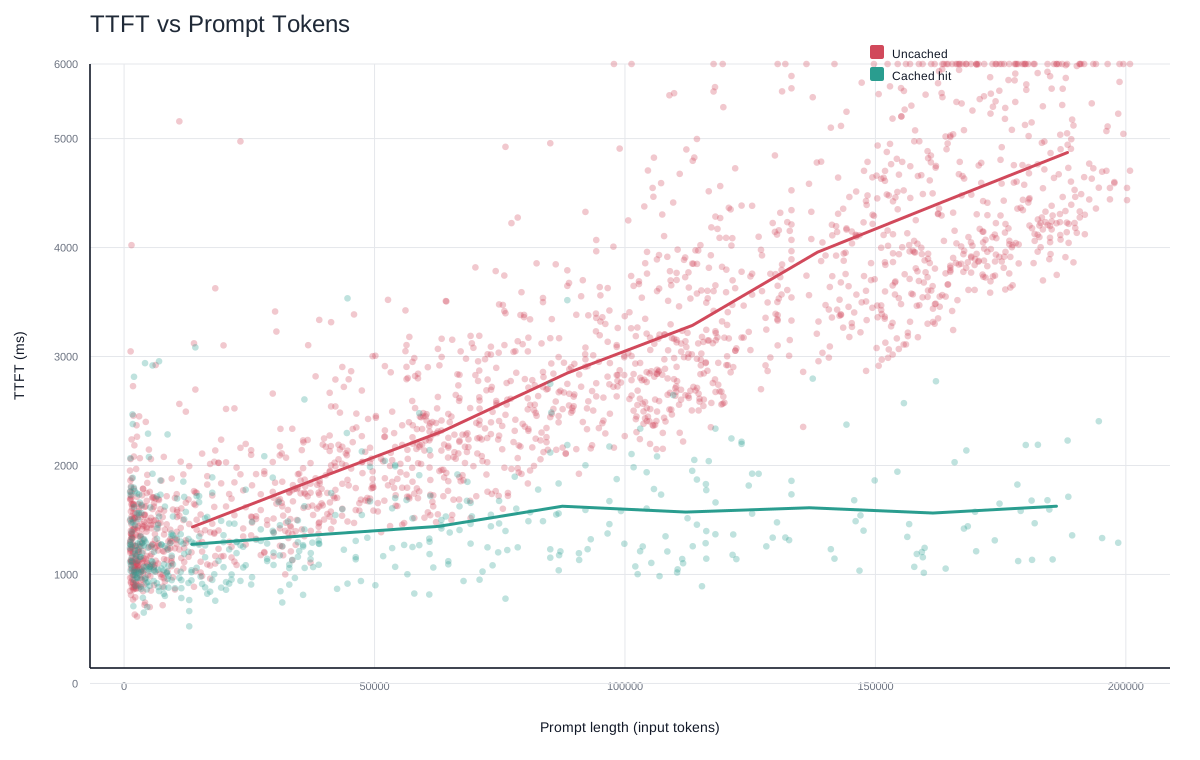
Reducing time-to-first-token (TTFT) is a primary motivation for improving cache rates. Cached tokens can reduce latency by up to ~80%. Caching keeps latency roughly proportional to generated output length rather than total conversation length because the full historical context is not re-prefilled. When we get cache hits, sampling the model is linear rather than quadratic. I ran a series of prompts 2300 times and plotted the cached vs uncached requests. For the shortest prompts (1024 tokens), cached requests are 7% faster, but at the longer end (150k+ tokens) we’re seeing 67% faster TTFT. The longer the input, the bigger the impact of caching on that first-token latency.
3. Measure caching first (so you can iterate)
3.1 Per-request: cached_tokens
Responses include usage fields indicating how many prompt tokens were served from the cache. All requests will display a cached_tokens field of the usage.prompt_tokens_details Response or Chat object indicating how many of the prompt tokens were cached.
"usage": {
  "prompt_tokens": 2006,
  "completion_tokens": 300,
  "total_tokens": 2306,
  "prompt_tokens_details": {
    "cached_tokens": 1920
  },
  "completion_tokens_details": {
    "reasoning_tokens": 0,
    "accepted_prediction_tokens": 0,
    "rejected_prediction_tokens": 0
  }
}
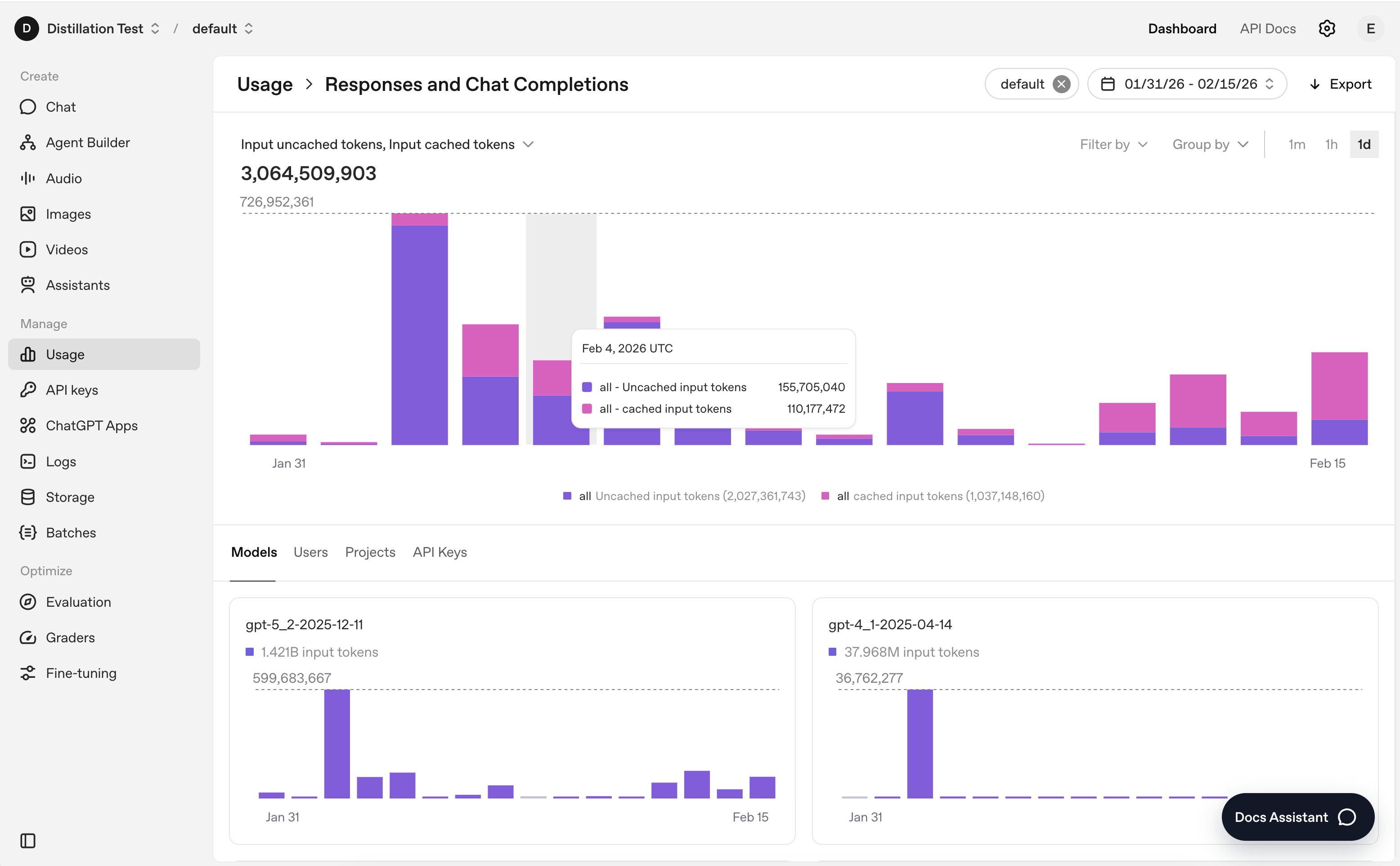
You can also get a high level overview by filtering selected cached / uncached tokens for the measures in the usage dashboard
4. Improve cache hit rate (tactical playbook)
What’s a cache hit? That’s when a request starts with the same prefix as a previous request, allowing the system to reuse previously computed key/value tensors instead of recomputing them. Increasing the cache hit rate — maximizing how often prefixes can be reused — directly improves both performance and efficiency, so maximizing this is our goal!
4.1 Send a Prompt over 1024 tokens
It can feel counterintuitive, but in some cases, making your prompt slightly longer can reduce overall cost. Say you have a 900 token prompt - you’ll never get a cache hit. If you lengthen your prompt to 1100 tokens and get a 50% cache rate you’ll save 33% on the token costs. If you get a 70% cache rate, you’d save 55%. Once you cross the caching threshold and achieve meaningful reuse, the marginal cost of those repeated tokens drops substantially. That means a slightly longer but stable prefix can be cheaper than a shorter prompt that never caches.
4.2 Stabilize the Prefix
This is the lowest-effort, highest-impact optimization: keep the early portion of the prompt stable. Place durable content at the beginning:
- Instructions
- Tool definitions
- Schemas
Move volatile content (e.g., user input, dynamic values, session-specific data) to the end. Even small changes in early tokens will invalidate exact prefix matching and prevent cache hits.
Learnings from Codex When our engineering team outlined how they architected the Codex agent loop, they emphasized prompt structure as a first-class performance surface and caching as a top priority. In the Codex CLI, system instructions, tool definitions, sandbox configuration, and environment context are kept identical and consistently ordered between requests to preserve long, stable prompt prefixes. The agent loop appends new messages (rather than modifying earlier ones) when runtime configurations change mid-conversation (e.g. new working directory or approval mode). By avoiding changes to the original prefix, the system preserves exact-prefix matches, which are required for prompt cache hits.
Tip: Use metadata
We’ve seen customers accidentally invalidate their cache by including a timestamp early in their request for later lookup/debugging. Move that to metadata where it will not impact the cache!
4.3 Keep Tools and Schemas Identical
Tools, schemas, and their ordering contribute to the cached prefix - they get injected before developer instructions which means that changing them would invalidate the cache. This includes:
- Schema key changes
- Tool ordering changes
- Changes to instructions
Tip: Adjust tools without breaking prompt caching
Leverage allowed_tools tool_choice option. It allows you to restrict the tools the model can call on a request without changing the tools array and busting the cache. List your full toolkit in tools, and then use an allowed_tools block to specify which tool can be used on a single turn.
# Static “tools” stay in the cached prompt prefix:

tools = [get_weather_def, get_location_def, calendar_def, …]

# Per-call “allowed_tools” only lives in request metadata, not in the prefix:

allowed_tools = {"mode":"auto", "tools":["get_weather","get_location"]}
4.4 Use prompt_cache_key to Improve Routing Stickiness
Caching only works if two requests share the same prefix and land on the same machine. Requests are routed to inference engines based on a hash of the first ~256 tokens of the prompt. When you provide a prompt_cache_key, it is combined with that hash to increase routing stickiness - meaning requests with the same prefix are more likely to land on the same engine and reuse cached KV state. It’s effective - one of our coding customers saw an improved hit rate from 60% to 87% when they started using prompt_cache_key.
prompt_cache_key is especially useful when you are sending different requests that have the same initial set of context (i.e. first 256 tokens) but then vary later as it lets you intentionally group related requests.
Inference engines can handle roughly ~15 requests per minute per prefix + prompt_cache_key combination. If traffic exceeds that rate — for example, if you send thousands of requests sharing the same prefix and key — the system will distribute the excess requests across additional machines for load balancing. Each new machine is a one-time cache miss.
That means you should choose a key granularity that can keep each prefix + key combination below ~15 RPM.
For coding use cases we’ve seen:
- Per-user keys improve reuse across related conversations (e.g., working in the same codebase).
- Per-conversation keys scale better when users run many unrelated threads in parallel. Grouping several users to share a key can also be a good approach. A simple algorithm for this would be to hash and mod a user id by number of “buckets” to aim close to 15RPM to aim for to maximize caching performance.
Tip: Test Flex Processing instead of the Batch API
If you have latency insensitive workflow you may be using the Batch API. For more flexibility around caching, consider using Flex Processing. Flex offers the same 50% token discount as Batch but runs through the Responses API with service_tier="flex" specified per request. This gives you more flexibility:
- Control over request rate (RPM)
- Access to extended prompt caching
- Ability to include a prompt_cache_key
Because you can tune routing and cache locality more precisely, Flex can achieve higher cache hit rates in some workloads. It is particularly well suited for prototyping or production workloads that are not inference-intensive but still benefit from cost optimization.
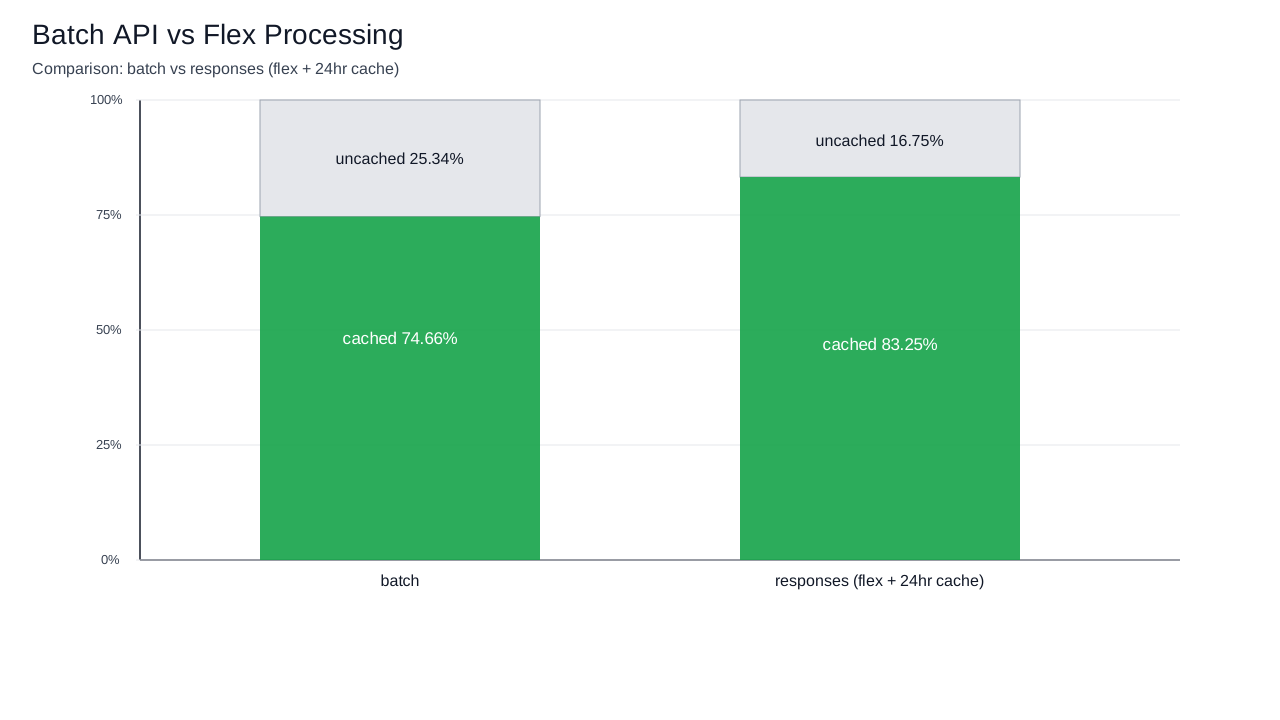
I ran a head-to-head test of 10,000 identical requests. Flex (using extended prompt caching and prompt_cache_key) produced an 8.5% increase in cache hit rate compared to the Batch job. That improvement translates into a 23% reduction in input token cost.
There isn’t model parity for caching on the Batch API - pre-GPT-5 models are not supported, so if you’re using o3 or o4-mini, you should consider switching to Flex to take advantage of caching. Check the most up to date info on this in our pricing docs.
Insight: prompt_cache_key as shard key
It might be helpful to think of the prompt_cache_key as a database shard key when thinking about how we route the request on the backend - the considerations are very similar when optimizing for the parameter. Like shard keys, granularity is a balancing act. Each machine can only handle about ~15 RPM for a given prefix, so if you use the same key on too many requests, requests will overflow to multiple machines. For each new machine, you’ll start the cache anew. On the other hand, if your key is too narrow, traffic spreads out across machines and you lose the benefit of cache reuse. Routing is still load-balanced - prompt_cache_key increases the chance similar prompts hit the same server but does not guarantee stickiness - caching is always best-effort!
4.5 Use the Responses API instead of Chat Completions
As we outlined in Why we built the Responses API, our internal benchmarks show a 40-80% better cache utilization on requests when compared to Chat Completions.
This is because, unlike Chat Completions, the raw chain of thought tokens get persisted in the Responses API between turns via previous_response_id (or encrypted reasoning items if you’re stateless). Chat Completions does not offer a way to persist these tokens. If you aren’t leveraging reasoning models, there’s no caching improvement. Better performance from reasoning models using the Responses API is an excellent guide to understanding this in more depth.
4.6 Be thoughtful about Context Engineering
At its core, context engineering is about deciding what goes into the model’s input on each request. Every model has a fixed context window, but curating what you pass on each request isn’t just about staying under the limit. As the input grows, you’re not only approaching truncation - you’re also increasing replay cost and asking the model to distribute its attention across more tokens. Effective context engineering is the practice of managing that constraint intentionally. However, when you drop, summarize or compact earlier turns in a conversation, you’ll break the cache. In that regard, context engineering and prompt caching are inherently at odds - one prioritizes dynamism, the other stability.
With the rise of longer running agents and native compaction tools, it’s important to keep caching in mind when architecting to ensure the right balance of cost versus intelligence savings.
response = client.responses.create(
        model="gpt-5.2-codex",
        input=conversation,
        store=False,
        context_management=[{"type": "compaction", "compact_threshold": 100000}],
    )
A common failure mode is an overgrown tool set that introduces ambiguity about which tool should be invoked. Keeping the tool surface minimal improves decision quality and long-term context. When curating tools on a per-request basis, use tip 4.3 and leverage the allowed_tools tool_choice option for pruning.
Practical rule Leverage your evals to choose the compaction method and frequency that balances cost (both from reducing total input tokens via truncation/summarization as well as caching) and intelligence gained from careful context engineering
5. Troubleshooting: why you might see lower caching:
Common causes:
- Tool or response format schema changes
- Naive truncation from hitting the models’ context window
- Changes to instructions or system prompts
- Changes to reasoning effort
- Cache Expiration: too much time passes and the saved prefix is dropped.
- Adding in a space, timestamp or other dynamic content
- Using Chat Completions with reasoning models, since the hidden chain-of-thought tokens are dropped
6. Extended Prompt Caching & Zero Data Retention
Extended Prompt Caching works by offloading the key/value tensors to GPU-local storage when memory is full, significantly increasing the storage capacity available for caching. For gpt-5.5, gpt-5.5-pro, and all future models, the default is 24h and in_memory is not supported.
{
  "model": "gpt-5.1",
  "input": "Write me a haiku about froge...",
  "prompt_cache_retention": "24h"
}
KV tensors are the intermediate representation from the model’s attention layers produced during prefill. Only the key/value tensors may be persisted in local storage; all original input content is only retained in memory.
Insight: What Is Actually Cached? The KV cache just holds the model’s key/value tensors (linear projections of the hidden‑states) so we can reuse them on the next inference step. The KV cache is an intermediate representation. It’s essentially just a bunch of numbers internal to the model - that means no raw text/multi-modal inputs are ever stored, regardless of retention policy.
7. Realtime API
Caching in the Realtime API works the same as with the Responses API - all the audio, text or images passed in will be cached, and any change to the prefix will break the cache. However, given the shorter context window of the Realtime API (currently 32k), managing truncation is especially relevant. A 32k context model with 4,096 max output tokens can only include 28,224 tokens in the context before truncation occurs.
7.1 Retention Ratio
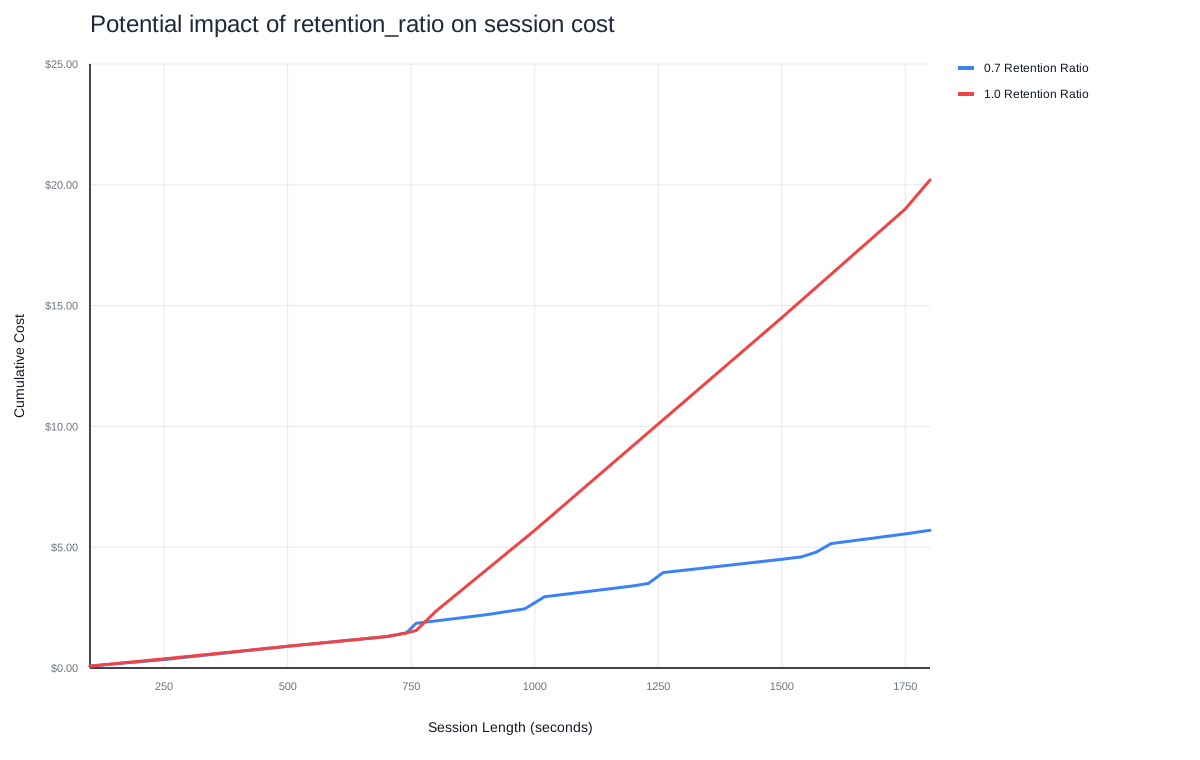
By default (truncation: "auto"), the server removes just enough old messages to fit within the context window. This “just-in-time” pruning shifts the start of the conversation slightly on every turn once you’re over the limit. However, this naive strategy causes frequent cache misses.
The retention_ratio setting changes this by letting you control how much of the earlier context to keep vs. drop. It’s a configurable truncation strategy that lets developers control how much of the token context window is retained, balancing context preservation with cache-hit optimization.
For example, retention_ratio: 0.7 means that when truncation happens, the system keeps roughly 70% of the existing conversation window and drops the oldest ~30%. The drop happens in one larger truncation event (instead of small incremental removals).
{
  "event": "session.update",
  "session": {
    "truncation": {
      "type": "retention_ratio",
      "retention_ratio": 0.7
    }
  }
}
This creates a more stable prefix that survives across multiple turns, reducing repeated cache busting.
The trade-off is that truncation happens in bigger chunks, so you can lose more conversation history at once. That means the model may suddenly “forget” earlier parts of the dialogue sooner than with gradual truncation. You’re effectively trading off memory depth for cache stability (more consistent prefix).
Here’s what this impact looks like in the naive per-turn truncation approach vs using retention_ratio.
Conclusion
Prompt caching is one of the highest-leverage optimizations available on the OpenAI platform. When your prefixes are stable and your routing is well-shaped, you can materially reduce both cost and latency without changing model behavior or quality.
The key ideas are simple but powerful: stabilize the prefix, monitor cached_tokens, be mindful of the ~15 RPM limit, and use prompt_cache_key thoughtfully. For higher-volume or latency-insensitive workloads, consider Flex Processing and extended retention to further improve cache locality.
Caching is best-effort and routing-aware, but when engineered intentionally, it can deliver dramatic improvements in efficiency. Treat it like any other performance system: measure first, iterate deliberately, and design your prompts with reuse in mind.