Learn how to manage conversation state during a model interaction.
Responses
OpenAI provides a few ways to manage conversation state, which is important for preserving information across multiple messages or turns in a conversation.
When troubleshooting cases where GPT-5.5 treats an intermediate update as
the final answer, verify your integration preserves the assistant message
phase field correctly. See Phase
parameter for details.
Manually manage conversation state
While each text generation request is independent and stateless, you can still implement multi-turn conversations by providing additional messages as parameters to your text generation request. Consider a knock-knock joke:
By using alternating user and assistant messages, you capture the previous state of a conversation in one request to the model.
To manually share context across generated responses, include the model’s previous response output as input, and append that input to your next request.
For stateless reasoning-model requests, preserve every item in the response’s output array. The Responses API returns encrypted reasoning items by default. Replaying the complete output keeps reasoning items and assistant phase values intact. Models that support persisted reasoning can use reasoning.context: "all_turns" to render the available reasoning from earlier turns into the next sample. See preserve reasoning across calls.
In the following example, we ask the model to tell a joke, followed by a request for another joke. Appending previous responses to new requests in this way helps ensure conversations feel natural and retain the context of previous interactions.
Manually manage conversation state with the Chat Completions API.
Our APIs make it easier to manage conversation state automatically, so you don’t have to pass inputs manually with each turn of a conversation.
We recommend using the Responses API instead. Because it’s stateful, managing context across conversations is a simple parameter.
If you’re using the Chat Completions endpoint, you’ll need to either manually manage state, as documented above.
Using the Conversations API
The Conversations API works with the Responses API to persist conversation state as a long-running object with its own durable identifier. After creating a conversation object, you can keep using it across sessions, devices, or jobs.
Conversations store items, which can be messages, tool calls, tool outputs, and other data.
In a multi-turn interaction, you can pass the conversation into subsequent responses to persist state and share context across subsequent responses, rather than having to chain multiple response items together.
Manage conversation state with Conversations and Responses APIs
Python
1
2
3
4
5
6
7const response = await client.responses.create({ model: "gpt-6-astra", input: [{ role: "user", content: "What are the five Ds of dodgeball?" }], conversation: conversation.id,});console.log(response.output_text);
1
2
3
4
5response = openai.responses.create(model="gpt-6-astra",input=[{"role": "user", "content": "What are the 5 Ds of dodgeball?"}],conversation=conversation.id,)
1
2
3
4
5
6
7
8
9
10
11
12
13response, err := client.Responses.New(context.Background(), responses.ResponseNewParams{ Model: "gpt-6-astra", Conversation: responses.ResponseNewParamsConversationUnion{ OfString: openai.String(conversation.ID), }, Input: responses.ResponseNewParamsInputUnion{ OfString: openai.String("What are the five Ds of dodgeball?"), },})if err != nil { panic(err)}fmt.Println(response.OutputText())
1
2
3
4
5
6
7response = client.responses.create( model: "gpt-6-astra", conversation: conversation.id, input: "What are the five Ds of dodgeball?")puts(response.output_text)
Passing context from the previous response
Another way to manage conversation state is to share context across generated responses with the previous_response_id parameter. This parameter lets you chain responses and create a threaded conversation.
Chain responses across turns by passing the previous response ID
1
2
3
4
5
6
7
8
9
10
11
12
13
14
15
16
17
18using OpenAI.Responses;#pragma warning disable OPENAI001string key = Environment.GetEnvironmentVariable("OPENAI_API_KEY")!;ResponsesClient client = new(key);ResponseResult first = await client.CreateResponseAsync( "gpt-6-astra", "Tell me a joke.");Console.WriteLine(first.GetOutputText());ResponseResult second = await client.CreateResponseAsync( "gpt-6-astra", "Explain why this is funny.", previousResponseId: first.Id);Console.WriteLine(second.GetOutputText());
1
2
3
4
5
6
7
8
9
10
11
12
13
14
15
16require "openai"client = OpenAI::Client.newfirst = client.responses.create( model: "gpt-6-astra", input: "Tell me a joke.")puts(first.output_text)second = client.responses.create( model: "gpt-6-astra", previous_response_id: first.id, input: "Explain why this is funny.")puts(second.output_text)
In the following example, we ask the model to tell a joke. Separately, we ask the model to explain why it’s funny, and the model has all necessary context to deliver a good response.
Manually manage conversation state with the Responses API
1
2
3
4
5
6
7
8
9
10
11
12
13
14
15
16
17
18using OpenAI.Responses;#pragma warning disable OPENAI001string key = Environment.GetEnvironmentVariable("OPENAI_API_KEY")!;ResponsesClient client = new(key);ResponseResult first = await client.CreateResponseAsync( "gpt-6-astra", "Tell me a joke.");Console.WriteLine(first.GetOutputText());ResponseResult second = await client.CreateResponseAsync( "gpt-6-astra", "Explain why this is funny.", previousResponseId: first.Id);Console.WriteLine(second.GetOutputText());
1
2
3
4
5
6
7
8
9
10
11
12
13
14
15
16require "openai"client = OpenAI::Client.newfirst = client.responses.create( model: "gpt-6-astra", input: "Tell me a joke.")puts(first.output_text)second = client.responses.create( model: "gpt-6-astra", previous_response_id: first.id, input: "Explain why this is funny.")puts(second.output_text)
previous_response_id in WebSocket mode
If you are using the Responses API WebSocket mode, continuation uses the same previous_response_id semantics as HTTP mode, but over a persistent socket with repeated response.create events.
The connection-local cache keeps recent previous responses in memory for low-latency continuation. When you use stream_id, each lane can retain its latest response; previous_response_id still controls lineage, so a new lane can fork from a response on another lane while that response remains available. If an uncached ID cannot be resolved, send a new turn with previous_response_id set to null and pass full input context.
Response objects are saved for 30 days by default. They can be viewed in the dashboard
logs page or
retrieved via the API.
You can disable this behavior by setting store to false
when creating a Response.
Conversation objects and items in them are not subject to the 30 day TTL. Any response attached to a conversation will have its items persisted with no 30 day TTL.
OpenAI does not use data sent via API to train our models without your explicit consent—learn more.
Even when using previous_response_id, all previous input tokens for responses in the chain are billed as input tokens in the API.
Managing the context window
Understanding context windows will help you successfully create threaded conversations and manage state across model interactions.
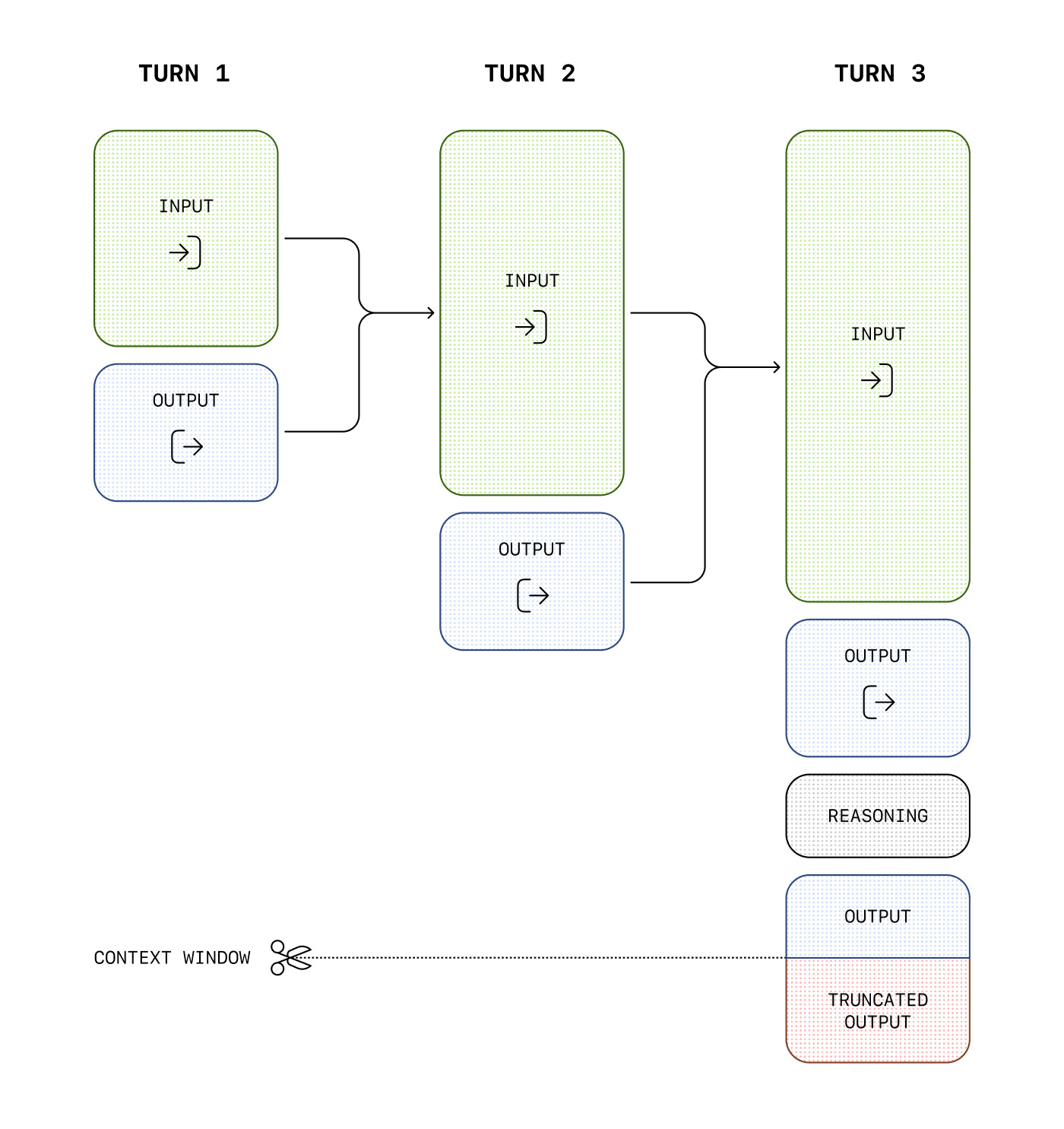
The context window is the maximum number of tokens that can be used in a single request. This max tokens number includes input, output, and reasoning tokens. To learn your model’s context window, see model details.
Managing context for text generation
As your inputs become more complex, or you include more turns in a conversation, you’ll need to consider both output token and context window limits. Model inputs and outputs are metered in tokens, which are parsed from inputs to analyze their content and intent and assembled to render logical outputs. Models have limits on token usage during the lifecycle of a text generation request.
Output tokens are the tokens generated by a model in response to a prompt. Each model has different limits for output tokens. For example, gpt-4o-2024-08-06 can generate a maximum of 16,384 output tokens.
A context window describes the total tokens that can be used for both input and output tokens (and for some models, reasoning tokens). Compare the context window limits of our models. For example, gpt-4o-2024-08-06 has a total context window of 128k tokens.
If you create a large prompt—often by including extra context, data, or examples for the model—you run the risk of exceeding the allocated context window for a model, which might result in truncated outputs.
For example, when making an API request to Chat Completions with the o1 model, the following token counts will apply toward the context window total:
Input tokens (inputs you include in the messages array with Chat Completions)
Output tokens (tokens generated in response to your prompt)
Reasoning tokens (used by the model to plan a response)
For example, when making an API request to the Responses API with a reasoning enabled model, like the o1 model, the following token counts will apply toward the context window total:
Input tokens (inputs you include in the input array for the Responses API)
Output tokens (tokens generated in response to your prompt)
Reasoning tokens (used by the model to plan a response)
Tokens generated in excess of the context window limit may be truncated in API responses.
You can estimate the number of tokens your messages will use with the tokenizer tool.
Compaction
Detailed compaction guidance now lives in
Compaction.
For /responses with context_management and compact_threshold, see
Server-side compaction.