
The Decisions API evaluates text, images, or both and returns typed answers about 10x faster than the Responses API. Get the probability that a condition is true, a choice from a fixed set, or a score against a rubric. Use those answers to classify content, route requests, and prioritize work in your application.
Try the Decisions API in the Playground to experiment with questions and inputs before writing code.
The Decisions API is in public beta, and we expect to GA in the coming weeks.
gpt-6-luna is the only model currently available. Use the dedicated POST /v1/decisions endpoint.
How decisions work
A request has three parts:
| Field | Purpose |
|---|---|
model |
The model that evaluates the request. Currently, only gpt-6-luna is supported. |
input |
Shared evidence for the questions: a text string or user messages containing text and images. |
questions |
What to evaluate, including each question’s type, instructions, and any allowed choices or score levels. |
The response contains an answers array. Give each question a unique name to identify its answer; the API echoes that name in the response.
Choose a question type
| Type | Use it to | Main result |
|---|---|---|
predicate |
Check a condition, such as visible damage or passage relevance. | probability: an estimate from 0 to 1 that the condition is true. |
choice |
Select one option, such as a department or content category. | choice: one of your supplied values. |
score |
Rate an input against ordered levels, such as issue severity. | score: the probability-weighted average of the level indices. |
Both choice and score return probabilities over discrete options. Use choice for categories without an order, such as departments. Use score for ordered levels, such as severity; it takes the probability-weighted average of their numeric indices to produce a score that can fall between levels.
Use Decisions when your application needs one of these answer types. Use Structured Outputs with the Responses API when you need to generate an object that follows your own JSON schema, such as extracted fields or a written explanation, or function calling when you need a model to request a tool call with arguments.
Check an image for visible damage
Use a predicate question to check a product photo for visible damage. This request combines the image with instructions to look for a crack, tear, or dent.
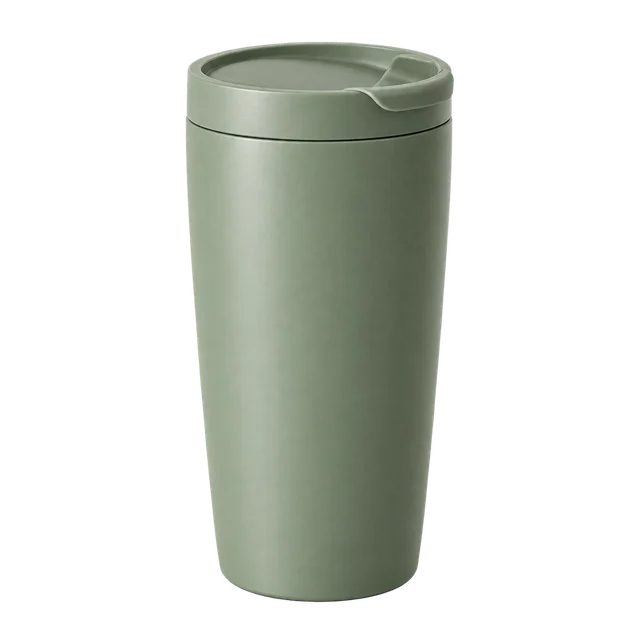

IMAGE_BASE64="$(base64 < product.png | tr -d '\r\n')"
curl https://api.openai.com/v1/decisions \
-H "Authorization: Bearer $OPENAI_API_KEY" \
-H "Content-Type: application/json" \
--data-binary @- <<JSON
{
"model": "gpt-6-luna",
"input": [{
"role": "user",
"content": [
{"type": "input_text", "text": "Inspect the product in this photo."},
{"type": "input_image", "image_url": "data:image/png;base64,$IMAGE_BASE64"}
]
}],
"questions": [{
"type": "predicate",
"name": "visible_damage",
"instructions": "Does the product have visible damage, such as a crack, tear, or dent? Ignore shadows and damage to the packaging."
}]
}
JSONAn illustrative response excerpt:
{
"answers": [
{
"type": "predicate",
"name": "visible_damage",
"probability": 0.92
}
]
}The probability is the model’s estimate that the condition is true. Use it to flag photos for review based on a threshold you choose.
Images must be inline base64 data URLs. Hosted HTTP or HTTPS image URLs and file_id inputs aren’t supported by this endpoint. Combine input_text and input_image parts in a user message to evaluate images together with instructions or other context.
Select from fixed options
A choice question selects one value from the options you provide. Use distinct values and descriptions that explain when each option applies.
This request routes a customer complaint:
curl https://api.openai.com/v1/decisions \
-H "Authorization: Bearer $OPENAI_API_KEY" \
-H "Content-Type: application/json" \
-d '{
"model": "gpt-6-luna",
"input": "I was charged twice for my order.",
"questions": [{
"type": "choice",
"name": "department",
"instructions": "Which department should handle this complaint?",
"choices": [
{"value": "billing", "description": "Payments, invoices, and refunds."},
{"value": "technical", "description": "Problems using the product."},
{"value": "shipping", "description": "Delivery and tracking."},
{"value": "other", "description": "Requests outside these categories."}
]
}]
}'An illustrative response excerpt:
{
"answers": [
{
"type": "choice",
"name": "department",
"choice": "billing",
"probabilities": [
{ "value": "billing", "probability": 0.95 },
{ "value": "technical", "probability": 0.02 },
{ "value": "shipping", "probability": 0.01 },
{ "value": "other", "probability": 0.02 }
],
"confidence": 0.93
}
]
}The answer’s choice field contains a supplied value, here "billing". It also includes a probabilities array for the options and a confidence field. See Interpret the answers for guidance on setting thresholds.
Include a fallback option such as "other" when your categories don’t cover every possible input. Your application can send that result to a general review queue.
Score against a rubric
A score question evaluates an input against ordered levels. Define the criteria for each level and arrange them from lowest to highest.



curl https://api.openai.com/v1/decisions \
-H "Authorization: Bearer $OPENAI_API_KEY" \
-H "Content-Type: application/json" \
-d '{
"model": "gpt-6-luna",
"input": "Export fails in Safari but works in Chrome.",
"questions": [{
"type": "score",
"name": "severity",
"instructions": "How severe is this issue?",
"levels": [
{"label": "Cosmetic", "description": "Appearance only; no lost functionality."},
{"label": "Workaround available", "description": "A task fails, but another way works."},
{"label": "Fully blocked", "description": "A task fails with no workaround."}
]
}]
}'An illustrative response excerpt:
{
"answers": [
{
"type": "score",
"name": "severity",
"score": 1.1,
"probabilities": [
{ "value": 0, "label": "Cosmetic", "probability": 0.1 },
{ "value": 1, "label": "Workaround available", "probability": 0.7 },
{ "value": 2, "label": "Fully blocked", "probability": 0.2 }
],
"confidence": 0.55
}
]
}Level indices start at 0. Here, 0 means cosmetic, 1 means a workaround is available, and 2 means fully blocked. The returned score is a probability-weighted average, so it can fall between levels. In this example, probabilities of 0.1, 0.7, and 0.2 produce a score of 1.1.
The answer also includes confidence and the per-level probabilities. The score summarizes the distribution across levels. Use choice to select a single category.
Ask multiple questions
Put independent questions in the same questions array to evaluate shared input. For a product photo, you could check for damage and classify the product category in one request. Each question can use a different type.
For decisions that depend on an earlier answer, send separate requests. For example, check for damage first, then use the result to decide whether to request a repair category.
Write questions around observable criteria. Separate different concerns into different questions, give choices distinct meanings, and define score levels so that adjacent levels have distinct criteria.
Interpret the answers
Predicates return the estimated probability that a condition is true. Choice and score answers return a probability distribution and a separate confidence field.
Use labeled examples from your application to set thresholds for routing, filtering, or review. Choose thresholds based on the cost of false positives and false negatives.
Pricing and availability
With gpt-6-luna, input costs $0.10 per 1M tokens. You pay only for input tokens: there are no cache-read, cache-write, or output-token charges.
Regional processing premiums and long-context input pricing multipliers apply. These rates apply to /v1/decisions; other requests using gpt-6-luna follow the applicable model and processing-tier pricing.
The Decisions API supports Zero Data Retention (ZDR) and HIPAA use for eligible customers. Data residency and regional processing are supported in the United States and Europe (EEA + Switzerland). See data controls for eligibility requirements, required agreements, and limitations.
Add voice control
Use client delegation with the Live API to choose actions from voice requests and report their results to the user.