

For my roommate’s birthday, I’d bought him a little LED display that shows flights passing near our window. It was a pretty cool gift, but after watching planes pop up on the screen, I kept wondering whether a display like that could do more than track airplanes. Could it show the weather or my calendar? And when I was heading out, could I just ask, “When’s the next train?” and see the answer on the display?
This quickly turned into a side project involving a Raspberry Pi, a 128 × 64 HUB75 LED panel, Codex, and an assistant I eventually started calling Jack. The conversation runs on GPT-Live-1, the full-duplex voice model we recently launched in the API. Another model helps with research, and a renderer takes care of the pixels, although we definitely didn’t start with anything that well thought out. This post documents how that process went.
How Codex helped me get a HUB75 RGB LED panel working
At first, Codex and I had to figure out how to get anything useful onto the display. I was working with a 128 × 64 HUB75 RGB panel, but I didn’t know much about the controller, the wiring, or what it would take to send it something other than the content it was already showing.
I started sending Codex pictures and asking it to explain what I was looking at. It helped identify the important connections, make sense of the ESP32-based controller, and work out how a HUB75 panel actually receives display data. It even marked up the pictures to show me which parts mattered, which was useful because, on my own, I mostly saw a circuit board and a lot of opportunities to guess wrong.
Once we understood the basic hardware, Codex helped me get the controller running WLED-MM and confirm that the panel was configured for the right 128 × 64 resolution. From there, we could send it custom frames and start experimenting with what actually looked good on a display that small. Codex did the research and troubleshooting, while I handled the physical connections and reported back when something didn’t behave the way we expected.
Building a voice-controlled LED display prototype on my Mac
The first working version was much simpler than what we ended up with. Once the controller was running WLED-MM, Codex helped me build a renderer and a custom skill, and I used Voice in the ChatGPT desktop app to tell it what to put on the display.
That was already enough to make the display feel different. It could show the weather, my calendar, subway arrivals, financial charts, messages, countdowns, photographs, artwork, or a custom animated scene, and we kept adjusting the renderer whenever an idea didn’t look right on a screen that small.
The voice interaction was still happening inside Codex, and the custom skill gave it a way to update whatever the wall was supposed to show. From there, the renderer on my Mac turned the layout into 128 × 64 RGB frames and sent them over the local network using DDP, while the ESP32 controller running WLED-MM handled getting those frames onto the panel.
Codex helped with more than just connecting those pieces. A 128 × 64 display doesn’t give you much room, so we kept working through how to fit text, images, weather, calendar events, and subway arrivals onto the screen without everything turning into an unreadable mess. I’d tell Codex what looked off, it would adjust the renderer or the layout, and we’d try again until the idle screen started to feel like something I actually wanted to leave up.
The problem was that the whole thing still depended on my Mac. The renderer ran there, the voice interaction started there, and if my laptop went to sleep or I took it somewhere else, the wall stopped being useful in the way I wanted. Ideally, I wanted to come back to my apartment from work and ask my wall to show me something.
Moving the voice assistant and renderer to a Raspberry Pi
I told Codex I wanted to get my laptop out of the loop, so we moved the parts that needed to stay on over to a Raspberry Pi, put the code in a private repository, and made sure we had a backup and a way to roll back if we broke something. Once I had plugged in the Pi, Codex took care of getting the code running, checking the logs, and sorting out whatever went wrong while I kept describing what I wanted it to do.
There are now two small services running on it:
- The voice service handles the microphone, PipeWire audio, WebRTC echo cancellation, wake and sleep behavior, interruptions, the GPT-Live-1 connection, and client-side delegation.
- The renderer service keeps the animated idle screen running, refreshes weather and MTA subway arrivals, uses sanitized calendar data, validates scene descriptions, and streams frames to the wall.
With a microphone and speaker connected to the Pi, I could walk into the room, say “Hey Jack,” and ask for something without opening my computer. We spent a while improving the wake behavior and the way it responded, but getting it off my Mac was what made it feel less like a laptop demo and more like something we could just leave on.
How GPT-Live-1 and the Raspberry Pi work together
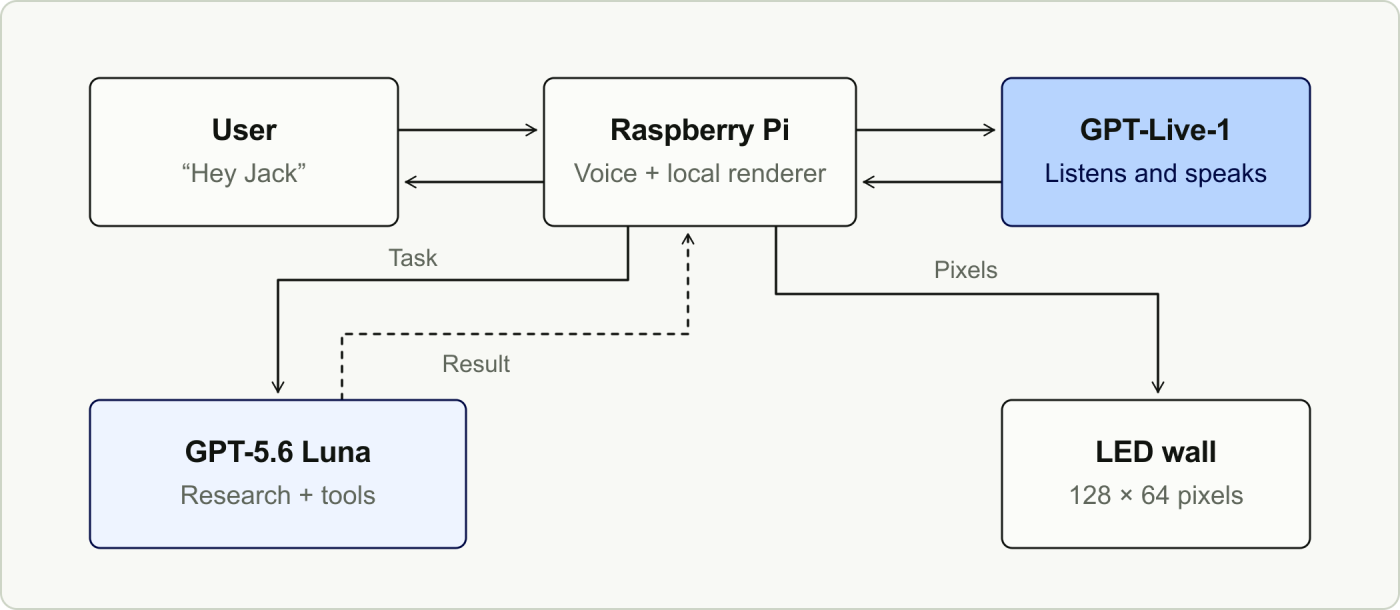
The way we ended up splitting the work is that GPT-Live-1 is the part I’m talking to, not the part drawing on the wall. GPT-Live-1 keeps the conversation open, listens while it speaks, lets me interrupt it, and decides when a request needs something beyond the conversation itself.
When that happens, the Raspberry Pi receives the delegation and starts a client-side Responses API request using GPT-5.6 Luna with low reasoning effort. Luna can search the public web, check a read-only connection to my calendar, find reusable images from Wikimedia Commons, and decide what kind of scene the request needs.
At one point, I asked Jack to put a photo on the wall, and it told me it couldn’t. The renderer already supported images, but I hadn’t given the voice assistant a tool to find and send one. Codex helped me connect it to Wikimedia Commons so it could look for a matching image and check its license and attribution. We also adjusted how images fit the panel: the Pi resized them to fit within 128 × 64 pixels while preserving their proportions, so they wouldn’t stretch across the display.
As we kept adding things, Codex helped keep the pieces from getting tangled together: the code on the Pi decides which tools Luna can use, Luna figures out what information or scene is needed, and the renderer checks the scene JSON before turning it into exactly 128 × 64 RGB pixels. It then sends those frames over DDP to the WLED-MM controller, which drives the HUB75 panel.
One early bug showed up in a very ordinary conversation. I’d ask Jack for the weather in New York, then say, “Show that on the wall,” and it didn’t know what “that” meant. Codex found that our app was sending the model updating the display only the latest request. We changed the handoff to include the recent conversation and earlier results.
From “Hey Jack” to pixels on the LED display
If I ask Jack to look something up and put it on the display, this is roughly what happens:
- The Raspberry Pi captures my voice as 24 kHz PCM audio and applies local audio processing.
- GPT-Live-1 receives the stream, understands what I’m asking for, and keeps the conversation open so I can interrupt or add something.
- If the request needs research, calendar information, an image, or a wall update, GPT-Live-1 creates a client-side delegation, and the Pi sends the task to GPT-5.6 Luna through the Responses API.
- Luna uses the tools I exposed for that request, such as hosted web search, the read-only calendar connection, reusable-image lookup, or a tool for updating the wall.
- It chooses a weather, agenda, message, or countdown scene if one already fits, or creates a new scene when I ask for something we hadn’t anticipated.
- The local renderer validates that scene, turns it into 128 × 64 RGB frames, and sends them to the wall over DDP while GPT-Live-1 tells me what it found.
The part I like is that I don’t have to wait for a rigid voice-assistant turn to finish before saying something else. I can interrupt Jack, clarify what I meant, and still have the research and rendering happen in the background.
All in all, this was a pretty simple side project. I didn’t have experience with HUB75 panels, ESP32 controllers, Raspberry Pis, or voice models, and at another point I probably would have stopped as soon as I opened up the display. Instead, Codex helped me figure things out as I went, and whenever I ran into something unfamiliar, I could just ask.
If you have a project like this and aren’t sure where to start, ask Codex. You might be surprised by how far you can get.