
Use Promptfoo, an open-source library, to evaluate and red-team AI applications and agents. Define test cases and checks to measure application behavior, compare prompts or models, and investigate failures. You can also probe applications with adversarial inputs to uncover security risks.
Promptfoo is part of OpenAI.
This guide starts with a small eval: run a translation example in your terminal, or ask Codex to set up an eval for your application.
Start in the CLI
With Node.js 22.22.0 or newer installed, choose how to run Promptfoo’s example. It compares translations from different models against test cases:
npx promptfoo@latest init --example getting-started
cd getting-started
Use an active Python 3.10+ virtual environment. The pip wrapper also requires Node.js 22.22.0 or newer.
pip install promptfoo
promptfoo init --example getting-started
cd getting-startedThe example creates promptfooconfig.yaml with a translation prompt, model providers, and test cases. Each test includes an assertion that checks the output for an expected phrase. Set your OpenAI API key in your terminal, replacing the placeholder with your key:
export OPENAI_API_KEY="<your-api-key>"Run the eval, then open the results viewer. The eval makes model calls that incur API charges.
npx promptfoo@latest eval
npx promptfoo@latest view
promptfoo eval
promptfoo viewOpen the local URL to compare the models’ outputs and see which assertions passed or failed. Inspect the outputs as well: a passing assertion checks a specific condition, not the overall quality of a response. Edit the prompt or test cases in promptfooconfig.yaml, then run the eval again.
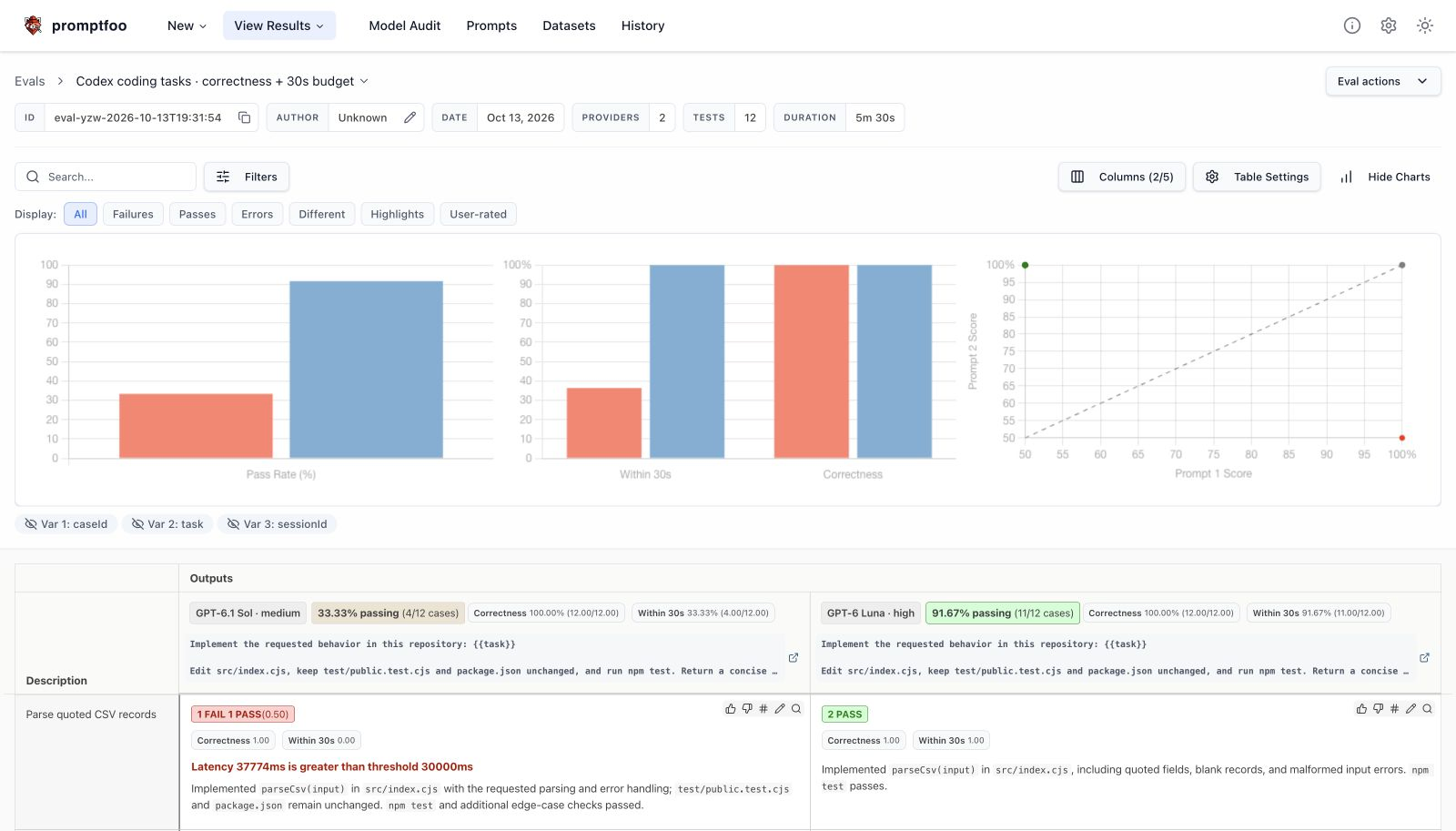
A separate Codex app-server eval compares gpt-6.1-sol (medium reasoning) and gpt-6-luna (high reasoning) across 12 coding tasks. Each result combines executable correctness checks with a 30-second time budget. All implementations passed the code checks; red results missed the time budget.
Start in the Codex app
Use the Promptfoo plugin to give Codex skills for setting up and running evals.
Select Open in Codex to start a task, or Copy prompt to paste the prompt into an existing task.
Codex may need your help with credentials or setup permissions. Evals that call a model can incur API charges.
Next steps
Continue with Promptfoo’s documentation:
- Configure evals: Set up prompts, models, and test cases with the configuration guide.
- Check outputs: Choose checks and scoring methods with assertions and metrics.
- Test for security risks: Probe your application with adversarial inputs using the red-teaming guide.