
This tutorial walks through an example of crawling a website (in this example, the OpenAI website), turning the crawled pages into embeddings using the Embeddings API, and then creating a basic search functionality that allows a user to ask questions about the embedded information. This is intended to be a starting point for more sophisticated applications that make use of custom knowledge bases.
Getting started
Some basic knowledge of Python and GitHub is helpful for this tutorial. Before diving in, make sure to set up an OpenAI API key and walk through the quickstart tutorial. This will give a good intuition on how to use the API to its full potential.
Use Python 3.11 or later. Create a virtual environment, install the packages used in the examples, and set OPENAI_API_KEY as described in the quickstart.
python -m venv env
source env/bin/activate
python -m pip install openai pandas numpy requests beautifulsoup4 tiktoken matplotlibCopy the examples into a Python file or notebook in the order shown and run them in the same working directory.
Setting up a web crawler
Choose a website you can crawl. Expand the steps below to collect page text for the embeddings.

Building an embeddings index

CSV is a common format for storing embeddings. You can use this format with Python by converting the raw text files (which are in the text directory) into Pandas data frames. Pandas is a popular open source library that helps you work with tabular data (data stored in rows and columns).
Blank empty lines can clutter the text files and make them harder to process. A function can remove those lines and tidy up the files.
def remove_newlines(serie):
serie = serie.str.replace("\n", " ")
serie = serie.str.replace("\\n", " ")
serie = serie.str.replace(" ", " ")
serie = serie.str.replace(" ", " ")
return serieConverting the text to CSV requires looping through the text files in the text directory created earlier. After opening each file, remove the extra spacing and append the modified text to a list. Then, add the text with the new lines removed to an empty Pandas data frame and write the data frame to a CSV file.
Extra spacing and new lines can clutter the text and complicate the embeddings process. The code used here helps to remove some of them but you may find 3rd party libraries or other methods useful to get rid of more unnecessary characters.
from pathlib import Path
import pandas as pd
# Create a list to store the text files
texts = []
# Get all the text files in the text directory
for file in os.listdir("text/" + domain + "/"):
# Open the file and read the text
with open("text/" + domain + "/" + file, "r", encoding="UTF-8") as f:
text = f.read()
page_name = Path(file).stem
domain_prefix = f"{domain}_"
if page_name.startswith(domain_prefix):
page_name = page_name[len(domain_prefix) :]
elif page_name == domain:
page_name = "index"
# Replace -, _, and #update with spaces.
texts.append(
(
page_name.replace("-", " ").replace("_", " ").replace("#update", ""),
text,
)
)
# Create a dataframe from the list of texts
df = pd.DataFrame(texts, columns=["fname", "text"])
# Set the text column to be the raw text with the newlines removed
df["text"] = df.fname + ". " + remove_newlines(df.text)
df.to_csv("processed/scraped.csv")
df.head()The next step is tokenization after saving the raw text into a CSV file. This process splits the input text into tokens by breaking down the sentences and words. A visual demonstration of this can be seen by checking out our tokenizer in the docs.
A helpful rule of thumb is that one token generally corresponds to ~4 characters of text for common English text. This translates to roughly ¾ of a word (so 100 tokens ~= 75 words).
The API has a limit on the maximum number of input tokens for embeddings. To stay below the limit, the text in the CSV file needs to be broken down into multiple rows. The existing length of each row will be recorded first to identify which rows need to be split.
import tiktoken
# Load the cl100k_base tokenizer which is designed to work with the ada-002 model
tokenizer = tiktoken.get_encoding("cl100k_base")
df = pd.read_csv("processed/scraped.csv", index_col=0)
df.columns = ["title", "text"]
# Tokenize the text and save the number of tokens to a new column
df["n_tokens"] = df.text.apply(lambda x: len(tokenizer.encode(x)))
# Visualize the distribution of the number of tokens per row using a histogram
df.n_tokens.hist()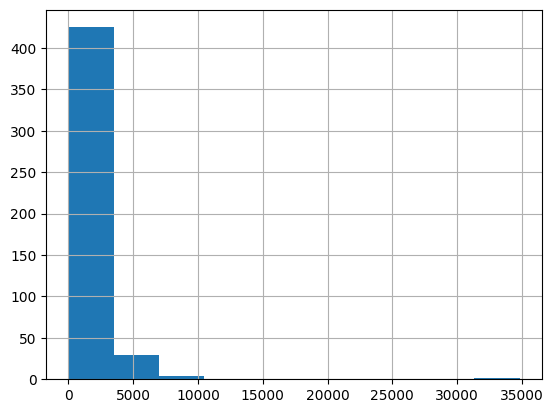
Split longer pages into chunks that fit within the embedding model’s input limit.
max_tokens = 500
# Function to split the text into chunks of a maximum number of tokens
def split_into_many(text, max_tokens=max_tokens):
if max_tokens < 1:
raise ValueError("max_tokens must be positive.")
if not text.strip():
return []
sentences = text.split(". ")
chunks = []
chunk = ""
for index, sentence in enumerate(sentences):
if index < len(sentences) - 1:
sentence += "."
# Do not silently discard a sentence that needs finer-grained splitting.
if len(tokenizer.encode(sentence)) > max_tokens:
raise ValueError("A sentence exceeds max_tokens; split it before chunking.")
candidate = f"{chunk} {sentence}" if chunk else sentence
if len(tokenizer.encode(candidate)) > max_tokens:
chunks.append(chunk)
chunk = sentence
else:
chunk = candidate
if chunk:
chunks.append(chunk)
return chunks
shortened = []
# Loop through the dataframe
for row in df.iterrows():
# If the text is None, go to the next row
if row[1]["text"] is None:
continue
# If the number of tokens is greater than the max number of tokens, split the text into chunks
if row[1]["n_tokens"] > max_tokens:
shortened += split_into_many(row[1]["text"])
# Otherwise, add the text to the list of shortened texts
else:
shortened.append(row[1]["text"])Visualizing the updated histogram again can help to confirm if the rows were successfully split into shortened sections.
df = pd.DataFrame(shortened, columns=["text"])
df["n_tokens"] = df.text.apply(lambda x: len(tokenizer.encode(x)))
df.n_tokens.hist()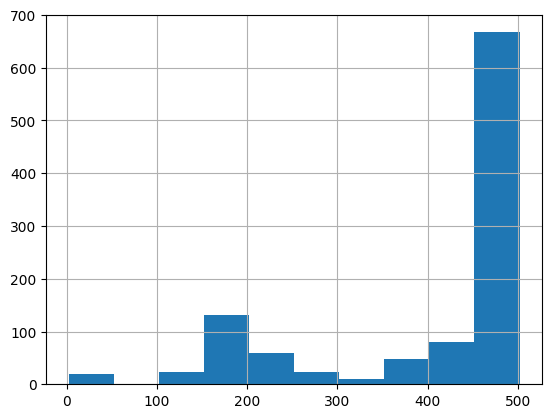
Create an embedding for each chunk with text-embedding-3-small. Use the same model for query embeddings. If you change embedding models, rebuild the index before searching it.
from openai import OpenAI
client = OpenAI()
df["embeddings"] = df.text.apply(
lambda x: client.embeddings.create(
input=x, model="text-embedding-3-small"
).data[0].embedding
)
df.to_csv("processed/embeddings.csv")
df.head()This should take about 3-5 minutes but after you will have your embeddings ready to use!
Building a question answer system with your embeddings

Embed the user’s question and compare it with the indexed chunks to find the most relevant text. Send that text and the question to the Responses API to generate an answer.
Turning the embeddings into a NumPy array is the first step, which will provide more flexibility in how to use it given the many functions available that operate on NumPy arrays. It will also flatten the dimension to 1-D, which is the required format for many subsequent operations.
from ast import literal_eval
import numpy as np
df = pd.read_csv("processed/embeddings.csv", index_col=0)
df["embeddings"] = df["embeddings"].apply(literal_eval).apply(np.array)
df.head()Embed the question using the same model you used to build the index. The example computes cosine distances with NumPy and retrieves the closest text chunks.
def distances_from_embeddings(query, embeddings, distance_metric="cosine"):
if distance_metric != "cosine":
raise ValueError("This example supports cosine distance only.")
return [
1 - float(np.dot(query, item) / (np.linalg.norm(query) * np.linalg.norm(item)))
for item in embeddings
]
def create_context(question, df, max_len=1800):
"""
Create a context for a question by finding the most similar context from the dataframe
"""
# Get the embeddings for the question
q_embeddings = (
client.embeddings.create(input=question, model="text-embedding-3-small")
.data[0]
.embedding
)
# Get the distances from the embeddings
df["distances"] = distances_from_embeddings(
q_embeddings, df["embeddings"].values, distance_metric="cosine"
)
returns = []
cur_len = 0
# Sort by distance and add the text to the context until the context is too long
for _, row in df.sort_values("distances", ascending=True).iterrows():
# Add the length of the text to the current length
cur_len += row["n_tokens"] + 4
# If the context is too long, break
if cur_len > max_len:
break
# Else add it to the text that is being returned
returns.append(row["text"])
# Return the context
return "\n\n###\n\n".join(returns)The max_len argument limits how many tokens of retrieved text to include. Pass that text and the question to the Responses API using gpt-6-luna. Read the answer from response.output_text.
def answer_question(df, question, max_len=1800):
context = create_context(question, df, max_len=max_len)
response = client.responses.create(
model="gpt-6-luna",
instructions=(
"Answer the question using only the supplied context. "
"If the context doesn't answer the question, say \"I don't know.\""
),
input=f"Context: {context}\n\nQuestion: {question}",
)
return response.output_text.strip()Ask a question the indexed pages can answer, then ask one they cannot. If the index contains a description of ChatGPT, the first call should answer from it. The second should return “I don’t know.”
print(answer_question(df, "What is ChatGPT?"))
print(answer_question(df, "What did I have for breakfast today?"))
If the system is not able to answer a question that is expected, it is worth searching through the raw text files to see if the information that is expected to be known actually ended up being embedded or not. The crawling process that was done initially was setup to skip sites outside the original domain that was provided, so it might not have that knowledge if there was a subdomain setup.
Currently, the data frame is being passed in each time to answer a question. For more production workflows, a vector database solution should be used instead of storing the embeddings in a CSV file, but the current approach is a great option for prototyping.