
Use AWS Lambda MicroVMs to run your agent’s tools in your AWS account. OpenAI runs the agent harness; each MicroVM runs codex exec-server and holds the session’s workspace files.
Build an image, then run the application-managed or webhook-managed example. Both use the same image and credentials.
Each example asks the agent to write hello.txt, then downloads and checks it. Use --suspend-resume to verify the file survives between turns.
How it works
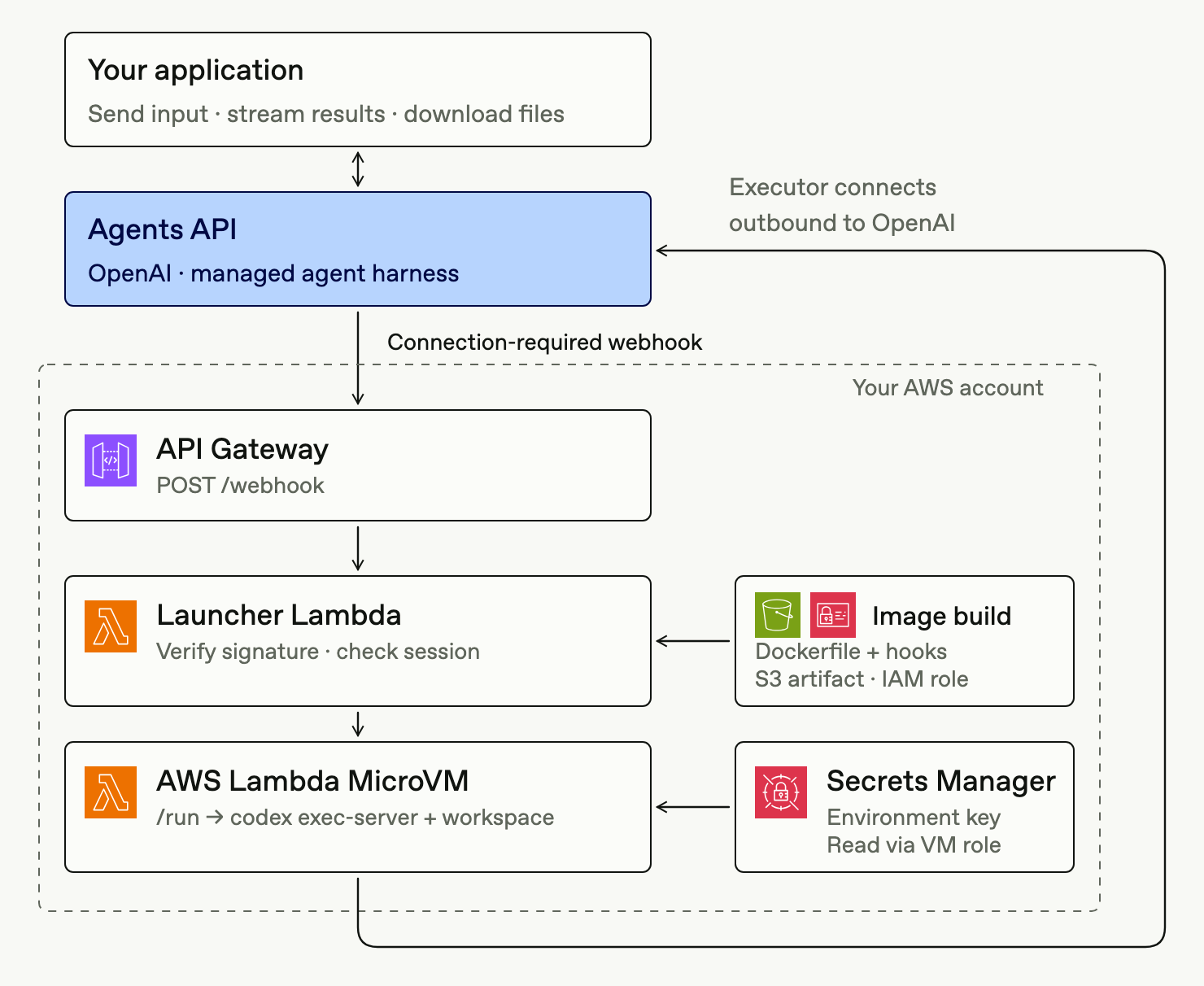
In the webhook path, your application creates a self-hosted session and sends input. When the session needs an executor, OpenAI sends agent.session.action_required with an environment_connection action. API Gateway delivers the webhook to a launcher Lambda, which verifies the signature, checks the current session, and launches a MicroVM.
The MicroVM’s /run hook fetches an environment key from Secrets Manager and starts the executor. The executor connects outbound to OpenAI, and the waiting input proceeds. Your application follows the session stream, downloads output files, and terminates the MicroVM after the final turn.
Before you begin
- AWS access: An account with Lambda MicroVMs access and an AWS CLI that includes
lambda-microvms. The build script creates the S3 artifact bucket, IAM image build role, and CloudWatch log group. Your AWS credentials need permission to create these resources and build and run MicroVMs. See AWS’s getting started guide for background. - Application key: Use
OPENAI_API_KEYto create sessions and submit input. - Environment key (
OPENAI_EXECUTOR_API_KEY): Create a separate environment key with matching organization, project, and user or service-account ownership. Store its value in Secrets Manager, for example in a secret namedcodex/agents-api/executor. The/runhook passes it to Codex asCODEX_API_KEY. - MicroVM execution role: Allow this role to read only the environment-key secret. Add decryption permission if you use a customer-managed KMS key. See AWS security and permissions for role setup.
Keep the application key and webhook signing secret outside the MicroVM. A webhook launcher needs these credentials in its own Secrets Manager secret; the VM receives only the ARN of its environment-key secret.
Prepare a reusable image
Build an image with the Codex CLI, tool dependencies, a working directory such as /workspace, and an HTTP server for the AWS lifecycle hooks.
| Hook | Behavior |
|---|---|
/aws/lambda-microvms/runtime/v1/ready |
Return HTTP 200 when the server is ready for AWS to snapshot. Leave the executor disconnected. |
/aws/lambda-microvms/runtime/v1/run |
Read the session connection values and secret ARN, fetch the environment key, and start the executor. |
/aws/lambda-microvms/runtime/v1/validate |
Check that Codex runs and the workspace is writable. |
/aws/lambda-microvms/runtime/v1/suspend |
Stop the executor and flush writes before AWS snapshots the VM. |
/aws/lambda-microvms/runtime/v1/resume |
Fetch the key again and restart the executor for the same environment. |
/aws/lambda-microvms/runtime/v1/terminate |
Stop the executor and flush writes before termination. |
Package the Dockerfile and hook server in an S3 artifact, then build codex-executor with 8 GB memory (4 vCPU baseline). The build script enables these hooks on port 8080. Keep session IDs, credentials, and live executor connections out of the reusable image snapshot. See AWS MicroVM images for build and hook configuration.
At launch, your application or launcher serializes these values as JSON in runHookPayload:
| Value | Purpose |
|---|---|
session.environment.id |
Identifies the environment the executor connects to. |
session.environment.remote_url |
Provides the executor’s OpenAI connection URL. |
| Environment-key secret ARN | Lets the hook retrieve the key using the MicroVM’s execution role. |
The /run hook parses the payload, retrieves the key, sets CODEX_API_KEY, and starts the executor. Return once the process starts to avoid a hook timeout.
Allow the executor’s required outbound connections and access to Secrets Manager. Configure an AWS egress connector for private resources or network restrictions.
Use PUT /upload/<path> to write a file under /workspace and GET /download/<path> to read it. Uploads accept raw bytes up to 64 MiB. The upload_file and download_file helpers obtain an AWS authentication token for port 8080. Paths outside the workspace are rejected.
Launch the MicroVM
Keep the session event stream open until the turn finishes.
Application-managed provisioning
- Create a self-hosted session whose working directory matches the image, then open its event stream.
- Call AWS RunMicrovm with the image ARN and version, execution role, network connectors, and
runHookPayload. Save the returnedmicrovmIdalongside the session ID. - Send input and follow the turn’s result.
- Retrieve output files and stop the MicroVM.
Webhook-managed provisioning
Your application creates the session, opens its stream, and submits input. An OpenAI webhook reaches the launcher Lambda through API Gateway.
- Deploy a
POST /webhookroute that invokes the launcher. Give the launcher permission to read its credentials, inspect, launch, resume, and terminate MicroVMs from the selected image, pass the MicroVM execution role, and use the configured network connectors. - Register the endpoint for
agent.session.action_requiredandagent.session.failed. Store the endpoint’s signing secret with the launcher’s application key. - Verify the webhook signature against the raw request body before accessing sessions or launching compute. Retrieve the current session and confirm the handler owns it, for example by matching a dedicated saved agent.
- If
environment_connectionis still pending, resume the session’s recorded VM if suspended. Otherwise, launch a VM if none is recorded and save its ID; if saving fails, terminate it. If the executor connects before the connection timeout, the waiting input proceeds without resubmission. - If the session is still
failed, terminate its recorded MicroVM. Ignore deleted sessions, resolved actions, and events owned by another handler.
The example saves the VM ID in session metadata. Concurrent webhook deliveries before that ID is recorded can still launch extra VMs.
Stop the MicroVM
On the session stream, wait for agent.session.turn.completed, agent.session.turn.failed, or agent.session.turn.cancelled for the main agent (event.turn.subagent_id is null). Subagents share the MicroVM; their terminal events must not trigger cleanup. Retrieve needed files, call TerminateMicrovm, and verify the VM reaches TERMINATED. Run cleanup on application errors too.
Turn outcomes are stream events, not webhook subscriptions. The agent.session.failed webhook handles session failures, but doesn’t cover every failed turn. Don’t terminate on agent.session.idle alone: it can arrive before waiting input starts.
Set AWS limits in case cleanup fails:
| Setting | Guidance |
|---|---|
maximumDurationInSeconds |
Set a ceiling for the workload, such as 900 for a 15-minute test. It can interrupt active work. |
maxIdleDurationSeconds |
Cover the expected workload. AWS measures inbound traffic; the executor’s outbound connection doesn’t reset this timer. |
suspendedDurationSeconds / autoResumeEnabled |
The examples use 0 / false by default and 300 / false with --suspend-resume. |
See AWS Running and using MicroVMs for lifetime and idle controls.
Delete the session separately; this doesn’t stop the VM or send a deletion webhook. Keep the image and environment-key secret for reuse. See Sandbox lifecycle for handling follow-up turns.
Suspend and resume between turns
Use AWS suspend and resume to preserve memory and disk between turns. Set a nonzero suspendedDurationSeconds; snapshot storage charges apply while suspended. maximumDurationInSeconds limits total running and suspended time to eight hours.
With --suspend-resume, the application suspends the VM after the first turn. The application-managed example resumes it directly; the webhook-managed example sends another input so the webhook resumes it. The next turn reads the existing hello.txt, and the application checks that its contents survived.
The hooks stop Codex before suspension and reload its key on resume. Suspend only after tools and subagents finish. Automatic resume requires inbound VM traffic; Agents API input alone doesn’t wake it.
Verify and monitor
Run either example and check the downloaded hello.txt, VM state (TERMINATED), and session deletion (HTTP 404).
Set MICROVM_IMAGE_ARN to your image ARN and use your deployment’s AWS region:
aws logs tail /aws/lambda/codex-agents-api-webhook --since 10m

aws lambda-microvms list-microvms \
  --image-identifier "$MICROVM_IMAGE_ARN" \
  --query 'items[].{id:microvmId,state:state}' --output table
Log session and MicroVM IDs together to trace a run. Keep credentials and raw webhook bodies out of logs.
Troubleshooting
| Symptom | What to check |
|---|---|
| Webhook signature is rejected | Use the endpoint’s signing secret and verify the unmodified request body. |
| No MicroVM launches | Check the webhook subscription, session ownership filter, pending environment_connection action, and launcher’s IAM permissions. |
| Image build fails | Check the S3 artifact, image build role, and /ready hook response. |
/run fails or times out |
Check secret access and executor startup. Return after starting the process, not after the turn. |
| Executor can’t connect | Check the environment ID, remote URL, key ownership, and outbound network access. |
| VM stops during a turn | Check maximum lifetime and idle policy; outbound executor traffic doesn’t count as inbound activity. |
For connection failures, inspect agent.session.environment.failed and the executor logs. See Self-hosted sandboxes for the shared executor contract.