

OpenAI is winding down the Evals product and recommends Promptfoo for continuing and extending your evaluation workflows.
Promptfoo is an open-source CLI and library for evaluating and red-teaming AI apps and agents. It gives you a more flexible way to run, maintain, and extend your evals locally or in CI.
What Changes When You Move to Promptfoo
OpenAI Evals and Promptfoo share the same core building blocks: test data, prompts, providers/models, and criteria for scoring outputs. When you recreate an evaluation in Promptfoo, map these pieces into a portable configuration so you can continue testing the same behavior.
The main difference is the workflow. OpenAI Evals is managed in the OpenAI Platform, where evaluations, runs, results, and related dataset workflows are available in the dashboard. Promptfoo is centered on a portable configuration file and CLI workflow. You can keep evaluations alongside your application code, run them locally or in CI, and adapt them as your testing needs evolve.
| OpenAI Evals | Promptfoo |
|---|---|
| Evaluations and results are managed in the OpenAI Platform dashboard. | Evaluations are defined in a config file and run with the CLI or in CI. |
| Graders are configured as testing criteria in an eval. | Grading behavior is configured as assertions and metrics. |
| Runs are tied to the Platform evaluation workflow. | Runs can be integrated into development, testing, and deployment workflows. |
| Platform features such as dataset review and prompt iteration remain in OpenAI. | Provider selection and evaluation customization are managed in Promptfoo. |
Promptfoo does not simply reproduce the OpenAI Evals interface in another tool. It provides a more portable, code-oriented workflow for maintaining, running, and extending evaluations over time.
Migrate an Evaluation to Promptfoo
This guide covers manually recreating an evaluation in Promptfoo. It does not require an OpenAI Evals export feature.
Before You Start
- Install Promptfoo.
- An existing OpenAI Evals evaluation.
- An API key for the model provider used in your eval, such as
OPENAI_API_KEY.
Create a Promptfoo Configuration
Recreate your evaluation’s prompts, provider, test cases, and assertions in a promptfooconfig.yaml file. See Configure evaluations in Promptfoo for the configuration format.
Run a Manually Recreated Evaluation in Promptfoo
Run a fresh evaluation and open the results viewer:
promptfoo eval -c promptfooconfig.yaml --no-cache
promptfoo view
eval creates a new Promptfoo evaluation run, while view opens its results locally. This new run is separate from any previously completed OpenAI Evals runs.
If you modify the configuration or encounter a configuration error, validate it before retrying:
promptfoo validate config -c promptfooconfig.yaml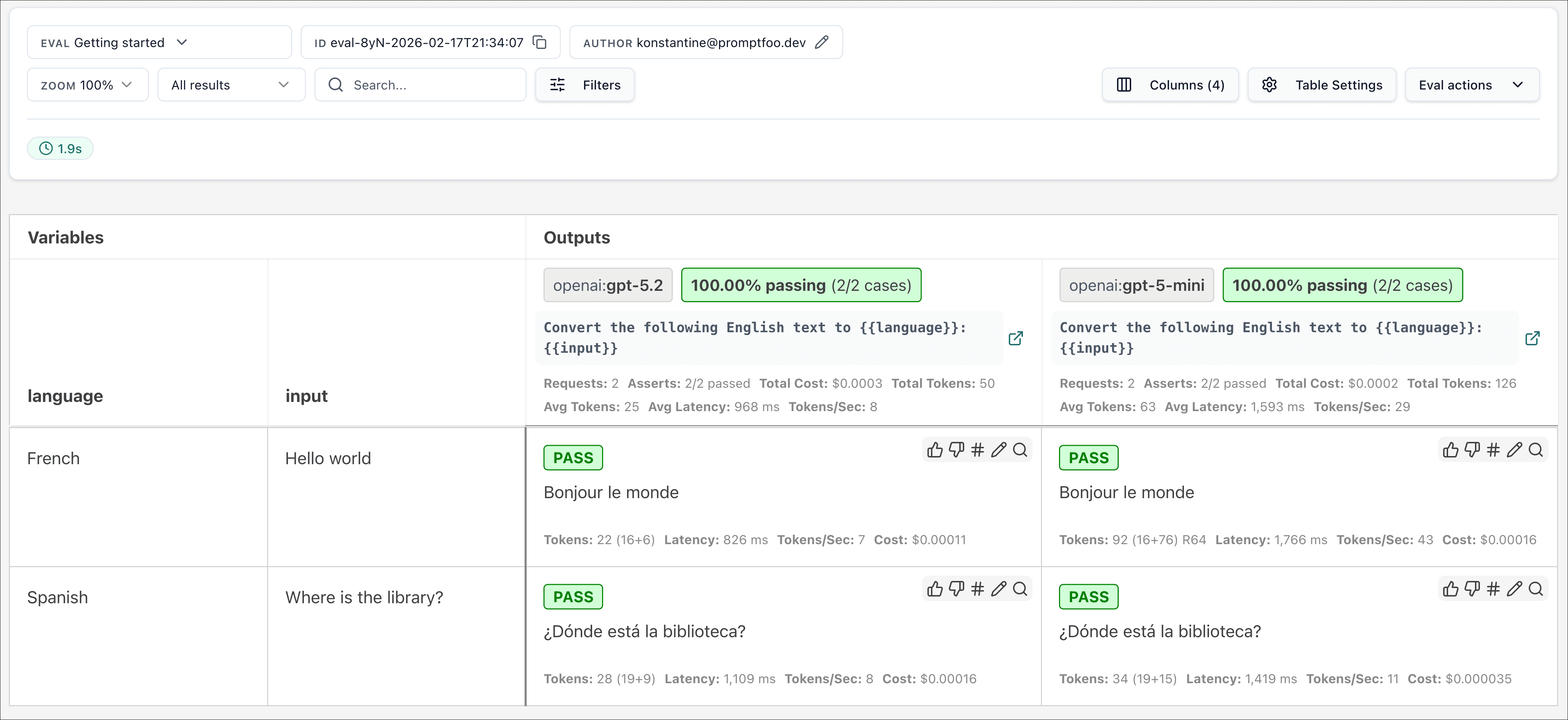
Verify the Migrated Evaluation
After your first Promptfoo run, review the results to confirm that the evaluation behaves as expected. Compare the recreated prompts, assertions, and outputs before using the eval in an ongoing workflow.
Similarity-based scoring may not produce identical numerical results across systems. Any manually recreated grader, especially an LLM-as-a-judge grader, should be validated before you rely on it for regression decisions.
Cases That Require Manual Setup
Some evaluations may require additional setup in Promptfoo.
| Situation | What to do |
|---|---|
| A grader needs to be recreated. | Recreate it as a Promptfoo assertion and verify its behavior before relying on it. |
| A tool, agent, or custom provider workflow is not represented in your Promptfoo configuration. | Configure that workflow in Promptfoo and test it before using the migrated eval. |
Customize Your Workflow in Promptfoo
Once your migrated evaluation is working as expected, you can use Promptfoo to expand your test coverage, run evals in CI, and add red-team testing.
If you use Codex, see Add evals to your AI application to build and maintain Promptfoo eval suites with the Promptfoo Codex plugin.