

Workspace Agents let teams save repeatable work in ChatGPT: instructions, connected context, app actions, approvals, and output format. API triggers let another system start that saved workflow when work begins outside ChatGPT.
In this notebook, you send one source event, confirm the trigger was accepted, and verify the result in the agent’s destination. The API starts the run. The instructions, app permissions, and approval settings control what happens next.
API-triggered runs are asynchronous. The endpoint queues the run, but it does not return the completed agent response.
What you will build
By the end, you will have a saved Workspace Agent, an API channel with an agtch_... trigger ID, and a Python trigger call that can run live against your agent.
Prerequisites
Before running the live trigger cell, you need:
| You need | Use this doc |
|---|---|
| Workspace Agents enabled in a supported ChatGPT workspace, plus permission to create and share agents | ChatGPT Workspace Agents guide |
| A saved Workspace Agent with one destination it can write to | Create and manage Workspace Agents |
An API channel on that agent and its agtch_... trigger ID | Trigger workspace agent runs |
| A Workspace Agent access token with the Workspace Agents scope | Authenticate with Workspace Agent access tokens |
A notebook or backend environment that can send HTTPS POST requests | This notebook uses Python’s standard library. No OpenAI Platform SDK is required. |
One async detail matters: the HTTP request returns before the agent finishes. The destination can be any connected app or surface the agent can write to, such as a channel, document, email, or ticket.
Check the Help Center for current plan and regional availability.
Architecture
The source system decides when work starts. The Workspace Agent decides how the saved workflow runs using its instructions, context, apps, and approvals.
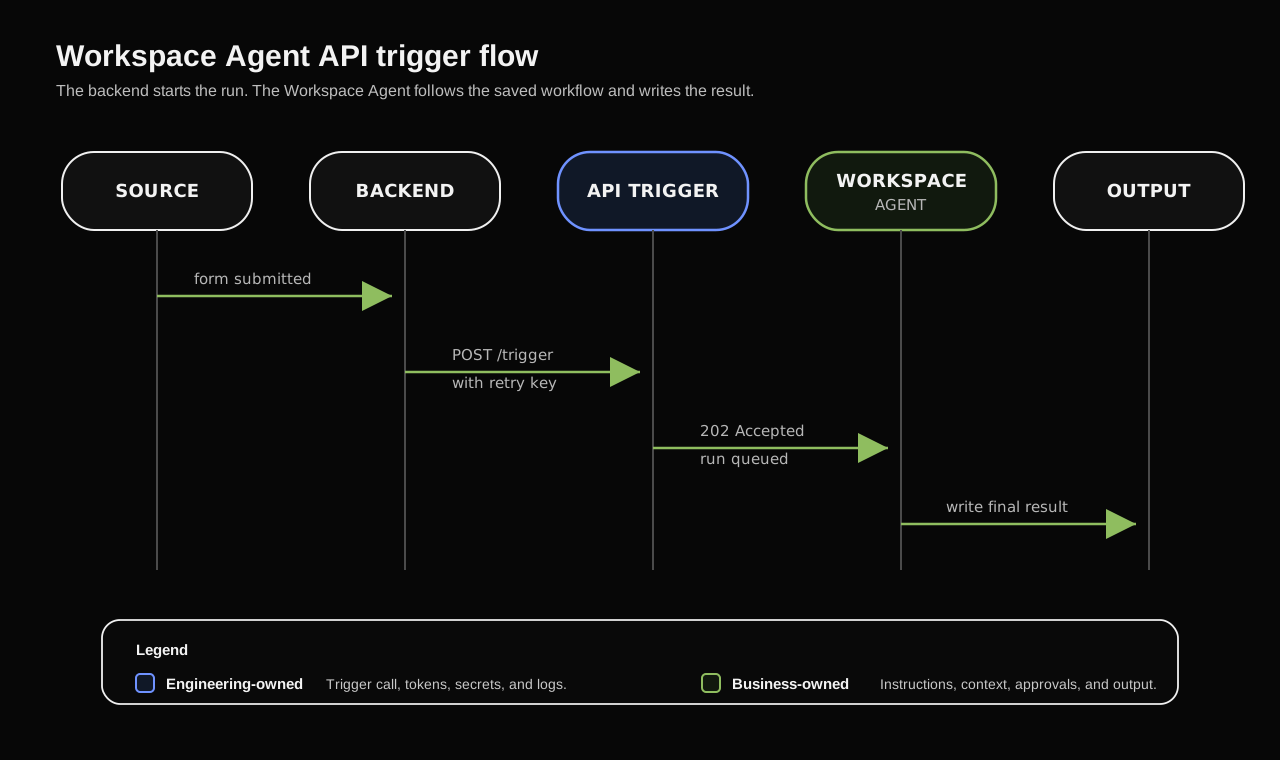
The backend starts the run. The agent follows the saved workflow and writes the result.
1. Write the agent instructions
The API trigger only starts the run. The Workspace Agent instructions tell the agent what to do next.
| Instructions decide | App setup decides |
|---|---|
| Which destination to use | Whether the app can access that destination |
| What output to write | Whether the write action is available |
| Whether to act immediately or ask first | Whether approval is required before writing |
For this demo, the instructions should be narrow: read the source event, write one update to the destination, and include the request ID so you can verify it.
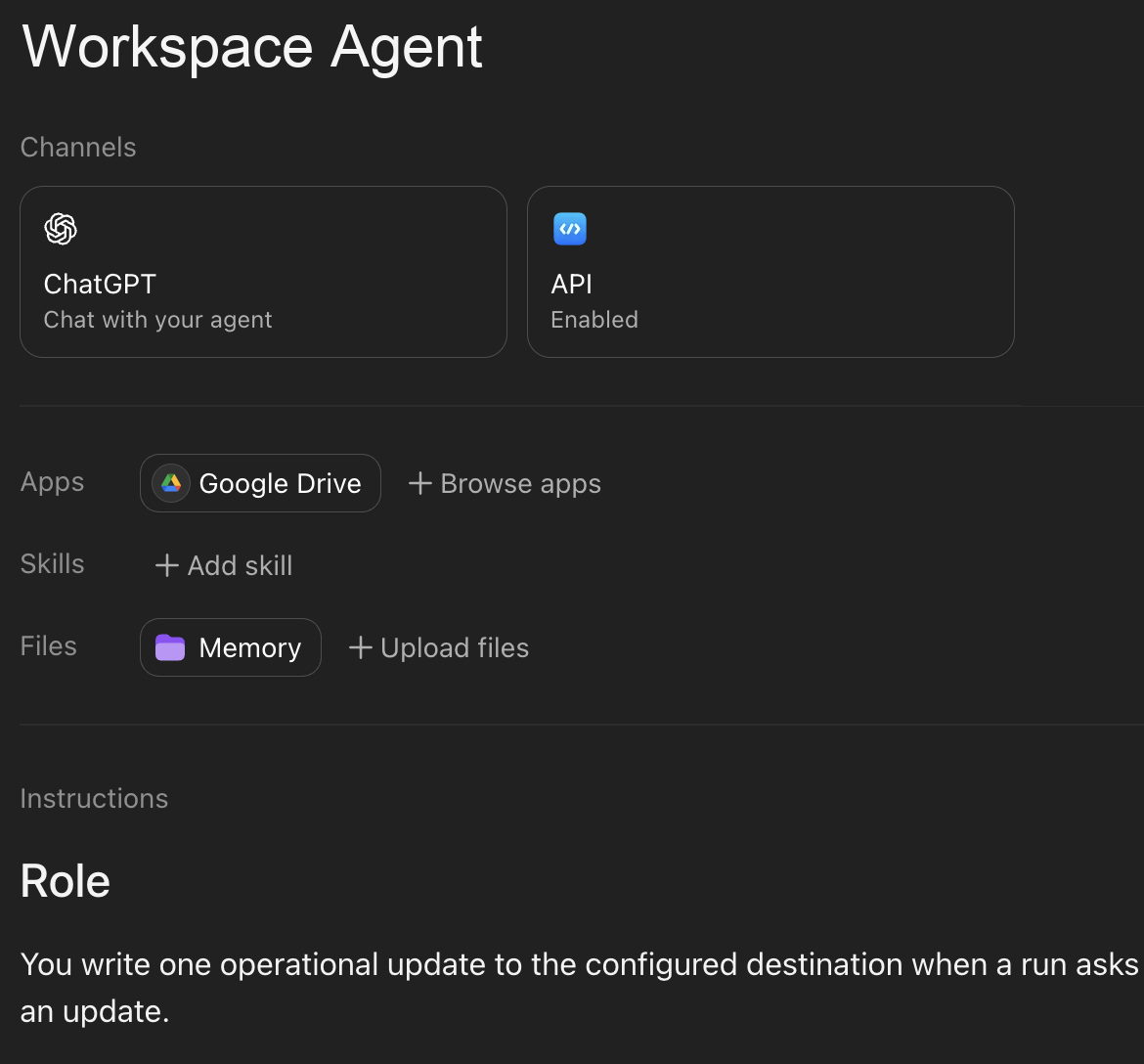
Use the instructions section to make the destination, write behavior, and approval expectations clear.
agent_builder_prompt = """
Create a Workspace Agent that writes API-triggered updates to the configured destination.

When the agent receives an API-triggered run:
1. Find the request ID, source system, output destination, and update text in the input.
2. Write one short update to that destination if the connected app allows it.
3. Start the update with: Workspace Agent API demo received: <Request ID>
4. Include the source system, submitted timestamp, and update text if present.
5. After the write succeeds, stop.

Use the exact destination named in the input or saved in these instructions.
Do not assume the API-triggered run has a current chat, channel, thread, or document context.
If write approval is required, request approval. If the destination is unavailable, say that the output destination could not be reached.
""".strip()

print(agent_builder_prompt)
Test the exact behavior in Preview before adding the API trigger. Paste a sample message with a request ID, destination, and update text. If Preview cannot write to the destination, the API trigger will not either.
2. Connect one output destination
Choose one low-risk destination the agent can write to: a channel, document, email, ticket, or another connected app. Configure the app connection and decide whether writes should require approval before testing the API trigger.
Auto-approved writes are useful for low-risk demo destinations. Riskier writes should stay approval-gated.
| Auth model | Use it when | Watch for |
|---|---|---|
| End-user account | Each person running the agent should use their own app permissions | API-triggered workflows may need the caller to have the right app access |
| Agent-owned account | The workflow needs a consistent shared connection, such as a team channel, shared document, or shared inbox | Use a service account when possible. Avoid personal accounts unless you understand the risk |
api_output_instructions = """
When triggered by API, write one short update to the configured destination.
Always include the request ID from the trigger input.

Start the update with: Workspace Agent API demo received: <Request ID>
Include the source system, submitted timestamp, and update text if present.
Use the exact destination named in the input or saved in these instructions.
Do not assume the API-triggered run has a current chat, channel, thread, or document context.
If writes are auto-approved for this destination, write immediately. If approval is required, request approval.
After the write succeeds, stop.
""".strip()

print(api_output_instructions)
3. Add an API channel
Open the agent in the Workspace Agent builder. Add an API channel, save the agent, copy the trigger ID, and confirm the ID starts with agtch_.
Share the agent with the user whose access token will call the API. The trigger ID goes in the API path. It is different from the agent name.
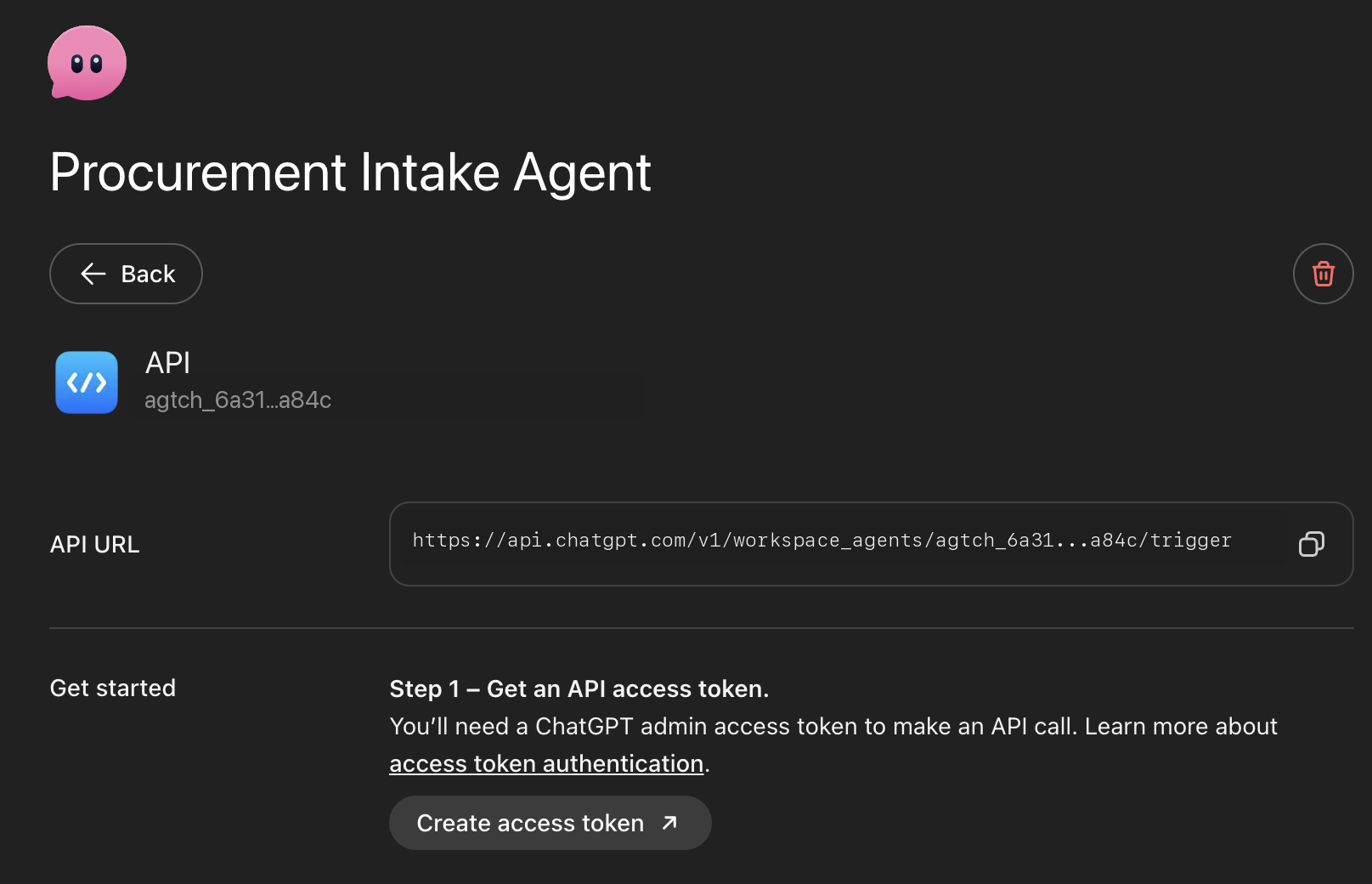
Use this API channel ID in the trigger endpoint.
4. Configure the live call
You need two values:
| Value | Where it comes from |
|---|---|
| API trigger ID | The agent’s API channel. It starts with agtch_.... |
| Workspace Agent access token | ChatGPT Admin > Access tokens, with the Workspace Agents scope. |
Use a Workspace Agent access token for https://api.chatgpt.com, not an OpenAI Platform API key. The token owner must be able to run the shared agent, or the API returns 403 Forbidden.
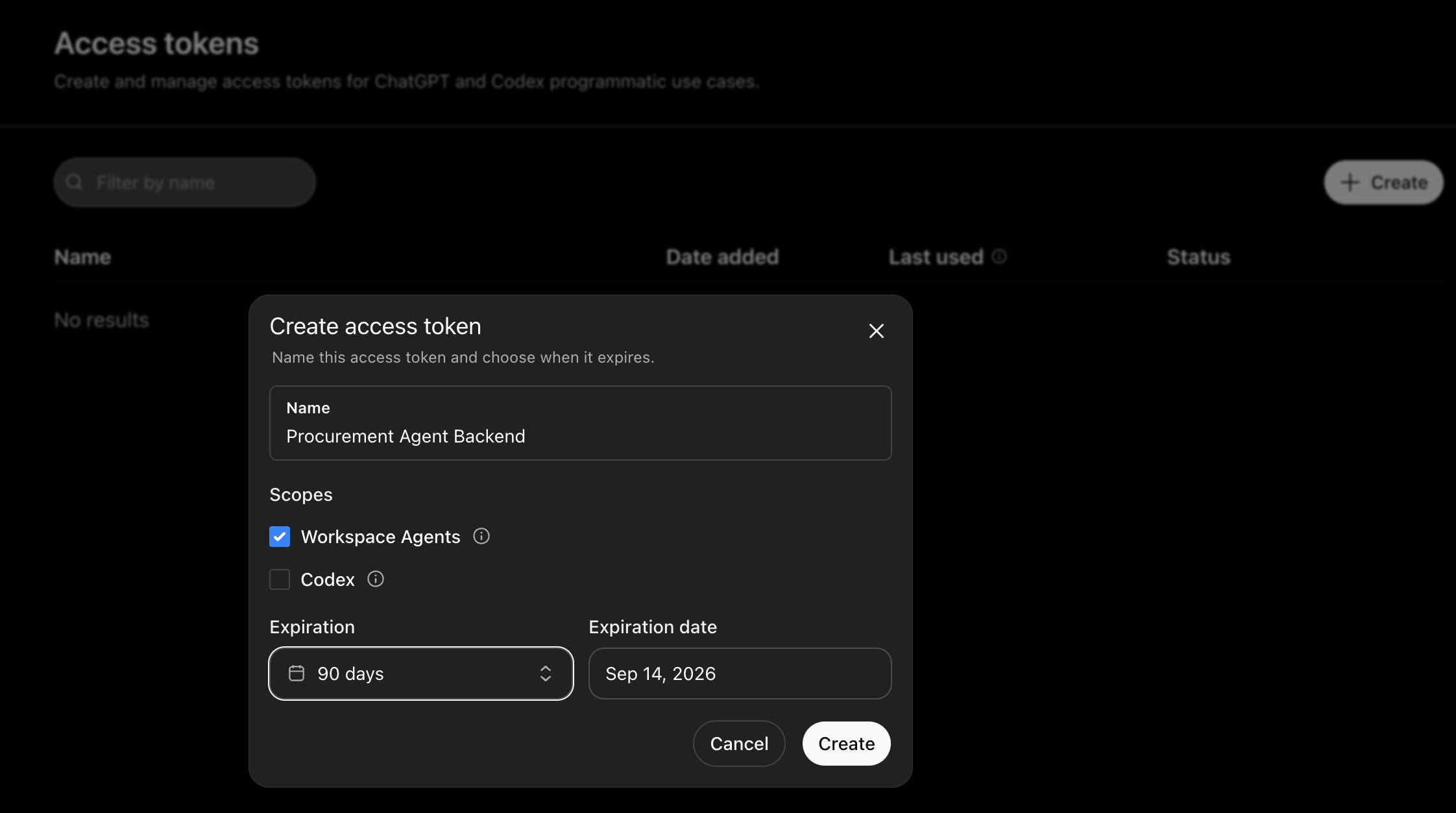
Store the token as a secret. Do not paste it into notebook code.
For a live run, export the values before opening the notebook:
export WORKSPACE_AGENT_TRIGGER_ID="agtch_..."
export WORKSPACE_AGENT_ACCESS_TOKEN="<workspace-agent-access-token>"
export WORKSPACE_AGENT_OUTPUT_DESTINATION="output-destination"

jupyter notebook  # or jupyter lab
WORKSPACE_AGENT_OUTPUT_DESTINATION is optional. It labels the destination in the trigger input; access still comes from the agent’s connected app.
import json
import os
import textwrap
import urllib.error
import urllib.request
from datetime import datetime, timezone


def read_env(name: str, default: str = "") -> tuple[str, str]:
    value = os.environ.get(name, "").strip()
    if value:
        return value, "environment"
    return default, "default" if default else "missing"


TRIGGER_ID, trigger_id_source = read_env("WORKSPACE_AGENT_TRIGGER_ID")
ACCESS_TOKEN, access_token_source = read_env("WORKSPACE_AGENT_ACCESS_TOKEN")
OUTPUT_DESTINATION, output_destination_source = read_env(
    "WORKSPACE_AGENT_OUTPUT_DESTINATION",
    "the agent's configured destination",
)
API_BASE = "https://api.chatgpt.com/v1"

print(f"Trigger ID configured: {bool(TRIGGER_ID)} ({trigger_id_source})")
print(f"Access token configured: {bool(ACCESS_TOKEN)} ({access_token_source})")
print(f"Output destination label: {OUTPUT_DESTINATION} ({output_destination_source})")

if ACCESS_TOKEN.startswith("sk-"):
    print("Warning: this looks like an OpenAI Platform API key. Create a ChatGPT Workspace Agent access token from Admin > Access tokens instead.")

if OUTPUT_DESTINATION == "the agent's configured destination":
    print("Tip: set WORKSPACE_AGENT_OUTPUT_DESTINATION when you want the API input to name a specific destination.")
5. Send one source event
Keep the first input small: a source system sends an event, and the Workspace Agent writes one update to its destination.
run_stamp = datetime.now(timezone.utc).strftime("%Y%m%d%H%M%S")

source_event = {
    "request_id": f"DEMO-{run_stamp}",
    "submitted_at": datetime.now(timezone.utc).isoformat(),
    "source_system": "notebook demo",
    "update_text": "The API trigger reached the Workspace Agent and asked it to write this update.",
    "output_destination": OUTPUT_DESTINATION,
}

source_event
Map the source event into plain text before calling the trigger endpoint. The API passes the event to the agent. The agent’s saved instructions, app permissions, and approval settings control the write.
def build_agent_input(event: dict) -> str:
    return textwrap.dedent(f"""
    Request ID: {event['request_id']}
    Source system: {event['source_system']}
    Submitted at: {event['submitted_at']}
    Output destination: {event['output_destination']}
    Update text: {event['update_text']}

    Please write this update to the configured destination.
    Start with exactly: Workspace Agent API demo received: {event['request_id']}
    """).strip()


agent_input = build_agent_input(source_event)
print(agent_input)
Use conversation_key when multiple events should continue the same agent conversation, such as several updates for the same request.
For retries, send an Idempotency-Key header. Reuse the same key only when retrying the same source event.
conversation_key = f"workspace-agent-api-demo-{source_event['request_id']}"
idempotency_key = f"workspace-agent-api-demo-{source_event['request_id']}-v1"

payload = {
    "conversation_key": conversation_key,
    "input": agent_input,
}

print(json.dumps(payload, indent=2))
print("Idempotency-Key:", idempotency_key)
6. Trigger the agent from the API
Endpoint:
POST https://api.chatgpt.com/v1/workspace_agents/{id}/triggerRequired and recommended request fields:
| Location | Field | Required | Description |
|---|---|---|---|
| Path | id | Yes | API trigger ID from the agent’s API channel, in agtch_... format |
| Header | Authorization | Yes | Bearer credential using the Workspace Agent access token |
| Header | Content-Type | Yes | Use application/json |
| Header | Idempotency-Key | Recommended | Stable key for retrying the same source event |
| Body | input | Yes | Message text passed to the agent as trigger input |
| Body | conversation_key | No | Caller-defined stable ID for continuing the same agent conversation |
def trigger_workspace_agent(trigger_id: str, access_token: str, payload: dict, idempotency_key: str) -> dict:
    url = f"{API_BASE}/workspace_agents/{trigger_id}/trigger"
    body = json.dumps(payload).encode("utf-8")
    request = urllib.request.Request(
        url,
        data=body,
        method="POST",
        headers={
            "Authorization": f"Bearer {access_token}",
            "Content-Type": "application/json",
            "Idempotency-Key": idempotency_key,
        },
    )

    try:
        with urllib.request.urlopen(request, timeout=30) as response:
            return {"ok": True, "status": response.status, "error": None}
    except urllib.error.HTTPError as exc:
        error_body = exc.read().decode("utf-8", errors="replace")
        try:
            parsed_error = json.loads(error_body).get("error", {})
        except json.JSONDecodeError:
            parsed_error = {"message": error_body}
        return {"ok": False, "status": exc.code, "error": parsed_error}


def print_trigger_error(result: dict) -> None:
    status = result.get("status")
    error = result.get("error") or {}
    message = error.get("message", "Unknown error")
    code = error.get("code")

    print(f"Workspace Agent trigger failed: HTTP {status}")
    print("Message:", message)
    if code:
        print("Code:", code)

    if status == 401:
        print()
        print("Fix: create a fresh ChatGPT Workspace Agent access token from Admin > Access tokens with the Workspace Agents scope.")
        print("Do not use an OpenAI Platform API key from platform.openai.com for this endpoint.")
    elif status == 403:
        print()
        print("Fix: the token is valid, but the token owner cannot trigger this agent. Share the agent with that user or use a token from an allowed owner.")
    elif status == 404:
        print()
        print("Fix: confirm the API channel trigger ID starts with agtch_ and belongs to an agent visible to the token owner.")
    elif status == 409:
        print()
        print("Fix: save/publish the agent and confirm the API channel is active and runnable.")


if not TRIGGER_ID or not ACCESS_TOKEN:
    print("No live request sent.")
    print("Set WORKSPACE_AGENT_TRIGGER_ID and WORKSPACE_AGENT_ACCESS_TOKEN before starting the kernel.")
else:
    result = trigger_workspace_agent(TRIGGER_ID, ACCESS_TOKEN, payload, idempotency_key)
    if not result["ok"]:
        print_trigger_error(result)
    else:
        status = result["status"]
        print("HTTP status:", status)
        assert status == 202, f"Expected 202 Accepted, got {status}"
        print("Trigger accepted. Look in the configured destination for the result.")
        print("Search for request ID:", source_event["request_id"])
        print("Expected output destination:", source_event["output_destination"])
A 202 Accepted confirms the trigger was accepted for processing. It does not mean the agent finished. The API returns no body, no public run ID, and no final agent output.
For the first live run, look for three things: HTTP status: 202, a unique request ID, and an update in the destination that starts with Workspace Agent API demo received:.
If the trigger succeeds but nothing is written, debug the agent configuration, not the HTTP request. Usually one of these is missing: destination instructions, app permission, app authentication, or the intended approval setting.
For repeated notebook tests, keep the generated request ID and idempotency key unique. Reusing the same Idempotency-Key for the same source event can return the original accepted outcome instead of enqueueing a new run.
7. Adapt the call for a backend worker
The live call above is the minimal test. The helper below wraps the same request shape for a backend worker, scheduled job, or workflow engine.
Keep conversation_key and Idempotency-Key stable for the same source event so retries do not enqueue duplicate runs.
def build_backend_trigger_request(event: dict) -> dict:
    """Create the Workspace Agent trigger request from a source-system event."""
    request_id = event["request_id"]
    return {
        "trigger_id": TRIGGER_ID,
        "payload": {
            "conversation_key": f"workspace-agent-api-demo-{request_id}",
            "input": build_agent_input(event),
        },
        "idempotency_key": f"workspace-agent-api-demo-{request_id}-v1",
    }


def handle_source_event(event: dict, *, live: bool = False) -> dict:
    """Preview or send the backend trigger call."""
    trigger_request = build_backend_trigger_request(event)
    result = {
        "request_id": event["request_id"],
        "conversation_key": trigger_request["payload"]["conversation_key"],
        "idempotency_key": trigger_request["idempotency_key"],
        "queued": False,
        "status": None,
    }

    if live:
        if not TRIGGER_ID or not ACCESS_TOKEN:
            raise RuntimeError("Set WORKSPACE_AGENT_TRIGGER_ID and WORKSPACE_AGENT_ACCESS_TOKEN before live=True.")
        trigger_result = trigger_workspace_agent(
            trigger_request["trigger_id"],
            ACCESS_TOKEN,
            trigger_request["payload"],
            trigger_request["idempotency_key"],
        )
        result["status"] = trigger_result["status"]
        result["queued"] = trigger_result["ok"] and trigger_result["status"] == 202
        if not trigger_result["ok"]:
            result["error"] = trigger_result["error"]

    return result


backend_preview = handle_source_event(source_event, live=False)
print(json.dumps(backend_preview, indent=2))
In production, log the source request ID, trigger ID, idempotency key, timestamp, and HTTP status. Do not log the access token or sensitive request details.
8. Verify the destination action
The API does not return the completed response, so verify the action in the agent’s destination. Check the exact destination named in the trigger input or saved in the agent instructions.
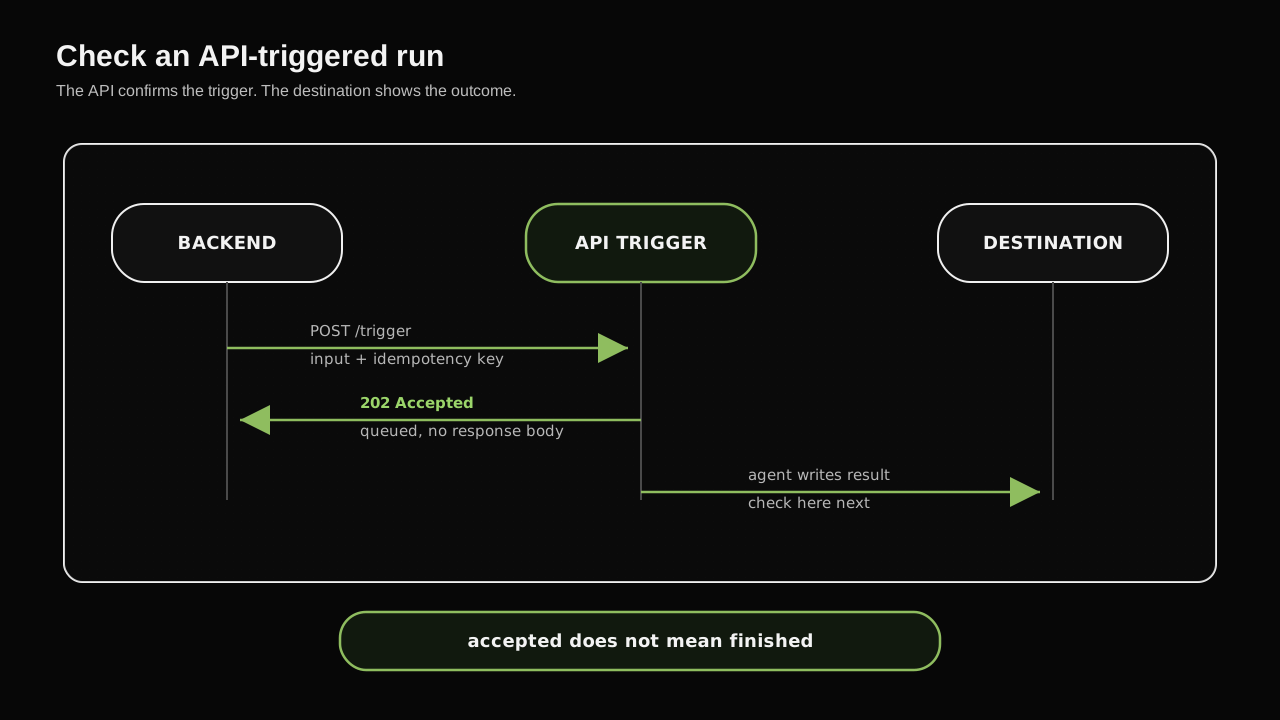
The HTTP response tells you the trigger was received. Verify the actual work in the destination.
Search the configured destination for the generated request ID printed by the live trigger cell. The update should start with:
Workspace Agent API demo received: DEMO-20260618010101At that point, the end-to-end path is working: trigger, token, sharing, instructions, app permissions, and approval behavior.
If the trigger succeeds but no output appears, check these first:
| Check | What to verify |
|---|---|
| Preview | Paste the exact agent_input text and confirm the agent writes to the destination |
| Destination | Set WORKSPACE_AGENT_OUTPUT_DESTINATION to the exact destination name before starting the kernel |
| Permissions | Confirm the connected app can write to that destination during API-triggered runs |
| Approval | Confirm the write action is auto-approved if the demo should write automatically |
| Access | Confirm the token owner can run the agent and the saved API channel is active |
From there, replace source_event with any backend event. The API call stays the same. The agent owner updates the instructions, destination, and approval behavior in ChatGPT.
Before rollout, run a small test matrix:
| Test | Expected result |
|---|---|
| Happy path | Agent writes Workspace Agent API demo received: <request_id> to the configured destination |
| Missing request ID | Agent asks for a request ID and does not write an ambiguous update |
| Duplicate retry with same idempotency key | API returns the original accepted outcome instead of enqueueing a second trigger event |
| Token from unshared user | API returns 403 Forbidden |
| Wrong trigger ID | API returns 404 Not Found |
| Agent or destination not runnable | API returns 409 Conflict |
Error handling
The trigger endpoint can return:
| Status | What it means | What to do |
|---|---|---|
202 Accepted | Request accepted for processing | Verify the result in the configured destination |
401 Unauthorized | Token is missing, expired, revoked, invalid, or the wrong credential type | Create a ChatGPT Workspace Agent access token from Admin > Access tokens with the Workspace Agents scope. Do not use an OpenAI Platform API key |
403 Forbidden | The token is valid but cannot trigger this agent | Share the agent with the caller or use a token from an allowed user |
404 Not Found | The trigger ID does not exist or is not visible to the caller | Confirm the agtch_ ID from the API channel |
409 Conflict | The agent or API channel is not runnable | Save/publish the agent and confirm the API channel is active |
202 Accepted, but no output appears | The trigger succeeded, but the agent did not write to the destination | Check instructions, app authentication, destination permissions, and write-approval settings |
For transient network failures, retry with the same Idempotency-Key for the same source event. For a different source event, generate a new idempotency key.
Production checklist
Before expanding beyond a pilot, lock down four things:
| Area | Check |
|---|---|
| Auth | Store and rotate the access token. Use a token owner that makes run attribution clear. |
| Access | Share the agent only with allowed users or groups. Confirm the connected app can write to the destination. |
| Behavior | Make destination, output format, and approval behavior explicit in the agent instructions. |
| Operations | Include source event IDs, monitor non-202 responses, and watch for missing output. |
Auto-approve only low-risk writes. Keep sensitive writes approval-gated until the workflow is reviewed with the business owner.
When to use this pattern
Use API triggers when a business-owned Workspace Agent should do the work, but another system starts it.
| Use this pattern when | Use another approach when |
|---|---|
| A non-technical owner should maintain the workflow instructions. | The caller needs the completed answer in the HTTP response. |
| Work starts from a form, ticket, CRM record, scheduled job, or backend event. | The source system needs low-latency synchronous behavior. |
| The result can be written to a connected app, channel, document, or email. | There is no durable destination for the agent output. |
| Instructions and approval settings can safely control the write behavior. | The workflow is high-impact and lacks review, audit, or rollback paths. |
That is the ownership split: business teams refine the agent in ChatGPT, while engineering keeps the source-system trigger stable.
Adapt this pattern
Use the same pattern when work starts outside ChatGPT but should run through a reusable Workspace Agent:
| Workflow | Source event | Agent output |
|---|---|---|
| Meeting follow-up | Meeting recording or transcript is ready | Action items and follow-up draft |
| Calendar-driven prep | Google Calendar event or upcoming-meeting schedule is found | Briefing document or prep summary |
| Inbound lead qualification | CRM lead or form submission | Account summary and sales task |
| Support escalation | High-priority ticket is created | Escalation summary and next steps |
| Employee support | Helpdesk ticket is opened | Triage answer or escalation route |
| Weekly reporting | Scheduled job finds new records | Summary document or team update |
Start with one narrow workflow, one clear source event, and one output destination. After the agent behaves consistently, add more destinations, richer context, or additional approval-gated actions.