
Overview
Multi-agent lets a model spin up and coordinate subagents in parallel, synthesizing their work to provide a final response. This is especially effective for applications with complex tasks that benefit from parallel work delegation, such as codebase exploration, documentation, and implementation.
Multi-agent is available as a beta feature with GPT-6.1 Sol and all GPT-5.6 models. Check the model page before enabling Multi-agent in your application.
When to use Multi-agent
Tasks can often be divided into independent sections of work that a single agent would complete sequentially, but multiple agents are able to tackle in parallel. Multi-agent enables a root agent to delegate to multiple subagents that complete work concurrently. This can provide multiple benefits:
- Parallel execution. Independent research, analysis, or implementation tasks can proceed at the same time, which can lead to faster execution.
- Focused context. Each subagent receives a bounded task and maintains its own context, which reduces interference in context between unrelated lines of work and improves performance.
- Model-directed coordination. The root agent can create subagents, send them additional information, wait for results, and synthesize a final answer without requiring your application to implement orchestration.
Multi-agent orchestration is most useful when a task can be divided into concrete, independent workstreams, such as:
- Exploring separate parts of a large codebase
- Comparing multiple proposals, documents, or hypotheses
- Researching several sources in parallel
- Implementing independent components or writing independent test suites
- Investigating different possible causes of a failure in parallel
- Exploring separate approaches to a problem concurrently
Note that adding subagents can increase token usage, and may not be as beneficial for tasks that depend on a single ordered chain of reasoning, require frequent writes to shared mutable state, or are already dominated by one slow external operation.
| Use Multi-agent when | Prefer one agent when |
|---|---|
| Work can be split into independent, bounded tasks | Each step depends directly on the previous step |
| Separate context improves focus | The task is small enough to complete in one short run |
| Parallel exploration can reduce wall-clock time | Agents would contend over the same mutable resource |
| Comparing independent findings improves coverage | You require a fixed, deterministic execution graph |
Quickstart
The Python and JavaScript examples use the beta Responses SDK. For HTTP
requests, use client.beta.responses and pass responses_multi_agent=v1 in
the betas argument. For raw HTTP requests and WebSocket connections, pass
OpenAI-Beta: responses_multi_agent=v1 in the request or connection headers.
Item schemas may change while Multi-agent is in beta.
Enable Multi-agent in your Responses API request with multi_agent.enabled. When multi_agent.enabled is true, the root agent becomes eligible to spawn a tree of subagents. The subagents share the request’s model and available tools, while agents coordinate through collaboration primitives such as spawning, messaging, and waiting (see How Multi-agent works). The root agent is responsible for synthesizing subagent responses and providing the final response.
from openai import OpenAI
client = OpenAI()
def review_pull_request(diff: str) -> str:
response = client.beta.responses.create(
model="gpt-6.1-sol",
input=(
"Review the pull-request diff below with three agents: one for "
"correctness, one for security, and one for missing tests. "
"Reconcile duplicate or conflicting findings, then return a "
"prioritized review with file and line references.\n\n"
f"<diff>\n{diff}\n</diff>"
),
multi_agent={
"enabled": True,
"max_concurrent_subagents": 3,
},
betas=["responses_multi_agent=v1"],
)
return "".join(
part.text
for item in response.output
if (
item.type == "message"
and item.agent is not None
and item.agent.agent_name == "/root"
and item.phase == "final_answer"
)
for part in item.content
if part.type == "output_text"
)max_concurrent_subagents sets the maximum number of subagents that can be active simultaneously across the entire agent tree. It includes all descendants—children, grandchildren, and deeper subagents—but excludes the root agent.
The API does not impose a fixed upper bound on this setting. The default is 3, which is recommended for most workloads. Multi-agent runs also have no fixed limit on tree depth or the total number of subagents created during a run.
Add a developer message to tune when the root model should spawn subagents. This developer message is additive to the instructions injected for the root agent and subagents.
Examples of developer messages include:
- “Do not spawn subagents unless the user explicitly asks for subagents, delegation, or parallel agent work.”
- “Proactive Multi-agent delegation is active. Use subagents when parallel work would materially improve speed or quality.”
How Multi-agent works
The Responses API provides the root and subagent models with hosted orchestration actions and instructions for using them. The root agent is named /root. Spawned subagents use hierarchical paths such as:
/root
├── /root/researcher
├── /root/reviewer
└── /root/reviewer/tester
Multi-agent imposes no fixed limit on the total number of subagents or tree depth. For most tasks, use the default max_concurrent_subagents value of 3. This setting limits the number of active subagent turns across the entire tree, including children and deeper descendants.
When Multi-agent mode is enabled, the Responses API provides six hosted collaboration actions. You may see these as multi_agent_call items. Your application should not execute these or submit outputs for them.
| Action | Purpose |
|---|---|
spawn_agent |
Create a subagent and assign its initial task. |
send_message |
Queue a message for an existing agent without starting a new turn. |
followup_task |
Assign more work to an existing non-root agent and start or resume its turn. |
wait_agent |
Wait for an update in the calling agent’s mailbox. |
interrupt_agent |
Interrupt another agent’s active turn without deleting its context. |
list_agents |
Return the current agent tree, statuses, and each agent’s last_task_message. |
Handling developer-defined tool calls works in the same way as without Multi-agent enabled. Any agent in the tree may emit a function_call. Your application must execute the call and submit a matching function_call_output.
Note that all agents in the tree have access to the tools configured in the API request’s model call.
Using Multi-agent in Responses API
HTTP vs. WebSocket performance
HTTP and WebSocket support the same Multi-agent capabilities, but WebSocket is recommended for tool-heavy or long-running workflows. Its persistent connection lets your application return function outputs as they become available, reducing continuation overhead and allowing agents to spend less time waiting.
With HTTP, the response completes once every active agent has either finished or paused to wait for a client-executed function call. Your application then executes all outstanding function calls and submits their outputs in a new Responses API request, allowing the paused agents to resume.
With WebSocket, your application can inject each function output into the response as soon as it becomes available, without waiting for the active response to complete. The waiting agent can resume immediately while other agents continue working. This reduces coordination delays and avoids extra request round trips when agents finish or request tools at different times.
HTTP may be sufficient for workflows that require calling multiple hosted tools, such as parallel web searches, or one-request workflows with few function calls. For most Multi-agent workflows, WebSocket is likely to provide lower latency and better end-to-end performance.
HTTP function call execution
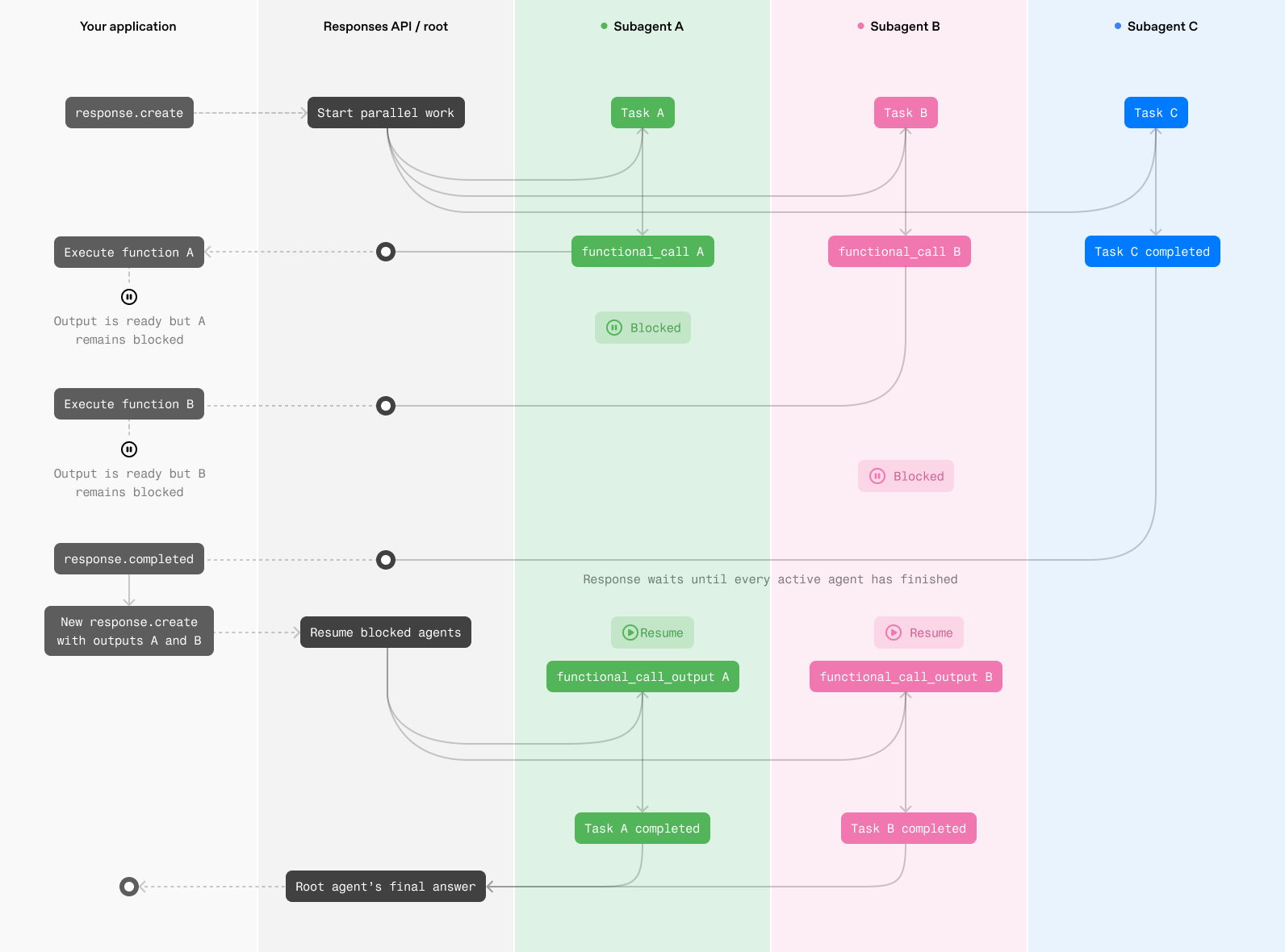
WebSocket function call execution
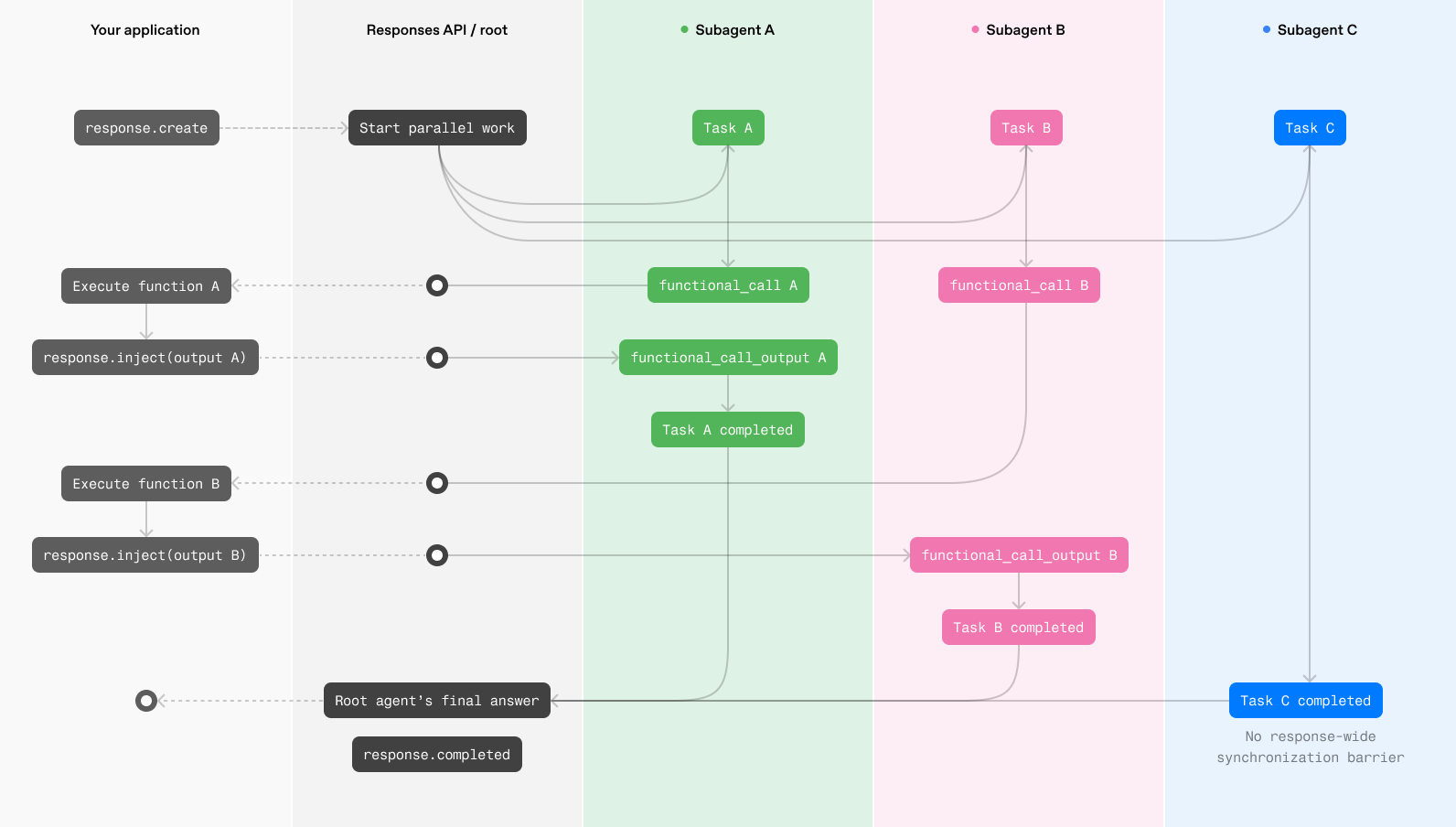
HTTP
These examples require beta SDK builds that expose the beta Responses API. For HTTP streaming, call client.beta.responses.create and pass responses_multi_agent=v1 with the betas argument; this enables beta types and autocomplete. In Python, import beta response item types from openai.types.beta when adding type annotations.
Example client-side code:
from __future__ import annotations
import json
import sys
from openai import OpenAI
from openai.types.beta import BetaResponseOutputItem
client = OpenAI()
ROOT = "/root"
PROPOSALS = {
"alpha": {"estimated_weeks": 6, "risk": "medium"},
"beta": {"estimated_weeks": 8, "risk": "low"},
}
tools = [
{
"type": "function",
"name": "get_proposal",
"description": "Return details for a proposal that the agents should compare.",
"parameters": {
"type": "object",
"properties": {
"proposal": {
"type": "string",
"enum": ["alpha", "beta"],
}
},
"required": ["proposal"],
"additionalProperties": False,
},
"strict": True,
}
]
history = [
{
"role": "user",
"content": "Compare proposal alpha and proposal beta.",
}
]
def agent_name(item: BetaResponseOutputItem) -> str:
return item.agent.agent_name if item.agent else ROOT
def render_to_user(delta: str) -> None:
print(delta, end="", flush=True)
def log_subagent_text(agent: str, delta: str) -> None:
print(f"[{agent}] {delta}", end="", file=sys.stderr, flush=True)
def process_tool_call(name: str, arguments: str) -> str:
if name != "get_proposal":
raise ValueError(f"Unknown tool: {name}")
parsed_arguments = json.loads(arguments)
return json.dumps(PROPOSALS[parsed_arguments["proposal"]])
while True:
output_items = []
pending_calls = []
item_agents: dict[int, str] = {}
stream = client.beta.responses.create(
model="gpt-6.1-sol",
input=history,
tools=tools,
store=False,
multi_agent={
"enabled": True,
"max_concurrent_subagents": 3,
},
stream=True,
betas=["responses_multi_agent=v1"],
)
for event in stream:
if event.type == "response.output_item.added":
item_agents[event.output_index] = agent_name(event.item)
elif event.type == "response.output_text.delta":
agent = item_agents.get(event.output_index, ROOT)
if agent == ROOT:
render_to_user(event.delta)
else:
log_subagent_text(agent, event.delta)
elif event.type == "response.output_item.done":
output_items.append(event.item)
if event.item.type == "function_call":
# Handle function calls from both the root agent and subagents.
pending_calls.append(event.item)
elif event.type == "response.completed":
print(f"\nUsage: {event.response.usage}", file=sys.stderr)
break
elif event.type in {
"error",
"response.failed",
"response.incomplete",
}:
raise RuntimeError(event)
history.extend(output_items)
for call in pending_calls:
history.append(
{
"type": "function_call_output",
"call_id": call.call_id,
"output": process_tool_call(call.name, call.arguments),
}
)
if not pending_calls:
breakIf one or more agents call developer-defined functions, execute every pending call and create a continuation request containing their outputs.
WebSocket
In WebSocket mode, when an agent calls a developer-defined function, execute the function in your application and send its result to the active response with a response.inject event. The waiting agent can then resume without waiting for the entire Multi-agent response to complete.
{
"type": "response.inject",
"response_id": "resp_123",
"input": [
{
"type": "function_call_output",
"call_id": "call_123",
"output": "{\"temperature\":72}"
}
]
}For a valid response.inject request, the server replies with one of two events:
response.inject.created: the input was validated and accepted for injectionresponse.inject.failed: the input was not injected; inspecterror.code
{
"type": "response.inject.created",
"sequence_number": 42,
"response_id": "resp_123"
}{
"type": "response.inject.failed",
"sequence_number": 43,
"response_id": "resp_123",
"input": [
{
"type": "function_call_output",
"call_id": "call_123",
"output": "{\"temperature\":72}"
}
],
"error": {
"code": "response_already_completed",
"message": "Response 'resp_123' has already completed."
}
}If a request doesn’t conform to the response.inject schema, the server sends a generic error with status 400 and closes the WebSocket connection. Fix the request and open a new WebSocket connection before sending another event.
The Python beta SDK exposes WebSocket mode through client.beta.responses.connect. The TypeScript beta SDK exposes it through ResponsesWS. Pass OpenAI-Beta: responses_multi_agent=v1 in the connection headers; unlike HTTP streaming, the WebSocket connectors do not yet accept the betas argument.
Save the response ID from the response.created event and include it in every response.inject event you send for that response. After sending an injection item, continue reading from the WebSocket until the response has completed and every injection has produced either a response.inject.created or response.inject.failed event.
from __future__ import annotations
import json
from openai import OpenAI
client = OpenAI()
PROPOSALS = {
"alpha": {"estimated_weeks": 6, "risk": "medium"},
"beta": {"estimated_weeks": 8, "risk": "low"},
}
tools = [
{
"type": "function",
"name": "get_proposal",
"description": "Return details for a proposal that the agents should compare.",
"parameters": {
"type": "object",
"properties": {
"proposal": {
"type": "string",
"enum": ["alpha", "beta"],
}
},
"required": ["proposal"],
"additionalProperties": False,
},
"strict": True,
}
]
def process_tool_call(name: str, arguments: str) -> str:
if name != "get_proposal":
raise ValueError(f"Unknown tool: {name}")
parsed_arguments = json.loads(arguments)
return json.dumps(PROPOSALS[parsed_arguments["proposal"]])
def run_multi_agent(connection):
previous_response_id: str | None = None
pending_input: list[dict[str, object]] = [{"role": "user", "content": input()}]
while pending_input:
request = {
"type": "response.create",
"model": "gpt-6.1-sol",
"store": True,
"multi_agent": {"enabled": True},
"tools": tools,
"input": pending_input,
}
if previous_response_id is not None:
request["previous_response_id"] = previous_response_id
connection.send(request)
next_input: list[dict[str, object]] = []
completed_response = None
response_id: str | None = None
pending_injections = 0
for event in connection:
event_type = event.type
if event_type == "response.created":
response_id = event.response.id
elif event_type == "response.output_item.done":
item = event.item
if item.type == "function_call":
if response_id is None:
raise RuntimeError(
"Received a function call before response.created"
)
output = {
"type": "function_call_output",
"call_id": item.call_id,
"output": process_tool_call(item.name, item.arguments),
}
pending_injections += 1
connection.send(
{
"type": "response.inject",
"response_id": response_id,
"input": [output],
}
)
elif event_type == "response.inject.created":
pending_injections -= 1
elif event_type == "response.inject.failed":
pending_injections -= 1
if event.error.code != "response_already_completed":
raise RuntimeError(event.error)
next_input.extend(item.model_dump(mode="json") for item in event.input)
elif event_type == "response.completed":
completed_response = event.response
elif event_type in {
"error",
"response.failed",
"response.incomplete",
}:
raise RuntimeError(event)
if completed_response is not None and pending_injections == 0:
break
if completed_response is None:
raise RuntimeError("Connection ended before response.completed")
if not next_input:
return completed_response
previous_response_id = completed_response.id
pending_input = next_input
with client.beta.responses.connect(
extra_headers={"OpenAI-Beta": "responses_multi_agent=v1"},
) as connection:
run_multi_agent(connection)After sending a response.inject event, keep reading from the WebSocket and handle the acknowledgement:
response.inject.created: The function output was added to the active response. Continue reading events for that response.response.inject.failedwithresponse_already_completed: The response completed before the function output could be added. Take theinputreturned in the failure event and send it in a newresponse.createrequest that continues from the completed response.response.inject.failedwithresponse_not_found: The server could not find the response identified byresponse_id. Verify that you are using the ID received fromresponse.created.
A single Multi-agent run may span multiple Responses API requests. Over HTTP, when an agent calls a developer-defined function, your application executes the function and submits its output in a new response.create call. Over WebSocket, your application instead injects the function output into the active response.
New Multi-agent output items
Multi-agent responses can include three additional output item types:
multi_agent_call: records a hosted Multi-agent action, such asspawn_agent.multi_agent_call_output: contains the result from execution of a hosted action.agent_message: carries an encrypted message from one agent to another.
The call_id field links each multi_agent_call to its corresponding multi_agent_call_output.
Each item also includes an agent attribute. For an agent_message, agent.agent_name identifies the recipient agent. Use author and recipient to trace the message direction.
When your application receives a multi_agent_call, do not execute it as a function call or send back a result. The Responses API executes the hosted action and returns the corresponding multi_agent_call_output. Preserve both items if your application needs them for replay or tracing.
[
{
"type": "multi_agent_call",
"id": "mac_123",
"call_id": "call_spawn_a",
"action": "spawn_agent",
"arguments": "{\"task_name\":\"agent_a\",\"fork_turns\":\"all\",\"message\":\"enc_...\"}",
"agent": { "agent_name": "/root" }
},
{
"type": "multi_agent_call_output",
"id": "maco_123",
"call_id": "call_spawn_a",
"action": "spawn_agent",
"output": [
{
"type": "output_text",
"text": "{\"task_name\":\"/root/agent_a\"}",
"annotations": [],
"logprobs": []
}
],
"agent": { "agent_name": "/root" }
},
{
"type": "agent_message",
"id": "amsg_123",
"author": "/root/agent_a",
"recipient": "/root",
"content": [
{
"type": "encrypted_content",
"encrypted_content": "enc_..."
}
],
"agent": { "agent_name": "/root" }
}
]Agent-attributed SSE events include a top-level agent attribute. For an agent_message event, agent.agent_name identifies the recipient agent. Response lifecycle events such as response.created and response.completed describe the overall response rather than an individual agent, so they do not include an agent attribute.
{
"type": "response.output_item.done",
"agent": { "agent_name": "/root" },
"item": {
"type": "agent_message",
"id": "amsg_123",
"author": "/root/agent_a",
"recipient": "/root",
"content": [
{
"type": "encrypted_content",
"encrypted_content": "enc_..."
}
],
"agent": { "agent_name": "/root" }
}
}Limitations
- Compaction:
- The
/responses/compactendpoint is not supported when Multi-agent is enabled. - When
multi_agent.enabledis set totrue, automatic server-side compaction is enabled implicitly, even if the request does not configurecontext_management. Compaction is applied independently to the root agent and each subagent, preserving their separate contexts. Users can still overridecompact_thresholdby setting an explicitcontext_management.compact_thresholdin the request.
- The
reasoning.summaryis not supported when Multi-agent is enabled.max_tool_callsis not supported when Multi-agent is enabled.max_concurrent_subagentsdefaults to3, which is the recommended setting.
Prompt guidance
When Multi-agent is enabled, our systems automatically append these instructions to the root agent and subagents as a new developer message. You cannot edit or remove these instructions, but you should frame your developer instructions as additive to these automatically injected instructions.
Root agent
You are `/root`, the primary agent in a team of agents collaborating to fulfill the user's goals.

At the start of your turn, you are the active agent.
You can spawn sub-agents to handle subtasks, and those sub-agents can spawn their own sub-agents.
All agents in the team, including the agents that you can assign tasks to, are equally intelligent and capable, and have access to the same set of tools.

You can use `spawn_agent` to create a new agent, `followup_task` to give an existing agent a new task and trigger a turn, and `send_message` to pass a message to a running agent without triggering a turn.
Child agents can also spawn their own sub-agents.
You can decide how much context you want to propagate to your sub-agents with the `fork_turns` parameter.

You will receive messages in the form:
```
Message Type: MESSAGE | FINAL_ANSWER
Task name: <recipient>
Sender: <author>
Payload:
<payload text>
```
They may be addressed as to=/root

There are {max_concurrent_subagents + 1} available concurrency slots, meaning that up to {max_concurrent_subagents + 1} agents can be active at once, including you.
Subagent
You are an agent in a team of agents collaborating to complete a task.

You can spawn sub-agents to handle subtasks, and those sub-agents can spawn their own sub-agents. All agents in the team, including the agents that you can assign tasks to, are equally intelligent and capable, and have access to the same set of tools.

You can use `spawn_agent` to create a new agent, `followup_task` to give an existing agent a new task and trigger a turn, and `send_message` to pass a message to a running agent.
Child agents can also spawn their own sub-agents.

When you provide a response in the final channel, that content is immediately delivered back to your parent agent.

You will receive messages in the form:
```
Message Type: NEW_TASK | MESSAGE | FINAL_ANSWER
Task name: <recipient>
Sender: <author>
Payload:
<payload text>
```
You may also see them addressed as to=/root/..., which indicates your identity is /root/...

There are {max_concurrent_subagents + 1} available concurrency slots, meaning that up to {max_concurrent_subagents + 1} agents can be active at once, including you.